





Table of Contents
Amazon पर पैसा कमाने वाला हर seller यह सुनिश्चित करना चाहता है कि उसका product सही customer तक पहुँचे। और यह तो स्पष्ट है—अगर आपका item ठीक उसी चीज़ से match करता है जिसे shopper ढूँढ रहा है, तो यही “bingo” है।
जब भी कोई buyer कोई product ढूँढना चाहता है, वह search करता है। 10 में से 6 से अधिक e-commerce shoppers अपनी product search की शुरुआत Amazon पर करते हैं।
अक्सर वे search bar में search terms डालकर product खोजते हैं। अपने product को customer की query से match करने के लिए आपको अपने product listing में keywords जोड़ने होंगे। Relevancy जितनी ज़्यादा होगी, आपका product search results में उतना बेहतर rank करेगा। इसका सीधा असर sales और conversions पर पड़ता है। वैसे, जो sellers अपनी Amazon listings optimize करना चाहते हैं, उनके लिए product listings को track करना भी बेहद ज़रूरी है। इसमें आपकी listings और competitors की listings में होने वाले बदलावों को monitor करना शामिल है—जैसे price adjustments, keyword ranking changes और stock levels। SellerSonar इन बदलावों पर alerts देता है, जिससे sellers तेज़ी से react करके Amazon पर competitiveness और visibility बनाए रख सकते हैं।
तो यह जानने के लिए कि आपके product के लिए कौन-से keywords सबसे अच्छा काम करते हैं, आपको Amazon keyword research करना होगा।
आगे पढ़ें और जानें: Amazon keywords के अलग-अलग प्रकार क्या हैं, Amazon के लिए keywords कैसे चुनें, और Amazon keyword tool का उपयोग करके या बिना tool के keyword research कैसे करें।
Amazon Keyword Research क्या है?
Amazon पर keyword research एक प्रक्रिया है जिसमें seller उन search terms को ढूँढता और analyze करता है जिन्हें उसके customers उपयोग करते हैं। इसका उद्देश्य सबसे efficient terms चुनना होता है।
ये वही search terms हैं जिन्हें shoppers search engines में टाइप करते हैं, और FBA sellers अक्सर इन्हें search engine optimization (SEO) के लिए इस्तेमाल करते हैं।
Amazon keyword research sellers के लिए क्यों ज़रूरी है?
जब आप Amazon search keywords का set चुनते हैं, तो आपको सिर्फ वही keywords चुनने चाहिए जो आपके product से सबसे relevant हों। ये search terms आपके product title, frontend description और listing backend में दिखने चाहिए।
क्योंकि keywords shoppers को आपके listing तक लाते हैं, आप हर चीज़ को keyword की तरह नहीं जोड़ सकते। कई कारणों से keyword selection को optimize करना ज़रूरी है।
पहला, irrelevant keywords खराब user experience बनाते हैं। आपको अपने keywords real buyer personas को ध्यान में रखकर चुनने चाहिए। कल्पना करें कि कोई sunglasses ढूँढ रहा है और उसे आपके wine glasses दिख जाएँ—वह आपका product नहीं खरीदेगा।
दूसरा, आपको listing में बहुत ज़्यादा keywords नहीं भरने चाहिए। ऐसा करने से listing readable नहीं रहती। इसके अलावा, आप अपने potential customers को product की सही जानकारी भी नहीं दे पाएँगे। यह returns और negative reviews से बचने के लिए महत्वपूर्ण है। ये unwanted effects अक्सर unclear item descriptions की वजह से होते हैं।
तीसरा, listing frontend और backend में उपयोग करने के लिए characters की संख्या सीमित होती है। इसलिए आपको selective होना चाहिए और high-performing search terms का उपयोग करना चाहिए।
Keywords क्या हैं?
तो, Amazon पर keywords क्या होते हैं? Keywords वे specific words या phrases होते हैं जिन्हें product title, bullet points, description और backend search terms on Amazon में रणनीतिक रूप से शामिल किया जाता है।
ये keywords product से relevant होते हैं और यह दर्शाते हैं कि संभावित ग्राहक AMZ पर similar products ढूँढते समय क्या search कर सकते हैं।
Effective keyword research on Amazon और सही उपयोग product visibility optimize करने, search rankings सुधारने और listing पर सही target audience लाने के लिए आवश्यक है।
Amazon पर keywords कैसे काम करते हैं?
जैसे ही कोई shopper कोई product ढूँढना चाहता है, वह Amazon search bar में search query टाइप करता है। इसके बाद उसे search results दिखते हैं जिन्हें Amazon एक निश्चित क्रम में rank करता है।
Search results rank करने के लिए Amazon अपनी proprietary A10 search algorithm लागू करता है। यह सबसे relevant Amazon search terms से optimized और best-performing inventory को पहले Search Engine Results Page (SERP) पर ले आता है।
Relevant keywords आपके ASINs को shoppers के लिए visible बनाते हैं। वे Amazon की A10 algorithm को आपके listing तक “guide” करते हैं। A10 algorithm listings को shopper की search query के प्रति relevance के आधार पर rank करता है और Amazon की ranking criteria के अनुसार process करता है।
महत्वपूर्ण: product ranking जितनी ऊँची होगी, sales volume और conversion rates आमतौर पर उतने बेहतर होते हैं। Research दिखाता है कि search results के first page पर मौजूद products को कम से कम 80% clicks मिलते हैं, जबकि page 1 के top 3 listings को उन clicks में से कम से कम 60% मिलते हैं। इसके अलावा, केवल 30% shoppers ही page 1 से आगे जाते हैं।
मैं Amazon Keyword Research कैसे करूँ?
Keyword research के लिए दो approaches होते हैं: manual और automatic। Automatic search करने के लिए आप Amazon keyword tool का उपयोग कर सकते हैं।
पहला, आप अपने products के लिए सही Amazon keyword tips आसानी से तय कर सकते हैं। दूसरा, keyword generator आपको लगातार अपने items’ listings analyze करने और keyword rankings track करने में मदद करता है। तीसरा, आप keyword performance insights प्राप्त कर सकते हैं। इन insights के आधार पर आप अपनी SEO और marketing strategies को बेहद व्यवस्थित तरीके से optimize कर सकते हैं।
साथ ही, आप manual keyword research methods का उपयोग additional keyword source के रूप में कर सकते हैं।
Manual keyword research
Manual तरीकों से Amazon keywords ढूँढने के सबसे प्रभावी तरीके ये हैं।
#1. Automatic Amazon PPC Campaigns
जब आप Seller Central में Amazon PPC campaigns चलाते हैं, तो आप Manual Campaigns (जहाँ आप keywords खुद चुनते हैं) और Automatic Campaigns (जहाँ Amazon इन्हें automatic तरीके से handle करता है) के बीच चुन सकते हैं। Automatic mode में आप Reports > Advertising के तहत keyword report निकाल सकते हैं। इस तरह आपको आपके top-converting keywords मिल जाते हैं।
#2. Reverse ASIN Lookup
Reverse ASIN Search एक method है जो आपको competitors के सबसे efficient keywords discover करने देता है। यदि आप Brand Registry में enrolled हैं, तो आप Amazon Brand Analytics को reverse ASIN lookup tool के रूप में उपयोग कर सकते हैं।
#3. Amazon Autocomplete
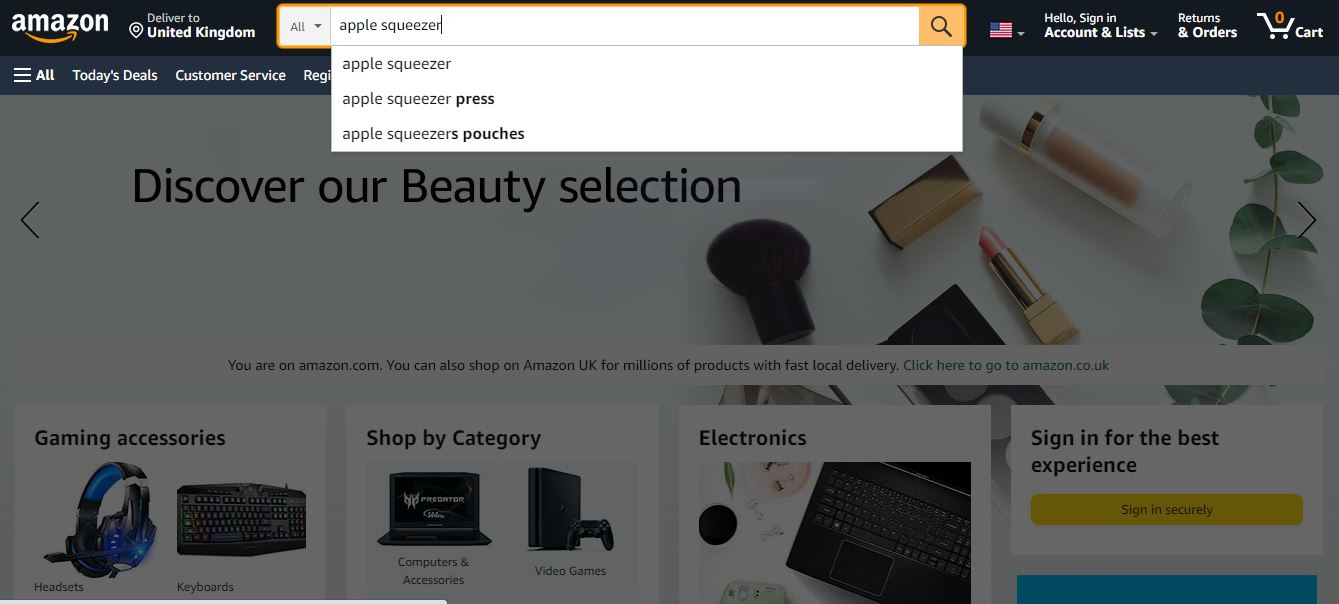
Amazon autocomplete सबसे ज्यादा searched terms दिखाता है। Amazon search bar में अपने product के लिए search query टाइप करना शुरू करें। इसके बाद आपको typical search term sequences दिखाई देंगे। उन्हें analyze करें और अपने product के लिए सबसे relevant terms को filter कर लें।
#4. “Frequently Bought Together”
उन popular items को देखें जो आपके product को complement करते हैं। Complements को target करके आप नए audiences तक पहुँचने के लिए नए keywords निकाल सकते हैं।
#5. Google Ranking
कुछ sellers की अपनी website होती है जहाँ वे Amazon के अलावा भी sell करते हैं। ऐसे में वे Search Console का उपयोग करके यह पता कर सकते हैं कि वह high-volume search queries के लिए rank कर रही है या नहीं। ऐसे queries को Amazon पर keywords के रूप में target किया जा सकता है।
Amazon Keyword Research के लिए Tools
Keyword research apps आपको आपके product से relevant, high-ranking Amazon search words detect करने में मदद कर सकते हैं। इसके आधार पर आप अपनी SEO strategy बना सकते हैं या improve कर सकते हैं। Keyword research के अलावा, इनमें से कई services product research और listing optimization जैसे additional features भी देती हैं—जिससे वे Amazon sellers के लिए valuable all-in-one solutions बन जाती हैं।
SellerSonar द्वारा Amazon Keyword Rank Tracker
SellerSonar monitoring software आपके sales पर नियंत्रण बनाए रखने का एक efficient तरीका है। यह sales को protect करने के लिए instant Amazon alerts देता है। इससे आप listing changes, Buybox hijackers, new/deleted reviews, keyword rank history और product suppressions पर up-to-date रह सकते हैं। इसके अलावा, इसका keyword rank tracker आपकी SEO strategy optimize करने में मदद कर सकता है। यह ऐसे काम करता है:
#1. Relevant keyword set तय करें
जब आप research करके best Amazon keywords की list बना लेते हैं जिन्हें आप track करना चाहते हैं, तब SellerSonar का keywords tracker आपको data-driven results देता है।
अपने SellerSonar account में login करें, Keywords page पर जाएँ और ऊपर दाईं ओर मौजूद button पर क्लिक करके keywords add करें। फिर एक product चुनें और track करने वाले सभी keywords enter करें। बस! ध्यान रखें कि data upload में कुछ मिनट लग सकते हैं।

Add Keywords
साथ ही, सभी products में bulk में keywords upload करने का option भी है। इसके लिए File Import button पर क्लिक करके pop-up window खोलें। फिर template download करें, अपने keywords भरें और एक click में file upload कर दें।

Keywords upload होने के बाद आपको Amazon search volume की जानकारी वाला dashboard मिलेगा। इसके अलावा, किसी specific keyword पर क्लिक करने पर आपको तीन user-friendly charts मिलेंगे—जो organic या paid traffic में keyword rank history के बदलावों को monitor करने और competitors के मुकाबले आपके product की position देखने में मदद करते हैं।
#2. Competitors के search terms reveal करें
SellerSonar Amazon listings के लिए best-performing competitors’ keywords uncover करने में मदद करेगा। साथ ही यह आपको उनकी marketing practices के बारे में भी awareness देता है।

यदि competitor listings add की गई हैं, तो आप organic और paid positions track कर सकते हैं। इससे आप उन keywords को identify कर सकते हैं जो search results page पर top पर rank करते हैं और ज्यादा clicks कमाते हैं।
आप अपनी keyword rankings को competitor rankings के साथ compare कर सकते हैं और analyze कर सकते हैं कि competitors किन keywords का उपयोग करके search results में ऊपर rank करते हैं और बेहतर organic reach लेते हैं।
#3. अपने metrics history को monitor करें
हमारे tool से आप अपने product का historical data monitor कर सकते हैं। Summary section में आप पिछले 10 दिन, 30 दिन, 6 महीने या पिछले साल के भीतर keywords performance, sponsored और organic ranks जल्दी check कर सकते हैं। Overall statistics देखें या data को brand या product के अनुसार filter करें।

इसके अलावा, Competitors section में आप product metrics की तुलना competitors के price, BSR, product review numbers, keyword rankings आदि में हुए changes से कर सकते हैं। हमारा competitor research tool competitive landscape समझने के लिए convenient graphs देता है। उदाहरण के लिए, आप competitors का BSR monitor करके sales में spikes और drops पर react कर सकते हैं और अपनी sales strategy जल्दी adjust कर सकते हैं।
 यह SellerSonar की capabilities का बस एक छोटा सा हिस्सा है। Features को firsthand देखने के लिए आप हमारा demo देख सकते हैं या हमारे expert के साथ live meeting schedule कर सकते हैं।
Keywords के साथ Product Listings Optimize करना
Keywords के साथ product listings optimize करना Amazon पर visibility बढ़ाने और sales drive करने के लिए आवश्यक है। इसे प्रभावी ढंग से करने के तरीके:
- Strategic Placement: अपने primary keywords को product title, bullet points, description और backend search terms में natural तरीके से शामिल करें। Readability और relevance पर focus रखें ताकि आपका listing customers और Amazon के search algorithm—दोनों के लिए meaningful रहे।
- Prioritize Relevance: ऐसे Amazon key words चुनें जो आपके product को सही तरीके से describe करें और shoppers की search intent से match हों। Keyword stuffing या irrelevant terms से बचें, क्योंकि इससे listing performance और credibility को नुकसान हो सकता है।
- Long-Tail Keywords: सिर्फ broad, high-volume keywords पर निर्भर न रहें। Long-tail keywords भी शामिल करें—ये अधिक specific phrases होते हैं जो buyer intent को बेहतर capture करते हैं। इनमें competition अक्सर कम और conversion rates अधिक हो सकते हैं।
- Optimize Images and Backend Keywords: Images और backend keywords की अहमियत को नज़रअंदाज़ न करें। High-quality images इस्तेमाल करें और backend search terms में relevant keywords जोड़ें ताकि listing visibility और बेहतर हो।
- Monitor Performance: SellerSonar के keyword rank tracker से keywords की performance नियमित रूप से monitor करें। New data और insights के आधार पर अपनी strategy को लगातार refine करें ताकि competitive edge बना रहे।
अब SellerSonar आज़माएँ। सभी Business plan features के साथ हमारी 14-day trial के लिए register करें और Amazon पर अपना business अधिक कुशलता से चलाने के लिए अपना workflow मजबूत करें।

