





Table of Contents
- 1 A Real Seller Example of Amazon Virtual Multipacks
- 2 What Amazon Virtual Multipacks Are
- 3 Amazon Virtual Multipacks vs Virtual Product Bundles
- 4 Why a New Amazon Multipack ASIN May Appear in Your Catalog
- 5 Amazon-Created ASIN or Something More Suspicious?
- 6 Why the New Amazon Multipack ASIN May Look Suppressed or Confusing
- 7 What to Check If You See an Unknown Amazon ASIN
- 8 Why Amazon Virtual Multipack Reporting Can Be Misleading
- 9 How SellerSonar Helps Monitor Amazon Virtual Multipacks
- 10 Conclusion: Why Amazon Virtual Multipacks Need Monitoring
 Amazon virtual multipacks can introduce unfamiliar ASINs into your catalog without anyone on your team creating them manually. When that new ASIN looks suppressed or inactive, it is easy to mistake it for hijacking, a duplicate listing, or an internal catalog mistake.
Sometimes the explanation is simpler, but still frustrating. A virtual multipack may have been created from an existing FBA product, which means a new ASIN can appear in your account even though no one on your team created it manually.
Quick Answer
Amazon virtual multipacks are multi-unit versions of an existing single-pack FBA product. These listings are fulfilled from your existing single-pack inventory and have their own ASINs and SKUs. During the pilot, sellers may see virtual multipack listings created for them. Virtual multipack sales also do not appear in most Seller Central reports at this time. For sellers who want earlier visibility into listing changes, SellerSonar Alerts can help surface unusual catalog activity faster.
A Real Seller Example of Amazon Virtual Multipacks
A SellerSonar scan of the seller’s catalog surfaced two unknown ASINs in the account. The seller did not recognize them. When he checked them, they appeared as Listing Suppressed or looked like they had been deleted.
The first conclusion was predictable: something was wrong. Maybe a duplicate. Maybe hijacking. Maybe a catalog mistake.
After digging into it, the explanation turned out to be different. New multipack ASINs had been created around the seller’s existing products.
That is why sellers should pay attention to this. An unexpected ASIN on Amazon is not always a hostile event. In some cases, it is a virtual multipack built around an eligible single-pack FBA product. Those multipacks have unique ASINs and SKUs that are separate from the original listing.
What Amazon Virtual Multipacks Are
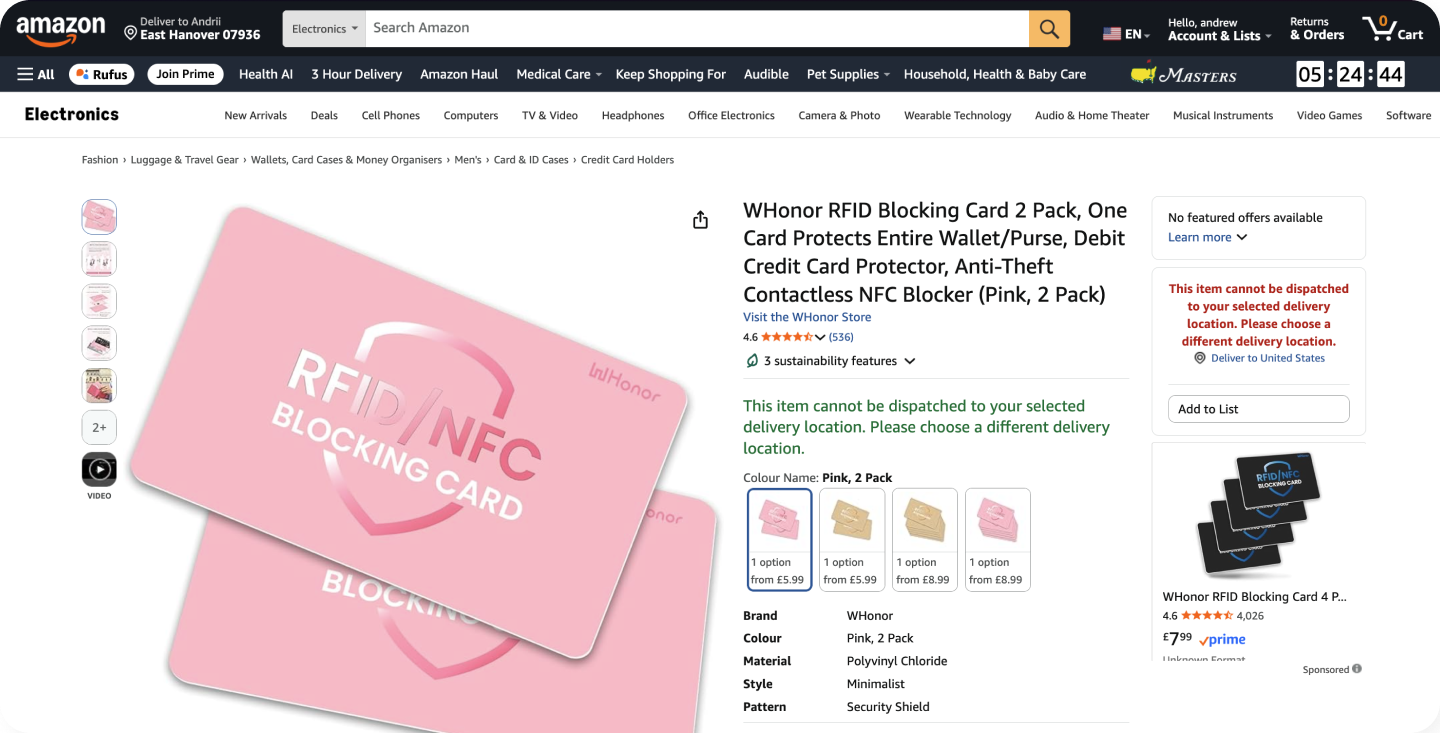
An example of how a multi-unit product listing appears on Amazon
Virtual multipacks are multi-unit listings built from an existing single-pack FBA product. They are fulfilled from the seller’s current single-pack inventory rather than from separately pre-packed multi-unit inventory. The multipack gets its own ASIN and SKU, even though the inventory still comes from the same single-pack product. Virtual multipack SKUs also use the prefix VMP_. You can read the official details on Amazon’s help page on virtual multipacks.
The program is still in a pilot phase. During that pilot, sellers may see virtual multipack listings created for them.
That is where the confusion usually starts. The inventory is familiar. The listing identity is not.
By default, the price follows the current per-unit price multiplied by pack size. In practice, that means a 2-pack starts at roughly two times the single-unit price unless you adjust it.
This is also where sellers often confuse virtual multipacks with virtual product bundles. They are not the same. This article focuses specifically on virtual multipacks, where a multi-unit version of the same FBA product can appear around a product you already sell.
Amazon Virtual Multipacks vs Virtual Product Bundles
Sellers often confuse these two Amazon programs, but they work in very different ways.
| Feature | Virtual Multipacks | Virtual Product Bundles |
|---|---|---|
| What it combines | Multiple units of the same single-pack FBA product | Two to five complementary ASINs |
| How it is fulfilled | From existing single-pack inventory | From the bundled component ASINs in FBA |
| How it gets created | May be created on the seller’s behalf during the pilot | Created manually through Amazon’s bundle tool |
| Typical seller confusion | A new ASIN appears that looks like a duplicate or unknown multi-pack listing | Seller assumes bundles and multipacks are the same program when they are not |
If a new multi-unit ASIN suddenly appears around one of your existing products, virtual multipacks are usually the first place to look. Virtual product bundles are a different program and are normally created intentionally through Amazon’s bundle tool.
Why a New Amazon Multipack ASIN May Appear in Your Catalog
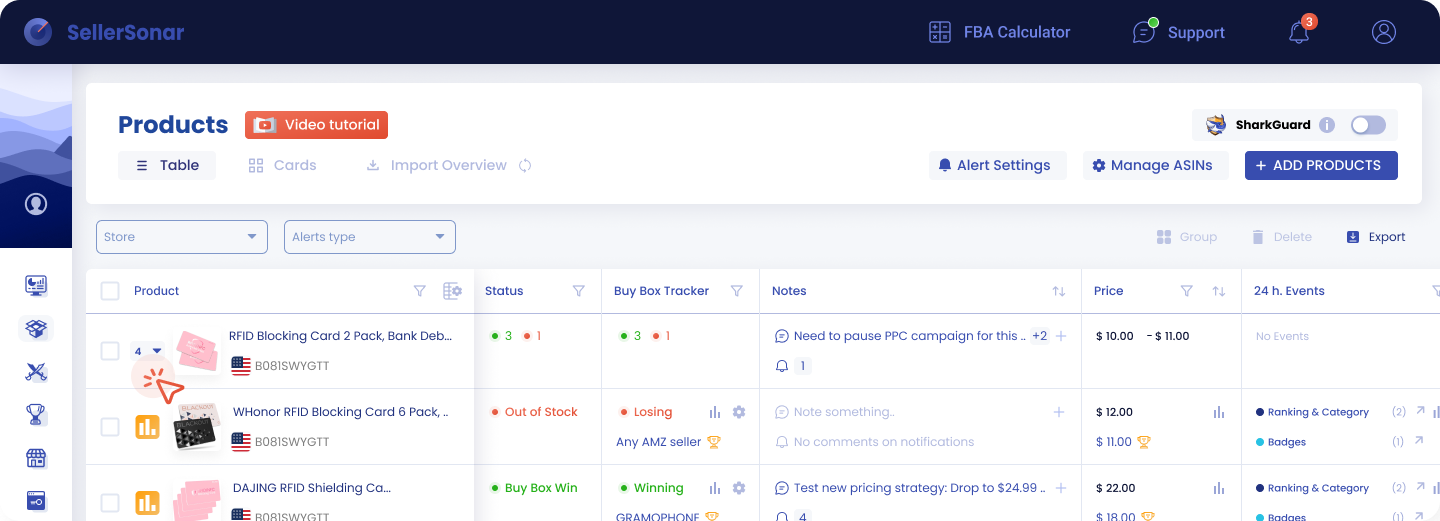
A quick look at how SellerSonar helps sellers track products, listing status, pricing, and Buy Box changes
A new multipack ASIN may be created from an eligible single-pack FBA listing you already have. Because the multipack has its own ASIN and SKU, it can show up in catalog monitoring, listing scans, or alerts as something completely new. If you already monitor listing changes with a tool like SellerSonar Alerts, this kind of change is easier to catch early.
In practice, sellers may notice:
- A new ASIN tied to a familiar product
- An unexpected ASIN that nobody on the team recognizes
- A monitoring alert for a listing nobody remembers creating
- Internal concern that turns out not to be hijacking at all
That is why a new ASIN should be investigated before anyone jumps to conclusions.
Amazon-Created ASIN or Something More Suspicious?
Here is the quickest way to think about it.
- Likely Amazon-created: the ASIN appears tied to an existing single-pack FBA product, follows pack-count logic, and looks like a multi-unit version of something you already sell.
- Needs deeper investigation: the ASIN looks unrelated to your catalog, the content does not match the source product, or there is no clear link to an existing FBA product.
The goal is not to guess fast. It is to understand what you are looking at before your team escalates the wrong problem.
Why the New Amazon Multipack ASIN May Look Suppressed or Confusing
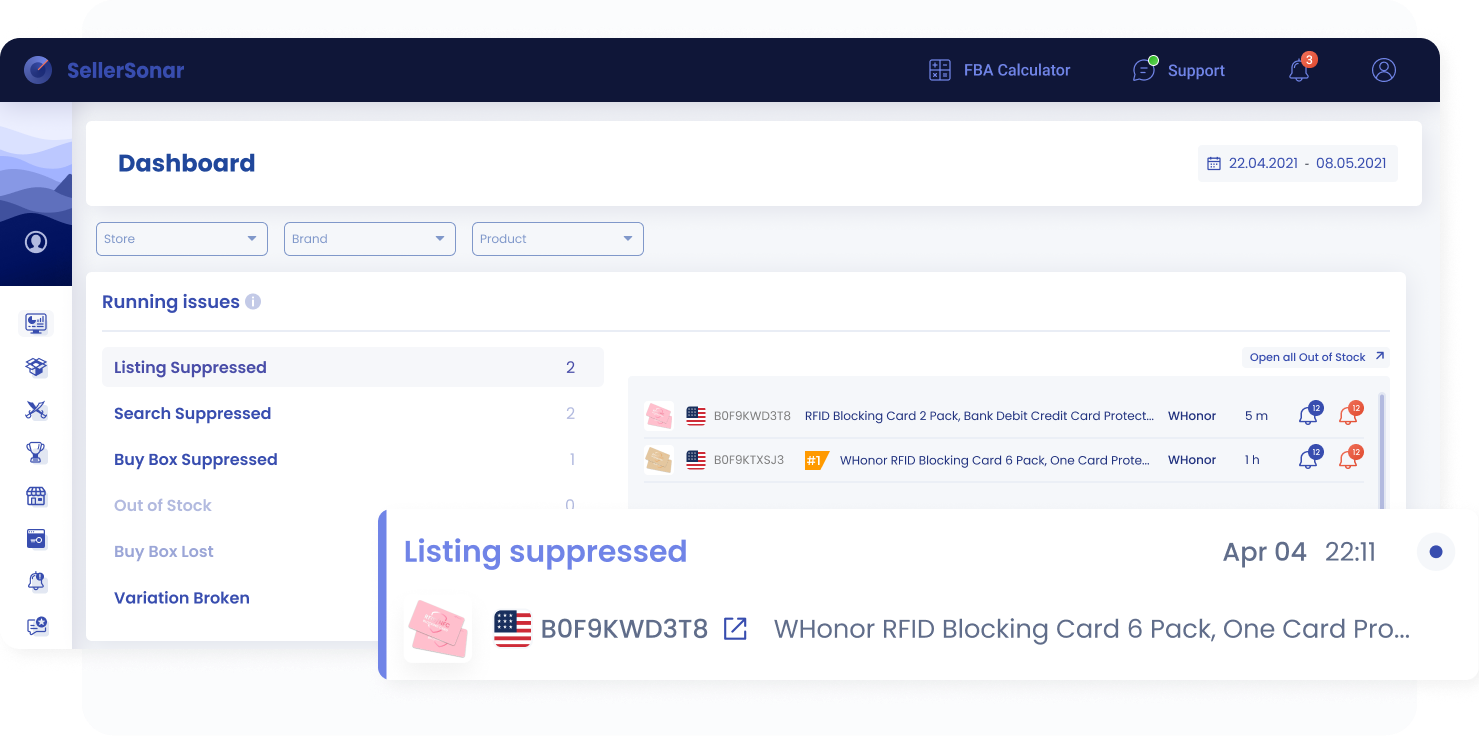
A quick look at how SellerSonar highlights suppressed listings
Most sellers do not discover these ASINs during a calm catalog review. They find them when something looks wrong: the ASIN appears in monitoring, looks inactive, or shows Listing Suppressed.
That signal does not automatically mean the ASIN is fraudulent or unauthorized. It may simply mean that a multipack listing was created and the seller only noticed it once a listing-health issue or status change surfaced.
Here is the important distinction. The official help content does not suggest that virtual multipacks are normally suppressed by default. So if a new multipack ASIN appears suppressed, treat it as a listing-health issue to investigate, not as proof that the ASIN itself is illegitimate. That is an operational inference based on the seller scenario, not an official explanation from Amazon’s virtual multipacks help page.
What to Check If You See an Unknown Amazon ASIN
A quick view of seller details, tracked products, and suppressed listings in SellerSonarIf an unfamiliar ASIN appears in your account, use this simple checklist:
- Check the source product. Is your product a single-pack FBA product that could be used for a virtual multipack?
- Compare the listings. Look for pack-count logic, title similarities, and signs that the unfamiliar ASIN is a multi-unit version of the same product.
- Review the status. Check whether the ASIN is active, inactive, or suppressed.
- Document the basics. Note when the ASIN first appeared and which product it seems tied to.
- Rule out virtual multipacks first. Do that before treating the issue as hijacking or an unauthorized listing.
Why Amazon Virtual Multipack Reporting Can Be Misleading
Virtual multipack sales do not appear in most Seller Central reports right now. When a customer buys a virtual multipack, the sale is recorded as separate sales of each single unit included in that multipack.
That leaves sellers with a real visibility gap. You may see a new ASIN in your catalog, but not get a clean reporting trail for that ASIN in the places your team usually checks. That can make it harder to understand where the ASIN came from, whether it generated sales, and how to interpret its impact on inventory or margins.
Seller discussions also show that operators are concerned about visibility, reporting, and margin clarity around virtual multipacks. That community feedback is useful context, but it should not be treated as official Amazon guidance.
What Amazon confirms
- Virtual multipacks are created from existing single-pack FBA products.
- They are fulfilled from existing single-pack inventory.
- They receive their own ASINs and SKUs.
- During the pilot, virtual multipack listings may be created on the seller’s behalf.
- Virtual multipack SKUs use the prefix VMP_.
- Default pricing is based on the current per-unit price multiplied by pack size.
- Virtual multipack sales are not available in most Seller Central reports at this time.
What sellers often infer
- Unexpected ASINs may appear without the seller manually creating them.
- Reporting gaps can make visibility and margin analysis harder.
- Unknown ASINs can create internal confusion and support friction.
How SellerSonar Helps Monitor Amazon Virtual Multipacks
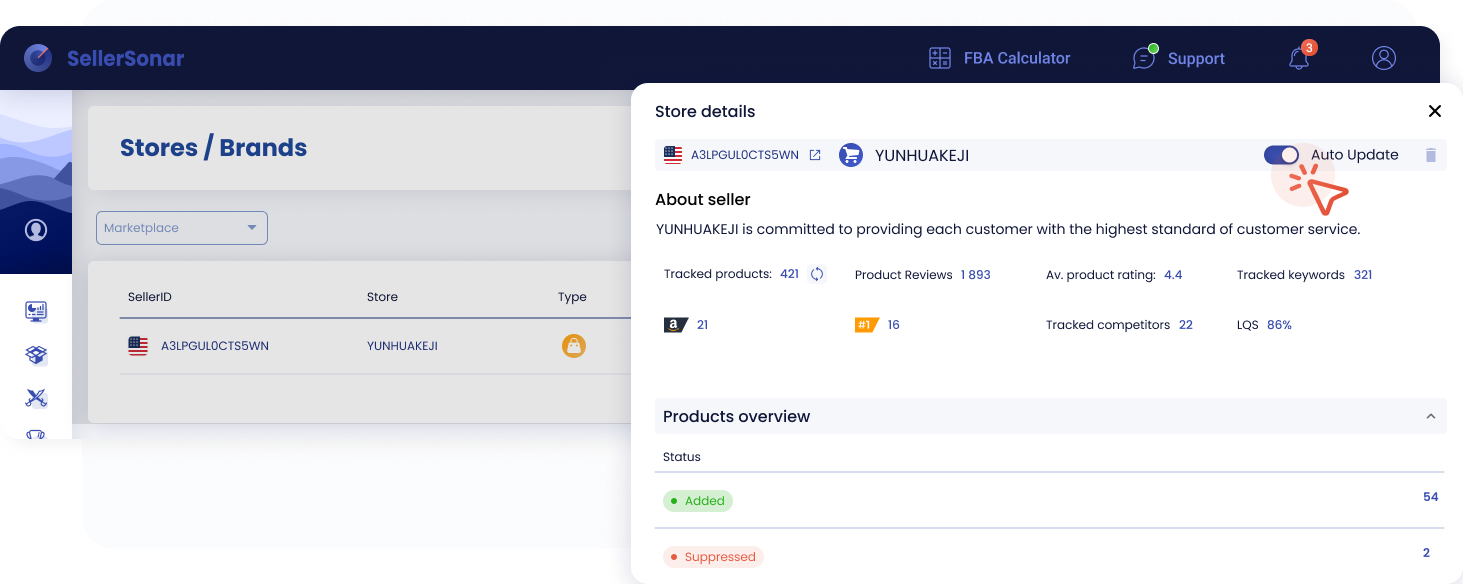
A quick view of seller details, tracked products, and suppressed listings in SellerSonar
This is exactly the kind of issue that gets missed when sellers rely on manual catalog checks.
SellerSonar helps by monitoring listings and surfacing unusual ASIN activity early. In a scenario like this, that means it can help teams:
- Spot unexpected ASINs tied to known products
- See when a listing has entered a suppressed or unusual state
- Catch listing changes without relying only on manual checks
- Investigate catalog anomalies faster
That is the real value here: spotting unexpected listing changes before they turn into a bigger problem. If suppressed listings are part of your workflow, Retail Issues alerts are especially useful.
SellerSonar helps sellers spot unexpected ASINs, track listing changes, and catch suppression issues early, making catalog anomalies easier to investigate before they turn into bigger operational problems.
Conclusion: Why Amazon Virtual Multipacks Need Monitoring
Amazon virtual multipacks are a real Amazon program that turns eligible single-pack FBA products into multi-unit listings. But they can also create a real operational blind spot.
If you suddenly see an unfamiliar ASIN, do not assume the worst immediately. Check whether it may be a virtual multipack built around your existing inventory, review the listing status, and keep in mind that standard reporting may not tell the full story. One of the main reasons this is confusing is that virtual multipack sales are not available in most Seller Central reports at this time.
If your catalog can change without your team touching it, then monitoring it is not optional. The earlier you spot a new ASIN or unusual status change, the easier it is to understand what happened and respond before it turns into a bigger support or visibility problem. To see how this works in practice, take a look at the SellerSonar trackers.
