




Quick Answer
Amazon BSR (Best Sellers Rank) is the number Amazon gives a product to show how its sales compare with other products in the same category. Lower is better: #1 is the best seller in that category. Amazon calculates it from all-time sales with recent sales weighted more, updates its Best Sellers lists every hour, and doesn’t count reviews or page views. BSR reflects sales. It doesn’t drive them.
Most product pages on Amazon show a line called Best Sellers Rank. Sellers check it every morning, product researchers sort by it, and almost everyone reads more into it than Amazon actually puts in.
This guide explains what BSR means in Amazon’s own words, how it’s calculated, what a good BSR looks like, and how it differs from search rank. You’ll also see 31 days of real BSR data from one phone case through Prime Big Deal Days 2026, so you can watch what the number does in practice.
About the Author: Gloria Anderson writes for the SellerSonar editorial team about Amazon rankings, competitor research and pricing. She checks every Amazon rule in her articles against Seller Central help, and the ranking examples against live Amazon listings we track in SellerSonar.
What Is BSR on Amazon?
BSR stands for Best Sellers Rank, also called Amazon Sales Rank. It’s a number that shows how well a product sells compared with other products in the same category. A product ranked #1 sells best in that category, and a product ranked #500 has 499 products ranked above it.
The number works backwards from what many new sellers expect. Amazon’s guide to Amazon sales rank puts it this way: “Typically, the lower the score, the higher the Amazon sales rank.” So when someone says their BSR “went up,” ask which they mean. A bigger number is a worse rank.
Three things about BSR trip people up:
- It’s per category. There’s no single Amazon-wide rank. A product can be #127 in a main category and #13 in a subcategory at the same time.
- It’s per marketplace. Each Amazon store ranks its own sales. Amazon’s example: “an item ranked #1 in the US might rank #23 in the Amazon UK or Japan stores.”
- It’s relative. Your rank depends on your sales and on everyone else’s sales in that category during the same period.

You’ll also see BSR called “sales rank,” “Amazon seller rank” or just “rank.” They all mean the same number. Our Best Sellers Rank glossary entry has the one-paragraph version.
How do I find BSR on Amazon?
Open the product page and scroll down. Amazon says you can often find BSR “in the ‘Product information’ section” of the product detail page. Page layouts differ by category, so if you don’t see that section, search the page for “Best Sellers Rank.”
Most products show one rank in a main category, such as Cell Phones & Accessories, and one or more in subcategories, such as Cell Phone Basic Cases. The two can move in very different directions. A Bedsure comforter set (B07NYR18X4) we track was #1 in its bedding subcategory every day from September 29 to October 29, 2026. Over the same month its Home & Kitchen rank drifted from #520 to #1,173.
Amazon doesn’t publish a full BSR list for every product. Its Best Sellers pages show the top 100 per category, described as “Our most popular products based on sales. Updated frequently.” The Movers & Shakers lists show “the biggest gainers in sales rank over the past 24 hours,” which makes them useful for product research. Below the top 100, you read the rank on the product page or use a tracker that records it over time.
How Is BSR Calculated?
Amazon doesn’t publish the formula. But its Seller Central Sales Rank FAQ says more than most guides quote. Here’s what it states, word for word:
- What counts: “Sales rank is calculated based on all-time sales of an ASIN/Product where recent sales are weighted more than older sales.”
- It’s relative: “Sales ranks are relative. While your product has had a lot of sales, there may have been other products in the same category that might also have seen an increase.”
- How fast it updates: “While we update best sellers list every hour, it can take up to 12 hours for an order to show the sales rank.”
- Reviews don’t count: “Sales rank is generated based on order data and product reviews are not taken into consideration.”
- When there’s no rank: ranks are shown for an ASIN “with a sale record and if it has been assigned to the featured categories.”
Amazon’s seller guide adds two points: “BSRs aren’t influenced by page views or customer reviews,” and “The Amazon Best Sellers Rank doesn’t drive sales directly.” A good rank is the result of sales, not the cause of them.
Sellers often call the recent-sales part “sales velocity.” That’s a fair shorthand, as long as you remember Amazon also counts older sales, just with less weight. It’s why a product can sell a lot in one day and barely move, or have a slow day and keep its rank.
| Factor | Does it count toward BSR? | Source |
|---|---|---|
| Orders of the product on that marketplace | Yes: all-time sales, recent sales weighted more | Seller Central Sales Rank FAQ |
| Sales of other products in the same category | Yes: the rank is relative | Seller Central Sales Rank FAQ |
| Price, deals, ads | Only through the extra orders they bring | sell.amazon.com BSR guide |
| Customer reviews and star rating | No | Both Amazon sources |
| Page views | No | sell.amazon.com BSR guide |
| Sales in other Amazon marketplaces | No: each store ranks separately | sell.amazon.com BSR guide |
Sometimes. Amazon’s FAQ says it depends on the product’s display group: “In some stores, we add up all the sales for a child ASIN and apply it to the parent ASIN. In these stores, parent ASINs and child ASINs will have the same rank.” In other stores, each child ASIN gets its own rank.
We see the shared version in our own data. A Levoit top-fill humidifier (B0C2C9NHZW) and its sibling variation (B0GPWP16GL) showed exactly the same Home & Kitchen rank every day from October 16 to October 29, 2026, moving from #26 to #14. Both were #1 in Humidifiers.
🎯 Pro Insight: If a variation’s rank disappears after a catalog change, Amazon’s FAQ points to two checks: the parent and child ASINs sit in the same display group, and the parent has the right browse categories. Selling Partner Support can confirm which featured category your product is assigned to.
How does the Best Seller badge work?
The Best Seller badge isn’t a separate score. Amazon’s FAQ calls it an achievement award for ASINs “featured as #1 in a featured category with at least 100 products,” plus ordering thresholds that differ by marketplace. Amazon also says it doesn’t show the badge on product pages in stores where child ASIN orders are rolled up into the parent’s rank.
What a Real BSR Chart Looks Like: 31 Days of One Product
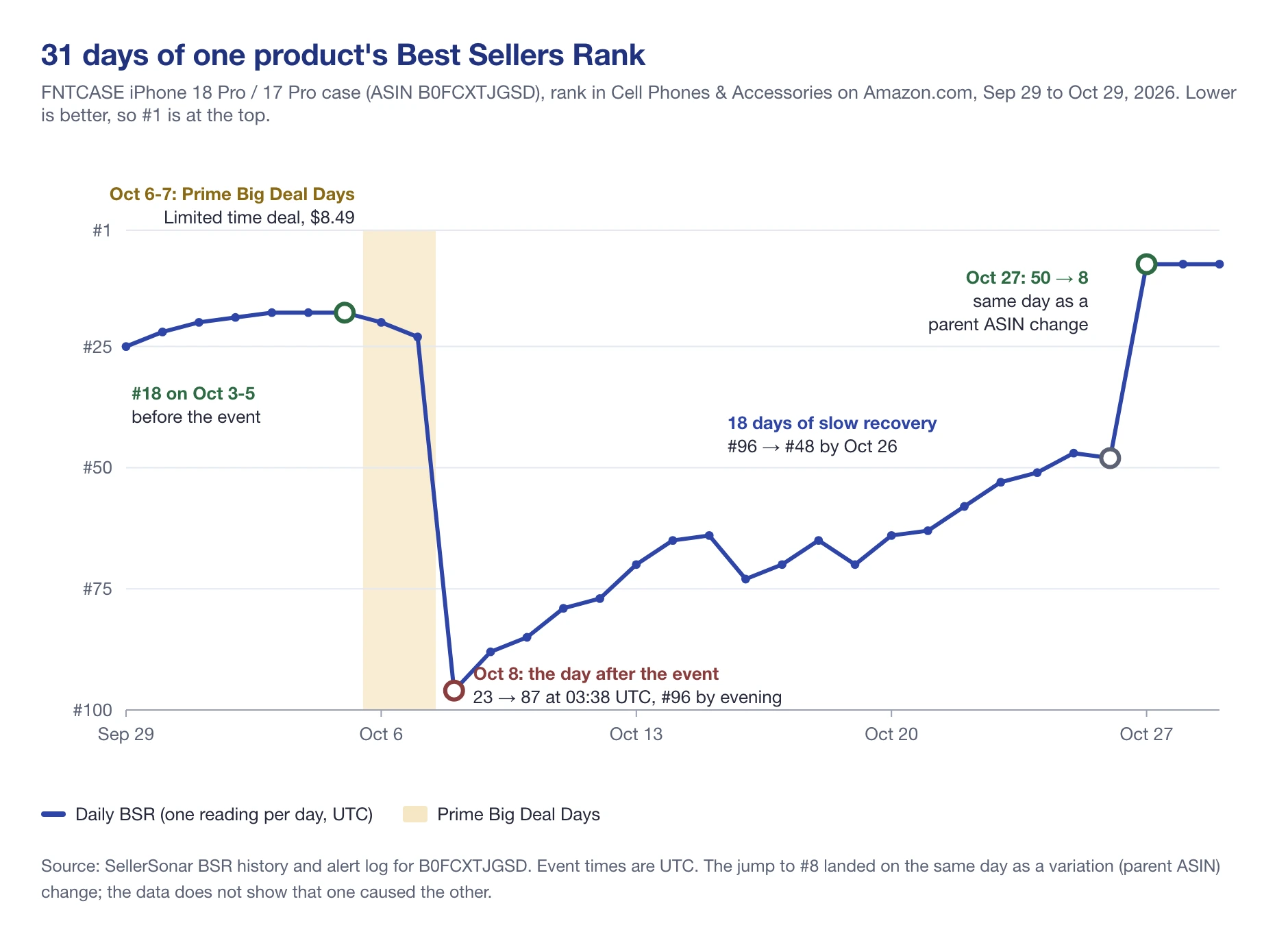
Definitions only go so far. Here’s the daily BSR of one listing we track: an FNTCASE iPhone 18 Pro / 17 Pro case (ASIN B0FCXTJGSD) on Amazon.com, through Prime Big Deal Days, which ran October 6-7, 2026.
Here’s what happened, step by step, from the alert log:
- Before the event: the case climbed from #25 on September 29 to #18 on October 3-5.
- October 6: the FBA seller on the listing cut the price from $9.99 to $8.49. At 13:20 UTC Amazon showed a Limited time deal at $8.49. During the two event days, the rank slipped from #18 to #23.
- October 8: at 03:38 UTC the rank dropped from #23 to #87, and it was #96 by the evening. The price went back to $9.99 that morning, and the deal was removed at 10:41 UTC.
- October 8-26: a slow climb back, from #96 to #48 over 18 days.
- October 27: the listing’s parent ASIN changed (a variation change) at 10:08 UTC. At 20:59 UTC the rank jumped from #50 to #8, and the subcategory rank from #10 to #2. It was still #8 on October 29.
Three lessons from one chart. First, a deal doesn’t guarantee a better rank during the event, because every other product in the category is on sale too. A competing BERFY case we track slid from #112 to #167 on October 7. Second, the biggest move came the day after the event ended, not during it. Third, the jump to #8 landed on the same day as a variation change. The timing fits Amazon’s note that some stores rank the whole variation family together, but our data shows timing, not cause.
Recency weighting also shows up the other way round. Amazon Basics #2 pencils (B071JM699B) ran a 15% Limited time deal that ended on October 8. Their best Office Products reading that week came a day later: #8 on October 9 at 09:18 UTC. Then the rank decayed to #17 by October 12, and it was #18 on October 29.
📌 From Our Experience: In the listings we tracked through Prime Big Deal Days 2026, some of the biggest rank moves came in the days after the event, not during it. Judge a deal on the following week, not on the day itself, and have stock ready for both.
What Is a Good BSR on Amazon?
There’s no single good number, because categories differ hugely in size. Jungle Scout’s guide to Amazon Best Sellers Rank (updated July 22, 2026) gives a clear example from its own estimates: “a rank of 100,000 in the kitchen category only equates to roughly 30 sales per month. In the book category, a 100,000 Amazon Best Seller Rank is roughly 200 sales per month.”
If you want a rough scale anyway, sellerboard published these ranges on May 22, 2026, in its article What’s a good Amazon sales rank. It calls them “broad estimates”:
| BSR range (main category) | sellerboard’s general reading |
|---|---|
| Under 1,000 | Very high demand |
| 1,000 to 10,000 | Strong sales velocity |
| 10,000 to 50,000 | Moderate sales |
| 50,000 to 100,000 | Slower but active |
| Above 100,000 | Low sales activity |
These are third-party estimates, not Amazon numbers. sellerboard itself warns that the ranges “vary significantly by category,” and that large categories like Home & Kitchen, Beauty and Sports & Outdoors support much larger sales at higher BSRs than small ones. So the same number can mean very different sales in two categories.
A more useful way to decide what’s good for you:
- Compare inside one category. Line your rank up against the top products in the same subcategory, never against a different category.
- Read the trend, not a snapshot. One hourly reading can be up to 12 hours behind recent orders. A 30-day line tells you far more.
- Start from your sales target. Jungle Scout’s advice: if your goal is 300 sales a month, use that number to find the BSR you need in your category.
- Check your margin. A strong rank bought with deep discounts or heavy ad spend can still lose money.
💡 Expert Tip: Before you call a rank good or bad, pull 30 days of BSR for your product and the three to five best sellers in the same subcategory. If they all dropped on the same day, it was the market. If only you dropped, look at your listing, price and stock.
How Sales Estimators Turn BSR Into Sales
Amazon doesn’t show how many units another seller’s product sells. What it does show is BSR. So every “BSR calculator” or sales estimator works the same basic way: it collects real sales and rank data, builds a model of how rank maps to sales for each category and marketplace, and then reads your rank through that model.
Jungle Scout shows how loose the link is, using its own product. At an average BSR of #1,699 it sold roughly 810 units a month. A month with an average of #3,000 brought about 510 sales, and a fall month averaging #500 brought 1,980. The same product, three very different ranks and sales.
That’s why two estimators can give you two different numbers for one ASIN. They use different data, read the rank at different times, and handle shared variation ranks differently: if the whole family shares one rank, the tool can’t see how the sales split between the children. Treat any estimate as a range. Our guide to Amazon sales estimators compares the main tools and how they work.
BSR and search rank are often mixed up, but they measure different things. BSR ranks a product’s sales inside a category. Organic search rank is where the product appears when a shopper types one specific keyword.
Amazon’s guide is direct about it: “a top BSR doesn’t always equal a high organic search ranking, and a high organic ranking isn’t guaranteed to have a high BSR score. But both rankings relate to sales volume.” In other words, selling well helps both, but one doesn’t decide the other.
| Best Sellers Rank | Organic search rank | Share of Voice | |
|---|---|---|---|
| What it measures | Sales compared with the category | Position for one keyword | A brand’s visibility across many keywords |
| Scope | One product, one category, one marketplace | One product, one keyword | One brand, a set of keywords |
| Where you see it | Product page, Best Sellers lists | Amazon search results | Tools that track search results over time |
| Main question it answers | How well does this sell? | Can shoppers find it for this search? | How visible is my brand next to competitors? |
Share of Voice is the brand-level view of search. Instead of one product on one keyword, it shows how much of the search results your brand holds across the keywords you track, compared with competitors. Paired with BSR, it helps you tell the two problems apart: a rank drop with steady visibility points to sales, while falling visibility points to search.
If you’d rather read than watch, our Share of Shelf guide explains SellerSonar’s shelf reports in text.
How Can Sellers Improve Their BSR?
There’s only one real lever: sell more units than the products around you, and keep doing it, since Amazon weighs recent sales more. Amazon’s guide lists the ways to get there, and they hold up in practice:
- Choose the most specific accurate category. Amazon’s first tip is to pick “the most relevant and accurate category” and, for variations, to “assign the parent ASIN and all child ASINs to the same category.”
- Optimize the listing for search. Better titles, photos, bullet points and A+ Content bring more shoppers to the page and convert more of them.
- Price competitively. Check competitor prices regularly and test what actually brings more orders. Amazon also points sellers to its Automate Pricing tool.
- Use ads and marketing. Amazon names cost-per-click (CPC) ads and product bundling. Ad-driven orders count toward BSR like any other order.
- Stay in stock. You make no sales while you’re out of stock, so the rank slips as competitors keep selling.
- Plan deals with the week after in mind. As the chart above shows, a deal can cost rank once it ends. Have stock and ads ready for the following days.
- Ask for reviews the right way. Request reviews from every buyer “in a neutral manner,” as Amazon’s code of conduct puts it. Reviews help shoppers decide, but they don’t count toward BSR, and asking only happy customers breaks the rules.
How to Protect Your BSR From Sabotage and Sudden Drops
Amazon doesn’t offer a “BSR protection” program. What you can protect against are the things that knock a rank down when demand hasn’t actually changed:
- Category changes. A listing moved into another category is ranked against a different set of products from then on. This can happen through catalog edits, by mistake or on purpose. Amazon’s seller code of conduct lists “Attempting to damage another seller, their listings or ratings” as an unfair activity.
- Stockouts. No stock means no sales, and the rank slides every hour you’re out.
- Broken variations. If a child ASIN is split from its parent, or the parent loses its browse category, the rank can change or vanish (see the variations section above).
- Price and deal moves by competitors. A rival’s deal can pull sales from your listing for a few days. That’s competition, not sabotage, but it shows up the same way on the chart.
Hijackers selling on your listing are a real problem, but they don’t lower the ASIN’s rank by themselves, because BSR counts the product’s orders whoever fills them. They’re a Buy Box and brand issue, covered in our guide to Amazon listing hijacking.
Finally, protect the account itself. The same code of conduct bans “Manipulating sales rank (such as by accepting non-authentic orders or orders that you have paid for, or refunded externally or orders that you discounted externally) or making claims about sales rank in product titles or descriptions.” So no paid-for orders, and no “#1 Best Seller” in your title.
How SellerSonar’s BSR Tracker Works for Amazon Sellers
Amazon shows you the current rank and nothing else. To see trends, compare competitors or catch a category change, you need the history. SellerSonar’s Ranking Tracker checks each tracked ASIN’s categories and BSR, keeps the history, and sends alerts when something moves. Research suites chart it too: here is how Jungle Scout and SellerSonar track BSR. It works on 23 Amazon marketplaces, for your own products and for competitors.
How often it checks depends on the plan: every 4 hours on Pro, every 2 hours on Premium, and every hour on Business and Enterprise. Badges are checked about every 3-4 hours. Alerts show what SellerSonar found at each check, so they’re not real-time.
Prefer to watch first? Our BSR tracking tutorial shows how to monitor your ASIN and your competitors’ ranks in SellerSonar, step by step (about 3 minutes, published December 2025).
1. Check your Ranking & Category alerts
There are eight Ranking & Category alerts: Main category changed, Sub-category changed, added or removed, BSR improved, BSR declined, and Subcategory rank improved or declined. New accounts start with the category alerts and BSR improved and declined switched on. Subcategory rank alerts are off by default, so turn them on if your subcategory matters more to you than the main category.

BSR alerts use a 20% change threshold by default. You can set it in percent or in positions, and 0% sends an alert on every change. In the same setup, check that the Best Seller badge gained and lost alerts are on (they are by default).
2. Read what changed
Each alert shows the category, the old rank, the new rank and the change. On the FNTCASE case above, the October 8 alert read 23 to 87, flagged as a decline.

When a decline arrives, check the obvious causes first: stock, price, a competitor’s deal, and whether the category or variation changed at the same check.
3. Track and compare BSR over time
The BSR chart shows one tab per category, with ranges such as 10 days, 30 days, 6 months and a year (how far back you can go depends on your plan). Switch on the competitor comparison to see your rank and your competitors’ ranks on the same chart, which is the quickest way to tell a market-wide dip from a problem on your own listing.

Competitors get the same kinds of alerts as your own products. With the comparison on, the BERFY case’s slide on October 7 sits right next to the FNTCASE line.
4. Choose where alerts go
Delivery lives in the app under Alerts, then Delivery Settings. You can get alerts immediately after each check, or as a daily or weekly digest, at the time and time zone you choose. Send them by email, to a Slack channel or to a webhook, and set this up separately for each product group.

A practical setup: send BSR declines and category changes immediately to the person who manages the listing, and a daily digest of everything else to the team channel.
Amazon BSR: Final Thoughts
BSR is the most visible number on an Amazon product page and one of the most misread. Keep these points in mind:
- Lower is better, and the rank only means something inside one category on one marketplace.
- Amazon builds it from all-time sales with recent sales weighted more. Reviews and page views don’t count.
- The lists update every hour, but an order can take up to 12 hours to show.
- A “good” BSR depends on the category. Third-party ranges are estimates, so compare against your own subcategory and your own sales target.
- Watch the trend and the events behind it: deals, stock, category and variation changes.
If you’d like to watch BSR, category and Best Seller badge changes on your own listings and your competitors’, SellerSonar’s free 14-day trial covers 5 ASINs and 10 keywords, with no credit card needed. You can compare plans and start the trial here.

