





Quick Answer
Amazon FBA (Fulfillment by Amazon) means you send your inventory to Amazon’s warehouses, and Amazon stores it, packs and ships every order, and handles customer service and returns. Your products also get Prime shipping. To start in 2026: register a seller account, list your products as FBA, prep and label your units yourself (Amazon stopped doing it for US shipments on January 1, 2026), and send your first shipment through Send to Amazon.
You found a product, maybe even a supplier. Now you’re staring at Seller Central wondering what FBA actually costs, what Amazon does for you, and what you still have to do yourself. That’s a fair place to be stuck. Amazon changed a lot of the rules in 2026, and most beginner guides haven’t caught up.
This guide covers how Amazon FBA works, the six steps to get started, what you’ll pay in 2026 (with real numbers from Amazon’s rate cards and from a listing we track), and the mistakes that cost new sellers money in their first few months.
About the Author: Alex Harrison writes for the SellerSonar editorial team on Amazon fulfillment, fees, and seller operations. He checks every rate in his articles against Amazon’s own Seller Central help pages, and he has watched enough first shipments get stuck at receiving to have opinions about labels.
What Is Amazon FBA?
Amazon FBA is a fulfillment service: you sell, Amazon ships. You send inventory to Amazon fulfillment centers, and from then on Amazon receives it, stores it, picks and packs each order, delivers it, and handles customer service and returns for those orders. In Amazon’s own words, FBA lets you outsource order fulfillment to Amazon and offer customers free, two-day shipping through Prime.
That Prime badge is the real reason most sellers use FBA. Shoppers filter for it, and you can’t get it on a self-shipped listing unless you qualify for Seller Fulfilled Prime, which has strict delivery standards of its own.
What FBA doesn’t do: it doesn’t find your product, write your listing, run your ads, or protect your listing from other sellers. Those stay your job. (If you only want the short definition, our plain-English FBA explainer covers it in a few minutes. This guide is the full walkthrough.)
How Amazon FBA works, step by step
Amazon lays the process out in six steps. Here’s our 2026 version, with prep and labeling split out because they’re now fully on you. Five of the six steps are yours. Only one is Amazon’s, and it’s the one most people think of as “FBA”.
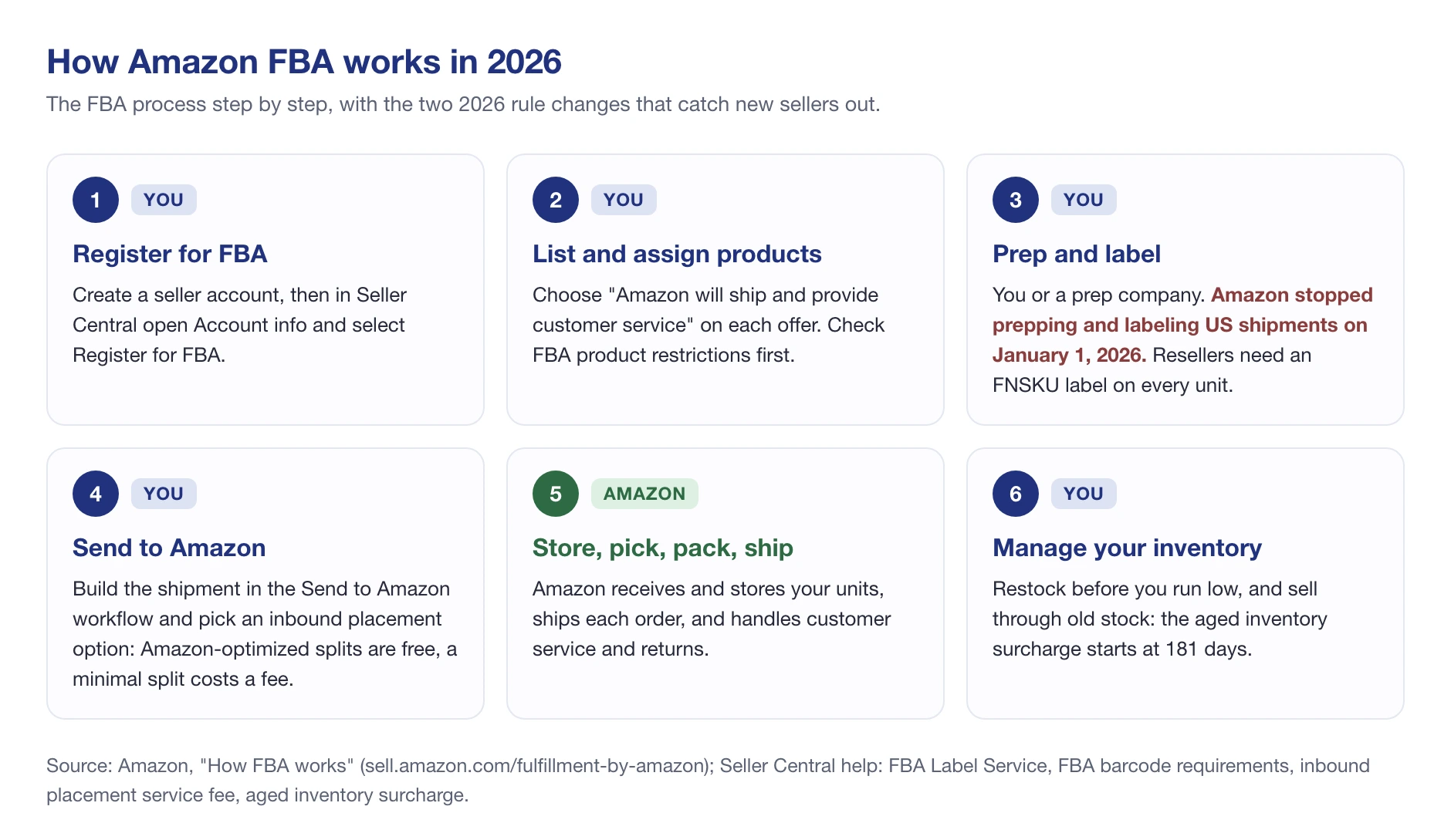
The two red lines in step 3 are the 2026 changes. Amazon no longer offers prep and item labeling services for US shipments created after January 1, 2026, so your units must arrive ready to sell. And since March 31, 2026, anyone who isn’t the brand owner has to put Amazon’s own barcode on every unit. More on both in step 4 below.
How to Start Amazon FBA
Here’s the order we’d follow if we were starting from zero today. It’s close to Amazon’s own sequence, with the decisions that come before you ever open Seller Central added at the front.
Step 1: Choose a business model and a product
Before the product, pick the model. It decides how much money you need, how fast you can launch, and which 2026 rules hit you.
- Private label: you create your own brand and have a manufacturer make the product. Most control, most upfront cost, slowest start.
- Wholesale: you buy existing brands from distributors and sell on their listings. Faster, but you share each listing with other sellers.
- Online or retail arbitrage: you buy discounted products from stores and resell them. Cheapest way to learn, hardest to scale.
Then look for a product with steady demand, room on page one, and a price that leaves margin after Amazon’s cut. A rough filter we use: if the referral fee plus the FBA fee eat more than a third of the price before you’ve paid for the product itself, keep looking. Run every candidate through the free FBA calculator before you order anything.
Also check the category isn’t gated. Amazon tells you to confirm your products are eligible by reviewing its FBA product restrictions before you assign them to FBA, and some categories need approval before you can list at all.
Step 2: Register your Amazon seller account
Go to sell.amazon.com and choose a plan. Per Amazon’s pricing page, Individual costs $0.99 per item sold and Professional costs $39.99 a month, with extra tools like bulk listing and Amazon Ads.
Both plans can use FBA. If you expect to sell more than 40 units a month, Professional is cheaper, because 40 × $0.99 is already $39.60.
According to Amazon’s seller registration guide, have these ready before you start:
- A government-issued ID
- A credit card and a bank account
- A business license or registration (if your business has one)
- Proof of address dated within the last 180 days, such as a bank or credit card statement
- Your tax information
The last step is identity verification. Amazon asks you either to take a photo of your face and your ID, or to join a video call with an Amazon associate. Use the exact name and address that’s on your documents. A mismatch here is the most common reason registration stalls.
Step 3: Learn your way around Seller Central
Seller Central is where you’ll list products, create shipments, read your fees, and handle account health. Spend an afternoon clicking around before you list anything. The pages you’ll use most as an FBA seller are Add Products, the FBA inventory page, Send to Amazon, and the Payments dashboard.
One expectation to reset: the A/B testing tool (Manage Your Experiments) and Brand Analytics search data only open up after you enroll a brand in Brand Registry. A brand-new account without a trademark won’t see them yet.
Step 4: Enroll in FBA, list your products and send your first shipment
To turn on FBA, open Settings, then Account info, select Manage on the Seller Account Information page, and click Register for FBA. Then, when you create each offer, choose “Amazon will ship and provide customer service”. That’s what makes a listing FBA.
Now the part that changed the most in 2026: labels. Before you print anything, work out which barcode Amazon expects from you.
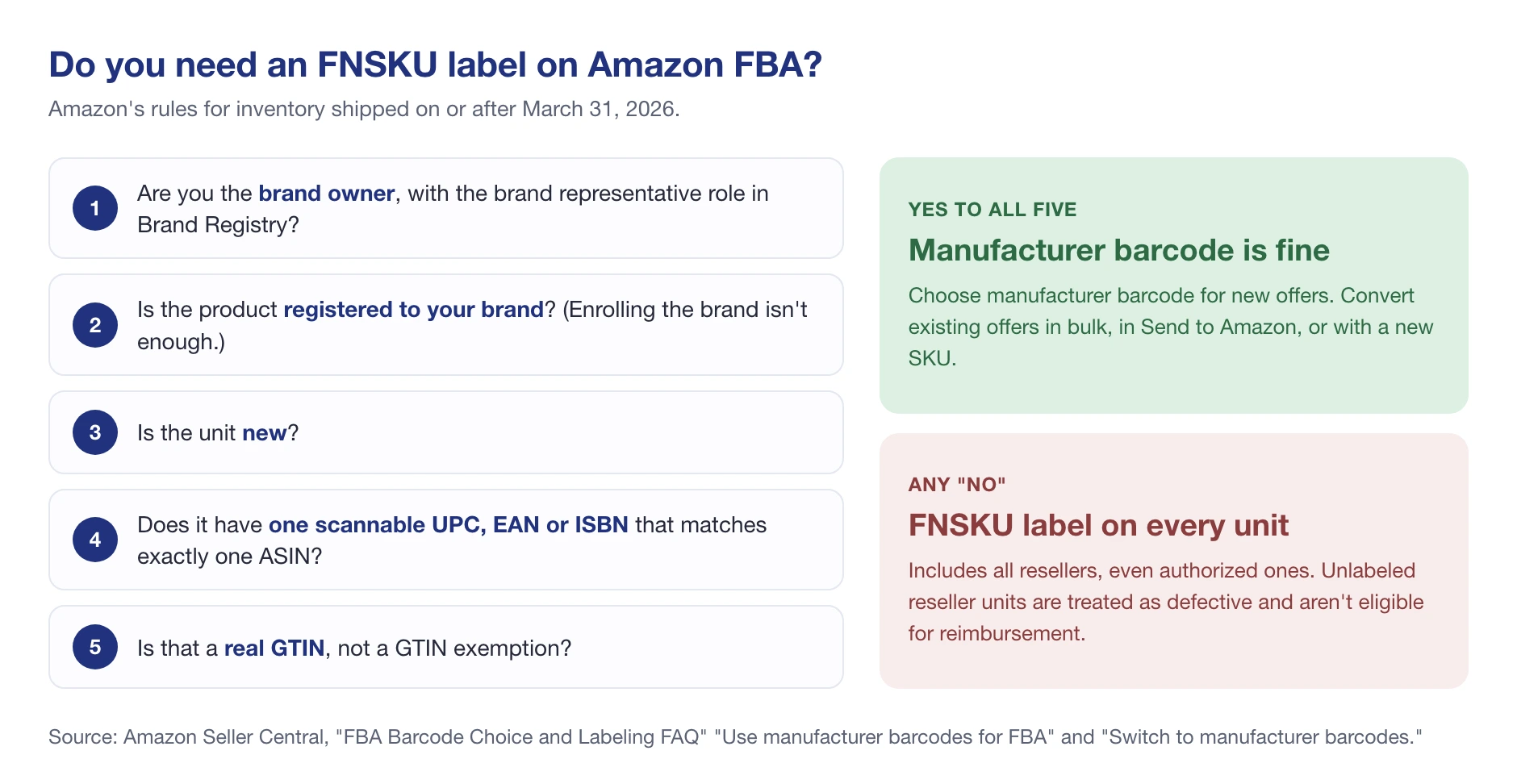
In short, per Amazon’s FBA barcode requirements: as of March 31, 2026, brand owners can keep using manufacturer barcodes without stickers, but resellers must use Amazon barcodes even if the product already has a UPC. So a wholesale or arbitrage seller labels every unit with an FNSKU. The FNSKU only exists after you create the FBA offer, which is why labeling comes now and not in step 1. Our FNSKU guide covers label size and placement.
Then build the shipment in Send to Amazon. It walks you through packing and box labels, and asks you to choose an inbound placement option. If you split the shipment the way Amazon suggests, sending to several locations yourself, there’s no placement fee, but you need at least five identical cartons or pallets per item. Sending everything to one location (a minimal split) is simpler, and Amazon charges a per-unit fee for it.
💡 Expert Tip: For a first shipment of a few hundred units, the minimal-split fee is usually worth paying. It’s one box run instead of four, and according to Amazon’s FBA page, new Professional sellers get a $400 credit toward inbound placement costs. Check the fee in Send to Amazon before you confirm; it shows the cost of each option.
Step 5: Build your brand and launch your advertising
If you sell your own brand, enroll it in Brand Registry (see the section below). It unlocks A+ Content, Sponsored Brands ads and the brand protection tools, and from 2026 it’s also what lets you skip FNSKU stickers.
For launch traffic, most new listings start with Sponsored Products on a tight budget, aimed at a short list of exact-match keywords. Our Amazon PPC strategies guide walks through the first campaigns. Once the listing is live, track where it ranks for the keywords you’re paying for, so you can tell organic progress from ad spend.
Step 6: Scale internationally
Once one marketplace works, Amazon lets you pair FBA with programs like Amazon Global Logistics, Remote Fulfillment with FBA, and Amazon Export to reach other countries without opening a warehouse there. Each country brings its own tax rules: in Europe, for example, that usually means VAT registration in the countries where you store or sell goods.
Don’t rush this. Fix your margins, reviews and restock rhythm at home first. Every problem you haven’t solved in one marketplace shows up twice as big in two.
What Amazon FBA Costs in 2026
You’ll pay Amazon in four ways: the selling plan, a referral fee on each sale, a fulfillment fee on each unit Amazon ships, and storage for the space your stock takes up. Here’s the quick reference, with Amazon’s 2026 rates.
| Fee | What it is | 2026 rate (US) |
|---|---|---|
| Selling plan | Your account subscription | $39.99/month (Professional) or $0.99 per item sold (Individual) |
| Referral fee | Amazon’s commission on every sale | A percentage by category: 15% in most, from 5% up to 45%, usually with a $0.30 minimum |
| FBA fulfillment fee | Picking, packing and shipping one unit | By size tier, shipping weight and price band, plus a 3.5% surcharge since April 17, 2026 |
| Monthly storage | Space your inventory uses | Standard-size: $0.78 per cubic foot (January to September), $2.40 (October to December) |
| Aged inventory surcharge | Extra charge on old stock | From 181 days: $0.50 per cubic foot, rising to $7.90 per cubic foot (or $0.35 per unit) at 456+ days |
| Inbound placement fee | Sending your shipment to fewer locations | Free with Amazon-optimized splits; per unit for a minimal split |
| Low-inventory-level fee | Running too lean on stock | Only when both your 30-day and 90-day supply fall under 28 days |
Sources: Amazon’s pricing page, referral fee schedule, monthly storage fees, aged inventory surcharge and low-inventory-level fee. Returns processing, removal and disposal fees apply too, but only when those things happen. Our full breakdown of Amazon seller fees covers every line.
What Amazon takes from a $100 sale
Let’s put real numbers on it, using Amazon’s 2026 rate cards. Take a $100 Home and Kitchen product, large standard size, weighing just over a pound.
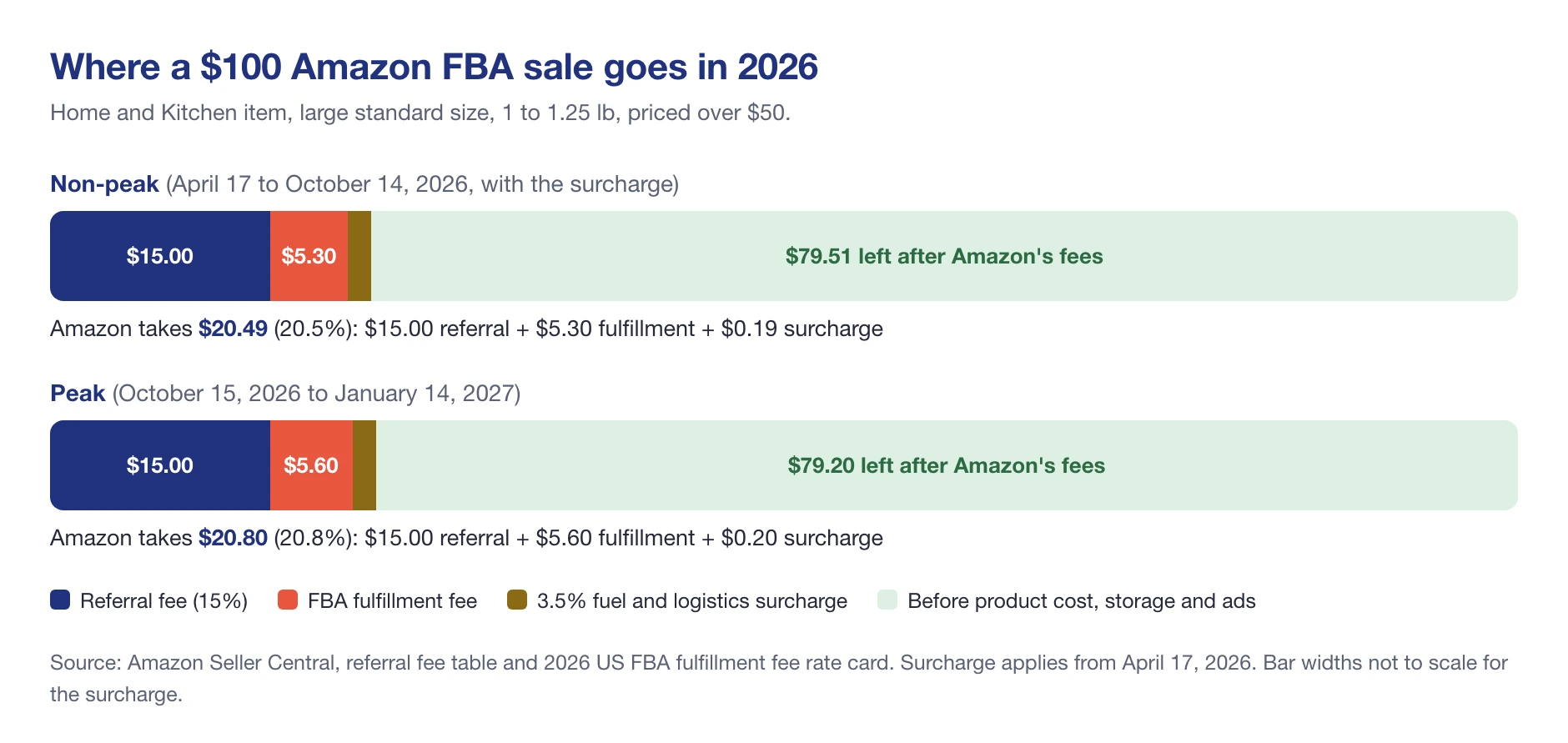
Outside the holiday season, Amazon keeps $20.49: a $15.00 referral fee (15%), a $5.30 fulfillment fee and a $0.19 surcharge. During the holiday peak, October 15, 2026 to January 14, 2027, the fulfillment fee rises to $5.60 and the total to $20.80, per Amazon’s 2026 FBA fee changes. Storage, ads and the product itself come out of the $79 that’s left.
Cheaper products give up a bigger share, because the fulfillment fee doesn’t shrink with the price. That’s the single biggest reason beginners lose money on $10 products.
What changed in 2026
Fees don’t sit still, and Amazon doesn’t email you when your product’s fee moves. Here’s one listing we track in SellerSonar, a $39.95 phone case, over twelve months.
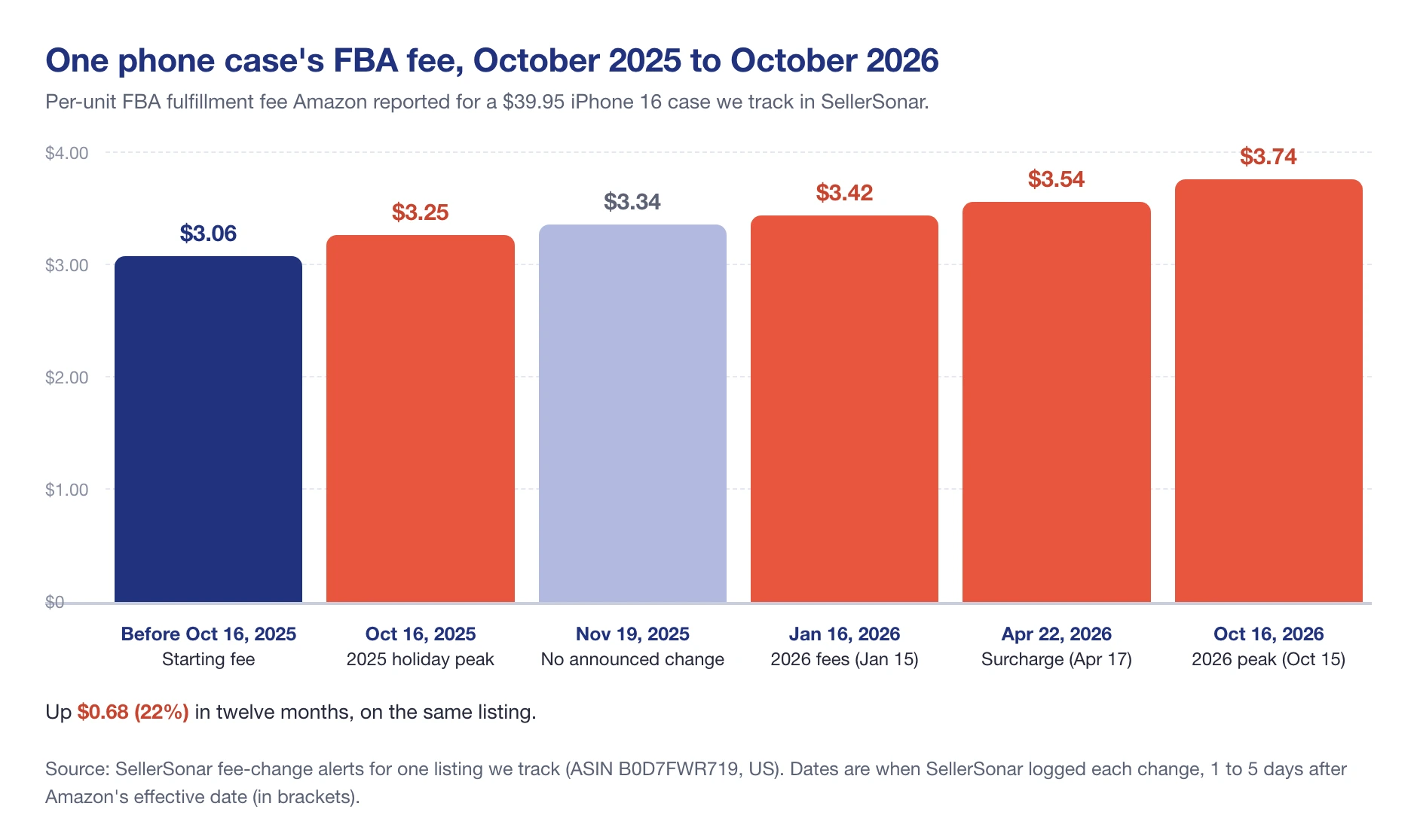
Every bar maps to a dated change. Most of them came straight from Amazon’s 2026 calendar, as published in its Seller Central help pages:
- January 1, 2026: Amazon ended its prep and item labeling services in the US.
- January 15, 2026: new non-peak fulfillment fees. Standard-size products priced $10 to $50 went up $0.08 per unit on average.
- January 16, 2026: a new top tier for aged inventory, $7.90 per cubic foot or $0.35 per unit, at 456 days or more.
- March 31, 2026: resellers must use Amazon (FNSKU) barcodes.
- April 17, 2026: a 3.5% fuel and logistics surcharge on all FBA fulfillment fees.
- October 15, 2026 to January 14, 2027: holiday peak fulfillment fees.
Twenty-two percent in a year. On a product that sells 500 units a month, that phone case’s increase is $340 a month you didn’t budget for.
How Much Does It Cost to Start Amazon FBA?
There’s no honest single number, and anyone who gives you one is guessing about your product. What we can tell you is what you’ll pay for, and which parts are fixed.
Fixed by Amazon: $39.99 a month for the Professional plan, plus the per-unit fees above. Everything else depends on your model and your product:
- Inventory: the biggest line by far. Private label means a factory minimum order; arbitrage can start with a few dozen units.
- Samples and shipping to you: plan for more than one round of samples.
- Barcodes: a private-label brand needs real GS1 barcodes (see our UPC guide); resellers print FNSKU labels from Seller Central.
- Prep: your own time, or a prep company, now that Amazon doesn’t do it.
- Freight to Amazon and any inbound placement fee.
- Launch ads for the first few weeks.
- Trademark, if you want Brand Registry.
Amazon softens the start a little. According to Amazon’s FBA page, new Professional sellers get $100 off shipments through the Amazon Partnered Carrier program, a $200 credit toward Amazon Global Logistics, the $400 inbound placement credit, and free storage and returns through auto-enrollment in the FBA New Selection program. And if you have a new-to-Amazon brand, Amazon’s pricing page says you can get over $50,000 in automatic referral-fee waivers for your first year.
Time is a cost too. For a first private-label product, four to six months from research to first sale is normal, and most of it is spent waiting on someone else.
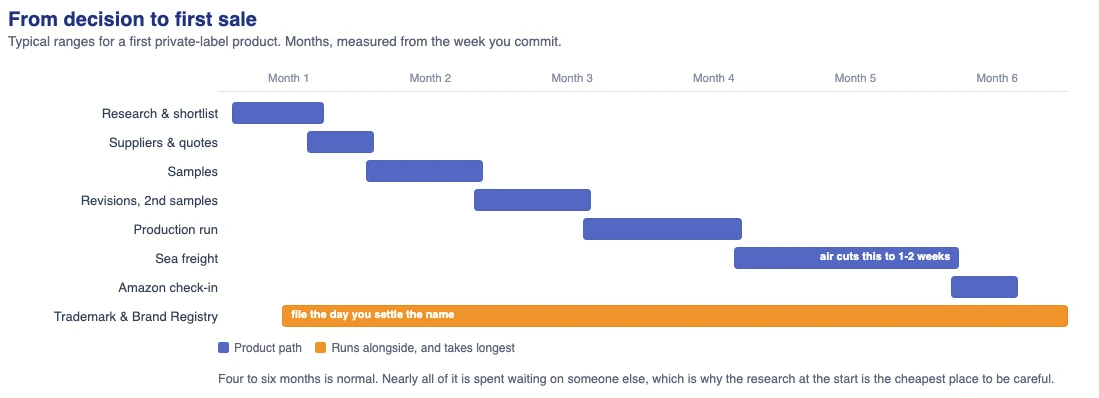
That’s why the research at the start is the cheapest place to make a mistake. Our private label guide covers each stage of that timeline in detail.
FBA vs FBM: When Amazon FBA Is Worth It
FBM (Fulfilled by Merchant) means you store and ship orders yourself. You skip FBA fees and storage, but you take on packing, carriers, returns and customer service, and you lose Prime unless you qualify for Seller Fulfilled Prime.
FBA usually wins for small, light products that sell steadily. FBM often wins for heavy, bulky or slow-moving items, where FBA fees and storage outgrow the margin. And you don’t have to choose once: fulfillment is set per offer, so many sellers run both.
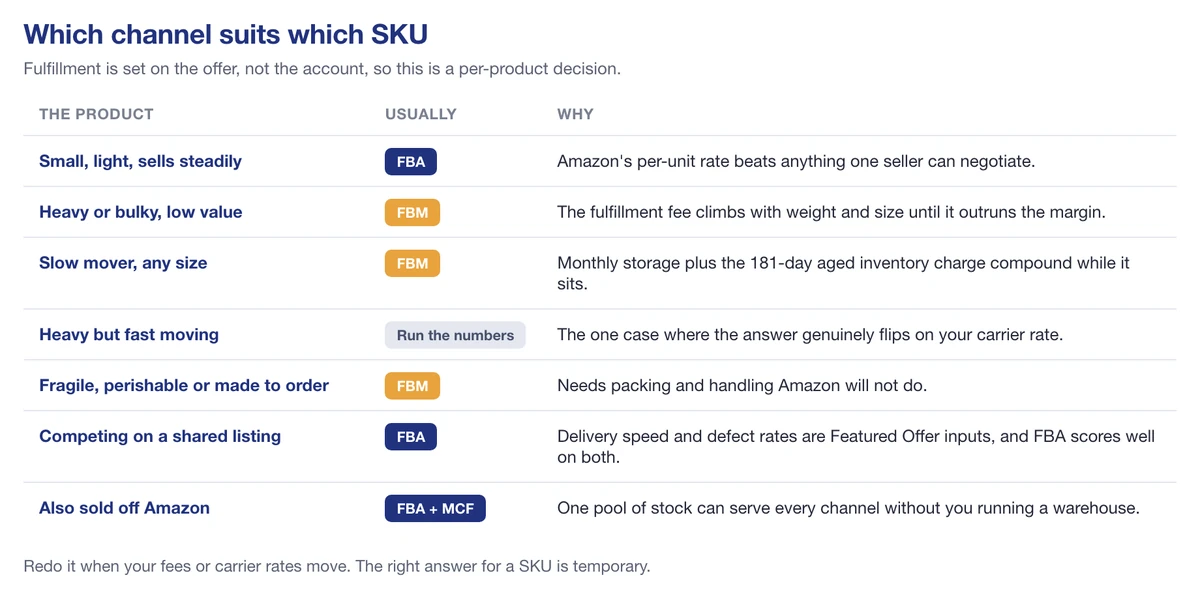
One thing FBA doesn’t buy you is a guaranteed Buy Box. Price, delivery speed and seller performance all count, and we regularly see merchant-fulfilled sellers win it (there’s an example further down). Our FBA vs FBM comparison runs the per-unit arithmetic for both.
🎯 Pro Insight: Run the comparison per product, not per account. A seller with a 2 lb kitchen gadget and a 30 lb storage bin can have FBA as the obvious answer for the first and a money-loser for the second, on the same day.
Amazon Brand Registry for FBA Sellers
If you sell your own brand, Brand Registry is worth doing early. It isn’t the same as registering a business name; it’s Amazon’s program for verified brand owners, and it gives you control of your listings plus A+ Content, Sponsored Brands, Brand Analytics, Manage Your Experiments, and brand protection tools. In 2026 it also matters for FBA directly: the brand representative role is what lets you ship on manufacturer barcodes instead of FNSKU stickers.
What you need, according to Amazon Brand Registry:
- A brand name or logo permanently affixed to your products or packaging
- A pending or registered trademark for that name or logo, from the trademark office of a country with an Amazon store (USPTO in the US)
A pending application counts, so you don’t have to wait for the trademark to be granted. If you don’t have one yet, Amazon’s IP Accelerator connects you with vetted law firms that file trademarks for you.
To enroll, sign in to Brand Registry with your Seller Central login, choose “Enroll your brand”, and have three things ready: the trademark registration or application number, images of your logo and of a product or its packaging showing the brand, and the list of categories you sell in.
Do You Need a Business License or an LLC for Amazon FBA?
For Amazon, no LLC is required. You can register as an individual and sell with FBA. An LLC is a legal and tax decision, not an Amazon one; our guide to whether you need an LLC to sell on Amazon walks through when it actually helps.
Business licenses are a state and local question. Amazon’s registration guide lists a business license or registration among the documents to have ready, and some states require one once you trade there. Many set thresholds. Washington, for example, requires a business license once your gross income reaches $12,000 a year, or earlier if you need to collect sales tax or hire employees.
Rules change by state, county and city, so check with your state’s licensing office before your first sale. The SBA’s guide to licenses and permits is a good starting point.
If you sell from outside the US, expect extra steps too: tax interviews in Seller Central, and VAT or other registrations wherever you store or sell inventory.
What Types of Products Work Best for Amazon FBA?
FBA fees are priced by size and weight, so the products that work best are the ones the fee schedule is kind to:
- Small and light: they fit the cheapest size tiers and cost little to store.
- Priced well above the fees: under about $15, the fulfillment fee alone takes a painful share of the price.
- Steady sellers: stock that moves within a few months never reaches the 181-day aged inventory surcharge.
- Durable and simple to prep: nothing fragile, liquid, perishable or regulated as dangerous goods for a first product.
- Not gated: categories you can sell in without approval.
Before you commit, check how crowded page one is, how many reviews the leaders have, and what the realistic margin looks like after every fee. If a product only works at the most optimistic price, it doesn’t work.
Common Amazon FBA Mistakes Beginners Make
Most first-year losses we see come from the same short list. None of them are about finding the perfect product.
- Sending too much stock. The aged inventory surcharge starts at 181 days, not a year. A first order sized for twelve months of hope is a storage bill.
- Running too lean. The low-inventory-level fee applies when both your 30-day and 90-day supply drop below 28 days, and a stockout costs you rank on top.
- Shipping reseller units without FNSKU labels. Since March 31, 2026, unlabeled reseller units are treated as defective and aren’t eligible for reimbursement.
- Pricing for non-peak fees in Q4. From October 15 to January 14, every unit costs more to ship.
- Ignoring restrictions until the shipment is built. Check FBA product restrictions before you buy the inventory, not after.
- Not watching the listing after launch. Fees change, other sellers join, stock runs out. Nobody tells you.
📌 From Our Experience: The phone case in our fee chart above sold out for two days in early June 2026. Its category rank went from 421 to over 1,300 over the following five weeks, though demand for that phone’s cases was also fading. We can’t say the stockout caused all of that drop. We can say a low-stock alert a few days earlier would have been cheaper than finding out from the rank.
Protect Your FBA Listings After Launch
Launching is the start of the work. Once your listing is live, other sellers can add offers to it, the Buy Box can move, and your fees can change without a message from Amazon. Here’s a storage cabinet we track in SellerSonar over ten days in October 2026.
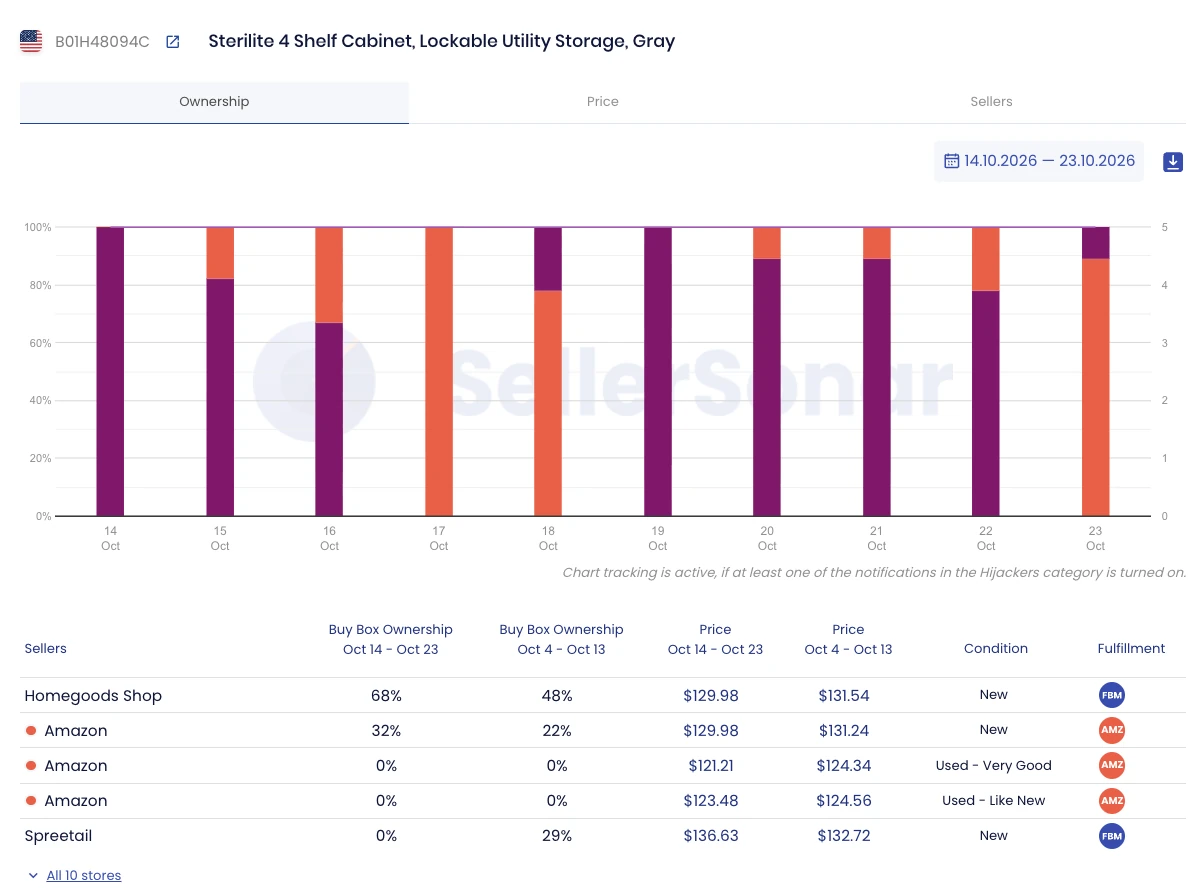
From October 14 to 23, 2026, a merchant-fulfilled seller, Homegoods Shop, held the Buy Box 68% of the time. Amazon’s own offer, at the same $129.98, held 32%. In the ten days before that, a second merchant-fulfilled seller had 29%. Same listing, same price, and the Buy Box kept moving.
If that’s your listing, you want to know the day it happens, not at month-end. That’s what SellerSonar does. It tracks your listings and sends Buy Box and price alerts, flags new sellers and hijackers on your listing, and alerts you when Amazon changes your FBA fee or your stock runs low. It doesn’t find products or write listings for you; it watches the ones you have.
So, How Do You Start Amazon FBA?
Pick a model and a product that survives the fee math. Register with your documents ready. Turn on FBA, label correctly for 2026 (FNSKU on every unit unless you’re the brand owner), and send a first shipment you can sell through in a few months. Then watch fees, stock and the Buy Box every week.
Final Expert Recommendations: If you remember one thing, make it the math. Work out the referral fee, the FBA fee with the 3.5% surcharge, and peak-season rates before you order inventory, and size that first order so it sells through well before 181 days. Most beginners who struggle with FBA don’t have a product problem; they have a fee and inventory problem they didn’t model.
When your first listing goes live, try SellerSonar free for 14 days (5 ASINs and 10 keywords, no credit card) and let it watch the Buy Box, your fees and your stock while you work on the next product.

