





Quick Answer
Amazon Seller Support (officially Selling Partner Support) is the team that handles seller questions in Seller Central. To reach it, sign in, open Help, choose “Get help and resources,” pick your issue, and use the contact option shown: phone callback, email, or chat. Amazon publishes no dial-in number, and the options depend on the issue and your account.
Amazon doesn’t have one support desk for sellers. It has several, and each one sits behind a different button: Selling Partner Support, Account Health Support, Brand Registry, Advertiser Support, Vendor Central support, and Developer Support.
This guide routes you to the right team for your role and your problem. It also covers the honest answer on phone numbers, a case template, the escalation steps Amazon’s own staff recommend, and how to get Amazon to answer your buyers for you.
About the Author: Diana Walsh writes about Amazon account operations and Seller Central for our editorial team. She checked every route in this guide against Amazon’s Seller Central help pages and dated Seller Forums posts by Amazon staff, and every screen against a signed-in Seller Central account, as of November 2, 2026.
Which Amazon support team do you need?
Start here, because the wrong team is the most common reason a case goes in circles. A listing problem and an account health warning look similar from your side. Inside Amazon, they go to different people.
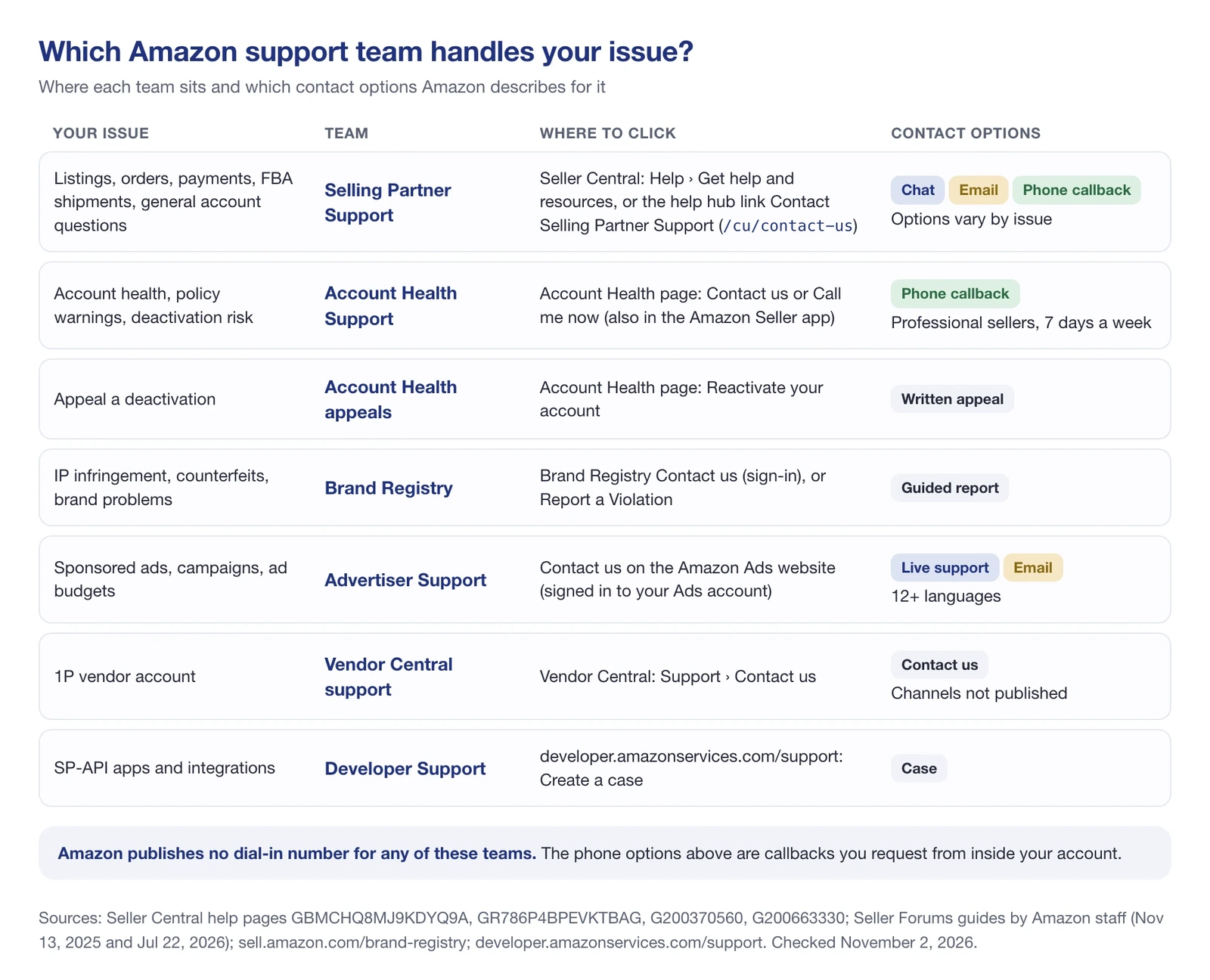
Two quick rules cover most cases. If the problem is about your account’s standing (a policy warning, a deactivation risk, an Account Health Rating question), go to Account Health Support. Almost everything else on a seller account starts with Selling Partner Support.
If you’re a shopper with an order problem, you need a different team: see how to contact Amazon customer service.
How to contact Amazon Seller Support, step by step
Selling Partner Support is the general seller support team. Amazon’s help pages use that name, while sellers and Amazon’s own forum staff still call it Seller Support. There are two ways in.
This is the path Amazon staff described in a step-by-step Seller Forums guide on July 22, 2026:
- Sign in to Seller Central.
- Open Help at the top right of the page and select Get help and resources.
- Pick your issue from the list of common issues, or choose My issue is not listed.
- Describe the issue. Seller Central then shows the contact options available for it.
The guide lists three options:
- Phone: you give your number and an associate rings you back.
- Email: you get a written response.
- Chat: you talk to an associate in a live chat.
The same post adds a note worth remembering: “Not all contact methods are available for every issue category.”
Amazon announced live chat with Selling Partner Support on the Seller Forums on December 11, 2023.
From the help hub: Contact Selling Partner Support
The Seller Central help hub has a Need more help? box in the sidebar with three links: Visit Seller Forums, Visit Seller University, and Contact Selling Partner Support. That last link opens the Contact Us form at /cu/contact-us on your Seller Central domain.
On November 2, 2026, the form asked for a language (English by default, with more than 40 options), a subject, a description of the issue, a contact method, and your name. You can attach up to 6 files, 10MB combined, in CSV, DOC, DOCX, JPG, PDF, PNG, PPT, PPTX, RTF, TXT, XLS, or XLSX format.
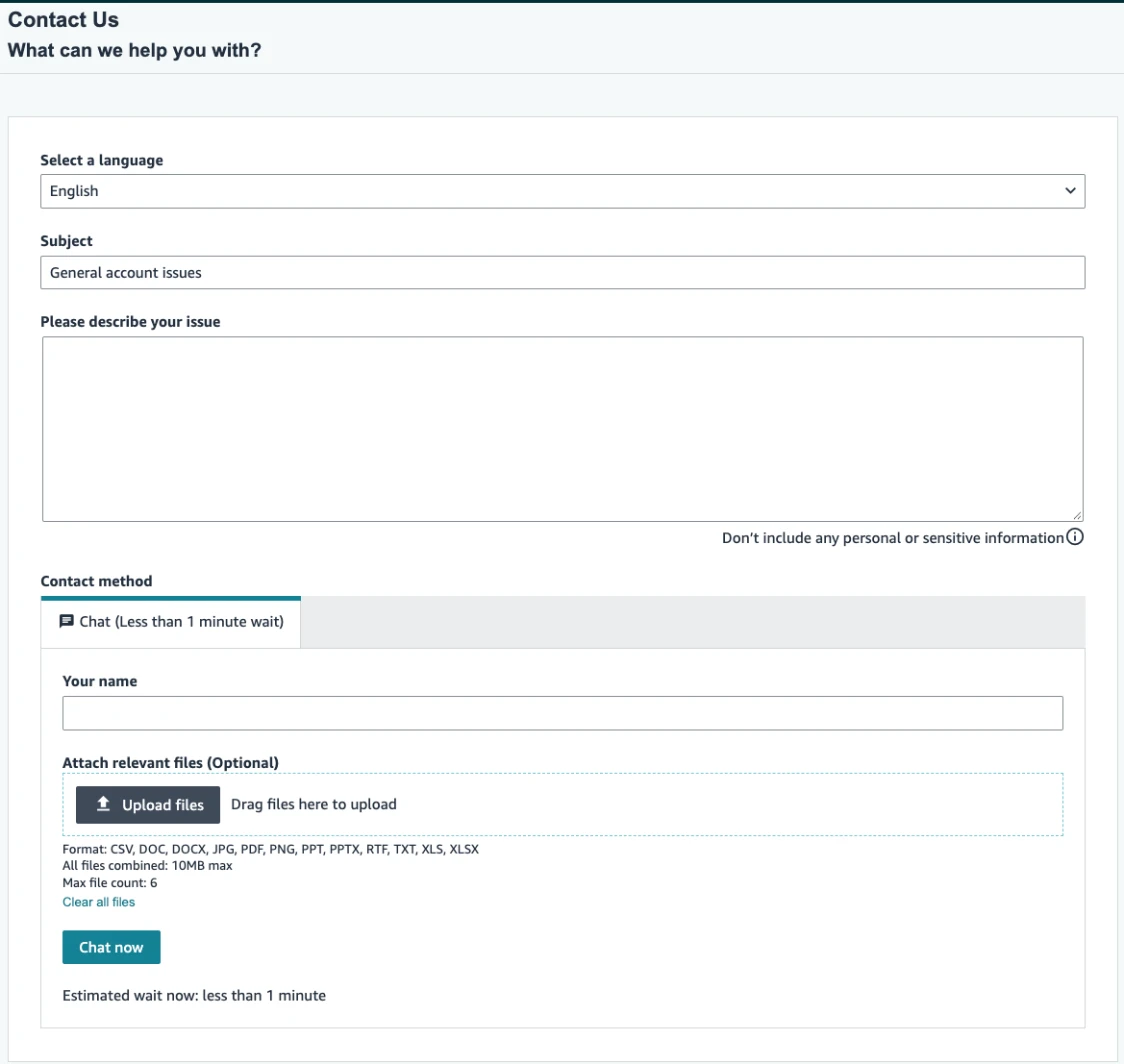
For “General account issues” on the account we checked, the only contact method shown was Chat, with an estimated wait of under a minute at that moment. No phone or email tab appeared. That’s the practical meaning of “options depend on the issue”: pick the most specific subject you can, and the choices may change.
Seller Assistant can hand you to a person
Several Seller Central help pages carry the same note: “Amazon’s Seller Assistant can provide help with this topic. For most language settings, the Seller Assistant can also directly connect you to Selling Partner Support.” If the AI answer doesn’t solve it, ask it to connect you.
Which channels you get depends on your plan
Amazon staff spelled out the plan split in a November 13, 2025 guide on the Amazon.in Seller Forums:
| Selling plan | Selling Partner Support | Account Health Support |
|---|---|---|
| Professional | Email, phone, and chat | Phone callback from the Account Health page |
| Individual | Not available (help pages and Seller University instead) |
Even on a Professional plan, Seller Central shows only the options available for your issue. The Account Health Support column comes from Amazon’s Account health support FAQ, covered below.
💡 Expert Tip: Before you open anything, check your Case Log. Amazon staff point out that a case marked “Pending Merchant Action” is waiting for you, not for Amazon. Answering it is faster than starting a new case.
Is there an Amazon Seller Support phone number?
No. Amazon doesn’t publish a phone number you can dial for Seller Support, and we found none on any Amazon page. Phone support for sellers works the other way around: you ask for a call from inside your account, and Amazon calls you.
There are two ways to get that call:
- Selling Partner Support: choose Phone in the contact options when Seller Central offers it for your issue, and an associate rings you back.
- Account Health Support: click Contact us on the Account Health page, enter your number, and a specialist calls you. This is for professional sellers.
Sellers ask for a number all the time. In a May 2024 US Seller Forums thread titled “What is the phone number of the US Seller Support team?”, the Amazon moderator’s reply (May 9, 2024) didn’t give one. It asked for the performance notification instead.
Amazon may also call you. Its account health help page says that if your account health degrades and becomes eligible for deactivation, “we may call you to offer personalized support,” and asks you to keep your Emergency Contact phone number up to date.
Don’t trust “seller support numbers” from other sites
Search for an Amazon seller support number and you’ll find complaint sites and agency pages listing phone numbers. On November 2, 2026, a consumer complaint site ranked in the top 10 for “amazon seller central phone number.” Amazon doesn’t publish those numbers on its own pages, so don’t call them and don’t give anyone your Seller Central login on the phone.
Amazon.in sellers: phone support and languages
India is the one marketplace where Amazon’s seller site talks about phone support directly. Its help page for sellers says: “As an Amazon seller, you also have the option of getting support over the phone,” and lists English, Hindi, Kannada, Tamil, and Telugu. You still reach it from Seller Central, as a registered seller.
The toll-free number on sell.amazon.in, 1800-419-7355, is on the registration page for people who haven’t signed up yet, and Amazon marks it “For Indian Callers Only.” It’s not a support line for existing seller accounts.
Account Health Support and appeals
Amazon describes Account Health Support as “a dedicated support channel designed to help professional sellers worldwide maintain account health by addressing performance issues and policy violations.”
To reach it, click Contact us (some pages call the button Call me now) on your Account Health page, or use the same button in the Amazon Seller app. You enter your phone number and an account health specialist calls you. The team works 7 days a week; the hours for your time zone and language show when you click the button.
What Account Health Support doesn’t handle
In an August 12, 2024 Seller Forums post, Amazon’s community team listed what AHS does not cover:
- Feedback removal or A-to-z disputes
- Questions about disbursements
- FBA questions
- The Prime program
- Technical issues
- Account information updates
- The Featured Offer
- Account closure requests
Those go to Selling Partner Support. If you’re not a professional seller, Amazon points you to the account health pages in Seller Central Help and to Seller University.
Appeals and reactivation
Appeals run from the Account Health page. If your account was deactivated, click Reactivate your account at the top of the page and follow the steps.
Amazon says you may be asked to complete a questionnaire, acknowledge a violation, complete a quiz, or provide documents. For a listing-level violation, you appeal through the Product Policy Compliance Dashboard.
The Account health support FAQ also says what evidence helps:
- Intellectual property violations: proof you can sell the product, such as authorization letters or invoices from authorized distributors.
- Counterfeit allegations: invoices from manufacturers or authorized distributors that show the supply chain.
- Performance defects: a review of the metrics behind the warning, and evidence if an Amazon system error caused it.
If the appeal buttons are grayed out, Amazon suggests a different browser or a cleared cache, then the Amazon Seller app, then the Contact us button. If that button is unavailable too, use Seller Central’s general support. For the full appeal process, see our guide to an Amazon account suspension.
Brand Registry support
Brand owners have their own support route. Brand Registry’s Contact us page sits at brandregistry.amazon.com and needs you to sign in with your Brand Registry account.
For infringement, Amazon’s Brand Registry page points to Report a Violation, a guided workflow for suspected IP infringement, store policy violations, and regulatory compliance concerns. A seller offering counterfeits of your brand belongs here, not in a general Seller Support case. Our Amazon Brand Registry guide covers enrollment and the protection tools.
Want a person at Amazon assigned to your brand? Amazon’s New Seller Success program “pairs select brands with a dedicated Amazon account representative for up to 12 months.” It’s the only official account-manager route for smaller brands we found, and it’s by selection, not on request.
You’ll see a Brand Registry support email address quoted in forums and third-party guides. Amazon doesn’t publish it on its own pages, so use the Contact us page instead.
Amazon Ads support for advertisers
Advertising questions don’t belong in a Seller Support case. Amazon’s help page says questions about Sponsored Products, Sponsored Brands, and Sponsored Display campaigns, including performance and budgets, “are answered by the Advertiser Support team.”
To reach that team, go to Contact us on the Amazon Ads website while signed in to your Ads account. Amazon says you can contact Advertiser Support “via live support options or email in over 12 languages.” When we opened advertising.amazon.com/contactus on November 2, 2026, it redirected to the Amazon Ads sign-in page.
There’s no public Amazon Ads phone number either. The one phone option on record is for DSP: in August 2022, Amazon Ads launched phone support with an Ads specialist for DSP, in English only, in the US, Brazil, Canada, and Mexico.
Agencies and tool providers have a separate front door. Amazon calls the Ads Partner Network “a self-service hub for agencies and tool providers to manage their business relationships with Amazon Ads.”
Vendor Central support for 1P vendors
If you sell to Amazon as a first-party vendor, your support lives in Vendor Central under Support > Contact us. For API integration questions, Amazon’s developer site points vendors to Support > Contact us > API Integration.
Amazon doesn’t publish which channels vendors get, and we couldn’t verify them without a vendor account. Agency pages that rank for “vendor central phone number” list numbers Amazon doesn’t publish, so treat them like the seller numbers above.
Don’t confuse Vendor Central with Supplier Central, which is for companies selling goods to Amazon for its own operations. Our Amazon Vendor Central guide explains how the 1P model works.
Developers: SP-API Developer Support
If you build apps on the Selling Partner API, go to SP-API Developer Support. Amazon describes it this way: “Use this page to create a case with Developer Support and learn about the other resources available to developers.”
The same page links Solution Provider Support, Support Guidelines with examples of a good case, API Status, and Developer Forums on GitHub. API Status is worth a look before you open a case about API errors.
Agencies and service providers
Agencies don’t get their own Seller Support line. We found none. An agency works inside the seller’s account as a secondary user, and opens cases from there.
To add one, the primary user goes to Settings > User permissions, enters the person’s name and email, and selects Invite. To change access later, search for the user and choose Manage global permissions.
For advertising work, agencies join the Ads Partner Network described above. And if you’re looking to hire help rather than give it, Amazon runs the Service Provider Network (SPN). Amazon.in’s help page describes it as a way to connect with third-party professionals for services such as product photography, cataloging, account management, and advertising.
How to write a case that gets solved
Most slow cases have the same problem: the first message is missing the facts, so the case bounces back to you. Amazon staff guides on the Seller Forums from November 2025 and July 2026 give the same core advice: be specific, put the IDs up front, keep one issue per case, and attach your evidence.
Here’s a template that follows that advice:
Subject: [Issue type] ASIN [B0XXXXXXXX] on [marketplace]

What happened: [one sentence], first seen on [date, time, time zone].
IDs: ASIN [ ], SKU [ ], order ID [ ], shipment ID [ ]
What I already checked: [e.g. listing quality page, inventory status]
What I need: [the one outcome you want from this case]
Attached: [screenshots with dates, invoices, tracking]
Keep it to one issue. If you have a suppressed listing and a missing reimbursement, that’s two cases, and Amazon staff say so explicitly: “Create separate cases for different issues.”
How to escalate when the answer doesn’t fix it
We found no escalation department for seller cases on any Amazon page. What Amazon does publish, through its forum staff and help pages, is an order of steps:
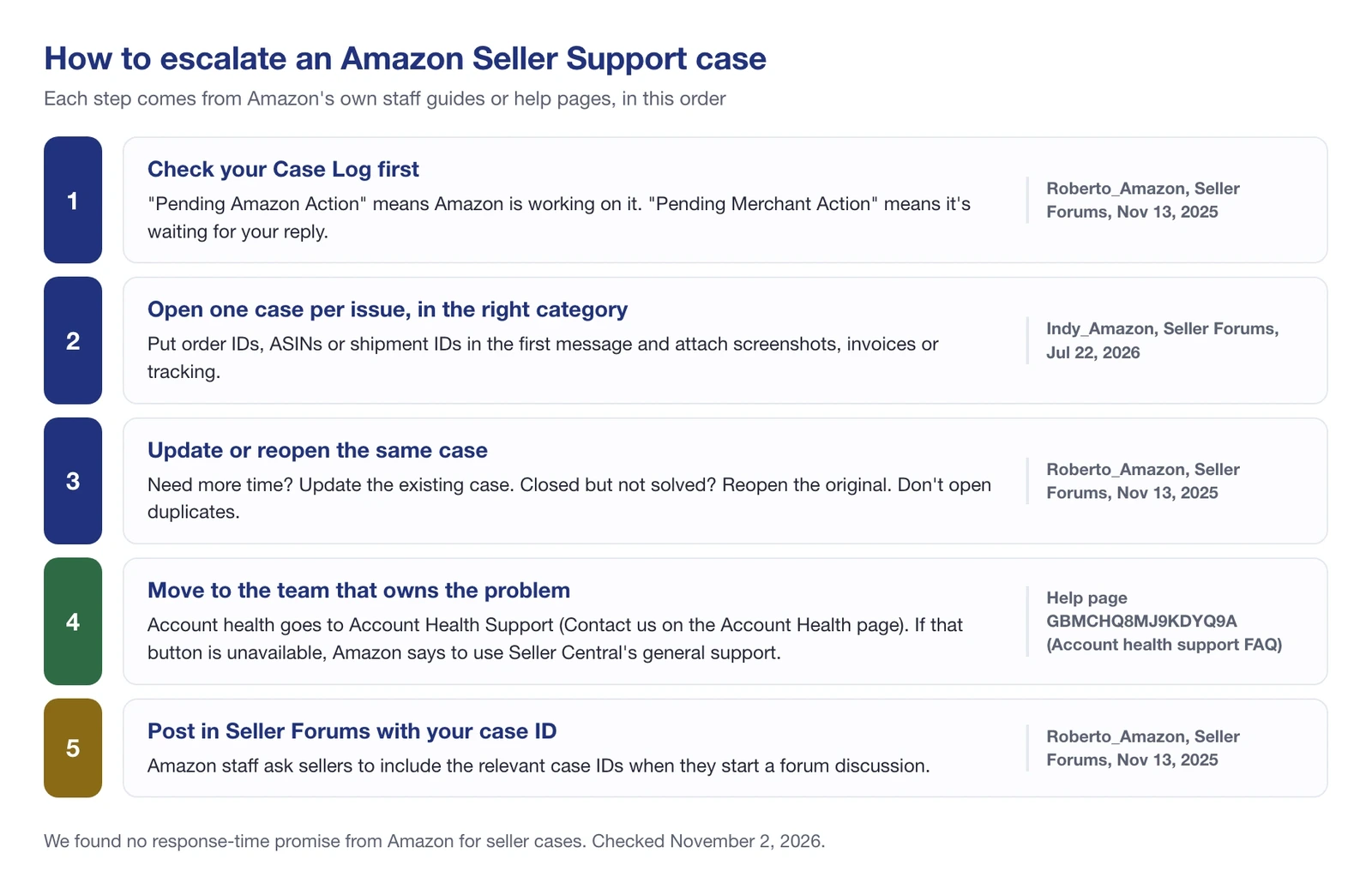
The step sellers skip most is the third. Amazon staff wrote on November 13, 2025: “For questions about closed cases, please reopen the original case instead of creating a new one.” A fresh case starts from zero; a reopened one keeps its history.
The forum step works because Amazon moderators do reply to threads, as the May 2024 phone-number thread shows. Include the case ID, remove personal details, and describe what you’ve already tried.
🎯 Pro Insight: The best evidence is dated. “My listing disappeared last week” starts a back-and-forth. “Search suppressed on October 21 at 08:43 UTC, restored October 23 at 12:02 UTC, screenshot attached” gives the associate an exact time window to look at.
When Amazon should answer your buyers instead
Some sellers search for seller support when what they want is for Amazon to talk to their buyers. Amazon covers that in two ways.
FBA orders: Amazon handles customer service for orders it fulfills. Its help page says that for FBA orders, Buyer-Seller Messages are for product inquiries only, and “any customer service inquiries should be directed to Amazon customer service.” Multi-Channel Fulfillment orders are not covered.
Seller-fulfilled orders: Customer Service by Amazon (CSBA) lets Amazon’s customer service answer buyers on your own shipments. New sellers on Amazon.com are enrolled by default, there’s a 90-day free trial, and Amazon’s program page lists it for the United States, Germany, and Japan. If you ship with Easy Ship or Seller-Fulfilled Prime, CSBA is already part of the program.
Amazon’s CSBA fees page says the service is “completely free for the majority of sellers enrolled.” The fee depends on your contacts per unit (CPU): the buyer contacts Amazon handled for you in a quarter, divided by the seller-fulfilled units you shipped in that quarter.
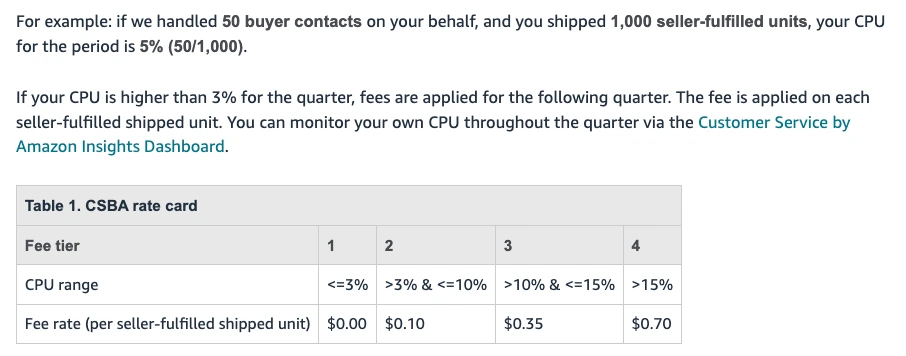
According to Amazon’s fee page, staying at 3% CPU or lower for a quarter makes the next quarter free. Above that, the per-unit fee applies to every seller-fulfilled unit in the following quarter: $0.10, $0.35, or $0.70 depending on the tier. Questions about CSBA itself go to Selling Partner Support.
Can’t sign in to Seller Central?
A login problem is the one case you can’t open from inside your account. Amazon’s own checklist, posted on the Seller Forums on March 4, 2021, still covers the basics:
- Check that you’re using the right email and password, with no extra spaces from a copy and paste.
- If you’re asked for a Two-Step Verification code, use the most recent one; older codes won’t work.
- Clear your browser cookies and cache, or try another browser or device.
- Use Amazon’s password assistance page to check which email address is registered.
If none of that works, the same post says to contact Selling Partner Support through the login contact form it links and describe the issue in detail. The post dates from March 2021, so the form may look different from what it describes.
Catch the problem before you need a case
Most seller cases start with something that changed on a listing: it dropped out of search, the title was edited, the variation broke, a new seller appeared. The sooner you know, and the more precisely you can date it, the shorter the case.
That’s where monitoring helps, though it doesn’t contact Amazon for you. SellerSonar’s retail issues alerts flag a search-suppressed or restored listing on the next check, with how long the issue has been active and a dated snapshot of the product page. Its content change alerts record the before and after values when a title, bullet, description, or image changes.
Checks run every 4 hours on Pro, every 2 hours on Premium, and every hour on Business and Enterprise.
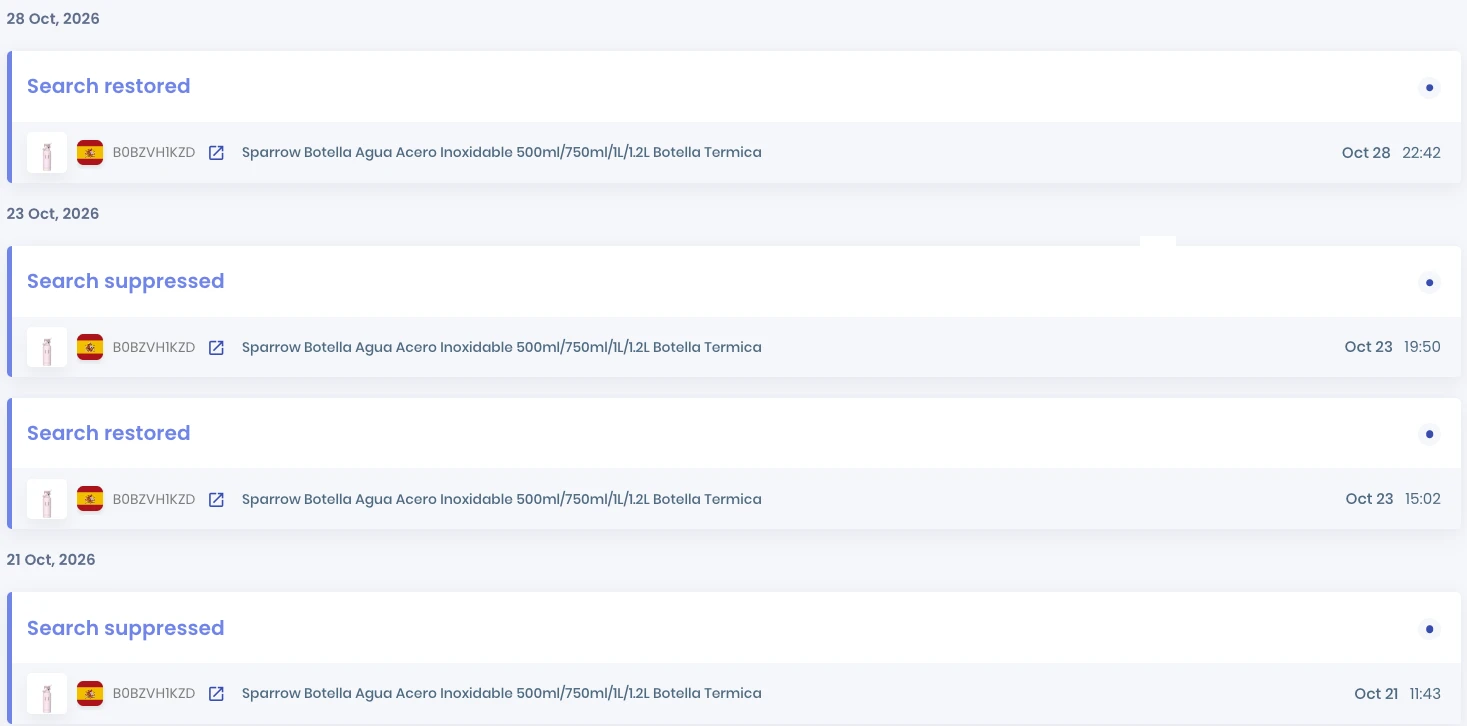
Here’s a real example from a product we track on amazon.es (ASIN B0BZVH1KZD). It was search suppressed on October 21, 2026 at 08:43 UTC and restored on October 23 at 12:02 UTC, about 51 hours later. It was suppressed again that afternoon at 16:50 UTC and stayed out of search until October 28 at 20:42 UTC, about 5 days.
A case about the second episode can say exactly when it started, that it happened once before, and include the page snapshot. What monitoring can’t tell you is why Amazon suppressed the listing. That reason is in Seller Central, and that’s the question to put to Selling Partner Support.
📌 From Our Experience: The cases that close fastest are the ones where the seller already knows what changed and when. Spend five minutes collecting dates and screenshots before you open the contact form, and you’ll usually save a round of “please provide more information.”
Bringing it together
Getting help from Amazon as a seller comes down to three choices: the right team, the right channel, and a first message that doesn’t need a follow-up.
- Pick the team first. Selling Partner Support for most account, listing, and order issues; Account Health Support for policy and deactivation; Brand Registry for infringement; Ads, Vendor Central, and Developer Support for their own worlds.
- Don’t hunt for a phone number. There’s no public one. Ask for a callback inside the case, or from the Account Health page if you’re a professional seller.
- Write one issue per case, with IDs and dates. Then update or reopen the same case instead of starting over.
- Escalate in Amazon’s order. Case Log, the right team, then the Seller Forums with your case ID.
- Let Amazon answer buyers when it can. FBA includes customer service, and CSBA covers seller-fulfilled orders for most sellers at no charge.
Final Expert Recommendations:
Bookmark your Contact Us page and your Account Health page, and check that your Emergency Contact number is current. Then build the habit that shortens every case: note what changed, when, and on which ASIN, with a screenshot.
The sellers who get answers quickly aren’t the ones who know a secret number. They’re the ones who open the right case once, with the evidence already attached.
Want to know when a listing is suppressed or edited before a buyer tells you? Start a free 14-day SellerSonar trial (5 ASINs and 10 keywords, no credit card) and have dated evidence ready for your next case.
Sources: Amazon Seller Central help pages on Account Health Support, account deactivation and appeals, Account Health Rating, Amazon Ads, FBA customer service, Customer Service by Amazon and its fees (read November 2, 2026); Seller Forums posts by Amazon staff dated March 4, 2021, December 11, 2023, May 9, 2024, August 12, 2024, November 13, 2025, and July 22, 2026; sell.amazon.com Brand Registry and CSBA program pages; sell.amazon.in seller help; developer.amazonservices.com support page; SellerSonar data from products we track, October 2026.
