





Quick Answer
Alexa for Shopping is Amazon’s AI shopping assistant, the new name for Amazon Rufus since May 13, 2026. It answers shoppers using Amazon’s product catalog, customer reviews, community Q&As, and information from across the web. For sellers, that means your detail page, your reviews, and your price history are what the assistant works from when a shopper asks about your product.
A shopper on your product page types “Is this dishwasher safe?” and gets an answer in a chat window instead of reading your bullets. Since May 13, 2026, that window is called Alexa for Shopping. Before that, sellers knew it as Amazon Rufus.
This guide covers what Amazon has published about the assistant: what it reads, where shoppers meet it, the price tools it gives them, the ads that run inside it, and where it’s live. It also marks what Amazon hasn’t said, and shows how to watch the parts of your listing it reads.
About the Author: Diana Walsh writes for the SellerSonar editorial team on Amazon listing quality, search visibility, and seller operations. She checked every Amazon fact in this guide against Amazon’s news, Amazon Ads, and Seller Central pages, and every SellerSonar figure against our own listing records, as of November 16, 2026.
What is Alexa for Shopping, and what changed from Rufus?
Alexa for Shopping is the AI assistant in the Amazon Shopping app and on the Amazon website. Amazon’s older Rufus articles carry the same note: “On May 13, 2026, Rufus was renamed Alexa for Shopping.”
It’s more than a new label. Amazon’s Alexa for Shopping announcement says it combines “Rufus’s product expertise and Amazon shopping history with the personalized knowledge and context of Alexa+,” so what a shopper tells Alexa on an Echo can shape answers in the Amazon app.
The dated history:
- February 1, 2024: Amazon announces Rufus in beta “to a small subset of customers in Amazon’s mobile app” in the US.
- July 12, 2024: Rufus reaches all US customers in the app and on desktop.
- May 13, 2026: Rufus is renamed Alexa for Shopping.
- November 10 to 13, 2026: it launches in Italy (November 10), Spain (November 11), Germany and Austria (November 12), and France (November 13), and starts rolling out in India “on select storefronts” (November 12).
- November 13, 2026: Amazon updates its announcement to say the assistant “is available in full across 13 countries.”
Amazon wrote on October 29, 2026 that “over 400 million customers have used Alexa for Shopping in the last 12 months.” It’s free for any signed-in customer, no Prime needed.
Where do shoppers meet Alexa for Shopping?
Amazon’s guide to using Alexa for Shopping, updated October 29, 2026, lists these entry points:
- The Alexa icon in the app’s bottom navigation bar, and at the top of the screen on desktop
- The main search bar. When a shopper types a question, “the search experience recognizes when you’re asking a question” and the assistant answers it
- AI overviews at the top of search results in the app and on product detail pages, which Amazon says are “rolling out to all U.S. shoppers”
- Your detail page, through the “Compare with Similar” button and the price history link next to the price
The answers aren’t limited to Amazon listings either. Through Shop Direct, products from other online stores can appear “in relevant searches and within Alexa for Shopping.” Amazon’s November 4, 2026 Shop Direct post adds that Amazon sellers “may also be eligible to participate in Shop Direct and list selection they don’t currently sell in Amazon’s store.”
What can Alexa for Shopping do for shoppers that affects sellers?
Several features put your listing next to rivals or your pricing on display.
- Product answers. Amazon’s sample questions include “Does this blender crush ice?” and “Is this water bottle dishwasher safe?”
- Comparisons of “features, prices, and reviews” for products a shopper selects in search results.
- Review summaries. A shopper can ask “What do customers say?” instead of reading your reviews.
- Price history of up to 365 days. Amazon’s price history article updated on November 16, 2026, says that “in 2026, more than 100 million customers worldwide have used price history hundreds of millions of times.”
- Price alerts and auto-buy. The assistant alerts the shopper or buys when your price hits their target. Amazon said in November 2025 that auto-buy requests “stay active for six months or until you cancel.”
- Deal notifications. Amazon’s customer help page “Use Alexa to Find Deals” says that once a notification is created, “Alexa monitors the item for 30 days.”
Our guide on how to see price history on Amazon shows the shopper’s view.
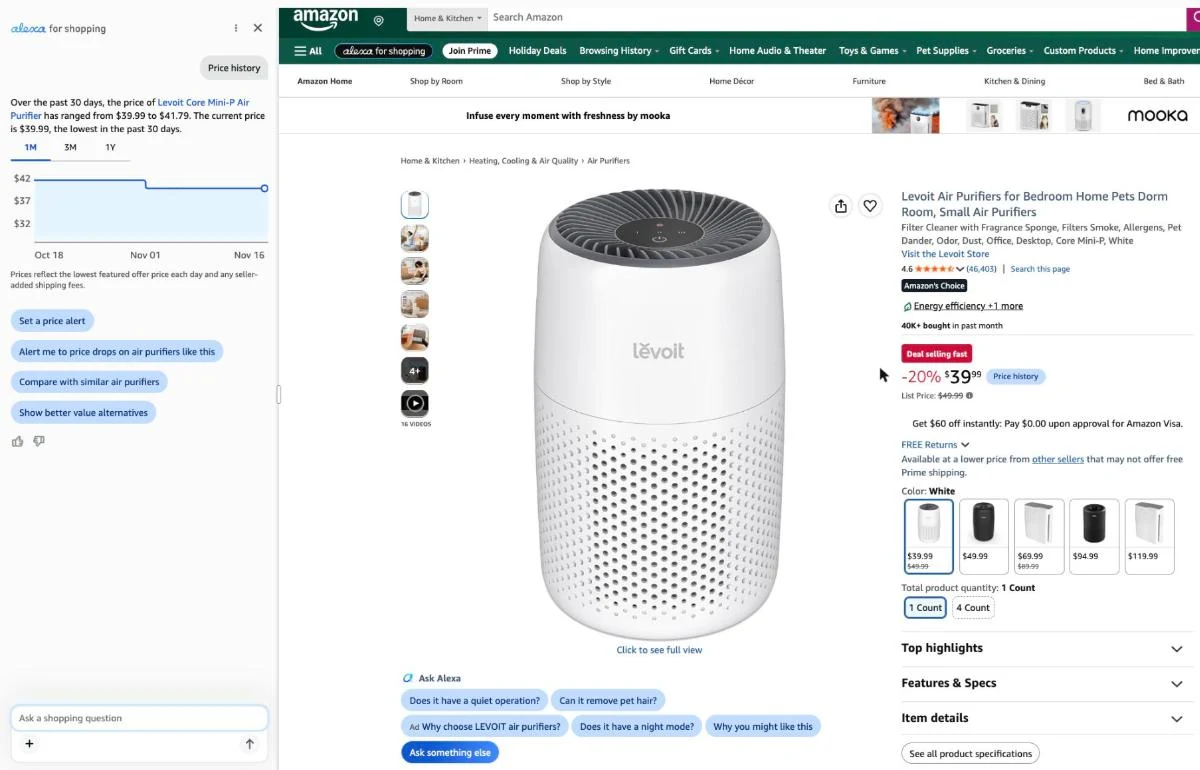
🎯 Pro Insight: Price history turns old pricing decisions into something every shopper can check. If a price goes up the week before an event so the deal looks bigger, that jump sits right there on the 30, 90 or 365-day chart.
What information does Alexa for Shopping use?
Amazon has described its sources the same way since launch. Its November 18, 2025 article says the assistant runs on several models, including a custom one built on “Amazon’s extensive product catalog, customer reviews, community Q&As, and information from across the web.” For web answers, it names “The New York Times, USA Today, Good Housekeeping, and Vogue” as examples.
For questions about a specific product, Amazon’s seller help page is more direct. The Seller Central Alexa for Shopping help page says that for questions like “What are the dimensions?” or “Is this machine washable?”, “Alexa for Shopping uses information from the product’s detail page.”
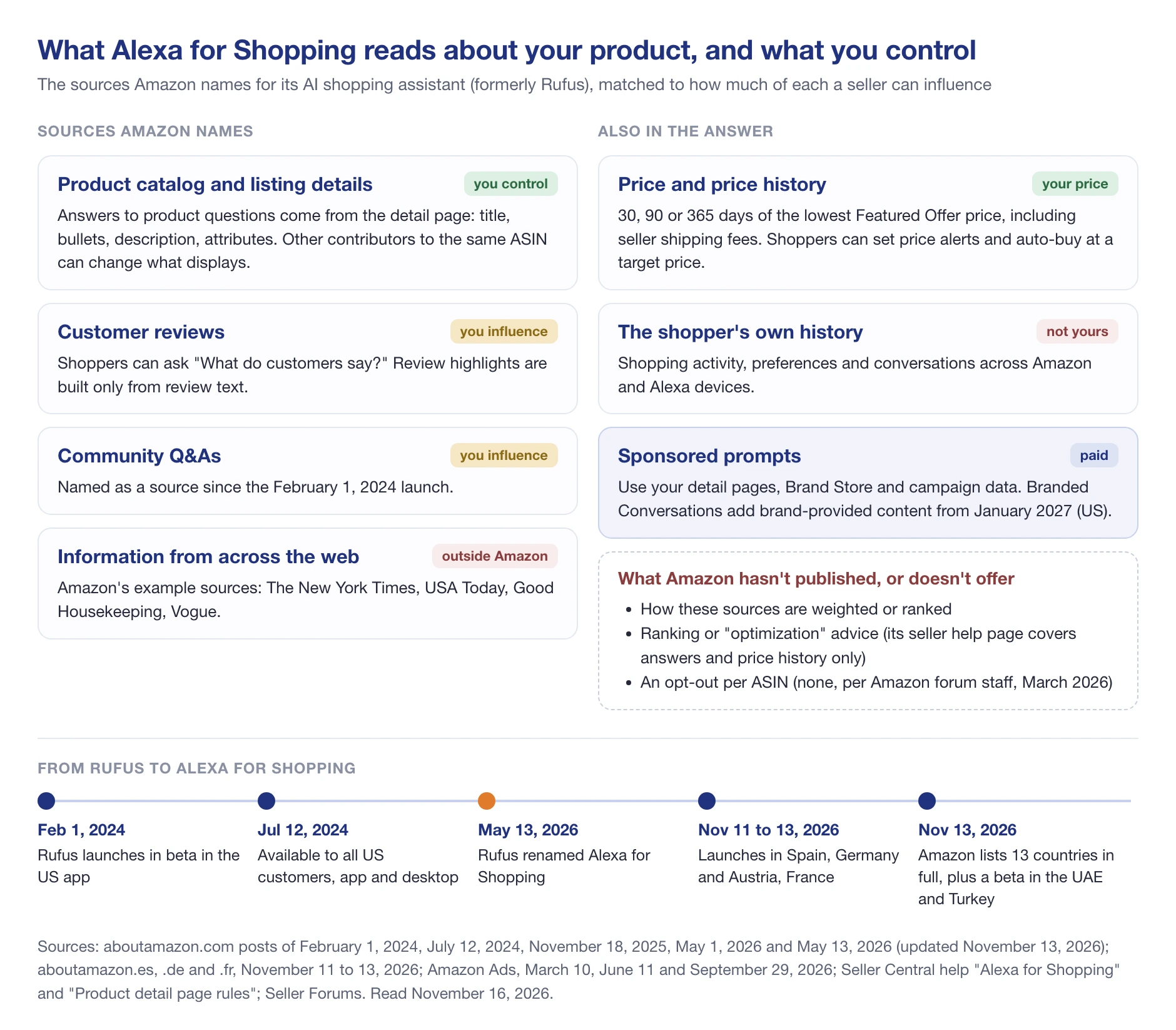
The same page defines price history as “the lowest Featured Offer price for each day or week including any shipping fees added by sellers and excluding temporary price errors,” over 30, 90, or 365 days. The shopper’s own history also shapes answers, outside your reach.
What Amazon has not published, as of November 16, 2026:
- How these sources are weighted, or which products the assistant recommends first and why
- Any ranking factors or “optimization” checklist for sellers
- A way to opt a product out
On that last point, an Amazon staff member answered a seller in the Seller Forums in March 2026: “currently there isn’t an option for sellers to opt-out at the ASIN level or train Rufus with specific instructions for individual products.” It’s a forum reply, not a policy page, but it’s the most specific seller-side statement we found.
What can sellers do about Alexa for Shopping?
Without ranking factors, the safe moves follow from Amazon’s own statements, and they help shoppers who never open the assistant too.
- Make the detail page accurate and complete. The assistant answers product questions from it. Amazon’s product detail page rules already require that “Product information must be accurate and trustworthy, and not mislead customers about the products’ qualities or characteristics.”
- Fill the structured attributes. The forum reply said of compatibility data: “Amazon’s systems, including Rufus, pull from this data,” so complete structured fields matter.
- Answer the questions buyers actually ask. If your inbox keeps getting a question, the answer belongs in the listing.
- Fix what reviews complain about. Review summaries come from review text, so a recurring complaint keeps surfacing.
- Price with the history in mind. Your lowest Featured Offer price over the past year is one tap away for shoppers.
Watch who else edits your page: when several brand users contribute to one attribute, Amazon’s “automatic system may choose which information should be displayed.” Our Amazon listing optimization guide covers the listing work itself.
When an answer is wrong, the help page says to verify the detail page first, then submit a ticket with the ASIN, a screenshot of the question and Alexa’s response, your expected response, and proof such as a product manual or the manufacturer’s website.
💡 Expert Tip: On your own detail page, ask the assistant the five questions your buyers ask most. Screenshot every wrong or vague answer: that’s your listing to-do list and your ticket evidence.
What do “optimize for Rufus” guides get wrong?
We read six vendor guides that rank for this topic on November 16, 2026. The core advice, clear and complete listing content, is sensible. The numbers and the certainty are not.
- Stale or mislabeled usage figures. “250 million shoppers are using Rufus right now” repeats Amazon’s November 2025 figure of 250 million customers “this year.” Amazon’s October 2026 figure is over 400 million in 12 months.
- A twisted conversion claim. Amazon said customers who use the assistant “are over 60% more likely to make a purchase during that shopping trip.” Some guides turn that into “60% higher purchase intent than regular search,” a comparison Amazon never made.
- Unsourced lifts such as “20-35%” conversion gains.
- Suppression and ranking claims. One guide says the assistant “will suppress your listing to avoid a bad customer experience.” No Amazon page we read says that.
- “Not influenced by advertising spend.” One guide says that of the assistant’s recommendations, but Amazon Ads says existing sponsored ads campaigns “are automatically eligible to serve in Alexa for Shopping.”
Most of the six skip the rename, price history, and Amazon’s seller help page. Treat any promised ranking boost as opinion.
Can you advertise inside Alexa for Shopping?
Yes, partly without setup. Amazon Ads’ June 11, 2026 post on agentic shopping says existing sponsored ads campaigns can serve in the assistant “without additional campaign setup.”
The dedicated format is prompts. According to the Sponsored Products and Sponsored Brands prompts announcement:
- Prompts started in open beta in November 2025 and became generally available in the US on March 25, 2026.
- Campaigns are enrolled automatically, and Amazon charges for prompts “as part of your CPC bidding and billing parameters.”
- They draw on your detail pages, Brand Store, and campaign data, so a weak listing feeds a weak prompt.
- A Prompts report shows clicks, spend, sales, and ACOS per prompt, and any prompt can be paused.
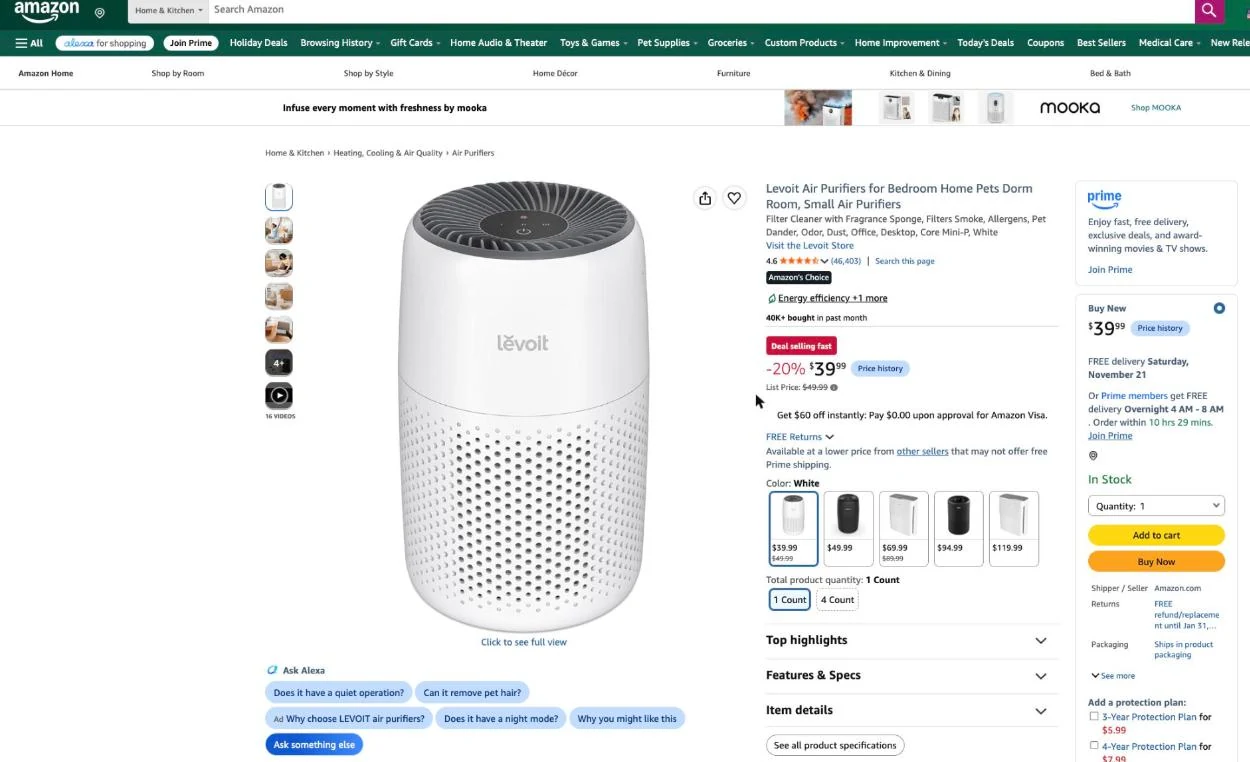
You can see one in the wild on the Levoit page above. On November 16, 2026, one of its four suggested “Ask Alexa” questions carried an “Ad” label: “Why choose LEVOIT air purifiers?” It sits in the same row as the organic questions, so most shoppers won’t notice the difference.
Amazon’s own figures, with no method published: “Nearly 20% of shoppers who interact with a prompt continue the conversation about that brand,” and adding prompts to a Sponsored Brands ad “drives a 6% increase in conversions.”
Next comes Branded Conversations, which adds brand-provided product expertise to those conversations. Amazon Ads’ September 29, 2026 announcement says they “are clearly marked as Sponsored” and “will launch in January 2027 in the United States.” For how these fit with your other campaigns, see our guide to Amazon ad types.
Where is Alexa for Shopping available?
Here is what each Amazon page says:
| What | Where, per Amazon |
|---|---|
| Alexa for Shopping in full | 13 countries: US, UK, Germany, France, Italy, Spain, Canada, Japan, India, Brazil, Mexico, Austria, Australia |
| Alexa for Shopping in beta | United Arab Emirates and Turkey |
| Launch dates under the new name | Italy November 10, Spain November 11, Germany and Austria November 12, France November 13, 2026; India rollout “on select storefronts” from November 12, 2026 |
| Price history | US, UK, Canada, India, Japan, Germany, France, Italy, and Spain (Amazon’s price history article, updated November 16, 2026); Austria with the German launch on November 12, 2026 |
| Sponsored Products and Sponsored Brands prompts | United States |
| Branded Conversations | United States, from January 2027 |
Sources: the Alexa for Shopping announcement (updated November 13, 2026), the German launch post, Amazon’s Italian, Spanish, French, and Indian posts, and the Amazon Ads pages above.
One caveat: Seller Central publishes its help page per marketplace, and the German post lists price alerts as still to come. Check your own marketplace before you plan around a feature.
How do you keep an eye on what the assistant sees about your products?
You can’t see every shopper’s answer, but you can watch the inputs: listing text, price, and reviews.
What changed on two listings we track
Here is what changed on two US listings we track in SellerSonar, October 11 to November 16, 2026. We can’t see what Alexa for Shopping answered, only the page it reads.
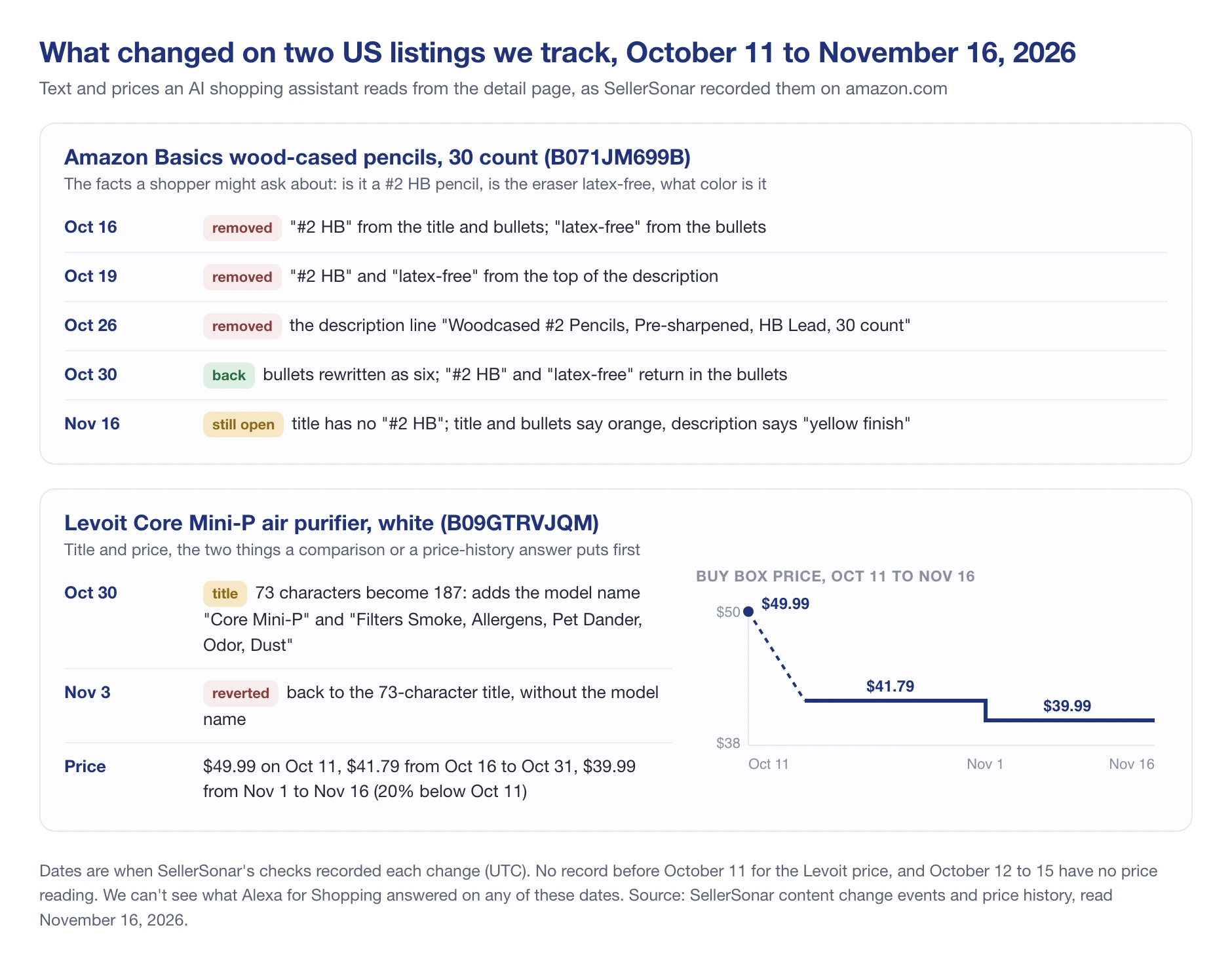
Amazon Basics wood-cased pencils, 30 count (B071JM699B). On October 16, “#2 HB” disappeared from the title and bullets, and “latex-free” from the bullets. On October 19 and 26 the description lost them too.
The bullets were rewritten on October 30, and both facts came back there. As of November 16 the title still doesn’t say “#2 HB,” and the description still mentions a “satin-smooth yellow finish” while the title and a bullet say orange.
For two weeks, a shopper asking “Are these #2 pencils?” was asking about a page whose title and bullets didn’t say so.
Levoit Core Mini-P air purifier, white (B09GTRVJQM). On October 30 the title grew from 73 to 187 characters, adding the model name and what it filters. On November 3 it went back to the short version. Amazon’s detail page rules cap titles at 75 characters for all non-media product types.
The price moved too: $49.99 on October 11, $41.79 from October 16 to 31, and $39.99 from November 1 to 16, 20% below our first reading. Amazon’s own answer on November 16 matched: over the past 30 days the price “ranged from $39.99 to $41.79,” and $39.99 was “the lowest in the past 30 days.”
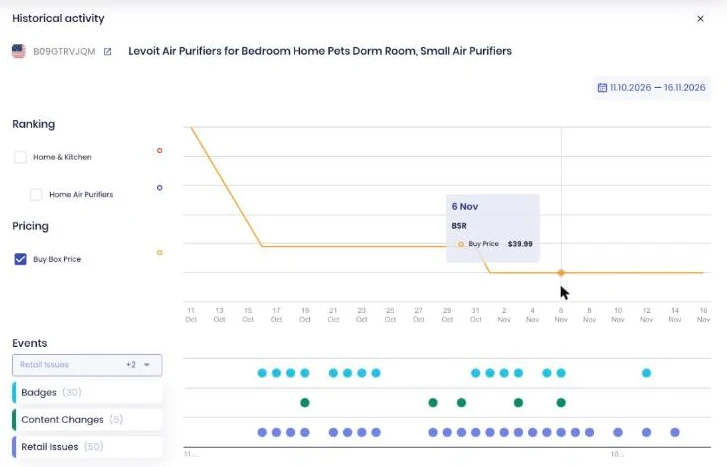
📌 From Our Experience: Across the US listings we track, SellerSonar recorded 64 title, bullet, and description changes from October 1 to November 16, 2026. Most were small, but one edit can remove a fact shoppers ask about for weeks.
How SellerSonar fits in
SellerSonar watches the detail page, not the assistant’s answers. That covers the three inputs you can act on.
- Listing text: content change alerts cover title, bullet points, description, main and other images, and brand, with the text before and after each change.
- Price: price history charts start the day you add a product, and the Seller’s price changed alert flags moves above a threshold you set. Buy Box and pricing alerts are off by default, so switch them on in Alerts, then Delivery Settings.
- Reviews: our review monitoring tracker has 10 review alert types on every plan. Rating changed updates every 3 to 4 hours; new-review alerts depend on collection through the SellerSonar Chrome Extension, which we recommend running every 1 to 3 days.
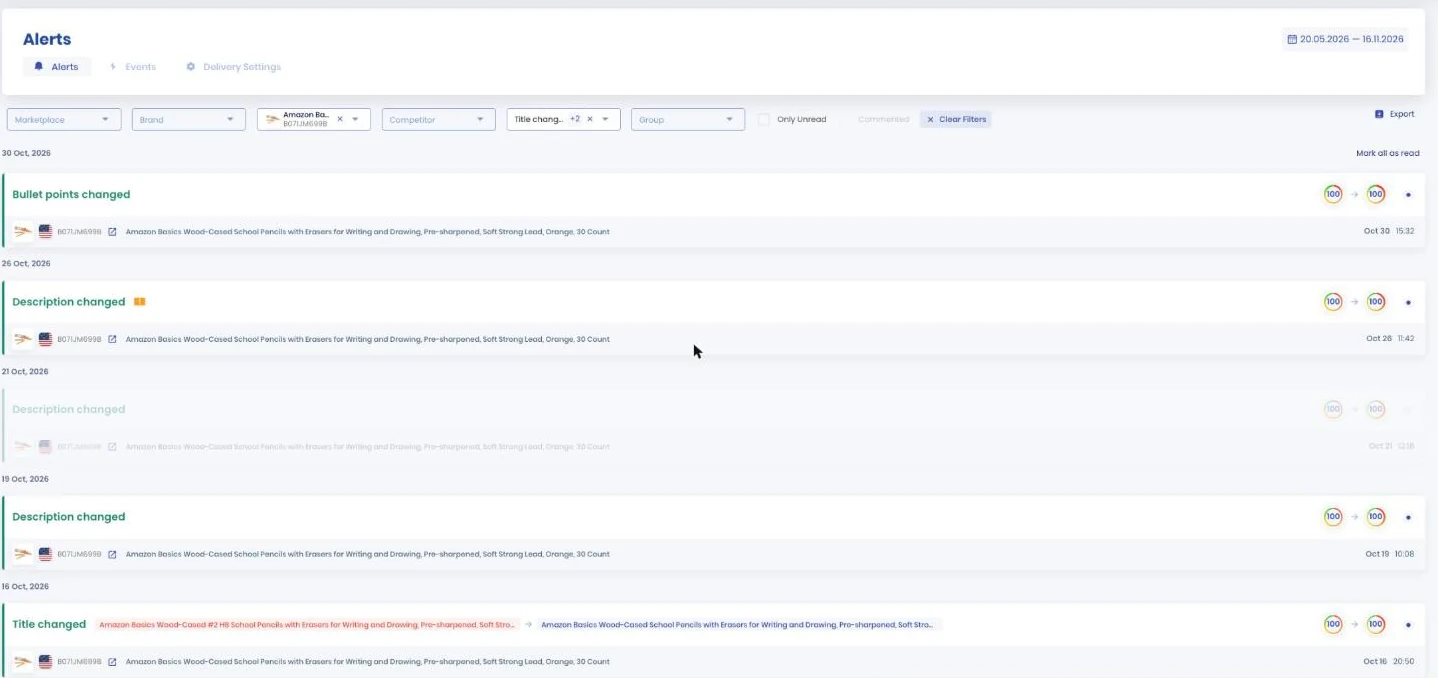
Listing checks run every 4 hours on Pro, 2 hours on Premium, and every hour on Business and Enterprise, for competitors as well as your own ASINs.
Bringing it together
Alexa for Shopping is Rufus with a new name, more entry points, and Alexa’s memory behind it.
- What it reads: the product catalog, customer reviews, community Q&As, web sources, and up to 365 days of Featured Offer prices.
- What Amazon hasn’t said: how it ranks or weights any of that, so treat “Rufus optimization” checklists as opinion.
- What you can do: keep the detail page accurate and complete, answer real buyer questions, fix review themes, and report wrong answers with a ticket.
Final Expert Recommendations:
Ask the assistant your buyers’ top questions on your own page and fix every gap it exposes. Then watch the inputs: any edit to your title, bullets, or description, any price move a shopper will see in history, and any shift in your rating.
Want to know when someone edits the listing text Alexa for Shopping reads? Start a free 14-day SellerSonar trial (5 ASINs and 10 keywords, no credit card).
Sources: Amazon news posts on Rufus and Alexa for Shopping (February 1, 2024 to November 13, 2026); Amazon Ads pages on prompts, agentic shopping, and Branded Conversations (March 10, June 11, and September 29, 2026); Seller Central help pages “Alexa for Shopping” and “Product detail page rules” and one Seller Forums staff reply (read November 16, 2026); SellerSonar records for listings we track, October to November 2026.
