






Quick Answer
Amazon Review Requests are paid ads that invite customers who recently bought your product to rate it in one click, with an optional written review, while they shop on Amazon. Sellers and vendors in good standing can use them for products under 1,000 ratings and reviews. It is in open beta in the US, and you pay only when a shopper leaves a rating or review.
A new product with 12 ratings sits on the same search page as rivals with 1,200. Many buyers never get around to rating what they bought, and the free ways to ask them are limited to one request per order.
This guide covers what Amazon has published about Review Requests ads: who qualifies, when they open, how to set one up, and the rules that still apply. It compares them with the other allowed ways to get reviews and shows how to measure whether a campaign worked.
About the Author: Gloria Anderson writes for the SellerSonar editorial team on reviews, ratings, and listing health. She checked every Amazon fact in this guide against Amazon Ads and Seller Central help pages on November 20, 2026, and every SellerSonar figure against our own review records through November 16, 2026.
What are Amazon Review Requests ads?
Review Requests is an Amazon Ads campaign type that asks your recent buyers for a rating. Amazon’s Review Requests launch page, dated September 29, 2026, says it “reaches customers who recently purchased your product and invites them to submit a star rating or written review while they are shopping on Amazon.”
From the shopper’s side, it works in three steps:
- A customer who recently bought your product sees a Review Requests ad while shopping.
- They submit a star rating in one click.
- If they want, they add a written review with video or images.
Where does the ad show? Amazon’s launch page says “Amazon’s highest-traffic pages.” Its unBoxed news post from the same day names one: “Amazon’s busiest pages, like the homepage.” Neither page lists every placement.
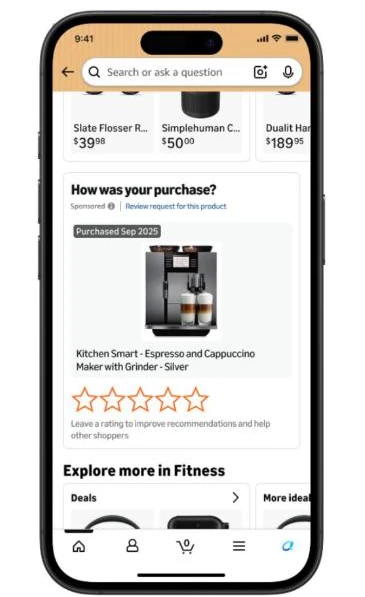
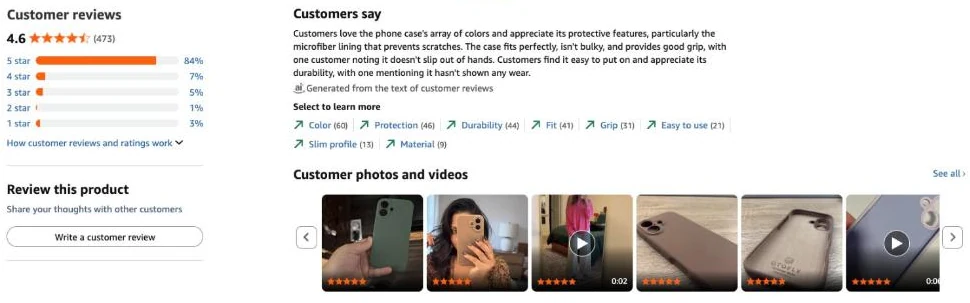
The ratings are ordinary ones. Amazon calls them the “same authentic reviews customers already leave,” and they appear on your product detail page for every shopper, not only those who saw the ad.
Who is eligible for Review Requests?
Amazon sets two conditions, one for the account and one for the product:
- Account: “Registered sellers and vendors with an advertising console account in good standing and no active policy violations.”
- Product: “fewer than 1,000 total ratings and reviews.”
Eligibility is checked when you create the campaign and again while it runs. Once a product reaches 1,000, its Review Requests pause automatically.
The launch page words the cutoff two ways: “1,000 total ratings and reviews” for eligibility and “the ratings threshold of 1,000 reviews” for the pause. Amazon’s Review Requests API overview settles it: the pause comes at “1,000 total reviews (star ratings and written reviews),” the ratings count on your product page. Unlike Vine, the page doesn’t mention Brand Registry.
When is Review Requests available?
Amazon announced Review Requests at unBoxed on September 29, 2026, and gave two different dates the same day:
- The launch page: “Review Requests launches in open beta in the United States in late October 2026.”
- The unBoxed news post: “Review Requests will launch in November 2026.”
Amazon’s Review Requests help pages, updated on November 18, 2026, now say it is “in open beta for advertisers in the US marketplace,” and the API version became available on November 16. Neither gives a general availability date. During the beta, Amazon turns Review Requests on per advertiser account, so if you don’t see the Review Requests tab under Sponsored ads, contact your Amazon Ads account team.
It is US-only for now. Under availability, Amazon lists “North America: United States” and adds that “additional marketplaces and Amazon properties are planned for future releases,” with no dates.
How do you set up a Review Requests campaign?
Amazon’s Create a Review Requests campaign help page lists these steps in Amazon Ads Agent:
- Click Create campaign, open the Review Requests tab in the Sponsored ads card, and click Create campaign.
- Name the ad group and add products, each with fewer than 1,000 ratings and reviews.
- Set a default bid. Targeting is automatic: Amazon reaches customers who bought the product, “starting 7 days after delivery and continuing up to 150 days after delivery.” There is no manual targeting option.
- Enter a campaign name, dates, and a daily budget, then launch. Amazon says the campaign can take up to 1 hour to process.
Developers can create the same campaigns through the Amazon Ads API, where Review Requests is “an extension of the existing Unified Campaign Management API endpoints.” Our guide to Amazon ad types covers how Amazon Ads Agent fits with Sponsored Products and Sponsored Brands.
What do Review Requests ads cost?
You pay per rating or review. Amazon’s Review Requests API FAQ says it “uses cost-per-click (CPC) billing, where the billable click is a shopper leaving a rating or review on the card.” Impressions and shoppers who see the card without rating cost nothing. You control spend with a bid, the most you pay per rating or review, and a daily budget.
- No minimum bid or daily budget is published. Amazon’s API guide uses a $0.75 bid in its example; that isn’t a recommendation.
- A one-star rating is billed the same as a five-star one. Advertisers can’t select shoppers or “influence the star rating.”
- Nothing guarantees that a campaign produces a rating or review.
💡 Expert Tip: Before the first campaign, write down your target cost per new rating. Divide the campaign spend by the extra ratings above your baseline, not by all ratings that week. Ratings you would have gotten anyway don’t belong in the math.
What does Amazon’s “3x more reviews” claim mean?
Amazon’s launch page says: “Early test results show that products received three times as many ratings and reviews per week compared to before the test.” The footnote reads: “Internal Amazon data, Closed Beta, US, June 3-21, 2026.”
What that does and doesn’t tell you:
- It’s a before-and-after comparison of the same products, not a test against products without the ad.
- It ran for 19 days, in a closed beta, in the US.
- It counts ratings and reviews together, so most of the gain could be one-click star ratings with no text.
- It says nothing about the rating itself. Three times as many ratings can mean three times as many one-star ratings.
- Amazon didn’t publish how many products took part, their categories, their spend, or their starting review counts.
The unBoxed post softens it to “around three times as many ratings and reviews each week.”
🎯 Pro Insight: Tripling a small number is still a small number. A product getting 2 ratings a week would get about 6, which is roughly 100 extra ratings over half a year if the effect held. Plan for less than 3x until your own data says otherwise.
Which review rules still apply?
All of them. Review Requests is a new way to ask, not a new set of rules. Amazon’s Customer product reviews policies still prohibit, among other things:
- Offering money, discounts, free products, refunds, or other compensation for a review
- Asking a reviewer to change or remove a review
- Diverting negative reviews to you while positive reviews go to Amazon (review gating)
- Inserts that ask for a positive review or offer an incentive
Amazon calls it “a zero-tolerance policy.” Penalties include losing selling privileges, removal of all the product’s reviews, and permanent delisting.
The ad asks for a rating, not a good rating. A one-star tap counts toward your average exactly like a five-star tap. Amazon only removes reviews that break its guidelines, and says removal “is at Amazon’s discretion and is not guaranteed.”
Your own messages are also capped. The Communication program policy bans asking for a review “more than 1 time per customer per order” and any request that “suggests, incentivizes or persuades” buyers toward a favorable review.
How to get reviews on Amazon in 2026: the four allowed ways
Start with a fact many sellers miss: you don’t have to ask at all. Amazon’s own review requests already go out, and its Request a Review help page says its systems do that “on your behalf at no cost to you.” On top of that, there are four ways you can ask.
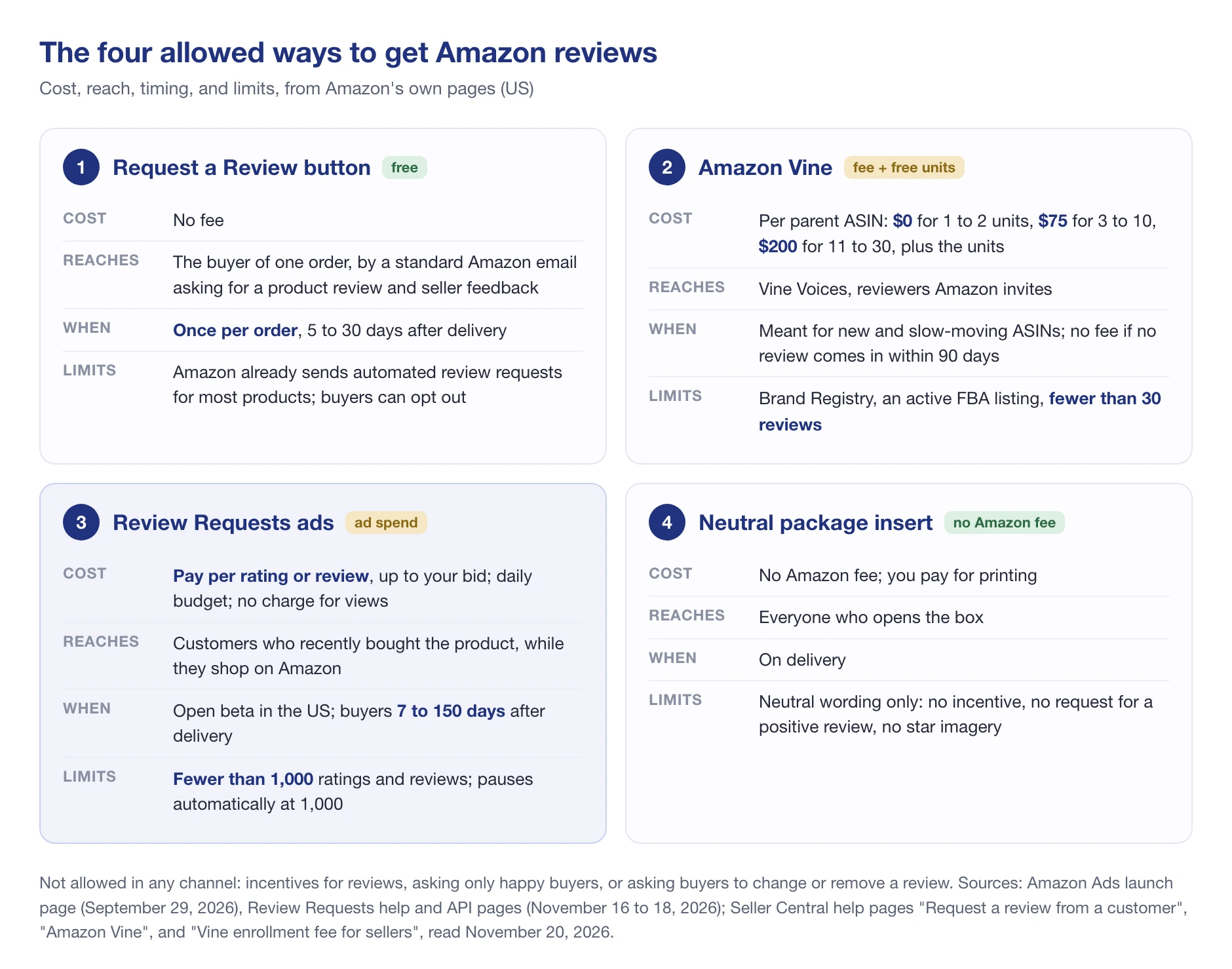
- The Request a Review button. On the Order Details page, it sends a standard email asking for a product review and seller feedback. Amazon’s Request a review help page allows it “once per order between 5 and 30 days after the order delivery date.”
- Amazon Vine. You give free units to Vine Voices, reviewers Amazon invites. Our Amazon Vine guide covers enrollment and fees in depth.
- Review Requests ads. Paid, on Amazon, to recent buyers of products under 1,000 ratings and reviews.
- A neutral package insert. Amazon’s own compliant example: “Thank you for your purchase! Feel free to share your honest feedback by leaving a review!”
Buyer-Seller Messaging can replace the button for an order but not add to it: Amazon allows a review request there only if you haven’t used Request a Review for that order.
Side by side, with each row from Amazon’s own pages:
| Request a Review button | Amazon Vine | Review Requests ads | Neutral insert | |
|---|---|---|---|---|
| Cost | Free | $0 (1 to 2 units), $75 (3 to 10), $200 (11 to 30) per parent ASIN, plus units | Pay per rating or review, up to your bid | No Amazon fee |
| Who it reaches | The buyer of one order, by email | Vine Voices Amazon invites | Recent buyers, on Amazon’s pages | Anyone who opens the box |
| When | 5 to 30 days after delivery | No fee if no review within 90 days | 7 to 150 days after delivery | On delivery |
| Product limit | None stated | Fewer than 30 reviews, FBA, Brand Registry | Fewer than 1,000 ratings and reviews | None stated |
| Main catch | Once per order; buyers can opt out | Fee charged even if you dislike the reviews | US only, open beta | Neutral wording only |
Sources: Request a review, Amazon Vine, Vine enrollment fee for sellers, and the Review Requests launch page.
The real difference is timing. Vine works before a product has buyers, the button and inserts reach each buyer once, and Review Requests reaches buyers again on Amazon after an email they may have skipped. The button stops at 30 days after delivery; Review Requests keeps asking up to day 150.
Should you use Review Requests ads?
It fits a narrow but common case. Good candidates:
- Products with steady sales but few ratings, since the ad only reaches recent buyers
- Products past Vine’s 30-review limit and far from 1,000
- Listings with a healthy rating and no open quality complaints
- Sellers already using the free button on every order
Skip it, or wait, if:
- The product has a known defect. Faster ratings will mostly be faster bad ratings, and you pay for each one.
- It sells a few units a week. There aren’t enough recent buyers to ask.
- It’s close to 1,000. The campaign pauses at 1,000 anyway.
- You sell outside the US. It isn’t available there yet.
How do you measure whether Review Requests worked?
You need a baseline from before the campaign. Without one, there’s no way to tell the ad’s ratings from the ones you would have gotten anyway. Amazon’s campaign view shows cost per click, rating-only reviews, written reviews, and average star rating, but it can’t tell you which of those you would have gotten without the ad. That’s what the baseline is for.
- Record 8 to 12 weeks of history: new ratings per week, the star rating, and any drops in the count.
- Run the campaign and track the same numbers weekly.
- Compare the weekly average with the baseline, and check the star rating didn’t fall.
- Watch for removed reviews. A drop in the count can hide new ratings.
- Stop or rebudget near 1,000, where Amazon pauses the campaign.
A baseline from one product we track
Here is what that history looks like for an OTOFLY iPhone 16 Pro Max case (B0F1B8KFDS) on amazon.com, a listing we track in SellerSonar. We have no data on whether this brand used Review Requests, so treat it only as a baseline example.
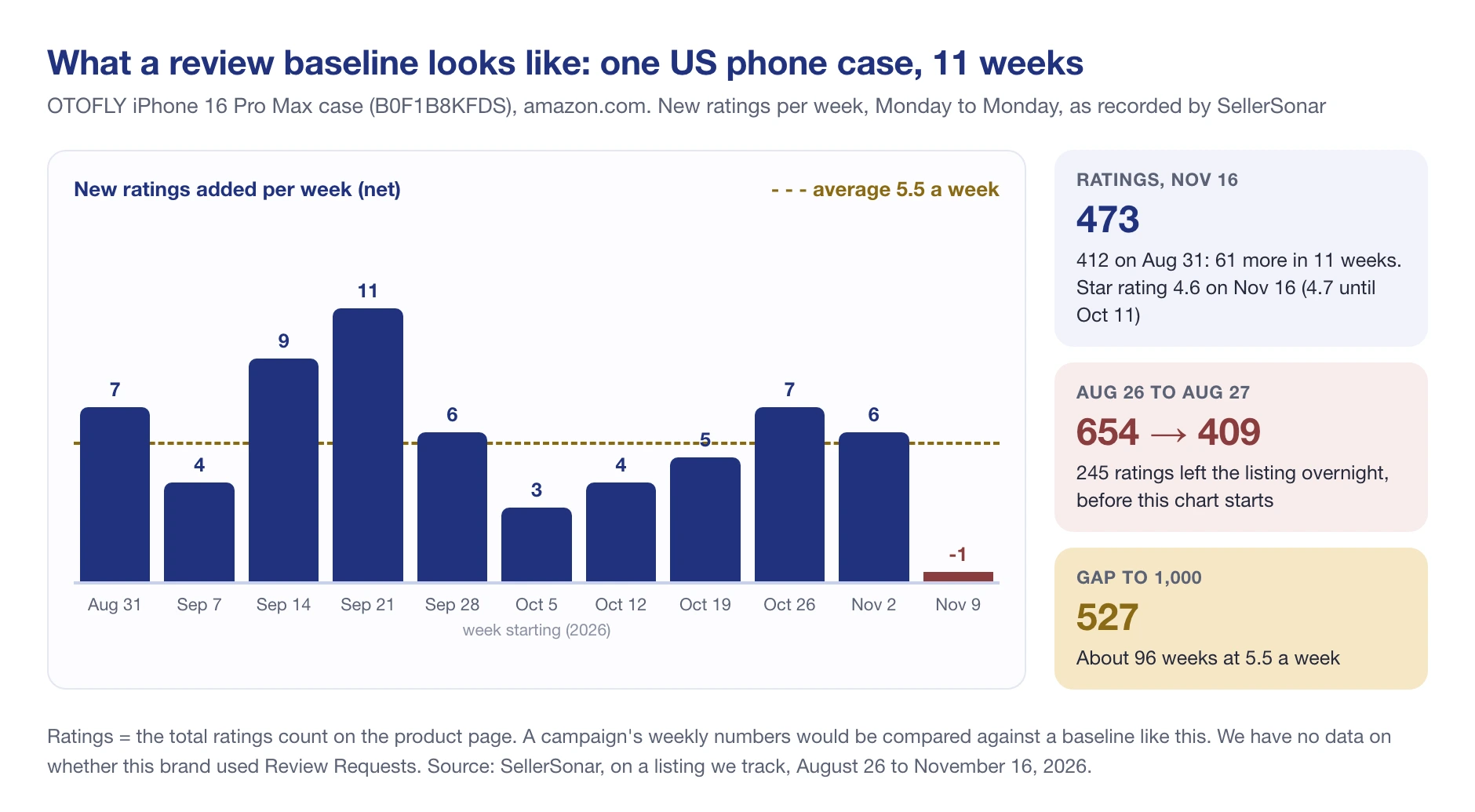
Between August 31 and November 16, 2026, the ratings count went from 412 to 473. That’s 61 in 11 weeks, or 5.5 a week, with weeks ranging from minus 1 to plus 11. The star rating slipped from 4.7 to 4.6 on October 12, went back to 4.7 on November 12, and was 4.6 again on November 16.
Two things stand out. First, the count fell from 654 to 409 between August 26 and August 27, so a campaign running that week would have looked like a disaster. Second, SellerSonar collected only 10 new written reviews for the case over the same weeks, all positive, which suggests most new ratings arrived without text.
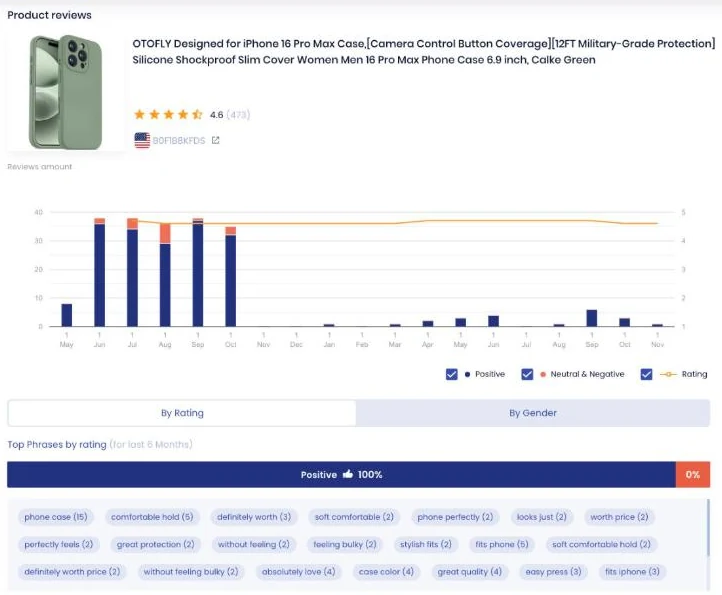
At 5.5 a week, the case needs about 96 weeks to close the 527-rating gap to 1,000. For a product like this, the cutoff isn’t the constraint; the budget is.
📌 From Our Experience: Track a close competitor alongside your product. Between the weeks of October 13 and November 10, 2026, a Lamicall phone grip we track went from 596 to 700 ratings, while a SuydanBox grip added 9 ratings in 13 weeks. A sudden jump on a rival’s listing tells you what you’re up against.
How SellerSonar fits in
Amazon “does not notify sellers when new reviews are posted or existing reviews are removed.” Our review monitoring tracker records the ratings count and star rating for your products and competitors, with 10 review alert types on every plan.
For a campaign, three alerts matter most: Rating changed, Reviews removed (it shows the count before and after, though not which reviews went), and New negative review.
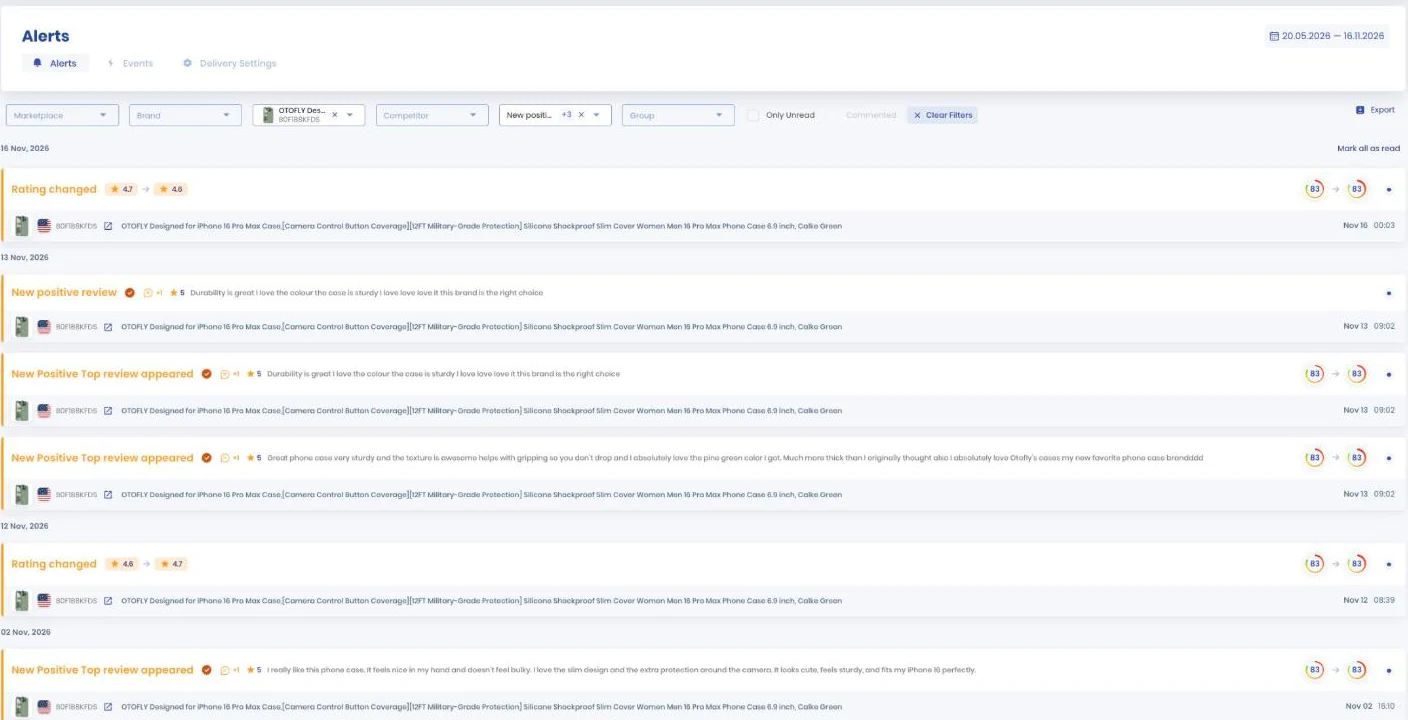
Timing depends on the alert. Rating changed and Reviews removed update every 3 to 4 hours.
New-review alerts fire when reviews are collected through the SellerSonar Chrome Extension, which needs the extension signed in, an Amazon buyer account logged in, and the marketplace tab open; we recommend collecting every 1 to 3 days. Our guide on how to track reviews on Amazon walks through the setup.
Bringing it together
Review Requests gives sellers a paid way to ask recent buyers for a rating where they already shop. It’s useful in a narrow window, and you pay only for the ratings and reviews you get.
- Eligibility: sellers and vendors in good standing, products under 1,000 ratings and reviews.
- Timing: open beta in the US as of November 20, 2026; ads reach buyers 7 to 150 days after delivery.
- Cost: you pay per rating or review, up to your bid, with no charge for views.
- Rules: unchanged. No incentives, no gating, and negative ratings count the same.
Final Expert Recommendations:
Use the free button on every order first, then record 8 to 12 weeks of baseline before you test Review Requests on one product with steady sales and a healthy rating. Judge it on extra ratings per dollar against that baseline, not on Amazon’s 3x.
Want a weekly baseline for your products and competitors before you spend on Review Requests? Start a free 14-day SellerSonar trial (5 ASINs and 10 keywords, no credit card).
Sources: Amazon Ads launch page and unBoxed news post on Review Requests (September 29, 2026); Amazon Ads help pages “Understand Review Requests” and “Create a Review Requests campaign” (updated November 18, 2026) and the Review Requests API overview, FAQ, and release note (November 16, 2026); Seller Central help pages on review requests, review policies, communication policy, and Amazon Vine (read November 20, 2026); SellerSonar review data for products we track, August to November 2026.
