





Quick Answer
The Amazon Ads MCP server is Amazon’s own connector that lets an AI assistant like Claude or ChatGPT read and change your Amazon Ads account: campaigns, bids, budgets, reports, and billing. Amazon opened it as an open beta on February 2, 2026. It’s still in beta as of October 16, 2026. To connect, you need an approved Amazon Ads API application, and direct advertisers can apply, not just agencies.
Key facts, as of October 2026:
- Server:
https://advertising-ai.amazon.com/mcpfor North America, with separate URLs for Europe and the Far East - Sign-in: OAuth 2.1 or a manually pasted token; on a public OAuth client, the access token expires after 1 hour
- Documented AI clients: Claude Code, Claude Desktop, ChatGPT, Kiro CLI, and Amazon Quick (5 in total)
- Blind spot: it only sees your ad account, so it can’t tell you who took the Buy Box or what a competitor changed
Say you run ads for a kitchen brand. On a Tuesday morning you ask Claude why Sponsored Products impressions on your best ASIN fell by half overnight.
With the Amazon Ads MCP connected, Claude pulls the campaign report and reads it back. Budget’s fine. Bids haven’t moved. Nothing in the ad account changed, not a single setting, which is exactly why the report looks so calm.
That’s the answer it can give you. The one it can’t: a new seller took the Buy Box at 3 AM, and that’s the thing that actually changed.
If you’ve been reading about the Amazon Ads MCP, you’ve probably seen it described as the start of an Amazon Ads AI agent running your whole account. Some of that is real. This guide sticks to what Amazon actually shipped: who can get access (more sellers than the launch coverage suggests), how to connect Claude or ChatGPT without fighting a token that dies every hour, what the server is blind to, and how to pair it with a listing monitor so your AI sees both sides of the problem.
Already use SellerSonar? The SellerSonar MCP setup guide shows how to add it to the same Claude or ChatGPT workspace, which is what the pairing section below relies on.
About the Author: Alex Harrison writes for the SellerSonar editorial team on Amazon monitoring, marketplace APIs, and AI tools for sellers. Alex covers how sellers and agencies put AI to work in their day-to-day Amazon routine, and tests new tools against the realities of running a private-label brand or a client roster.
What is the Amazon Ads MCP server?
The Amazon Ads MCP server is a connector that turns the Amazon Ads API into tools an AI assistant can call by itself. MCP (Model Context Protocol) is a shared standard for plugging AI apps into outside data, and our plain-English guide to Amazon MCP covers the protocol if it’s new to you.
According to Amazon’s MCP overview, the server gives an agent two kinds of building blocks. Tools are functions the agent calls. Skills are prompts Amazon wrote to guide common jobs.
Tools split again. Standard tools are deterministic, like updating a budget or building a whole campaign in one go, while expert tools interpret your request and apply Amazon’s own logic to it. The first expert tool, the AMC SQL Generator, is still in closed beta.
So what can it actually touch? Amazon’s campaign management tool reference lists jobs like creating a Sponsored Products campaign in a single step, changing a campaign budget, updating a target bid, and checking whether a product can be advertised at all. Other tool groups cover reporting, billing, Amazon Marketing Cloud (AMC), account settings, and user permissions.
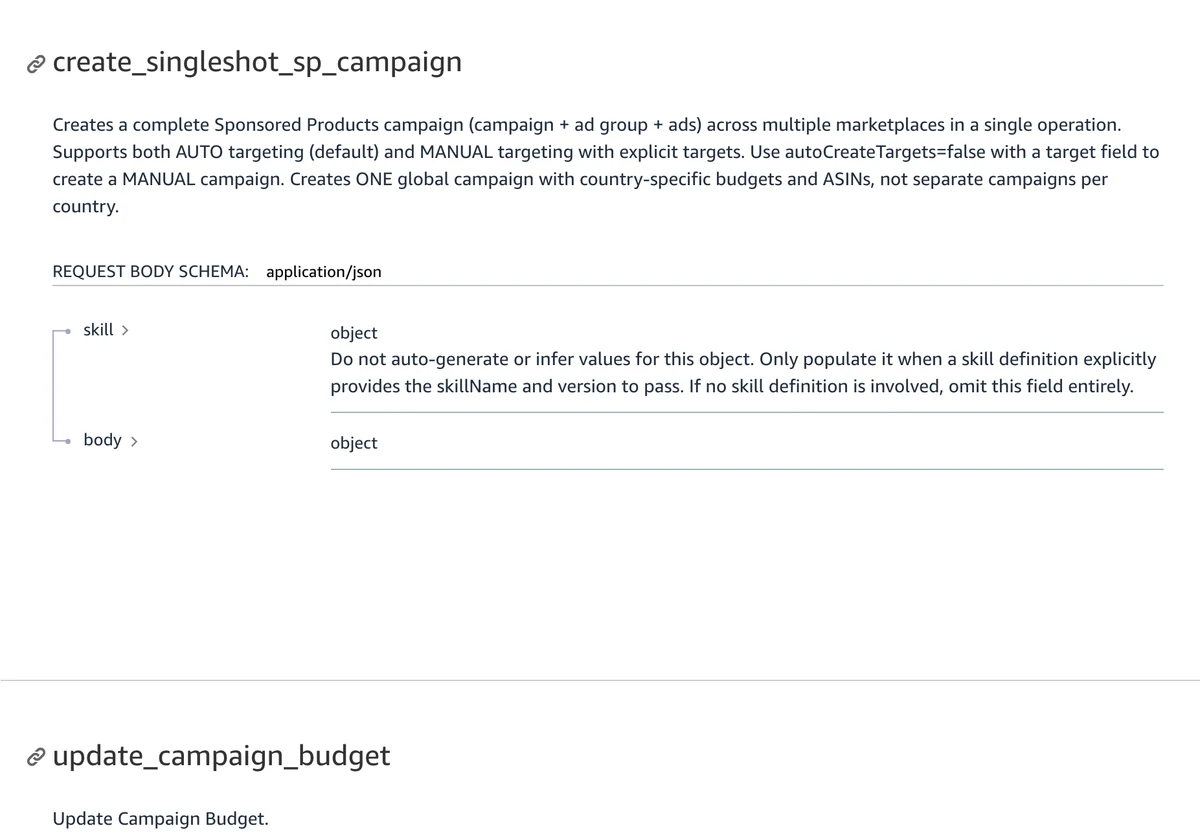
Coverage isn’t even across ad types, though. Campaign creation supports Sponsored Products, Sponsored Brands, and Amazon DSP, while campaign lookups also reach Sponsored Display and Sponsored TV. (If those names are a blur, our breakdown of Amazon ad types in 2026 sorts out what got renamed.)
There’s a lighter version, too. The Lite server exposes just three tools (search, describe, and invoke), and Amazon calls it “functionally equivalent” to the regular one, which helps when your AI client chokes on a long tool list.
One more thing to clear up. Searching “amazon ads mcp github” turns up community-built servers on GitHub and PyPI. Those are separate open-source projects, not Amazon’s server, and they come with their own setup and their own risks.
Who can use the Amazon Ads MCP?
Anyone with an approved Amazon Ads API application can use the Amazon Ads MCP. That’s a wider group than most coverage implies.
The launch announcement says the beta is open globally “to Amazon Ads partners with active API credentials.” Plenty of sellers read that line and figured it was agency-only. The API’s own onboarding docs say otherwise:
“Direct advertisers, partners, and integrators are all eligible to apply.”
(Amazon Ads, API onboarding overview)
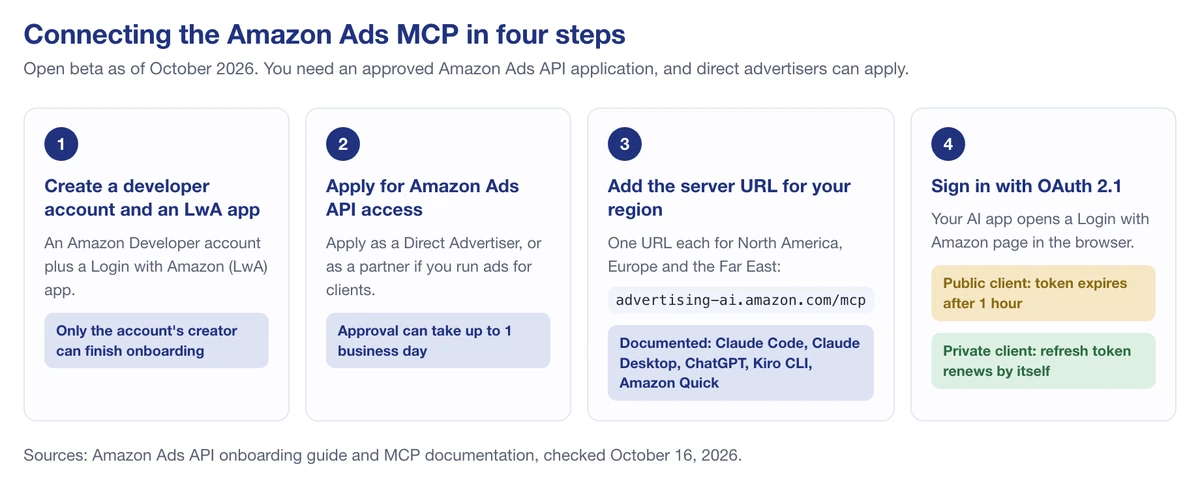
The same page says approval “may take up to 1 business day.” Here’s the path, following Amazon’s apply-for-access guide:
- Create an Amazon Developer account and a Login with Amazon (LwA) app. Only the person who created the developer account can finish the onboarding, so don’t hand this step to a VA.
- Apply for Ads API access. Pick “Direct Advertiser” if you run your own ads, or a partner type if you manage ads for clients.
- Assign API access to your LwA app once approved, and keep its Client ID handy.
- Choose an AI client that Amazon documents a callback for (next section).
Honestly, this is still a developer-style setup. If you’ve never handled a Client ID or a Client Secret before, set aside a quiet afternoon for it rather than squeezing it in between calls.
💡 Expert Tip: The write tools here are real; there’s one that deletes campaigns. Amazon’s test accounts only come in Author and Vendor types, so most sellers will be working on a live account. Amazon’s own setup guide shows how to switch off
campaign_management-delete_campaignandcampaign_management-delete_adin your client config, and I’d do that on day one.
How to connect the Amazon Ads MCP server to Claude or ChatGPT
Start with the server address. Amazon’s setup page lists three regional URLs and warns that “These URLs are not region agnostic,” so pick the one that matches where your ad account lives:
- North America:
https://advertising-ai.amazon.com/mcp - Europe:
https://advertising-ai-eu.amazon.com/mcp - Far East:
https://advertising-ai-fe.amazon.com/mcp
Then check your client. Amazon’s OAuth documentation gives callback URLs for five clients: Claude Code, Claude Desktop, ChatGPT, Kiro CLI, and Amazon Quick. Gemini gets a mention in the launch announcement’s marketing copy, but there’s no documented callback for it, so as of October 2026 I’d treat Gemini as unsupported.
The 1-hour token problem
This is the detail most setup guides skip, and it’s the one that’ll annoy you first.
If you register a public client (Client ID only), your token expires after 1 hour and a browser window pops up asking you to sign in again. Every hour. If you register a private client (Client ID plus Client Secret), the refresh token sits in your system keychain (or a credentials file) and renews on its own. For anything you want to run on a schedule, or anything longer than a quick question, use the private client.
Your AI plan matters too
The server is only half of it. Your AI app’s plan decides how many servers you can connect and whether write tools run at all:
- Claude Code: add as many servers as you like with
claude mcp add, per the Claude Code MCP docs. - Claude apps: connectors switch on per conversation, and free Claude users are limited to one custom connector.
- ChatGPT: OpenAI’s help article (updated October 15, 2026) says full MCP is for Business and Enterprise/Edu, while Pro connects custom servers with read and fetch permissions only. So bid and budget changes won’t run on Pro.
Once you’re connected, Amazon’s docs suggest one first prompt: “Show me my advertising accounts.” If your accounts come back, you’re in.
What the Amazon Ads MCP can’t see
It sees one thing very well: your ad account. Everything happening on the public product page sits outside it.
That matters more than it sounds, because Amazon ties ad delivery to the state of the listing. The rule is right on the Sponsored Products page:
“Products must be in one or more eligible categories and be eligible for the Featured Offer in order to advertise.”
(Amazon Ads, Sponsored Products)
The same page says Sponsored Products ads only appear when the advertised items are in stock. And the reasons Amazon’s product eligibility check can return, listed in the Ads API eligibility spec, include NOT_IN_BUYBOX, OUT_OF_STOCK, and LISTING_SUPRESSED (that’s Amazon’s spelling, not ours).
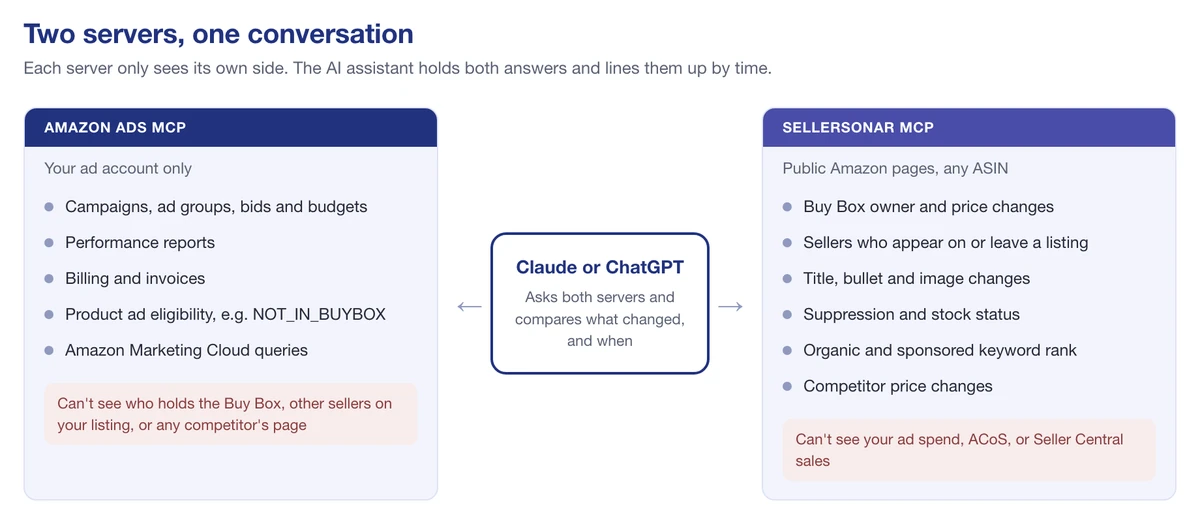
So the Ads MCP can tell you a product’s ad eligibility has a problem. The cause? That’s on the page, out of its reach:
- who took the Buy Box, when, and at what price
- that a new seller joined your listing, possibly a hijacker
- that the listing got suppressed, and what changed right before
- where you rank organically for the keywords you’re paying for
- anything at all about a competitor’s listing: price, stock, title, images
Most write-ups on this suggest pairing the Ads MCP with a Seller Central connector for inventory and fees. That fills in your own numbers, and it’s worth doing. It still won’t show you a competitor’s listing, because no connection to your own account can.
🎯 Pro Insight: When an ad metric drops, check the listing before you touch the bid. Raising bids on an ASIN that has lost Featured Offer eligibility spends your time on a lever that may not be connected to anything. Run the product eligibility check first and look for
NOT_IN_BUYBOXorOUT_OF_STOCKin the response.
Pairing the Amazon Ads MCP with SellerSonar
This is where a second server earns its place in the same chat.
SellerSonar monitors the public side of Amazon: Buy Box owner and price, sellers on a listing, suppression, content changes, keyword rank, and competitor listings, across 23 marketplaces. Alerts update every 1 to 4 hours depending on the SellerSonar plan you choose; on our Business-plan test account in October 2026, the Buy Box was checked 14 to 17 times a day.
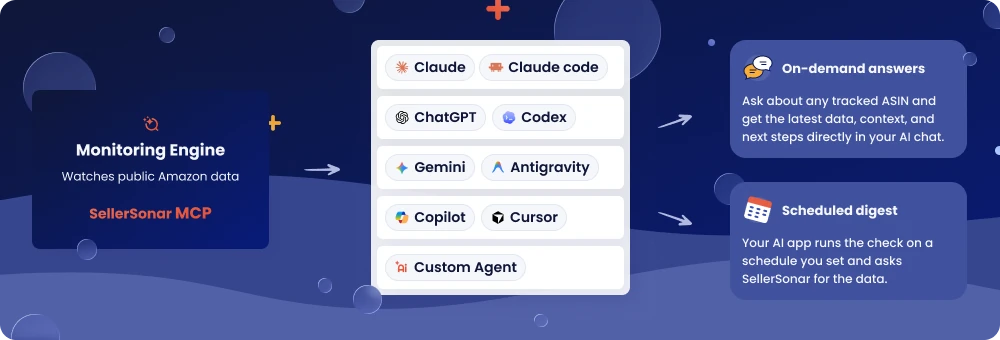
The SellerSonar MCP signs you in to your SellerSonar account with OAuth, and it never asks for Amazon access: no Seller Central login, no SP-API. It also can’t see your actual ad spend, ACoS, or the real sales and profit numbers in Seller Central. Ad data is the Ads MCP’s lane.
Put both servers in one conversation and the AI holds results from each, so it can line up “what changed in the ad account” against “what changed on the page” in a single answer. Three workflows show it best.
Workflow 1: impressions fell, so is it the ad or the listing?
Ask something like: “Pull yesterday’s Sponsored Products report for ASIN B0XXXXXXX. Then use SellerSonar to list Buy Box changes, sellers that appeared or left, and listing changes for the same ASIN over the same window, with timestamps. Tell me which one explains the drop.”
Say Marcus sells a cast-iron skillet. His impressions crater on a Wednesday. The Ads MCP shows nothing changed in the campaign.
SellerSonar shows a new seller came in at $2.50 below him at 2:40 AM and took the Buy Box. A quick eligibility check on the ASIN comes back with NOT_IN_BUYBOX. So Marcus doesn’t raise bids. He starts on the Buy Box problem instead, because that’s what’s actually broken.
We ran the SellerSonar side of this prompt against a test account in October 2026. Each signal came back as its own event with a timestamp to the second: who won the Buy Box and at what price, which seller appeared or left, and which image or bullet changed, with the old and new text side by side. The daily histories (Buy Box share, seller counts) are rolled up by day, so for “what happened at 3 AM” it’s the events you want.
Workflow 2: a competitor cuts their price
Ask: “Which of my tracked competitors changed price this week? For each one, list my campaigns that target their ASIN or share their main keywords, with spend and sales for the last 7 days.”
SellerSonar answers the first half from competitor monitoring. The Ads MCP answers the second half from your campaigns. If a rival just dropped $4 below you on the same search, paying more for that click may not buy you the sale, so this is the moment to look at the numbers before you decide to push harder or hold. Either way, see the list first, and if you want a refresher on bid tactics, our Amazon PPC strategies guide covers the basics.
Workflow 3: paying for clicks you might get anyway
Ask: “Use SellerSonar to list my keywords where I rank in the organic top 3. Then pull my ad spend on those same keywords for the last 30 days.”
SellerSonar’s keyword tracker follows organic and sponsored positions for every tracked keyword, so you can see where you’d still show up if the ad went quiet before you decide anything. Through the MCP they come back as two separate numbers per keyword; on our test account, “16x25x1 air filter” sat at #1 organic and #3 sponsored for the same filter.
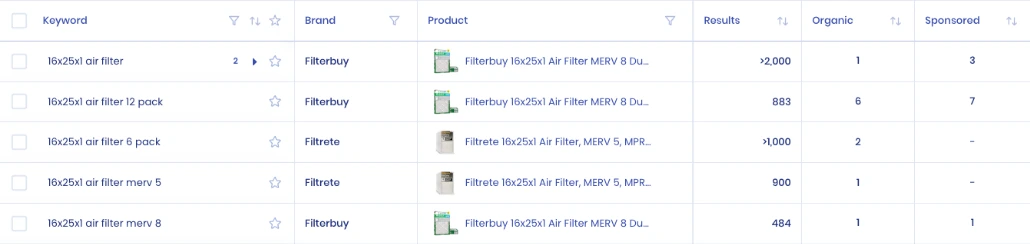
Say Priya ranks #2 organically for her main keyword and still spends on it every day. She lowers the bid for two weeks and watches her organic rank and total orders. Here’s my honest caveat: Amazon doesn’t publish data on how much paid and organic clicks overlap, so treat this as a test with a clear before-and-after, not a rule. Sometimes the ad is what keeps the organic rank up.
🎯 Want the listing side in the same chat? Start your free 14-day SellerSonar trial (5 ASINs, 10 keywords, no credit card), then connect it next to the Ads MCP in Claude or ChatGPT.
Before you let an Amazon Ads AI agent change your bids
Reading reports through an AI is low-risk. Letting it change bids is not, and a few things are worth knowing before you go there.
It’s a beta. Tool names and coverage can change, and Amazon hasn’t announced a general-availability date as of October 2026.
The model isn’t Amazon’s. Amazon’s overview says plainly that it doesn’t own or operate the AI models that connect through the server. Your AI provider’s data settings apply to everything the agent reads.
Write tools are real. The server has tools that change bids and budgets, so keep approval prompts switched on in your client, and ask the agent to list every change it plans before it makes one. A misread report shouldn’t become a deleted campaign.
SellerSonar’s side is narrower. Its MCP can’t change anything on Amazon; the most it can do is add products, keywords, or groups inside your SellerSonar account. Every connected app is listed under User profile → MCP access, with its expiry date and a Revoke button.

Freshness differs between the two servers. Ads reports and listing checks run on their own schedules. Check both. When timing matters, ask the AI for the timestamp behind each number before you act.
💡 Expert Tip: Ask the AI to show the observation time for every listing signal it cites. A Buy Box loss from this morning and one from three days ago call for very different responses, and a daily history won’t tell you which hour it happened.
So, is the Amazon Ads MCP worth setting up?
For most sellers running real ad spend, yes, with clear limits. Four things to hold onto:
- Access is wider than the headlines. Direct advertisers can apply for the Ads API, and approval can take up to 1 business day.
- Use a private client. The 1-hour public token is fine for a test, not for daily work.
- Check your AI plan. ChatGPT Pro won’t run write tools, and the free Claude plan allows one custom connector.
- It only sees your ad account. The Buy Box, hijackers, suppression, and competitors live on the public page.
Final Expert Recommendations:
Based on how the Amazon Ads MCP is documented today, the most useful setup is read-heavy: let the agent pull reports and explain them, and keep bid and budget changes behind your own approval until the beta settles. If you’re just getting started, connect it next to a listing monitor first, because the questions you’ll ask most (“why did this drop?”) usually have their answer on the product page, not in the ad account.
The vendor-by-vendor comparison of seller-side MCP servers covers the other options if you want more than these two. And if you want the listing side covered today, start a free 14-day SellerSonar trial and ask your AI the Marcus question on your own ASINs.

