





Quick Answer
Prime Big Deal Days is Amazon’s October deal event for Prime members, and in 2026, as Amazon confirmed, it ran on October 6 and 7. Sellers often call it October Prime Day or fall Prime Day.
- It’s a separate event from the summer Prime Day. Separate submission windows, separate deadlines, separate fees, and qualifying for one does nothing for the other.
- Deal submissions for 2026 closed in September. Coupons and price cuts stay open right up to the event.
- Four promotion types behave very differently: Lightning Deals, Best Deals, Prime Exclusive Discounts and Coupons.
- The riskiest window isn’t the event itself. It’s the 48 hours when your listing gets more traffic than it will all quarter and nobody is watching it.
About the Author: Alex Harrison writes for the SellerSonar editorial team on Amazon monitoring and seller operations. He has watched enough deal events to know the pattern: the listing problems that cost the most money always happen on the days nobody has time to check.
Prime Big Deal Days is the October event, and 2026’s ran on the 6th and 7th. If you have seen it called October Prime Day, fall Prime Day or the Prime Early Access Sale, those all point at the same thing. Amazon has renamed it more than once.
This is a guide for the seller side of Prime Day rather than the shopping side. Most coverage of the event is written for buyers hunting discounts; what follows is about what the two days do to your listings, and what you can control.
It matters because it is the opening move of Q4. Whatever happens to your rank, your reviews and your Buy Box over those two days carries into Black Friday and Christmas.
How it differs from the summer Prime Day
They look similar and they are run as separate events.
The summer Prime Day, which ran June 23-26 in 2026, is the bigger one by volume and by shopper attention. October’s is deliberately positioned as a holiday-shopping opener, so the buying intent skews toward gifts and stocking up rather than the impulse discovery you see in summer.
There is a geographic difference too. Prime Big Deal Days runs in 22 countries and India is not one of them; amazon.in holds the Great Indian Festival instead, which in 2026 started on October 8.
The practical difference for sellers is the calendar. Each event has its own submission window, its own inventory cut-offs, and its own fee schedule. Qualifying for one does not enroll you in the other, and the deadlines land months apart.
The four promotion types, and how they actually differ
This is where most of the confusion sits. These four are not interchangeable, and the right one depends on how much inventory you want to move and how much visibility you are buying.
| Promotion | How long it runs | Where shoppers see it | Best for |
|---|---|---|---|
| Lightning Deal | A few hours | Today’s Deals page, with a countdown and a claimed-percentage bar | Short, sharp volume on one ASIN |
| Best Deal | Several days up to a couple of weeks | Deals pages, with a discount badge on the listing | Sustained visibility across an event |
| Prime Exclusive Discount | You set the window | A Prime-only price on the listing and in search | Rewarding Prime buyers without a deal slot |
| Coupon | You set the window | A clippable green badge in search results | Cheap visibility and a nudge at the decision point |
Two things are worth knowing beyond the mechanics.
They cost different amounts, and the rates depend on the marketplace. Amazon has published more than one fee structure across its own seller announcements, with different figures for standard deals, peak-event deals and the Prime-exclusive variants. Check the current rates for your specific promotion in Seller Central before you commit, because quoting a number from a blog post, including this one, is how people get surprised by an invoice.
Your deal price is measured against your own history. Amazon compares what you are offering against your recent lowest price, so a run of discounts before the event can disqualify the deal you actually wanted. If you plan to run something in October, stop cutting the price in September.
For the full mechanics of one promotion type, our guide to Amazon Lightning Deals goes deeper than there is room for here.
What to do if you missed the deadline
Deal submissions for Prime Big Deal Days closed in September, per Amazon’s holiday deadline announcement in the Seller Forums. In the US the window ran from July 8 to September 8, 2026, and in the European marketplaces it closed on September 23, 2026. If you did not submit by then, that ship has sailed for Lightning Deals and Best Deals.
What stays open after that cut-off:
- Coupons. Quick to set up, visible in search, and they do not need a deal slot.
- Prime Exclusive Discounts. They can be submitted much closer to the event, and they put a Prime price in front of exactly the audience that is shopping.
- Straight price cuts. No badge, no fee, but they still compete.
- Advertising. The traffic arrives whether or not you have a deal. Bids get expensive, so decide your ceiling before the day rather than during it.
For the longer-range preparation work, listing content, imagery and inventory planning in the months before an event, see our guide to preparing for Prime Day. This article stays on the final two weeks before an event and the event itself.
💡 Expert Tip: If you have no deal running, the event is still worth preparing for. Your competitors’ deals pull shoppers onto category pages where your listing also appears, and a well-priced listing with a coupon can pick up traffic that a rival’s discount paid to generate.
What to watch during the 48 hours
Here is the part most Prime Day guides skip. A deal event puts more traffic through your listings in two days than they will see in a normal quarter, and it does that at exactly the moment your team is busiest.
Four things move during deal events, and all of them cost money if you catch them late.
The Buy Box. Competitors reprice aggressively during events, and if you lose the Buy Box mid-deal, the traffic you paid for goes to someone else. On a normal Tuesday that is annoying. During a two-day event it is most of your upside.
Hijackers. High-traffic listings are the ones worth attaching to. An unauthorized seller who shows up during a deal event gets the benefit of every impression your promotion generates. Our removal playbook covers what to do, but the speed of noticing is what decides the damage.
Listing changes and suppression. A suppressed listing during Prime Big Deal Days is the worst possible timing, and suppression does not announce itself.
Badges. Deal badges appear and disappear as promotions start and end, and Amazon’s own badges move with them.
That last one has a tail. Deal events drive a spike in returns a few weeks later, and a high enough return rate can land you the frequently returned item badge in November, on the listing that did best in October. It is a delayed cost that is easy to miss because it arrives long after the event that caused it.
🎯 Pro Insight: Decide before the event who is watching what, and for how long. Most sellers plan the promotion in detail and plan the monitoring not at all, then spend the event refreshing a dashboard instead of selling.
How alerts cover the gap
You can’t manually check listings during a 48-hour event. There are too many of them, the changes land at odd hours, and the two days when watching matters most are the two days your team has the least attention to spare.
Software is better at this. SellerSonar watches tracked ASINs and tells you when something moves. It checks them every hour on Business and Enterprise, every 2 hours on Premium and every 4 hours on Pro.
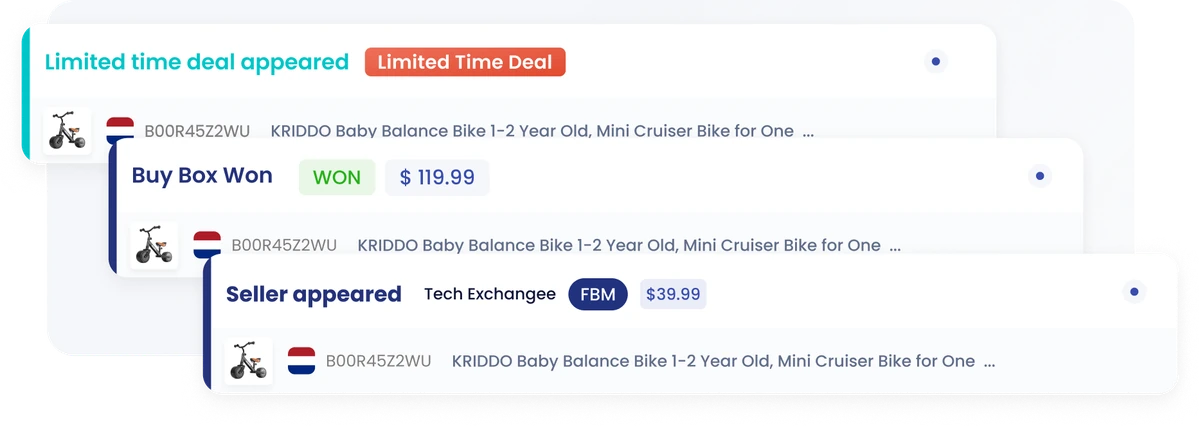
Read that SellerSonar screenshot as a deal-event timeline and you’ll see why it matters. A limited time deal appeared on the ASIN, so the promotion is live and the clock has started. The Buy Box is yours at $119.99, which is the thing your advertising is actually buying. Then a new seller appeared, offering the same ASIN at $39.99.
That last line is the whole argument. A seller undercutting you by two thirds during your own promotion takes the Buy Box, and every impression your deal generated goes to them instead. Find out within hours and you’ll file a report while the event is still running. Find out on Thursday and you have paid for somebody else’s best week.
The alerts worth having switched on for those two days:
- Seller appeared. The highest-value alert of the five during an event, because an unauthorized seller arriving on a listing you are actively promoting takes the Buy Box and everything downstream of it.
- Buy Box lost or won. Tells you whether the traffic is converting to you, or past you.
- Deal badge appeared or ended. Confirms the promotion went live, and tells you when it stops.
- Price changed. Catches competitor repricing and your own mistakes equally well, and the second category is more common than anyone admits.
- Listing suppressed. Rare. Ruinous.
Set it up before the event rather than during it, and point it at the ASINs that actually matter. A handful of high-traffic listings watched properly beats a whole catalog watched in theory.
Want to know when something moves on your listings? Start a free 14-day SellerSonar trial and track 5 ASINs and 10 keywords, no credit card required.
Watching the event from Amazon itself
There’s a second way to do this that suits event days better than a dashboard does. During an event like Prime Big Deal Days you’re on Amazon anyway, checking your listings, looking at what rivals are running, seeing which deals are live.
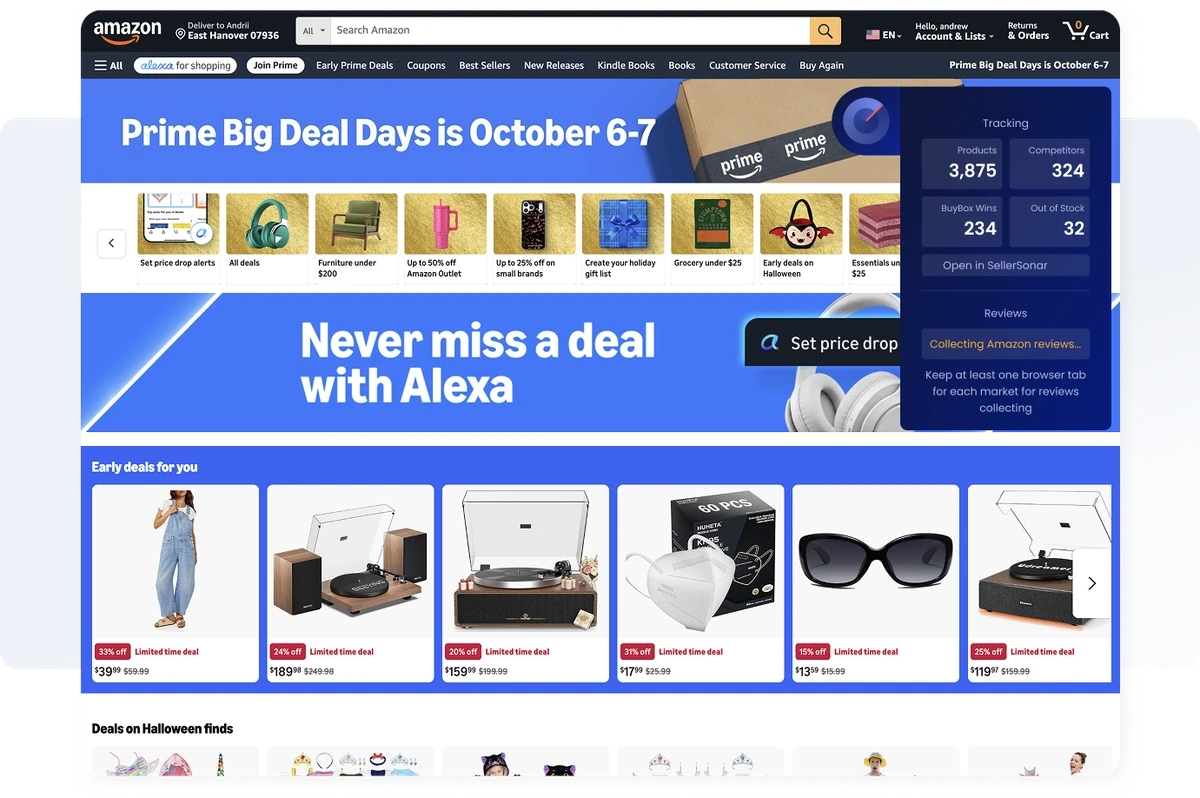
The SellerSonar Chrome extension puts your own numbers on top of the page you are already looking at. On the event landing page above it reports the account-level view: products tracked, competitors, Buy Box wins and ASINs out of stock, with a link straight through to the full dashboard.
On an individual listing it gets more specific.
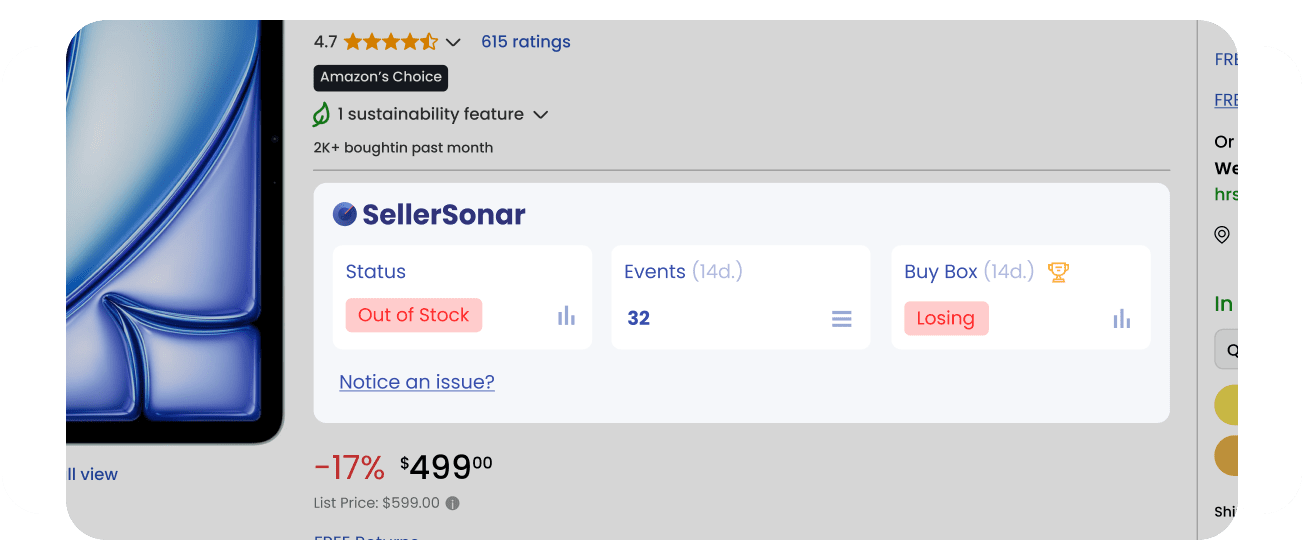
Three fields, and during a deal event all three are the ones you care about. Status tells you whether the ASIN is in stock. Events counts what has changed on the listing recently. Buy Box tells you whether you are winning or losing it right now, which on the screenshot above reads Losing on a listing that is also out of stock.
Out of stock is the number to watch on an event day. Running out mid-deal is the most expensive thing that can happen to you, because traffic keeps arriving and the promotion keeps paying for it while you have nothing to sell. Seeing that count move while you are browsing beats discovering it in a report afterwards.
The same panel collects Amazon reviews in the background, which matters because reviews land fast after a deal event and shape what happens to the listing afterwards.
Why Buy Box status matters more during the event
The Buy Box is always worth watching. During a 48-hour event it is close to the only thing worth watching, because every other lever has already been pulled.
Your deal is booked, your price is set, your ads are running. What remains variable is whether the traffic those things generate converts to you or to somebody else on your listing, and that is decided entirely by who holds the Buy Box at the moment a shopper clicks buy.
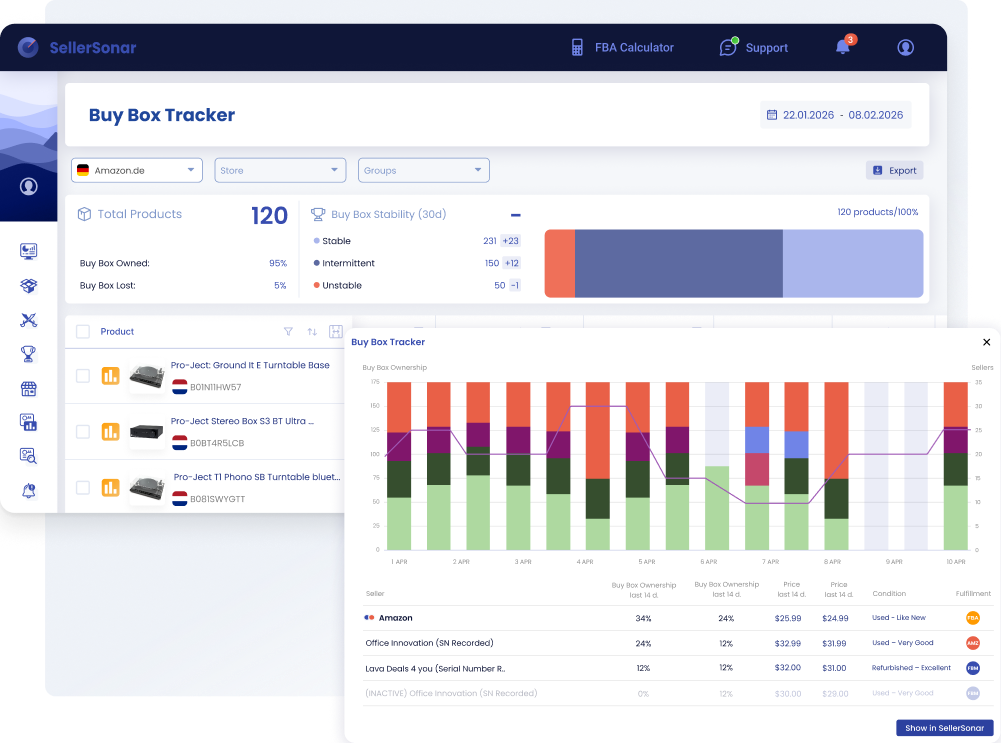
The extension and the Buy Box Tracker answer different questions, and during an event you want both. The extension tells you the state of the ASIN you are looking at, right now, without leaving Amazon. The tracker gives you the pattern across the catalog: how much of the time you own the Buy Box, which ASINs are stable and which keep flipping, and which competing sellers are taking it from you at what price.
That second view is the one that tells you whether losing the Buy Box was a one-off or a seller who has settled in for the week.
What all this comes down to
Prime Big Deal Days 2026 ran on October 6 and 7. Separate event, separate deadlines, and the deal submission window closed in September.
If you have a deal in the event, the remaining work is pricing, inventory and watching the listing while the event runs. Missed the deadline? Coupons, Prime Exclusive Discounts and advertising still put you in front of the traffic.
Final Expert Recommendations:
Treat the two days as an operations problem rather than a marketing one. The promotion is booked or it is not, and there is nothing left to decide there. What is still in your control is whether you find out quickly when the Buy Box moves, a hijacker attaches, or a listing goes quiet, because that is where a good event turns into an expensive one.

