





Amazon return rate badges can change how shoppers see your product before they buy it.
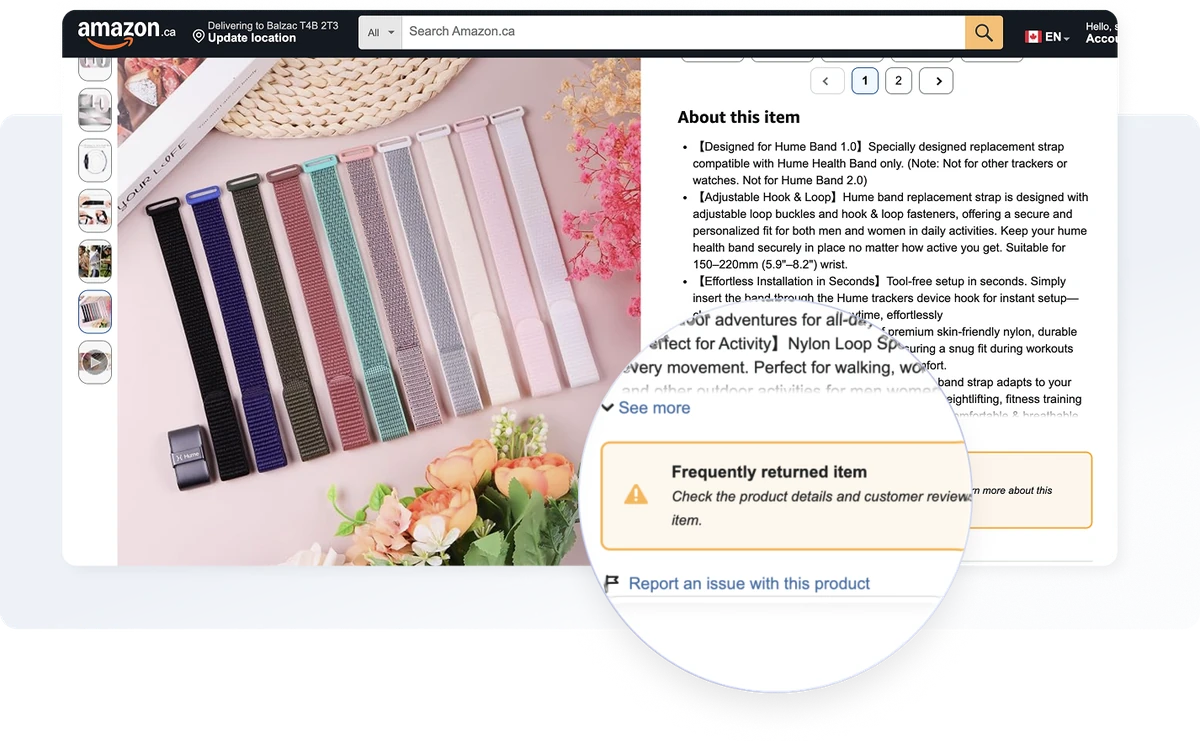
The most familiar warning is “Frequently returned item.” Some listings also show the positive message “Customers usually keep this item,” while others display a more specific explanation such as “Frequently returned due to poor fit” or “Frequently returned due to compatibility issues.”
For sellers, these messages matter because they can appear even when your product still has strong reviews, stable pricing, and no obvious listing changes. A badge can also change before you notice a problem in your sales reports.
This guide explains what each Amazon return badge means, where to check it in Seller Central, what you can do about it, and how SellerSonar can alert you when a badge changes.
Quick Answer
Amazon shows three different return messages on product pages:
- “Frequently returned item” is the warning, and it means Amazon sees more returns on your ASIN than it expects from a product of its type.
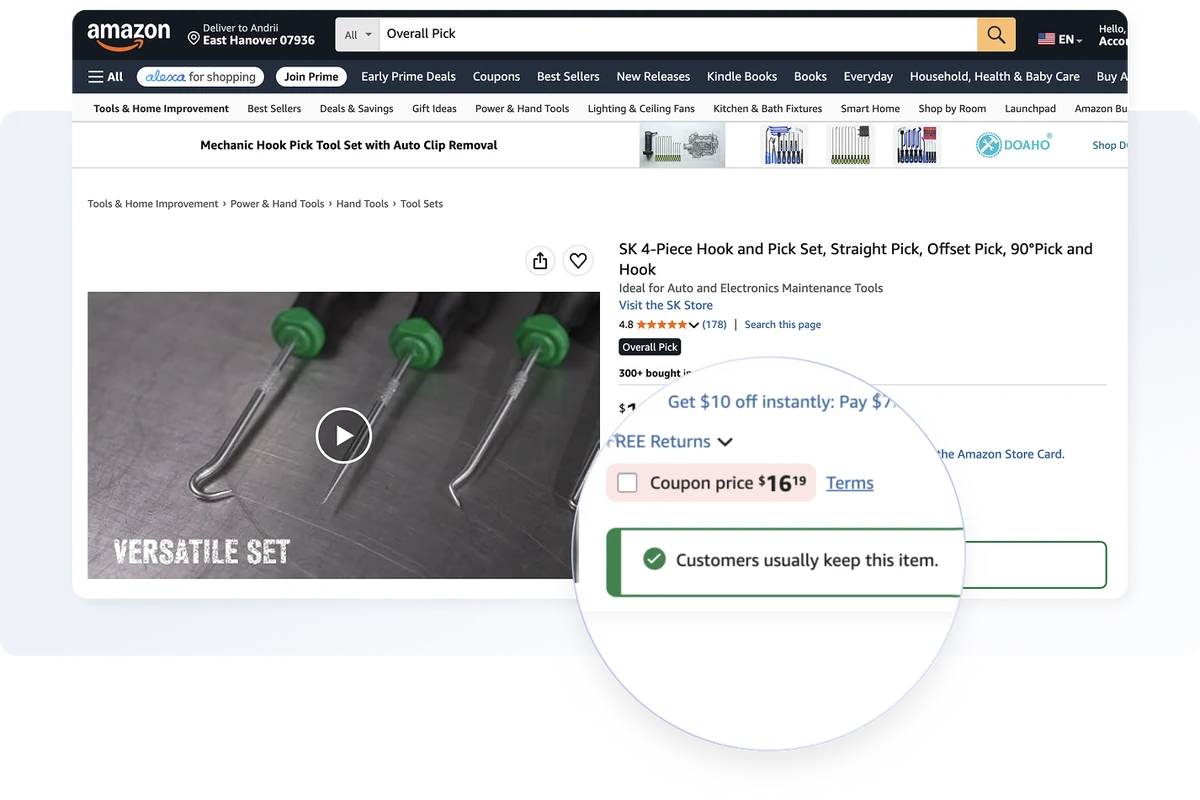
- “Customers usually keep this item” is the opposite signal, and it means fewer returns than your neighbours.
- “Frequently returned due to…” names a likely cause, such as fit, leaks or compatibility.
- There’s no published trigger percentage.
- Check your position under Performance → Voice of the Customer in Seller Central.
- SellerSonar can monitor badge changes on tracked product pages.
About the Author: Gloria Anderson is an Amazon Brand Protection Specialist with 9 years of experience helping private label brands and distributors protect their listings on Amazon. She spends most of her time in the part of the catalog where listing changes, Buy Box swings and return performance quietly decide whether a brand keeps its sales, and she has lost count of how many sellers first learned about a problem from a sales chart instead of an alert.
What are Amazon return rate badges?
All three messages come from one underlying number: how often your ASIN comes back compared with the products Amazon treats as similar to it.
Amazon hasn’t published one universal return-rate percentage that triggers a badge in every category. The clearest explanation available comes from an Amazon moderator in the public Seller Forums, where Manny_Amazon wrote that “your ASIN is determined to be a frequently returned ASIN by comparing your ASIN’s return rate with the return rates of similar ASINs.” Note what that is and isn’t: a forum answer from Amazon staff, not published policy documentation.
A rate that’s unremarkable in one category can be high in another, so be careful with any generic “badge threshold” number you find in an old blog post.
What does the “Frequently returned item” badge mean?
The “Frequently returned item” badge is a warning shown to shoppers when Amazon determines that an item is returned more often than similar products.
It doesn’t automatically mean that the product is defective. Returns can happen for many reasons, including:
- the size or dimensions weren’t clear;
- the product looked different from the images;
- compatibility or installation details were missing;
- it arrived damaged;
- the listing promised something the product didn’t deliver.
The badge is also not the same as a low star rating or a poor Voice of the Customer score. A product can have good reviews and still receive a return warning if its recent return performance is high compared with similar products.
On how the badge is assigned, Cooper_Amazon told sellers only that “Amazon uses a variety of sales and returns information when it determines what ASINs to badge as a ’Frequently Returned Item.’” That’s the whole of it. Anyone quoting you a precise formula is filling in a blank Amazon left empty.
Is there a fixed percentage that triggers the badge?
No. There’s no single percentage that applies to every ASIN in every category, because the comparison Amazon runs is relative to similar products and the suggested rate moves as those products move.
Check Voice of the Customer for your position. Then check the live page.
💡 Expert Tip: Check both, and check the product page second. The dashboard and the live listing don’t always update at the same moment, and it’s the listing your customers are looking at. When the two disagree, trust the page shoppers see.
What does “Customers usually keep this item” mean?
This is the good one. It’s the positive counterpart to the warning, and it tells shoppers your product comes back less often than the products Amazon is comparing it against.
Treat it as a signal, not a promise.
Amazon hasn’t published a formula for earning it, and nobody outside Amazon knows how many sales, how few returns or how much elapsed time it takes to qualify. In one Seller Forum thread a seller reported around 80 sales with no returns at all and asked what else was needed. An Amazon moderator pointed them at Seller Support. See the discussion.
Watch this badge as closely as the negative one. Losing it is an early warning that your return performance, or the performance of the products you’re measured against, has shifted well before any red warning shows up.
What does “Frequently returned due to…” mean?
Some Amazon product pages show a more specific message after the general warning. Examples may include:
- “Frequently returned due to poor fit”;
- “Frequently returned due to loose fit”;
- “Frequently returned due to leaks”;
- “Frequently returned due to compatibility issues”;
- “Frequently returned due to charging issues.”
This is the most useful of the three badges and almost nobody writes about it. The plain warning tells you that you have a problem. The reason-specific version tells you roughly where the problem is, which is the difference between a week of guessing and an afternoon of checking.
It’s still only a hint. Amazon doesn’t publish the full list of these phrases, doesn’t explain how any of them are generated, and doesn’t promise the wording will stay the same. It can differ by product, by variation, by marketplace and over time. Treat it as the first line of the investigation, never as the conclusion.
Here’s how to read the common ones:
| What the page says | What it usually points at | Check this first |
|---|---|---|
| Poor fit, loose fit, tight fit | Sizing that doesn’t match the chart, or a chart that doesn’t match reality | Measure real units against your published size chart, then read the fit comments in recent reviews |
| Compatibility issues | Buyers expected it to work with something it doesn’t | Your supported-device or model list, and whether it’s visible before the fold rather than buried in the description |
| Leaks, damage, broken on arrival | Product quality or transit protection | Recent production batches first, then packaging. Damage in transit is often the cheaper fix |
| Charging issues, stopped working | Component or battery failure, often batch-specific | Date codes on returned units. If they cluster, you have a batch problem, not a design problem |
| Not as described, different from image | An expectation gap created by your own listing | Main image and first two bullets. This one is usually self-inflicted and quick to fix |
One pattern worth watching for: the reason phrase and your review complaints often disagree. Reviews skew toward the customers who felt strongly enough to write something. The return reason reflects everyone who quietly sent it back. When the two point in different directions, the returns are usually telling you the more representative story.
Where can sellers check Amazon return-badge status?
You can review Amazon’s return-badge information in Voice of the Customer:
- Open Seller Central.
- Go to Performance.
- Select Voice of the Customer.
- Find the Return badge displayed column.
- Select See details for the ASIN you want to review.
Amazon says this area can include:
- ASINs that currently have the frequently returned badge;
- ASINs at risk of receiving the badge;
- three-month and 12-month return-rate data;
- a suggested return rate that can help sellers prevent or remove the badge.
Those four items come from the Seller Forums announcement by News_Amazon that introduced the column. Read the replies too. Sellers in that thread push back hard on having no way to dispute a badge, and on not being able to sort or filter by the new field.
Seller Central helps you investigate the numbers. You should also check the live product page, because that’s where shoppers see the message. The dashboard and product page may not update at exactly the same time.
How to work out your own return rate
Voice of the Customer gives you Amazon’s version of the number, and it’s worth knowing how that number gets built, because the arithmetic hides a trap that catches people out.
Return rate = units returned ÷ units shipped, over the same window.
Amazon shows this on a trailing three-month and 12-month basis. That’s why one bad month on a slow mover can shift your rate more than it feels like it should.
Now the trap. The denominator is units shipped in the window, not the units those particular returns actually came from, and a return landing today is usually for something that shipped weeks ago.
So a climbing ASIN flatters itself. A falling one looks worse than it is. If your rate jumped with no change to the product, check whether your shipped volume dropped first.
Can a frequently returned badge reduce sales?
Amazon has never published a conversion figure tied to the badge, and no study or survey backs the “cuts sales by 30%” line that circulates in agency blogs. It traces to nobody. We aren’t going to add a number of our own either.
What we can describe is the mechanism, because it’s visible on the page.
The warning sits high on the listing, in dark red, above the bullet points. That puts it in front of the shopper before the decision, not after it. Someone who arrived ready to buy now has a reason to pause, open the reviews, or go look at a competitor instead. Whatever share of shoppers that costs you, it comes out of traffic you already paid to attract.
Then it compounds. The same number of sessions producing fewer orders is a conversion rate problem, and Amazon’s search results reward listings that convert. Slip in rank, get fewer sessions, and next month starts from a lower base.
The badge is the trigger. The damage is in the chain that follows it.
It also makes a decline hard to diagnose. If your content, price and ad spend haven’t moved but the graph is heading down, go and look at the page itself before you audit anything else.
What a high return rate costs you in fees
Lost conversion is only half the bill.
Returns aren’t a niche problem. The National Retail Federation and Happy Returns put the 2025 return rate at 15.8% of all purchases and 19.3% of online sales, worth $849.9 billion in merchandise, and Amazon has been busy pricing that reality into seller fees.
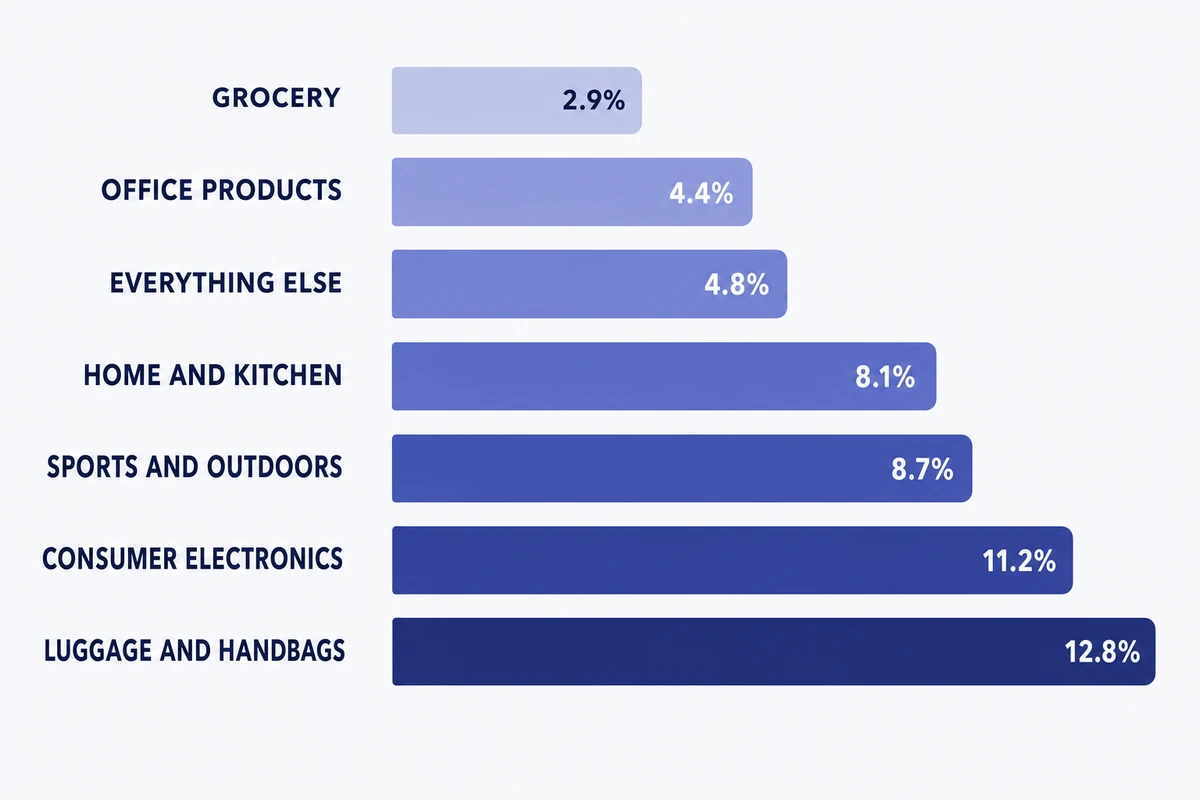
So there’s a second threshold. Amazon charges a returns processing fee on products whose return rate runs above the limit set for their category.
Keep it separate from the badge in your head. These thresholds decide whether you pay a fee, not whether you get badged, and Amazon has never said the two use the same calculation. Plenty of advice online quietly treats one as the other.
Category thresholds run from 2.9% to 12.8%, with anything uncategorised falling under “Everything Else” at 4.8%, per Feedvisor’s breakdown of the returns processing fee rate card (updated February 2026):
Two exceptions are worth knowing before you budget for this:
- Apparel and Shoes work differently. Those two categories are charged on every return, with no threshold at all.
- Low-volume and new products get relief. ASINs shipping fewer than 25 units a month are exempt, and the FBA New Selection program waives returns processing on a capped number of units for products new to FBA.
Rate cards change, so check your own Fee Preview report in Seller Central before you model any of this. To see what a single return actually costs on a specific ASIN, run the product through our free FBA calculator and add the returns processing fee on top.
🎯 Pro Insight: Sort your catalog by units shipped, not by return rate, when you decide what to fix first. A scary-looking rate on an ASIN that ships a handful of units a month is a rounding error. A middling rate on your best seller is where the money actually is, and it’s also the listing most exposed to the badge, because Amazon needs recent sales volume before it can calculate a meaningful rate at all.
How to reduce the risk or recover from a return badge
Amazon controls the badge, so sellers can’t simply switch it off. Amazon says it monitors return performance and may remove the warning when the rate approaches the suggested rate or when it sees a steady improvement. Suggested rates can change, so don’t promise recovery in a fixed number of days.
Use the badge as a prompt to review the full customer experience.
1. Check the listing for expectation gaps
Review the title, bullets, images, A+ Content, description, dimensions, size charts, compatibility details, and included accessories. Our free Amazon listing quality checker will flag the obvious gaps in a couple of minutes, and it’s worth re-reading the image requirements while you’re in there, because a main image that oversells scale causes more returns than most sellers expect.
Ask someone who doesn’t know the product to describe what they expect to receive after reading the page. If what they describe isn’t what turns up in the box, you’ve found your problem.
2. Review return reasons by size, color, or model
Don’t stop at the parent ASIN. A single size, colour, model or bundle is very often responsible for the bulk of the returns while every other child in the family behaves perfectly well.
📌 From Our Experience: This is the step sellers skip, and it’s usually where the answer is hiding. A parent ASIN with a mediocre return rate usually turns out to be one variation doing nearly all the damage while the rest behave normally. Fix that one, and the parent’s number follows on its own.
Compare return reasons with negative reviews and customer feedback. Look for repeated phrases such as “too small,” “not compatible,” “different color,” “missing part,” or “stopped working.”
3. Check product quality and packaging
Start with the returned units themselves. Get a dozen back from a removal order and open them. Date codes are the fastest signal you have: if the failures cluster around one production run, you have a batch problem, and a batch problem is a supplier conversation rather than a redesign.
Measure real units against your published specification, not against the spec your supplier sent you. Dimensions drift between runs, and a tolerance that nobody thought was important can be the difference between “fits” and “sent it back.”
Then separate the two failure types, because they have different owners. A product that doesn’t work is a manufacturing problem. A product that arrives broken is a packaging problem, and packaging is almost always the cheaper of the two to fix.
Ship a few units to yourself and see what turns up. If the box looks tired after a normal transit, your customers are receiving the same thing.
And check whether the units are faulty at all. Plenty come back in perfect condition because the buyer expected something else, and those get fixed in step 1, not in the factory.
4. Review recent changes
Return rates rarely drift on their own, so line up the date yours started climbing against everything that changed around it. The usual suspects, roughly in order of how often they turn out to be the cause:
- A new main image. The most common self-inflicted wound. An image that makes the product look larger, brighter or more premium than it is will lift your click rate and your return rate at the same time.
- A title or bullet rewrite. Especially one done for keywords rather than for clarity. Check what got removed, not just what got added, because sizing and compatibility details are usually the first casualty of a keyword pass.
- A variation change. Merge a weak child into a strong parent and its returns come with it.
- A new seller on the listing. Someone else shipping your ASIN means their fulfilment quality is now your return rate, and this is the one cause you can’t fix by editing anything, so rule it out early. Our guide to dealing with listing hijackers covers removal.
- A Buy Box change or a price cut. Bargain traffic returns more than intent-driven traffic.
- A stockout and restock. New batch, new supplier, or a switch between fulfilment methods, and any one of those quietly changes what actually turns up on the customer’s doorstep.
Keep a change log. Reconstructing six weeks of edits from memory is what makes this step slow.
5. Watch the trend over time
The badge is a lagging indicator. By the time Amazon prints it on your page the rate has usually been drifting for weeks, so if you only go looking once something appears, you’re always arriving after the damage is done.
Put a recurring check in the calendar. Record four things: your return rate, Amazon’s suggested rate, whether the ASIN is on the at-risk list, and the mix of return reasons.
That last one is the leading indicator, and most sellers ignore it. The mix shifts before the rate does. A month where “not as described” quietly overtakes “no longer needed” is telling you something changed, even while the headline number still looks fine.
Catch it there and you’re fixing a listing. Catch it after the badge and you’re fixing a listing, a rate, a rank and a month of lost sales.
Watch the at-risk list harder than the badged list. Everything on it’s still preventable.
How SellerSonar can monitor return-badge changes
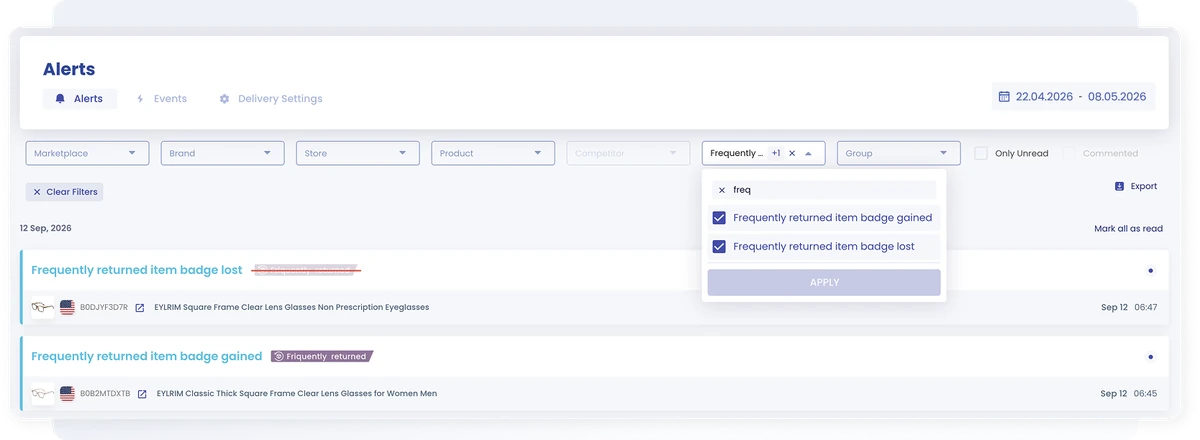
Everything above assumes you already know the badge is there. Amazon doesn’t tell you, so most sellers find out from the sales graph a week later.
That’s the gap worth closing. SellerSonar watches your listings for changes and alerts you when something moves, across your own ASINs and any competitor ASINs you choose to track. A rival picking up the warning is a window worth knowing about too.
The point isn’t knowing that a badge exists. It’s knowing when it changed, which ASIN it hit, and what else moved at the same time, because that last part is usually your answer.
Confirm the exact alert name and available channels in your current SellerSonar plan before you build a workflow around this.
Ready to catch important Amazon listing changes sooner? Start your free SellerSonar trial and monitor the ASINs that matter most to your business.
Final takeaway
Amazon’s return badges aren’t cosmetic. They’re messages shoppers read before checkout, and they usually point at something real in the product, the listing, the fit or the delivery experience.
Final Expert Recommendations: The badge is never the first problem, it’s the first visible one, because the return rate had been drifting for weeks before Amazon printed anything on your page. So treat it as a deadline, not a diagnosis. Start with the highest-volume ASIN on the at-risk list, rule out a single bad variation before you blame the product, and close the expectation gap in the listing before you touch the factory. If you do one thing after reading this, go and look at what your best seller’s page says to a shopper today.
Monitor the ASINs that matter most. Start your free SellerSonar trial.

