





Q3 2026 is the quarter SellerSonar opened up to AI assistants. Across July, August, and September there are 5 main changes: MCP access, a refreshed SharkGuard, new Return Rating signals, a cleaner Reviews experience with one-place collection, and more flexible product management. This quarter was about helping you work with your Amazon data the way you already work: inside your AI assistant, in one clear view, and with less manual checking.
Connect Your AI Assistant to SellerSonar with MCP
Your product data is most useful when it’s easy to reach. MCP is now available on the Business and Enterprise plans. It connects SellerSonar to the AI assistant you already use, so you can ask about your monitoring data in plain English instead of opening the dashboard.
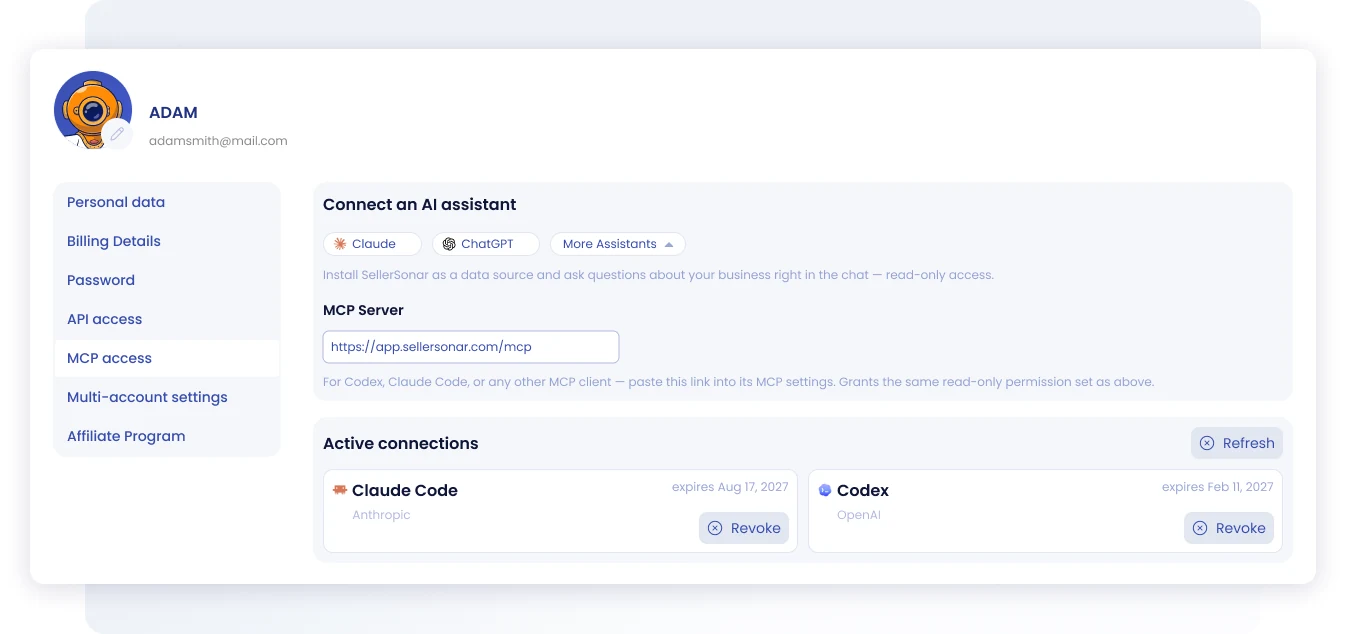
Where to find it
Open MCP access in your profile settings. Use your primary account: the page is not available to shared sub-users.
Two ways to connect
From the connector directory. Claude, ChatGPT, and Codex list SellerSonar directly. Choose your assistant on the MCP access page, sign in to the SellerSonar account you want to use, review the access request, and approve it. In Claude Team or Enterprise, an organization owner enables the connector first, and each member then connects their own account.
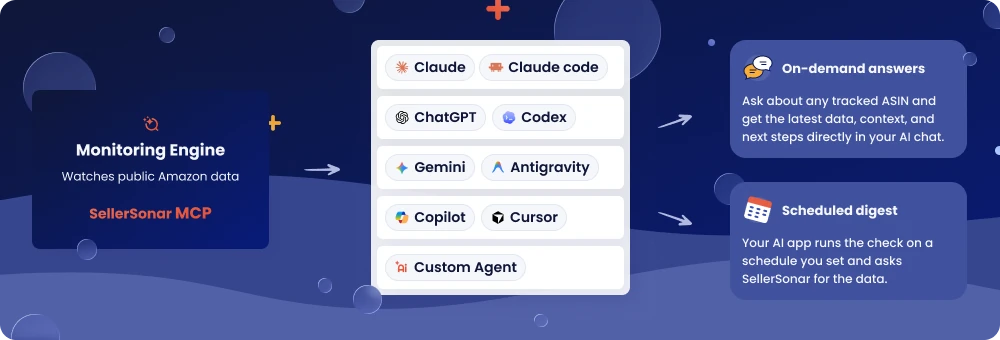
With the server URL. For Claude Code, Copilot, Cursor, Gemini, Antigravity, or any other MCP client, copy the server URL from the same page and paste it into that client’s MCP settings:
https://app.sellersonar.com/mcp
You authorize through OAuth the first time you connect, so there is no API key to generate or store. The connection grants read and write access, so the assistant can act in SellerSonar rather than only answer questions. The server URL grants the same permissions. SellerSonar still reads Amazon’s public pages, so none of this asks for Seller Central access.
What you can ask
Once the connection is live, your assistant can reach the monitoring data already in your account, and carry out supported actions such as adding a product to monitoring:
- Listing changes and what caused them
- Buy Box activity, prices, and sellers
- Keyword rankings
- Reviews
- Competitors you track
A question like “Anything break on my listings overnight?” is a good first test, because it touches several alert types at once.
Managing and revoking access
Every client you approve appears under Active connections with its name and an expiry date. Refresh updates the list, and Revoke disconnects a single client without touching the others.
For step-by-step instructions per client, including troubleshooting, see the SellerSonar MCP setup guide.
Why it matters: You can connect SellerSonar with the AI tools you already use, so your product data is easier to access and work with.
Spotting a hijacked ASIN is only the first step. What you do next is what protects your listing.
We’ve refreshed the SharkGuard interface to make that next step easier. When SharkGuard detects a hijacked ASIN in a marketplace where you don’t currently sell, you can now review the product, add it to your account, and track its reviews, price, and other metrics while you work with Amazon Support to remove the hijacker.
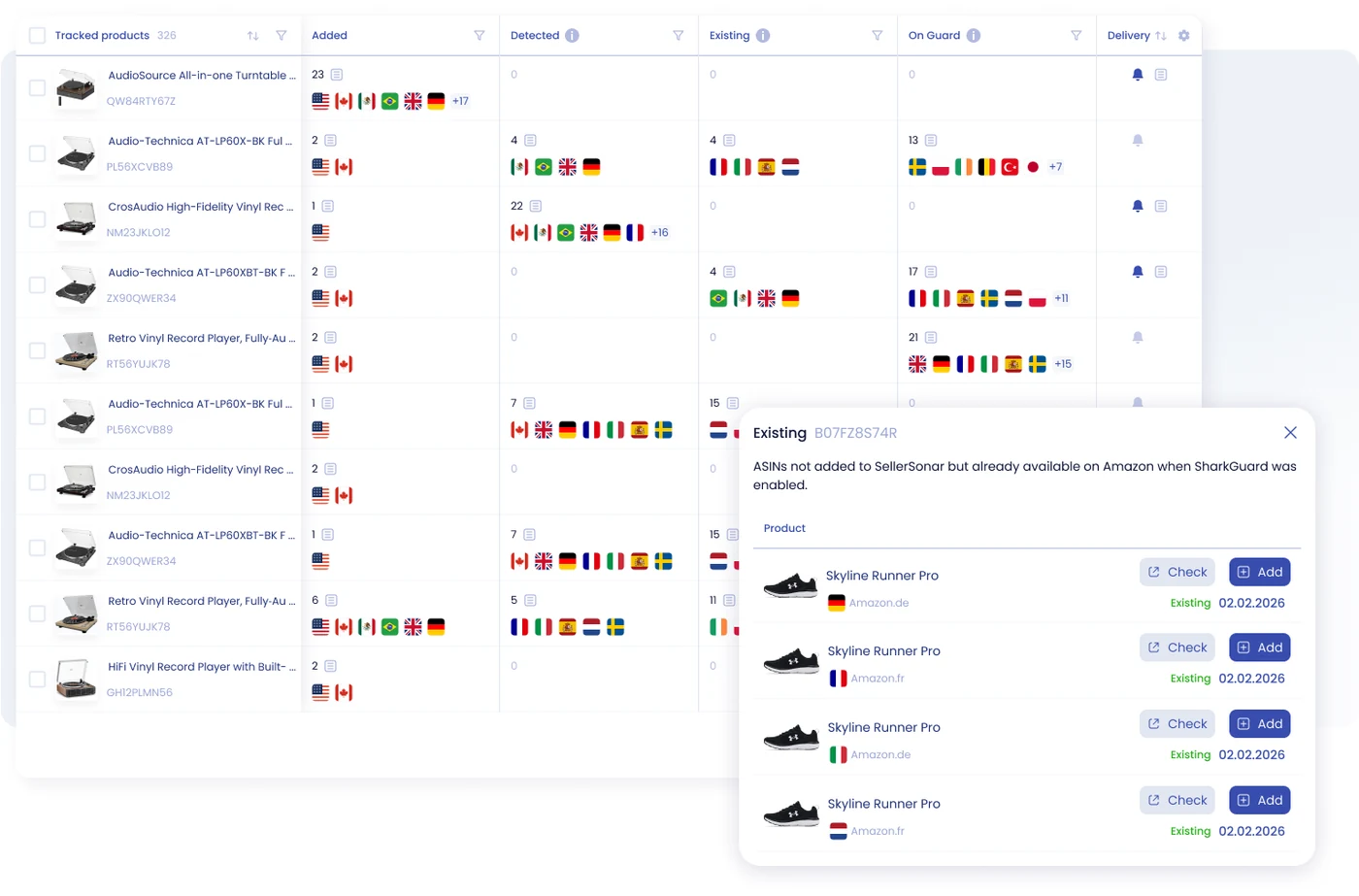
What’s improved:
- Updated SharkGuard interface
- The ability to add detected products to your account
- Easier actions for adding and removing products
- Better visibility while working with Amazon Support to remove the hijacked ASIN
Why it matters: The refreshed interface helps you move from detection to monitoring more smoothly and take action with less friction.
Return Rating: Frequently Returned and Kept Item Signals
Return patterns are easy to miss until they hurt your listing. We’ve added Frequently Returned and Kept Item badges and alerts to the Return Rating section on Amazon product pages, so you can spot them early.
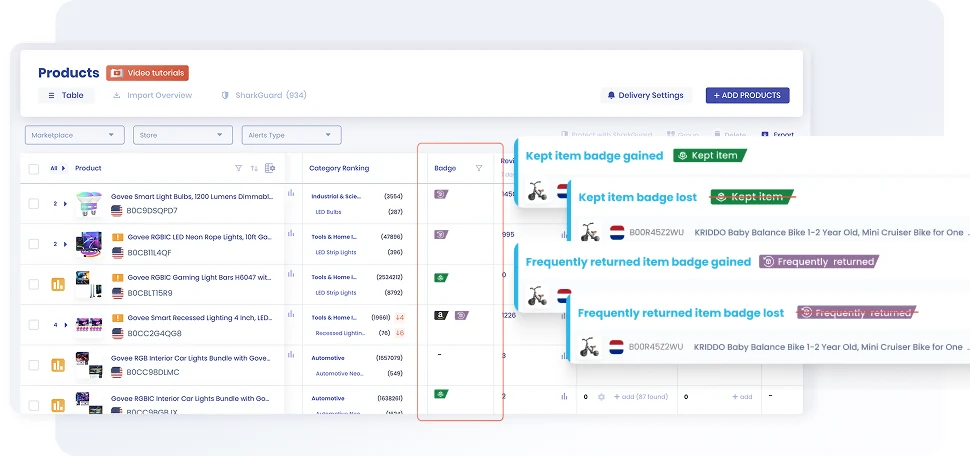
What’s new:
- Frequently Returned and Kept Item badges
- Gained and Lost alerts for both signals
- Product filters for each return-rating signal
- Alert setup through Delivery Settings
Why it matters: You can spot important return patterns faster and focus on the products that need attention.
Reviews: A Cleaner View and Collection from One Place
Reviews got two upgrades this quarter. In July, we redesigned the Reviews page and made it possible to collect reviews through the SellerSonar Extension. In August, we made collection simpler for sellers working across several marketplaces. Review tracking is available from the Premium plan up.
Before you start
Collection runs through the SellerSonar Extension in Google Chrome, and three things have to be true or no review data arrives at all. The extension has to be installed, with you signed in to SellerSonar inside it. You have to be logged in to Amazon in the same browser, using a buyer or business account. And one logged-in tab has to stay open for each marketplace you track.
Seller Central is not involved at any point. If the extension icon is not visible in Chrome, click the puzzle icon to find it.
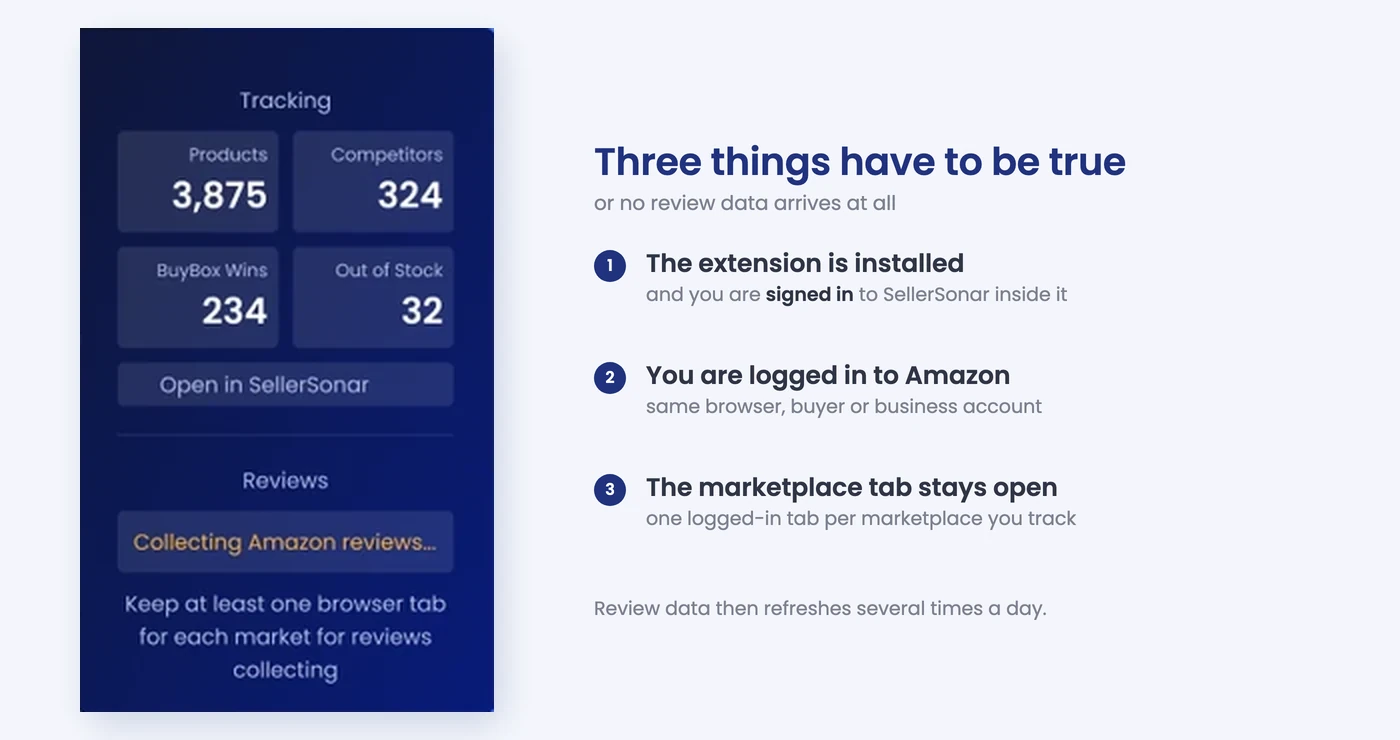
Collection is not instant. Give it a few minutes after opening the marketplaces. Review alerts fire each time a collection runs, so we recommend collecting every 1-3 days.
On the Reviews page
The page carries a “Last collected data” timestamp, so you can always see how fresh the numbers are. You’ll also find:
- A new table layout and improved filters
- Review tags and easier sorting
Collecting across marketplaces
The extension now handles every connected marketplace from one panel instead of one market at a time. Use Open all marketplaces to launch the tabs you still need, then watch each one report back:
- Start review collection for all connected marketplaces in one place
- Check login status and which tabs are open
- Follow progress per marketplace: Reviews collected, Update in progress, or the date of the last update
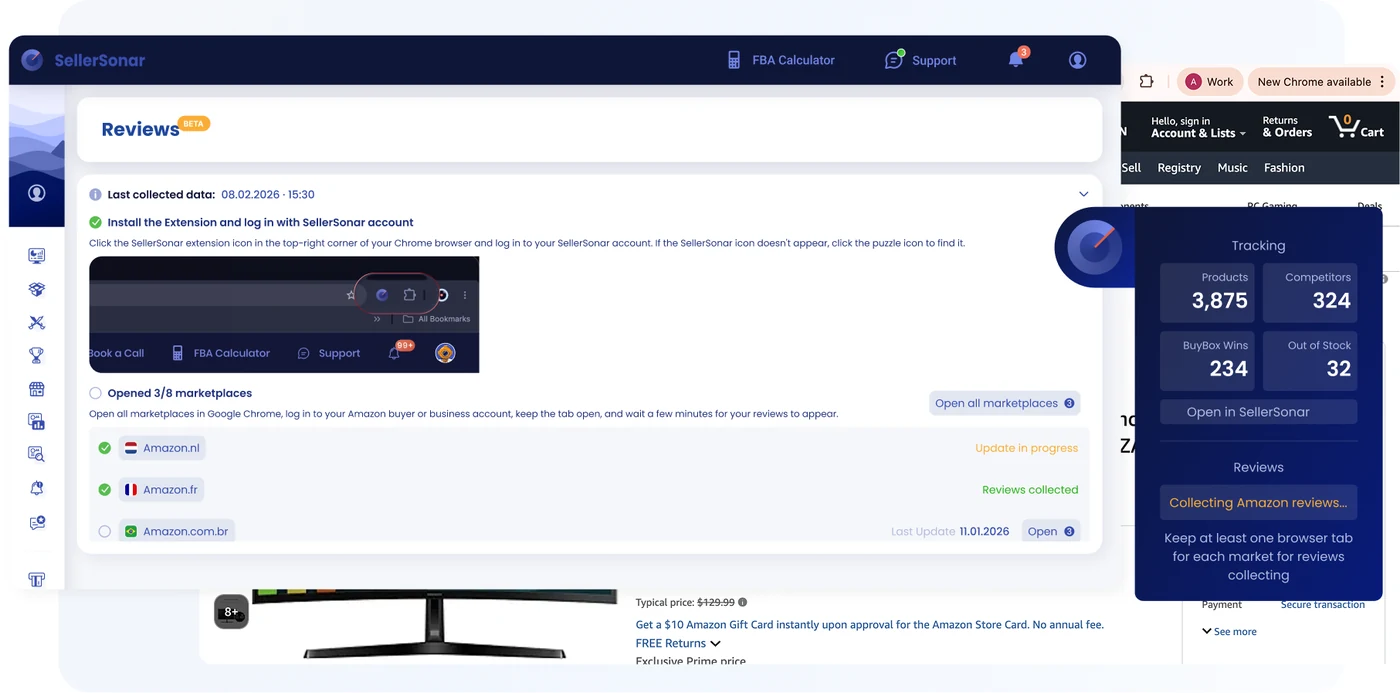
Why it matters: You can organize, filter, export, and collect review data more easily from one improved workflow.
Product Groups and Product Table: More Control, Less Manual Work
Managing products and product variations is now more flexible. Instead of rebuilding your setup by hand, you can import products into groups with a structured file template, and shape the Product Table around how you actually work.
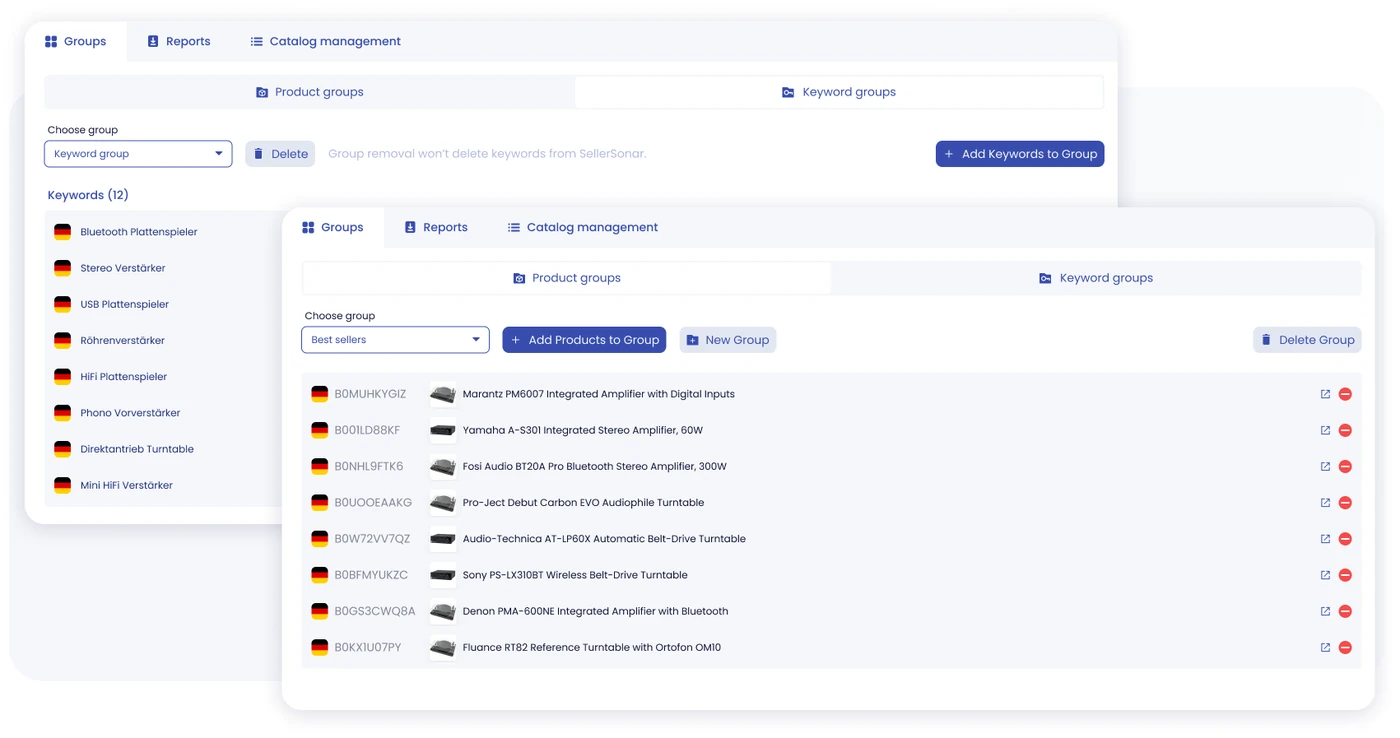
What’s new:
- Import products into groups using a structured file template, including products that are not yet in your account
- Hide or show Product Table columns
- Reorder columns to match your workflow
- Expand or collapse all product variations at once
Why it matters: Big catalogs take less manual work, and the table shows what matters to you first.
Watch the walkthrough: our 12-minute Groups tutorial shows the file template import step by step, along with keyword groups and alerts by product group.
Also New This Quarter
A few smaller updates that are worth a look:
- New Products in Store alert. Get notified when new products are added to your stores in SellerSonar. It lives in the Others category and is enabled by default for all plans.
- Organic TOP 3 in Keyword Insights. The metric is now in keyword tables, summaries, and charts, so you can see how often your products reach the top three organic results.
- Flexible Heatmap exports. Export Total, Organic, or Sponsored data and choose a date range before exporting.
- First Available column. See First Available dates in the product table for listings where they are provided, and in product exports.
- Affiliate Program page. Find the program details and check your affiliate connection status in one place.
Built to Save You Clicks
This quarter was all about getting you to the answer faster.
Less switching.
More signals.
Clearer decisions.
Log in to SellerSonar to connect your AI assistant with MCP, review your SharkGuard detections, set up Return Rating alerts, try the new review collection flow, and organize your catalog into groups.
And as always, more updates are coming 🙂

