






Quick Answer
The Amazon Selling Partner plugin is Amazon’s own connector that brings Seller Assistant, and your Seller Central data, into Claude and Amazon Quick. Amazon announced it on September 23, 2026. As of October 16, 2026 it’s a beta for sellers in Amazon’s US stores, and in Claude it connects “in roughly 60 seconds, no coding required.”
Key facts, as of October 2026:
- What it connects: your listing contributions, real-time performance metrics, inventory levels, and sales analytics
- What it can do: read that data and take actions, with your approval on each one and an audit trail
- Where it runs: Amazon Quick first, Claude in beta, with more integrations promised
- Bonus: a free 12-month Amazon Quick Plus subscription for primary account holders, through December 31, 2026
- What it doesn’t list: public-page history on other sellers’ listings, which is what a monitoring tool records
Say you sell kitchen gear and you already spend half your day in Claude. On a Thursday you ask it why your best skillet sold 40 fewer units this week than last.
Until last month, Claude had to guess. It couldn’t see your Seller Central account unless someone built a connection for you.
Now Amazon has built that connection itself. The Amazon Selling Partner plugin lets Claude read your sales, inventory, and listings, and act on them once you approve.
That’s a real shift, and Amazon hasn’t announced a fee for it. It also raises the questions most launch coverage skips: what exactly gets connected, what the plugin is allowed to change, and what it still can’t tell you about the listings around yours. This guide covers all three, plus how to pair it with a monitoring tool in the same Claude chat.
Already use Claude for your Amazon business? Our plain-English guide to Amazon MCP explains the standard this plugin runs on, if that part is new to you.
About the Author: Alex Harrison writes for the SellerSonar editorial team on Amazon monitoring, marketplace APIs, and AI tools for sellers. Alex covers how sellers and agencies put AI to work in their day-to-day Amazon routine, and tests new tools against the realities of running a private-label brand or a client roster.
What Amazon actually launched on September 23, 2026
The Amazon Selling Partner plugin is a connector that brings Seller Assistant’s “reasoning, recommendations, and ability to take action” into an outside AI agent. Amazon’s announcement bundles three things under one headline, and it helps to pull them apart.
Seller Assistant is Amazon’s AI helper inside Seller Central. According to Amazon, it’s built on Amazon Bedrock with Anthropic’s Claude models, has rolled out to over 90% of selling partners worldwide, and sellers accept its recommendations over 90% of the time. It now keeps a persistent memory of your pricing patterns, inventory cycles, and growth goals.
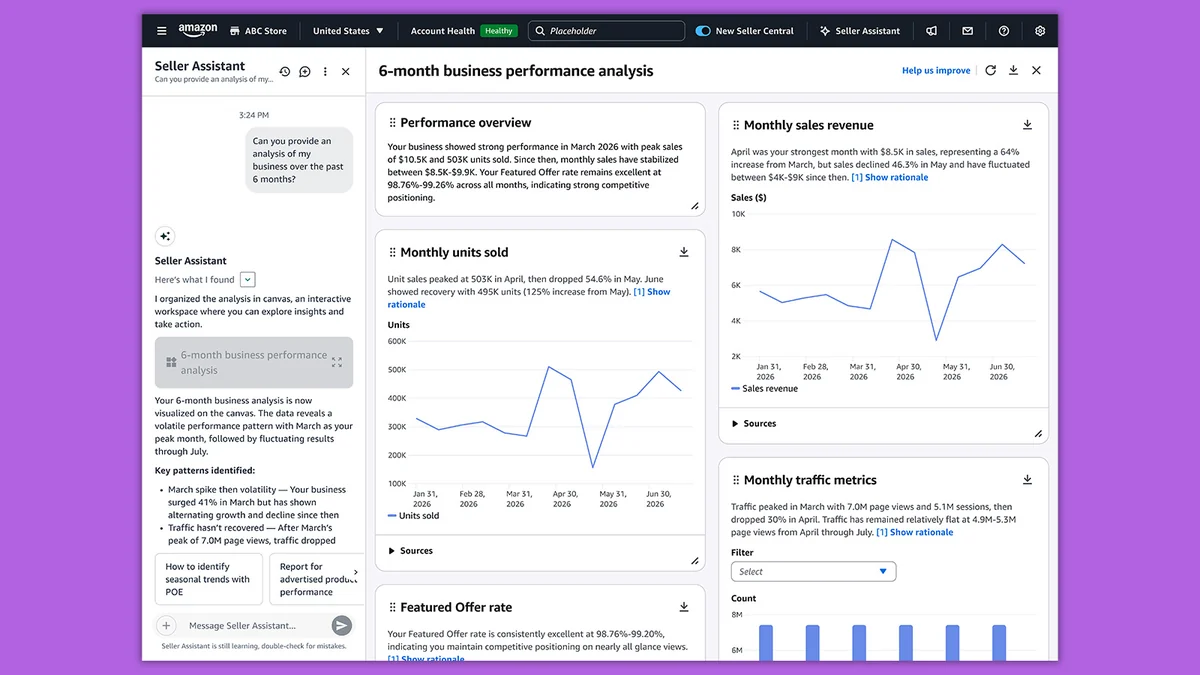
Seller Assistant workflows are automations that run on their own. Amazon says they keep working “even when the seller isn’t logged in to Seller Central,” and you choose whether each one only recommends or also acts.
The Amazon Selling Partner plugin is the piece that leaves Seller Central. It carries Seller Assistant’s reasoning and your data into the AI tool you already use, starting with Amazon Quick and, in beta, Claude.
Why now? Amazon’s own number explains it:
“Today, 90% of Amazon selling partners already use third-party AI tools to run their businesses.”
(Amazon, launch announcement, September 23, 2026)
Sellers were already pasting exports into chatbots. Amazon decided to give them a proper connection instead, with its own guardrails attached.
How to connect Amazon Seller Central to Claude with the plugin
The Amazon Seller Central Claude connector sits in Claude’s directory under the name Amazon Selling Partner. Its official listing names Amazon as the maker, marks it “Currently in beta,” says sign-in is required, and shows it was added in September 2026.
Here’s the path, as of October 2026:
- Check you sell in a US store. Amazon says the plugin is “now available in beta for sellers in Amazon’s U.S. stores, with international expansion to follow.”
- Install the plugin in Claude. Open the directory, search for Selling Partner plugin, and select Install. Claude’s help center says web connectors are available for all users on Claude, Cowork, Claude Desktop, and Claude Mobile. On Team and Enterprise plans, an admin enables connectors first.
- Sign in with your Amazon selling account, review what the plugin can access, and authorize it. Amazon’s help page for the plugin says the account must be on a Professional selling plan.
- Ask something simple, like your sales for the last 7 days, to confirm it works.
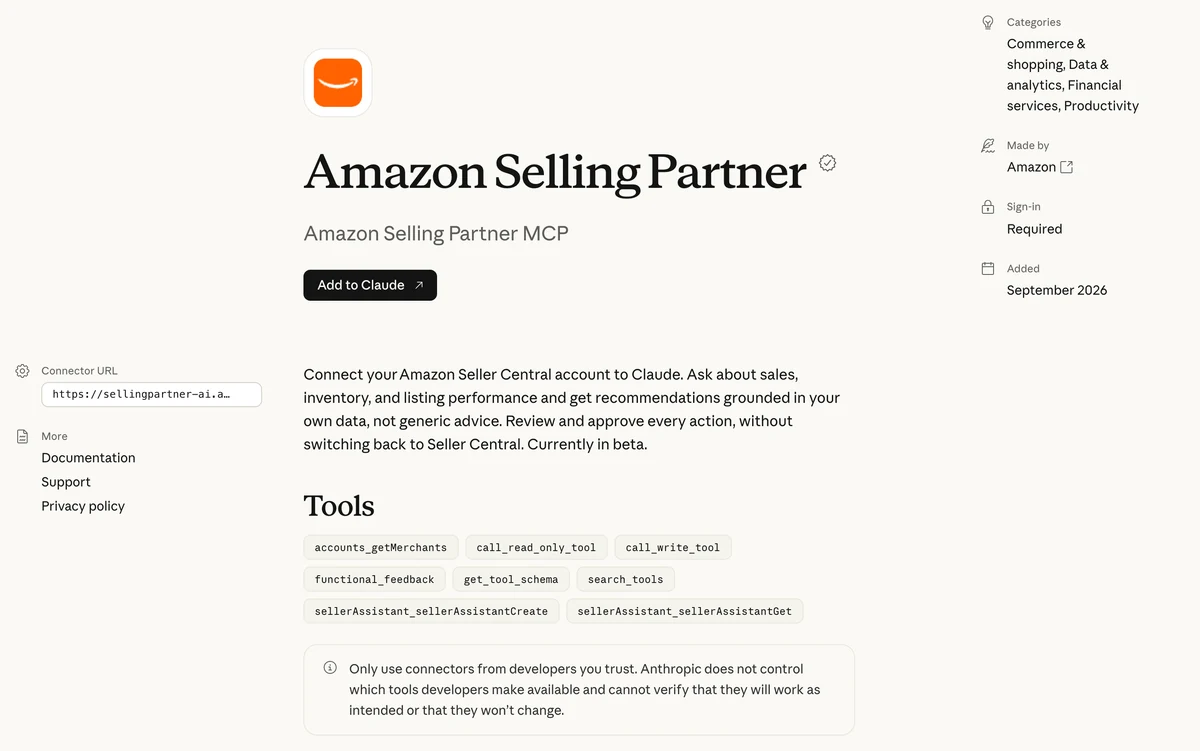
If you’d rather not use Claude, the same plugin runs in Amazon Quick. Every primary account holder can claim a free 12-month Quick Plus subscription through December 31, 2026, plus two co-workers. According to Amazon’s help page, that year is worth up to $720.
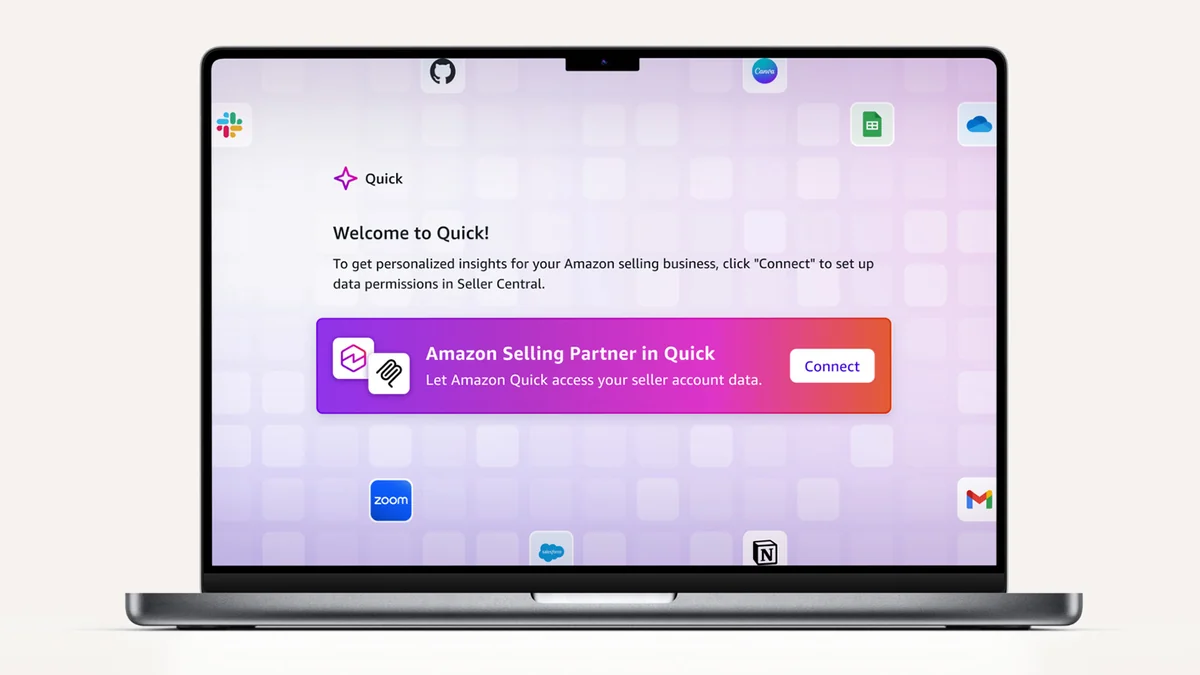
Don’t be surprised if nothing happens right away. Amazon says access is “rolling out to sellers over time,” so after you connect, either the plugin works immediately or your account joins a waitlist and you get an email when it’s ready.
What the plugin can do, and what you’re letting it change
The listing shows eight tools. Two names matter more than the rest: call_read_only_tool and call_write_tool. One reads your account. The other changes it.
That’s the honest headline on this plugin. Amazon says your AI “doesn’t just read from their Amazon business; it can act on it, the same way Seller Assistant does inside Seller Central.” Amazon’s examples for Seller Assistant include adjusting a price for an ASIN and drafting a restock plan.

The guardrails are real too. Amazon says every plugin interaction has “clear boundaries on what it can access, human approval on actions, and complete audit trails.” In practice, Claude proposes, you approve in the chat, and the action goes into an audit trail.
💡 Expert Tip: Start in answers-only mode. Amazon’s help page says you can limit the assistant to answers only, so it can’t take actions. Ask it to propose a price change and explain its reasoning. If the reasoning holds up for two weeks, then give it permission to act.
Eric Burns, field CTO at Anthropic, put the pitch plainly:
“It’s a snap to connect Amazon accounts to Claude for strategic recommendations built on a seller’s whole business, empowering sellers to earn more sales, more conversions, and faster growth.”
(Eric Burns, field CTO at Anthropic, quoted in Amazon’s announcement)
Say Dana runs a 40-ASIN pet supply brand from a laptop. Before the plugin, her Monday restock check meant three reports, a spreadsheet, and an hour. Now she asks Claude which ASINs fall under three weeks of cover, Seller Assistant drafts a restock plan, and she approves it in the chat. James Oliver, a beta tester and founder of Atlas Bar, described the jump on the data side: connecting his Amazon data to AI tools used to take hours, and “What took an afternoon now happens instantly.”
What the Amazon Selling Partner plugin sees, and what it doesn’t list
Amazon describes the plugin’s data as “a seller’s Amazon data, including their listing contributions, real-time performance metrics, inventory levels, and sales analytics.” In other words, your account, in depth.
To be fair to it, Seller Assistant reaches past your own numbers in places. Amazon says it can “identify a competitive signal,” and its workflow examples include monitoring competitive pricing. The plugin’s help page even lists “Show me the competitive landscape for an ASIN,” which returns the Featured Offer, reference price, and lowest offers. So don’t buy any tool on the claim that Amazon’s AI is blind to competitors. It isn’t.
That’s a snapshot of right now. What Amazon doesn’t list is a recorded history of the public pages around you. A monitoring tool keeps that kind of record:
- who won the Buy Box on a listing, at what price, and when, timestamped to the second
- which sellers appeared on or left a listing, including possible hijackers on yours
- field-level content changes to titles, bullets, and images, with the old and new versions side by side
- organic and sponsored keyword rank, per keyword
- the same records for any competitor ASIN, not just your own
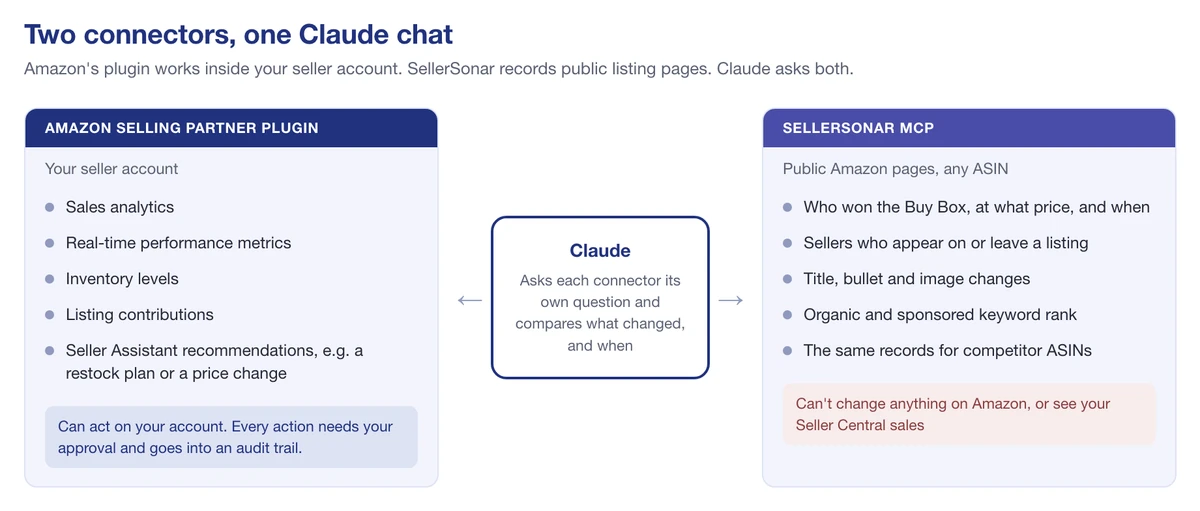
We checked that list against SellerSonar’s own MCP on a test account in October 2026. Each item came back as data with timestamps, so an AI assistant can line it up against what the plugin reports from your account.
🎯 Want the public-page side in the same chat? SellerSonar connects to Claude too, and it never asks for your Amazon login. Start your free 14-day trial (5 ASINs, 10 keywords, no credit card).
Using the plugin and SellerSonar in the same Claude chat
This is where Claude for Amazon sellers gets practical. Claude lets you switch on several connectors in one conversation. With both on, Claude can ask each one its own question and combine the answers. Two prompts show how it works.
Prompt 1: sales dropped, so what changed?
“Use the Amazon Selling Partner plugin to show sales, sessions, and inventory for my top ASIN over the last 14 days. Then use SellerSonar to list Buy Box changes, sellers that appeared, and listing changes on the same ASIN, with timestamps. Tell me what changed first.”
Say Marcus sees his best seller drop from 60 orders a day to 41 on a Wednesday. The plugin shows inventory was fine and the price didn’t move.
SellerSonar shows a new seller appeared on the listing Tuesday night and won the Buy Box $2.50 below him. Now he knows the drop isn’t demand. It’s a seller problem, and the next step is checking whether that offer is authorized.
Prompt 2: a competitor cut their price
“Use SellerSonar to list this week’s price changes on these competitor ASINs: B0XXXXXXX1, B0XXXXXXX2, B0XXXXXXX3. Check each ASIN on its own. For the biggest cut, ask the Amazon Selling Partner plugin for my current price and recent sales on my ASIN that competes with it, and draft a pricing recommendation. Don’t change anything yet.”
SellerSonar answers the first half from competitor monitoring. Name the ASINs rather than asking for “my competitors”: on our test account, Claude gave the cleanest answers when it checked each competitor ASIN on its own. The plugin answers the second half from your account and drafts the change. You decide whether to approve it.
A few honest limits. SellerSonar checks listings every 1 to 4 hours, depending on the SellerSonar plan you choose, so it’s not a second-by-second feed.
It also can’t see your ad spend or the sales numbers inside Seller Central; that’s the plugin’s job. To connect SellerSonar, follow the SellerSonar MCP setup guide. It signs you in to your SellerSonar account, never your Amazon one.

💡 Expert Tip: Ask Claude to show the timestamp behind every listing signal it cites. A Buy Box loss from this morning and one from last week call for different responses.
Seller Assistant workflows vs a monitoring tool: where each wins
Amazon’s workflows overlap with monitoring, and it would be silly to pretend otherwise. One of Amazon’s own examples is “Alert me if any of my top 10 products drop below a 4-star rating and draft a response plan.” That’s an alert, it’s built into Seller Central, and it runs while you sleep.

Here’s how I’d split the work today:
- Use Seller Assistant workflows for anything inside your own account: restock thresholds, account health, order summaries, pricing rules you trust it to apply.
- Use a monitoring tool for the record of what happened on public pages, yours and competitors’: who took the Buy Box and when, which seller joined, what text changed, where you rank organically versus sponsored. Our keyword tracker is one example of that last piece.
- Use both in one chat when the question crosses the line, which is most “why did this drop?” questions.
Say Priya runs ads and listings for six brands at an agency. Workflows handle each client’s restock alerts. SellerSonar watches the 40 competitor ASINs her clients care about. When a client asks why sales slipped, she asks Claude once and gets both sides.
Running ads too? Amazon has a separate server for your ad account; our guide to the Amazon Ads MCP covers who can get access and how to connect it. For third-party servers that reach Seller Central, see the Amazon Seller Central MCP comparison.
So, should you connect the Amazon Selling Partner plugin?
If you sell in a US store and already use Claude or Amazon Quick, yes. Four things to hold onto:
- It’s Amazon’s own connection. Beta, US stores first, about a minute to connect, and no announced fee.
- It can act, not just read. Keep approvals on, and start in answers-only mode.
- Your data, your account. It’s built for your sales, inventory, and listings, not a recorded history of everyone else’s.
- Pair it, don’t replace it. A public-page monitor in the same chat answers the “what changed out there?” half.
Final Expert Recommendations:
Based on what Amazon has published, the plugin is the best way to bring your own Seller Central data into Claude today. Connect it, start with recommendations only while you learn how it reasons, and add a public-page monitor in the same chat so the AI can see what changed around your listing, not just inside your account. If listings are your main worry, Amazon’s AI tooling there is covered in our Amazon listing optimization guide.
Want the public side covered today? Start a free 14-day SellerSonar trial, connect the SellerSonar MCP next to the plugin, and ask Claude the Marcus question about your own best seller.
