

Quick Answer
Amazon MCP is a connector built on Anthropic’s Model Context Protocol, and it lets AI assistants like Claude and ChatGPT read your Seller Central and Amazon Ads data, and in some cases act on it. For one-off questions and weekly reports, it’s genuinely good. It won’t watch your listings while you sleep.
Key facts (verified September 2026):
- Amazon Ads MCP Server: in open beta since February 2, 2026, per the official Amazon Ads MCP announcement.
- AWS MCP Server: live since May 2026.
- Competitor ASINs: only servers that read public Amazon pages, like SellerSonar MCP, can answer questions about them, because a server tied to your Amazon login can only ever see your own account.
- What it replaces: CSV exports and pivot tables.
- What it doesn’t replace: anything that has to catch a change at 2 AM while you sleep.
You’ve probably had this moment already. It’s Tuesday morning, someone drops a link in your Slack, and the message says something like “Amazon MCP, is this finally the AI thing that matters for sellers?” You click. You skim three vendor blog posts, and every single one of them ends with the same instruction, which is to install theirs. None say what it actually does.
Here’s the honest picture, from a company that has spent nine years building Amazon monitoring software and now ships an MCP server of its own.
Amazon MCP is real. It’s useful. It’s also probably not what you think it is yet, so this guide covers what it does, when to set one up, which server to pick, and where the whole idea still runs into a wall.
About the Author: Alex Harrison writes for the SellerSonar editorial team on Amazon monitoring, marketplace APIs, and AI tools for sellers. Alex covers how sellers and agencies put AI to work in their day-to-day Amazon routine, and tests new tools like Amazon MCP against the realities of running a private-label brand or a client roster.
What Amazon MCP Is
Amazon MCP is a bridge, and it lets any AI assistant read, and sometimes change, your Amazon business data through one shared standard.
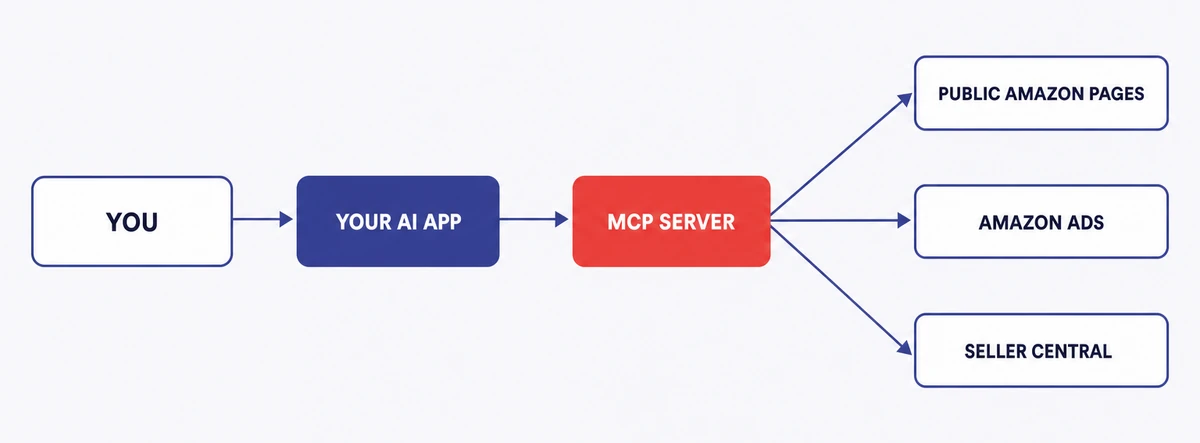
Two things had to line up first.
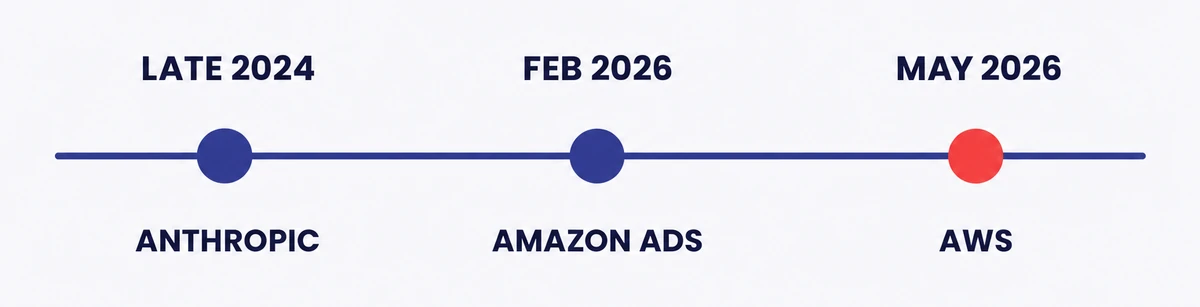
Anthropic released MCP as an open standard in late 2024, per the official Anthropic MCP announcement. Think of it as USB-C for AI. One plug shape, so any AI app can talk to any tool without somebody building a custom connection for every single pair.
Then Amazon Ads shipped its own MCP server in open beta on February 2, 2026, per the Amazon Ads MCP documentation, and from that day anyone with an approved Amazon Ads API application, direct advertisers included, could point Claude at an ad account and ask questions in plain English. A crowd followed.
Seller Labs, DataDoe, Zapier and others now run hosted “Amazon MCP” servers that reach past ads into Seller Central data. SellerSonar went a different way. Its server reads public Amazon pages instead of your account, so it works on any ASIN you can think of, including every one of your competitors’, with nothing to connect.
💡 Expert Tip: Don’t mix up “Amazon MCP” (Model Context Protocol) with “MCF” (Multi-Channel Fulfillment). We have watched sellers Google one and land on the other, then spend twenty minutes wondering why the answers make no sense. Three shared letters, nothing else.
Why Sellers Care in 2026
Developers have known about MCP for a while, but three things happened this year that dragged it out of engineering chat and into every Amazon seller newsletter.
Amazon Ads backed the standard. Amazon beta-launched its own MCP server in February 2026, per the Amazon Ads MCP documentation. That wasn’t a hobby project by two engineers on a Friday, it was Amazon’s own ads team, and it gave the whole standard instant credibility with sellers.
AWS made it official. The AWS MCP Server went live in May 2026, per the official AWS announcement. Translation: not a one-off ads experiment.
Setup stopped being a developer job. You can add most hosted servers straight from your AI app’s connector list now, or by pasting in a URL and approving access, which is a very different afternoon from building your own Amazon API integration and then keeping it alive.
What MCP Does Well Today
Two buckets here, and both matter if you’re deciding whether this deserves a slot in your week: what MCP is genuinely good at, and what people keep wishing it did.
What MCP does well
Answers questions in plain English. Ask Claude “which Sponsored Products campaigns went over target ACOS last week?” and an answer comes back, with no SQL, no pivot tables, and no trip to the Ads console. This is the part that earns its keep.
Pulls from two places at once. Most third-party servers bundle Ads and Seller Central together, so a single question can pull ad spend from one side and stock levels from the other, which used to mean a custom reporting project and a budget to match.
Drafts your recurring reports. Agencies save the most here. The AI grabs the fields you asked for and writes a first draft, skipping the whole export-then-format grind, though how much time you actually save depends on how many accounts and data sources you juggle.
What MCP doesn’t do
Watch anything on its own. An MCP server only answers when your AI app asks it something, and it never wakes itself up, so any check that needs to run on a timer has to come from your AI app or from a separate tool that does the watching. Vendor marketing skips right past this.
Touch anything expensive, safely. Most sellers won’t hand an AI open write access to Seller Central, and they’re right to hold that line, because editing listings, changing prices and launching campaigns are all bad ideas while these tools are this young.
See your competitors, unless it reads public pages. Most servers only see the account you connected. So if you want to ask what a rival is charging today, or whether they just took your Buy Box, you need a server that reads public Amazon pages instead, and that’s a much smaller group.
🎯 Pro Insight: The best use for Amazon MCP right now is your recurring, read-only reporting. If the job is “pull data, format it, look at it, decide something,” MCP fits. If the job is “watch this and tell me the moment it changes,” you need something else doing the watching.
Ready to see this in your own account? Start a free 14-day SellerSonar trial and pair it with any AI app that supports MCP. Five ASINs and ten keywords, no credit card.
How to Pick an MCP Server
Enough servers now call themselves “Amazon MCP” that “which one do I install?” has become a fair question, so here’s the way we walk sellers through it.
Want to skip the framework? Our breakdown of the six main Amazon seller MCPs puts them side by side and says who each one is built for.
Step 1: Pick your data scope
Three common scopes, riskiest permissions last:
1. Public Amazon page data only. Any ASIN, nothing to connect. This is the scope you want for competitor tracking, listing changes, and Buy Box.
2. Amazon Ads data. Your ad accounts, connection required, which covers spend, keywords, and campaign reporting.
3. Full Seller Central data. Orders, stock, profit, reviews. The most useful scope on the list and, by some distance, the most exposed.
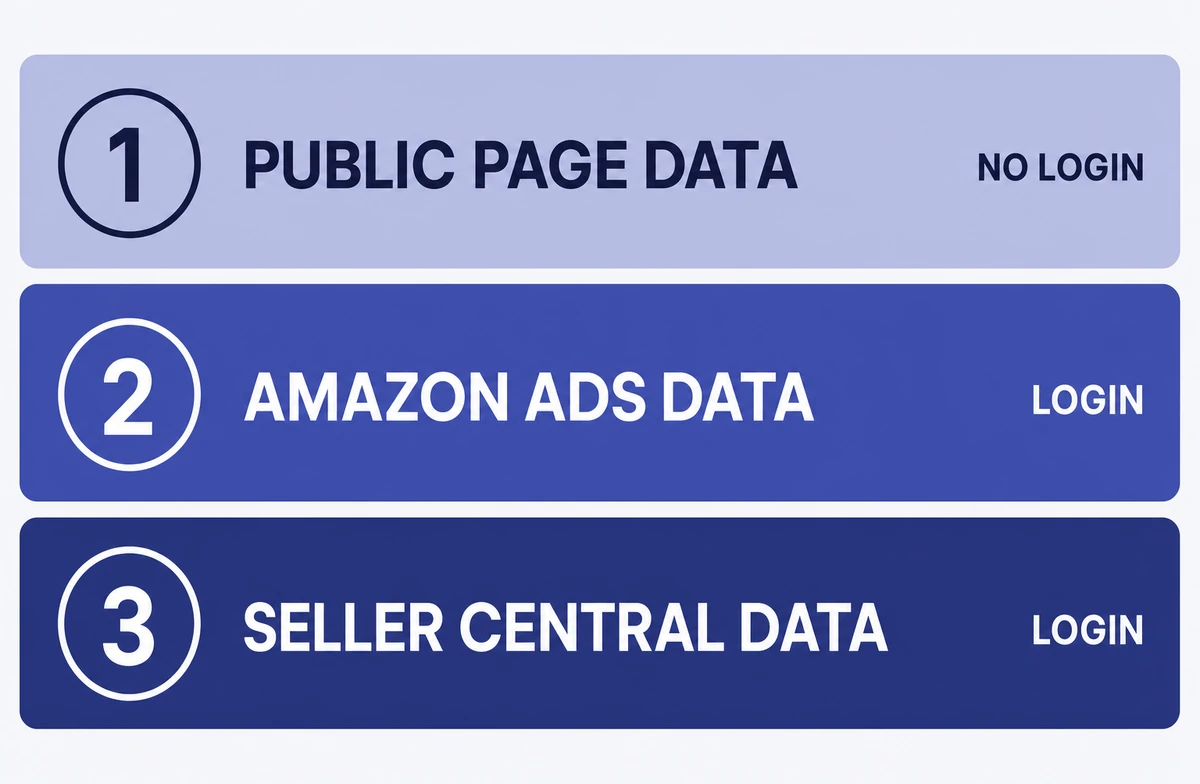
Match the server to what you actually need, and don’t hand over full Seller Central access when all you ever wanted was competitor tracking.
Step 2: Confirm your AI app is supported
Most Amazon MCP servers work with Claude Desktop and Claude Code. Several also work with ChatGPT and Cursor. Support varies by server and by how it signs you in, though, so check the vendor’s current setup page before you commit to anything.
Step 3: Read the tool list
Every decent MCP server publishes the exact list of things it lets an AI do. Read it. If you spot a “write” or a “delete” that you aren’t happy about, either pick a read-only server or switch those off, because this is the same care you would take with any app that touches your money.
Step 4: Ask about data handling
Two questions for the vendor:
- Does my data get stored anywhere, or does it just pass through on the way to my AI app?
- Are my chats saved, and for how long?
Vendors answer this differently, and either answer can be fine depending on the rules you work under. The one bad answer is “I don’t know.”
A Typical Setup Flow
Here’s what the first setup usually looks like, using SellerSonar’s own MCP as the example, though most hosted servers follow a similar path.
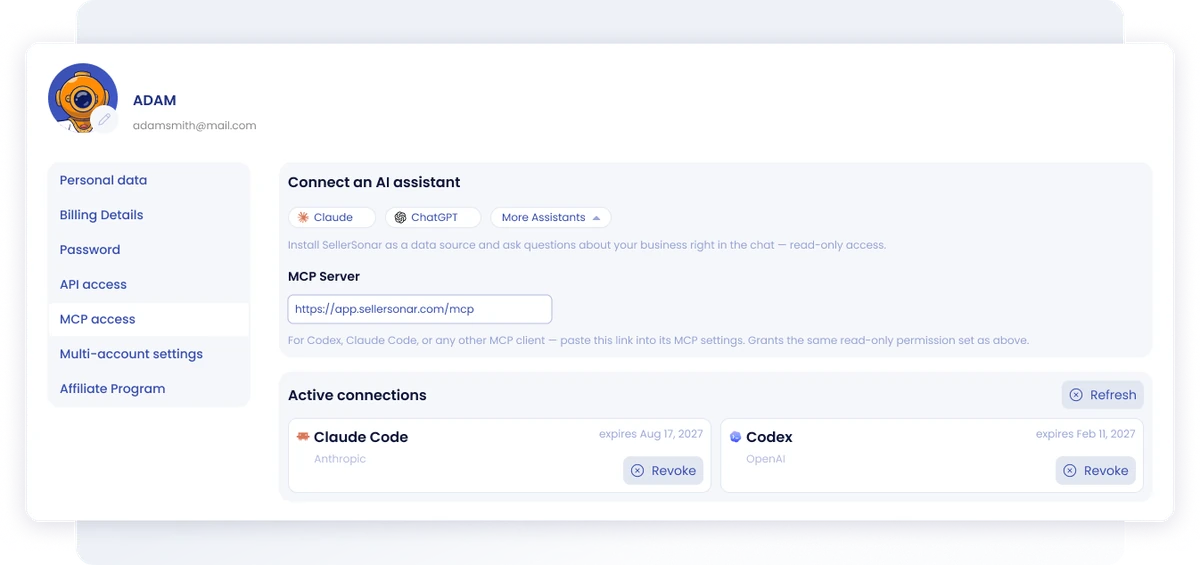
Picture a private-label seller with about seventy ASINs. They sign up, follow the setup guide, connect SellerSonar to their AI app, then ask a first question: “which of my tracked ASINs lost the Buy Box in the last seven days?” Back comes a list, with ASINs and timestamps.
No code. No Seller Central connection either, because SellerSonar reads public pages, and none of it replaced the monitoring already running quietly in the background on those same ASINs. MCP just added a way to ask about it in a chat.
That’s the pattern worth copying. MCP works best sitting next to your monitoring rather than trying to replace it.
Where MCP Falls Short
Most vendors skate past the limits, so I’d rather list them out.
It’s slow. Servers go and fetch from Amazon at the moment you ask, so one question can take five to fifteen seconds. Fine when you’re poking around. Painful at volume.
It can’t run on its own schedule. An MCP server won’t wake up and check your listings, so a 3 AM suppression alert needs either a timer inside your AI app or a separate tool that spots the change and pings you. Otherwise it waits until you ask.
The apps are finicky. Claude Desktop, ChatGPT and Cursor each handle MCP a little differently, and the setup file changes every so often, so if nobody on your team enjoys editing settings files, budget some patience for the first install.
Amazon’s limits become your limits. Amazon caps how often its APIs can be called and MCP inherits every one of those caps, so ask something enormous, like every keyword for every ASIN, and the whole thing may simply time out on you.
Nothing is saved. Most servers pass live data through and keep no history. If Amazon has an outage or quietly changes an endpoint, your MCP stops being useful and you won’t get a warning, whereas a monitoring tool with its own stored history rides that out.
It can still get things wrong. Live data cuts down on guessing, but it doesn’t promise the math is right. Spot-check anything about money: ROAS, ACOS, refunds, stock calls, campaign changes.
Amazon’s rules still apply. Plugging in an MCP doesn’t put you outside Amazon’s agreements or its API rules, so read the terms before you switch on bulk edits, automated pricing or data collection, and keep a human approving anything that costs money.
📌 From Our Experience: The sellers who get the most from Amazon MCP already have monitoring, reporting and alerts running before they start. MCP is the question layer on top of that. Teams who try to make it the whole stack find the holes inside a week.
MCP vs Continuous Monitoring
This is where the confusion lives, so here are the differences in one place.
| Capability | Amazon MCP | Continuous Monitoring (e.g. SellerSonar) |
|---|---|---|
| Answers questions in plain English | Yes | No (needs a dashboard or filter) |
| Runs on a schedule by itself | No; needs a timer or a separate tool | Yes |
| Sends an alert when Buy Box is lost | No | Yes |
| Spots a hijacker within minutes | No | Yes |
| Pulls ads and stock in one question | Yes | Partial (depends on tool) |
| Works on any ASIN with no account link | Only if it reads public pages | Yes for public-page monitoring |
| Speed per question | 5-15 seconds | Instant (already stored) |
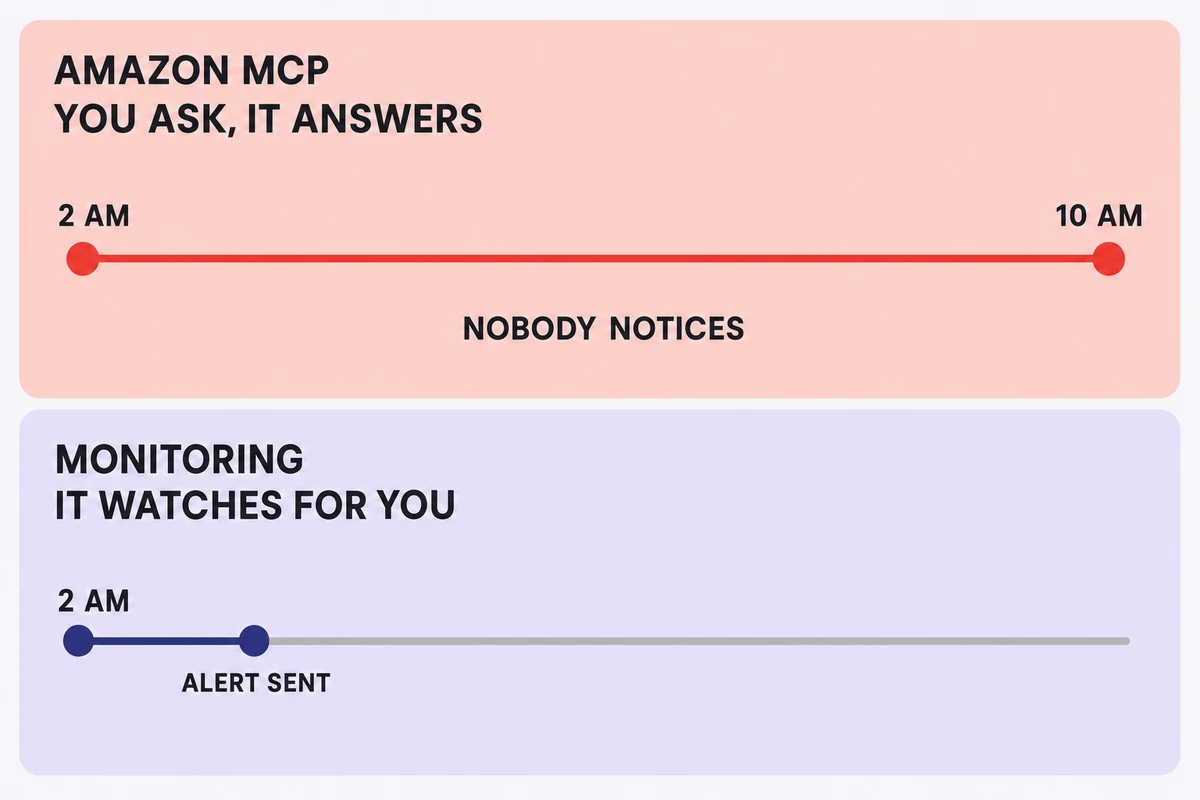
Read the table this way. MCP and monitoring are partners, not rivals. If you already have monitoring running, MCP is a genuinely good addition on top of it, and if you don’t, then buying an MCP server first is solving the wrong problem in the wrong order.
If monitoring is the piece you’re missing, start with our Buy Box and pricing alerts and listing hijacking guide instead.
Do You Actually Need an MCP Setup?
Not yet, for plenty of sellers. Catalog size turns out to be a weak signal, and the better one is how many hours a week your team burns pulling, merging and formatting data by hand.
You probably don’t need MCP yet if:
- You sell a small catalog in one marketplace.
- Your dashboard already answers almost everything you think to ask it on a normal day.
- You rarely need ads, stock and competitor data together.
- Nobody is waiting on a weekly report from you.
You will get real value if:
- You run a bigger catalog, or you sell across several marketplaces and have to reconcile them.
- You export into spreadsheets over and over.
- The same questions come up weekly.
- You want a faster first pass on analysis or on the client reporting that eats your Mondays.
Make it a priority if:
- You’re an agency juggling client accounts.
- Someone on your team loses hours a week to reports that look the same as last week’s.
- You have alerts covered, but still no quick way to just ask a question.
Somewhere in the middle? Start read-only, with one recurring job, and if it takes real work off your plate without creating new things to double-check, widen it from there.
Where SellerSonar MCP Fits
Most Amazon MCP servers share one blind spot: they only see the account you connected, and your competitor is never going to connect theirs for you.
SellerSonar made a different bet. SellerSonar MCP reads public Amazon pages rather than Seller Central, and that single choice changes what you’re able to ask it.
Point Claude at any ASIN, yours or a rival’s:
- “Which of my ASINs lost the Buy Box in the last 24 hours?”
- “Did any competitor of ASIN B0ABC123 swap their main image this week?”
- “Show me every hijacker on ASIN B0XYZ789 in the last 30 days.”
- “Which tracked competitors dropped price today?”
None of that needs Seller Central access, yours or theirs, which is the whole moat: public-page servers are the only ones where competitor tracking is even possible. The rest are locked out by design.
Two limits, up front. SellerSonar MCP can’t see profit, COGS, ad spend, FBA fees or reimbursements, because every one of those sits behind a Seller Central login, so those questions belong to the Amazon Ads MCP or to a full Seller Central server. SellerSonar handles the public side: Buy Box, listings, reviews, keywords, hijackers, competitor moves.
Setup is short. Sign up, add SellerSonar inside your AI app, approve access, and start asking. The free 14-day trial covers 5 ASINs and 10 keywords, no credit card.
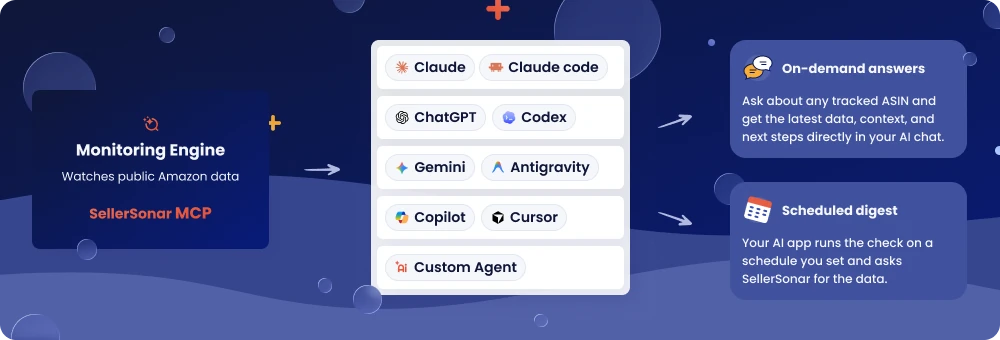
Try it on your own catalog: See the SellerSonar MCP overview or start the free 14-day trial (5 ASINs / 10 keywords, no card).
Security: Two Questions First
These tools touch money and stock, so security here deserves a bit more attention than the average app install gets.
Question 1: What can the AI actually change? “Nothing, it is read-only” is the safest answer you can get back. If the answer covers editing listings, changing prices or launching campaigns, get specific about what you’re approving, then switch off whatever you don’t need.
Question 2: Where does my data live, and for how long? Some servers pass data straight through, while others keep a copy, and every copy is one more place your account data can leak from. Read the vendor’s data page before you approve anything.
There’s no single right answer here. Teams draw the line in different places, and both sides of that line are defensible, so the only real mistake is skipping the question.
Final Recommendations
Nine years of watching Amazon tools come and go, and roughly seven months of watching this one specifically, land on five points:
1. Already monitoring? Install an MCP server this month. The time it saves on questions and reports is real, and setup takes an afternoon.
2. Not monitoring yet? Fix that first, because MCP without monitoring is a Ferrari with no tires. Start with a free 14-day SellerSonar trial, then add MCP on top. SellerSonar’s own MCP is included on the Business and Enterprise plans, and in the free trial, and it works on any ASIN, yours or a competitor’s, with no Seller Central access.
3. Pick on data scope, not on brand. Public pages for competitor tracking, Ads MCP for spend, and full Seller Central only when you genuinely need what sits behind that login.
4. Stay read-only for now. Don’t grant write access yet, and look at that decision again in six months.
5. Put a date in your calendar. This space moves fast, and what’s true today about app support and Amazon endpoints won’t all still hold in six months, so re-check your setup every quarter.
Amazon MCP earns a spot in a well-run Amazon operation. It’s not the second coming of AI selling, and any vendor telling you otherwise has something to sell you. Use it for what it’s good at, skip it for what it’s not, and keep a tool that watches your listings while you sleep.