





Quick Answer
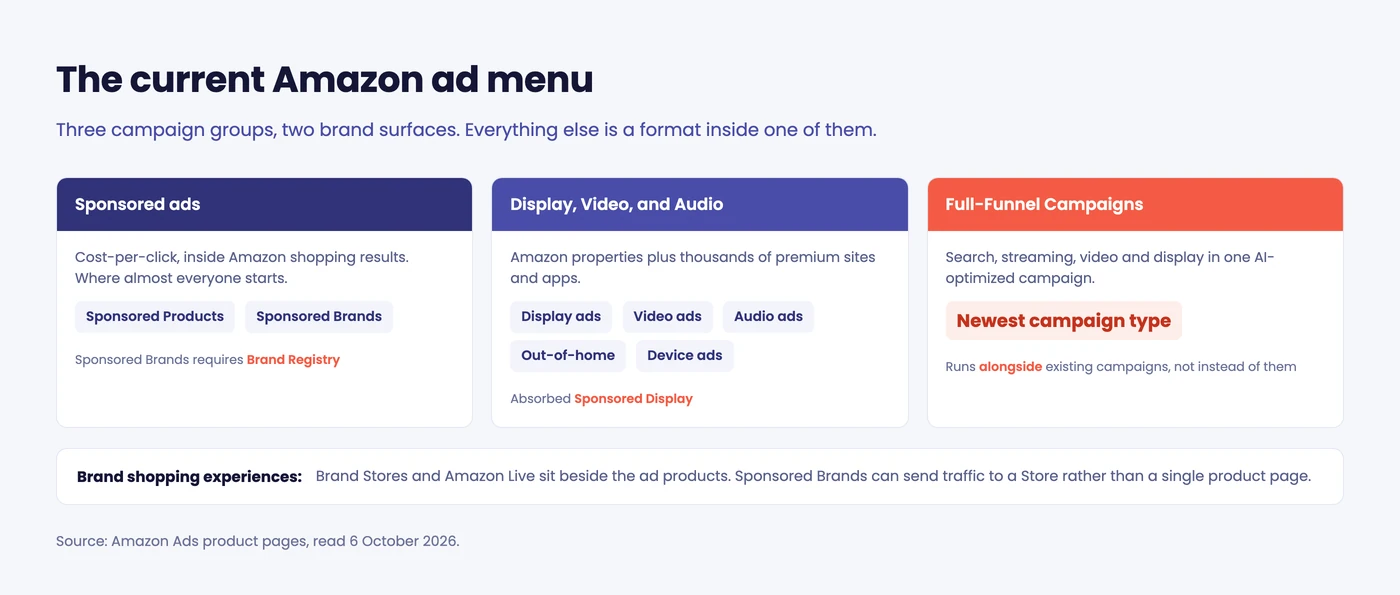
Amazon ad types now fall into 3 campaign groups: Sponsored ads (Sponsored Products and Sponsored Brands), Display, Video, and Audio, and Full-Funnel Campaigns. Two names you’ll still see in older guides are gone: AMS became Amazon Ads, and Sponsored Display is now simply display ads. Existing Sponsored Display campaigns keep running.
If you learned Amazon advertising from a guide written two or three years ago, some of what you know has been renamed.
Not repositioned, not deprecated with a long notice. Renamed, folded into something else, and left for you to spot on your own.
This is the current map, taken from Amazon’s own ad products page: what each type is, what it used to be called, and which ones are worth your first budget. Everything here is checked against Amazon’s own product pages rather than against other people’s blog posts, because that is where most of the stale information is coming from.
About the Author: Gloria Anderson writes for the SellerSonar editorial team on Amazon advertising, marketplace visibility, and seller operations. She has spent more time than she would like reconciling campaign reports that stopped matching last quarter’s names.
The renames, first, because they cause the most confusion
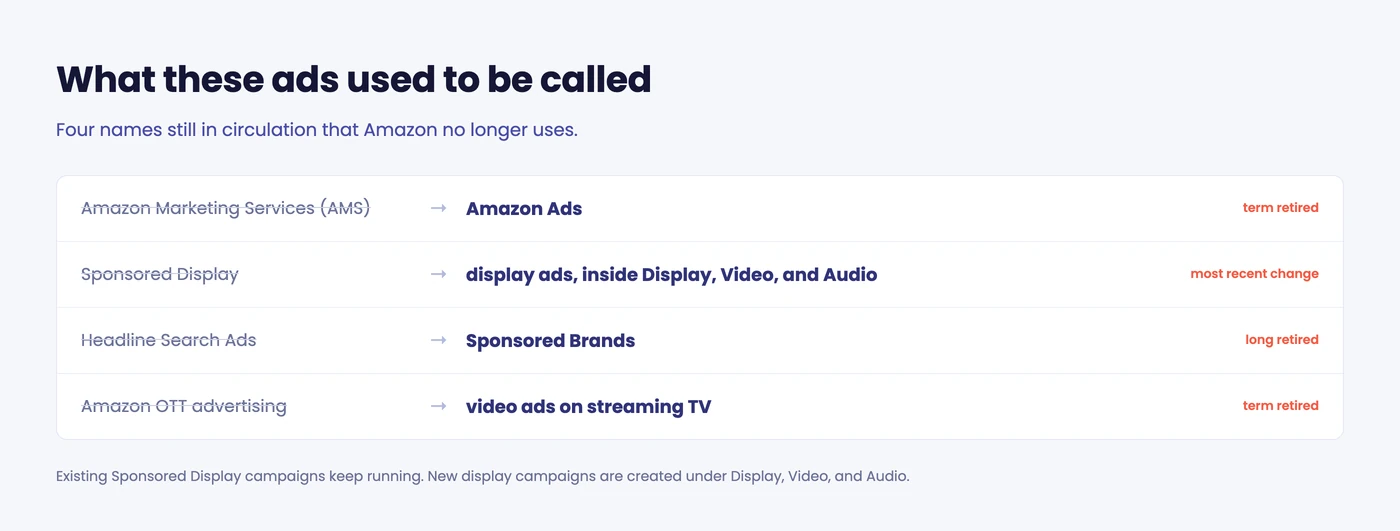
Four names are still circulating that Amazon has dropped. AMS is now Amazon Ads. Sponsored Display is now display ads, inside Display, Video, and Audio. Headline Search Ads became Sponsored Brands years ago, and what guides call Amazon OTT advertising is now just video ads on streaming TV.
The Sponsored Display change is the recent one, and it is the one that catches people mid-campaign. Per Amazon: “Sponsored Display is now a part of Amazon’s wider display ads offering within our ad platform, Amazon Ads Agent, that unifies access to all Amazon Ads products, bringing together sponsored ads and Amazon DSP workflows into a single workspace.”
Three practical consequences:
- Existing Sponsored Display campaigns keep running. Amazon says they “will continue to run uninterrupted,” and you reach them through Display, Video, and Audio campaigns.
- New display campaigns start somewhere else. Campaigns, then Create Campaign, then under “Display, Video, and Audio” choose Display.
- Sponsored ads and DSP now live in one workspace, which is the actual point of the change.
💡 Expert Tip: Before following any Amazon advertising tutorial, check the publish date and then check one product name against Amazon’s own site. If the guide says “Sponsored Display” as a current campaign type you create from the sponsored ads menu, it predates this change and its screenshots will not match what you see.
Sponsored ads
The cost-per-click family, and where almost every seller starts.
Sponsored Products
Amazon describes these as ads that “showcase individual products and drive discovery and sales more efficiently with ads that appear in Amazon shopping results.”
One product, one ad, shown to someone already searching. It’s the simplest thing to run, the easiest to measure against one ASIN, and the right first campaign for most sellers.
Sponsored Brands
In Amazon’s words, these “showcase discovery of your brand with ads that appear in shopping results.”
The difference from Sponsored Products is that you’re advertising more than one item: a logo, a headline, and several products or a video, rather than a single listing. That makes it a brand-awareness format, which also makes its return harder to read on any single ASIN.
Amazon’s current description is worth quoting, because the creative options have been relabelled before. Sponsored Brands “helps shoppers discover your brand with video, image, or collections,” appearing in “prominent placements like top of search and product pages,” and sending traffic “to your Brand Store or detail pages.”
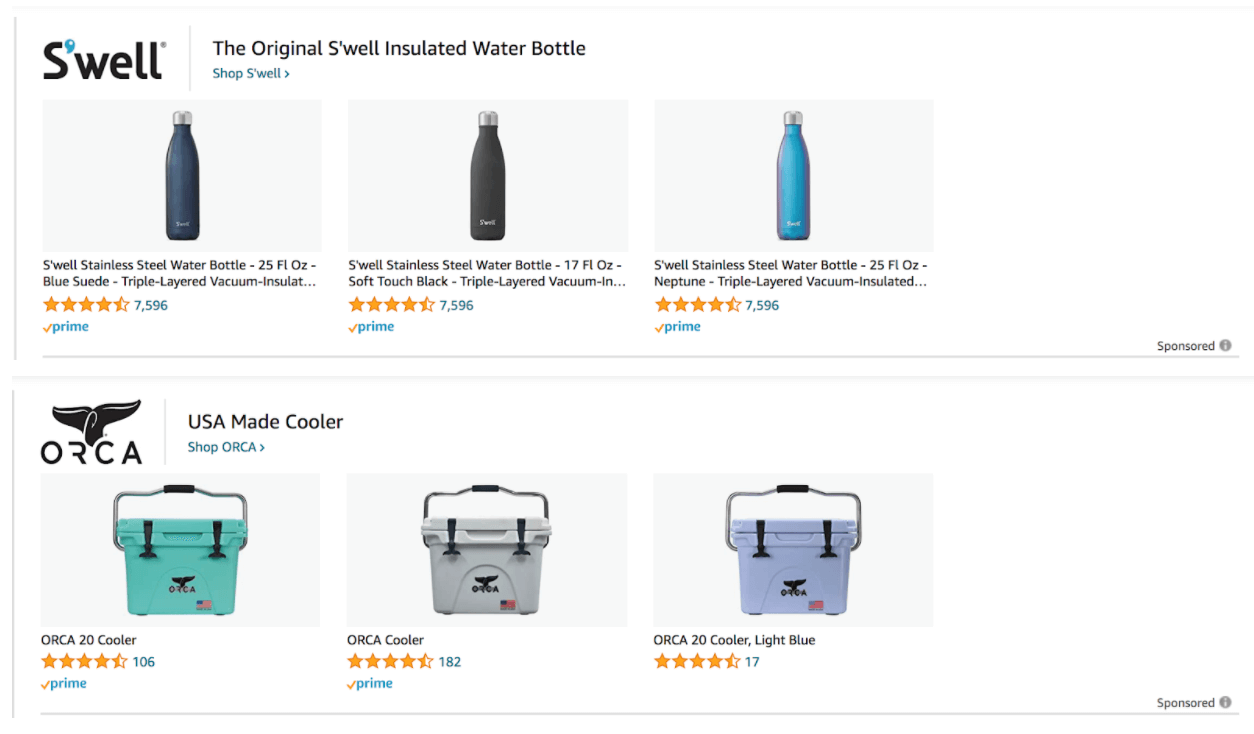
That last part decides more than people expect. A Sponsored Brands ad can land a shopper on one product page or on a Store holding your whole range. If you’ve built the Store, send them there. If you haven’t, you’re paying brand-ad prices for a single-product destination.
Display, Video, and Audio
The group that absorbed Sponsored Display, and the one most sellers have not looked at.
Amazon positions it as reaching “audiences across streaming TV, online video, display, and audio on Amazon properties and thousands of premium sites and apps.”
The formats inside it:
- Display ads. Flexible formats that reach audiences “wherever they spend time using Amazon-generated creative or your own creative assets.” This is where Sponsored Display went.
- Video ads. Streaming TV, including full-screen non-skippable ads inside shows and movies, plus in-stream and out-stream video on other sites. If you read about “Amazon OTT,” this is it.
- Audio ads. Streaming audio, in the connected home and beyond.
- Out-of-home ads. On-package ads, in-store signage, and locker pickup locations.
- Device ads. Fire tablet, Echo Show, Fire TV and Prime Video.
The last two exist, and most private-label sellers will never touch them. They’re here so you know the menu, not because you should be budgeting for locker signage.
Full-Funnel Campaigns
The newest campaign type, and the one no older guide mentions.
Amazon describes it as bringing “search, streaming, video, and display into one AI-optimized campaign, intended to grow sales and work alongside your existing campaigns,” launched “in a few clicks.”
Read “work alongside your existing campaigns” carefully. It’s positioned as an addition rather than a replacement, which means it spends on top of what you already run, not instead of it. Budget for that.
Brand shopping experiences
Not ads exactly, but Amazon groups them here and they interact with your campaigns.
- Brand Stores. A multi-page storefront for your brand. Sponsored Brands can send traffic to it instead of to a single product.
- Amazon Live. Shoppable livestreams.
🎯 Pro Insight: If you run Sponsored Brands without a Brand Store, you are sending expensive brand-level traffic to a single product page. The Store costs nothing to build. Build it before you raise the Sponsored Brands budget, not after.
Who can run what
Worth checking before you plan a budget around a format you can’t access.
Sponsored Brands requires Brand Registry. Per Amazon, it’s open to “vendors, book vendors, Kindle Direct Publishing (KDP) authors, agencies, and professional sellers enrolled in Amazon Brand Registry.” If you’re a professional seller without a registered brand, this one isn’t available to you yet, and registering is the prerequisite rather than a nice-to-have.
Amazon also excludes some inventory from these ads entirely: adult products, used products, refurbished products, and anything in a closed category.
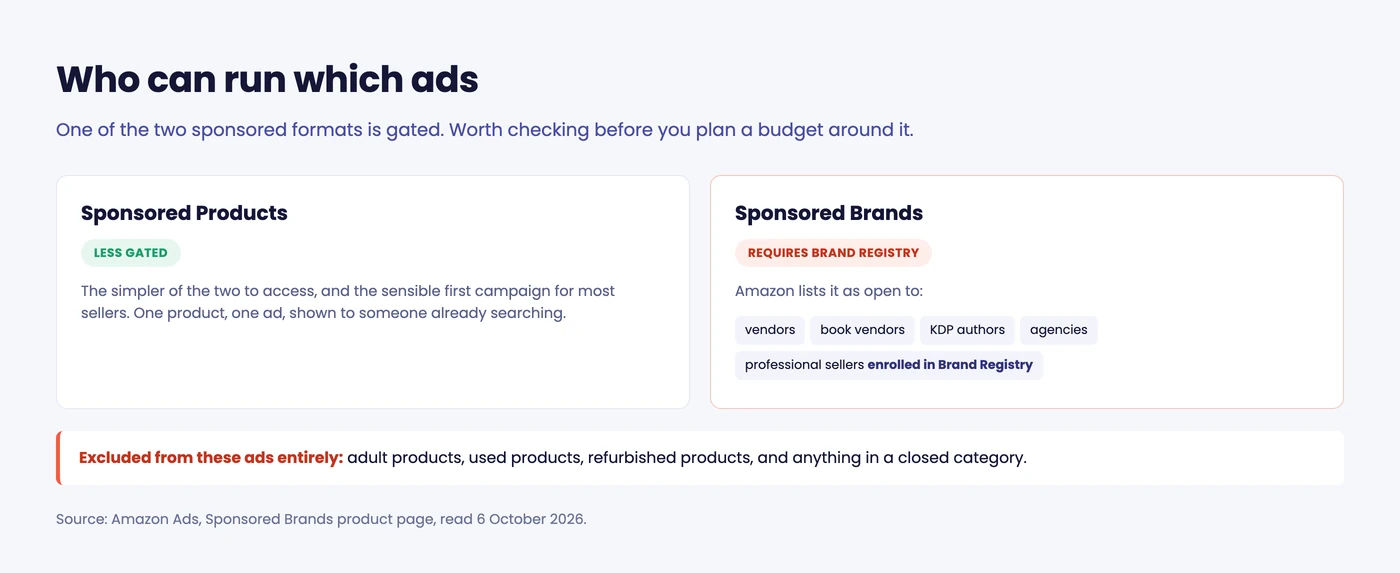
Sponsored Products is the less gated of the two, which is another reason it’s the sensible first campaign. If you are not registered yet, our guide to Amazon Brand Registry covers what enrolment unlocks beyond advertising.
📌 From Our Experience: Sellers often discover the Brand Registry requirement after planning a quarter around Sponsored Brands. If brand registration is still in progress, build the plan on Sponsored Products and treat everything else as a later phase.
Which to run first
In order, for a seller with a working listing and a limited budget:
- Sponsored Products. One campaign, your best-converting ASIN, a floor on bids, and two weeks of data before you touch anything.
- Sponsored Brands, once you have a Brand Store worth sending people to. Watch which terms actually move with keyword rank tracking rather than judging a brand campaign on ACOS alone.
- Display ads, when retargeting is worth paying for, which usually means after you know your conversion rate is healthy.
- Video, audio, Full-Funnel, when the first three are profitable and you are buying reach rather than sales.
Most sellers don’t need steps 3 and 4. The ones who jump there usually do it because the first two weren’t working, which is the one situation where more ad types won’t help.
A note on reading your own reports
One side effect of the renames is that your historical data outlives the labels on it.
If you exported reports before the Sponsored Display change, those rows still say Sponsored Display while the console now says display. Same campaigns, same spend, different word. When you compare this quarter against last, make sure you’re comparing the same thing and not an artifact of a rename.
The same goes for anything built on top of the ad API, or a spreadsheet that maps campaign types by name. Those mappings don’t update themselves.
What advertising cannot fix
Worth stating plainly, because it is the most expensive mistake in this whole category.
Ads do not fix a broken listing. They pay full price for it.
If your listing is suppressed, your Buy Box is gone, your main image got swapped, or an unauthorized seller is sitting on your ASIN, the campaigns keep spending and keep converting badly. The ad platform has no idea anything is wrong. It reports a rising cost per sale and leaves you to work out why.
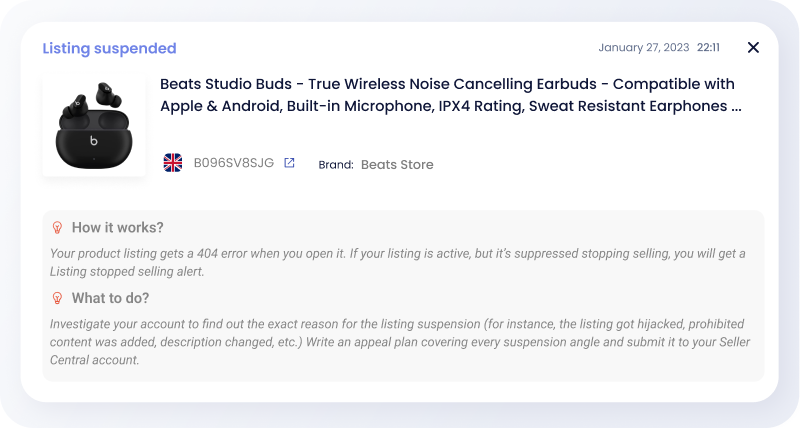
That gap is worth closing before you scale spend, not after:
- A suppressed listing can keep taking clicks while the product is unbuyable.
- Losing the Buy Box means your ad sends a shopper to someone else’s offer.
- A content change you didn’t make can undo the copy the campaign was built around.
- A competitor moving on your terms shows up in competitor monitoring before it shows up as a rising cost per sale.
📌 From Our Experience: The sellers who get the worst return on Amazon ads are rarely the ones with bad targeting. They are the ones whose listing broke on a Thursday and who found out from the ACOS report the following week.
Wrapping up
Amazon’s ad menu is not especially complicated. It’s just renamed often enough that most of the written guidance about it is quietly out of date, including, until today, several pages on this blog.
The current map is three campaign groups, two brand surfaces, and five ad formats. Start with Sponsored Products, add Sponsored Brands when you have a Store, and ignore the rest until the first two make money.
Final Expert Recommendations: Check the date on any Amazon advertising guide before you follow it, including this one. Names change faster than the advice does. And before you raise spend, confirm the listing underneath the campaign is intact, because advertising is the most expensive possible way to find out it isn’t.
Want to pull campaign performance into Claude or ChatGPT instead of opening the console? Our guide to the Amazon Ads MCP covers who can get access and how to connect it.
Want to know the moment a listing stops being worth advertising? Start a free 14-day SellerSonar trial and track 5 ASINs and 10 keywords, no credit card required.

