





Quick Answer
Amazon listing optimization is the work of making a product page both findable and convincing: title, images, bullets, backend search terms, description, and rating. Six parts, and they are not equal. Fix them in order of impact: rating, images, title, bullets, backend terms, then A+ content. Amazon’s own free AI now handles most of the copywriting, so the advantage has moved from writing the page to noticing when something changes it.
Amazon now writes your listing for you. For free, inside Seller Central, with a button.
So why does amazon listing optimization still matter? Because the button is a starting point, not a finish line. Amazon’s AI knows your product data. It doesn’t know your margin, your competitor’s new bundle, or the keyword that quietly stopped converting last month.
No A9 mythology. No 47-point checklist you’ll never finish.
About the Author: Diana Walsh writes for the SellerSonar editorial team on Amazon listing quality, search visibility, and seller operations. She spends most of her week looking at listings that stopped converting and working out which part broke.
What Amazon’s AI already does for your listing
Start here, because it’s free and most sellers haven’t tried it.
Enhance My Listing is Amazon’s own generative AI tool for improving listings you’ve already published. Amazon announced it in September 2024 and has updated it since. You open a listing, it suggests better titles, bullets, and descriptions based on your product data and what shoppers search for, and you accept or reject each one.
It’s genuinely decent at the boring parts. Filling gaps. Rewriting a title that reads like a spreadsheet. Catching attributes you left blank.
Seller Assistant is the bigger one. It runs on Amazon Bedrock using Anthropic’s Claude models, and per Amazon it has reached over 90% of selling partners worldwide, with sellers accepting its recommendations more than 90% of the time. That’s a lot of listings being shaped by the same engine.
Amazon has also started pushing this outside Seller Central. Its selling partner plugin is live in Amazon Quick and in beta with Claude, connecting your listing data, performance metrics, and inventory straight into the AI tool you already use.
Amazon says it takes about 60 seconds to connect, and needs no code.
💡 Expert Tip: Run Enhance My Listing before you pay anyone for a listing rewrite. You’ll find out fast whether your problem is copy (the AI fixes it) or something else entirely (it won’t). That’s a useful diagnostic, and it costs nothing.
Here’s the part worth sitting with. Per Amazon’s own announcement, 90% of selling partners already use third-party AI tools. Everyone has the same assistant now. Which means the copy itself is no longer where the advantage lives.
Where Amazon’s AI stops
It sees your account. That’s the whole boundary.
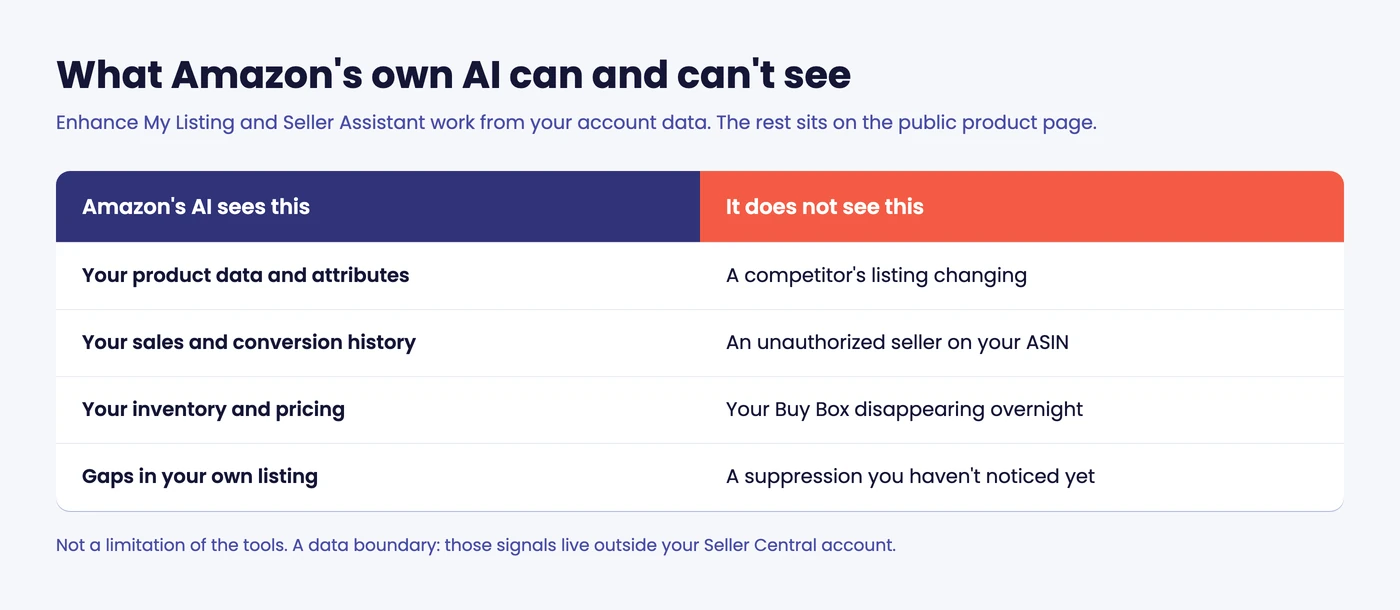
It can’t see a competitor’s listing changing, an unauthorized seller attaching to your ASIN, your Buy Box disappearing overnight, or a suppression you haven’t noticed yet.
None of that is a knock on Amazon. It’s a data boundary: those signals live on the public product page, outside your account, so no amount of account-side AI will surface them.
That boundary is what SellerSonar’s Amazon MCP server is built to cross. It reads the public product page rather than your Seller Central account.
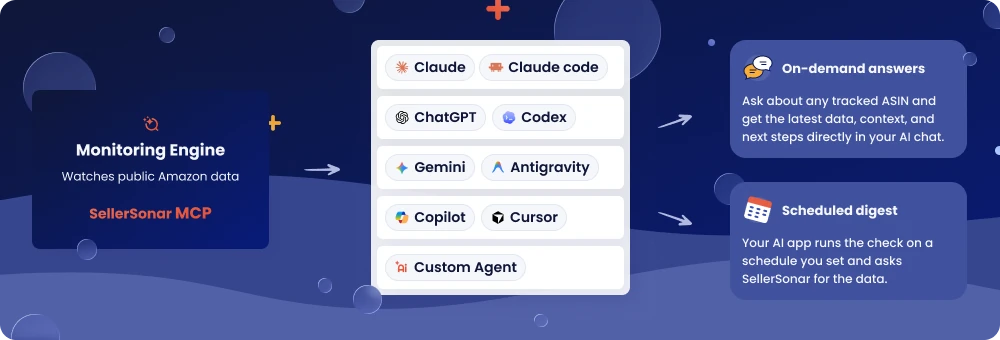
So the same AI assistant you already ask about your listing can tell you when a competitor moved, a hijacker appeared, or the Buy Box went.
The six parts of a listing that move your rank
Most amazon listing optimization advice sprawls across 40 bullet points. These are the parts that reliably do something.
Title
Your title is doing two jobs at once, and sellers usually optimize for one of them. It has to tell Amazon what the product is (so you’re indexed for the right terms) and tell a shopper why to click (so your click-through rate holds up).
Front-load the words buyers actually type, in this order:
- Brand
- The product noun
- The one or two attributes that decide the purchase: size, count, material, compatibility
Then stop.
A title stuffed to the character limit usually reads worse and converts worse. I’d rather see 120 useful characters than 200 desperate ones.
The mobile view is what settles this argument. On a phone, Amazon cuts your title well before the end, and whatever got cut might as well not exist. So the question isn’t “what can I fit?” It’s “what survives the cut?”
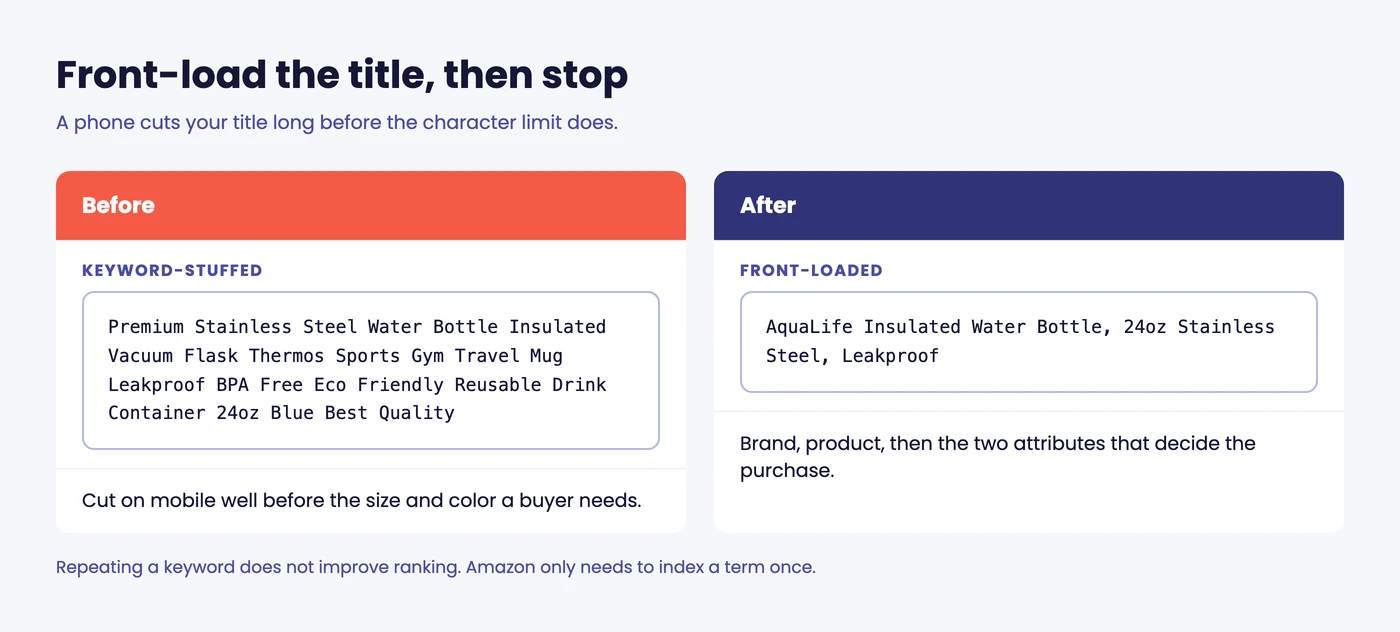
Try it on your own listing. Open it on your phone, look at where the text stops, and ask whether a stranger could tell what the product is from the part that’s still visible. If they couldn’t, the back half of your title is doing nothing except making the front half harder to read.
One more thing sellers get wrong here. Repeating a keyword in your title does not make you rank better for it; Amazon only needs to see a term once to index you for it. The second and third repetitions are spending your most valuable real estate on nothing.
Images
Images are where I see the most money left on the table, and it’s rarely about quality. It’s about coverage.
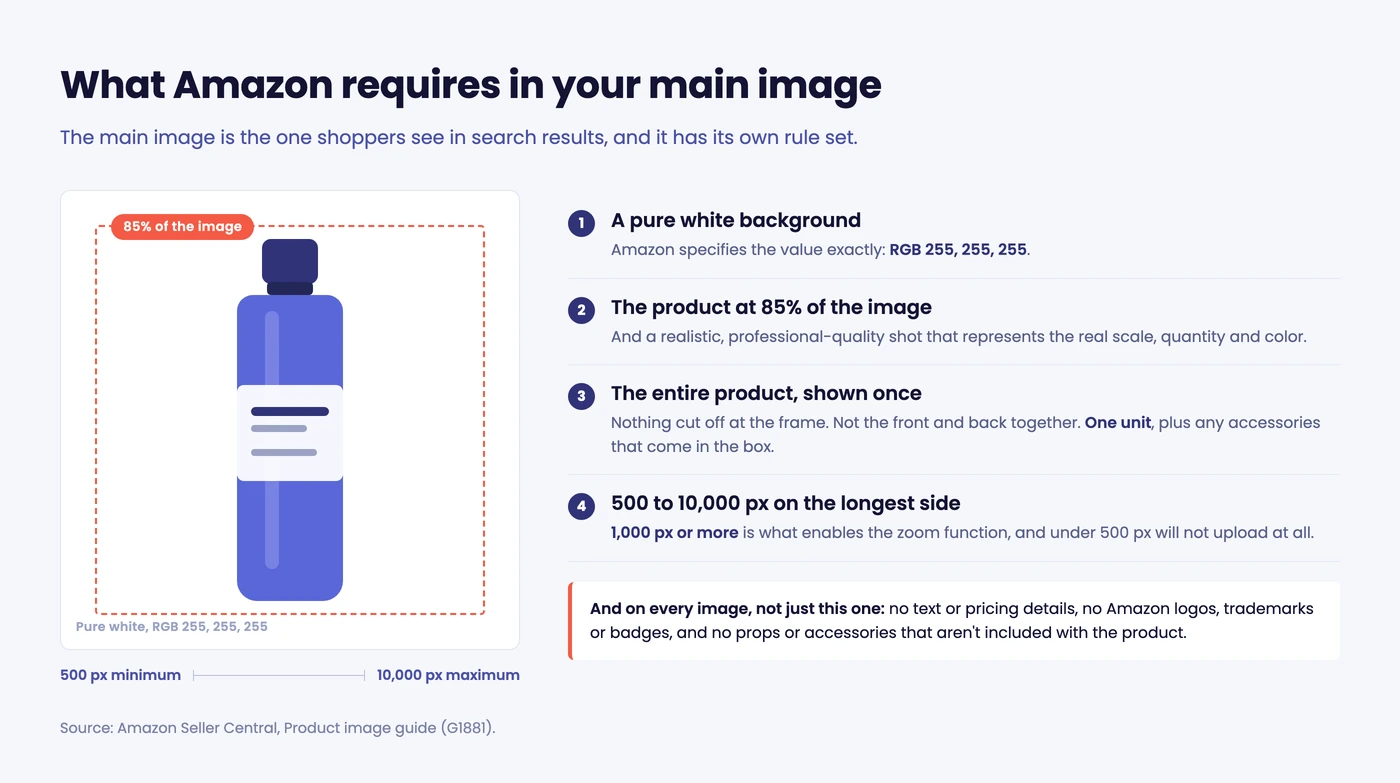
The specs first, because they’re non-negotiable:
- A pure white background, RGB 255, 255, 255, per Amazon’s product image guide
- The product at 85% of the frame, whole product visible, one unit only
- 500 to 10,000 pixels on the longest side, with 1,000+ recommended, which is what switches zoom on
Zoom matters more than it sounds. A shopper who can zoom into the stitching is a shopper who stops wondering about it.
Amazon also added a rule worth knowing if you’re generating images with AI: if your photo contains photorealistic AI-generated people, you have to tag it with the right metadata, because some jurisdictions require the disclosure. Easy to miss, and it’s in their guide now.
What matters more than the specs: use every slot.
Scale next to a hand or a common object. The product in use. A close-up of the thing people worry about. One image that answers the most common one-star complaint before anyone makes it.
Amazon’s own recommendation is at least six additional images plus one video on top of the main image. Most listings I look at have three.
Here’s a slot plan that works for most physical products:
- Main image. White background, product only, filling the frame.
- Scale. Next to a hand, a phone, or something everyone owns. Size confusion drives returns.
- In use. The product doing its job, in the place it’ll actually live.
- The detail people worry about. Stitching, seal, thread, connector, whatever the one-star reviews mention.
- What’s in the box. Every component laid out, counted.
- A comparison or spec graphic. Sizes, variants, compatibility.
- The objection-killer. Read your worst reviews, find the most repeated complaint, and answer it visually.
Most listings stop at four. The ones that convert rarely do. (We keep a longer breakdown of Amazon image requirements if you want the category-specific exceptions.)
That seventh one is the highest-impact image on the page and almost nobody has it. If three reviewers say the strap is too short, a photo of the strap at full extension next to a measuring tape will do more for your conversion rate than any title rewrite.
Bullet points
Bullets are not a feature list. They’re the objection-handling section of a sales page that nobody reads top to bottom.
Lead each one with the benefit in the first few words, because that’s all a phone shows before the fold. Put the specification after. If a bullet starts with “Made of 304 stainless steel”, flip it: what does the buyer get from that, and why should they care?
Five bullets. Each one a different objection.
A quick before and after:
Before: Made from premium 304 food-grade stainless steel with a durable powder-coated finish for long-lasting performance.
After: Won’t rust in the dishwasher. 304 food-grade stainless steel, powder-coated, safe for daily washing.
Same facts. The second one leads with the thing a buyer is actually worried about, and the specification earns its place by backing the claim up instead of opening with it.
If you’re stuck, pull your last 20 reviews and your last 10 pre-purchase questions. Your bullets should answer those, in order of how often they come up. (This is less creative work than it sounds, and it’s usually more accurate than guessing.)
Description and A+ content
If you’re eligible, A+ content replaces the plain description, and it’s worth the afternoon it takes. Modules, comparison charts, lifestyle images.
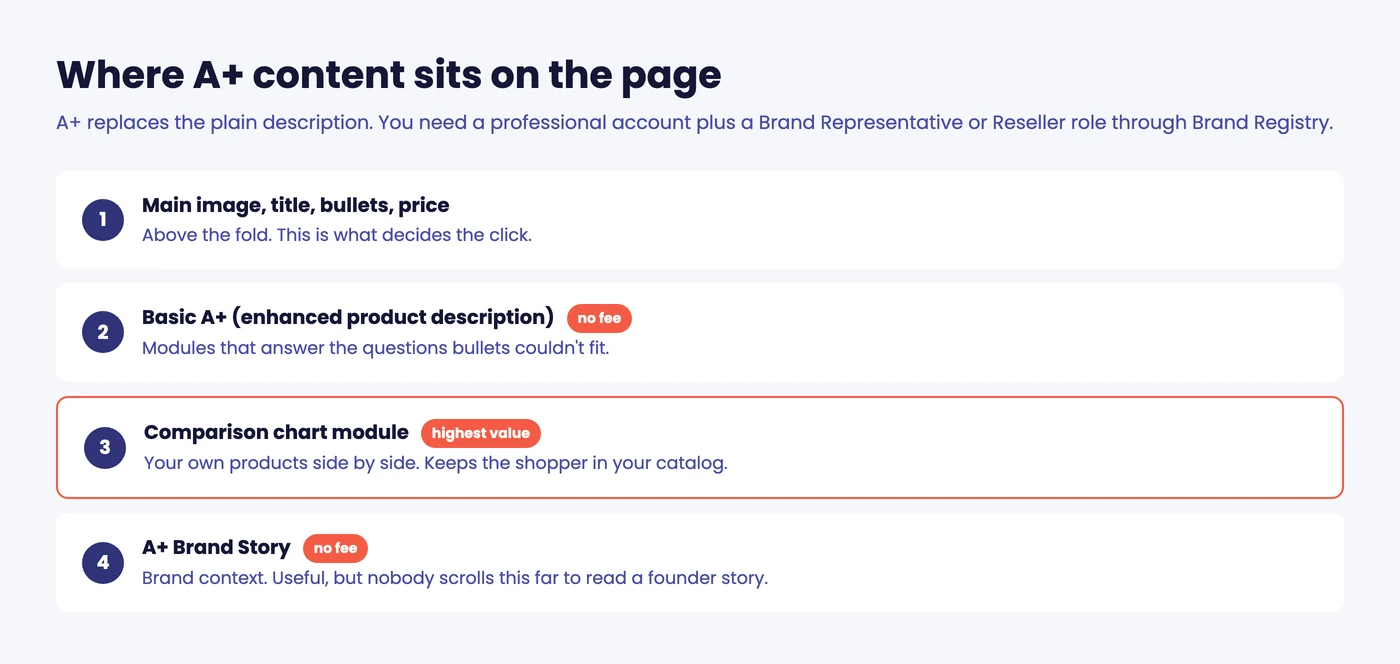
Eligibility is narrower than “have a brand”. Per Amazon’s A+ Content help page, you need a professional selling account and a Brand Representative or Reseller role for that brand through Brand Registry. Managed programs like Launchpad and Amazon Exclusives also qualify. Basic A+ and A+ Brand Story carry no fee.
If you don’t have Brand Registry yet, that’s probably a bigger lever than any copy change. Amazon Brand Registry unlocks A+ content, Brand Analytics, and better protection against hijackers, all at once.
What actually earns its space in A+: a comparison chart against your own other products, and one module that handles the question your bullets couldn’t fit. The chart matters because it keeps the shopper inside your catalog instead of sending them back to search.
What doesn’t: three lifestyle images of people laughing near your product, and a paragraph about your brand journey. Nobody scrolls that far to read a founder story.
Plain-text descriptions still matter if you’re not brand registered. Keep it short, keep it scannable, and don’t paste your bullets in again.
Backend search terms
The field nobody looks at, and the one that quietly decides what you’re indexed for.
Put the terms that don’t fit naturally in your visible copy here: synonyms, abbreviations, and alternative names for the same thing. If your product is a “beanie” and half your market calls it a “toque” or a “watch cap”, those belong in the backend.
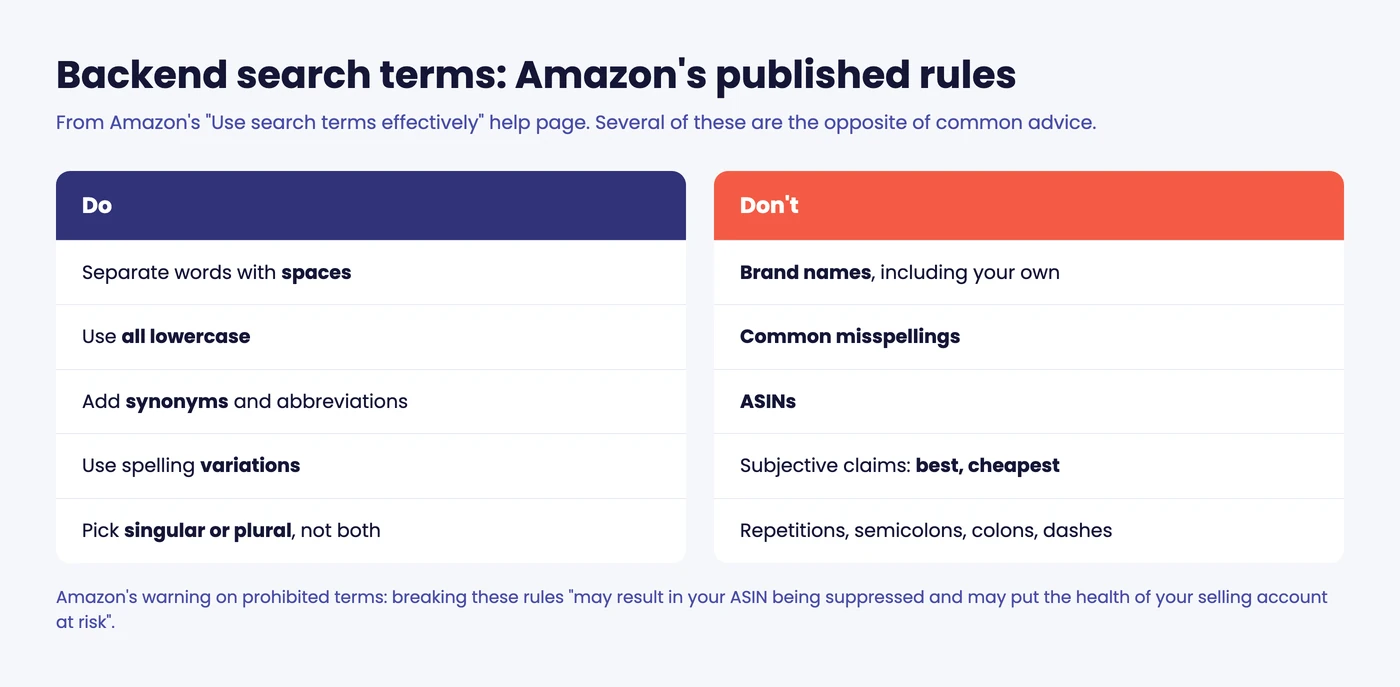
Amazon’s own guidance is more specific than most sellers realize, and a few of its rules are the opposite of common advice:
- Separate words with spaces. Avoid semicolons, colons, and dashes.
- Use all lowercase. Singular or plural, not both.
- Use spelling variations, but don’t add common misspellings. This one catches people out; Amazon handles misspellings on its side, and stuffing them in is wasted space.
- Avoid repetitions, and skip articles and prepositions like “a”, “and”, “for”, “of”, “the”, “with”.
- No brand names at all. Not a competitor’s, and not your own.
- No ASINs, no subjective claims (“best”, “cheapest”), and no temporary wording (“new”, “on sale now”).
That last group isn’t a style preference. Amazon says violating the prohibited-terms rules “may result in your ASIN being suppressed and may put the health of your selling account at risk”.
We go deeper on this in our guide to Amazon backend keywords, including the field limits and the mistakes that waste half the space.
Reviews and rating
You can’t write your way around a 3.2 rating. Nobody can.
Rating sits upstream of everything else in this list, because it caps the conversion rate your optimized copy is allowed to produce. If your rating dropped and your sales followed, the listing copy is not your problem.
Two situations, two different responses. A gradual slide usually means a product or packaging issue that’s been building, and copy won’t touch it.
A sudden drop is a different animal: a bad batch, a listing merge that pulled in another product’s reviews, or a competitor behaving badly. That kind is often fixable and often reversible, but only if you catch it while the trail is warm.
Either way, reviews are a signal about the product, and treating them as a marketing problem is how sellers waste a quarter.
🎯 Pro Insight: Fix the six parts in this order: rating, images, title, bullets, backend terms, A+ content. Most guides run it the other way around and start with the title, because the title is the easiest thing to change. Easy and high-impact aren’t the same thing.
How Amazon decides what ranks
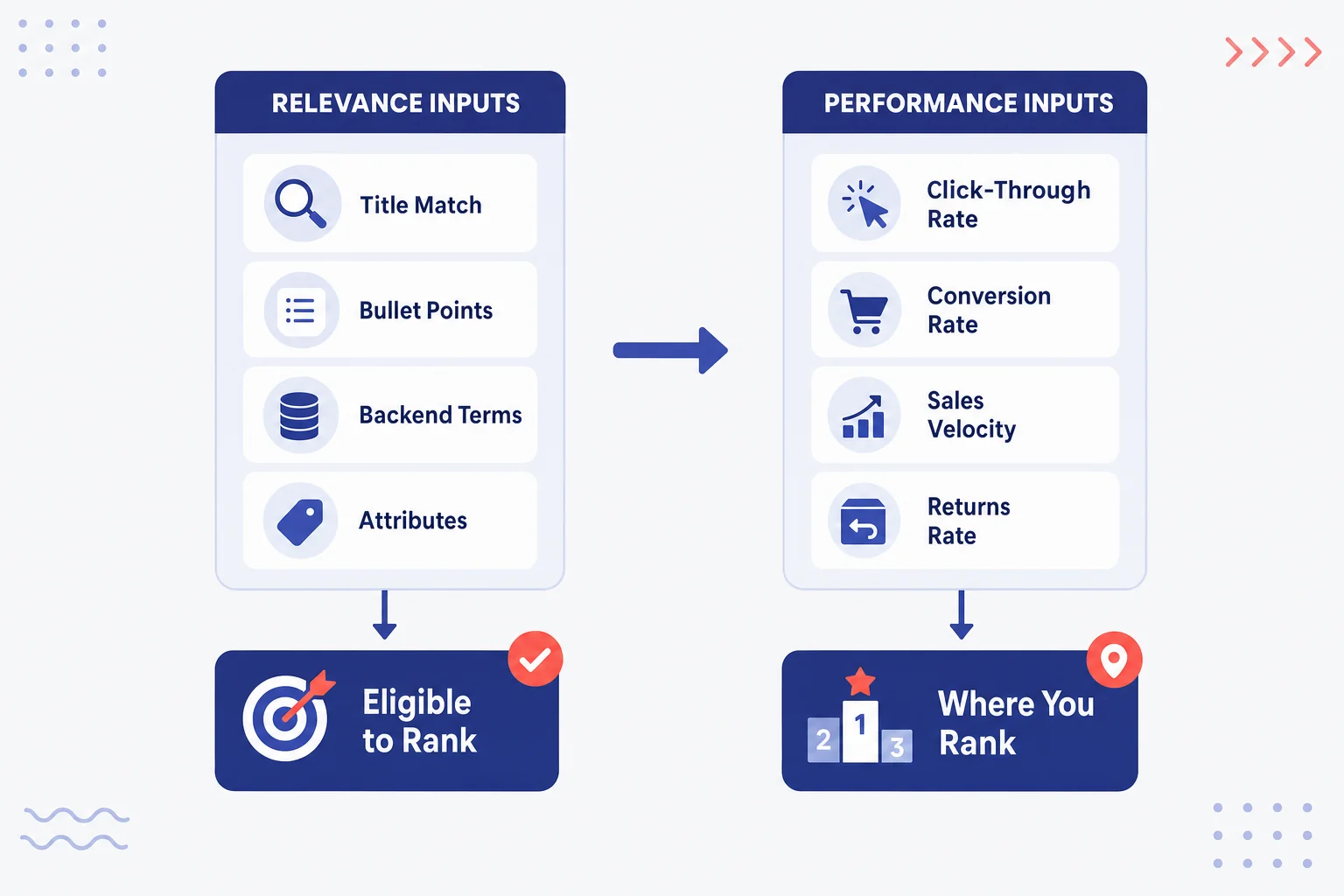
Two inputs. That’s genuinely most of it.
Relevance is whether Amazon thinks your listing matches the search. That comes from your title, bullets, description, backend terms, and attributes. If a term appears nowhere in your listing, you’re usually not indexed for it, and no amount of advertising fixes that permanently.
Performance is what happens after someone sees you. Click-through, conversion, sales velocity, and whether buyers keep the thing. A listing that gets clicks but no orders slides. A listing that converts well on a term climbs on it.
That’s the whole model, in practice.
You’ll see a lot written about “the A9 algorithm” and “A10” as though they’re published specifications with known weights. They aren’t. Amazon has never published either, and treating them as real gets sellers chasing rules nobody can verify.
Relevance gets you eligible. Performance decides where you sit among the eligible. Optimize for both, in that order.
The practical version, if you want something to act on:
- Not showing up at all for a term? That’s relevance. The term is missing from your listing, or you’re not indexed. Check indexing first, then your backend terms.
- Showing up but nobody clicks? That’s your main image and title, in that order, and possibly your price or rating showing in the search results.
- Getting clicks but no orders? That’s the detail page: images, bullets, reviews, price. Your listing is writing a cheque the product page can’t cash.
- Converting well but still sliding? Usually a competitor moved, or your velocity dropped for a reason outside the listing (stockouts do this, quietly).
Four symptoms, four different fixes. Most “my listing stopped working” posts are one of these, and diagnosing which one takes about five minutes.
A 20-minute listing audit
Most amazon listing optimization work starts with a diagnosis, not a rewrite. Set a timer and do this on your worst-performing ASIN first, not your best.
- Search your exact ASIN plus your main keyword in the Amazon search bar, as one query. If your product comes back, you’re indexed for that term. If nothing comes back, you aren’t, and that’s the whole problem. Fix indexing before anything else.
- Open your listing on a phone. Not a desktop. Most of your traffic is mobile, and the mobile view cuts your title and bullets in places you’ve never seen.
- Count your images. Fewer than seven, and you have work to do that costs nothing but time.
- Read your first bullet out loud. If it takes more than four seconds to reach a reason to buy, rewrite it.
- Check your backend search terms field. Not blank? Good. No commas, no repeated title words, no competitor brands? Better.
- Compare against the top three listings on your main keyword. Not to copy them. To spot the thing all three do that you don’t.
- Run your listing through a quality check. Our Amazon Listing Quality Checker is free and scores the structural parts in a few seconds, which is faster than eyeballing it.
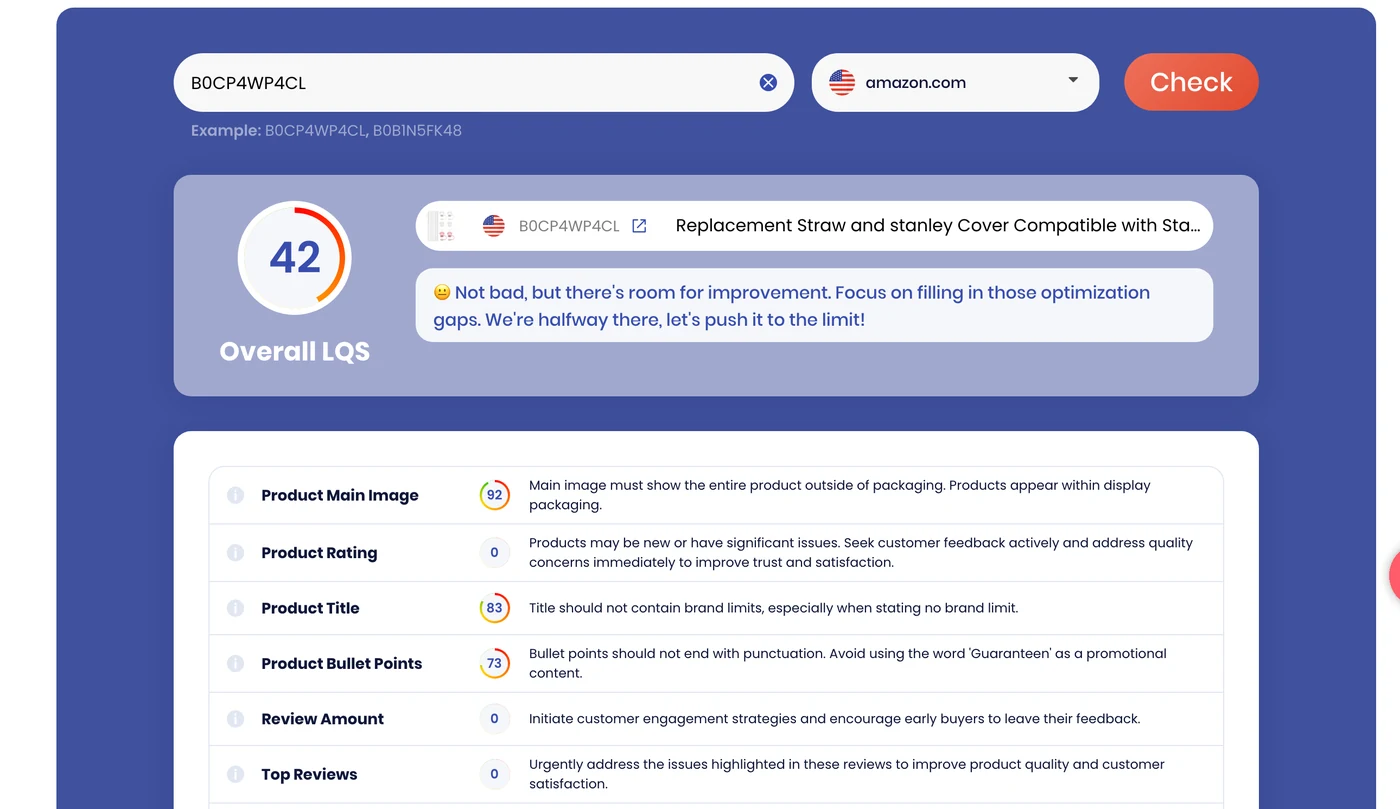
Twenty minutes. You’ll usually find two or three things, and one of them will be embarrassing. (That’s normal. I’ve never audited a listing and found nothing.)
What happens after you optimize
Here’s the part most guides skip entirely, and it’s the part that costs sellers money.
Amazon listing optimization is not a document you finish. It’s a page that other people can change.
Five things that change your listing without asking you:
- Amazon rewrites a title or attribute on its own, sometimes merging your content with another contributor’s
- A suppression appears, with no notification
- An unauthorized seller attaches to your ASIN and takes the Buy Box underneath you
- An image gets swapped
- A category assignment drifts
None of that announces itself. You find out from the sales graph, usually several days late, which is the expensive way to find out.
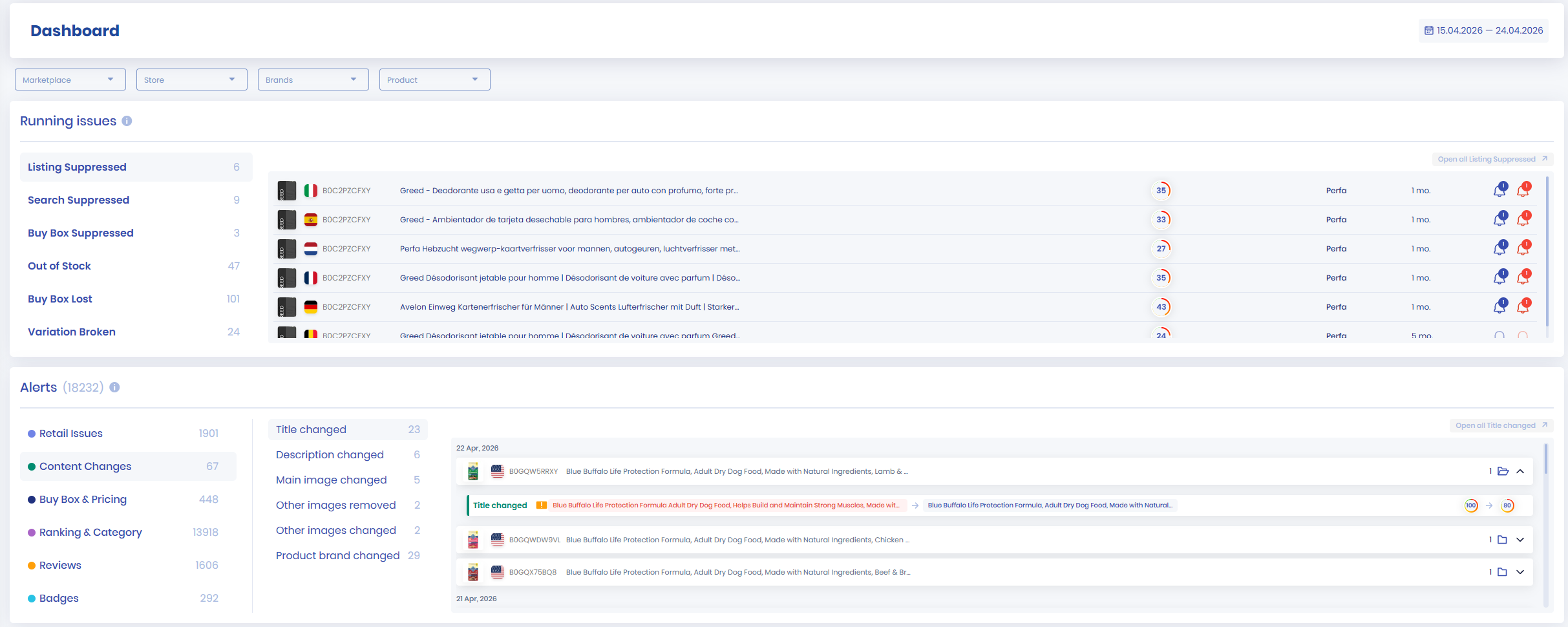
📌 From Our Experience: The sellers who get the most out of a listing rewrite are rarely the ones who wrote the best copy. They’re the ones who noticed within hours when something changed it back.
So the honest answer to “how often should I re-optimize?” is: don’t re-optimize on a schedule.
Watch for changes, and act when one happens. Listing change alerts handle the watching part, which means you’re not opening 200 product pages on a Tuesday to check whether anything moved.
Wrapping up
Amazon listing optimization in 2026 looks different from 2023, and the difference is who writes the words. Amazon does, for free, reasonably well, for almost everybody.
That shifts where the work is. Five things worth holding onto:
- Use Amazon’s free AI first. Enhance My Listing tells you quickly whether copy is actually your problem.
- Fix in order of impact: rating, images, title, bullets, backend terms, A+ content.
- Relevance gets you eligible. Performance decides your position. Skip the A9 and A10 folklore.
- Audit on your worst ASIN, not your best, and do it on a phone.
- The copy is a one-time job. Watching it isn’t.
Final Expert Recommendations: From what we see across seller accounts, the biggest gap is rarely the writing. It’s the delay.
A listing gets optimized in March, something changes it in June, and the seller notices in August from a sales dip. If you only do one thing after reading this, run the 20-minute audit on your three worst ASINs this week, then set up change detection so you don’t have to run it again from scratch.
The audit finds today’s problems. The alerts find next month’s.
Want to know the moment your listing changes instead of three weeks later? Start a free 14-day SellerSonar trial and track 5 ASINs and 10 keywords, no credit card required.

