





Quick Answer
Here’s how to prepare for Amazon Prime Day: work backwards from the event, not forwards from today. Amazon’s deal submission window and FBA inventory arrival deadlines close roughly four weeks before the sale, so the decisions that matter are made a month out. For Prime Big Deal Days on October 6-7, 2026, submissions closed September 22 and the last FBA arrival date was September 16. If those dates have passed, you still have coupons, Prime Exclusive Discounts, advertising, and listing fixes. Those have no submission window.
About the Author: Gloria Anderson is an Amazon Brand Protection Specialist with 9 years of experience helping private label brands and distributors protect their pricing policies on Amazon. She has worked with brands managing 50 to 2,000+ resellers and has seen firsthand what happens when MAP enforcement is reactive instead of proactive.
Here is the part nobody puts in the headline: by the time most sellers search for how to prepare for Amazon Prime Day, the deadlines they most need have already closed.
That’s not a scare tactic. It’s just how Amazon schedules these events. Submissions open in July. They close in September. Amazon announced the October 2026 dates on September 15, six days after the original submission window had already shut. Sellers who waited for the official announcement before planning were, by definition, too late to submit a deal.
Which is a shame, because the event is worth planning for. US shoppers spent $26.4 billion online across all retailers during the four days of the June 2026 Prime Day, up 9.3% on the equivalent 2025 window, according to Adobe Analytics data reported by Digital Commerce 360. That figure covers the whole US ecommerce market during the period rather than Amazon alone, so treat it as a measure of how much attention the window pulls, not as Amazon’s own revenue.
So this guide is built around the calendar rather than a list of tips. What to do when you have a month. What to do when you have a week. And what actually goes wrong during the 48 hours, which is the part the other prep guides skip entirely.
Work the Prime Day Calendar Backwards
Amazon runs two Prime events a year now. The summer one, which ran June 23-26 in 2026, and the autumn one, Prime Big Deal Days. Amazon’s announcement of the October event puts it at 48 hours starting 12:01 a.m. PDT on October 6, 2026, for Prime members in 22 countries, across more than 35 categories.
Never assume the month, though. Amazon moved the summer event two weeks earlier in 2026, and the month hasn’t been stable year to year.
What is stable is the shape of the runway. Here is how the 2026 October event actually sequenced, per Amazon’s seller announcement on holiday fees and deadlines:
| Milestone | 2026 date | How far out |
|---|---|---|
| Deal submission opens | July 8 | ~13 weeks |
| Early-submission fee saving ends | August 5 | ~9 weeks |
| AWD inventory arrival | September 2 | ~5 weeks |
| FBA arrival, minimal splits | September 9 | ~4 weeks |
| FBA arrival, optimized splits | September 16 | ~3 weeks |
| Deal submission closes (extended) | September 22 | ~2 weeks |
| Prime Big Deal Days | October 6-7 | Event |
| Peak fulfillment fees begin | October 15 | +1 week |
Read that column on the right again. The real work sits between nine and three weeks out. Everything after that is execution.
The submission deadline moved, by the way. It was September 8, then Amazon extended it to September 22 for US sellers. Useful to know, and also a reason not to build a plan around an extension you can’t count on.
💡 Expert Tip: Put the arrival deadline in your calendar, not the ship date. FBA deadlines are when units need to be checked in at the fulfillment center, not when they leave your warehouse or your supplier’s. In our experience that gap is where most missed deadlines actually happen, and it’s usually two to three weeks wide for anything coming from overseas.
And if you’re reading this in the autumn, the next set of deadlines is already visible. For Black Friday week and Cyber Monday 2026, the same announcement puts AWD arrival at October 14, FBA with minimal splits at October 21, and FBA with optimized splits at October 28. Those are the ones still ahead of you.
Preparing Late: What Still Works
Missed the submission window? You haven’t missed the event.
This is the section I wish more prep guides included, because the honest answer is that a lot of Prime Day upside has nothing to do with a submitted deal. Several levers have no deadline at all:
- Coupons. You can create, adjust, and stop them whenever you like. They show a green badge on the search results page, which is most of the visual benefit of a deal.
- Prime Exclusive Discounts. Prime-member pricing with a strikethrough on the detail page. Set these up close to the event.
- Advertising. Nothing stops you raising budgets on the day itself.
- Listing fixes. Free, immediate, and probably the highest-return thing on this list.
- Price positioning. A competitive price with no badge still wins the Buy Box, and the Buy Box is what actually converts.
Deal fees are worth a word here.

Amazon charges for Lightning Deals, Best Deals, and Prime Exclusive Price Discounts, and the published figures have been inconsistent enough that I would not quote a number at you. Check the fee shown in your own Seller Central deals dashboard before you commit, because it varies by promotion type and by event.
The promotion mechanics differ by event, and the four types Amazon runs for the October sale are broken down in our Prime Big Deal Days seller guide. This page stays deliberately event-agnostic, because the playbook repeats every year even when the dates move.
One more late-stage lever: your own audience. An email list or a social following can push external traffic on the day, and Amazon has historically rewarded off-platform traffic. It’s not nothing. It’s also not a substitute for being stocked.
Fix the Listings That Carry the Event
Pick your winners first. Prime Day isn’t the moment to resuscitate a slow ASIN; the algorithm already favors products with sales velocity, so the same promotional push goes further on something that is already moving.
Then audit those specific listings rather than the whole catalog. You’re looking for:
- Missing or thin bullet points, especially anything a buyer would need to decide in ten seconds
- Image sets under seven images, or no lifestyle shot
- Unanswered customer questions sitting on the detail page
- Missing backend search terms
- Any A+ Content gaps if you’re brand registered
Then check for suppression. A suppressed or inactive listing is invisible, and Amazon doesn’t always tell you loudly when one flips. Finding that on October 6 is a genuinely bad morning. Finding it on September 20 costs you twenty minutes.

On reviews: use the Request a Review button in Seller Central. Don’t go looking for the Early Reviewer Program, which Amazon closed to new enrollments in March 2021 and shut down entirely that April. Vine is the current equivalent for brand-registered sellers, and it needs lead time, so it’s a plan-ahead tool rather than a rescue.
Prime Day Inventory Math
Stockouts are the expensive failure mode, and they compound: you lose the sale, the ranking, and the review velocity all at once.
Pull last year’s numbers for the same event, not for an average month. Look at the units your top ASINs moved during the event window specifically, then add a buffer. I would say a week of normal sell-through is a reasonable cushion for a first attempt, more if your lead times are long or your category is gift-heavy.
Then factor the fees, because Q4 changes the math. Holiday peak fulfillment fees run from October 15, 2026 through January 14, 2027, averaging about $0.32 more per unit than non-peak rates, with a 3.5% fuel and logistics surcharge stacked on top. That’s an average across all sizes, so run your own sizes through the FBA calculator rather than applying $0.32 to the whole catalog.
Note the timing. Peak fees start eight days after Prime Big Deal Days. Units shipping during the event itself are still on standard rates; units shipping for Black Friday aren’t.
🎯 Pro Insight: Overshooting inventory is usually cheaper than undershooting, but only until October 15. After that you are paying peak fulfillment on every unit plus long-term storage on whatever does not clear. The asymmetry flips partway through Q4, which is why the October event and the November one need separate inventory decisions rather than one big order.
Ad Budgets on the Day
Budgets exhaust faster than usual. That’s the whole story, mechanically.
Traffic spikes, CPCs rise because everyone else raised their bids too, and a daily budget calibrated for a normal Tuesday will burn out by mid-morning. Then your listing goes dark on paid placements during the exact window you were preparing for.
I’m not going to hand you a multiplier, because the right number depends on your category, your margin, and how much of your traffic is paid to begin with. What I’d do instead: check budget utilization on day one of the last comparable event. If campaigns capped out before noon, that tells you more than any rule of thumb.
Two things worth setting up beforehand:
- Dynamic bidding, down only, if you’re nervous about spend. Up and down if you’re chasing volume and can absorb a higher ACoS for two days.
- Sponsored Products on your deal ASINs. The ad surfaces the deal badge, which is a meaningful click-through difference when shoppers are specifically hunting discounts.
Beyond that, general PPC strategy doesn’t change much for an event. The budget ceiling is the thing that breaks.
What Breaks During a Deal Event
Here’s what the other prep guides don’t cover, and it’s the part that costs real money.
During a deal event, your best listings become the most attractive targets on the marketplace. High traffic, high conversion, competitors watching. From what we see across customer accounts, the failure modes cluster:
- Buy Box loss. Volatility spikes during deal events. A competitor undercuts, or a third-party seller appears on your ASIN, and you keep paying for ads that now send traffic to someone else’s Buy Box.
- Hijackers. High-traffic listings attract unauthorized sellers, and a hijacker who lands on October 6 has 48 hours of peak traffic before most sellers notice.
- Suppression. A listing can flip inactive mid-event over an image or attribute issue.
- Price errors. A repricer misfiring during a discount period can sell inventory below cost at volume.
None of these announce themselves. You find out when the sales graph looks wrong, which is usually hours later.
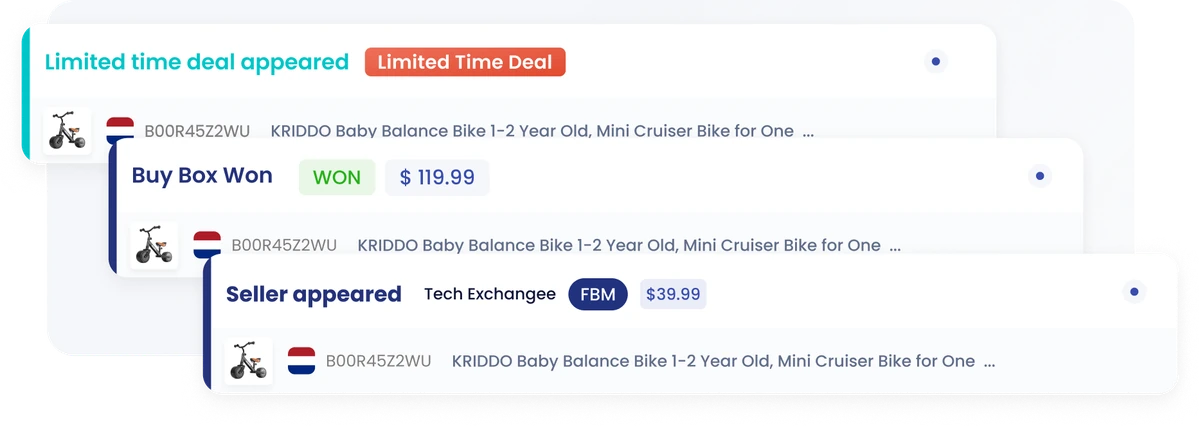
This is the honest case for monitoring, and I’ll be straight about the limits: alerts won’t stop any of it from happening. Amazon is Amazon. What they change is how long a problem runs before you know about it.
Buy Box monitoring and hijacking alerts close the gap between a problem starting and you noticing it. Across a two-day or four-day event, on your best ASIN, that gap is the whole argument.
📌 From Our Experience: Set your alert thresholds before the event, not during it. Deal pricing triggers a lot of legitimate price-change noise, and sellers who leave default thresholds on tend to get flooded and start ignoring notifications on exactly the day they should be reading them.
The Bill That Arrives in November
Deal events have a delayed cost almost nobody plans for.
You sold a lot of units at a discount, often to first-time buyers of your product, often as gifts. Some fraction of those come back. The returns land weeks after the event, and the return rate on those ASINs climbs.
That matters now, because Amazon displays a frequently returned item badge on listings with high return rates relative to their category. Which sets up a genuinely unpleasant sequence: your best-performing October listing picks up a badge in November that suppresses conversion going into Black Friday and Christmas.
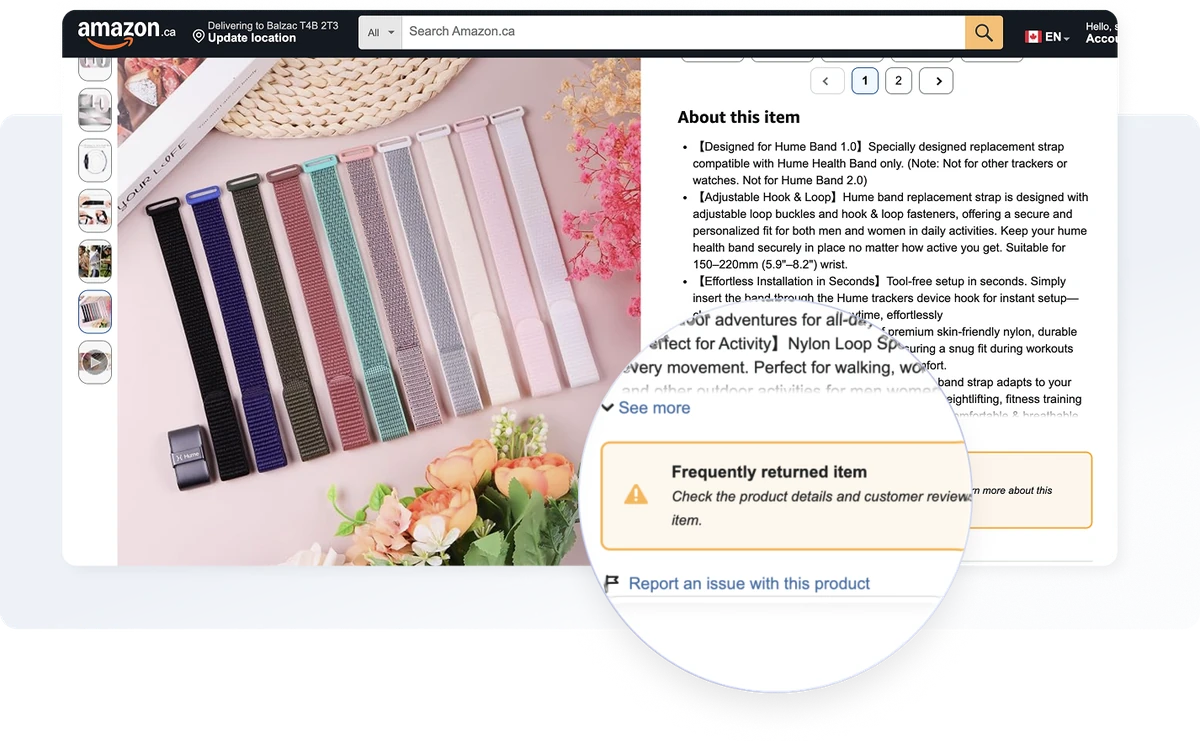
I don’t think this is a reason to skip deal events. It’s a reason to watch return rates on your deal ASINs for the six weeks afterwards instead of closing the book on the event the day it ends.
Your 72-Hour Reset
The three days after the event are worth more attention than they usually get.
Reset pricing. Discounts you set to stay competitive should come back up. Products that did not move at a discount probably need to come down further, not return to list price. Repricing within a few days keeps momentum and avoids the post-event dip.
Rebalance ads. Budgets back to normal, but read the search term report first. Deal events generate keyword data you cannot get any other way, because a different set of shoppers searched their way to your product. Some of those terms are worth keeping.
Sort out inventory. Restock what sold through before the peak-fee window bites. Remove or reprice overstock before storage fees do it for you.
Write down what happened. Which ASINs carried it, what the actual margin was after deal fees and peak fulfillment, which competitors showed up. You’ll want that document in July, when submissions open again and you have forgotten all of it. I always think I’ll remember. I never do.
Conclusion
Knowing how to prepare for Amazon Prime Day comes down to accepting that it is a calendar problem first. The submission window and the inventory arrival dates close about a month before the event, so the sellers who do well are the ones planning in July and August, not the ones reacting to Amazon’s announcement in September.
If you’re late, you’re not out. Coupons, Prime Exclusive Discounts, advertising, and listing repairs all still work, and a clean listing at a competitive price beats a badge on a broken one.
Then plan for the 48 hours themselves, and for the six weeks after. That is where this event differs from a normal week: the Buy Box moves, hijackers show up, and the returns arrive in November attached to the listing that performed best in October.
Final Expert Recommendations:
Based on what we see going wrong around these events, the highest-return hour you can spend is auditing your top five ASINs for suppression and content gaps, because it’s free, it takes an hour, and a suppressed listing turns your entire plan into nothing. If you’re just getting started, ignore the deal submission entirely for your first event and run coupons instead. You’ll learn the same lessons about inventory and ad budgets without paying a promotion fee to learn them. And whatever else you do, set up monitoring on the ASINs you are promoting before the event opens, so a Buy Box loss at 2 a.m. does not run until lunchtime.
Want to see what event-period monitoring looks like on your own ASINs? Sign up for a free 14-day trial.

