






Amazon FBA fees come down to one subtraction: selling price, minus the referral fee, minus the FBA fulfilment fee, minus storage, minus your own product and freight costs. What is left is your margin. An FBA calculator runs that subtraction for one product at one price using Amazon’s current rates.
This page covers how to run the calculator, which fees it includes, which costs it quietly leaves out, and how to rebuild the same arithmetic in a spreadsheet when you need to compare more than one product at a time.
What is an Amazon FBA Fees Calculator?
If you are still weighing up the programme itself rather than the maths, start with what Amazon FBA is and what it costs.
The FBA calculator on Amazon, also known as the Amazon Revenue Calculator, is a seller tool available from Amazon that is designed to calculate Amazon fulfillment costs for your product. This instrument helps sellers compare Amazon’s fulfillment charges with those of other 3PL order fulfillment services.
However, Amazon warns sellers that the free Amazon FBA calculator should be used only as a guide since the calculation is inaccurate. Sellers can use this option for rough evaluation of fulfillment charges per order, but for precise calculations, you’ll need to check your Amazon Services Business Solutions Agreement. Additionally, the New Amazon Fulfillment option can help verify your Selling on Amazon fees and FBA fulfillment fees, including the long-term storage fee for products stored at an Amazon fulfillment center.
Keep in mind that the calculations may vary depending on the marketplace, so you’ll need to use the right calculator applicable to the marketplace where you sell.
Which FBA Fees Are Included in FBA Estimator?
There are many different fees associated with the FBA program, and without a tool like the FBA Calculator, it can be tough to get a real sense of what selling on Amazon costs. Therefore, it’s essential to clarify which fees your FBA Calculator includes and what those costs represent to feel confident in the data you are getting from this tool.
Here is a brief description of fees included in the Amazon Tax Calculator.
Amazon Selling Fees
Two fees apply to every sale before FBA is even involved: the referral fee, and a closing fee on media.
The referral fee is what Amazon charges for the sale itself. Amazon takes either a percentage of the sale price or a per-category minimum, whichever is greater. Both numbers vary by category and are revised periodically, so read them from Amazon’s current schedule rather than from any article, this one included.
The closing fee is narrower. It applies only to media: books, music, video, DVD, software, video games and consoles.
FBA Fees
The FBA fee is calculated based on the weight and dimensions of the item. It comprises a monthly storage fee and a fulfillment fee. The Fulfillment Fee covers labor costs for packaging and shipping supplies (labels, boxes, dunnage), shipping to the client, and customer service that Amazon fulfills. The Monthly Storage Fee is calculated based on the volume of the product (in cubic feet).
To maximize your Amazon FBA profit, understanding these fees is crucial. Leveraging tools provided on Amazon Seller Central can help you manage your amazon store more effectively.
When to Use the Amazon Fee Calculator?
One of the most valuable times for an FBA seller to use the FBA Calculator is when researching new items to sell on Amazon. This tool allows sellers to calculate Amazon FBA costs and get a sense of the potential profit margin they can expect for a particular product. The Amazon FBA revenue calculator provides a clear picture of the per-unit FBA costs. Additionally, this calculator helps you understand the margin impacts of adjusting your goods’ cost or sale price. This information is crucial for setting your product cost budget, determining your minimum price to stay profitable, and estimating the potential margins from a higher price. Finally, the Amazon fee estimator is useful for FBA sellers considering a switch from a merchant-fulfilled model to FBA, since it puts the costs and margins of each side by side.
How to Use Fulfillment by Amazon Revenue Calculator?
The Amazon FBA fees estimator is great for determining your Fulfillment by Amazon fee. However, you can use Amazon’s FBA calculator not only for expenditures but also as an Amazon profit calculator. To get the bigger picture, we have put together some simple tips on monitoring your spending and measuring actual profits.
Now that you have a sense of the types of Amazon charges the Amazon profitability calculator includes and what such fees represent, let’s dive into what these calculations look like in real life for a specific product.
Step 1
When using the FBA Calculator, the first step is to fill in an identifier to pull up the item you’re researching (feel free to use the ASIN, ISBN, EAN, or search term).
Step 2
As soon as you pull up the item, you can enter values in the Amazon Fulfillment column fields to calculate the margin for your specific item. The first value to enter is the Product Price. You can find similar goods to understand the pricing range and play around with these values to see the margin influence you receive from lowering or raising the price. For instance, we’ll use a sale price of $12.99.
Step 3
The following field you need to fill in is the Ship to Amazon info. If you already sell goods on Amazon, you might have a sense of the average per-unit price to ship your items to the Amazon warehouses. Of course, it will vary depending on the dimensions and weight handling of the product and the quantity you send at any given time. It’s another place where it pays to try a range of costs and watch what happens to the margin. Otherwise, you can leave this field blank; however, if you do, be sure to expect margin impacts and additional costs from your shipping expenses. Let’s use a shipping cost of $0.40 per item in our example.
Step 4
The final info to enter in the calculator is the Cost of the Product. It’s where you will fill in your per-unit cost to buy this item from a manufacturer or wholesaler. Keep in mind this should be an “all-in” charge, including any fees for overseas delivery, customs, packaging materials, or other costs related to buying this item. We will use a value of $3.50. As soon as you input this field, click Calculate.
Results
Here the Amazon FBA calculator will show you the net profit and margin for the item based on your input values. In addition, you’ll see that Selling on Amazon commissions and Fulfillment By Amazon (FBA) costs have been estimated, displaying a Total Fulfillment Cost.
The tool produces a series of bar graphs on the right of your screen, providing a convenient representation of your revenue, costs, seller proceeds, and net profit.
Are There Any Alternatives to Amazon FBA Fee Calculator?
Of course! There are many apps available online that merchants can benefit from. Some of them are even capable of cross-platform operation.
Some seller tools bundle their own estimator into the software or a browser extension, which keeps the research and the maths in one place instead of spread across tabs. Ours is one of them: the SellerSonar FBA calculator, free and without a login.
SellerSonar is a comprehensive Amazon software that helps automate metrics monitoring. With it, you can set up notifications and track changes on any Amazon product without connecting to the Seller Central account. And the great part is that it provides a free Amazon FBA calculator, and a full breakdown of every charge in our guide to Amazon seller fees.
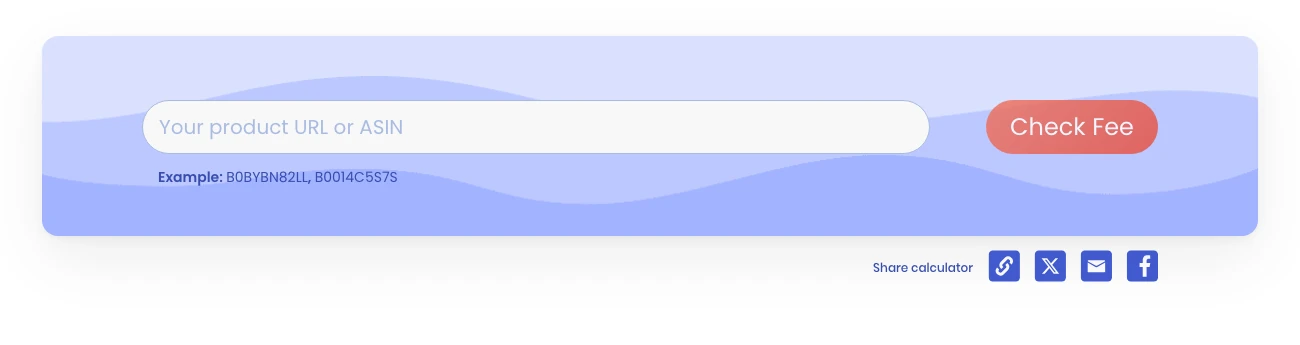
The free FBA calculator takes a product URL or ASIN, no login
The estimation process is as easy as ABC. To calculate your fees and potential profits:
- Find your product by entering the product’s ASIN or its URL. If you search for items by ASIN, pick a specific Amazon marketplace.
- Click on the ‘Check fee’ button and wait a bit for the Amazon FBA calculator to find the necessary product information.
- SellerSonar’s calculator will find the item and show its size and weight.
- On the right, it will display the average price of this item on Amazon as well as estimated FBA and commission fees.
- Your profit indicates the amount you will receive from each product sold and includes the cost of the product. So, to estimate the net profit, just subtract all additional expenses, if any.
Sounds easy, isn’t it? Meanwhile, this free tool can make a real difference to your Amazon business. Unlike a basic fees estimator provided by Amazon, SellerSonar’s service more accurately handles expenditures and profit margin calculation. As a result, it allows sellers to see the bigger picture, measure their actual profits, and adjust their selling strategies.
Below are some additional reasons why Amazon merchants should consider complementing the free Amazon fulfilment calculator with third-party options.
Reasons Why Revenue Calculator on Amazon Alone Is Not Enough
Although the Amazon FBA calculator provides specific perks to Amazon merchants, especially the newbie ones, there are aspects that this internal estimator is incapable of doing. As a result, the free Amazon calculator is commonly used by experienced users for initial guesstimation.
Below are some reasons why merchants should consider opting for the estimating power of third-party Amazon calculators.
Tedious and time-consuming process
Amazon users of the free FBA calculator can readily attest to the tedious process of the free calculator. To learn the Amazon fees for a particular product, sellers must manually fill in the item name, the Universal Product Code (UPC) or Amazon Standard Identification Number (ASIN).
No save function
Concerning the above paragraph, merchants should also think of using an external FBA calculator because of the lack of save function of the free one.
After all the time and effort allocated for crunching the FBA fees of a specific product, sellers will need to redo this process if they wish to recheck it afterwards. In addition, as there’s no save option, they will have to redo this process to retrieve results when dealing with technical problems, such as power outages, website crashes, or browser problems.
No data export feature
Apart from this, the free FBA calculator also lacks the data export option. It simply means that whatever is calculated or displayed via a free calculator cannot be saved or downloaded as a PDF or CSV file.
Some Amazon sellers write down particular calculations to compare them with another consequence of a specific Amazon product. However, this process would be taxing when a seller lacks the technical knowledge, such as keyboard shortcuts.
Comparison difficulty
Since split tabulation is unavailable and data cannot be downloaded, simultaneous information comparison is also impossible with the free profitability calculator on Amazon.
Some Amazon merchants use third-party Amazon FBA calculators to enjoy essential features like data comparison. Such an option will ultimately result in increased productivity and sales.
No additional cost perspective
Since the FBA calculator of Amazon primarily focuses on Amazon fees, other critical expenses or costs involved in the business are not included.
Expenses such as taxes, advertising, marketing, overheads, and other hidden costs are beyond the scope of this free FBA calculator. Hence, it would help if you had a more comprehensive FBA tool.
How to Use the Amazon Margin Calculator to Understand the Impact of Business Decisions?
This tool provides a quick and easy method to understand the margin impact of different business decisions. For instance, say you reduce your client’s price to become more competitive. If you wish to see how low you can go while staying profitable, you can promptly determine this using the calculator.
You might use this program to play around with the cost of products to find the margin influence from lower or higher item costs.
What Amazon charges, and what the calculator does not include
Three of these are fixed and easy to verify. The rest move by category and season, which is exactly why a calculator beats arithmetic on a notepad.
| Cost | What Amazon charges | In the FBA calculator? |
|---|---|---|
| Individual selling plan | $0.99 per item sold | No, add it yourself |
| Professional selling plan | $39.99 per month | No, it is a flat monthly cost |
| Referral fee | A percentage of total price or a per-category minimum, whichever is greater | Yes |
| Closing fee on media items | $1.80 per item | Yes, for media categories |
| FBA fulfilment fee | By size tier and weight | Yes |
| Monthly storage and aged-inventory surcharge | By volume and how long stock has sat | Partly, and not your real turnover |
| Cost of goods, freight, duty | Yours, not Amazon’s | No, you supply these |
| Advertising | Yours, varies by campaign | No |
| Returns and removals | Varies | No |
Selling plan, closing fee and referral-fee mechanics verified against Amazon’s own pricing page on 29 September 2026. Per-category referral percentages sit behind an expandable table there; read them from Amazon rather than from a third party, because they change.
The gap in that right-hand column is the real point. A calculator tells you the margin Amazon leaves on one unit at one price. It does not know your advertising, your return rate, or that a competitor undercut you last Tuesday. Once a product is live, what changes your margin is usually not the fee schedule but the numbers you fed the calculator going out of date.
Build the same calculation in a spreadsheet
A calculator answers what a product leaves you at a given price. It does not tell you how many units that product moves, which is the other half of the decision and the job of an Amazon sales estimator. Estimate the demand first, then bring the number here.
The calculator handles one product at a time and forgets everything when you close the tab. For a shortlist of ten products, or for one product at four different price points, a spreadsheet is faster and it leaves a record you can go back to.
Set up these columns:
| Column | Holds | Where it comes from |
|---|---|---|
| A | Product or ASIN | You |
| B | Selling price | You |
| C | Referral percentage as a decimal | Amazon’s fee schedule, by category |
| D | Referral fee | Formula |
| E | FBA fulfilment fee | The calculator, or Amazon’s size-tier table |
| F | Storage per unit | Your monthly storage bill divided by units |
| G | Cost of goods | You |
| H | Inbound freight per unit | You |
| I | Net proceeds | Formula |
| J | Margin | Formula |
Three formulas do the work, and they are the same in Excel and Google Sheets:
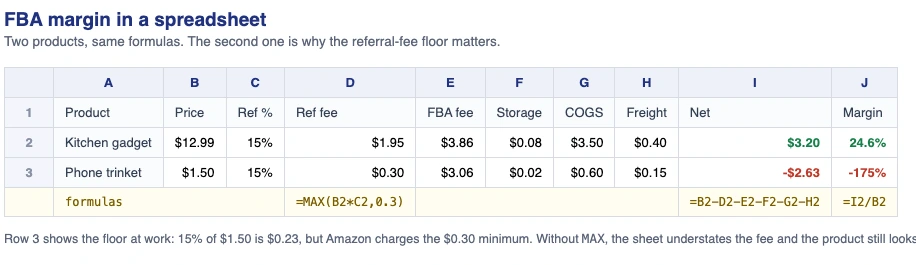
The same calculation in a sheet: row 3 is why the referral-fee floor matters
- Referral fee, D2:
=MAX(B2*C2, 0.3) - Net proceeds, I2:
=B2-D2-E2-F2-G2-H2 - Margin, J2:
=I2/B2
The MAX in the first one matters. Most categories carry a minimum referral fee of $0.30, so a straight percentage will understate what Amazon takes on anything cheap. A $4 item at 15% calculates to $0.60 and is charged $0.60, but a $1.50 item calculates to $0.23 and is charged $0.30. Without the floor, your sheet will tell you a low-priced product is viable when it is not.
Pull the referral percentage and the fulfilment fee for each product out of the calculator once, paste them into columns C and E, and the sheet will re-run every product the moment you change a price. That is the part the calculator cannot do, and it is why the two tools belong together rather than in competition: the calculator is the source of the rates, the sheet is where you compare.
Re-check columns C and E whenever Amazon changes its fee schedule, which is at least once a year and was twice in 2026. Everything else in the sheet is yours and does not move on Amazon’s timetable.
How to Save on FBA Fees?
As soon as you finish your calculations and determine that FBA is the proper choice for your goods, you will notice the bite is taken out of your revenues, and you will wish to start learning how to save as much cash as possible on the Amazon FBA process. Below are our top tips:
Tip #1: Developing your own FBA shipping schedule
Most merchants let Amazon pick which fulfilment center to store their merchandise, but this is a huge mistake. Most people do not know that Amazon will sometimes send products to different warehouses to test demand in that region. For instance, you may have sent a product to a New Mexico FC, and Amazon might send that product to Nebraska or New York. You may think it doesn’t sound so terrible, but it is, because Amazon charges you every time it moves them. We recommend you take charge and come up with your own FBA shipping schedule, meaning you tell Amazon where your goods are stored and that you do not want your items moved around. For this, follow Amazon’s shipping plan request guide.
Tip #2: Bulk shipping
UPS is Amazon’s partnered carrier for small-parcel inbound shipments in the US, and it bills the greater of a box’s actual weight and its dimensional weight, which comes from the outer dimensions rather than what is inside. A 20x20x20 box costs about the same to send whether it holds 20 lb or 40 lb, so shipping half-empty boxes is money you never get back. Fill them. The ceiling is 50 lb per box for mixed contents; anything heavier has to be a single oversized item and needs lift labels on at least five sides, or the shipment can be refused.
Tip #3: Long-term inventory management
We recommend shipping in bulk, but only if you’re sure you may move your inventory fast, in Amazon’s terms, fast means selling through before storage costs start stacking up, since storage is billed monthly. Now you may keep a product on the shelves at Amazon for six months and pay your dues; however, after that period, the fees climb, because Amazon treats slow units as space it could have sold to someone else. Amazon has since replaced the old long-term storage fee with an aged-inventory surcharge that steps up the longer a unit sits, on top of monthly storage. The bands and rates are revised periodically, so check the current schedule in Seller Central before modelling them. The practical advice has not changed: slow-moving stock in FBA gets more expensive the longer it stays, so plan removals before inventory ages into the higher bands.
SellerSonar will let you keep the pricing on a competitive level to generate revenue, protect the inventory from a stockout and notify you of any changes in the product rankings. The tool monitors the product listings round-the-clock and sends alerts about all the critical changes in real time. Besides, it offers a free Amazon profit calculator for your convenience.
So, register for up to a 14-day trial and put it to work on your Amazon business, estimate your profits, and handle any issue promptly.


Thank you for having such an in-depth article on how to do this! I’ve been looking into being an entrepreneur & your content is so useful!
Thank you for simplifying it. You made it so easy. This post cleared all my confusion about how to use FBA calculator.
Thank you for valuable information, but I don’t know if the VAT is included in calculations?
Thanks for your feedback. You are right. The FBA calculator doesn’t include VAT on the fees.
Dont really know much about this amazon stuff but after reading your blog I might get into this actually industry
Thanks for post! Please make another on how to reduce costs?
Thanks for your idea! Follow us to get updates.
Love this article!)