






Quick Answer
Amazon automation means 4 different things, and mixing them up is how sellers lose money. It can mean Amazon’s own built-in tools, third-party software you run yourself, an AI assistant connected to your data, or a company that runs your store for a fee. The first 3 are real tools. The 4th is a business opportunity the FTC has repeatedly sued over.
Ask someone what Amazon automation is and you’ll get one of four answers, depending on who’s selling.
That’s the whole problem with the term. It covers a free pricing rule inside Seller Central and a “done-for-you storefront” the FTC has taken to court, and those two things have nothing in common except the word.
So this guide separates them. What each one actually is, which ones work, and which one has a federal enforcement record.
No “passive income.” No autopilot.
About the Author: Diana Walsh writes for the SellerSonar editorial team on Amazon listing quality, search visibility, and seller operations. She spends most of her week looking at listings that stopped converting and working out which part broke.
The four things “Amazon automation” means
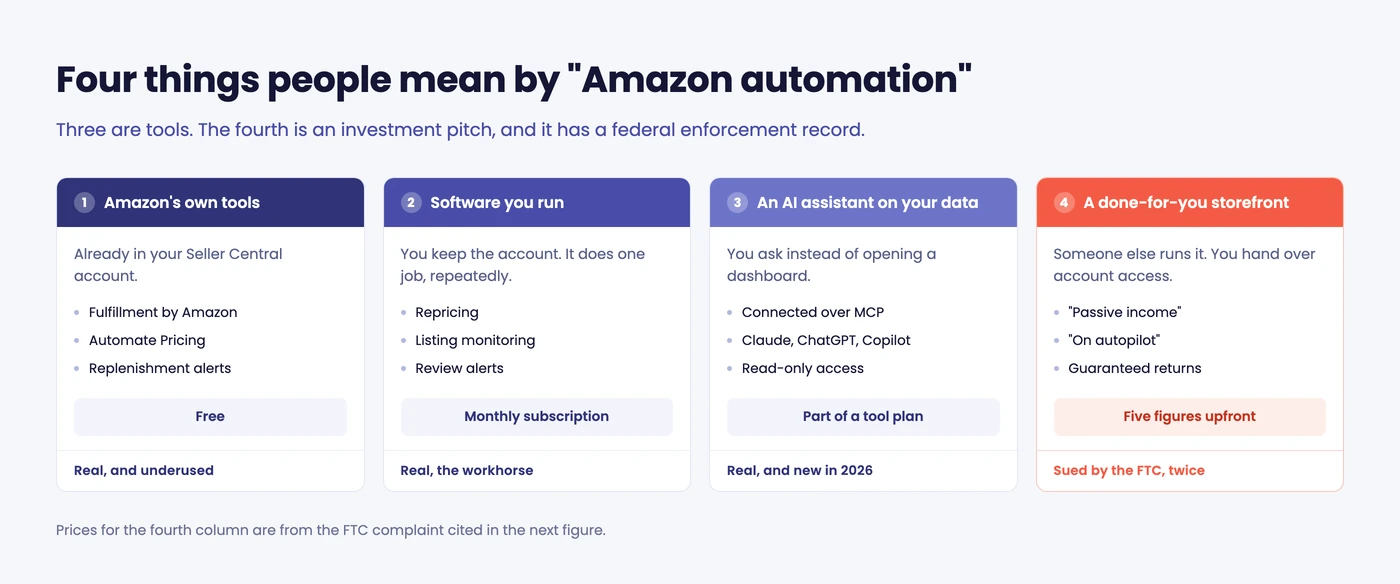
1. Amazon’s own built-in automation
The cheapest automation you’ll ever buy, because it’s free and already in your account.
Fulfillment by Amazon is the big one. Send inventory to Amazon’s warehouses and they pick, pack, ship, handle customer service, and process returns. Most sellers don’t think of FBA as automation, but it’s the single largest chunk of work most sellers have handed off.
Automate Pricing is the one almost nobody switches on. Per Amazon’s own help page, it lets you “automatically adjust prices on SKUs in your catalog in response to events such as the Featured Offer (Buy Box) price, without having to revisit the SKU every time you want to change your price.” You write a rule, set your floor and ceiling, pick the SKUs.
It’s free. It’s built in. And in our experience most sellers paying for a third-party repricer have never opened it.
💡 Expert Tip: Before you buy any automation tool, spend an hour in Seller Central finding out what you’re already paying for. FBA, Automate Pricing, replenishment alerts, and subscription-based promotions are all included. Buying software to do something Amazon does for free is the most common automation mistake we see.
2. Third-party software you run yourself
This is what most sellers mean, and it’s the category that reliably works.
You keep control of the account. The software does one job repeatedly, and you check the output and change the rules when they’re wrong.
The usual jobs:
- Repricing, within a floor and ceiling you set
- Listing and Buy Box monitoring, so changes surface the same day
- Keyword rank tracking, to see which terms are actually moving
- Review and rating alerts
- Inventory forecasting and reorder reminders
- PPC bid adjustments, inside rules you review
The honest framing is that this isn’t hands-off. It’s hands-less-often. You’re trading a daily task for a weekly review, which is a genuinely good trade when you have 200 ASINs and one of you.
3. An AI assistant connected to your data
New, and the reason the word “automation” is being reused in 2026.
Instead of opening a dashboard, you ask your AI assistant a question and it reads your monitoring data to answer. “Did anything break on my listings overnight?” The assistant goes and looks.
This is a real shift, not a rebrand, and it’s covered properly further down.
4. A company that runs your store for you
Marketed as “Amazon automation,” “done-for-you,” “DFY,” or a “fully managed store.” You pay a large upfront fee, hand over account access, and someone else is supposed to run the business while you collect.
This is the one with the enforcement record.
🎯 Pro Insight: The first three meanings describe tools. The fourth describes an investment. When someone uses “automation” to mean the fourth and quotes you a price with a comma in it, you’ve left the software conversation and entered the business-opportunity conversation. Price the two differently in your head.
Is Amazon automation a scam?
The software isn’t. The business opportunity frequently is, and we’d rather say so plainly than hedge.
Here’s the record.
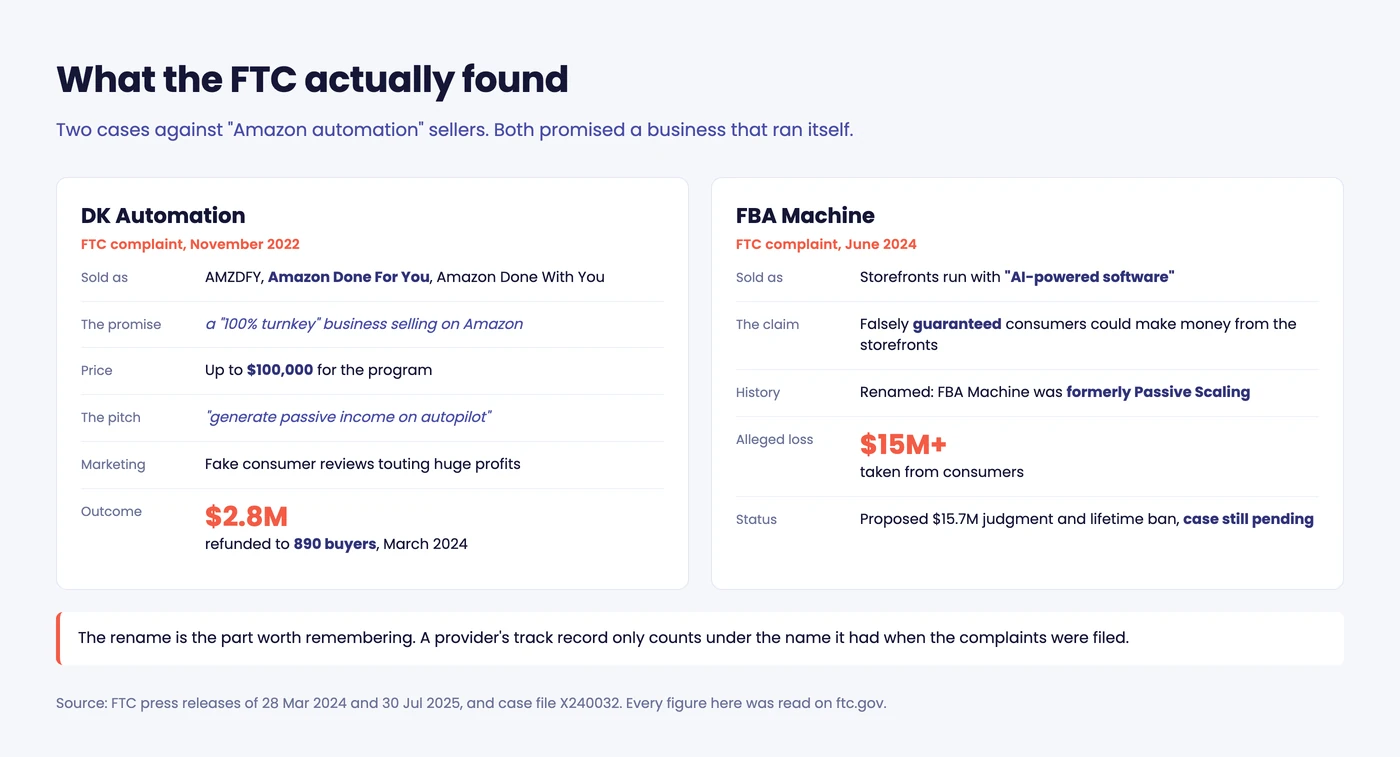
In November 2022 the FTC sued DK Automation and its owners, who sold Amazon business packages under the names AMZDFY, “Amazon Done For You,” and “Amazon Done With You.” Buyers were promised a “100% turnkey” business, charged as much as $100,000, and told they could “generate passive income on autopilot.” The FTC says marketing was filled with fake consumer reviews touting huge profits, and that few consumers ever made money. In March 2024 the FTC sent $2.8 million in refunds to 890 people.
Then there’s FBA Machine. The FTC sued in June 2024, alleging the operation guaranteed earnings from online storefronts run with “AI-powered software” and took consumers for more than $15 million. The FTC says the earnings were falsely guaranteed, and that the defendants never delivered them.
Read one detail carefully: the FTC describes FBA Machine as formerly Passive Scaling. Same operator, new name. In July 2025 the FTC filed a proposed settlement that would permanently ban him from offering any business opportunity, carrying a $15.7 million judgment partly suspended because he couldn’t pay it. The FTC still lists the case as pending, since an order like this takes effect once a district judge signs it.
That rebrand is the most useful fact in this article. The model survives enforcement by changing its name, so a provider’s track record only counts under the name it had when the complaints were filed.
Four things that should end the conversation:
- A guaranteed return. Nobody can guarantee Amazon results. Not Amazon.
- “Passive income on autopilot.” This is the phrasing in the FTC’s own complaint.
- A five-figure upfront fee before anything has been sold.
- Account access for a third party who won’t put their obligations in writing.
None of that makes every management agency fraudulent. Good ones exist, they charge a management fee or a revenue share rather than a five-figure entry ticket, and they’ll tell you what they can’t do. The distinction isn’t “agency versus software.” It’s whether you’re buying a service or buying a promise.
What you can actually automate today
Not everything that can be automated should be. This is the table we’d give a seller on day one.
| Task | Verdict |
|---|---|
| Order fulfillment | Automate fully. FBA, or a 3PL. |
| Listing and Buy Box monitoring | Automate fully. Humans are worst at exactly this: watching something that rarely changes. |
| Review and rating alerts | Automate fully. |
| Repricing | Automate with limits. Always set a floor. Rules without a floor are how sellers race each other to nothing. |
| PPC bid adjustments | Automate with review. Weekly eyes on search terms, or you’ll fund other people’s keywords. |
| Inventory reordering | Automate with review. Forecasts miss seasonality and promotions. |
| Listing copy | Draft with AI, approve yourself. |
| Customer messages | Keep manual for anything non-routine. |
| Choosing products | Keep manual. If software could reliably pick winners, it wouldn’t be sold to you for $49 a month. |
The pattern: automate the watching, supervise the deciding, and keep the judgment.
📌 From Our Experience: Sellers almost always automate in the wrong order. They start with repricing, because it feels like money, and leave monitoring until something expensive happens. Monitoring is cheaper, lower risk, and catches the problems that repricing can’t fix, like a suppressed listing quietly earning nothing all weekend.
What Amazon automation actually costs
Worth knowing before anyone quotes you a number, because the real categories price nothing alike.
| What you’re buying | Typical cost |
|---|---|
| Amazon’s own tools | Free. Automate Pricing costs nothing to switch on. |
| Monitoring and alert software | A monthly subscription, usually scaling with ASIN count. |
| Repricers, keyword and PPC tools | A monthly subscription, priced by catalog size or usage. |
| A managed-service agency | A management fee or revenue share, billed against results. |
| A “done-for-you” storefront | Five figures upfront. The FTC’s DK Automation case involved programs sold for as much as $100,000. |
The jump from the fourth row to the fifth is the whole story. A management fee comes out of money you’ve already made. An upfront storefront fee comes out of money you’re hoping to make, which is the structure every FTC complaint in this space describes.
The 2026 version: letting an AI assistant do the asking
The reason “automation” came back into fashion this year isn’t the tools. It’s the interface.
Until recently, automation meant software did a task and left the answer in a dashboard. You still had to go and look. With fifty ASINs that’s fine. With five hundred, the dashboard becomes another thing you don’t open.
What changed is that AI assistants can now read your data directly through MCP, an open standard for connecting tools to assistants like Claude, ChatGPT, Copilot, Gemini, and Cursor. For ad accounts, Amazon runs its own server, the Amazon Ads MCP. Instead of opening a dashboard, you ask.
“Anything break on my listings overnight?” The assistant checks your monitoring data and tells you a Buy Box went at 06:42 and an ASIN was suppressed at 22:11.
That’s the part worth understanding: the monitoring engine still does the work. The assistant is just a better way to ask it questions, and it can ask on a schedule you set.
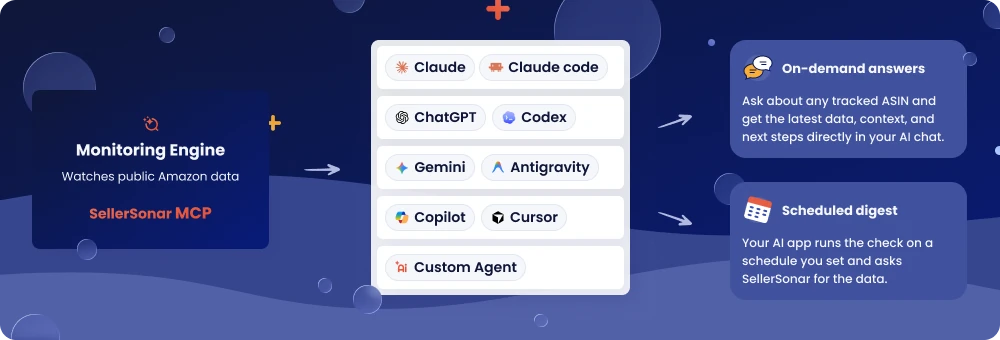
SellerSonar’s Amazon MCP server works this way, and it reads public Amazon product pages rather than connecting to your Seller Central account. Setup is a URL and an OAuth approval, with read-only access.
And here’s the honest limitation, because it’s the thing vendors skip: an MCP server can’t wake itself up. It answers when something asks. Any “notify me at 8 a.m.” workflow needs either your AI app’s scheduler or a monitoring service running on its own. If someone sells you an AI agent that promises to alert you proactively, ask which of those two is doing the waking.
If you want the longer version, we’ve written a full guide to Amazon MCP covering the setup and what each client can do.
What to automate first
In order of payback, based on what we see across seller accounts:
- Listing and Buy Box monitoring. Cheapest to run, and it catches the problems that cost the most. Listing change alerts tell you when someone edits your title or your images get swapped, which is the kind of thing you’d otherwise find in the sales graph a week later.
- Fulfillment. FBA if your margins take it.
- Repricing. With a floor. Our rundown of Amazon repricing software covers the tradeoffs.
- Review alerts, so a rating slide doesn’t become a rating problem.
- Reporting, last. It’s the one everyone starts with and the one that changes the least.
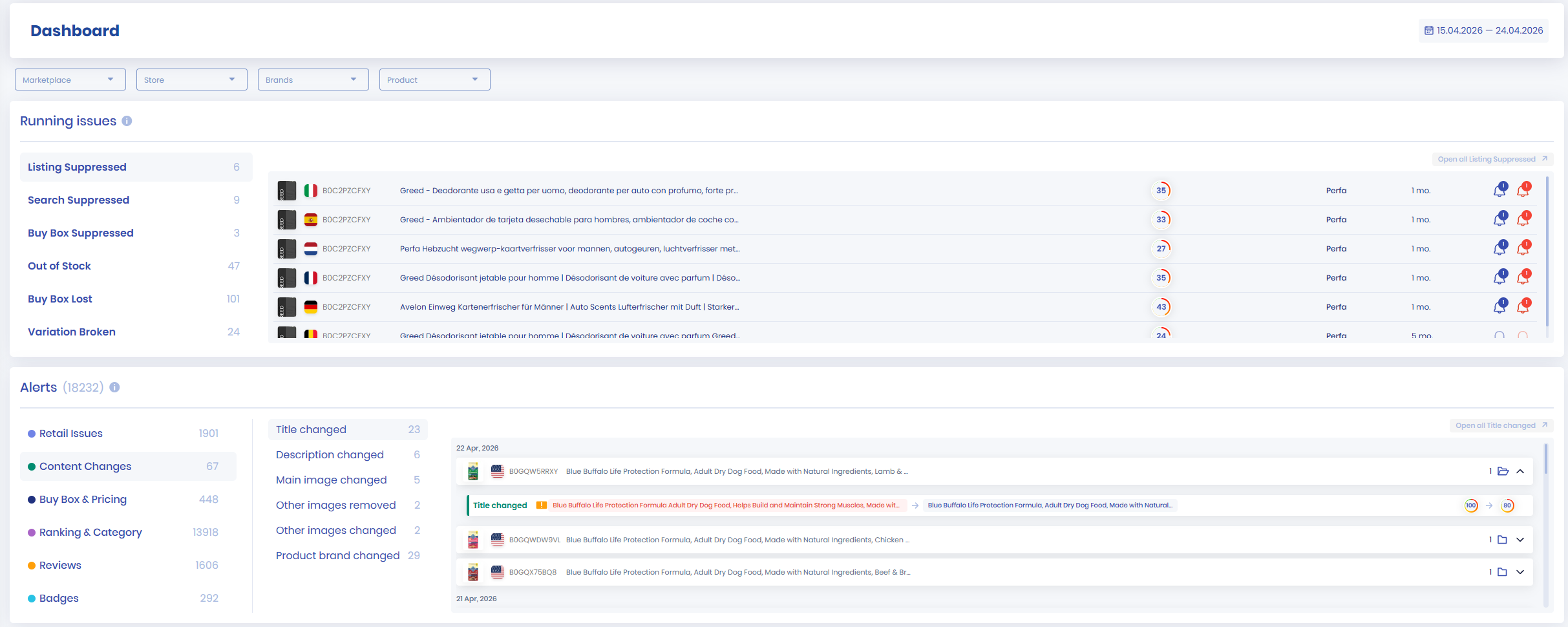
If you’re tracking more than a handful of ASINs, product monitoring is the piece that stops you opening product pages one at a time on a Tuesday.
Wrapping up
Amazon automation isn’t one thing, and the word is doing a lot of work for people who’d rather you didn’t look closely.
Three of its four meanings are genuinely useful. Amazon’s own tools are free and underused. Third-party software is the workhorse. AI assistants are a real improvement to how you reach that software, not a replacement for it.
The fourth meaning has cost buyers tens of millions of dollars, and the operators rename themselves faster than the warnings spread.
Final Expert Recommendations: Start with what Amazon already gives you, then automate the watching before you automate the deciding. Monitoring is the cheapest automation you can buy and the one humans are genuinely bad at.
If a provider’s pitch leans on the words “passive,” “autopilot,” or “guaranteed,” close the tab. The sellers who get the most out of automation aren’t running hands-off businesses. They’re spending their attention on the few decisions that actually need them.
Want to know the moment something changes on your listings instead of next Tuesday? Start a free 14-day SellerSonar trial and track 5 ASINs and 10 keywords, no credit card required.

