FBA stands for Fulfillment by Amazon. It’s the programme where you ship your inventory into Amazon’s fulfilment centres, and Amazon then picks, packs, ships, and handles customer service and returns on your behalf. Your products become eligible for Prime, and you stop touching orders yourself.
That’s the whole idea in two sentences. The rest of this guide covers what FBA actually includes, what it costs in 2026, where it hurts, and how to work out whether the numbers make sense for your products.
What is Amazon FBA?
Amazon FBA is a fulfilment service for third-party sellers. You send stock to Amazon’s warehouses, Amazon stores it, and when a shopper buys, Amazon’s staff prepare the package and ship it to the customer’s door. Amazon also answers customer enquiries about those orders and processes the returns.
Here’s how Amazon itself puts it on its seller site:
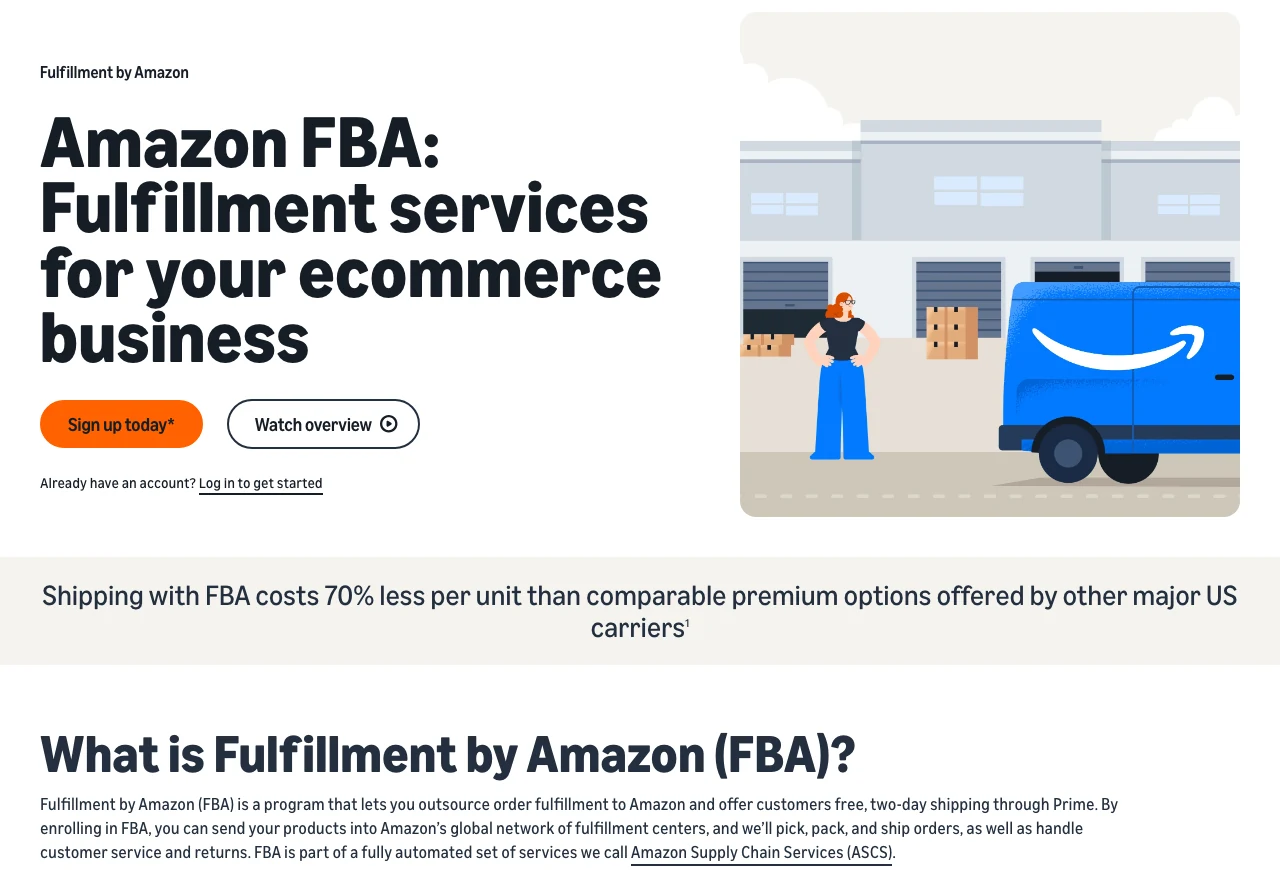
Amazon’s own definition of FBA on sell.amazon.com
Two things in that description matter commercially. The first is Prime: enrolling a product in FBA makes it eligible for free, two-day shipping through Prime, which is the main reason most sellers put up with the fees. The second is scale. Amazon claims shipping with FBA costs 70% less per unit than comparable premium options from other major US carriers. That’s Amazon’s own figure rather than an independent one, so treat it as a ceiling, not a promise, but the direction is right for most small parcels.
FBA suits new sellers who don’t want to build a warehouse operation, and it suits established sellers who’d rather spend their time on sourcing and advertising than on picking orders. It’s a poor fit for slow-moving stock, very heavy items, and anything with a thin margin, for reasons the cost section below gets into.
What FBA means on a listing or a shipment
Sellers and shoppers run into the abbreviation in a few different places, and it means something slightly different in each.
FBA on a product listing means Amazon holds that stock and will fulfil the order. In practice it’s the signal behind the Prime badge.
An FBA shipment is stock travelling from you into an Amazon fulfilment centre. You create it in Seller Central, print Amazon’s labels, and hand it to a carrier. It’s inbound, not an order going out to a shopper.
FBA delivery is the outbound leg: Amazon’s network taking the order from its shelf to the buyer. Delivery speed depends on the customer’s location and Prime status, not on you.
FBM is the opposite arrangement, Fulfilment by Merchant, where you store and ship everything yourself. Most sellers end up running both, and we’ve compared them properly in Amazon FBA vs FBM.
How Amazon FBA works, step by step
Amazon documents the flow in six steps, and it’s worth reading them in order because two of them catch people out.
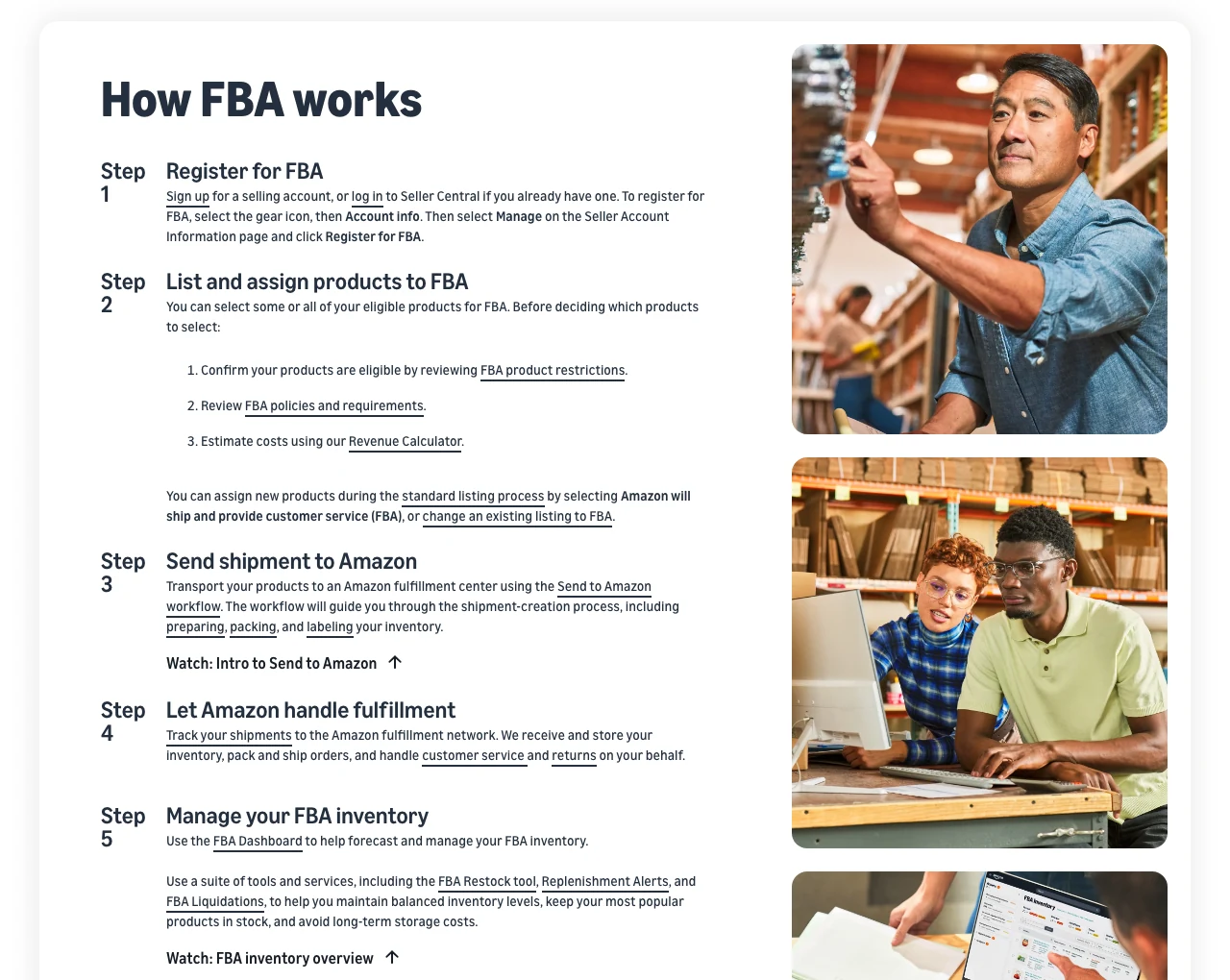
How FBA works, as Amazon documents it
The two that catch people out are step two and step three. In step two you have to confirm your products are actually eligible, because restricted and hazmat categories will bounce. In step three, Amazon decides which fulfilment centres your shipment goes to, and splitting it across fewer locations now costs you money. That’s the inbound placement fee, covered below.
If you’re setting FBA up for the first time rather than deciding whether to use it, our guide to starting with Amazon FBA walks through the account setup in detail.
What Amazon handles for you
Included in FBA
- Storage in Amazon’s fulfilment network, charged monthly by the space you occupy.
- Picking, packing, and shipping every order placed on Amazon.
- Customer service for those orders, handled by Amazon’s staff on your behalf.
- Returns and refunds, processed under Amazon’s policy rather than yours.
- Prime eligibility, applied automatically to FBA inventory.
- Global selling, letting you use the same programme across Amazon’s international marketplaces. A single Europe account alone reaches customers in 28 countries.
Optional services you pay extra for
- FBA Label Service and FBA Prep Service, no longer available in the US. Amazon used to apply barcode labels and bag or wrap units for you at a per-item fee. Both ended in the US marketplace on 1 January 2026, so inventory sent to US fulfilment centres now has to arrive fully prepped and labelled, whether you do that yourself or pay a third party. Shipments that turn up unprepped can be refused or returned at your cost. The services still run in some other marketplaces. Our breakdown of Amazon FBA prep services covers the options.
- Multi-Channel Fulfilment. Amazon ships the orders you take on your own site, eBay, or Shopify out of the same FBA stock.
- Amazon Partnered Carrier. Discounted carrier rates for getting your shipment into the fulfilment centre.
- Manual processing. Charged when you send a shipment without box content information and Amazon has to open and sort it.
What you can’t send to FBA
Not every product is eligible, and finding out after your shipment arrives is expensive. Some goods can be listed on Amazon perfectly legally but still can’t be sent into FBA. Amazon’s prohibited list includes alcoholic beverages, vehicle tyres, gift cards and certificates, loose packaged batteries, sky lanterns, and any damaged or defective stock.
Dangerous goods are a separate process rather than a flat ban. Aerosols, lithium batteries, flammable liquids, and similar items need to clear Amazon’s dangerous goods review before you can ship them, and that review takes time you should build into your launch.
Expiry-dated products have the tightest rules. Amazon requires at least 90 days of remaining shelf life at the point it receives the unit, on top of the product’s own consumption period, and it will remove and dispose of stock that comes within 50 days of its expiry date. Disposed units can’t be returned to you. The expiry date also has to be printed on the retail unit and on the master carton in 36-point type or larger.
Check eligibility in Seller Central against your specific ASIN before you book a shipment, not against the category in general.
One service that no longer exists: the old Inventory Placement Service, which let sellers pay to send an entire shipment to a single fulfilment centre, was retired in 2024. Amazon replaced it with the inbound placement service fee, which works the other way round: you’re charged based on how few locations you split your shipment across, and an Amazon-optimised split across several locations costs nothing. If you’re following an older FBA guide that tells you to enrol in Inventory Placement, it’s out of date.
FBA vs FBM at a glance
Most sellers don’t choose one model forever. They run FBA on the products where Amazon’s economics win and FBM on the ones where they don’t.
| FBA | FBM | |
|---|---|---|
| Who stores the stock | Amazon | You, or your 3PL |
| Who handles returns | Amazon, under its own policy | You, under yours |
| Prime badge | Automatic | Only via Seller-Fulfilled Prime |
| Cost shape | Per-unit fees you can forecast | Fixed overheads you control |
| Best for | Small, light, fast-moving stock | Heavy, bulky, slow, or handmade goods |
The full breakdown, including how sellers split their catalogues between the two, is in Amazon FBA vs FBM.
The pros and cons of FBA
Where FBA earns its fees
Logistics you don’t run. No warehouse lease, no packing bench, no carrier accounts. For a one-person business this is usually the difference between scaling and stalling.
Prime and the Buy Box. Prime eligibility measurably improves conversion, and fulfilment performance feeds into Buy Box share. FBM sellers can get there through Seller-Fulfilled Prime, but the performance bar is high.
Shipping rates you couldn’t negotiate alone. Amazon’s carrier agreements beat what a small seller gets from the same carriers directly.
Returns handled end to end. Amazon takes the return, refunds the customer, and puts sellable units back into your inventory.
Round-the-clock customer service on FBA orders, in the marketplace’s own voice, at no extra charge beyond the returns processing fee.
Where FBA costs you
The fees stack. Fulfilment, storage, aged inventory, returns, and placement fees all land on the same unit. A product that looks profitable on referral fee alone can be underwater once FBA fees are counted, which is exactly what catches out sellers who never run the numbers.
Returns go up. Amazon’s returns policy is generous by design, and free return shipping makes returning an item easy. Your return rate under FBA will usually be higher than under FBM.
Prep rules are strict. Units that arrive incorrectly packaged or labelled get charged for manual processing or refused. The FBA packaging requirements are worth reading before your first shipment, not after.
Slow stock is punished twice. Inventory sitting more than 181 days attracts the aged inventory surcharge, and stock that runs too thin triggers the low-inventory-level fee. FBA rewards accurate forecasting and penalises both extremes.
You lose visibility. Amazon occasionally loses or damages units, and reimbursements aren’t automatic in every case. Nobody is watching your listings for you either, which is why sellers on FBA still need their own monitoring.
How much does Amazon FBA cost?
Every Amazon seller pays for the selling plan and the referral fee, whether they use FBA or not. FBA fees sit on top.
Selling plan. The Individual plan costs $0.99 per item sold. The Professional plan costs $39.99 per month regardless of volume, so it pays for itself somewhere above 40 units a month.
Referral fee. Amazon takes a percentage of each sale that varies by category, from 5% at the low end to 45% for Amazon Device Accessories. Most categories sit between 8% and 15%, and most carry a $0.30 minimum. If you’ve read elsewhere that referral fees are simply “8% to 15%”, that’s the common band, not the range.
FBA fees. These are the ones specific to letting Amazon fulfil for you:
| Fee | What triggers it |
|---|---|
| Fulfilment fee | Charged per unit shipped, based on size tier and weight. Usually the largest FBA cost. |
| Monthly storage fee | Charged on the daily average cubic feet your stock occupies. Higher in Q4. |
| Aged inventory surcharge | Charged monthly on units stored more than 181 days, rising in bands as stock gets older. This replaced the old long-term storage fee. |
| FBA inbound placement service fee | Charged per unit when you send a shipment to fewer locations than Amazon would choose. An Amazon-optimised split costs nothing. |
| Low-inventory-level fee | Charged per unit when your historical days of supply falls below 28 days. |
| Returns processing fee | Charged on orders where Amazon gives the customer free return shipping. |
| Removal, disposal, and liquidation fees | Charged per item when you pull stock back out of the network. |
| Unplanned service fees | Charged when a shipment arrives without required prep, labelling, or box content information. |
Rates move at least once a year, and they moved twice in 2026, so treat any rate card you read in a blog post as indicative and check Amazon’s fee pages for the live numbers before you commit to a product.
Estimate your FBA fees before you ship
The only way to know whether FBA works for a specific product is to run that product’s dimensions, weight, category, and price through a calculator. Guessing from the fee tables is how sellers end up shipping in a loss-maker.
Our free Amazon FBA calculator does this without a login, and our walkthrough of how to use an FBA calculator explains what to do with the output. Amazon also provides its own tools inside Seller Central:
- Revenue Calculator, which compares FBA against your own fulfilment side by side;
- Fee Preview report, for estimated fees across your whole catalogue;
- Estimated fee per unit sold widget;
- the GetMyFeesEstimate API, if you’d rather pull the figures programmatically.
Run the same product through more than one of these. Where they disagree, it’s almost always because one is using a stale size tier.
Is Amazon FBA worth it?
For most sellers of small, light, reasonably fast-moving products, yes. The fulfilment fee is usually less than what it would cost you to pick, pack, and ship the same unit yourself once your own labour is priced in, and Prime eligibility lifts conversion enough to cover a good part of the rest.
It stops being worth it in three situations: heavy or oversized items where the fulfilment fee dwarfs the margin, slow sellers that sit long enough to attract the aged inventory surcharge, and low-priced goods where fixed per-unit fees eat the whole spread. In those cases FBM, or a mix of both, is usually the better answer.
Whichever model you choose, the fees are only half the picture. Suppressed listings, hijacked Buy Boxes, and silent listing edits cost more than a fee schedule ever will, and Amazon won’t tell you when they happen.
SellerSonar watches your listings for you, alerting you to listing changes, Buy Box hijackers, keyword rank movements, and product suppressions. Start your free 14-day trial.