





Quick Answer
Amazon PPC (pay-per-click) is Amazon’s auction-based advertising: you bid on search terms or products, and you pay only when a shopper clicks your ad, never more than your bid. The strategy that works for most sellers: start with an automatic campaign, move the search terms that sell into manual exact and phrase campaigns after about two weeks, block terms that don’t convert, and judge every campaign against your break-even ACoS. Only advertise listings that hold the Featured Offer and are in stock.
Amazon PPC can launch a new product, protect your brand name in search and keep a best seller visible. It can also burn a month of profit in a week if nobody watches the search terms. The difference is rarely the budget. It’s the setup and the weekly routine.
This guide covers how Amazon PPC works in 2026, what it costs, how to structure campaigns, the 9 strategies worth running, and the math that tells you whether a campaign makes money. Every rule here comes from Amazon’s own advertising pages, checked on October 30, 2026.
About the Author: Gloria Anderson writes for the SellerSonar editorial team about Amazon advertising, pricing and the Buy Box. She checks every Amazon program detail in her articles against Amazon’s own pages, and the ranking examples against live Amazon listings we track in SellerSonar.
What Is Amazon PPC?
Amazon PPC is the pay-per-click advertising model behind Amazon’s sponsored ads. You choose products to promote and the searches or product pages where they should show. When a shopper clicks your ad, Amazon charges you for that click and sends the shopper to your product detail page. Impressions cost nothing.
Most sellers start with Sponsored Products, which promote single listings in search results and on product pages. Sponsored Brands also bill per click. Display and video ads work differently, and our guide to Amazon ad types explains each format and the 2026 renames. This guide focuses on the pay-per-click side, because that’s where most seller budgets go.
How the Amazon PPC auction sets your cost
Your bid is the most you’re willing to pay for one click. The actual price comes from an auction. Amazon’s Sponsored Products best practices guide says your final cost per click “will never exceed your maximum adjusted bid,” and the auction weighs factors beyond the bid when it picks the ad and the price.
There are no monthly or upfront fees. You pay per click, up to the budget you set.
Who can run Amazon PPC
Amazon’s Sponsored Products page lists who can advertise: professional sellers, vendors, book vendors, KDP authors and agencies. Sellers on the Individual plan can’t. The product also has to sit in an eligible category and “be eligible for the Featured Offer in order to advertise.”
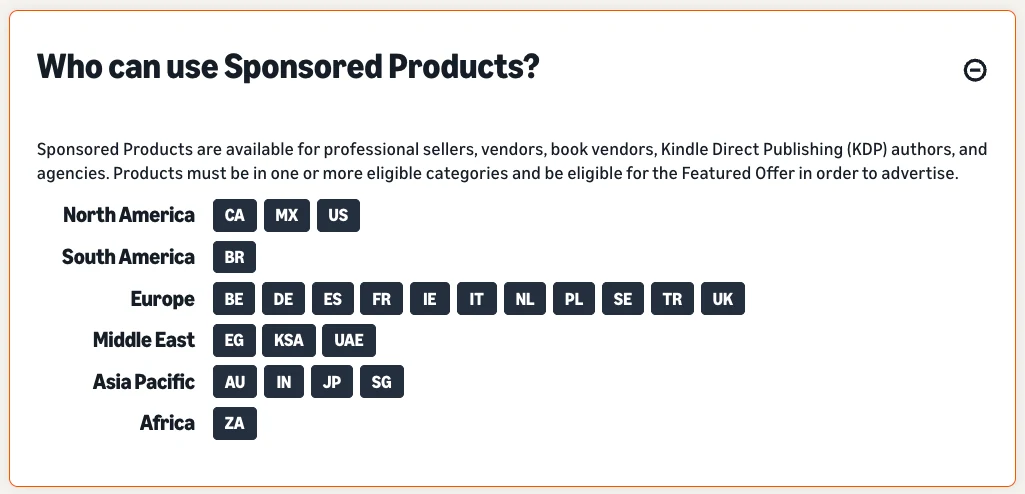
Some products can’t be advertised at all. Amazon names adult products, used products, refurbished products and products in closed categories. If you sell used or renewed items, PPC is off the table for those listings.
Is Amazon PPC Worth It for Your Listing?
Ads multiply what the listing already does. A page that doesn’t convert will waste clicks faster with a bigger budget. Before you spend, check the basics Amazon itself lists for advertised products:
- You hold the Featured Offer. Amazon’s guide calls it the box “above the Buy Now button.” Sellers know it as the Buy Box. Our explainer on what the Amazon Buy Box is covers how Amazon picks the winner.
- The product is in stock. Sponsored Products “only appear when your advertised items are in stock.”
- Reviews. Amazon suggests advertising products with five or more reviews and a rating of 3.5 stars or higher.
- Images and bullets. Four or more images at least 1,000 pixels on one side, so zoom works, and at least three bullet points.
- A clear title. For new listings, Seller Central’s product title requirements now say titles “must not exceed 75 characters, including spaces” (media excluded).
If two or more of these are missing, fix the listing first. Our guide to the Amazon conversion rate shows where shoppers usually drop off.
💡 Expert Tip: Run the checklist on the exact ASIN you plan to advertise, not the parent. In a variation family, one child can hold the Featured Offer while another doesn’t. Advertise the child that wins it most of the time.
How to Structure Amazon PPC Campaigns
Structure decides how easy your campaigns are to read later. Amazon’s targeting guide gives three rules that save most sellers from a messy account:
- Group similar products. Keep ASINs from the same category, and ideally the same price range, in one campaign. Bids apply to every product in an ad group.
- Few products? One ASIN per campaign. Amazon recommends it when you only have a few ASINs, so each product gets a budget you chose.
- Don’t mix targeting strategies in one campaign or ad group. Targeting can’t be changed after launch, so a new approach means a new campaign.
Most sellers end up with the same simple setup per product: one automatic campaign for discovery, one manual keyword campaign for proven terms, and later a product targeting campaign. The automatic campaign feeds the manual one, and negative keywords keep them from wasting money.
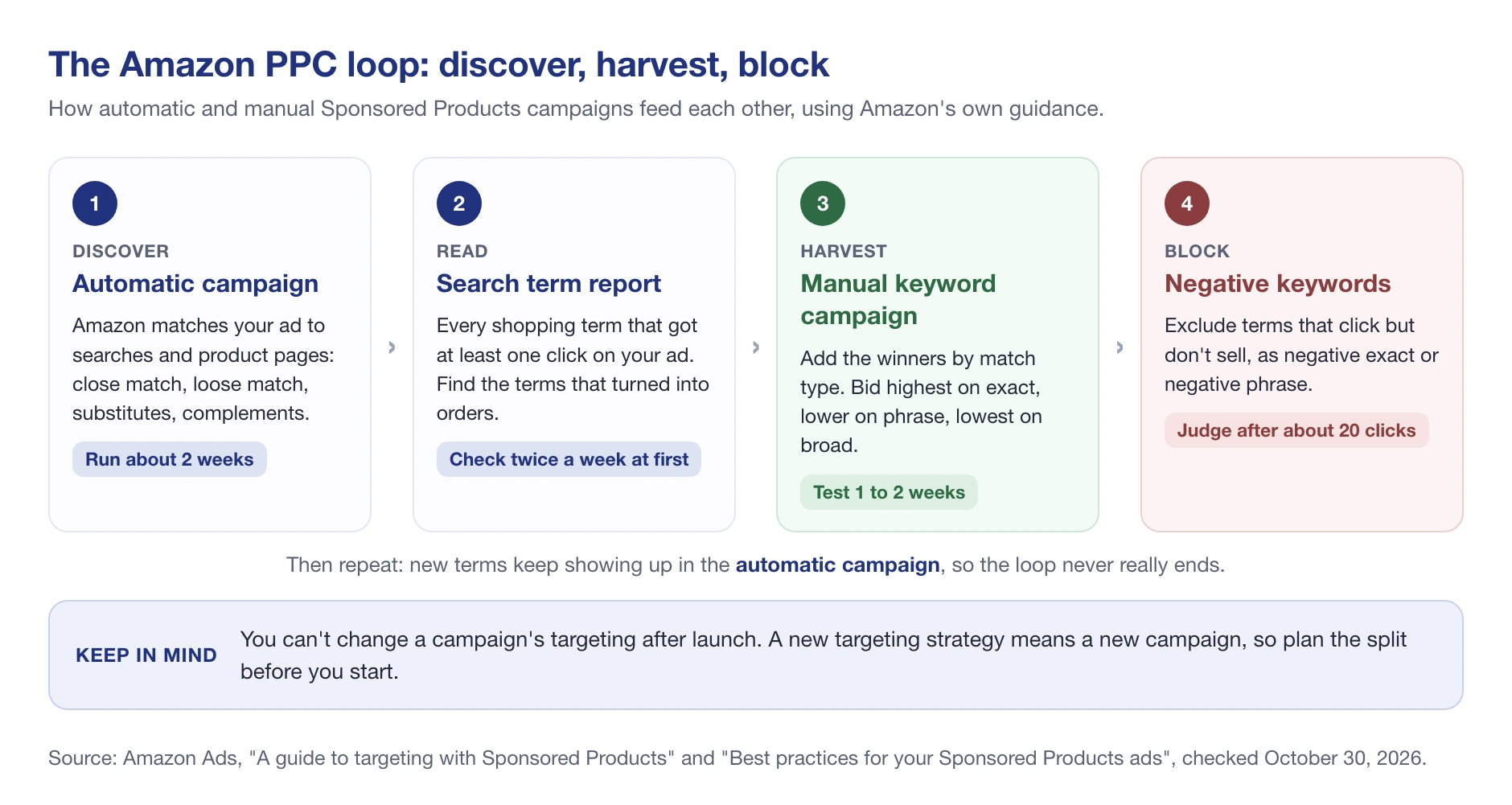
Name every campaign so you can filter it later: product, campaign type and match type, for example “Lip balm 2-pack | SP | Manual | Exact.” You’ll thank yourself when you have twenty of them.
9 Amazon PPC Strategies That Work in 2026
These are the moves that hold up on any budget. Most of them come straight from Amazon’s own guides. The rest come from watching what search results actually look like.
1. Start automatic, then harvest what sells
With automatic targeting, Amazon matches your ad to searches and product pages based on your listing. It uses four targeting groups, and you can bid on each one separately.
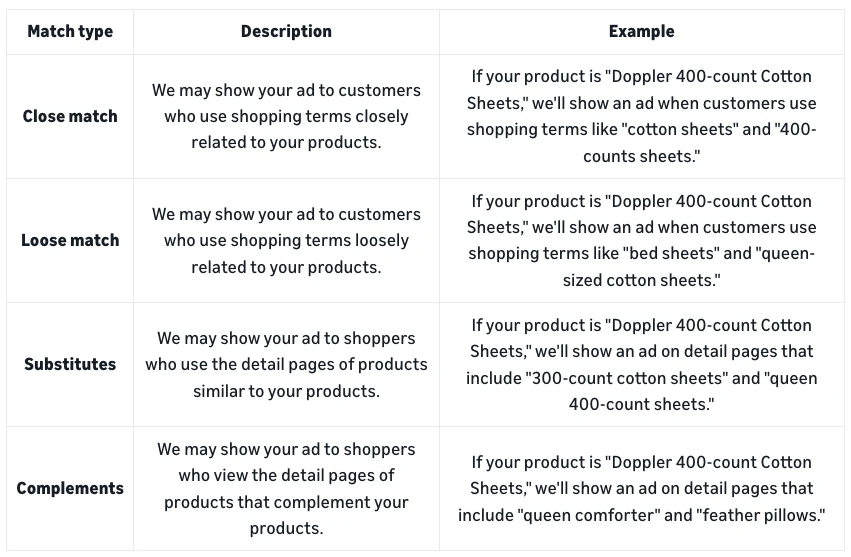
Amazon’s guide to targeting with Sponsored Products suggests letting an automatic campaign run “for about two weeks before creating a manual campaign.” Then open the search term report. It lists every shopping term that got at least one click. The terms that turned into orders go into your manual campaign.
2. Use all three match types, and bid highest on exact
Manual keyword campaigns use three match types:
- Broad: the widest reach. It can match plurals, synonyms and related terms, and the shopper’s search may not contain your keyword at all.
- Phrase: the search must contain your keyword’s words in the same order, for example “cotton sheet set” matching “king cotton sheet set.”
- Exact: the search must match your keyword word for word, plurals included. Amazon says it “tends to result in the highest conversion rates.”
Amazon’s advice is to set the highest bid on exact, a lower one on phrase and the lowest on broad. It also says you “won’t be bidding against yourself” by adding one keyword in several match types. Give each match type one to two weeks of data before you pause anything.
3. Add negative keywords based on data
Negative keywords stop your ad from showing on searches that don’t fit. Use negative exact for one specific search, and negative phrase to block every search that contains a phrase. A seller of adult socks, for example, would add “kids” as a negative phrase.
Don’t block a term after five clicks. Amazon recommends judging a keyword “after it has received at least 20 clicks,” and letting new negatives run for two weeks or more before you change course. Once a term moves into your manual campaign, many sellers also add it as a negative exact in the automatic campaign. That way the manual campaign, with its own bid, gets the traffic.
4. Pick a bidding strategy for each goal
Each campaign gets one of three bidding strategies:
| Bidding strategy | What Amazon does | Use it when |
|---|---|---|
| Dynamic bids, down only | Adjusts your bid with real-time signals, but only downward | You care most about ACoS or ROAS (Amazon’s own suggestion) |
| Dynamic bids, up and down | Adjusts your bid with real-time signals, upward or downward | You want more impressions, for example at launch |
| Fixed bids | Uses exactly the bid you set | You’re testing and want clean numbers |
On top of that, you can raise bids by placement: top of search, rest of search and product pages. Amazon allows placement adjustments of up to 900%. Check the placement report before you touch them, because top-of-search clicks usually cost more.
5. Set a budget that lasts all day
Amazon’s daily budget is not spread evenly across the day. The Sponsored Products page warns that “a smaller daily budget could be spent in a few minutes” when many shoppers are interested. If your campaign runs out by lunch, you’re missing every evening shopper.
Amazon treats the daily budget as a monthly average. Its example: a $100 daily budget allows up to $3,100 of clicks in a 31-day month. For a first campaign, Amazon suggests starting at $10 a day and adjusting once you see how fast it spends.
6. Protect your brand terms, then go after competitors
Amazon’s targeting guide names six campaign goals: expand, promote, protect, conquest, upsell and cross-sell. Two matter most for sellers with a brand.
Protect: bid on your own brand name. Amazon suggests it “as a brand defense strategy since your competitors may be bidding on your branded keywords, too.” Shoppers who search your brand name already want your product, so losing that click to a rival costs you a sale you had almost made.
Conquest: target competitor products with product targeting, so your ad shows on their detail pages. It works best when your offer is clearly better on price, reviews or features. Otherwise you pay to send shoppers back to them.
7. Use ads to launch new products
A new listing has no sales history and no organic rank. Ads are the fastest way to get it in front of shoppers while reviews build. Amazon even pays for part of it: new sellers “can earn up to $1000 in ad credits” when they launch and spend on Sponsored Products within 30 days of their first campaign. The offer covers Professional sellers whose first buyable ASIN went live within the last 90 days, in select marketplaces.
During a launch, expect ACoS to sit above break-even for a while. That’s a choice, not a failure, as long as you set an end date and a spending cap before you start. Our Amazon keyword research guide helps you pick the launch terms.
8. Watch organic and sponsored rank side by side
Sellers often ask whether ads lift organic rank. Amazon doesn’t publish how much they do, so test it on your own listings instead of trusting a rule of thumb. What you can see is where a listing sits in both lists for the same search.
Take a Duracell AA 28-pack we track in SellerSonar, on the search “aa batteries.” On October 29, 2026, its sponsored placement was #2 on page 1. Organically it ranked #11, which made it the 16th product on the page once sponsored results were counted. The ad put the same product near the top of the page.
The opposite case: a Levoit air purifier we track ranks #1 organically for “air purifiers for bedroom.” On October 30, 2026, it showed up twice on page 1, as the first product (the ad) and the third (organic #1). At three other checks that week, the ad wasn’t on page 1 at all, while the organic #1 held.
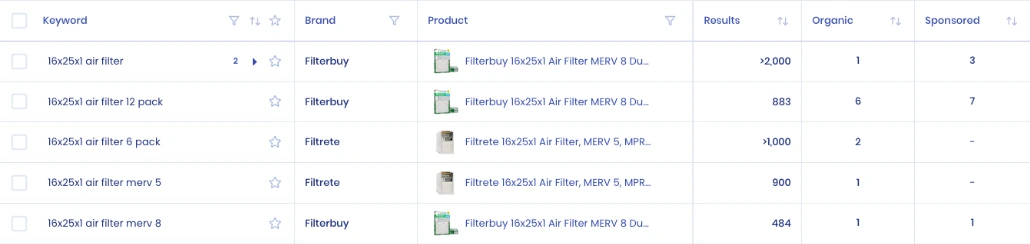
When a product already ranks in the organic top 3 for a term, test a lower bid on that keyword for two weeks and watch total orders, not just ad orders. Sometimes the ad is what holds the rank. Sometimes you’re paying for clicks you’d get anyway. SellerSonar’s keyword rank tracker records organic and sponsored positions daily for each tracked keyword, so the before and after is on one chart.
9. Review the same reports every week
Amazon suggests checking metrics at least twice a week during a campaign’s first week. After that, a fixed weekly routine is enough for most sellers:
- Search term report: harvest new winners, add negatives for terms with 20+ clicks and no sales.
- Targeting report: raise bids on keywords below your target ACoS, lower them on keywords above it.
- Placement report: compare top of search with the rest before changing placement adjustments.
- Advertised product report: pause ASINs that keep losing money and check their listings.
- Budget: see which campaigns ran out of budget early, and move money from the ones that didn’t need it.
If you’d rather ask for those reports in plain English, the Amazon Ads MCP lets an AI assistant like Claude pull them for you, once you have Amazon Ads API access.
🎯 Pro Insight: Change one thing per keyword per week. If you lower the bid, add negatives and change the placement adjustment on the same day, you’ll never know which change moved the numbers.
Amazon PPC Metrics: ACoS, ROAS, TACoS and Break-Even
Amazon’s ACOS guide defines the two core numbers:
- ACoS (advertising cost of sales) = ad spend ÷ ad sales × 100. Spend $50 to get $100 in ad sales and your ACoS is 50%.
- ROAS (return on ad spend) = ad sales ÷ ad spend. The same campaign has a ROAS of 2.
Neither number means anything until you compare it with your margin. Amazon puts it simply: your ACoS “needs to be lower than your profit margin,” or you spend more on ads than you earn. The ceiling is your break-even ACoS: profit per unit before ads, divided by the price.
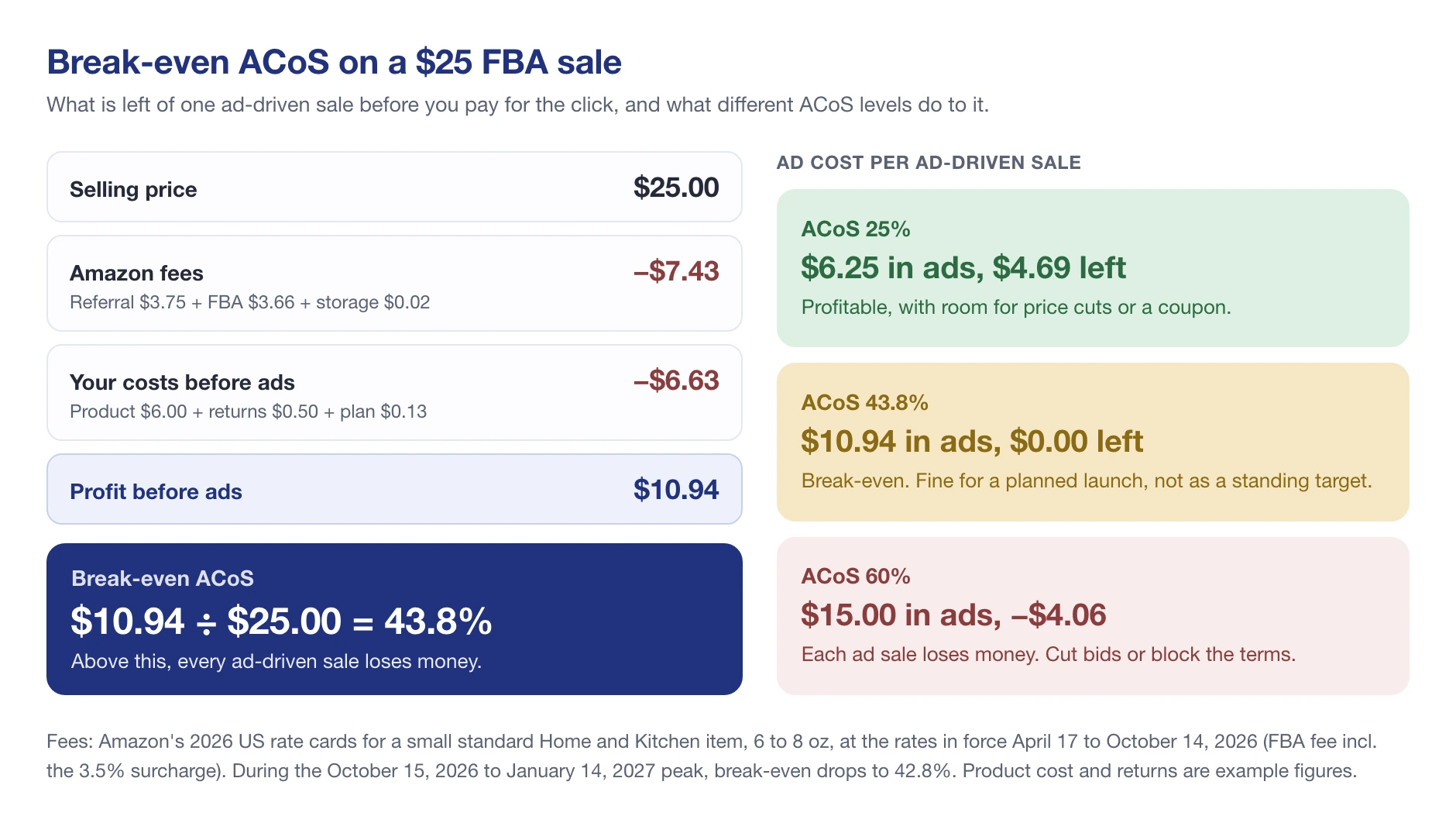
The example comes from our Amazon seller profit margin guide. A $25 product keeps $10.94 before ads, so its break-even ACoS is 43.8%. During the holiday peak fees from October 15, 2026 to January 14, 2027, it drops to 42.8%. Set your target ACoS below break-even by as much profit as you want to keep.
TACoS (total advertising cost of sales) = ad spend ÷ total sales, organic included. You calculate it yourself from your total sales. If TACoS falls while ad spend stays flat, organic sales are growing. If it climbs, the business is leaning harder on ads.
What Changed in Amazon PPC in 2026
Three changes affect campaigns you may have set up years ago:
- Sponsored prompts became billable. Amazon’s launch note says Sponsored Products prompts and Sponsored Brands prompts moved to general availability in the US on March 25, 2026, and are charged “as part of your CPC bidding and billing parameters.” Campaigns were enrolled automatically. You can review or pause prompts under Campaign, Ad Group, Ads, then the Prompts tab, which lists a prompt once it has had a click.
- Sponsored Display is now part of display ads. Existing campaigns keep running, but new display campaigns start elsewhere. Our guide to Amazon ad types has the details.
- Shorter titles for new listings. The 75-character title limit changes what a new listing can say, and the title is what shoppers see next to your ad.
Protect Your Ad Spend: Ads Stop Working When the Listing Breaks
Here’s the part most PPC guides skip. Amazon only advertises products that are eligible for the Featured Offer, and only while they’re in stock. So when your listing loses the Buy Box, gets suppressed or runs out, the problem isn’t only lost organic sales. Your ads for that product stop being eligible to show too.
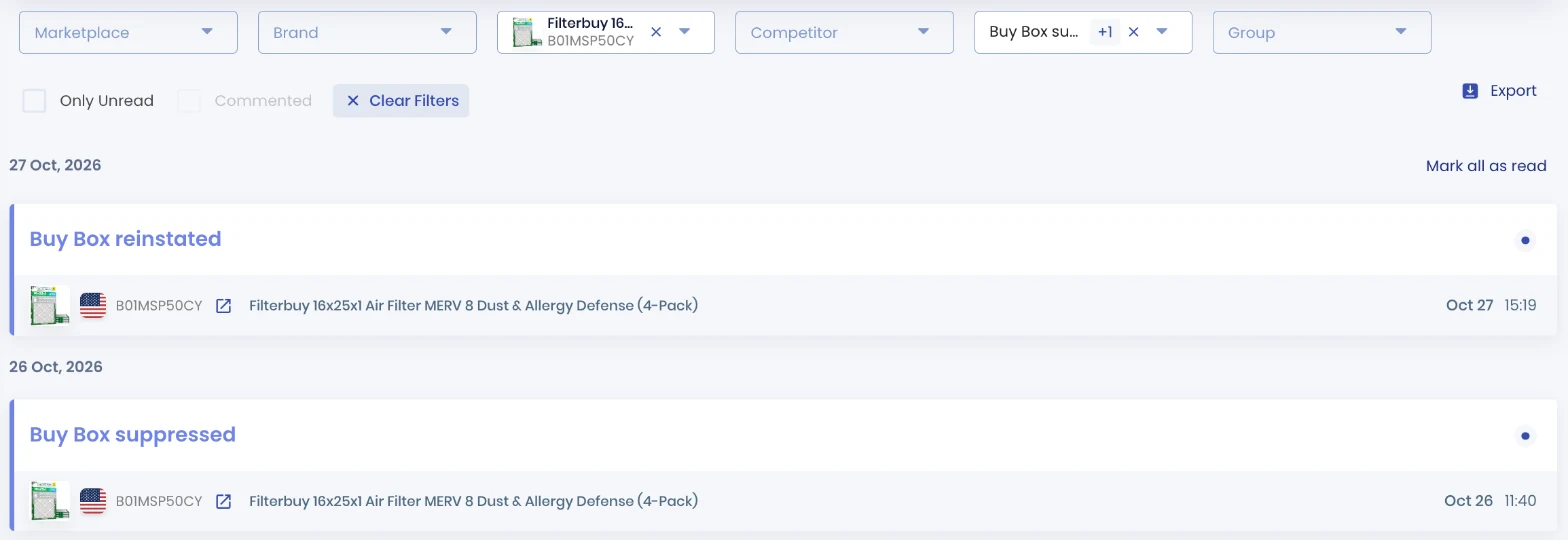
That Filterbuy listing had no Featured Offer for about a day. If you were advertising it, the ad wasn’t eligible to show for that whole time. SellerSonar sends Buy Box suppressed, listing suppressed and out-of-stock alerts on its next check: every hour on Business and Enterprise, every 2 hours on Premium and every 4 hours on Pro. Buy Box Won and Lost alerts start on Premium and are off by default, so switch them on in Alerts, then Delivery Settings.
When an alert lands, check the listing before you raise a single bid. A bid increase can’t fix a missing Featured Offer. Our Buy Box monitoring page shows what the tracker records.
📌 From Our Experience: When a campaign’s impressions drop to near zero overnight, sellers usually blame the bid. Check the Featured Offer and stock first. It takes a minute and it’s the more common cause.
Common Amazon PPC Mistakes
- Judging keywords too early. Five clicks is noise. Wait for about 20 clicks, as Amazon suggests.
- Running only automatic campaigns. You never move winners into exact match, so you never control their bids.
- No negatives. The same irrelevant searches eat budget every week.
- A target ACoS with no margin behind it. “Under 30%” means nothing until you know your break-even.
- Advertising a weak listing. Few reviews, no Featured Offer or a stock-out turn clicks into waste.
- Changing everything at once. You lose the ability to tell what worked.
Amazon PPC Strategy: Final Thoughts
A good Amazon PPC strategy is mostly routine: discover with automatic campaigns, harvest into exact match, block what doesn’t sell, and hold every campaign to a break-even ACoS you’ve calculated. Add brand defense once you have a brand, and test whether ads on your top organic terms are earning their keep.
For the bigger picture, including how ads fit next to deals, Brand Stores and off-Amazon traffic, read our Amazon advertising strategies guide.
And keep an eye on the listings you pay to promote. SellerSonar tracks organic and sponsored keyword rank and alerts you when a tracked listing loses its Buy Box or gets suppressed. You can try it free for 14 days, with 5 ASINs and 10 keywords and no credit card.

