







Quick Answer
Amazon review monitoring means watching review events, not just your star average. SellerSonar’s Review Tracker sends 10 alert types, and the ones that cost you money are the quiet ones: reviews removed in a sweep, a critical review upvoted to the top of your page, or a rating that slips after a buyer rewrites an old review.
- Free route: Voice of the Customer in Seller Central, plus reading product pages by hand. Fine at 10 ASINs, unworkable at 200.
- The catch: review data comes through your own browser, so it needs the Chrome extension signed in, an Amazon buyer account logged in, and the marketplace tab left open.
- Timing: alerts fire each time a collection runs, so collect every 1-3 days. They are never instant.
A review can change without anyone telling you. A buyer edits the text, a negative one gets upvoted to the top of your product page, Amazon removes a positive one in a sweep, and your rating ticks down while you’re busy doing something else. You find out when sales dip and you go looking for a reason.
That gap is the whole argument for Amazon review monitoring. Not a dashboard you check every morning out of anxiety, but something that watches the review section and tells you when it moves. This guide covers what it catches, how to set it up (stranger than you’d expect, and nobody explains it properly), what it won’t do, and how to do a decent job without paying for anything.
About the Author: Gloria Anderson writes for the SellerSonar editorial team on reviews, ratings, and listing health. She is unconvinced by any tool that promises to tell you a review is fake, and more interested in the boring events that actually move conversion.
What review monitoring actually catches
“Track my reviews” sounds like one job. It’s really 10 separate events, and the ones that cost you money are rarely the obvious ones.
SellerSonar’s Review Tracker sends 10 alert types. Grouped, they come down to four things:
- Reviews arriving. A new positive review, a new negative review, a new Vine review.
- Reviews disappearing. One “Reviews removed” alert, showing your review count before and after. Amazon does periodic purges; a chunk of your social proof can vanish overnight through no fault of yours.
- Reviews being edited. Amazon lets a buyer rewrite a review at any time. There is no dedicated edit alert, so a Rating changed alert is your prompt to go and reread.
- Reviews gaining weight. A negative review getting upvoted, a new negative or positive review appearing among the Top reviews on your listing page, a new phrase showing up often enough to become a pattern.
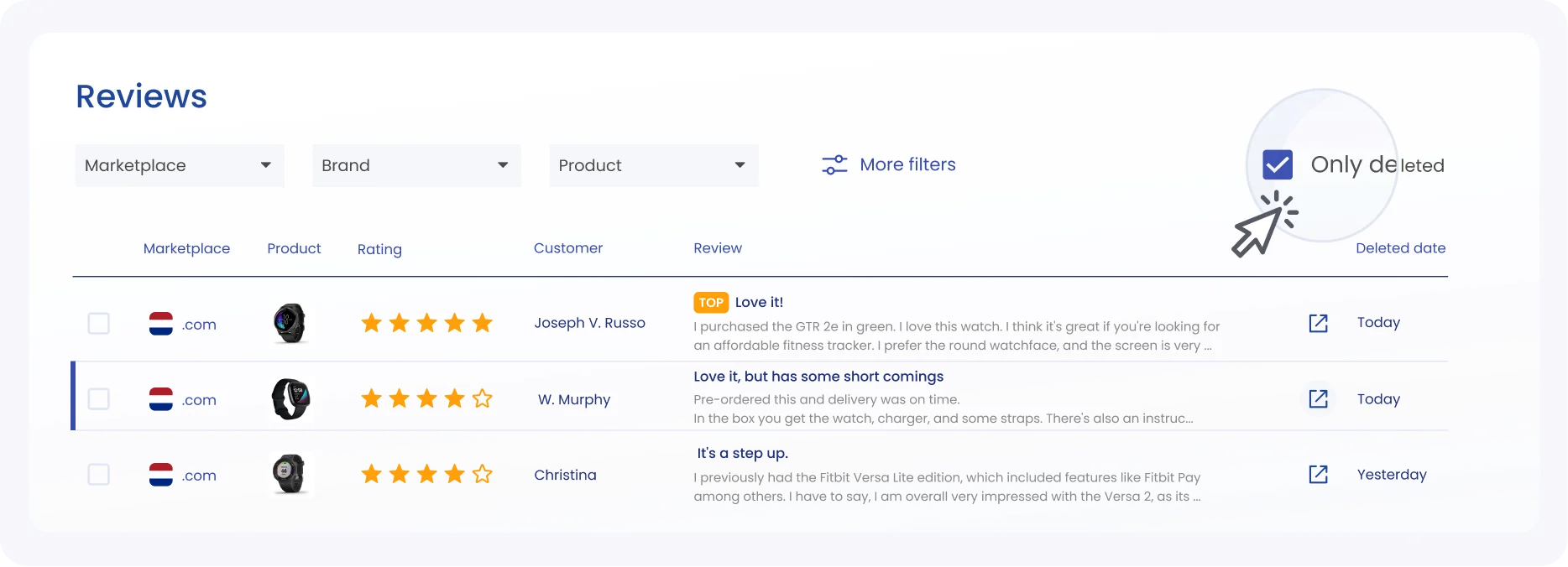
Every tracked review in one table, with the rating, tags, marketplace, and date.
That third group deserves a moment. A buyer can leave four stars, then come back a month later and rewrite the same review into one star with a paragraph about a part that broke.
The review ID doesn’t change. Nothing lands in your inbox. And if you’re watching your star average, you won’t see it either: one review moving from four to one barely shifts the number on a listing with a few hundred ratings.
But that text now sits on your product page. It’s the text shoppers read.
No tool hands you a neat “this review was edited” alert, SellerSonar included. What you can do is treat a Rating changed alert as a prompt to reread your most recent and Top reviews.
| Event | Why it matters | Spot it by eye? |
|---|---|---|
| New negative review | Needs a response while it is still recent | Yes, if you look daily |
| Review edited | Text shoppers read changes; your average barely moves | No |
| Review removed | Social proof disappears, often in an Amazon sweep | No |
| Critical review upvoted | Climbs to the top of your product page | Rarely |
| New Vine review | Permanent, and arrives during a launch window | Yes |
| Rating changed | Early signal of a durability problem | Only in aggregate |
A separate alert for a Top negative review gaining more votes sounds like over-engineering until the first time one starts climbing.
How to set up Amazon review monitoring
Here is where review monitoring differs from every other kind of Amazon tracking, and where most sellers get stuck.
Price, Buy Box, and ranking data can be read from the outside. Review data, since Amazon changed how review pages can be read, cannot. So SellerSonar collects reviews through your browser instead of from a server, using the SellerSonar Chrome Extension.
Watch the tutorial: SellerSonar’s four-minute walkthrough covers installing the extension and reading the on-page overlay, the Status, Events and Buy Box panels. It does not cover review collection, so take it as the install half and the three requirements below as the review half.
The three things that have to be true
All three, at the same time, or no review data arrives at all:
- The extension is installed, and you are signed in to SellerSonar inside it. Not just signed in to the web app. The extension has its own login.
- You are logged in to Amazon in the same browser, with a buyer or business account. Not Seller Central. It reads the review pages the way a shopper sees them, so it needs a shopper session.
- The marketplace tab stays open while collection runs. Collection happens per marketplace. Four marketplaces means four logged-in tabs, left open.
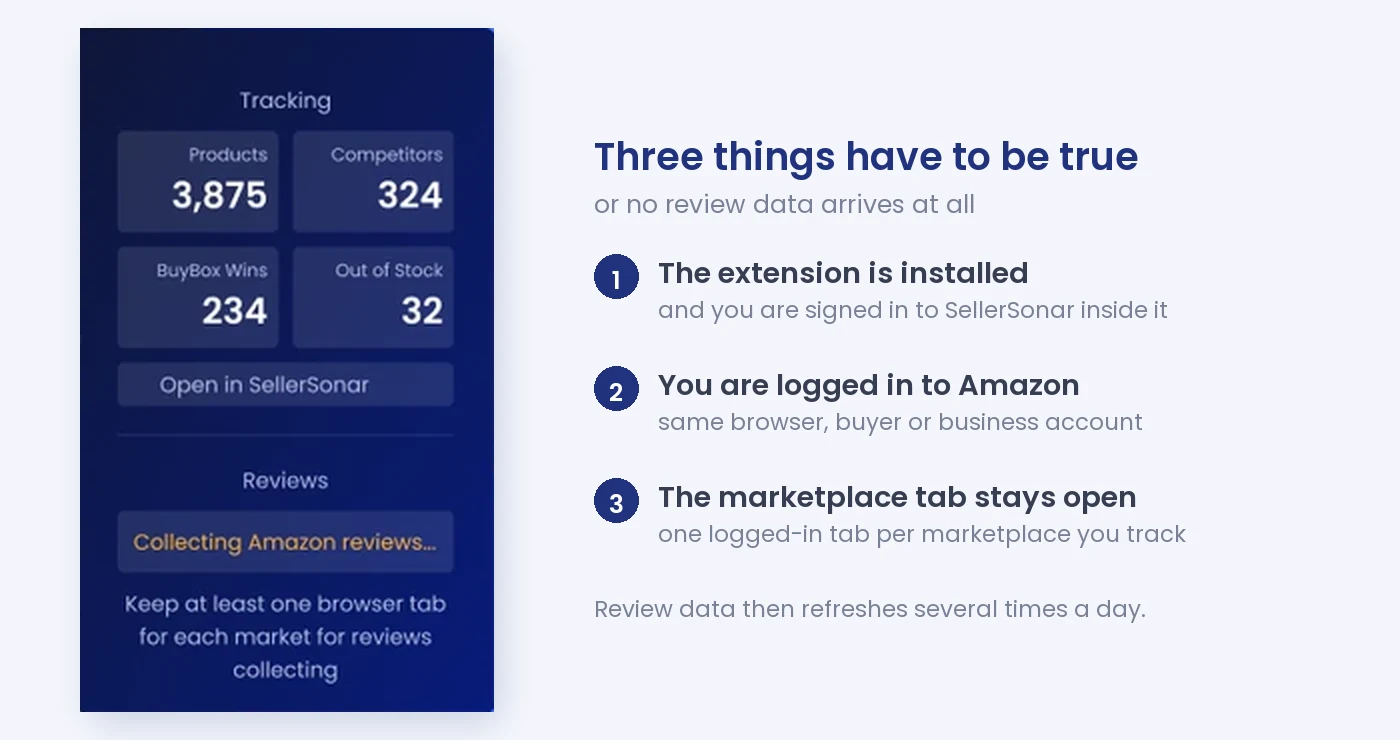
The extension says so itself: reviews only collect while a logged-in marketplace tab is open.
Then you wait a few minutes and reviews start filling in.
I wouldn’t call that elegant. It is, though, the honest trade: the alternative after Amazon’s change was no review data at all, which is what most monitoring tools quietly settled for. Worth knowing before you set it up and wonder why the table is empty.
💡 Expert Tip: If reviews stop updating, check the tab before you check anything else. It is the most common cause by a distance: someone tidied up their browser, closed the Amazon tab, and collection stopped without any error to explain it.
What happens after that
Review alerts fire when a collection runs, not in between. So how fresh your alerts are depends on how often you collect, and SellerSonar recommends every 1-3 days. If you have read a vendor page promising you will know the moment a review posts, treat that as marketing; nobody reads Amazon review pages continuously.
That pace is enough for the job, mind you. Responding to a one-star review within a day or two reads as attentive. Responding three weeks later reads as a brand that was not paying attention.
What review monitoring won’t do
Five limits worth being clear about, because the category oversells itself.
It won’t tell you a review is fake. No tool can. They can flag an implausible pattern, like 40 five-star reviews in a week on a product selling six units a day, and that pattern is genuinely useful.
But “suspicious velocity” isn’t proof, and the services promising fake-review detection are selling you an opinion. If that’s what you’re after, read our breakdown of how Amazon review checkers work before you pay for one.
It won’t remove a review. Neither can you, mostly. Amazon removes reviews that break its guidelines, and a seller’s job is to report and wait. We walk through what actually qualifies in the guide to getting an Amazon review removed.
It won’t tell you which reviews Amazon removed. The Reviews removed alert compares your total review count before and after, so you see the size of the drop, not the individual reviews behind it.
It won’t read your whole review history. Amazon limits collection to 10 pages of 10 reviews, so up to 100 reviews per product, and it sometimes shows fewer or blocks the reviews section altogether.
It won’t run on the cheapest plan. Review alerts and review tracking start at Premium; the entry Pro plan doesn’t include them. The plan comparison table has the current detail. Check it before you buy on the strength of a feature list.
🎯 Pro Insight: Set your alert thresholds by what you’d actually act on. A new five-star review needs no notification. A critical review gaining upvotes does, because that is the one climbing toward the top of your product page where every shopper will read it.
Tracking reviews without paying for anything
You can do a reasonable job manually. It costs time instead of money, and for a small catalog that is a fair trade.
Seller Central’s Voice of the Customer report shows you the complaint categories Amazon associates with each ASIN, which is the closest thing to free sentiment analysis. Beyond that, the honest method is to open each product page, sort reviews by most recent, and read. Then do it again next week.
Two things make this fall apart. The first is catalog size: 10 ASINs is 20 minutes, 200 ASINs is not a task anybody does twice. The second is that manual checking is terrible at exactly the events that matter most, because an edited review and a review that quietly disappeared both look like nothing happened.
If what you actually want is to find the reviews you wrote as a shopper, that is a different job with a different answer: see how to find your own Amazon reviews.
What to do when the alert fires
An alert you don’t act on is just a notification. Four events, four different responses.
A new negative review. Read it before you react. A lot of what reads as a product complaint turns out to be a delivery or packaging complaint, and those go to different places: one is a product fix, the other is a case with Amazon.
If it breaks the guidelines, report it. If it doesn’t, you can still reply publicly once, briefly, without arguing.
A rating change with no new review. Often a buyer has rewritten an old review. Reread your most recent and Top reviews. A buyer who downgraded after a month is usually telling you about durability, which is the most useful feedback you will get and the hardest to find any other way.
A critical review gaining upvotes. Treat this as urgent. Upvotes decide which review sits at the top of your product page, and the top negative review is read by a large share of shoppers who never scroll. You can’t downvote your way out of it; you can answer it, and you can fix the thing it describes.
Reviews disappearing. If several vanish at once, it’s almost certainly an Amazon sweep rather than anything you did. Note the date. If your conversion rate drops in the same week, now you know why, and you have the evidence for a case if the removals look wrong.

Recurring phrases grouped, which is how a pattern shows up before you notice it yourself.
One habit worth building: write the date of any rating change somewhere you will find it later. When conversion drops two months from now, that note is the difference between knowing the cause and guessing at it.
Keep a closer watch on Vine
Vine deserves separate attention during a launch, because the window is short and the reviews are permanent.
Vine runs through Amazon Brand Registry: if your product belongs to a brand, that brand has to be enrolled. Per Amazon’s Vine program page, you can enroll a product that has fewer than 30 reviews on its detail page, offer up to 30 units, and you aren’t charged if no Vine review arrives within 90 days of enrollment. Vine reviewers are candid by design; that’s the point of the program, and a launch can collect several critical reviews in a fortnight before you have any organic reviews to balance them.
New sellers who enroll a brand in Brand Registry also get a $200 Vine credit, per the same page, which makes a launch-window watch cheap to justify. A “new Vine review” alert during that window is worth more than the same alert six months later, when one review is a rounding error. Our guide to the Amazon Vine program covers the enrollment side.
📌 From Our Experience: The sellers who get the most out of review monitoring are not the ones watching their star average. They are the ones watching the top negative review, because that single block of text does more damage to conversion than a tenth of a star ever will.
Picking a tool, briefly
Three questions sort the category fast.
- Does it monitor reviews, or request them? Most “review software” is email automation for soliciting reviews, which is a different product.
- Does it watch competitor ASINs? That is how you tell whether a rating drop is you or the whole category.
- Does it catch what happens after a review arrives? Most tools only tell you when a review appears, not when it gets upvoted or removed.
We keep a current list in the best tools for managing Amazon reviews, including which ones have quietly stopped operating. Several have.
Where to start
Amazon review monitoring earns its keep on the events you’d never spot by looking: the quiet removal, the rating that slips after an edit, the critical review climbing your product page. Not on the five-star notifications.
If you’re setting this up today, do it in this order. Install the extension and sign in to it. Log in to Amazon in the same browser and leave the tab open. Run a collection every 1-3 days.
Then turn on alerts for new negative reviews, rating changes, and upvotes on negative reviews, and leave the positive ones off until you trust the volume. And watch your top negative review rather than your average.
Final Expert Recommendations: Based on what we see with sellers, the most useful setting is the least obvious one: the Rating changed alert. Everyone monitors new reviews, almost nobody watches for a rating that moves without one, and a rewritten review is the one that moves quietly and sits on your page for months. If you are just getting started, turn that on first and keep your notification volume low enough that you still read them.
Ready to set it up? SellerSonar review monitoring tracks ratings, sentiment, and competitor reviews, with a 14-day free trial and no card required.

