





Quick Answer
“Amazon account suspended” means Amazon has stopped your selling account (Amazon calls it a deactivation): you can’t sell, your listings go offline, and your payouts may be held. To appeal, open Account Health in Seller Central, click Reactivate your account, answer the questions with the root cause, your fixes and your evidence, and submit. Amazon says to expect a reply within two days.
Shopper, not a seller? If your Amazon shopping account is on hold, follow Amazon’s steps to regain access to an account on hold. The rest of this guide is for sellers.
Few emails scare a seller more than one that says the selling account has been deactivated. Sales stop, listings disappear, and the money in the account may be held.
This guide explains what each kind of suspension means, why Amazon suspends accounts, how the appeal works in Seller Central, what happens to your funds, and how to lower the risk of a repeat.
About the Author: Diana Walsh writes for the SellerSonar editorial team about Amazon policies, account health and Seller Central. Every rule, deadline and button name in this guide comes from Amazon’s Seller Central help pages and the Business Solutions Agreement, read on November 2, 2026. Where Amazon publishes no number, this guide doesn’t give one.
What does “Amazon account suspended” mean?
A suspended Amazon seller account is one that Amazon has stopped from selling. According to Amazon’s help page on how to appeal an account deactivation or listing removal, breaking its performance metrics or policies “may lead to the temporary deactivation of your account, removal of listings, or limitations on your use of the Merchant Fulfilled Network.”
So “suspended” is the word sellers search for, and “deactivated” is the word Amazon uses. Both describe the same thing, and both can be appealed.
Not every scary notice is an account suspension, though. A removed listing, an account under review or a limit on seller-fulfilled orders each has its own path back. Find your situation first.
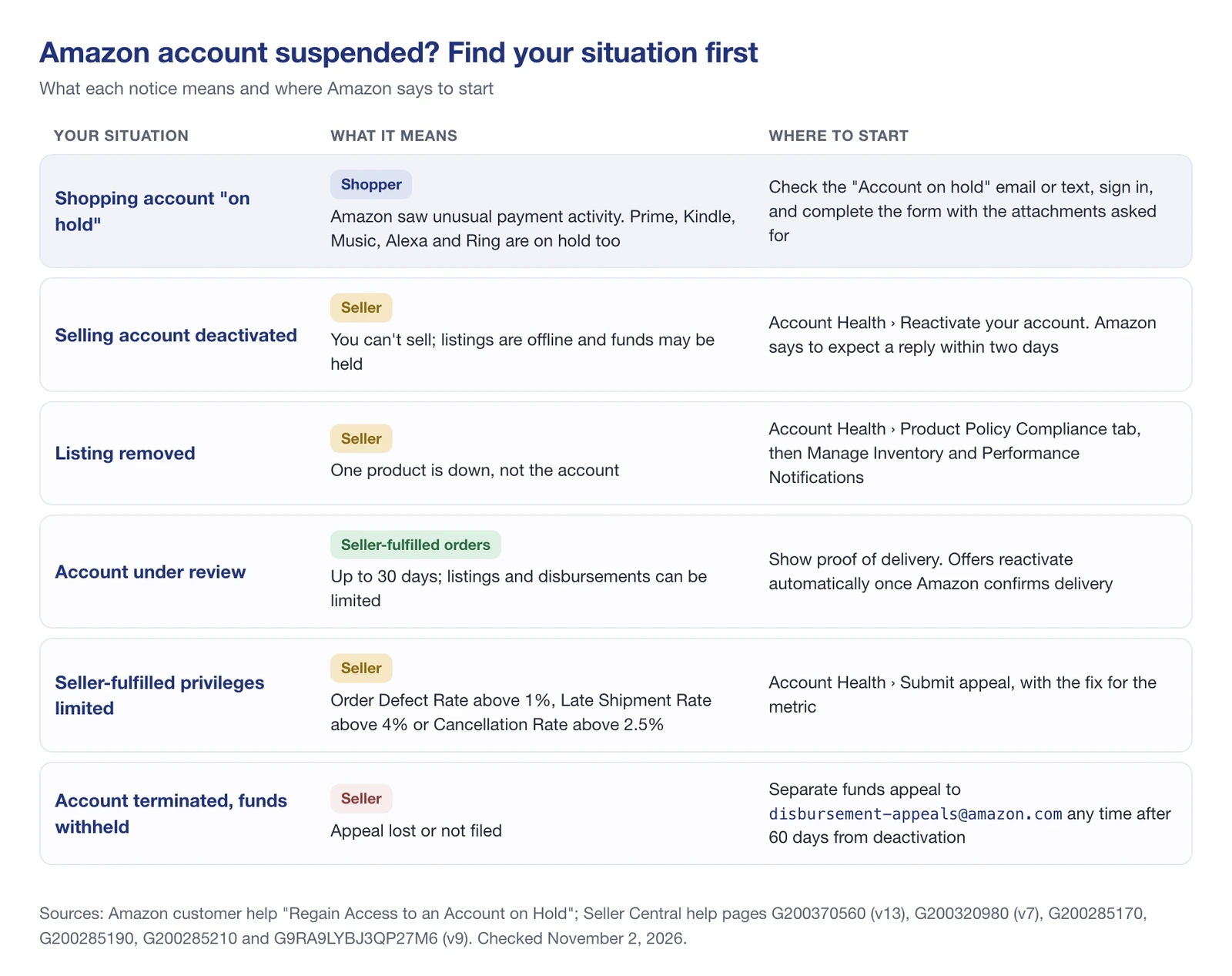
The rest of this section walks through each one, from the mildest to the most serious.
Types of Amazon account suspension
Here’s how the situations compare at a glance.
| Situation | What stops | How you get back |
|---|---|---|
| Listing removed or suppressed | One product | Fix the listing or appeal from Account Health |
| Account under review | Listings and payouts, up to 30 days | Proof of delivery; offers reactivate automatically |
| Seller-fulfilled privileges limited | Your seller-fulfilled offers | Fix the metric, then Submit appeal |
| Account deactivated (suspended) | The whole selling account | Reactivate your account appeal |
| Account terminated (banned) | The account, and possibly the funds | Separate funds appeal after 60 days; arbitration |
Amazon account deactivated
This is the account-level stop. You can’t sell, your offers leave the store, and Amazon may hold the money in your account while it decides what happens next.
It is also the case Amazon expects you to appeal. The appeal starts on your Account Health page, and we cover it step by step below.
Amazon account suspended (under review)
Many sellers say “suspended” when Amazon has placed the account under review. Amazon’s page on selling account reviews for seller-fulfilled orders says the review “should not exceed 30 days,” and during it Amazon can suspend all listings or just the seller-fulfilled ones.
Funds stay in your account, but Amazon limits disbursements until the review ends. Once it confirms delivery of your recent seller-fulfilled orders, your offers are “automatically reactivated.”
Typical triggers include a new or dormant account, buyers saying items never arrived, missing or invalid tracking, a sudden sales spike, and higher-risk items such as electronics. Keep shipping open orders, upload valid tracking, and use Appeal on the Account Health tab if you have extra proof of delivery.
Seller-fulfilled privileges limited
These limits apply to seller-fulfilled orders only. Each metric has a published limit: an Order Defect Rate below 1% over 60 days, a Late Shipment Rate below 4%, and a Cancellation Rate below 2.5% over 7 days.
Miss one and Amazon “may” suspend your Fulfilled by Merchant privileges or deactivate the offers behind the problem. The way back is the Submit appeal path on Account Health. Our guide to Amazon shipping delays covers how each rate is counted.
Listing removed or suppressed
A removed listing is a product problem, not an account problem. Amazon says to look in the Product Policy Compliance tab on Account Health, then Manage Inventory for inactive listings, then your Performance Notifications, and either appeal or fix the listing.
A listing can also drop out of search and come back with no account action at all. That’s what happened to a water bottle on amazon.es in October 2026, which SellerSonar’s Retail Issues alerts recorded twice as search suppressed and twice as restored.
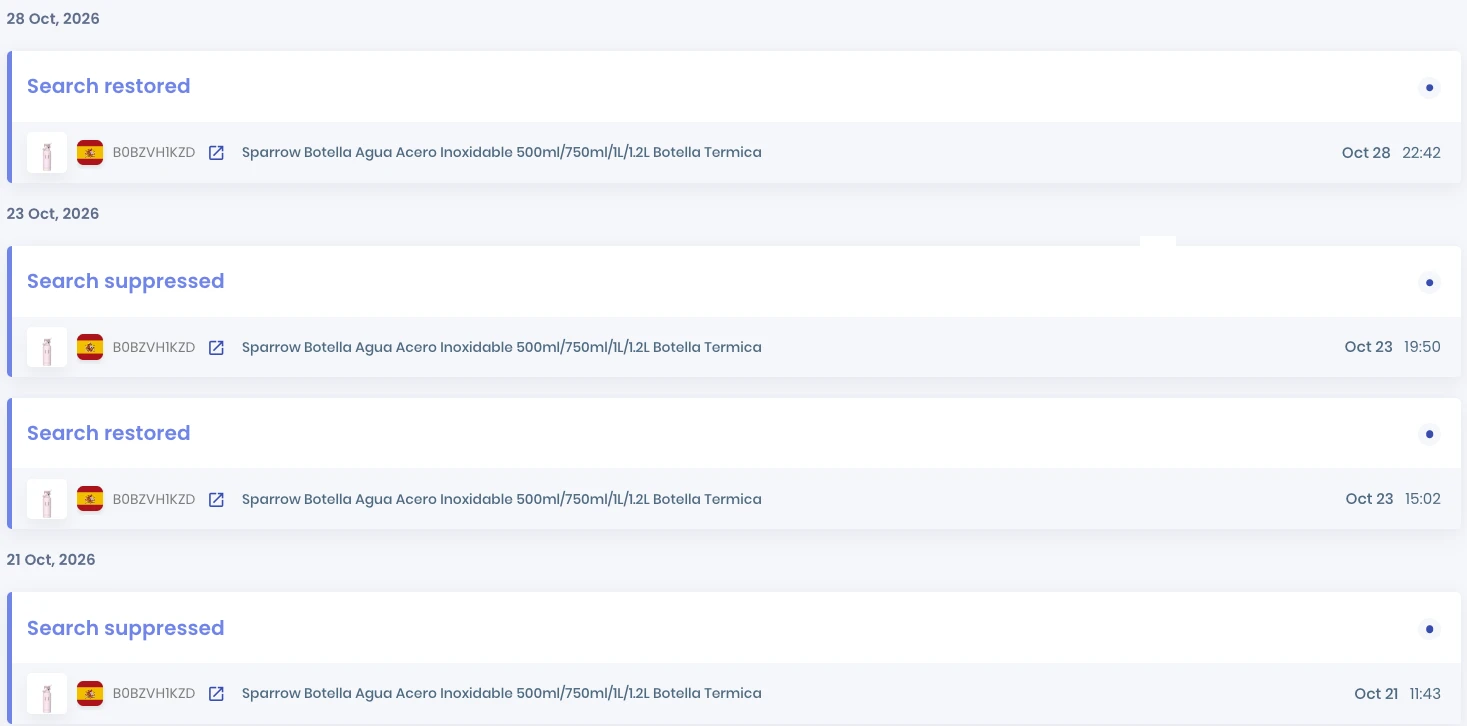
The first outage lasted about two days, the second about five. A monitoring tool can’t tell you why Amazon hid a listing; that answer sits in Seller Central. If you’re unsure which one you have, our suppressed listing guide explains the difference.
Appeal declined
A declined appeal isn’t always the end. If Amazon asks for more information, Amazon says to click View Appeal from Account Health and add the missing documents in your next submission.
Read the decision closely before you resubmit. If Amazon rejected invoices you sent, it says your Performance Notifications identify the reasons.
Amazon account banned
“Banned” isn’t an Amazon term, but it’s what sellers call a termination. This is the hardest case: Amazon’s Business Solutions Agreement (BSA), its contract with US sellers, allows it to “permanently withhold any payments” when an account was used for deceptive, fraudulent or illegal activity.
Selling counterfeits is the clearest route there. Amazon’s Anti-Counterfeiting policy says it “may immediately suspend or terminate your Amazon selling account (and any related accounts)” and dispose of inauthentic products in its fulfillment centers at your expense.
Why has Amazon suspended my account?
Section 3 of the BSA lists five grounds for suspending or terminating an account immediately:
- a material breach you didn’t fix within 7 days of a cure notice
- deceptive, fraudulent or illegal activity, or controls that flag it as possible
- harm, or possible harm, to other sellers, customers or Amazon
- an Account Health Rating below Amazon’s published threshold for deactivation
- a legal requirement
Amazon then notifies you by email or in Seller Central, “indicating the reason and any options to appeal.” The exception is when Amazon believes the details would hinder a fraud investigation.
🎯 Pro Insight: Read the notice inside Seller Central, not only in your inbox. The Account Health page shows the issues behind a deactivation and the appeal button, so it’s also a good way to check whether an alarming email is genuine.
Code of conduct violations
Amazon’s Selling policies and seller code of conduct sets nine rules every seller must follow. They include accurate information, fair use of Amazon’s features, no attempts to damage another seller, no influence over reviews, and contact with buyers only through Buyer-Seller Messaging.
Breaking them “may result in actions against your account, such as cancellation of listings, suspension or forfeiture of payments, and removal of selling privileges.” Reviewing your own products or a competitor’s, paying for reviews, or using bots to inflate traffic all count.
The code of conduct allows one Seller Central account for each region you sell in, “unless you have a legitimate business need to open a second account and all of your accounts are in good standing.” Amazon gives three examples of a legitimate need:
- you own multiple brands and run a separate business for each
- you manufacture products for two distinct, separate companies
- you were recruited for an Amazon program that requires separate accounts
The rule cuts both ways: “If any of your accounts are not in good standing, we may deactivate all of your selling accounts.” That’s why opening a new account to get around a deactivation can put every account you hold at risk.
Inauthentic products and IP complaints
Counterfeit and IP cases are among the most serious. The Intellectual Property Policy and the Anti-Counterfeiting policy both sit in the list of policies included in Account Health Rating, along with product condition, detail page rules, product safety, customer reviews and restricted products.
The evidence Amazon asks for is about your supply chain: authorization letters or invoices from authorized distributors for IP, and invoices from manufacturers or authorized distributors for counterfeit claims.
Restricted and prohibited products
Some restricted products need Amazon’s approval before you list them, and the rules differ by marketplace. Hazardous and prohibited items have their own rules on what you may list and how.
Listing a restricted product without approval breaks the Restricted Products policy, one of the policies counted in your Account Health Rating, and repeat violations cost more points each time.
Order performance
For seller-fulfilled orders, the Order Defect Rate counts negative feedback (1 and 2 stars), A-to-z Guarantee claims and credit card chargebacks. Product reviews aren’t part of it.
Late shipments and seller cancellations have their own rates, covered above. The consequence Amazon states for missing any of the three is a limit on your seller-fulfilled privileges or offers.
Identity verification
Amazon can ask for financial, business or personal information to verify your identity at any time. The BSA says that providing accurate identity verification “is a condition precedent to further disbursements following account suspension or termination.”
In plain terms: if Amazon can’t confirm who you are, you won’t get paid out. Answer verification requests with documents that match your account details exactly.
Account Health Rating and Account Health Assurance
Your Account Health Rating (AHR) is the number to watch. It’s a color-coded score from 0 to 1,000, shown on the Account Health page for each store you sell in, and it reflects policy adherence and selling activity over the last 180 days.
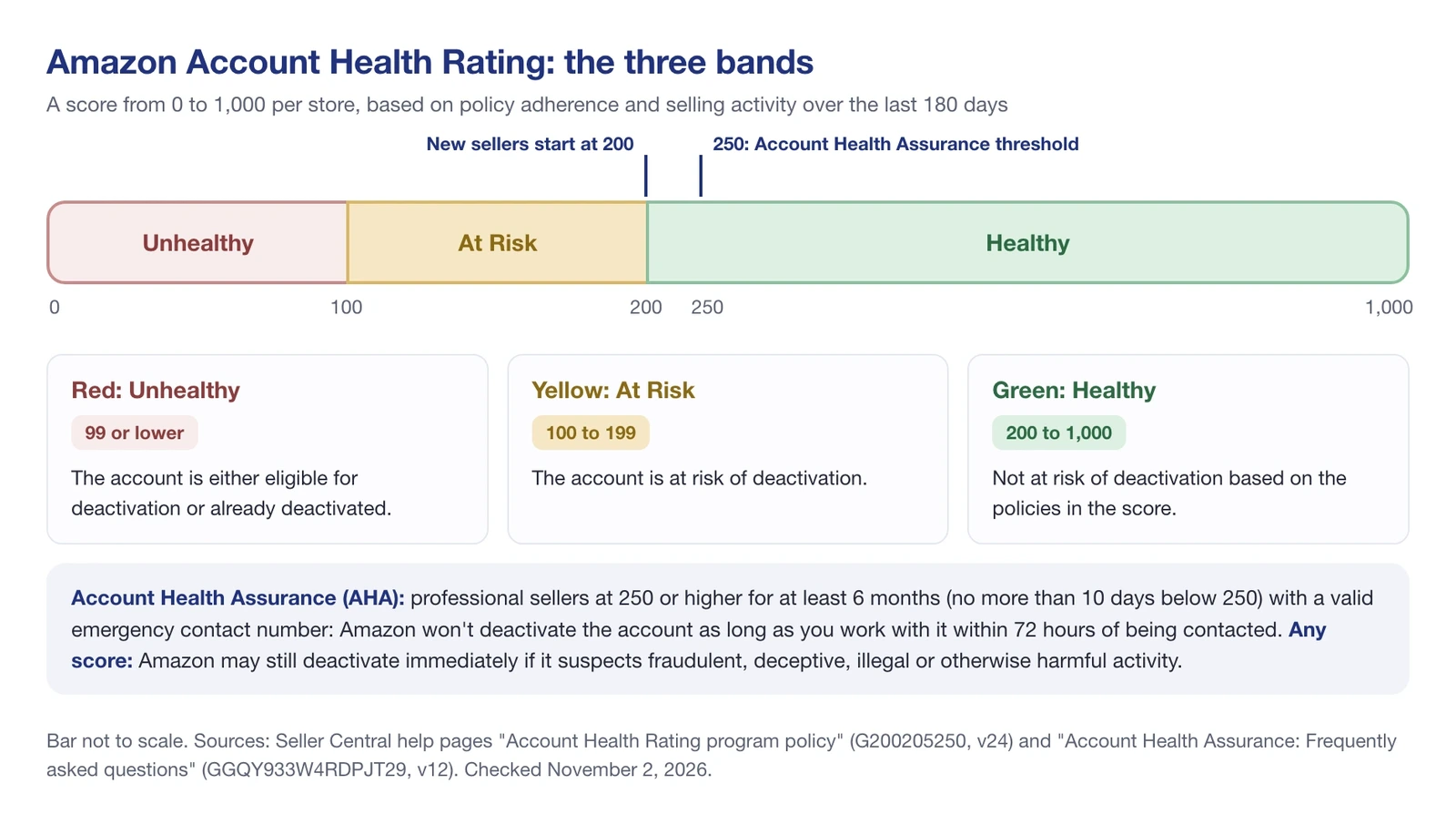
All new sellers start at 200. You lose points for new policy violations and gain them back when you address those violations. Amazon sorts violations into four severity levels (critical, high, medium and low), and critical ones “can lead to immediate account enforcement.”
Repeats are where accounts get into trouble. Each repeat of the same policy costs more points, and the maximum number of repeat violations in a 180-day period “can be as low as two violations for higher severity violations.”
The score doesn’t protect against everything. Amazon may deactivate an account immediately, whatever its AHR, if it suspects fraudulent, deceptive, illegal or otherwise harmful activity.
Account Health Assurance
Account Health Assurance (AHA) is the safety net for strong accounts. Professional sellers qualify with an AHR of 250 or higher for at least 6 months, no more than 10 days below 250, and a valid emergency contact number. Enrollment is automatic and confirmed by email.
With AHA, Amazon says it “will no longer deactivate your selling account as long as you work with us within 72 hours of contacting you to resolve any issues.” You keep selling while you fix the problem.
💡 Expert Tip: Check your emergency contact number before you ever need it. AHA requires a verified one, and Amazon uses it to call you about urgent issues. Open Notification Preferences, find the Emergency Notification widget, and complete the one-time code check if the tag is red.
How to appeal an Amazon account suspension
Amazon’s appeal is a guided form in Seller Central, not a free-form letter. Here are the steps from Amazon’s help page:
- In Seller Central, go to Account Health.
- At the top of the page, click Reactivate your account.
- Follow the instructions. You may be asked to submit a questionnaire, acknowledge a violation, complete a quiz, or provide supporting documents.
- Click Submit, then watch your email for Amazon’s decision.
Amazon says: “Please expect a reply to your appeal within two days.” That’s the reply time, not a promise of reinstatement. We found no overall timeline for getting an account back in Amazon’s help pages.
Write the appeal like a Plan of Action
Sellers still call the appeal a Plan of Action: the root cause, what you fixed, and what stops it from happening again. That structure now goes into the answers of the questionnaire. Amazon’s guide to completing an appeal questionnaire gives four rules:
- Be clear and concise. Stick to facts and events, leave out other support cases, and “avoid using emotive language.”
- Explain every issue. Find the root causes, such as unverifiable suppliers, inventory management or quality control, and list specific actions with dates.
- Support every item. Send evidence for every ASIN under review; the list is at the bottom of your notification.
- Highlight what matters. Circle or highlight the ASIN, supplier name or key clause in your documents.
For a late shipment case, that could read: root cause, a carrier pickup missed on three dates; corrective action, a second carrier contracted on a given date; preventive action, handling time raised and a daily ship-confirmation check. Short, dated and checkable.
One exception matters. For product condition violations, Amazon’s policy violation appeals FAQ offers two choices: acknowledge the violation, or submit evidence that it was an error. It also says a plan of action “will not be accepted” for these violations, nor will screenshots of your inventory or order page, or a bin check case that’s still under review.
Invoices that pass review
Amazon’s invoice requirements for appeals are specific:
- supplier name, phone number, address and website
- an issue date within the 365 days before the notification
- quantities that cover your sales and stock for each cited ASIN over the past 365 days
- clear product identifiers (name, model number, UPC, EAN or ISBN)
- PDF, JPG, PNG or GIF, no larger than 10MB, submitted through Seller Central
You may remove pricing, but the document “must be authentic and unaltered.” Pro forma invoices, sales quotes, self-issued invoices and editable Excel or Word files are rejected.
If you can’t submit the appeal
If the buttons are grayed out, Amazon’s Account health support FAQ suggests a different browser or a cleared cache, then the Amazon Seller app, then the Contact us button, and finally Seller Central’s general support. If you think an Amazon system error caused the violation, say so and attach the proof.
What not to do
- Don’t open a second account to keep selling; it puts every account you hold at risk.
- Don’t send edited or self-made invoices.
- Don’t blame customers or write an emotional appeal.
- Don’t resubmit the same appeal unchanged after a decline; add what was missing.
- Don’t threaten a lawsuit; the agreement sends disputes to arbitration (see below).
Who to contact about a suspended account
For account health problems, the team is Account Health Support, not general Seller Support. The same FAQ describes it as “a dedicated support channel for professional sellers worldwide,” available 7 days a week.
Click Contact us (or Call me now) on your Account Health page, enter your phone number, and a specialist calls you back. The same button is in the Amazon Seller app. Specialists can help you “submit requested information to avoid account deactivation or reinstate a deactivated account.”
Individual-plan sellers don’t get this channel; Amazon points them to the help pages, Seller University and Seller Forums. For every other route, see our guide on how to contact Amazon Seller Support.
What happens to your money
Under Amazon’s funds disbursement eligibility policy, a deactivation under Section 3 of the BSA can come with withheld funds. Amazon may use them to cover returns, A-to-z claims, outstanding fees and other amounts you owe.
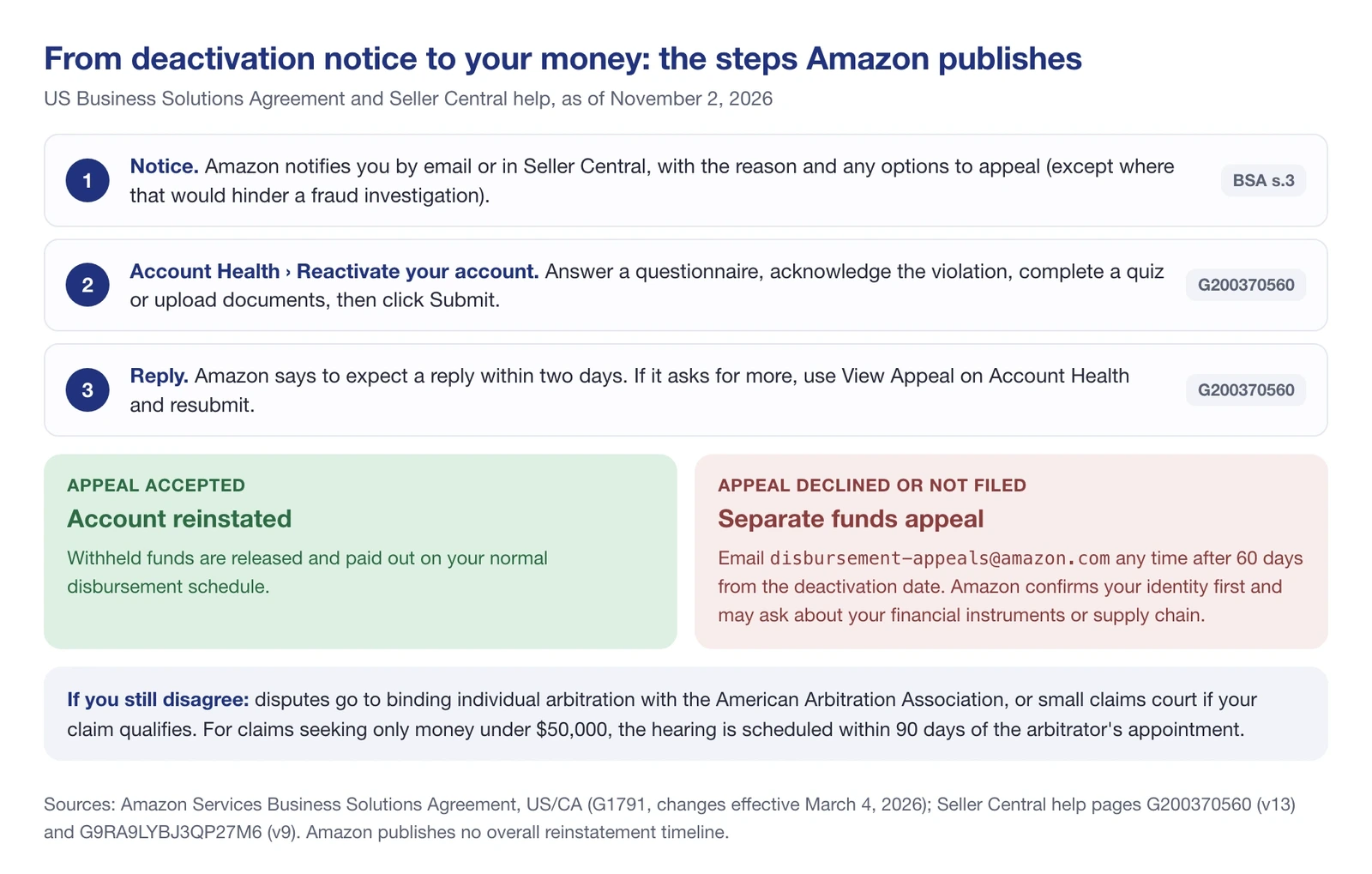
If the appeal succeeds, the funds are released on your normal disbursement schedule. If it fails, or you don’t appeal, you can “separately appeal to seek any withheld funds by contacting [email protected] at any point after 60 days from the date when your account was deactivated.”
Amazon first checks the account for fraud and confirms your identity, and may ask about your identity, financial instruments or supply chain. If it finds fraud or can’t confirm who you are, it may “permanently withhold any payments.”
FBA stock is a separate clock. After termination, the BSA’s FBA terms give you 14 days to tell Amazon whether to return or dispose of your units; after that (unless a program policy sets another period), Amazon may return or dispose of them itself.
Your legal options
The BSA was updated effective March 4, 2026, and Amazon’s summary of the changes moved dispute resolution into its own Section 20. A few rules matter if you’re weighing a fight:
- Notice. Amazon may end the agreement “for convenience with 30 days’ advance notice.” Immediate suspension needs one of the five grounds above.
- Arbitration. Disputes go to binding individual arbitration with the American Arbitration Association, not to court. Small claims court is allowed if your claim qualifies, and class actions are waived.
- Speed. According to the BSA, for claims seeking only money under $50,000, the hearing is scheduled within 90 days of the arbitrator’s appointment.
- First step. Before arbitration, you must send a letter describing your claim to Amazon’s registered agent named in the agreement.
Sellers in the EU have extra protection: under the Platform-to-Business Regulation (EU) 2019/1150, a platform must give a statement of reasons at least 30 days before a full termination takes effect, with exceptions such as legal obligations.
A suspension lawyer or appeal agency can help you write and document an appeal. No one outside Amazon can promise a reinstatement or a date, and Account Health Support is Amazon’s own route, so start there.
If you’re an agency, reseller, developer or vendor
Agencies: Your client’s account answers for what you do on it. Amazon’s code of conduct lists “allowing other people to act on your behalf in a way that violates Amazon’s policies” as a violation. Agents who file infringement notices that benefit their own selling account “may have their selling account terminated.”
Resellers and book arbitrage sellers: Your appeal lives or dies on invoices. They must come from a supplier that isn’t your own business, cover 365 days of sales, and include the ISBN or other identifiers. Amazon says media products such as books and CDs “follow the same documentation requirements as all other items.”
Developers: The BSA’s Selling Partner API terms let Amazon limit, suspend or terminate API access “for convenience with 30 days’ notice,” or immediately for an uncured breach, fraud, or use that may harm customers. On suspension, your credentials can stop working.
Vendors: If you sell to Amazon through Vendor Central, your account runs on separate vendor terms, so the Seller Central appeal above isn’t your route. Start with Vendor Central support.
How to prevent an Amazon account suspension
These habits catch most problems before they reach the deactivation stage:
- Check Account Health every week. Fix violations in order of severity, and don’t let a repeat stack up.
- Keep your emergency contact verified. It’s a condition of AHA and how Amazon reaches you.
- File supplier invoices as you buy. You may need 365 days of them on short notice.
- Watch your seller-fulfilled metrics. Order Defect Rate, Late Shipment Rate and Cancellation Rate each have a hard limit.
- Run one account per region unless you have one of Amazon’s legitimate reasons, documented.
- Keep listing information accurate, and notice edits to your listings that you didn’t make.
That last one is easy to miss, because your detail pages can change without you editing them. SellerSonar’s Content Changes alerts flag a new title, bullet, description or image on the next check (every 4, 2 or 1 hours, depending on plan), with the before and after values and, for text changes, a flag for restricted words.
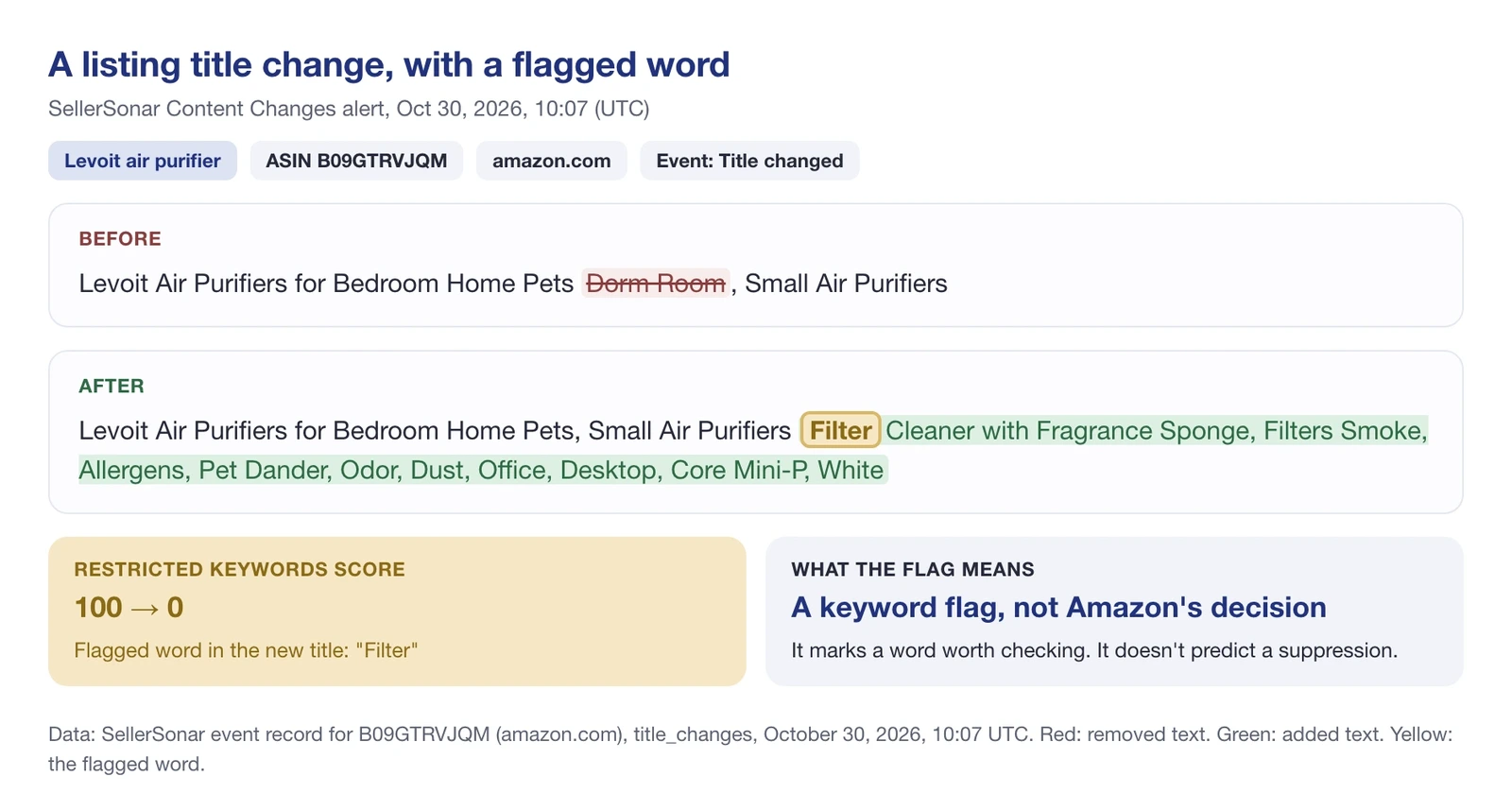
Here the new title added the word “Filter,” and the Restricted Keywords score fell from 100 to 0. That’s a keyword flag, not Amazon’s decision, and it doesn’t predict a suppression. But a dated before-and-after record is useful evidence when you need to show Amazon what your listing said on a given day.
📌 From Our Experience: The strongest appeals we see read like an audit, not a letter. The seller pulls the notice from Account Health, matches every cited ASIN to an invoice, writes down the root cause with dates, and only then opens the form.
Bringing it together
An Amazon account suspension is serious, but it follows published rules:
- Find your situation. A removed listing, an account under review and a deactivation each have different paths.
- Appeal from Account Health. Reactivate your account, answer with the root cause, the fixes and the evidence; expect a reply within two days.
- Call Account Health Support. Professional sellers get a callback 7 days a week.
- Know the money rules. Funds are released on reinstatement; otherwise a separate funds appeal opens 60 days after deactivation.
- Protect your rating. AHR of 250+ for 6 months earns Account Health Assurance.
Final Expert Recommendations:
Don’t rush the first submission. A clear, documented appeal that answers every cited ASIN is worth more than a fast one, because each decline adds another round. Call Account Health Support before you submit, keep invoices and your emergency contact current long before you need them, and treat a yellow AHR as the warning it is.
Want to know when one of your listings is suppressed, or when its title or images change? Start a free 14-day SellerSonar trial (5 ASINs and 10 keywords, no credit card) and get a dated record of every change.
Sources: Amazon Seller Central help pages on account deactivation appeals, appeal questionnaires, policy violation appeals, invoice requirements, Account Health Rating, Account Health Assurance, Account Health Support, selling account reviews, order performance metrics, the seller code of conduct and funds disbursement; the Amazon Services Business Solutions Agreement (US/CA, changes effective March 4, 2026); Amazon customer help on accounts on hold; Regulation (EU) 2019/1150, Article 4 (all read November 2, 2026); monitoring data from products we track, October 2026.

