





The FBA New Selection program cuts your referral fee and waives storage, returns and surcharges on the first 200 units of each new parent ASIN you send to FBA. It costs nothing to join.
If you read about it a year ago, almost every number you remember is out of date. Amazon rebuilt the program in 2026. The benefits are several times larger than the version most articles still describe.
Figures below are from Amazon’s own program page, checked on 30 September 2026. Program terms change, so confirm yours on the New Selection page in Seller Central before you plan around them.
What you actually get
| Benefit | What Amazon gives |
|---|---|
| Referral fee | A discounted 10% on the first 100 units sold of an eligible new-to-FBA parent ASIN, then 5% on the next 100 |
| Monthly storage | Free on the first 200 units of each new parent ASIN, for 120 days after it reaches a fulfillment center |
| Storage utilization surcharge | Waived, same 200 units and 120 days |
| Low-inventory-level fee | Waived, same 200 units and 120 days |
| Returns processing | Waived on up to 200 units per parent ASIN, where the return reaches a fulfillment center within 120 days of the stock arriving |
| Amazon Vine | A $75 credit against the enrollment fee, for 3 to 10 units per parent ASIN, if you enrol within 60 days of listing |
| Coupons | A $50 credit against coupon variable fees |
The referral discount is the part worth reading twice, because it’s a rate, not a rebate. Amazon’s wording is “a discounted 10% referral fee on the first 100 units sold of eligible parent ASINs that are new to FBA, and 5% on the next 100 units sold.”
What that is worth in money
Most categories charge a 15% referral fee, so take a product selling at $25 in one of them and apply Amazon’s published program rates.
On the first 100 units you pay 10% instead of 15%. That’s $1.25 a unit, or $125. On the next 100 you pay 5% instead of 15%, which is $2.50 a unit, or $250. The referral discount alone is $375 across 200 units, before a penny of storage, returns or surcharge relief.
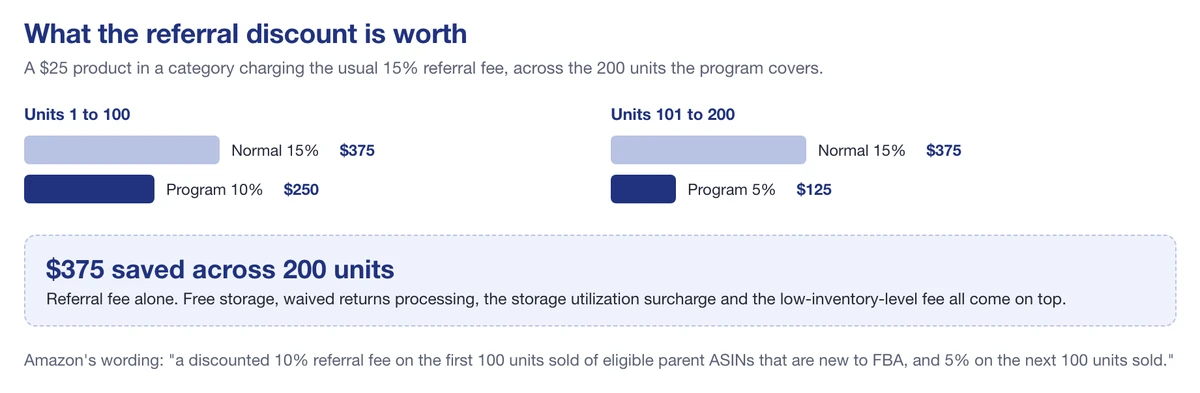
The referral discount alone, on a $25 product across the 200 units the program covers
Add 120 days of free storage on those units, waived returns processing, no low-inventory-level fee and no utilization surcharge, and the program is worth several hundred dollars per ASIN rather than the roughly $100 that older write-ups quote.
That gap is the whole point. Anything describing 50 units, three months of storage, or a $100 ad credit isn’t describing today’s program. It’s describing the one Amazon replaced.
What changed, if you knew the old version
- Free storage covered 50 units for three months. It’s now 200 units for 120 days.
- Returns processing was waived only in a handful of categories such as apparel, shoes and jewellery. It now applies across eligible ASINs, up to 200 units.
- There was no referral fee discount at all. There is now, and it’s the largest single benefit.
- The old sweeteners were carrier and advertising credits. The current ones are a $75 Vine credit and a $50 coupon credit.
- Surcharges that did not exist in the old program, the storage utilization surcharge and the low-inventory-level fee, are now waived too.
Who qualifies
- A Professional selling plan, and registration for FBA.
- An Inventory Performance Index of 300 or higher. Amazon’s page adds that “if you haven’t been assigned a score yet, you can still enroll”, which is what lets genuinely new sellers in.
- Parent ASINs that are new to FBA, meaning never previously received at a fulfillment center.
- FBA enabled on the ASINs you want covered.
You have to hold the score, not just reach it. Amazon says you “can be removed from the program if your IPI falls below 300 during an assessment period.”
Note the number. A great many articles, including this one until today, say the threshold is 400. Amazon’s own program page says 300.
How enrollment works
It differs depending on how new you are, and it’s where sellers lose the benefit without noticing.
Brand new sellers are enrolled automatically, provided you create your first FBA shipment within 90 days of listing your first buyable product. Miss that window and the automatic route closes.
Everyone else has to opt in on the program page in Seller Central. Nothing happens on its own. If you’ve been selling for a while and assume you’re covered because you read that enrollment is automatic, check, because that sentence was written about new sellers.
Either way, benefits attach from the point of enrollment forward. Nothing is applied retrospectively to stock already sitting in a fulfillment center, so enrolling late costs you the units you already sent.
About that October deadline
Several sites are circulating a 31 October confirmation deadline for keeping the 2026 benefits on ASINs listed after that date. Amazon’s public program page carries no calendar dates at all, so we’re not going to print one as fact.
What we’d do instead: open the New Selection page in your own Seller Central and look at your enrollment status. It takes a minute. Any deadline that applies to your account will be stated there. Don’t plan a launch around a date you read in an article, including this one.
How to sequence a launch around it
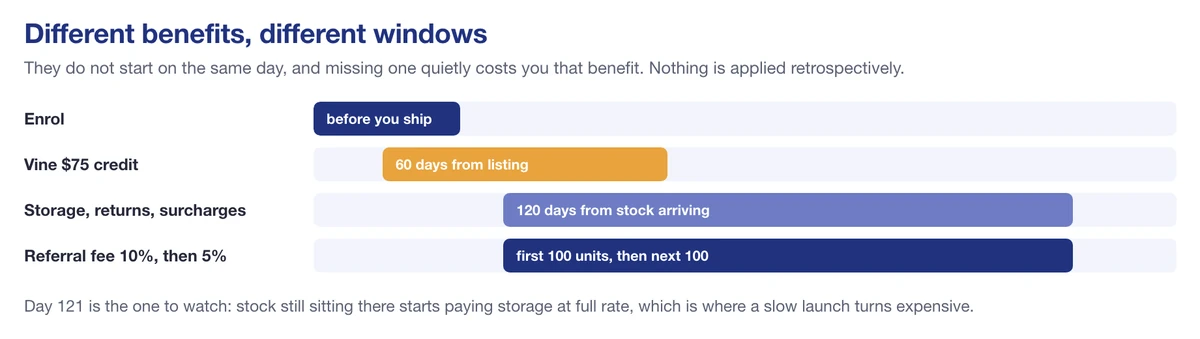
Each benefit runs on its own window, and none of them start on the same day
Enrol before you create the shipment, not after, because the clock on storage and returns starts when the stock is received and the waivers only attach from enrollment forward. Then size the first batch with 200 in mind: that’s the number every waiver is built around, and units beyond it pay normal rates from the first day.
Get Vine going inside 60 days of listing if you want the $75 credit, since that window runs from the listing date rather than from when the stock lands. And watch the 120 days, because it’s the real deadline. Stock still sitting there at day 121 starts paying storage at full rate, which is the moment a slow launch turns expensive.
Checking it is actually working
Enrolling and assuming is how sellers find out in month four that nothing applied.
Amazon provides an FBA New Selection dashboard in Seller Central listing your enrolled products and the savings against them. Open it a week after your first shipment is received and confirm the ASIN is there, because an ASIN that fails eligibility fails silently.
The usual reason is the parent. If any child of that parent has ever been received at a fulfillment center, the parent isn’t new to FBA and nothing under it qualifies, however new the child listing looks.
Which marketplaces it covers
The program runs in the United States, United Kingdom, Germany, Spain, France, Italy and Japan, with a global enrollment application covering them.
That matters if you sell across Europe: the same new parent ASIN can draw benefits in more than one of those stores, and enrollment isn’t something you repeat store by store.
What the program does not do
- It doesn’t lift your ASIN limits. This has confused sellers since the program launched. A cap on how many new ASINs can draw benefits is not permission to list more.
- It doesn’t cover variations of something you already sell through FBA. The parent ASIN has to be new to FBA, so a new color or size under an existing FBA parent is out.
- It doesn’t waive the fulfillment fee. Storage and returns are covered; the per-unit fee for picking, packing and shipping is not.
- It doesn’t make a bad product work. It lowers the cost of finding out, which is a different and more honest claim.
Is it worth using
Yes, because the downside is zero and the upside is a few hundred dollars per ASIN. There’s no fee, no commitment and nothing to lose by enrolling before you need it.
The more useful way to think about it is as a subsidy on testing. A 200-unit batch with waived storage, waived returns and a 10% referral fee is a much cheaper experiment than the same batch at full rates, which makes it the natural moment to try a product you weren’t sure about. If you’re launching under your own brand, our guide to private label covers the decisions that come before this one, and the FBA calculator guide shows how to model the unit economics with these waivers in place.
New ASINs are the ones most likely to get hijacked, suppressed or quietly changed. SellerSonar watches them from the day they go live. Start your free 14-day trial.

