





Quick Answer
The Amazon Vine program is an invitation-only review program: Amazon picks its most insightful reviewers (Vine Voices) and lets them order free products that brands enroll, in return for honest reviews. Reviewers aren’t paid, and the items count as taxable income. Sellers need a Professional account, a Brand Registry role and an FBA offer, and pay $0, $75 or $200 per parent ASIN depending on how many units they enroll.
Amazon Vine sits between two groups of people. Reviewers get free products to test. Sellers get early, honest reviews on products that have few or none. Both sides have rules, and both sides have costs that aren’t obvious at first.
This guide covers both. The first part is for reviewers: how invitations work and what you owe in taxes. The second part is for sellers: who can enroll, what it costs, when Amazon bills you, and what to expect once Vine Voices start ordering.
About the Author: Gloria Anderson writes for the SellerSonar editorial team about Amazon reviews, brand programs and selling on Amazon. She checks every Amazon program detail in her articles against Seller Central help and Amazon’s own program pages, and every tax figure against the IRS source it comes from.
What Is Amazon Vine?
Amazon Vine is a customer review program run by Amazon. In Amazon’s own words, Amazon Vine “is an invitation-only program which selects the most insightful reviewers in the Amazon store to serve as Vine Voices.” Vine Voices order products for free and review them.
The products come from brands that enroll them. A seller sends units to Amazon’s warehouses through FBA, enrolls the product in Vine, and Vine Voices can then request it. The seller never learns who the reviewers are.
A few facts that help both sides understand the program:
- Reviews can be positive, neutral or negative. Amazon asks Voices for “honest and unbiased opinions,” and a free product doesn’t buy a good rating.
- Vine reviews are labeled. They show up “in the same location as other reviews” with a badge that Amazon’s Vine page calls “Vine Customer Review of Free Product.” Seller Central help describes the tag as “Amazon Vine review of a free product.”
- Amazon doesn’t say Vine reviews carry extra weight. Its customer reviews help page says star ratings come from machine-learned models that consider factors such as how recent a review is and verified purchase status.
- Vine runs in 9 stores: the US, Canada, the UK, France, Germany, Italy, Spain, Australia and Japan.
- Amazon doesn’t publish how many Vine Voices there are. There is also no fixed number of reviews you need to be invited.
How Amazon Vine Works
Here is the whole program in four steps, from both sides:
- Amazon invites reviewers. Amazon invites customers who write insightful reviews of things they bought to become Vine Voices. There is no application form.
- Sellers enroll products. A brand-registered seller with an FBA offer enrolls a product in Seller Central and chooses how many units (1 to 30) to give away.
- Vine Voices order and test. Voices pick products they want from the Vine site. Amazon ships them from FBA stock at no cost to the reviewer.
- Voices post reviews. The review appears on the product page with the Vine badge. Voices aren’t required to review every item, but Amazon tracks how many of their orders they review.
The seller pays an enrollment fee for the product (more on that in the cost section), and the reviewer pays income tax on the value of what they receive. Nobody gets paid cash.
For Reviewers: How to Join Amazon Vine and Become a Vine Voice
You can’t apply to Amazon Vine. Amazon says customers “who consistently write insightful reviews are most likely to be invited.” Seller Central help puts it the same way: Amazon invites customers “based on the insightfulness of the reviews they published on their Amazon buys.”
So the only path in is the obvious one. Buy things on Amazon, and write detailed, useful reviews of them. Amazon doesn’t publish a minimum number of reviews, a rank you need to reach or a waiting time.
What happens when you’re invited
The invitation arrives by email. If you think you missed it, you can check your status at amazon.com/vine. To join, you accept the participation agreement and complete a tax interview, which asks for your Social Security number or another tax ID. After that you’re a Vine Voice.
Vine runs on Amazon’s customer site, not in Seller Central. Seller Central is only where sellers enroll products. Reviewers log in at amazon.com/vine with their normal Amazon customer account.
Do Vine Voices get paid?
No. Amazon’s Vine page says Voices “are shoppers like you and are not paid to participate in the program.” What you get is the product itself.
That also limits how you can make money from Vine. You can’t flip the items quickly. Amazon’s Vine Voice FAQ, as published by members, quotes the Vine terms: you “may not sell or give possession of the products to any other person or entity for six months following your order.”
The items also count as income. So a free product still comes with a tax bill, as the next section explains.
Staying in the program
Voices don’t have a deadline for each review. Seller Central help says plainly that “Vine voices don’t have any timeline to post a review.” Instead, Amazon looks at your record over an evaluation period.
According to Amazon’s Vine Voice FAQ, as published by members, there are two membership tiers. The higher tier lets you request more items per day and higher-value items, and you reach it by reviewing a large share of your Vine orders within each evaluation period. Review too few of your orders and your account can be closed. Your Vine account page shows the dates of your current evaluation period.
Taxes in Amazon Vine: ETV, 1099-NEC and What Reviewers Owe
This is the part most new Vine Voices get wrong. The short version: Vine products are free to order, but they are not free of tax.
Are Amazon Vine products taxable?
Yes. Amazon’s own Vine page for sellers says it directly: “Although Voices receive products for free, they are responsible for income tax on the products.”
That matches the general US rule. IRS Publication 525 says you “can receive income in the form of money, property, or services,” and that in most cases income “is taxable unless it is specifically exempted by law.” There’s no exemption for products received to review.
What ETV means
Every Vine item comes with a value set by Amazon. Reviewers usually call it the ETV, short for estimated tax value. The members’ copy of Amazon’s FAQ calls it fair market value (FMV). This value, not what you’d pay for it, is what counts as income.
Three rules about it, from that FAQ:
- It can differ from the price on Amazon. Amazon bases it on several factors, including information from the manufacturer.
- Some categories have a set value. Third-party household goods such as grocery, beauty and pet food are “generally valued at $0.” Books are valued at 99 cents.
- Amazon won’t change it. If you think a value is too high, Amazon’s advice is not to request the item.
Your Vine account page keeps a running total of the value of everything you received in the year. That total is the number to watch.
When you get a 1099-NEC: $600 for 2025 items, $2,000 for 2026 items
Amazon reports Vine income on Form 1099-NEC. The threshold that triggers a form depends on the tax year in which you received the items.
- Items received in 2025: the members’ copy of Amazon’s FAQ (dated June 15, 2025) says you get a 1099-NEC by January 31 if you “received over $600 in payments,” or if tax was withheld. That form arrives in early 2026.
- Items received in 2026: the IRS raised the threshold. Its instructions for Forms 1099-MISC and 1099-NEC (revision 12/2026) say that “for tax years beginning after 2025,” the reporting threshold “increased to $2,000 and may be adjusted for inflation beginning in calendar year 2027.” Forms for 2026 arrive in early 2027.
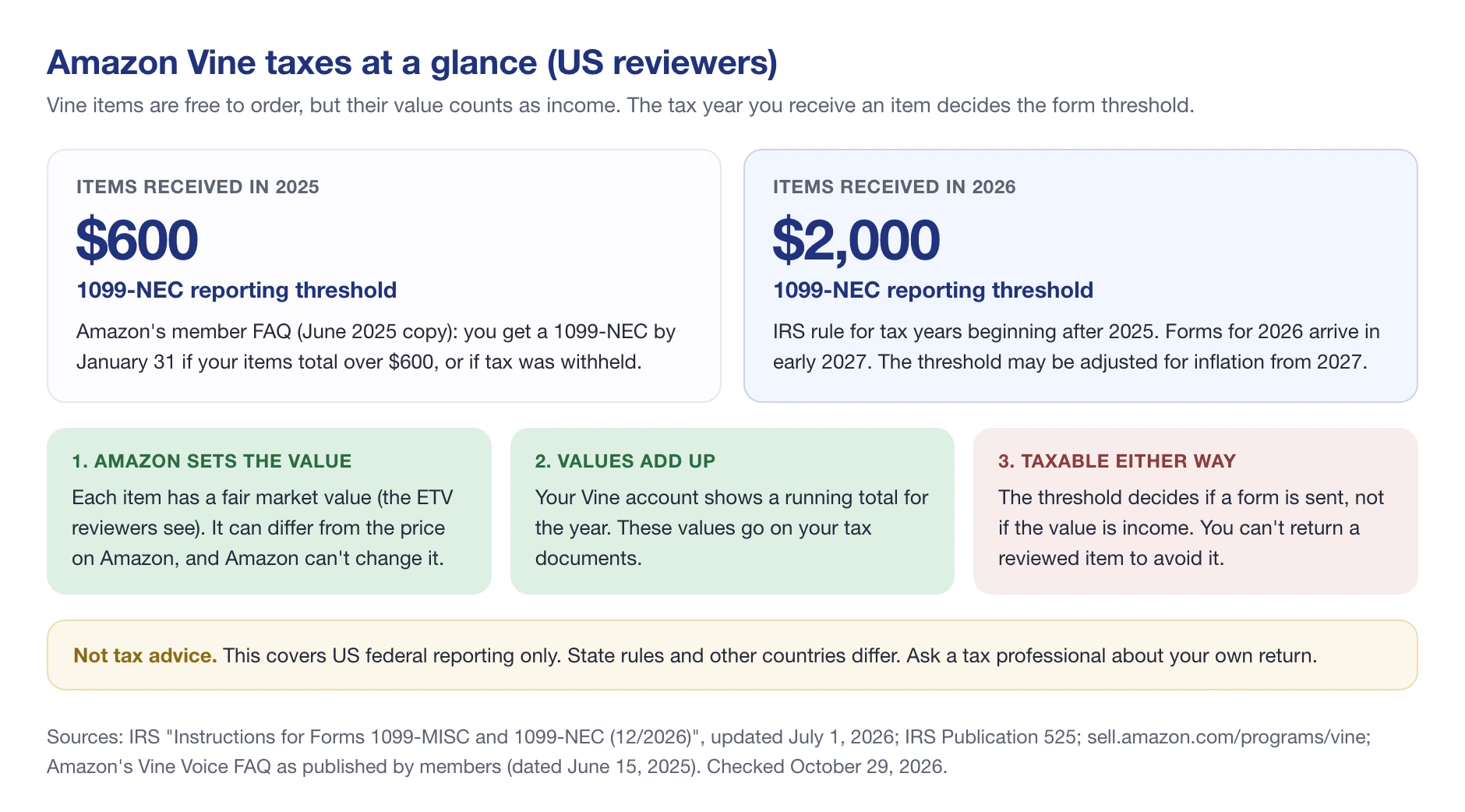
The members’ FAQ we could read still quotes $600, because it dates from 2025. Amazon’s own FAQ sits behind the Vine Voice login, so check it there for the current wording.
One thing doesn’t change with the threshold. It decides whether Amazon sends a form, not whether the value is income. If your 2026 Vine items add up to $1,500, you may get no 1099-NEC, but that $1,500 is still income on your return.
How much tax will you owe?
There’s no Vine-specific tax rate. The value of your items is added to your other income and taxed at your normal rate.
A simple way to estimate it: take the yearly total from your Vine account and multiply it by your own tax rate. As a purely hypothetical example, at a combined rate of 20%, $3,000 of Vine items would add about $600 to your tax bill. Your real number depends on your bracket, your state and your other income.
💡 Expert Tip: Look at the value before you request an item, not after. A $250 gadget you’d never buy for yourself adds $250 to your income either way. Many Voices keep a simple spreadsheet next to the Vine account total, with each item’s value and date, so the 1099-NEC holds no surprises in January.
Can you avoid Amazon Vine taxes?
Not by returning the item. Amazon’s member FAQ answers “Can I return my Vine item after reviewing so I do not have to pay taxes?” with a plain “No.” The only lever you control is what you order: skip high-value items you don’t need, and favor categories Amazon values low.
Whether you can report Vine income as business income and deduct costs against it is a question for a tax professional. It depends on how you treat your reviewing activity, and the answer differs from person to person.
Your tax details and privacy
Amazon asks every Voice for a tax identification number in the tax interview. Per the members’ FAQ, if you don’t provide one, Amazon must “apply the maximum amount of withholding,” and without a completed tax interview you can’t take part in Vine at all.
Amazon says it collects this information through its “secure systems solely for the purposes of tax information reporting.” It doesn’t share it with third parties “except as required by law (for example, we are required to file copies of Forms 1099 with the Internal Revenue Service).” So yes, Amazon reports Vine income to the IRS when a form is due. You can read the full member copy of Amazon’s Vine Voice FAQ (dated June 15, 2025).
This section explains US federal reporting in general terms and is not tax advice. State rules, and the rules in Canada, the UK and other Vine countries, are different. Ask a tax professional about your own situation.
For Sellers: Amazon Vine Eligibility Requirements
On the seller side, Vine is a review program for new or low-review products. Selling history doesn’t matter: a product that hasn’t launched yet can enroll. What matters is your account type, your brand role and your fulfillment method.
According to Seller Central’s Amazon Vine help page, you need:
- A Professional selling account. “You must be a Professional Selling Partner.”
- A Brand Registry role. Brand Registry is required per Seller Central help: you need a “Brand Representative or Reseller role assigned to a registered brand in Brand Registry.” If you’re not there yet, start with our guide to Amazon Brand Registry.
- An active FBA offer. Amazon ships every Vine unit itself so reviewers stay anonymous.
- No FBA Onsite history. Sellers who use or have used FBA Onsite can’t take part.
The product itself must also qualify:
- Fewer than 30 reviews on the product detail page
- An FBA offer with available inventory (or a pre-launch FBA listing, see below)
- An image, a title, a description, and a browse node
- The exact product shown on the FBA offer
- Not an adult or digital product, and not a bundle
- Reviewable on its own: an ink cartridge that only fits one printer is out, while a case for a popular phone is fine
One more practical point: some users on a Seller Central account may not see Vine. The account admin grants access under Settings, then User Permissions, then Advertising, then Vine.
How to Enroll Products in Amazon Vine
There’s no application or approval step. If the product is eligible, enrollment is immediate. Amazon’s enrollment steps are:
- In Seller Central, hover over Advertising in the main menu and select Vine.
- Enter the ASIN and click Begin enrollment.
- Check the product details. For a standalone ASIN, enter the number of units (1 to 30). For a product family, click Add variations. Amazon recommends “All eligible product variations” so Voices can pick the one they like.
- Click Enroll, then review the enrollment fee and the program’s terms on the confirmation screen.
- Click Enroll again to finish. The product now appears in your Vine dashboard.
After you submit, you can’t add or remove variations. You can add units during the first 30 days, but you can never remove them.
🎯 Pro Insight: Enroll the whole variation family under the parent ASIN, not one child at a time. Vine reviews are grouped at the parent level, and you can enroll an ASIN, or any variation of its parent, only once in its lifetime. If you merge ASINs later, Amazon keeps only as many Vine reviews as your tier allows.
Pre-launch Vine: reviews ready on launch day
You don’t have to wait for your product to go live. According to Amazon’s Vine FAQ in Seller Central, you can enroll “as soon as you create your FBA listing, even before inventory is received.”
The setup takes three steps:
- Set a future Product Site Launch Date on the listing.
- Leave the offer release date and seller release date empty.
- Enroll the product with the normal Vine steps above.
Regular customers can’t see or buy the product before launch. Only Vine Voices can order it once your inventory reaches Amazon, and their reviews stay hidden, even from you, until the launch date. The 90-day enrollment window starts when the inventory is received and buyable.
Amazon recommends having inventory in its network at least three weeks before launch, so Voices have time to receive and test the product. If you’re planning the full launch, our Amazon product launch guide covers the steps around it.
Cost of Amazon Vine
How much does the Amazon Vine program cost? There is one enrollment fee per parent ASIN, and it depends only on how many units you enroll. Child variations cost nothing extra.
This rate card has applied to enrollments since October 19, 2023. Before that, every enrollment cost a flat $200.
| Units enrolled (per parent ASIN) | US fee | Canada / UK / EU / Japan | Max Vine reviews kept |
|---|---|---|---|
| 1-2 | $0 | Free | 2 |
| 3-10 | $75 | CAD 100 / GBP 60 / EUR 70 / JPY 10,000 | 10 |
| 11-30 | $200 | CAD 240 / GBP 140 / EUR 170 / JPY 22,000 | 30 |
The fee doesn’t change with the number of reviews you get. In Amazon’s words, it “does not depend on the number of units claimed by reviewers or number of reviews received.”
When Amazon bills the Vine fee
The billing rules come from Seller Central’s Vine enrollment fee page:
- If the product has at least one Vine review 30 days after enrollment, you’re billed on day 30.
- If no review has come in by day 30, you’re billed when the first Vine review is published.
- If no Vine review arrives within 90 days, or the first one comes later than that, you pay nothing.
- If you add units in the first 30 days and move into a higher tier, the higher fee applies.
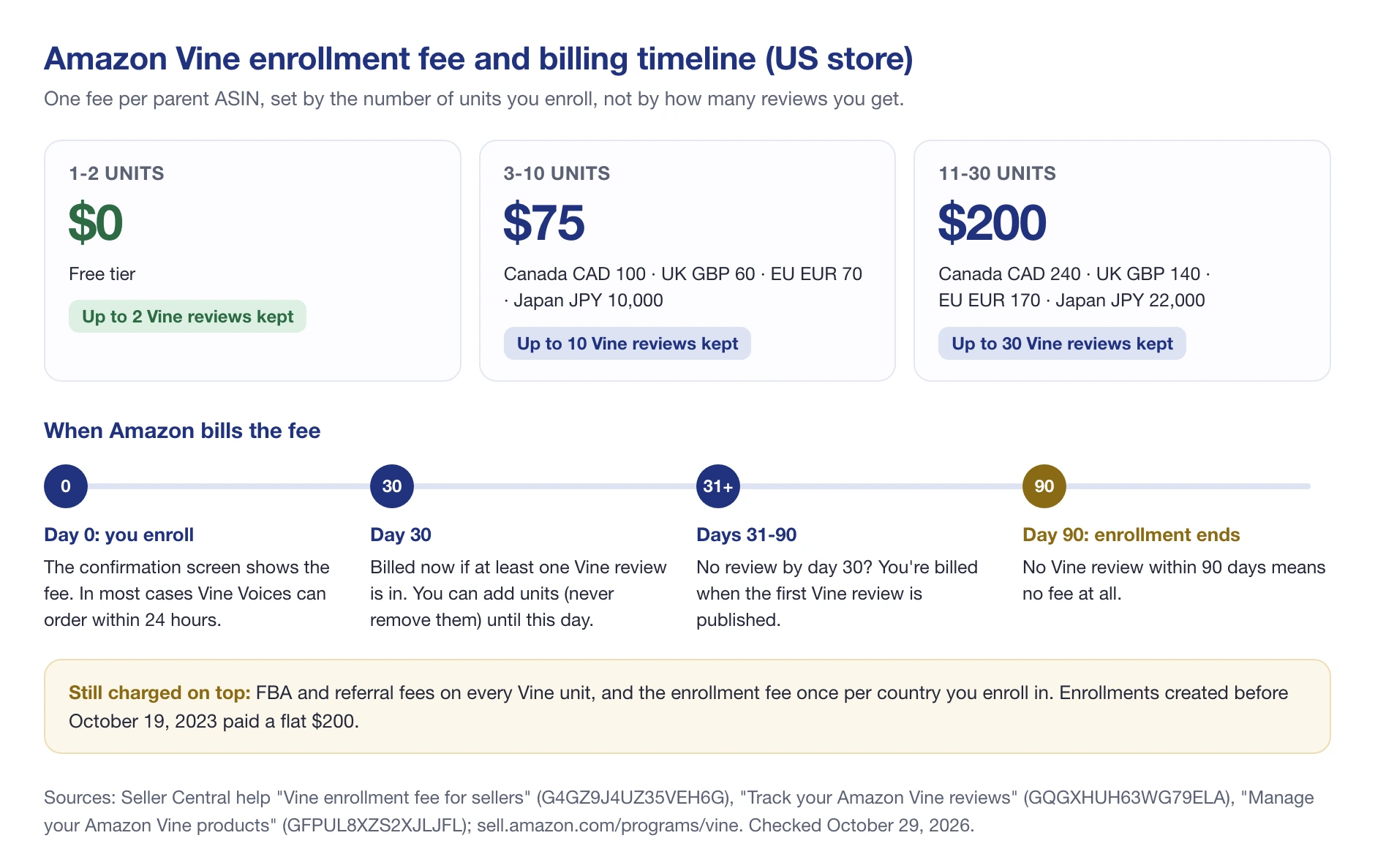
Two examples make the rule clear. Enroll 3 units and get just 1 Vine review in the first 10 days: you pay $75 on day 30. Enroll 2 units and get 2 reviews: you pay nothing, because 1-2 units are always free.
What else Vine costs you
The enrollment fee isn’t the whole cost. Keep these in your math:
- The units themselves. You give away up to 30 units of inventory.
- FBA and referral fees. Amazon charges both on Vine orders, the same as on normal sales.
- One fee per country. Enrolling the same product in the US and the UK means two fees.
- Possible tax on the fee. Depending on where you sell and where your business is, Amazon may add tax. The fee appears in your Payments report as “Vine Enrollment Fee.”
Units Vine Voices don’t claim stay in your FBA stock and sell as normal.
The $200 Vine credit for new sellers
New sellers can get Vine for free, up to a point. Amazon’s New Seller Incentives include a $200 credit for Amazon Vine for new sellers who enroll a brand in Brand Registry.
The timing is strict: enroll your brand in Brand Registry within six months of listing your first eligible product, then enroll a product in Vine within 90 days. The credit expires 90 days after your Brand Registry enrollment.
What to Expect After You Enroll
Once a product is enrolled, things move quickly. Seller Central’s Vine products help page says Voices can usually start ordering within 24 hours.
Amazon’s figures on review timing are old but still useful. About 25% of reviews come within five days of the order, and 99% within 35 days. That’s based on Amazon’s worldwide reviewer data as of April 2018.
Here’s what else to plan for:
- Reviews aren’t guaranteed. Vine Voices aren’t required to review every item they order. Enrolling 30 units means up to 30 reviews, not 30.
- Negative reviews happen. You can’t choose reviewers, and Amazon won’t refund the fee if you don’t like a review. Reviews that follow the Community Guidelines stay up.
- The 30-review cap. When the product reaches 30 reviews in total, Amazon stops offering it to Voices and closes the enrollment.
- The 90-day window. An enrollment ends after 90 days, or earlier once all units are reviewed, but never within the first 30 days. Reviews can still arrive after it ends.
- 200 active enrollments. You can have up to 200 enrollments running at once. After that, you wait for one to end.
- Cancel or stop. You can cancel only before any unit is claimed. After that, you can only stop the enrollment, which ends new claims but doesn’t stop reviews from claimed units.
- Your reports will look bigger. Vine orders count in Units Ordered and Ordered Product Sales in Business Reports. In Orders reports they show a promotion equal to the item price and no customer name. Use the Payments reports to see real revenue.
Is Amazon Vine Worth It for Sellers?
Amazon’s own pitch is that Vine can “boost sales an average of 30%.” That figure comes from Amazon’s internal data, and Amazon doesn’t publish how it was measured, so treat it as a claim, not a forecast.
Vine usually makes sense when:
- You’re launching a new product, or one with very few reviews, and you’re confident in its quality.
- Your margin can carry the fee plus up to 30 free units with FBA and referral fees on each.
- You have the $200 new-seller credit, or the product only needs the free 1-2 unit tier to get its first reviews.
It’s a poor fit when the product still has quality problems (Voices will say so), when the listing has already passed 30 reviews, or when your margin can’t absorb 30 free units. Start small: the free tier and the $75 tier cost little and show you how Voices react before you commit 30 units.

Vine isn’t the only way to get reviews. For other sources that stay within Amazon’s rules, see our guide on how to get Amazon reviews.
How to Track Amazon Vine Reviews
Amazon gives you the basic numbers in Seller Central. Open Vine, search for the ASIN or SKU, and the Amazon Vine reviews tab shows how many Vine reviews were submitted. To read them, you go to the product page and look for the Vine badge.
That works for one product. With several enrollments running, it means opening product pages one by one to see what each review says. This is where SellerSonar’s review tracker helps:
- Vine filter. The Reviews section tags Vine reviews, so you can filter them apart from other reviews and read what Voices said about each product in one place.
- “New Vine review” alert. SellerSonar can alert you when a new Vine review is found on a tracked product. This alert is off by default: switch it on in Alerts, then Delivery Settings.
- Other review alerts. New negative reviews, negative reviews gaining helpful votes and new Top reviews are useful during a Vine launch, when every early review counts.
How fast you hear about a review depends on collection. SellerSonar collects reviews through its Chrome extension, and the Vine alert fires when a collection runs, so every 24 hours at best. We recommend collecting every 1-3 days.
The setup has three parts. The extension must be signed in to SellerSonar. An Amazon buyer account (not Seller Central) must be logged in to the same browser. And the marketplace tab must stay open while collection runs.
SellerSonar collects up to 100 reviews per product, the most Amazon’s review pages show (and Amazon sometimes shows fewer). For a Vine product that’s plenty, since enrollment stops at 30 reviews.
Amazon Vine Program: Final Thoughts
For reviewers, Vine is a way to test products for free, as long as you treat the item values as income and keep track of them. The 1099-NEC threshold moved from $600 for 2025 items to $2,000 for 2026 items, but the value is taxable either way.
For sellers, Vine is one of the few ways Amazon allows to get early reviews. It works best on a product you trust, enrolled before or right after launch, with the fee and free units counted in your margin. Start with a small enrollment, read what Voices say, and fix the listing or the product before you scale.
If you run Vine enrollments, SellerSonar can collect those reviews and flag new Vine reviews for you. You can try it free for 14 days, with 5 ASINs and 10 keywords and no credit card.

