





Quick Answer
Amazon Pay is Amazon’s checkout service for other websites. Shoppers click the Amazon Pay button and pay with the cards and addresses already saved in their Amazon account, at no cost to them. The store pays a fee per transaction: 2.9% plus $0.30 in the US, 3.9% plus $0.30 for cards issued outside the US. Businesses can sign up in 18 countries, including the US, UK, Germany, France, Italy, Spain and Japan. Amazon Pay is not the same as selling on Amazon: you keep your own store, prices and customers.
You’ve probably seen the Amazon Pay button on a checkout page that has nothing to do with Amazon. It looks like a shortcut, and that is what it is. Behind it sits a full payment service with its own fees, payout rules and reserve policy.
This guide explains how Amazon Pay works for shoppers first, then what it means for sellers who run their own online store: the fees by country, how you get paid, the newer add-ons like Buy with Prime, and what changed from 2023 to 2026.
About the Author: Gloria Anderson writes for the SellerSonar editorial team about Amazon selling programs, fees and marketplaces. She checks every Amazon rule in her articles against Amazon’s own help and program pages, and dates every number she quotes.
What Is Amazon Pay?
Amazon Pay is a payment service run by Amazon Payments, Inc. that lets anyone with an Amazon account check out on other websites using the payment methods and addresses stored in that account. Amazon’s What is Amazon Pay page says shoppers can use it at “tens of thousands of online stores around the world.”
It has two sides:
- For shoppers, it is a faster way to pay. There is no separate sign-up and no extra fee.
- For businesses, it is a payment method you add to your own website or app, next to cards, PayPal or Apple Pay. Amazon processes the payment and sends you the money.
Amazon Pay is also the name of the place on Amazon.com where you manage your saved payment methods. Both are the same service.
How Does Amazon Pay Work?
For shoppers
- On a store that accepts it, you click the Amazon Pay button at checkout.
- You sign in with your Amazon account (or you’re already signed in).
- You pick a saved card and shipping address. No new account or password.
- The store gets your order and ships it. You can track Amazon Pay orders in your Amazon account under Your Orders.
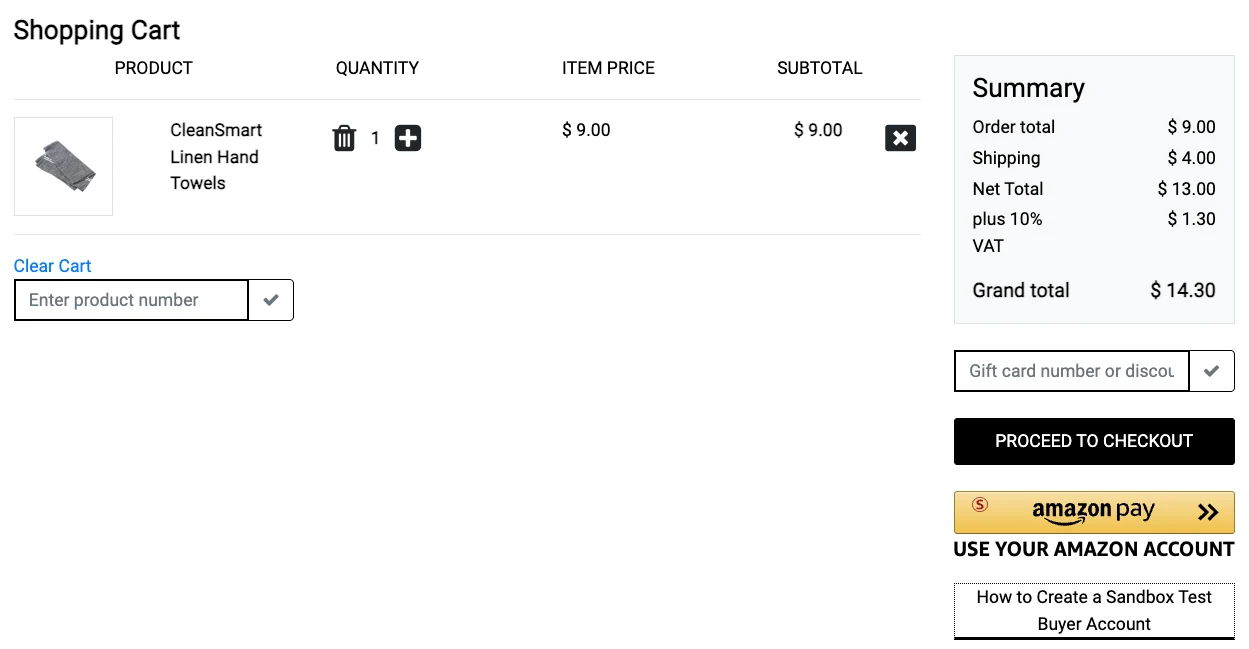
On a store that accepts it, the Amazon Pay button sits next to the store’s own checkout button. The store ships the order itself, not Amazon, so delivery questions go to the store.
The store never sees your full card number. Amazon’s shopper FAQ says it may share your name, email, shipping and billing address, phone number and the last 4 digits of your card, so the store can handle the order. Your card statement shows the charge as “AMZ*[Seller Name] amzn.com/pmts”.
A few limits shoppers run into:
- Amazon.com gift card balances can’t be used with Amazon Pay.
- Orders paid with Amazon Pay can’t be shipped to an Amazon Locker.
- You need an Amazon account. Amazon Pay has no guest checkout.
For businesses
Amazon’s How it works page for businesses describes a short path from sign-up to the first payout:
- Register at pay.amazon.com with “Business Registration”. This creates an Amazon Pay merchant account in Seller Central. If you already sell on Amazon, you can sign in with your existing Seller Central login.
- Connect your store with a plugin (Shopify, WooCommerce, BigCommerce, PrestaShop, Adobe Commerce and others) or a direct integration.
- Take orders. A shopper pays with Amazon Pay, and Amazon authorizes the payment.
- Capture the payment when you ship. Amazon’s help is blunt: “If you do not Capture payment, then you will not be paid for the order.”
- Get paid. Amazon sends disbursements to your bank account daily, minus fees and any reserve.
Amazon Pay supports one-time payments, subscriptions and recurring payments, digital goods, pre-orders, split payments and full or partial refunds. It does not support crowdfunding or adult products.
Is Amazon Pay Free?
For shoppers, yes. Amazon says using Amazon Pay adds no transaction, membership, currency conversion or foreign transaction fees. Your card issuer may still charge its own foreign transaction fee if the store is in another country.
For businesses, no. There’s no setup or monthly fee, but every successful transaction pays a processing fee plus an authorization fee.
Amazon Pay fees in the US
| Fee | Amount | When it applies |
|---|---|---|
| Domestic processing fee | 2.9% | Card issued in the US |
| Cross-border processing fee | 3.9% (instead of 2.9%) | Card issued outside the US |
| Authorization fee | $0.30 per transaction | Every successful authorization |
| Disputed chargeback fee | $20.00 plus tax | Only if you dispute a chargeback not covered by Amazon’s Payment Protection Policy |
Amazon’s own example on its US fee page: on a $10.00 order paid with a US card, the fee is 2.9% ($0.29) plus $0.30, or $0.59. With a foreign card, it is $0.69.
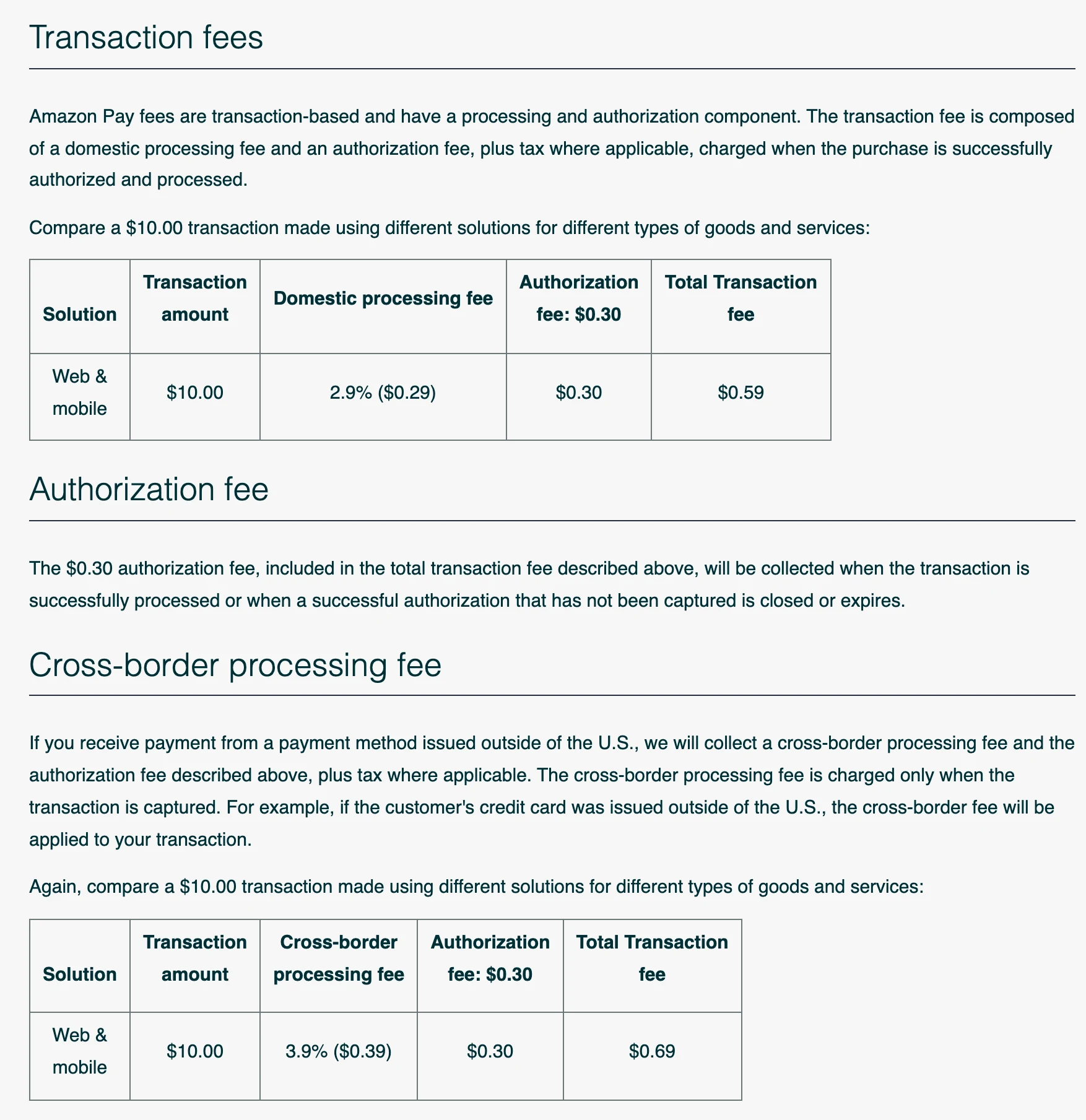
When you refund an order, Amazon gives back the percentage part of the fee. The $0.30 authorization fee and any chargeback dispute fee are not refunded.
Two exceptions change the math:
- Shopify. If you turn on Amazon Pay through Shopify Payments, Shopify’s fees apply instead of Amazon’s schedule, and Amazon says there are no third-party transaction fees. Those transactions also stop showing in your Amazon Pay account in Seller Central.
- Stripe. Amazon’s Amazon Pay on Stripe announcement says there are “no additional fees (beyond the typical card fees)” for Amazon Pay transactions processed through Stripe.
Amazon Pay fees in the UK and Europe
Outside the US, the fee depends on the country where your business is registered. Amazon publishes one fee schedule for the UK and EU, with a country selector. Germany has the lowest rate and Italy the highest.
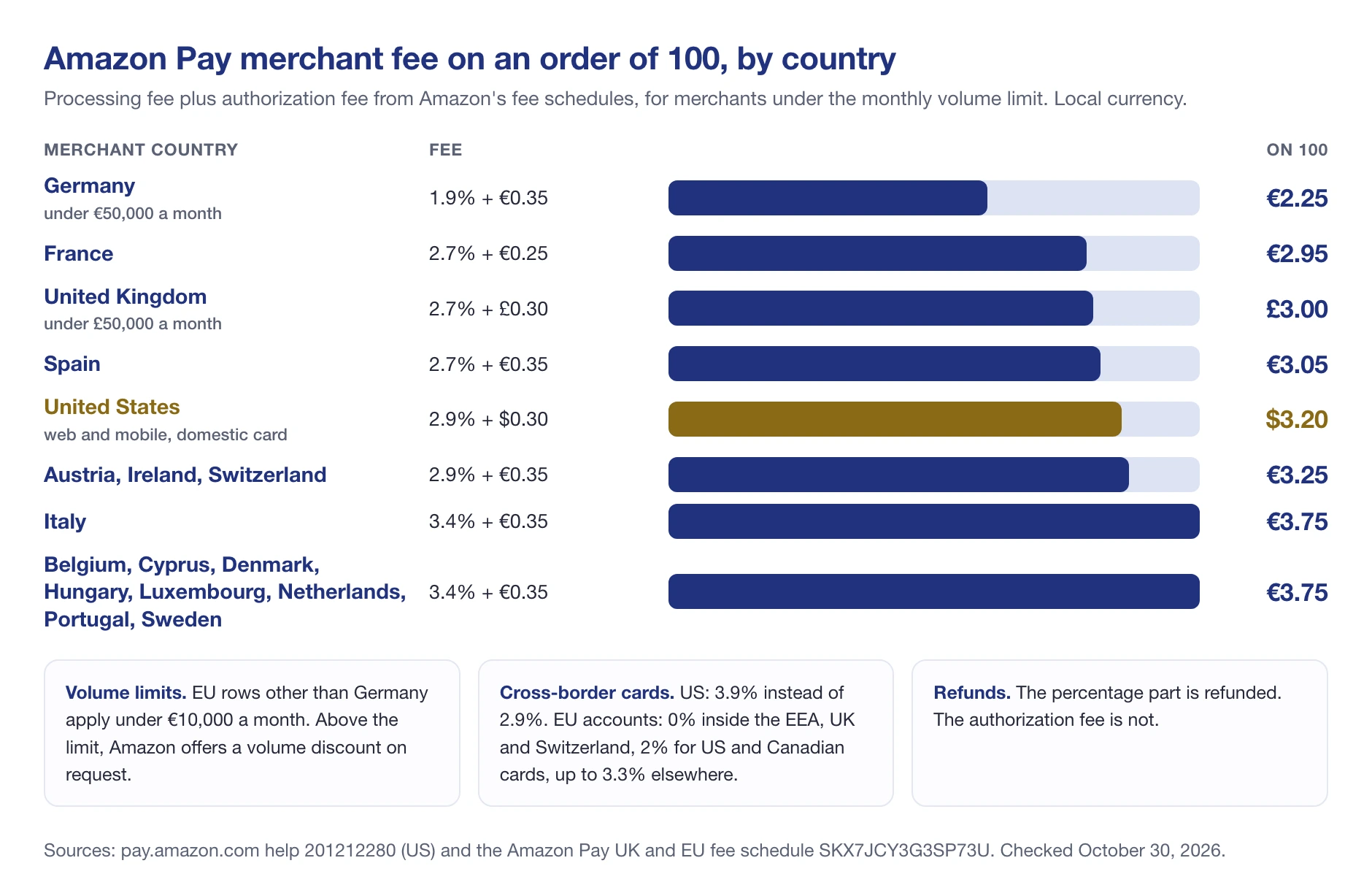
These rates apply below a monthly payment volume of €10,000 in most EU countries, and below €50,000 in Germany or £50,000 in the UK. Above that, you can ask Amazon for a volume discount. European accounts also pay a cross-border fee on cards from outside the EEA, UK and Switzerland (2% for US and Canadian cards, up to 3.3% elsewhere) and a 0.5% currency conversion spread. The chargeback dispute fee is €20, or £14 in the UK.
💡 Expert Tip: Compare Amazon Pay on your real order mix, not the headline rate. A store with many small orders feels the fixed authorization fee more than the percentage. On a $10 US order, the $0.30 part is more than half of the $0.59 fee.
Where Can Sellers Use Amazon Pay?
Amazon Pay works on your own website or mobile site. According to Amazon’s merchant FAQ, your business must be established in one of these 18 countries:
- United States and Japan
- United Kingdom and Switzerland
- Austria, Belgium, Cyprus, Denmark, France, Germany, Hungary, Ireland, Italy, Luxembourg, the Netherlands, Portugal, Spain and Sweden
Canada and Australia are not on the list, even though some older articles say they are. Shoppers can come from anywhere, but your business has to be in one of these countries.
To register in the US, Amazon asks for:
- A US business address and US phone number
- A credit card issued by a US bank
- A checking account with a US bank, for payouts
- Your EIN, or your Social Security number as an individual
- The website URL where you’ll use Amazon Pay
Individuals must be at least 18 and a US citizen or permanent resident. Merchants who only qualify for a W-8BEN form can’t use Amazon Pay in the US.
On the technical side, Amazon lists Shopify and Stripe as premier partners, plus BigCommerce, WooCommerce, PrestaShop, Adobe Commerce and OpenCart. If your platform isn’t on Amazon’s list, check whether it runs payments through Stripe or offers a custom integration.
How Amazon Pay Pays Merchants
Amazon Pay sends your money to your bank account every day. How fast it arrives depends on the payout option:
- Standard payout. Amazon’s help pages quote different transit times: 1 to 2 business days in the merchant FAQ, 3 to 5 business days on the funds page. Plan for up to 5.
- Express Payout. Free for US merchants with an in-network US bank and a US business address. Payouts arrive within 24 hours, weekends included, for transactions of $1 million or less. You opt in under Deposit Methods in Seller Central.
When you add or change bank details, Amazon applies a one-time 3-day hold on payouts, starting the day the change takes effect.
The Amazon Pay reserve
New merchants don’t get all their money right away. Amazon’s reserve policy uses default tiers that loosen as you build a track record:
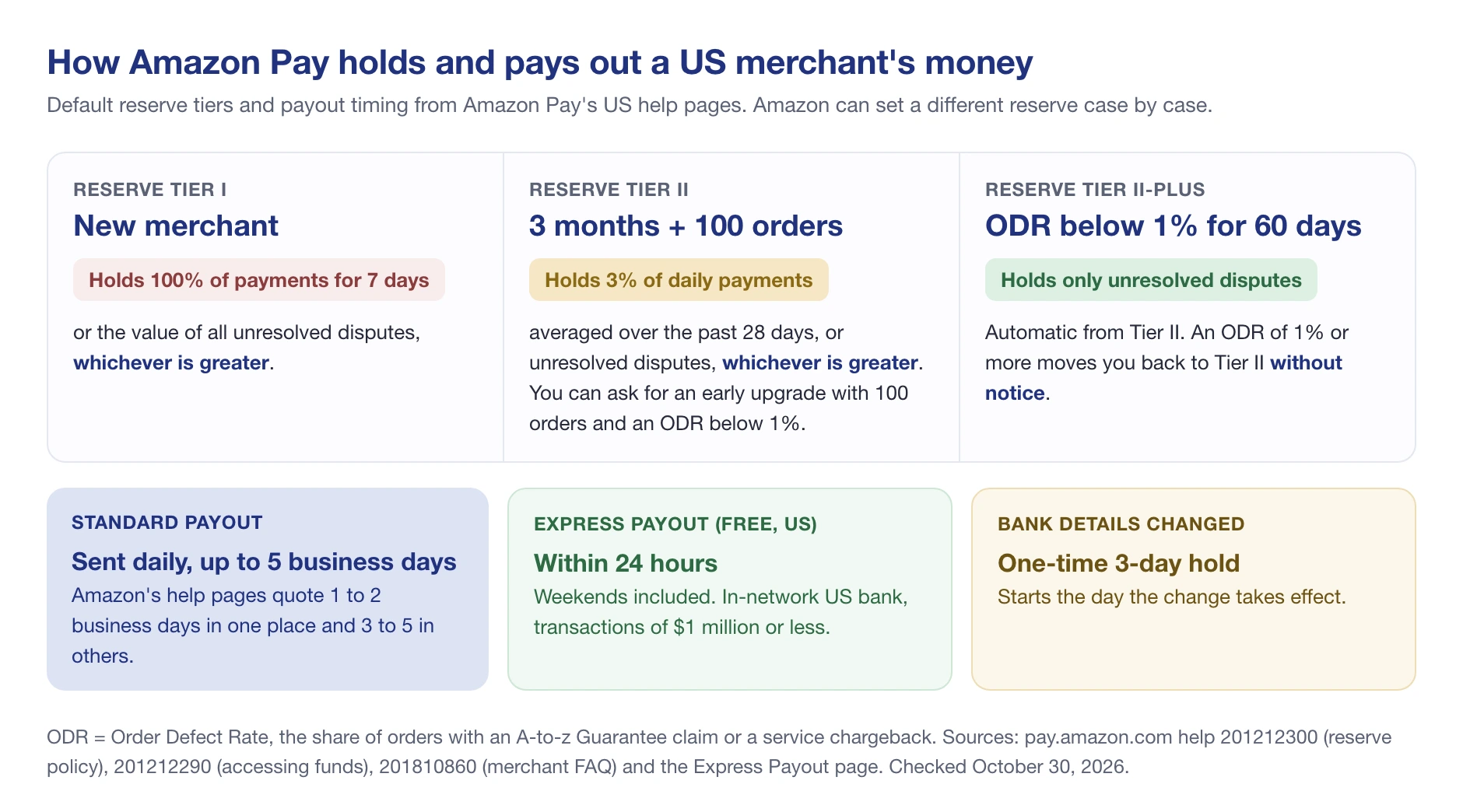
- Tier I (new merchants): Amazon holds 100% of payments for 7 days, or the value of all unresolved disputes if that is greater.
- Tier II: after 3 months and at least 100 completed orders, the reserve drops to 3% of your daily payments (averaged over 28 days) or your open disputes, whichever is greater. With 100 orders and an Order Defect Rate below 1%, you can ask Amazon Pay support for an early upgrade.
- Tier II-Plus: if your Order Defect Rate stays below 1% over the past 60 days, Amazon holds only the value of open disputes. At 1% or more, you drop back to Tier II without notice.
Your Order Defect Rate counts orders with an A-to-z Guarantee claim or a service chargeback. Amazon can also set a different reserve for any account, case by case.
🎯 Pro Insight: Budget for the first week of sales being locked. A store that takes $7,000 in its first 7 days on Amazon Pay should not count on that cash for inventory until the reserve releases it.
If you also sell on Amazon’s marketplace, those payouts work differently: they come from your Selling on Amazon account, on Amazon’s settlement cycle. Our guide on how selling on Amazon works covers the marketplace side, including how the first payout reaches your bank.
Amazon Pay Later: Pay-Over-Time Options at Checkout
Many people search for “Amazon Pay Later”. In the US, there is no product with that exact name on pay.amazon.com. Instead, Amazon Pay can show financing options at checkout. Amazon’s page on alternative payment methods lists:
- Amazon Store Card and Prime Store Card
- Amazon Visa and Prime Visa installments
- Citi Flex Pay for eligible Citi cardholders, on purchases of $50 or more
- Shop with Points
- Amazon Pay with Affirm: monthly installments or four interest-free payments
For eligible US merchants on Amazon’s current checkout (Checkout v2 with the Estimated Order Total setting), the first four come at no extra cost. Affirm is an opt-in with “its own additional rates”, and only for one-time purchases of physical goods.
In India, “Amazon Pay” is a different service on Amazon.in, used to pay on Amazon.in and through UPI. Its rules are not the ones in this guide.
Amazon Pay and Buy with Prime
Buy with Prime lets a brand offer Prime shipping, the Prime checkout and easy returns on its own website, with orders fulfilled from inventory stored in Amazon’s warehouses. Amazon Pay processes the payment on every Buy with Prime order. Amazon’s Buy with Prime page for Amazon Pay merchants says Buy with Prime “has been shown to increase shopper conversion by an average of 25%”, by Amazon’s own measurement.
On Shopify, the app is now called “Amazon MCF and Buy with Prime”. To use Buy with Prime there, you must turn on Amazon Pay through Shopify Payments.
The bigger change came on September 23, 2026. Amazon announced that Multi-Channel Fulfillment (MCF) merchants selling in the US can add fast, free Prime delivery to their own websites “at no additional cost”, without Buy with Prime. These merchants “do not need to change their payment processing, order management, or store policies.” For these merchants, Prime delivery no longer requires the Amazon checkout. Amazon also launched MCF Preferred Pricing, with “savings of 15% to 25% on fulfillment fees for the first six months.”
Both routes ship from inventory in Amazon’s network, as our guide to Amazon Logistics explains for marketplace orders.
What Changed: Amazon Pay Updates for Merchants, 2023 to 2026
| Date | Change | What it means for sellers |
|---|---|---|
| March 20, 2023 | Express Payout launched | US merchants can get payouts within 24 hours, weekends included, at no extra cost |
| March 7, 2024 | One-click activation in Shopify Payments | Shopify stores turn on Amazon Pay in Settings, Payments, Wallets, with Shopify’s fees |
| April 11, 2024 | Amazon Pay on Stripe | Stripe merchants can turn it on in the Stripe Dashboard, with no Amazon Pay fees beyond typical card fees |
| September 23, 2026 | Prime delivery for MCF merchant websites + MCF Preferred Pricing | US brands can offer Prime delivery on their own site without Buy with Prime or the Amazon checkout |
| Checked October 30, 2026 | US fee page lists web and mobile rates only | The separate Alexa rate that older guides quote is no longer on Amazon’s fee page |
Amazon Pay vs Other Amazon Payment Names
Amazon uses similar names for different things, which is why “Amazon Pay” searches mix very different questions.
| Name | What it is |
|---|---|
| Amazon Pay | The checkout button and payment service for other websites (this guide) |
| Amazon Payment Services | A separate payment gateway for businesses in the Middle East and North Africa. Its site, paymentservices.amazon.com, says it is “Available in 9 countries, across the MENA region” |
| Amazon Pay (India) | Amazon.in’s own payment service, including UPI payments |
| “AMZ*” on a card statement | A purchase you made on another store with Amazon Pay |
| Selling on Amazon payouts | Money Amazon sends marketplace sellers for orders placed on Amazon.com, after its fees |
The last row matters for sellers. Amazon Pay doesn’t put your products on Amazon, and selling on Amazon doesn’t need Amazon Pay. On the marketplace, you pay referral fees and, on the Professional plan, $39.99 a month (see our Amazon seller fees breakdown). With Amazon Pay, you pay only the transaction fee, but you bring your own traffic.
Amazon Pay Pros and Cons for Sellers
Benefits
- A checkout shoppers already trust. Amazon customers pay without creating an account or typing a card number.
- A conversion claim worth testing. Amazon’s homepage says Amazon Pay can “increase conversions by 35%” compared with a store’s own checkout. The footnote shows a Comscore study Amazon commissioned: 40 US merchants, October 2021 to March 2022. Treat it as a reason to test, not a promise.
- You keep the customer. Amazon can share the shopper’s name, email and shipping address with you for the order, and the shopper buys on your site, not on Amazon’s marketplace.
- Fraud protection. Amazon says it protects you fully from fraudulent-transaction chargebacks when you meet its Payment Protection Policy.
- Financing at no extra cost for eligible US merchants, through the Store Card, Visa and Citi Flex Pay options.
- Free next-day payouts with Express Payout in the US.
Drawbacks
- Fees on every order. 2.9% plus $0.30 in the US, with no volume discount on the US fee page.
- A 7-day reserve at the start. New merchants wait for their money.
- Disputes count against you. Shoppers can file A-to-z Guarantee claims if an item doesn’t arrive or is materially different than described, and those claims feed your Order Defect Rate.
- Amazon account required. Shoppers without one can’t use the button, so you still need a regular checkout.
- 18 countries only. Businesses in Canada, Australia, Turkey and most of the world can’t sign up.
- It’s not a marketplace. Amazon Pay doesn’t bring traffic. Shoppers must find your store first.
📌 From Our Experience: Sellers who run both a brand store and Amazon listings often add Amazon Pay to the store and keep the Amazon catalog separate. The store benefits from the familiar checkout, while the Amazon listings still need their own watching for Buy Box and listing changes.
Is Amazon Pay Worth It for Your Store?
Amazon Pay makes the most sense when:
- Many of your shoppers already have Amazon accounts, which is likely in the US, UK and Germany.
- You sell physical products with average orders big enough that the $0.30 fixed fee doesn’t dominate.
- You’re on Shopify or Stripe, where turning it on takes a few clicks and Amazon’s fee schedule doesn’t apply.
- You want Buy with Prime later, which runs on Amazon Pay.
It makes less sense if your business is outside the 18 countries, if most orders are small, or if a 7-day hold on early sales would strain your cash flow.
If you also sell on Amazon, keep an eye on those listings while you build your own store. SellerSonar tracks Buy Box and listing changes on your ASINs and alerts you on its next check, as often as every hour on the Business plan. You can start a free 14-day trial with 5 ASINs and 10 keywords, no credit card required.

