







Quick Answer
The Amazon API officially called the Selling Partner API, or SP-API, is a REST-based service that lets sellers, vendors, and approved third-party developers access Amazon business data programmatically. Most sellers never need to touch it directly. The headline-grabbing $1,400 annual fee announced in November 2025 was cancelled in May 2026.
Key facts:
- SP-API replaced the older Marketplace Web Services, or MWS, starting in 2020
- $1,400/year fee + $0.40 per 1,000 GET calls proposed Nov 3, 2025; cancelled May 12, 2026
- Fees only ever applied to third-party developers, never to sellers using SP-API for their own business
- The Orders API rate limit sits at 1 request per minute sustained
- Amazon processes about 58 billion SP-API calls per year across 1.6+ million developers
What is the Amazon API?
The Amazon API is a programmatic interface that lets software talk to Amazon directly, pulling seller data and pushing updates without anyone clicking through Seller Central. Today, “the Amazon API” almost always means the Amazon Selling Partner API, usually shortened to SP-API.
Amazon’s own developer documentation describes it like this:
“The Selling Partner API (SP-API) is a REST-based API that helps sellers and vendors access their data on orders, shipments, payments, inventory, and other business information.”
A few things sellers should know up front.
SP-API replaced MWS. The older Marketplace Web Services interface, launched in 2009, started phasing out in 2020. New integrations cannot use MWS, and Amazon no longer accepts new developer registrations for it. If you read a “how to use the Amazon API” guide that mentions MWS as a current option, it’s out of date.
It’s not the same as the Product Advertising API. That’s a separate beast used mostly by affiliate sites and price-comparison tools. When sellers say “Amazon API,” they almost never mean PA-API.
Access is OAuth-based. Developers register with Amazon, then sellers authorize specific apps through a Login with Amazon, or LWA, token flow. The handshake matters because it determines what data a tool can see, and for how long.
The short version. SP-API is the official, modern way to read and write Amazon seller data through code. Everything else with “API” in the name is either deprecated or a different product.
What sellers can actually do with SP-API
SP-API isn’t one feature. It’s a collection of endpoints, each tied to a different part of running an Amazon business. The most commonly used ones for sellers are:
- Orders. Pull order details, customer info, shipping addresses
- Inventory. Read FBA stock levels, multi-location quantities, and stranded inventory
- Listings. Create, update, and audit listings programmatically
- Reports. Schedule and download dozens of seller reports, including sales, advertising, and returns
- Notifications. Subscribe to event streams, like a listing status change alert
- Pricing & Buy Box. Read current offers and competitor pricing
- Financials. Pull transaction-level fee and payment data
Real example. When Sarah, who runs 50 SKUs across the US and UK marketplaces, decided to stop manually confirming shipments, her developer wired Amazon’s Orders API to her shipping software. The moment a label prints, tracking flows back to Amazon and the customer gets a confirmation email. She estimates that saved her 4 to 6 hours a week, mostly on Sundays when her VA used to catch up on manual entry. The setup took a developer about a week. The savings have compounded for two years.
That’s the kind of automation SP-API enables. Order processing, inventory sync across multiple sales channels, pricing automation, custom reports your spreadsheet can’t generate.
💡 Expert Tip: If you’re considering SP-API integration, write down the specific manual task you want to automate before talking to a developer. Vague briefs, such as “we want to use the API,” lead to expensive, half-finished integrations. Specific briefs, such as “auto-confirm shipments within 30 seconds of label printing,” lead to ROI you can measure.
Want a simpler path? If your goal is marketplace intelligence rather than order, payment, or inventory data, you probably do not need to integrate SP-API at all. SellerSonar API gives you structured Amazon data for product, search, offer, Buy Box, bestseller, seller catalog, and brand store workflows through REST API access.
The 2026 SP-API fee saga: what happened and why it matters
For 16 years, SP-API and MWS before it was free for everyone. Developers registered, sellers authorized, Amazon absorbed the infrastructure cost. That changed on November 3, 2025, when Amazon emailed third-party developers about a new fee structure. Then changed again. Then changed back.
The original fee structure, cancelled
The November 2025 announcement included:
- $1,400 annual subscription per developer account
- $0.40 per 1,000 GET API calls above included volume
- Tiered monthly plans ranging from free, for small developers with 2.5M calls/month, up to Plus at $10,000/month, with 250M calls included
- A mid-tier Pro plan at $1,000/month for 25M calls
Implementation was supposed to phase in starting January 31, 2026, with usage-based fees kicking in April 30, 2026.
The reaction
Third-party developers, repricers especially, did the math and didn’t like the answer. Threecolts CEO Yoda Yee summarized the industry impact in a quote that Marketplace Pulse circulated widely:
“Tools with 1,000 customers would face roughly $10,000 per month in API costs, forcing minimum viable price points around $99 per month for sellers.”
Yoda Yee, CEO, Threecolts
Repricers got hit hardest because they poll Amazon constantly. Inventory tools, analytics dashboards, PPC managers, all of them faced double or triple-digit cost increases. Several SaaS founders started modeling 30% price hikes for their seller customers.
Then came January 27, 2026. Amazon delayed implementation. On March 9, Amazon postponed the whole program “indefinitely” while it gathered more feedback. And on May 12, 2026, the Solutions Partner team sent a final email confirming what the ecosystem was hoping for.
“We will not move forward with SP-API usage and annual fees at this time.”
Amazon Solutions Partner team, May 12, 2026
According to novadata.io’s chronology, no charges were ever collected. The fee structure was withdrawn entirely.
Why this matters even though it was cancelled
Two words from that May 12 email do a lot of work: at this time. Industry analysts read that as Amazon leaving the door open. The infrastructure cost of 58 billion API calls per year doesn’t go away. Amazon spent six months developing this fee model. The precedent has been set, and the proposal can return in a different form.
Marcus, a repricer SaaS founder I spoke with, summed up his takeaway. “I spent two months modeling worst-case fees and rewriting our pricing page. Then it was cancelled. We rolled everything back. But now we have a tested playbook for the next time, and we’ve started architecting our integration to call Amazon less aggressively just in case.” That’s the durable lesson here. Amazon dependency is a real risk variable for any SaaS, and any seller who relies on those SaaS tools shares the exposure.
Do sellers actually pay these fees?
No. And to be clear, no seller ever was going to pay them, even during the months when the fees were live on paper.
Here’s the distinction that got lost in headlines.
| Who | What was proposed | What happened |
|---|---|---|
| Sellers using SP-API for their own business | Free, always was | Still free |
| Third-party developers building tools for other sellers | $1,400/year + usage fees | Cancelled May 2026 |
| Sellers using third-party SaaS tools | No direct fee | Indirect risk through tool pricing |
If you ever read an alarming Amazon API headline and thought “wait, am I paying $1,400 next year,” the answer was no. You’re not a third-party developer. You’re a seller who might use tools built by third-party developers, and those tools might or might not have raised prices to absorb the cost. With the cancellation, that pressure has eased for now.
🎯 Pro Insight: When evaluating any SaaS tool that integrates with Amazon, ask the vendor two questions. First, do they pull data via SP-API integration, or via public Amazon data? Second, what’s their plan if Amazon reintroduces API fees? Tools that depend heavily on SP-API are more exposed to Amazon policy changes than tools that don’t.
When sellers actually need Amazon API access
This is the question nobody answers cleanly. Most guides about the Amazon API for sellers leave readers with a vague sense that “API access” is something they should probably have, without ever knowing why.
Let me give you a straight answer. You need direct SP-API integration when:
- You’re running custom automation across many tools and want full data control
- You have an in-house developer or budget for one
- Your use case isn’t well-served by any existing SaaS, which is rare
- You operate at enough scale that paying for SaaS subscriptions per seat is more expensive than building once
You probably don’t need direct SP-API access when:
- You want listing monitoring, hijacker alerts, Buy Box tracking, or review monitoring
- You want competitor research or keyword rank tracking
- You’re running 1 to 500 ASINs and a SaaS subscription costs less than a developer day
- You don’t want to share Seller Central credentials with anything that doesn’t need them
The honest math. Hiring a developer to integrate SP-API for basic monitoring runs $3,000 to $15,000 upfront, plus ongoing maintenance. A monitoring SaaS that covers the same ground costs $20 to $75 per month. Unless you have a very specific reason to build, you’re paying for a custom solution that already exists.
📌 From Our Experience: From what we see at SellerSonar, sellers who try to DIY listing monitoring through SP-API spend the first two weeks on developer registration and OAuth setup before they pull their first data point. Sellers who use a third-party monitor are usually getting alerts the same afternoon they sign up. Both approaches work. One takes hours; the other takes weeks.
Ready to skip the API entirely? Start a free 14-day SellerSonar trial and monitor 5 ASINs and 10 keywords without giving anything access to your Seller Central account. No credit card required.
How to monitor Amazon listings without SP-API
This is the part most “Amazon API” guides skip, because most are written by developers for developers. So here’s the seller-side answer.
Plenty of monitoring tasks can be done against public Amazon data, the same pages anyone can see from a browser. That includes:
- Listing content, including title, bullets, description, images, and brand name
- Buy Box ownership and competing offer prices
- Number and names of other sellers on a listing, useful for hijacker detection
- BSR and category rank movements
- Public reviews and rating changes
- Search rank for tracked keywords
SellerSonar can monitor public-facing Amazon listing signals without requiring Amazon SP-API authorization, Seller Central access, or OAuth tokens. For teams that want those signals inside internal tools, SellerSonar API provides structured access through API requests instead of forcing them to build the data extraction layer themselves.
The tradeoff is that you can’t read order-level data this way; that requires SP-API. But for the most common seller anxieties, such as hijackers, suppression, listing changes, and Buy Box loss, you don’t need order data anyway. You need detection on the public-facing listing.
Tasha, a private label seller with 80 ASINs, tried both paths. She first hired a developer in early 2025 to build a custom listing monitor using SP-API. Eight weeks in, she had an OAuth flow working and most of the alerting logic written, but no actual production system. She’d spent about $7,000. She tried SellerSonar on a 14-day trial because someone in her seller mastermind mentioned it. Her listings were being monitored within 10 minutes. The first hijacker alert hit her inbox three days later, on a Sunday morning.
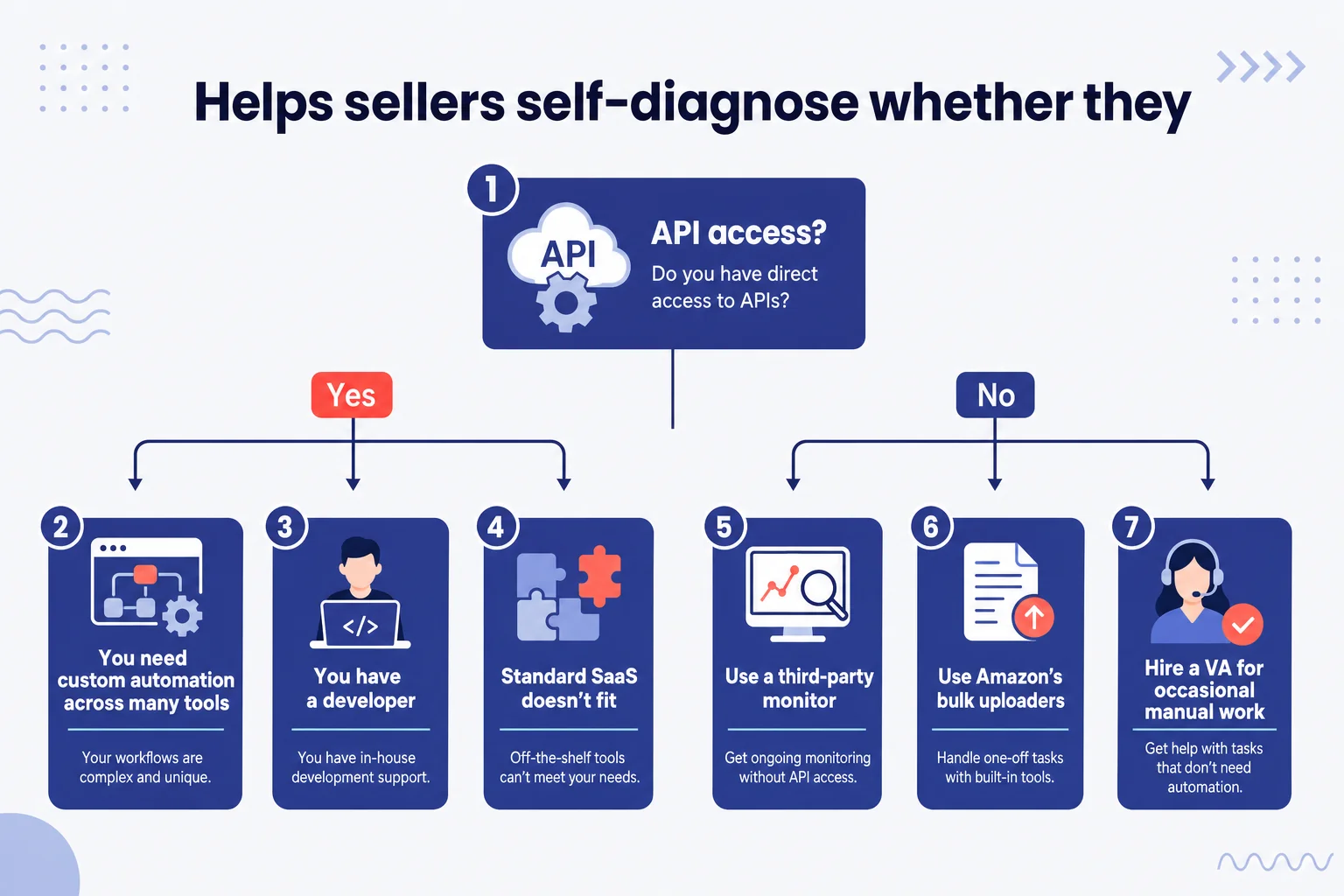
That gap, eight weeks of dev work versus 10 minutes of signup, is the reason most sellers shouldn’t be near SP-API. Not because it’s bad, just because it solves a different problem than the one most sellers actually have.
What is SellerSonar API?
SellerSonar API is an API-only product that gives teams structured Amazon marketplace data through scalable REST API access. Instead of building and maintaining scrapers, proxy systems, parsers, and normalization pipelines, your team can send API requests and receive clean Amazon data for internal tools, analytics dashboards, monitoring systems, repricing workflows, client reports, or automation platforms.
It is API-only access, not a dashboard product, so it is best suited for teams that want to use Amazon marketplace data inside their own systems.
What is the difference between Amazon SP-API and SellerSonar API?
- SP-API gives approved developers access to Amazon-side seller data such as orders, inventory, payments, and reports.
- SellerSonar API is built for marketplace intelligence: product data, search result data, offers, Buy Box ownership, bestseller rankings, seller catalog data, and brand store data.
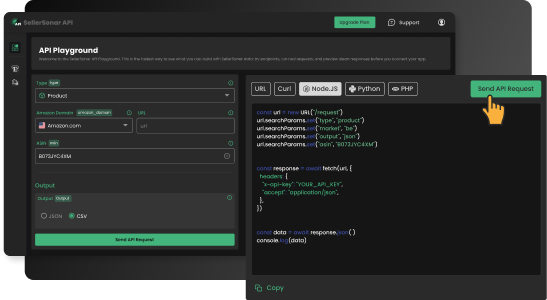
SellerSonar API helps teams access structured Amazon marketplace data without building scraping infrastructure.
What data can you get from SellerSonar API?
SellerSonar API gives sellers, brands, agencies, aggregators, vendors, and technical teams access to Amazon data that can support monitoring, analytics, and automation workflows.
- Product Request: ASIN-level product data, including pricing, BSR, listing status, variations, availability, core product attributes, and product-level signals such as black spot: frequently returned due to tight fit.
- Search Request: Amazon search result data for selected keywords, including ranking positions, sponsored placements, and results volume.
- Offers Request: Buy Box ownership, seller competition, fulfillment type, offer landscape, and price dynamics for a specific ASIN.
- Bestsellers Request: category-level bestseller rankings and ranking movement for market and niche analysis.
- Seller Products Request: seller catalog data for competitor research, assortment tracking, and portfolio-level monitoring.
- Brand Store Request: structured Amazon Brand Store data, including storefront architecture and featured product placement.
How SellerSonar API works
The workflow is simple: choose the type of Amazon data you need, send a request, and use the structured response inside your own system.
- Choose an endpoint. Select the request type that matches your use case, such as Product, Search, Offers, Bestsellers, Seller Products, or Brand Store.
- Enter request parameters. Add the marketplace, ASIN, keyword, seller, brand store, or other required input depending on the endpoint.
- Send the API request. Use your API key and send the REST request from your internal tool, dashboard, BI system, or automation workflow.
- Receive structured data. Get normalized output that your team can use for reports, monitoring logic, pricing decisions, competitor analysis, or alerting workflows.
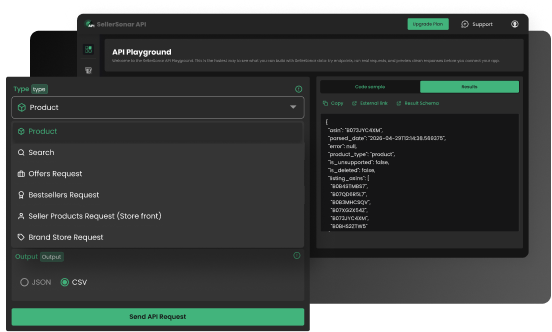
Choose the endpoint that matches the Amazon data you want to retrieve.
For example, if you want to analyze an ASIN, you can choose a Product Request, select the Amazon marketplace, enter the ASIN, and send the request. If you want keyword intelligence, you can use a Search Request to retrieve Amazon search result data for a specific keyword. If you need Buy Box or offer analytics, you can use an Offers Request to inspect seller competition and pricing dynamics.
After the request is sent, SellerSonar returns clean structured output. This makes the data easier to connect with internal dashboards, pricing systems, CRM tools, helpdesk workflows, warehouse systems, BI platforms, or client reporting environments.
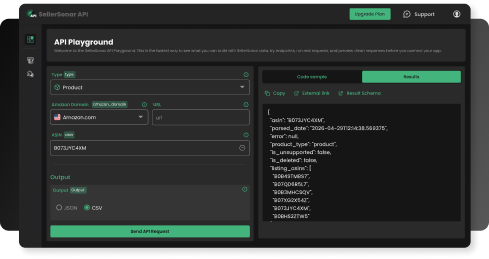
Receive structured Amazon data that can be used in dashboards, analytics systems, and automation workflows.
How SellerSonar API helps Amazon sellers and teams
SellerSonar API is most useful when a seller, brand, agency, or technical team needs Amazon marketplace data inside its own workflow instead of another standalone dashboard.
- Build internal Amazon dashboards. Pull ASIN, keyword, offer, seller, and category data into your own reporting environment.
- Monitor competitors at scale. Track seller catalogs, offer changes, price dynamics, bestseller movement, and brand store positioning across many ASINs or categories.
- Support repricing and Buy Box workflows. Use offer and pricing data to understand who owns the Buy Box, how sellers compete, and where pricing pressure appears.
- Automate product and keyword intelligence. Connect product data and search result data to custom tools for SEO, PPC, category research, and ranking analysis.
- Reduce development overhead. Avoid maintaining scrapers, parsers, proxy infrastructure, unstable pipelines, and manual data-cleaning workflows.
- Serve client accounts more efficiently. Agencies and aggregators can use structured Amazon data to power client reports, audit workflows, and portfolio-level monitoring.
When SellerSonar API makes more sense than direct SP-API access
SellerSonar API makes sense when your main goal is Amazon marketplace intelligence, not internal Seller Central data. If you need order-level data, payment data, inventory reports, or fulfillment data from your own Amazon seller account, SP-API is the correct source. If you need structured Amazon marketplace signals for products, keywords, offers, Buy Box analysis, competitors, category movement, or brand store research, SellerSonar API can be the cleaner path.
| Use case | Better fit |
|---|---|
| Orders, payments, inventory, fulfillment, seller reports | Amazon SP-API |
| ASIN data, search results, sponsored placements, Buy Box and offers, bestseller rankings | SellerSonar API |
| Custom Amazon analytics dashboard or client reporting system | SellerSonar API |
| Internal ERP or accounting integration with Amazon seller data | Amazon SP-API |
The practical difference is this: SP-API is for accessing Amazon-side seller account data. SellerSonar API is for retrieving structured Amazon marketplace intelligence without building your own extraction and normalization infrastructure.
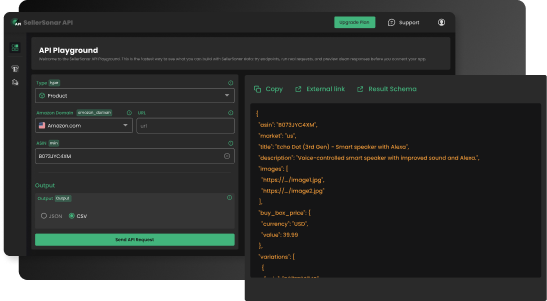
Example of a Product API request for retrieving structured ASIN-level data.
Build internal tools, analytics platforms, monitoring systems, repricing workflows, or client dashboards via scalable REST API without maintaining scraping infrastructure. Explore SellerSonar API.
How to get started with SP-API, for sellers who actually need it
OK, suppose you’ve worked through the decision framework and concluded you do need direct API access. Here’s the rough path.
Step 1. Register as a developer at sell.amazon.com/developers. This requires accepting Amazon’s developer agreement and submitting business information. Approval can take a few days.
Step 2. Choose between public and private applications. A private app accesses only your own seller account. A public app is meant for distribution to other sellers and requires a more involved review process.
Step 3. Set up Login with Amazon, or LWA, credentials. This is the token-exchange mechanism that proves your app has permission to read seller data.
Step 4. Implement the OAuth authorization flow. Sellers click an “authorize” button in your app, get redirected to Amazon, approve permissions, and get redirected back with a refresh token.
Step 5. Mind the rate limits. They’re stricter than most developers expect. The Orders API, as one example, allows roughly 1 request per minute sustained. Heavier endpoints, including reports and listings, have their own burst and steady-state limits. Building a system that respects all of them is half the engineering work.
💡 Expert Tip: Most sellers who get this far hire a developer or use a SaaS instead of building from scratch. The SP-API isn’t conceptually hard, but the operational pieces, including token refresh, error handling, rate-limit backoff, and marketplace-specific quirks, add up. Budget more time than you think.
For the deep technical specifics, Amazon’s developer documentation is the source of truth. It updates regularly and beats every third-party tutorial.
Bottom line
The Amazon API isn’t as scary as the 2025-2026 headlines made it sound. It’s a useful tool for sellers with specific automation needs and the resources to build, and for the rest, it’s mostly background plumbing.
Here’s what to remember:
- SP-API is the Amazon API today. MWS is dead, PA-API is a different product, ignore them for most seller use cases.
- The 2026 fees were real but cancelled. $1,400/year for third-party developers, withdrawn in May 2026. Sellers were never the target.
- You probably don’t need direct API access. Monitoring, hijacker alerts, Buy Box tracking, and review monitoring all work fine on public data through third-party tools.
- Build only when SaaS doesn’t fit. The math rarely favors custom integration unless you’re at high scale or have unusual automation needs.
- Watch Amazon’s “at this time” language. API monetization may return; build any SaaS-dependent process with that risk in mind.
Final Expert Recommendations: Based on what we see daily at SellerSonar, the smartest move for sellers under 500 ASINs is to skip the API question entirely unless they have a specific data workflow to solve. Pick a monitoring tool if you need alerts and protection running today. Use SellerSonar API when you need structured Amazon marketplace data inside your own tools, dashboards, reports, or automation systems. Spending weeks on SP-API developer registration to collect public-facing marketplace signals is often unnecessary. If you do need Amazon-side order, payment, or inventory data, SP-API is the right route. If you need product, search, offer, Buy Box, bestseller, seller catalog, or brand store intelligence, SellerSonar API is the more direct fit.
Want to work with Amazon marketplace data without building your own scraping infrastructure? Register for SellerSonar API and get 100 free API credits to test product, search, offer, bestseller, seller, and brand store requests.
Use it to validate your workflow, check response structure, and see how SellerSonar API can power your internal tools, dashboards, monitoring systems, or client reports. Explore SellerSonar API and start testing with your free credits after registration.

