





You check your dashboard on a Tuesday morning. Sales on your best ASIN are down 73% from yesterday. There is no alert, no email, and nothing obvious in Seller Central.
Then you scroll the listing in a private browser tab. The Buy Box has someone else’s name on it. They got it at 11 PM the night before.
That gap, from when you lost the Buy Box to when you found out, is where Amazon sellers lose the most money they never recover.
Most sellers obsess over the how of winning the Buy Box: pricing strategy, FBA versus FBM, repricer settings, and algorithm signals. However, the bigger lever for scaling sellers is the when. You cannot price-match your way back to ownership if you do not know you lost it for nine hours.
This guide walks through what has changed in Buy Box tracking, how to monitor ownership in practice, the four detection methods compared, six tools worth reviewing, and a 5-minute recovery playbook for when an alert fires. The framing throughout is simple: tracking and recovery are the lever, not algorithm theory.
About the Author: This article was reviewed by the SellerSonar editorial team and Amazon listing operations specialists who monitor Buy Box ownership across thousands of ASINs. The patterns and playbook below come from what we watch happen in real seller accounts, not theory.
💡 Expert Tip: Before you read the rest, run a quick test. Open one of your top ASINs in a private browser window right now. Is the Buy Box yours? If not, when did you last check? If you cannot answer that confidently within 30 seconds, this guide is for you.
The 2026 Buy Box landscape: 3 things that changed
Three shifts make Buy Box tracking different this year than it was 18 months ago.
1. Amazon is migrating “Buy Box” to “Featured Offer”
You will see both terms in Seller Central depending on which screen you open. They mean the same thing. Amazon now refers to the panel as the Featured Offer in its official seller documentation.
The wording matters because “Buy Box” implies a single winner, while “Featured Offer” reflects the rotational reality. Multiple eligible sellers can share Buy Box time on the same ASIN, weighted by performance. For tracking purposes, treat both terms as the same metric. We use “Buy Box” throughout because most sellers still search for it that way.
2. Pricing tolerance is tighter in competitive categories
In some categories, stale prices lose Buy Box time faster than they used to. A seller who manually updates prices once a week can fall behind faster when competitors adjust offers daily.
Therefore, Buy Box monitoring is not only about detecting loss. It is also about identifying when price pressure starts to affect ownership before the revenue drop becomes obvious.
3. Delivery speed has become more granular
Delivery speed can vary by shopper location, inventory placement, fulfillment method, and seller performance. As a result, a single manual check may not tell the full story for every customer region.
For sellers using FBM, this makes shipping reliability especially important. For FBA sellers, it also means inventory distribution and stock health can affect Buy Box stability.
These three changes share a theme: ownership is more volatile, more contextual, and faster-moving than most manual workflows can handle. Manual checking once a day was never great. Now it is even weaker.
What the Buy Box actually is: the 90-second version
The Amazon Buy Box is the purchasing module on the right side of a product page that contains the Add to Cart and Buy Now buttons. When a shopper clicks either button, they buy from whichever seller currently owns the box.
Multiple sellers offering the same product compete for ownership. Amazon decides who gets featured based on a blend of price, fulfillment, account health, stock, and customer experience.
Private label sellers should usually be the only seller on their listing, so they often hold the Buy Box by default. However, that changes when a hijacker or unauthorized reseller appears. In contrast, resellers, wholesalers, and arbitrage sellers compete for ownership against other sellers listing the same ASIN.
That is enough context for this guide. If you want the deeper walkthrough on definitions, eligibility, and edge cases, we cover it in the complete Buy Box explainer. The rest of this article assumes you know the basics and want to track and protect ownership.
Why tracking Buy Box ownership matters more than understanding the algorithm
Sellers love algorithm content because it feels productive. You read 5,000 words on landed price, ODR thresholds, and FBA weight, then go back to your day. Meanwhile, the ASIN you optimized last quarter can lose the Buy Box at 4 AM because a competitor came back in stock.
The metric sellers usually miss: detection lag
The single most valuable data point on Buy Box performance is not your eligibility score. It is your detection lag: the gap between when ownership flips and when you find out.
Industry estimates put roughly 82% of sales on a typical listing through the Buy Box (BigCommerce). Therefore, a 6-hour detection lag on a listing doing 40 units a day at $35 ASP is not a rounding error. Even at conservative loss rates, you are watching real money walk.
What detection lag looks like in practice
Sarah runs a private label home-goods catalog with about 80 ASINs. Her top product does roughly 50 units a day at $42. On a Saturday, she gets a hijacker, then a competitor with a slightly lower landed price elbows in.
Saturday she is busy with family. Sunday she is at a wedding. She does not open Seller Central until Monday morning. By that point, she has been split-sharing the Buy Box for 38 hours. In addition, the hijacker is fielding orders and creating review-risk on her listing.
Her direct revenue loss is roughly $1,800. The review-recovery cost, including responding, monitoring, and eventually getting the hijacker removed, eats another two weeks. The thing she is mad about is not the price war. It is that nobody told her until Monday at 9:14 AM.
Why alerts change the response
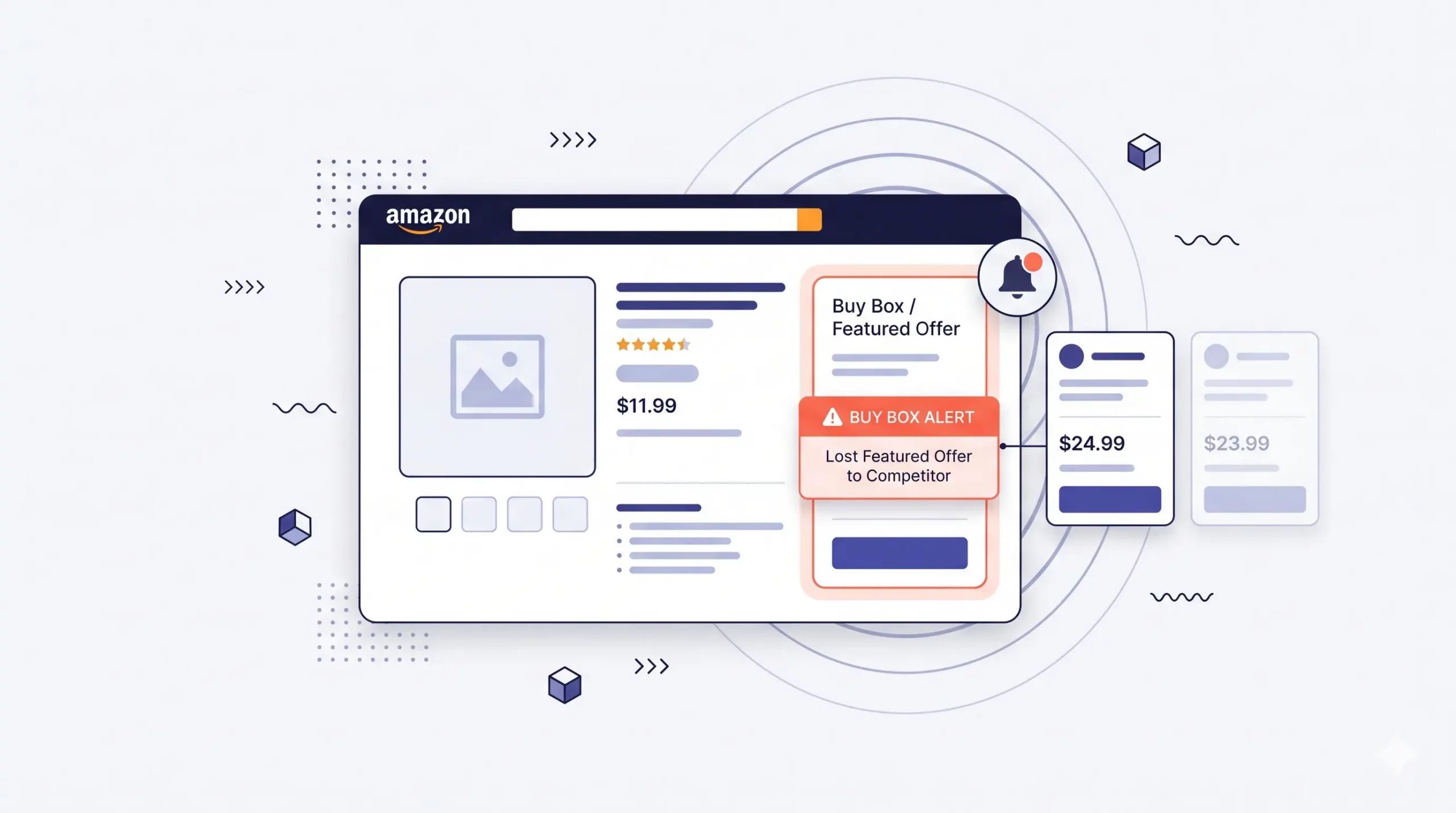
The fix for Sarah’s case is not a better pricing theory. It is a notification on her phone soon after the flip, with the ASIN, the new seller name, and the price gap.
Then she can decide whether to react, ignore, or escalate. That is the core value of the product category. Want to skip ahead and just see how the alerting works? Take a quick look at SellerSonar’s Buy Box monitoring, then come back for the rest of this guide.
Optimizing for ownership without monitoring for it is like running a fire drill once a year while turning off the smoke detector. The drill is useful. However, the detector is the part that actually saves the building.
How to check Buy Box ownership: 4 methods compared
There are four main ways to know whether you have the Buy Box on a given ASIN at a given moment. Each works in some situations, and each breaks in others.
Method 1: Manual Seller Central check
Inside Seller Central, the Manage Inventory view shows Buy Box status per ASIN under the “Featured Offer” column on newer accounts. Older accounts may still label it “Buy Box.” It is free, accurate, and built in.
However, it does not scale well. The data refreshes when you reload the page, not as a team workflow. Also, scrolling 50+ ASINs to scan a column becomes unrealistic. Past about 20 ASINs, you will skip the check on a busy day, then skip the next day. That is how detection lag opens up.
Method 2: Manual Amazon product page check
Open the listing in a private browser window. Whoever appears under “Sold by” in the Buy Box panel is the current owner. This is the most reliable manual check because it reflects what shoppers see at that moment.
Still, the method has the same scaling problem. In addition, Buy Box rotation is real. A single private-window check can show you as the owner even when you only have 40% of the rotation. To get a reliable read, you would need multiple checks across the day.
Method 3: Browser extensions
Tools like the SellerSonar Chrome extension, Keepa, Jungle Scout’s extension, and others show Buy Box history and current owner inline on the product page while you browse. They are useful for spot checks during competitor research.
However, they are still manual. Extensions help when you are looking. They do not help when you are not.
Method 4: Automated monitoring tools
This is the only method that handles real-world catalog sizes. Tools like SellerSonar, Repricer.com, Feedvisor, and a few others check Buy Box ownership across your ASINs on a set frequency and send alerts when ownership flips.
As a result, you stop checking manually. The tool tells you when something changes. The trade-off is cost, and the alert cadence varies a lot between vendors. We cover that in the comparison section.
| Method | Real-time | Scales past 20 ASINs | Catches 2 AM losses | Cost |
|---|---|---|---|---|
| Seller Central manual | Partial | No | No | Free |
| Product page incognito | Yes, single check | No | No | Free |
| Browser extension | Yes, when looking | No | No | Free / paid |
| Automated monitoring | Yes, continuous | Yes | Yes | $20-$200+/mo |
If you have under 10 ASINs and Buy Box ownership is not volatile in your category, manual checks may work. Above that, the math on detection lag versus tool cost usually favors the tool quickly.
What makes Amazon decide who gets the Buy Box
This section is intentionally compact. The deep-dive lives in the Buy Box algorithm guide. What follows is what to watch when you are tracking, not how to optimize from scratch.
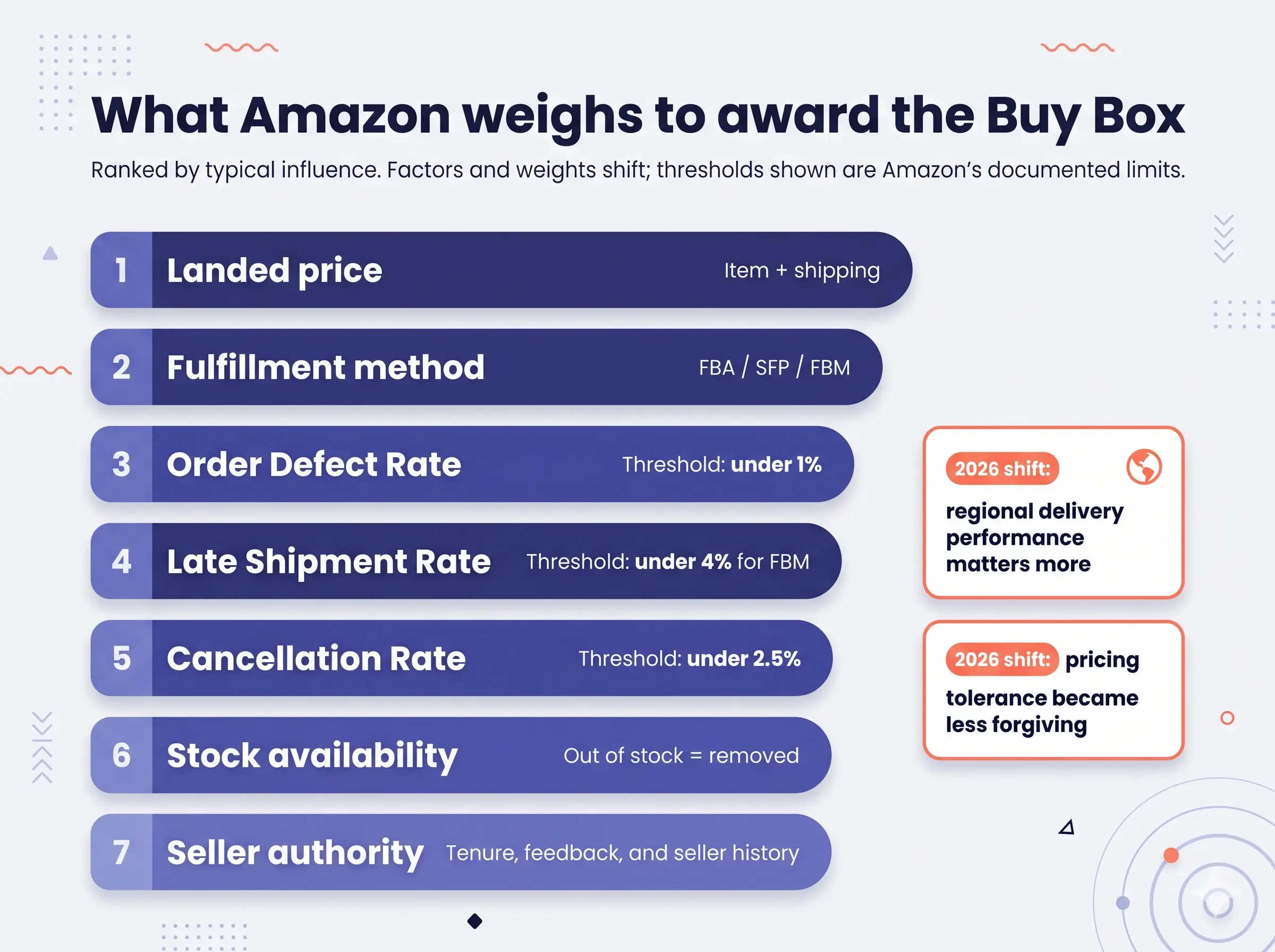
Amazon’s Buy Box decision is a weighted blend of factors. The weights shift, but the factors stay relatively consistent.
Landed price
Landed price is the total cost to the buyer: item price plus shipping. Amazon does not always award the Buy Box to the lowest landed price. However, the gap from the cheapest eligible offer usually cannot be too wide.
Fulfillment method
FBA carries an advantage because Prime delivery is built into the fulfillment model. Seller Fulfilled Prime can compete closely if you maintain the required metrics. Meanwhile, FBM can compete when delivery speed and account metrics are strong.
Account health and seller metrics
Order Defect Rate is one of the clearest documented signals. Amazon’s documented threshold is under 1% (Seller Central account health metrics). Above 1%, risk increases.
Late shipment rate is another key metric. Amazon documents the threshold as under 4%. For FBA sellers, this is mostly managed by Amazon. For FBM sellers, it can quietly reduce Buy Box share when warehouse turnaround slows.
Cancellation rate, stock, and account history
Cancellation rate matters because cancellations often indicate stock-control or operational issues. Amazon’s documented threshold is under 2.5%. Therefore, stockouts can hurt both availability and account-health signals.
Stock availability is even more direct. Out of stock removes you from Buy Box contention entirely. After replenishment, ownership may take time to stabilize. In addition, newer sellers often get smaller rotation slices until Amazon has more performance data.
🎯 Pro Insight: When you are tracking ownership and an alert fires, your first 60-second triage is not “fix everything.” It is “which factor moved?” In many cases, Buy Box losses trace back to one of three causes: a competitor’s price drop, a stock issue, or a metric drift. Therefore, build your alert response around those three first.
What happens the moment you lose the Buy Box
A Buy Box loss is not a slow-moving event. Conversion on the affected ASIN can drop quickly because shoppers default to whoever is now in the box. Most shoppers never check “Other Sellers.”
As a result, your sales can move from a healthy curve to partial or near-zero ownership in hours, not days.
Revenue impact example
Worked example. Say you are selling 40 units a day at $35. That is $1,400 in daily revenue on that ASIN. You lose the Buy Box at 11 PM Saturday, but you find out Monday at 8 AM. That gives you 33 hours of split-share Buy Box at best, and full loss at worst.
Even if you assume you held 30% rotation through that window, the math is still material:
- Hours without full ownership: ~33
- Hourly revenue at full ownership: ~$58
- Hourly revenue at 30% ownership: ~$17
- Hourly loss: ~$41
- Total revenue loss: ~$1,350
That number assumes you recover instantly Monday morning. In practice, recovery can take longer after the fix. Therefore, another day of partial ownership can compound the loss.
Why monitoring changes the economics
Marcus, a wholesale seller doing roughly $80K/month across ~120 ASINs, started tracking Buy Box ownership systematically after losing the box on his top SKU for an entire long weekend. Previously, he had relied on manual spot checks.
The weekend loss cost him roughly $4,300 that he could quantify. It also created a buy-side question from his supplier about why volume dropped. After that, he wired alerts into Slack.
Now Buy Box flips ping his team early enough to review them. Most flips are not worth action because short rotation changes happen. However, a handful per month are real and worth fixing. His monthly recovery time on Buy Box issues went from “whenever I notice” to “before the affected order count hits double digits.”
The thing Marcus’ team realized was simple: they were not worse pricers than the competition. They just were not watching.
Buy Box tracking tools compared
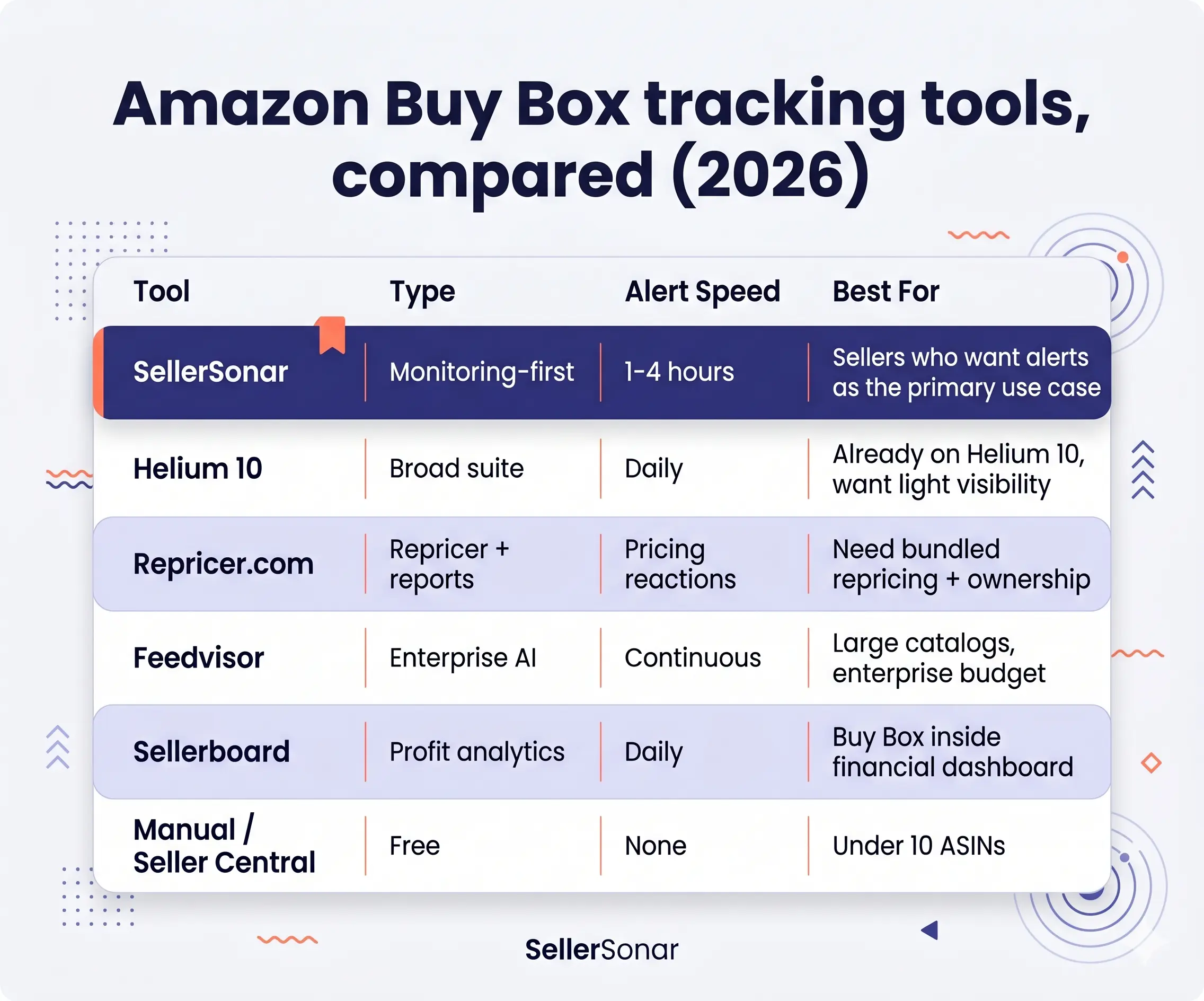
This is the section many “what is Buy Box” articles skip. Repricers are useful for automated price changes, but they are not the same as dedicated monitoring tools. Therefore, the right choice depends on whether you need repricing, alerts, ownership history, or a broader seller dashboard.
| Tool | Type | Alert speed | Scope | Pricing tier | Best for |
|---|---|---|---|---|---|
| SellerSonar | Dedicated monitoring | 1-4 hours depending on plan | Buy Box + 50+ other parameters | Pro $20/mo, Premium $40/mo, Business $75/mo | Sellers who want monitoring as the primary use case |
| Helium 10 | Broad seller suite | Daily | Buy Box is a feature, not a focus | $39+/mo | Sellers who already use Helium 10 for research and want light Buy Box visibility |
| Repricer.com | Repricer + Buy Box analytics | Real-time pricing reactions | Buy Box ownership reporting | $99+/mo | Sellers who need automated repricing and ownership reporting bundled |
| Feedvisor | Enterprise repricing + AI | Real-time, AI-driven | Buy Box is one signal in a larger AI engine | Enterprise, custom | Brands with large catalogs and enterprise budgets |
| Sellerboard | Analytics + profit dashboard | Daily | Buy Box reporting alongside P&L | $19+/mo | Sellers who want Buy Box folded into financial analytics |
| Manual / Seller Central | Free | None, you check | Same view as everyone else | Free | Sellers with under 10 ASINs and a habit of checking |
SellerSonar
The angle: SellerSonar is a dedicated Amazon listing monitoring tool, and Buy Box tracking is one of its core alerts. Premium and Business plans surface won/lost notifications with the new seller name, price gap, and timestamp. You can also route alerts into Slack, Trello, or webhooks.
Where it stands out: alert routing and operational context. If you want the notification to land in your team workflow with the relevant ASIN, this is the use case the product is built around. For sellers who want Buy Box ownership alongside best-seller rank in a single view, the SellerSonar BSR and Buy Box tracker bundles both metrics in one dashboard.
Where it does not: SellerSonar does not reprice. It tells you what changed. If you want auto-pricing baked in, pair it with a repricer or move to a bundled solution.
Helium 10
Helium 10 is a strong broad-suite product. Buy Box features exist, but they are not the core focus. Therefore, it is a good fit if you already use Helium 10 for keyword research, listing optimization, and product research and only need a basic ownership readout.
Repricer.com
Repricer.com is a repricing-first tool. Buy Box ownership reporting is useful because pricing decisions need that data anyway. If your bottleneck is competitor pricing reaction, this tool category can make sense.
However, it is less useful if your Buy Box losses come from metric drift, stock issues, or unauthorized seller activity rather than price.
For how Repricer.com stacks up against the other main options, see the best Amazon repricers.
Feedvisor
Feedvisor is an enterprise-tier platform with AI-driven repricing and a dashboard that surfaces Buy Box, pricing, and inventory signals together. It is usually more relevant for larger catalogs and teams with enterprise budgets.
For a private label seller with 50 SKUs, it may be more platform than needed.
Sellerboard
Sellerboard is a profit-first analytics platform that includes Buy Box reporting as part of its dashboards. It is affordable and useful if your main need is financial visibility, with Buy Box as a secondary metric.
However, it is less alert-focused than dedicated monitoring tools.
Manual / Seller Central
Manual checking is free and accurate at the moment of review. It can work for sub-10 ASIN catalogs where you are naturally in Seller Central every day.
Past that threshold, the math falls apart quickly because nobody checks every ASIN consistently.
The 5-minute Buy Box recovery playbook
When an alert fires, or when you discover ownership flipped manually, the response should be a documented sequence. Do not improvise if the ASIN matters.
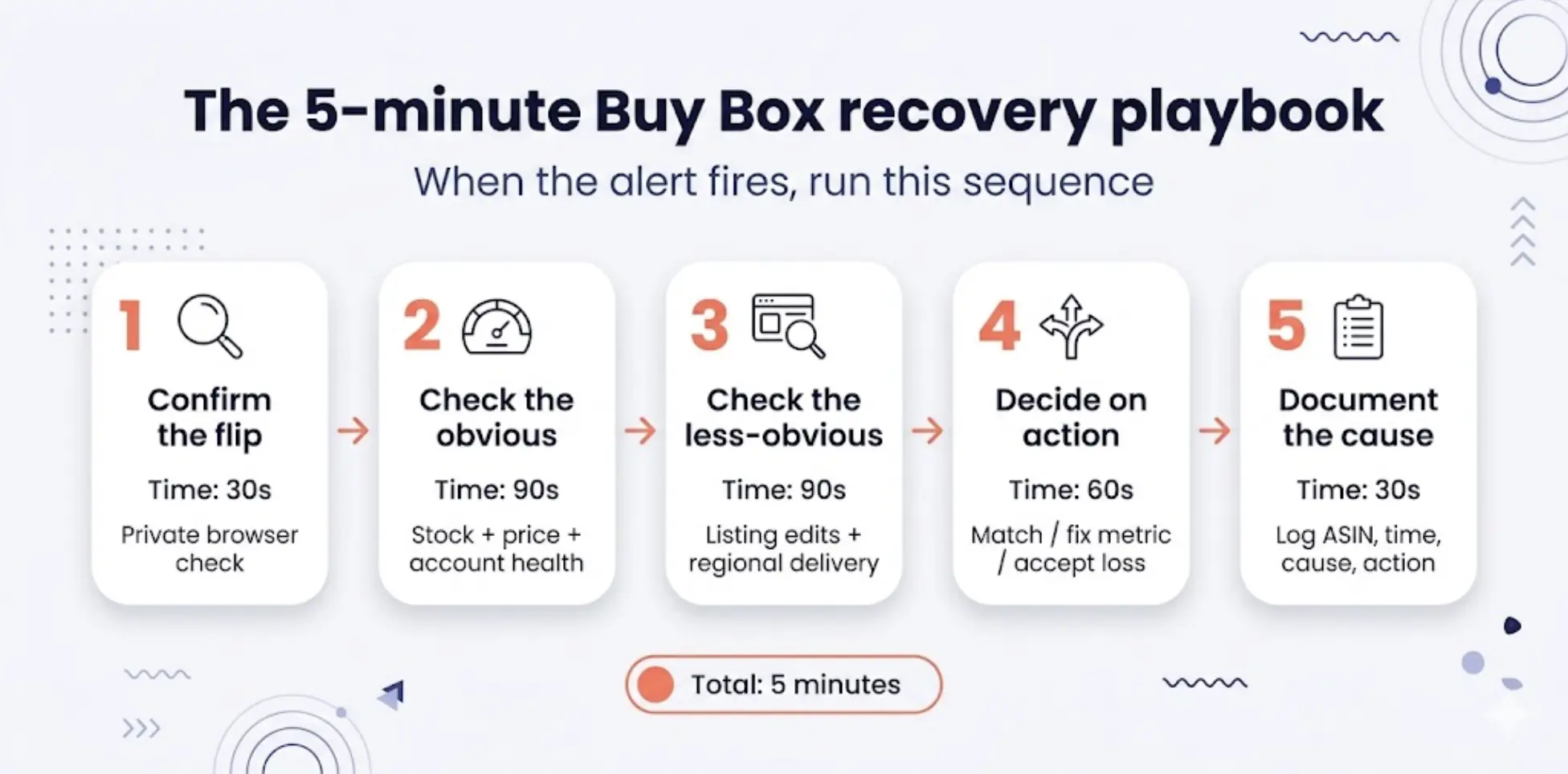
Step 1: Confirm the flip
Open the listing in a private browser. Then verify that another seller is in the Buy Box. Note who they are and their landed price. Sometimes alerts fire on transient rotation rather than full loss, so you want to know which one this is.
Step 2: Check the obvious three
- Stock status, yours and theirs
- Your current price versus the new owner’s landed price
- Account health flags in Seller Central, including ODR, late shipments, and suppression notices
Step 3: Check the less-obvious two
- Recent listing edits, including title or attribute changes that could affect eligibility
- Regional delivery speed, especially if FBA inventory distribution or FBM delivery promise changed
Step 4: Decide on action
Pick one of three responses:
- Match price if the gap is closeable and your margin allows
- Fix the metric if the cause is performance-related and price is not the issue
- Accept temporary loss if the new owner has structurally lower cost and chasing price would hurt margin more than the lost Buy Box share
Step 5: Document the cause
Log the event: ASIN, time, cause, and action taken. After three months, this log tells you whether you are losing to price, metrics, stock, or seller activity. As a result, reactive Buy Box management becomes structural improvement.
📌 From Our Experience: Sellers who consistently win the Buy Box back fastest are not always the ones with the best repricer. They are the ones with a documented playbook. Pricing changes are quick when the decision is pre-set. The slow part is debating the response every time.
Agency workflow example
Diana, who runs a small two-person Amazon agency, started using a 5-step checklist with her clients after one launch consumed a full weekend recovering a single ASIN. Her note from that experience was direct: “We weren’t slow because we didn’t know what to do. We were slow because nobody owned the decision.”
Once the team wrote a simple rule, such as “PM matches price if gap is under 4%, otherwise wait,” response time dropped under 10 minutes.
How SellerSonar’s Buy Box monitoring works
If you have read this far and concluded that the gap in your operation is monitoring, here is how the SellerSonar version fits together.
SellerSonar’s Buy Box and pricing alerts monitor every ASIN you load on the configured cadence. When Buy Box ownership flips, the alert lands in email and, optionally, Slack with the key event details.
What the alert shows
- ASIN and product title
- Timestamp of the flip
- Previous owner and new owner where available
- Price gap at the moment of the flip
- A direct link to the listing for verification
How teams act on alerts
From there, the alert can be turned into a Trello card with one click. This helps the response get ticketed and assigned instead of forgotten. You can also pipe alerts into webhooks for custom workflows such as Zapier, n8n, or Make.
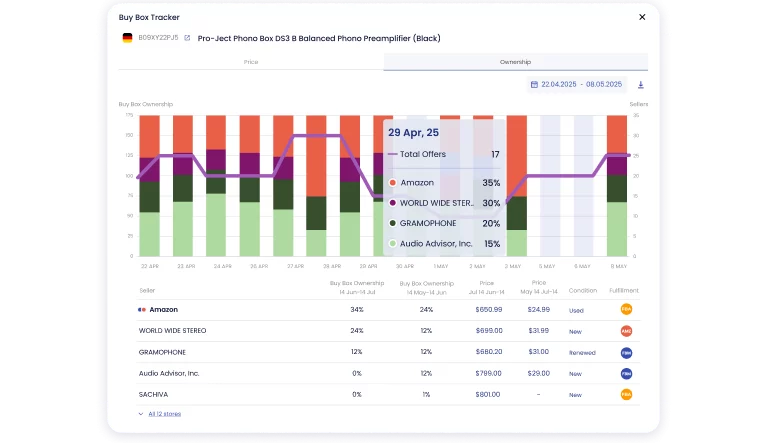
For example, on 29 April, the Buy Box was shared by Amazon (34%), WORLD WIDE STEREO (24%), and GRAMOPHONE (12%).
Limits are worth stating. SellerSonar does not reprice for you; it is a monitor, not a repricer. Also, it cannot prevent every Buy Box loss. Instead, it shortens the time between the ownership change and your response.
See it on your own listings. Start a free 14-day SellerSonar trial with 5 ASINs, 10 keywords, and no credit card required. Most sellers see their first useful alert within the first 48 hours.
Buy Box for new sellers: the eligibility shortcut
New sellers often receive smaller Buy Box rotation shares while Amazon builds confidence in the account. There is no universal published timeline. However, strong metrics, fast shipping, low cancellations, and consistent order quality help build eligibility over time.
Until then, even perfect pricing may not always win ownership against established sellers. Therefore, new sellers benefit from monitoring because their Buy Box share is structurally more fragile.
The bottom line
Buy Box ownership is volatile, contextual, and faster-moving than most manual workflows can handle. Most public discussion focuses on winning, but that does not help much if you already lost it overnight and nobody told you.
Three things are worth taking from this guide:
- Detection lag is the metric most sellers do not track and should not ignore. A 6-hour gap between Buy Box loss and your awareness of it can cost more than many optimization tasks would save.
- Manual checking stops working past small catalogs. Past that threshold, the choice is not tool or no tool. It is tool or accept that you may find out about losses late.
- A documented recovery playbook beats real-time improvisation. The 5-step sequence above takes minutes when pre-decided. Without it, teams debate the response every time.
Final expert recommendations
Based on what we observe across monitored ASINs, the highest-impact change a private-label or wholesale seller can make is not algorithmic. It is setting up alerts on the top ASINs and the most direct competitor ASINs, then writing a 5-step recovery playbook.
Setup can be simple: monitor the products that actually drive revenue, define who owns the response, and document what to check first. Consequently, when a Buy Box loss happens, the team does not waste the first hour deciding who should act.
If you want to see how this plays out on your own listings, start a free 14-day SellerSonar trial. Five ASINs, 10 keywords, no credit card needed. Load your top SKUs, walk away for 48 hours, and see what comes through.

