



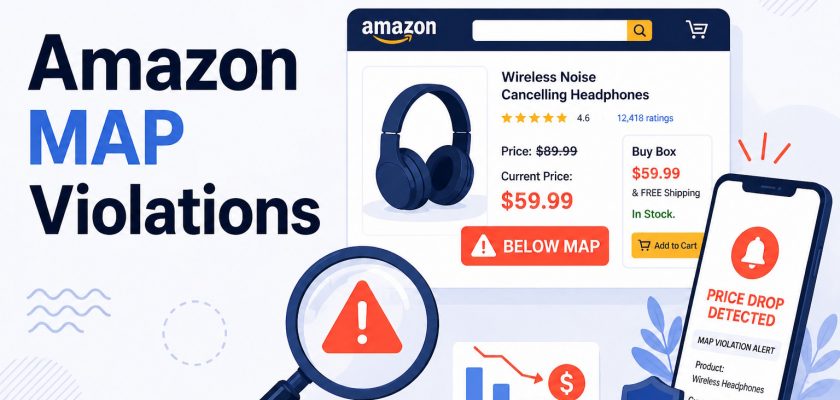



Twelve authorized resellers. A MAP price of $34.99. A written agreement that every single one of them had signed.
Dana managed pricing for a private label supplement brand. She had done everything right: distributed the product through vetted channels, included MAP terms in every reseller agreement, and checked prices every few weeks. Or at least, she thought she did.
Three weeks after two of her resellers started running 20% coupons on Amazon, Dana found out. Not because an alert fired. Because her sales dropped and she went looking. By then, the advertised price on those listings had been sitting at $27.99 for 21 days. The resellers who had honored MAP had lost the Buy Box entirely. And three of them called Dana that same week to ask why they should keep honoring a price that “the market” had already moved on from.
That is what MAP violations cost when you don’t have map violation alerts in place. Not just the margin on those 21 days. The erosion of the whole pricing structure.
This guide covers everything about map violation alerts: what they are, why Amazon makes MAP enforcement harder than any other channel, and how to set up monitoring that actually catches violations before the damage compounds.
About the Author: Gloria Anderson is an Amazon Brand Protection Specialist with 9 years of experience helping private label brands and distributors protect their pricing policies on Amazon. She has worked with brands managing 50 to 2,000+ resellers and has seen firsthand what happens when MAP enforcement is reactive instead of proactive.
What Is a MAP Violation?
A MAP violation occurs when a seller advertises a product below the minimum advertised price the brand has set in their MAP policy.
The key word is “advertised.” MAP governs the price a seller can show publicly, including on product listing pages, in ads, and in promotional materials. It does not govern what a seller charges after a customer contacts them directly, which is why MAP and MSRP (manufacturer’s suggested retail price) are different things. MSRP is the suggested sale price. MAP is the floor for public advertising.
When a reseller drops their Amazon listing price below MAP, that is a violation. When they apply a coupon that pushes the displayed “effective price” below MAP, that is also a map pricing violation. Same with Subscribe & Save discounts, bundle pricing tricks, and promotional deals.
MAP violations matter because they undercut every other seller who honors the policy. If one reseller sells at $27.99 when MAP is $34.99, the compliant sellers at $34.99 lose the Buy Box, lose sales, and lose trust in the brand. It’s a race to the bottom that you don’t want to start.
Why Amazon Makes MAP Enforcement Uniquely Difficult
Here’s the uncomfortable truth: Amazon does not enforce MAP. At all. Ever.
Amazon’s position is that MAP agreements are contracts between brands and their resellers. Amazon isn’t a party to those agreements. You can’t file a MAP complaint with Amazon, and you can’t have a listing removed because someone is violating your MAP.
Seller Central’s terms explicitly leave MAP enforcement to the brand. The Amazon Seller Forums confirm that this hasn’t changed, despite years of seller requests.
That means every violation you catch, you catch yourself. Every enforcement action is yours to take. Map pricing compliance falls entirely on the brand. And with dozens or hundreds of resellers across multiple channels, you can’t catch violations by checking manually.
Amazon Itself Can Violate Your MAP
This is the part most brands do not expect: Amazon’s own systems can push advertised prices below MAP.
Subscribe & Save applies discounts of 5 to 15%. If a seller opts their listing into Subscribe & Save and the discount drops the first-order price below MAP, that’s a MAP breach and the seller may not have done it intentionally. Amazon’s automated price-matching algorithms can also pull prices down without seller intervention. And promotional coupons applied by Amazon during sale events have pushed advertised prices below MAP on brands that never agreed to participate. GrayFalkon’s 2026 MAP enforcement analysis confirms that Amazon’s own systems are now among the most frequent sources of MAP violations on the platform.
None of this is addressable by contacting Amazon. The brand has to catch it, document it, and handle it.
The 5-Layer MAP Violation Problem
Most brands monitor the shelf price. But the shelf price is only one of five ways Amazon can display a price below MAP:
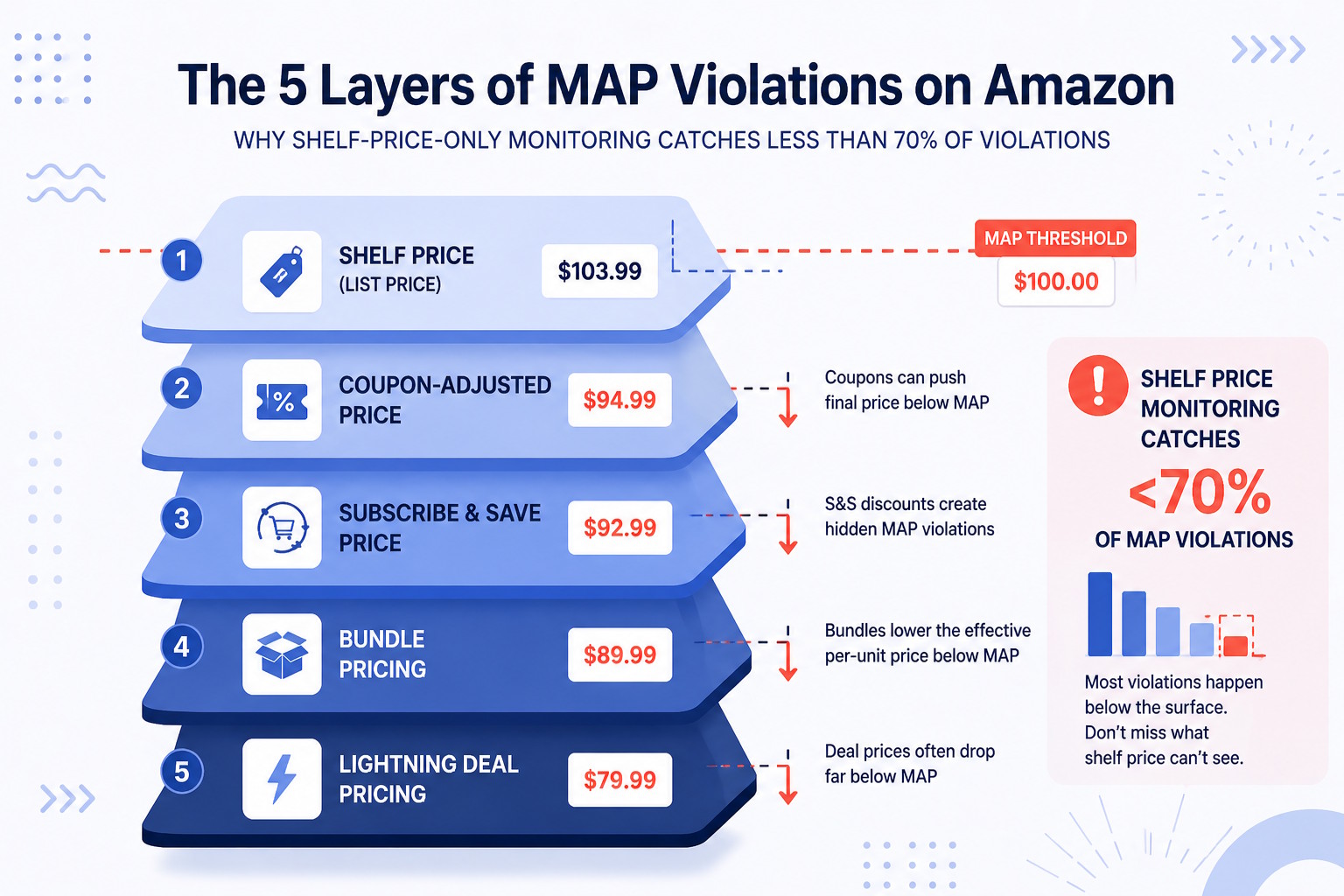
1. Shelf price: The listed product price visible on the detail page
2. Coupon-adjusted price: A seller-applied coupon that reduces the displayed effective price
3. Subscribe & Save price: The first-order Subscribe & Save rate, often 10 to 15% below shelf price
4. Bundle pricing: A multi-unit bundle priced to undercut MAP on a per-unit basis
5. Lightning Deal / promotional pricing: Time-limited promotional pricing events
Research from GrowByData confirms that tools monitoring shelf price alone probably miss 30 to 40% of effective MAP violations. The “visible” price is just the start.
💡 Expert Tip: When defining your MAP policy, specify that it applies to the “effective advertised price” inclusive of coupons, promotional discounts, and Subscribe & Save rates. Without that language, sellers will argue that their shelf price is compliant even as their coupon-adjusted price sits 20% below your floor. We have seen this argument used to stall enforcement for weeks.
What MAP Violation Alerts Are (and What They Catch)
A MAP violation alert is an automated notification triggered when a price on a monitored ASIN drops below the threshold you set. Map violation alerts are not the same as generic price trackers. They’re configured specifically against your MAP floor and tied to the ASINs your policy covers.
The best alerts catch more than just shelf price changes. A proper MAP monitoring alert should include:
- Which ASIN was violated
- Which seller is displaying the low price (if identifiable)
- What the displayed price is at the time of the alert
- A timestamp so you have documentation for enforcement
- The source of the violation (shelf price, coupon, Subscribe & Save) when detectable
Why does timing matter? Because the longer a violation runs undetected, the more damage it does. Compliant sellers see the low price, lose the Buy Box, and start asking why they’re holding a price that clearly isn’t being enforced.
Once one seller breaks ranks, others follow. The whole structure erodes. Quickly.
In our experience, the brands that catch violations within hours tend to resolve them with a simple message to the seller. The brands that find out three weeks later are probably dealing with a pricing reset that takes months to undo, sometimes longer.
| Manual Monitoring | Automated MAP Alerts | |
|---|---|---|
| Detection speed | Days to weeks | Minutes to hours |
| Coverage | Spot checks only | 24/7, every ASIN |
| Catches coupons? | Rarely | Yes (effective price) |
| Documentation | Screenshots by hand | Automatic timestamps |
| Scales with catalog? | No | Yes |
If you’re tracking Amazon prices manually, the gap between violation and detection is almost always measured in days or weeks. That’s too slow. Tracking Amazon prices across even a modest reseller network requires automated monitoring that runs continuously, not spot checks on a schedule.
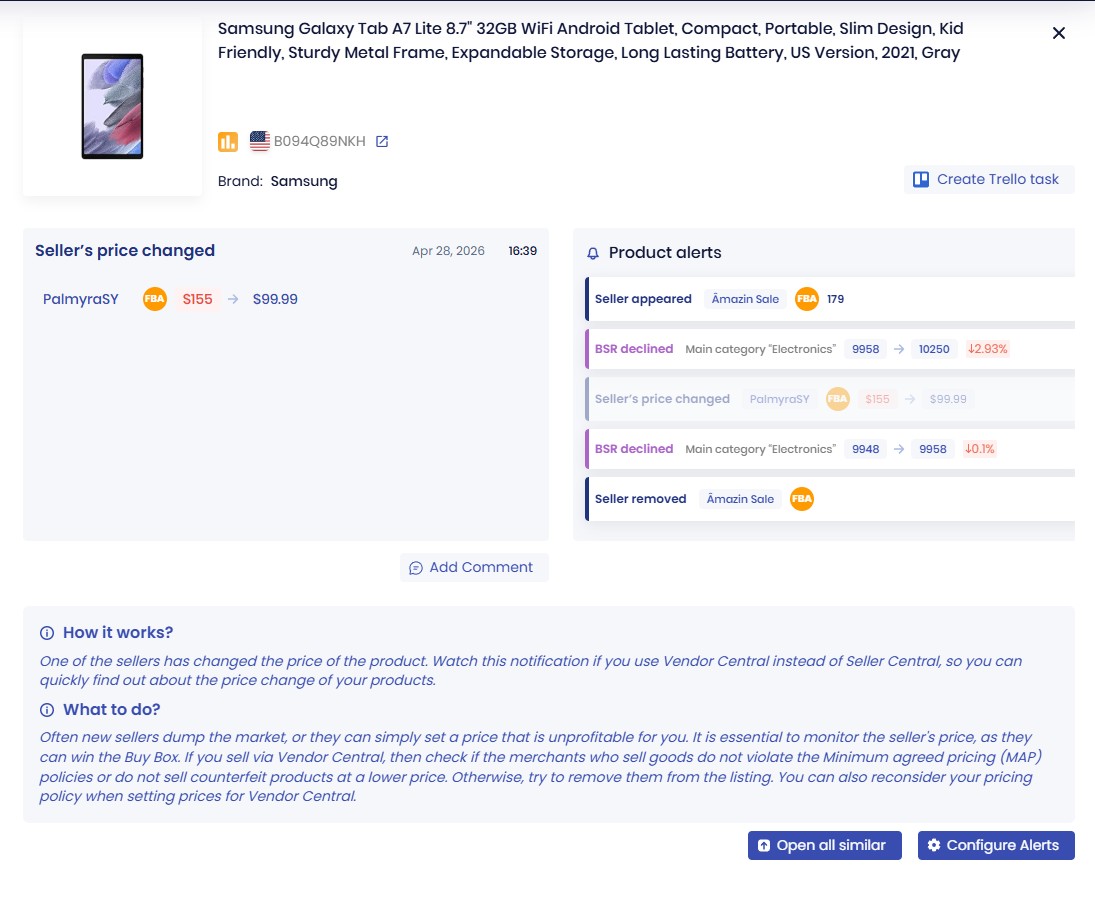
Ready to catch price violations before they compound? SellerSonar’s price change alerts watch every ASIN in your catalog 24/7 and notify you the moment a price drops below your MAP threshold.
How MAP Violations Affect Your Amazon Buy Box
This is the angle that most MAP enforcement guides skip, and it is the one that costs brands the most money.
Amazon’s Buy Box algorithm rewards the lowest price. When a reseller violates your MAP and lists at $27.99 while everyone else is at $34.99, Amazon sees that as a better offer for shoppers. The violating seller wins the Buy Box. Your compliant authorized sellers get suppressed.
To understand the impact clearly, you need more than a one-time price alert. You need to see how Buy Box price, your price, Amazon price, and used price move over time. That price history helps you spot when a reseller starts undercutting MAP, how quickly the Buy Box reacts, and whether the issue is isolated or part of a broader pricing pattern.
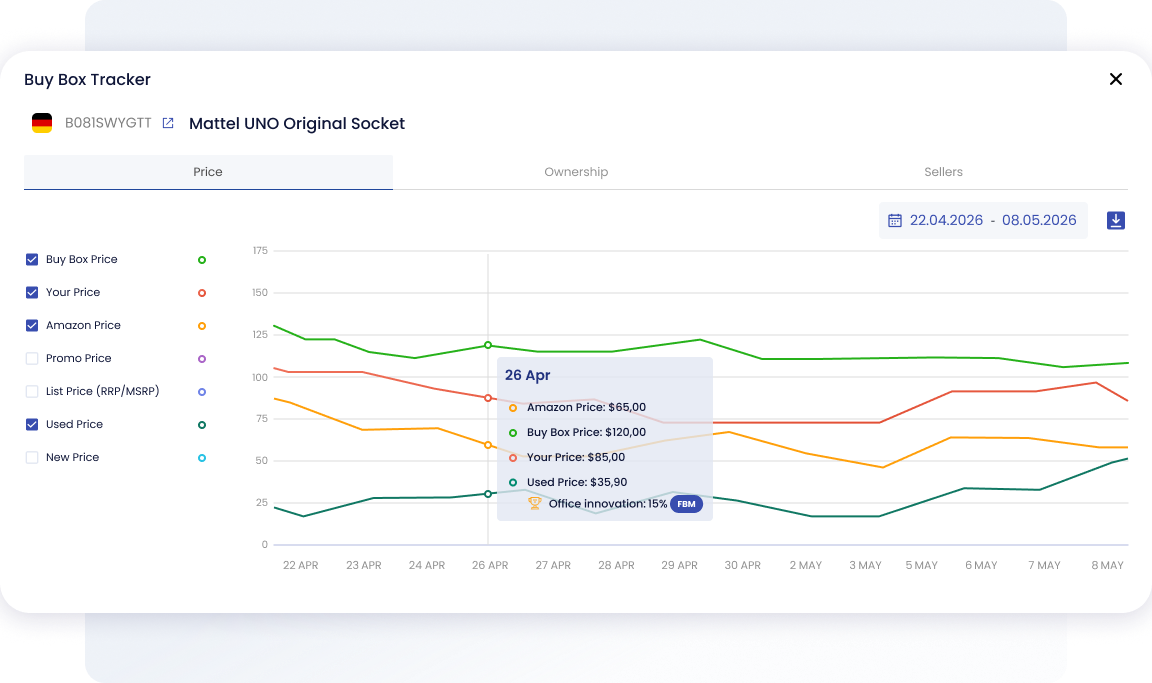
Track Buy Box price, your price, Amazon price, and used price changes in one SellerSonar dashboard to spot pricing shifts faster.
Here is the timeline, as we have seen it play out again and again:
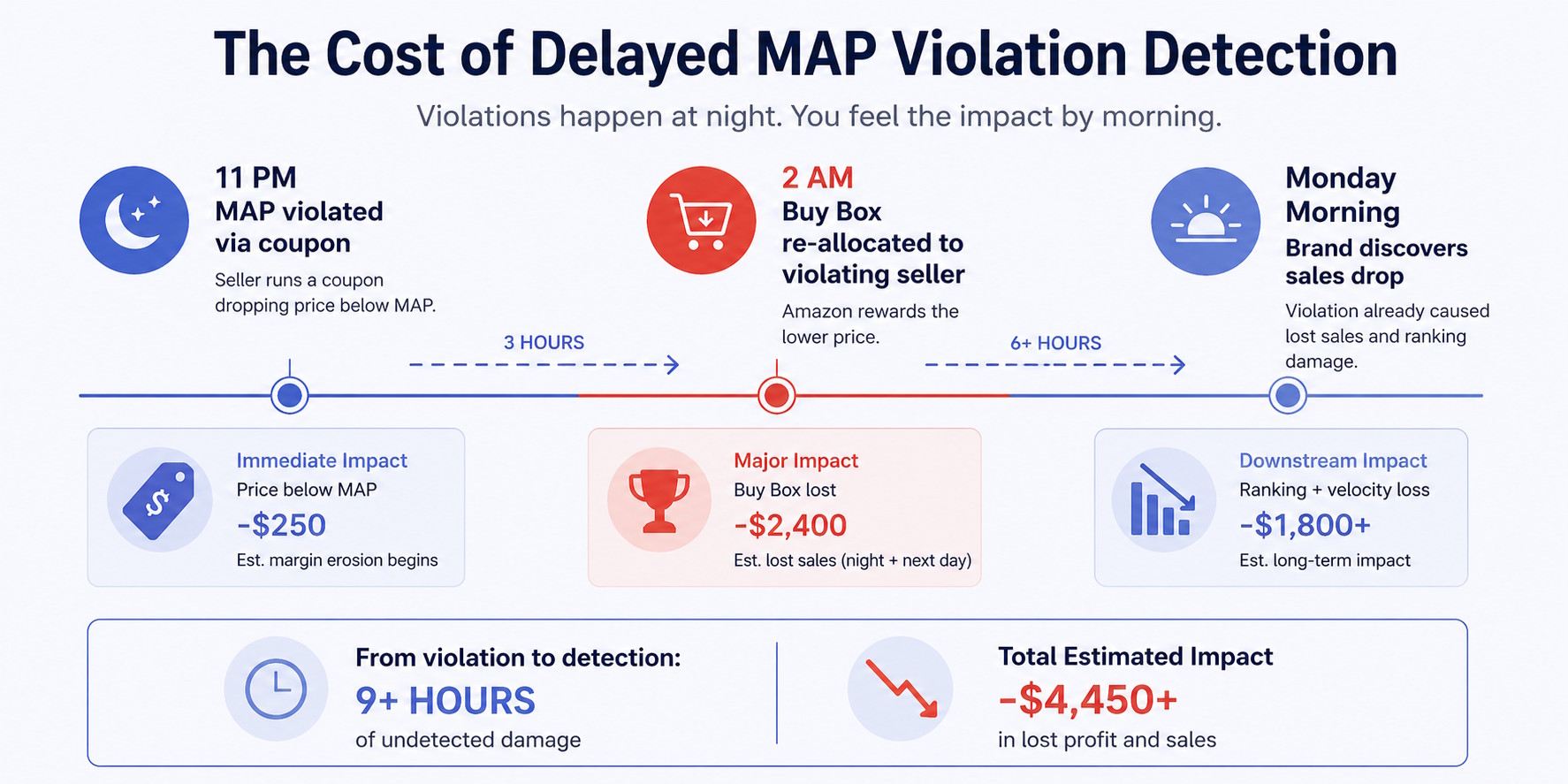
- 11 PM: A reseller applies a 20% coupon, pushing the effective price below MAP
- 2 AM: Amazon’s Buy Box algorithm re-allocates. The violating seller takes it.
- Monday morning: You open your dashboard and notice sales dropped over the weekend
By Monday, that reseller has had the Buy Box for 57 hours. They have taken sales that should have gone to your compliant sellers. And your compliant sellers, if they noticed, are now asking why they should keep honoring MAP.
This is separate from the direct margin impact of the violation itself. The Buy Box and pricing alerts that fire when a new seller takes your Buy Box are often the fastest way to detect a MAP violation in progress, because the Buy Box shift is visible before you even know the price dropped.
🎯 Pro Insight: One thing we see consistently: brands focus on catching the violating seller, but they do not think about what to say to the compliant sellers who just got burned. When a MAP violation takes someone’s Buy Box for a week, that seller needs to hear from you. Acknowledge it happened, confirm you are enforcing, and give them a timeline. If you do not, you lose their trust in your policy permanently.
How to Set Up MAP Violation Monitoring on Amazon (Step by Step)
You don’t need a full MAP enforcement platform to monitor violations on Amazon. Here’s a practical setup that works.
Step 1: Define Your MAP Threshold and Alert Sensitivity
Before adding any ASINs to a monitoring tool, get clear on what triggers an alert.
Your MAP threshold is your minimum advertised price. For monitoring purposes, set your alert at MAP minus a small buffer: typically 1 to 2%. This prevents false alarms from rounding or minor display differences while still catching real violations fast.
Also decide: do you want alerts only for shelf price drops, or do you want to flag any effective price drop including coupons? The answer should be both. Set shelf price as your primary threshold and treat any coupon activity on your ASINs as a secondary flag to investigate manually.
Load every ASIN covered by your MAP policy into your monitoring setup. For each ASIN, note which sellers are currently authorized and at what price they are listing.
This baseline serves two purposes. First, it tells you immediately when a new, unauthorized seller appears on your listing. Second, it gives you a comparison point for map violation tracking: you know whether a price alert is from an authorized reseller or a grey market seller. Both are violations, but they require different responses.
SellerSonar’s competitor monitoring tracks all sellers on a given ASIN and logs price changes across your competitive set. For MAP purposes, this means you can see not just when someone drops their price below MAP, but also who did it and when they joined the listing.
Step 3: Configure Your Alert Channels
Price drop alerts are only useful if you see them fast. Set up delivery to wherever your team actually works: email for the primary contact, Slack or a messaging app for the team.
For high-priority ASINs (your top sellers or products with the tightest margins), consider setting a more sensitive threshold. A 1% price drop on a $100 product might, I’d say, warrant a different response than a 1% drop on a $15 product. Don’t treat all ASINs the same.
Step 4: Document Violations with Timestamps
Every alert that fires is a potential enforcement record. Save the timestamp, the ASIN, the seller ID, the displayed price, and a screenshot of the listing. This documentation is what you send when you contact the seller, and it is what you reference if you escalate.
Without documentation, enforcement conversations become he-said-she-said. With it, you’ve got a clear record: “At 2:14 AM on April 22, your listing for ASIN B09XXXXX displayed a price of $27.99. Our MAP is $34.99.”
How to Respond When MAP Is Violated
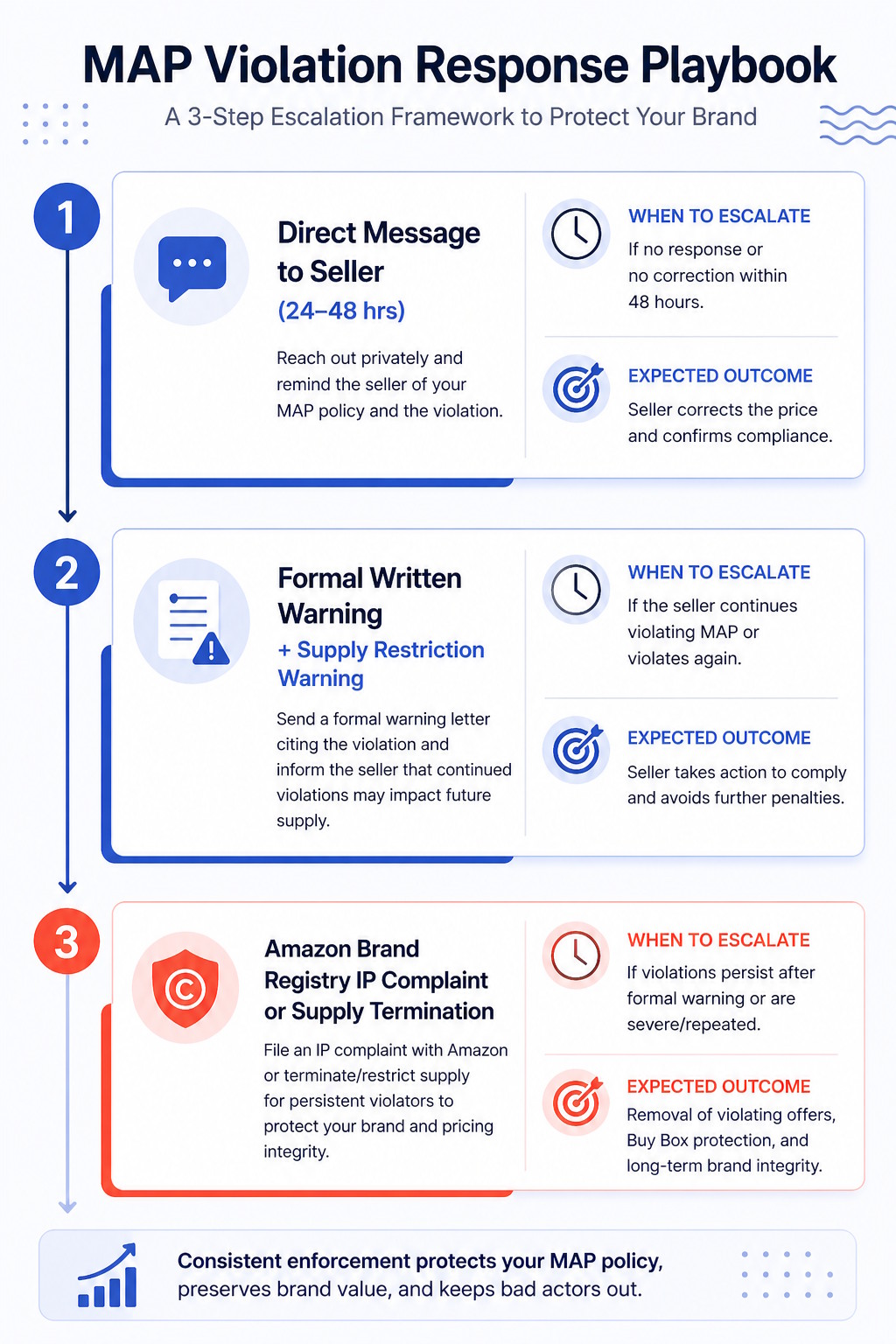
Catching the violation is step one. Responding effectively is what actually protects your pricing.
First contact: direct message to the seller. For most violations, especially from authorized resellers who made a mistake or misread a coupon configuration, a simple, professional message is enough. Share the documented violation, cite the MAP agreement they signed, and give a 24 to 48 hour deadline to correct. Most opportunistic violations end here.
Escalation: formal warning. If the seller does not correct within your deadline, send a formal written warning that references the specific clause in your reseller agreement. State that continued violations will result in supply restriction.
Amazon-specific escalation: IP complaint via Brand Registry. If the violating seller is unauthorized or is selling what you suspect are counterfeit units, Amazon Brand Registry‘s IP complaint tools apply. This does not address MAP directly, since Amazon does not enforce MAP, but it does address unauthorized sellers who may have no right to sell your product at any price.
Supply termination. For resellers who repeatedly violate MAP, the nuclear option is cutting supply. It is disruptive and not appropriate for first-time violations, but it is the most effective long-term deterrent. Authorized resellers who know supply termination is real tend to take MAP seriously.
📌 From Our Experience: The resellers most likely to comply quickly are the ones who understand that MAP protects them too. When you reach out, frame the conversation that way: “The seller who broke MAP at $27.99 took your Buy Box for a week. We are enforcing so that does not keep happening to you.” Resellers who feel protected by your MAP enforcement are allies. Resellers who see enforcement as punishment are not.
Conclusion
Map violation alerts aren’t a luxury for brands with large reseller networks. They’re the minimum requirement for running a MAP policy that anyone actually follows. Without them, you’re not enforcing MAP. You’re hoping.
Without alerts, violations run for days or weeks before you catch them. Compliant sellers lose Buy Boxes. Pricing structures erode. And when you finally find out, the enforcement window has passed.
The brands that maintain strong MAP compliance tend to have one thing in common: they find out about violations fast. Within hours, not weeks. That speed is what makes a MAP policy real rather than a document no one enforces.
For Amazon specifically, SellerSonar’s price change alerts give you that speed. Set your MAP threshold, add your ASINs, and know within minutes when any price drops below your floor. Pair that with Buy Box monitoring to catch the downstream impact when a violation knocks your compliant sellers out of contention. That combination covers map compliance monitoring at the ASIN level better than any shelf-price-only crawler.
A note on scope: SellerSonar is not a full MAP enforcement platform. It will not crawl Walmart, Google Shopping, or send cease-and-desist letters. But for Amazon-specific MAP monitoring, catching per-ASIN price drops in real time, it fills the gap that dedicated MAP tools often miss because they focus on shelf price across all channels, not Buy Box data on a specific listing.
Final Expert Recommendations:
Based on what we see with brands managing MAP on Amazon, the most important factor is detection speed. Every day a violation runs undetected, it gets harder to enforce and easier for other resellers to rationalize breaking ranks.
Start by monitoring your top 20 ASINs with a price drop alert set to your MAP threshold minus 1%. Add Buy Box monitoring for those same ASINs so you catch the downstream impact immediately. Document everything. And when you reach out to a violating seller, do it within 24 hours of detection. That response window is when enforcement is easiest.
Review your MAP monitoring setup on SellerSonar’s plans page to find the tier that covers your catalog size.

