






April updates are focused on one thing: helping you manage alerts faster and understand listing issues with less manual checking. This release includes a redesigned alert setup flow, smarter multi-account limit handling, a new stock alert, Buy Box suppressed snapshots, and a new Buy Box Stability metric in exports.
New Alert Setup Interface
We redesigned the alert setup flow to make it simpler and faster. Now everything is in one place, so you no longer need to switch between Settings and Alerts. The setup process is cleaner, with fewer steps, and you can control how alerts are delivered, including immediate notifications.
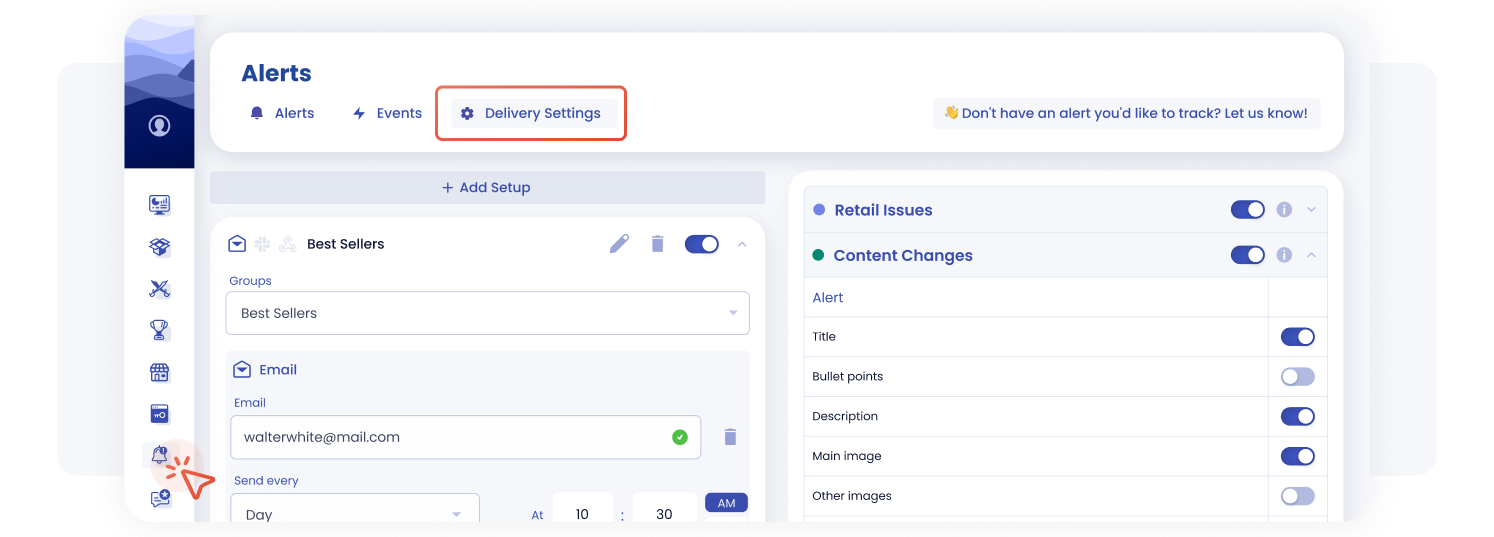
Set up SellerSonar alerts, delivery channels, and product group notifications from one cleaner Alerts interface.
Another important change: you can now configure alerts for a specific product group or groups within a single setup. For example, if you want to track your Bestsellers, you can create that group once and send alerts to multiple channels like Email, Slack, or Webhook from the same setup.
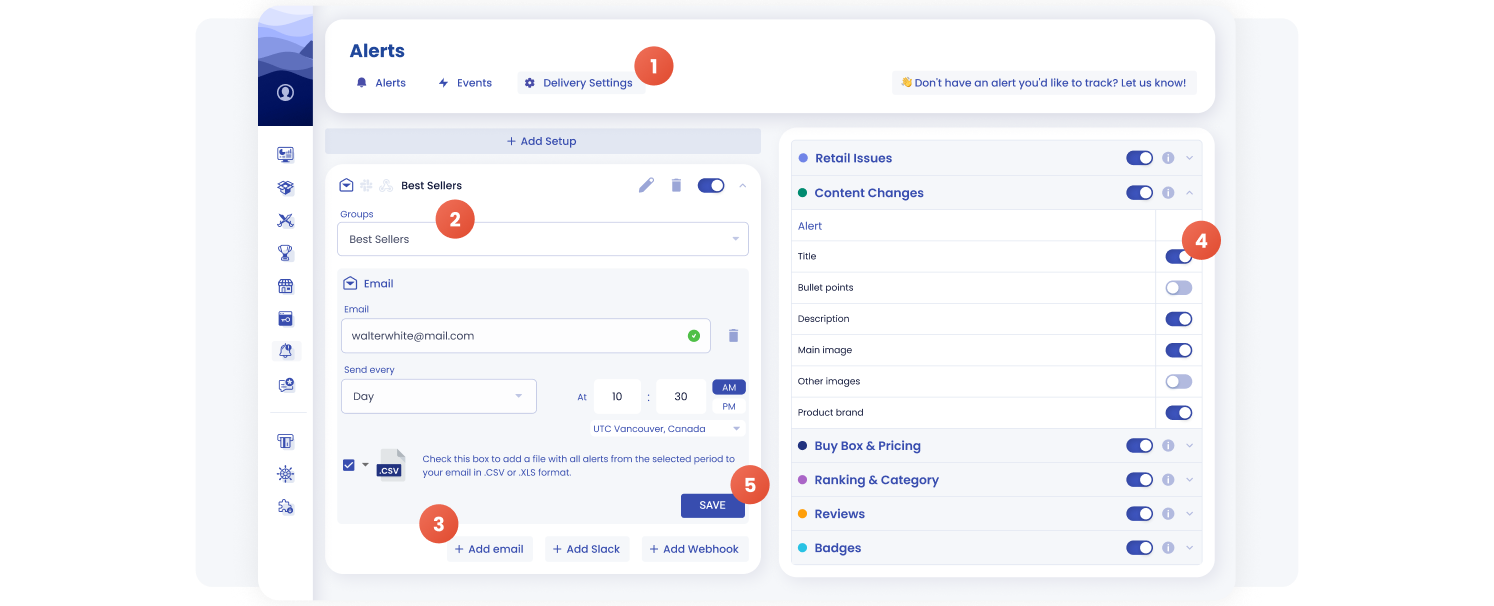
Configure alerts for a selected product group and send notifications through Email, Slack, or Webhook from one setup.
What changed:
- Delivery settings are now located inside Alerts → Delivery Settings
- No need to switch between Settings and Alerts anymore
- Cleaner structure with fewer steps
- Flexible delivery timing, including immediate notifications
- Alert setup for a specific product group within a single setup
- Alerts for the same group can be sent to multiple channels, including Email, Slack, and Webhook
How it works:
- Click “Add Setup” to create a new alert setup
- Select a product group, such as “All products” or “Bestsellers”
- Set up alerts for that group from one setup
- Choose delivery methods, including Email, Slack, or Webhook
- Select which alerts to track
- Click Save
We’ve also added a Delivery Channels table inside the alert details pop-up. It shows which channels each alert is sent through, including Email, Slack, and Webhook, so you can review delivery settings faster and avoid duplicate setups.
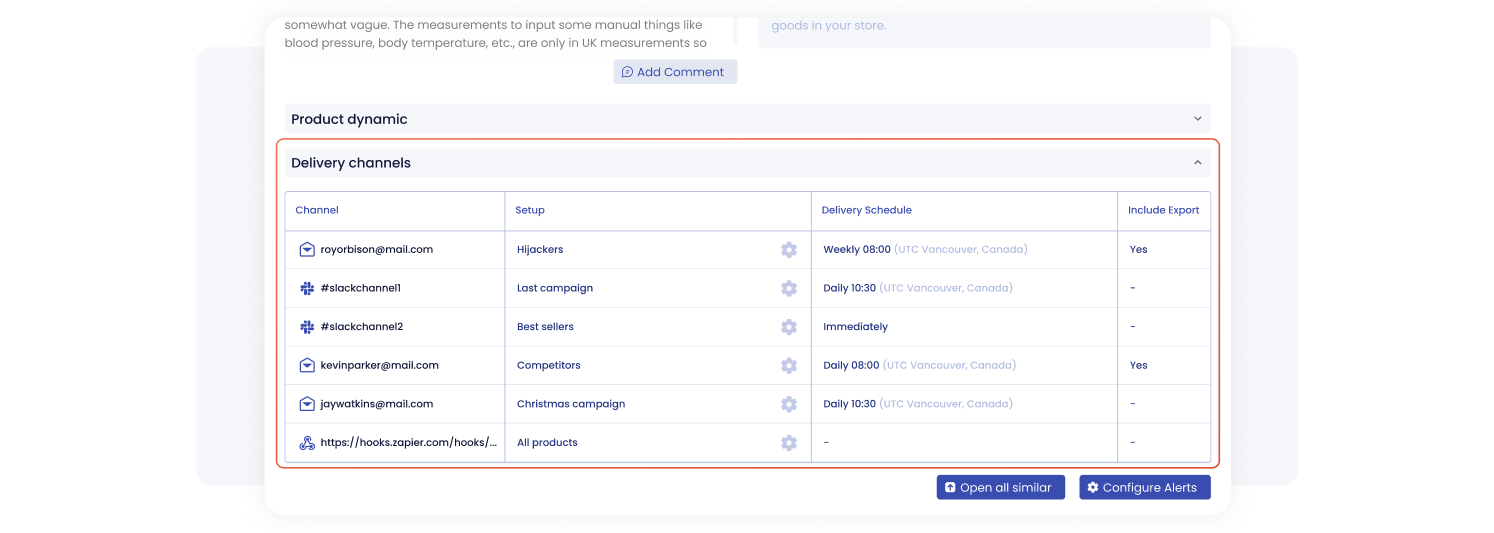
See exactly where each SellerSonar alert is delivered, including Email, Slack, Webhook channels, schedules, and export settings.
Multi-Account: No More Duplicate Limits
If you’re working with multiple accounts, this update removes one of the most common pain points.
Previously, the same product or keyword added across different accounts could count multiple times toward your limits. Now it doesn’t.
Each product or keyword is counted only once across all accounts and is assigned to the account where it was added first. If the same item is added elsewhere, it won’t affect your limits again.
You’ll also see which items are shared across accounts thanks to a new visual indicator in the interface.
This makes multi-account management much more predictable and fair.
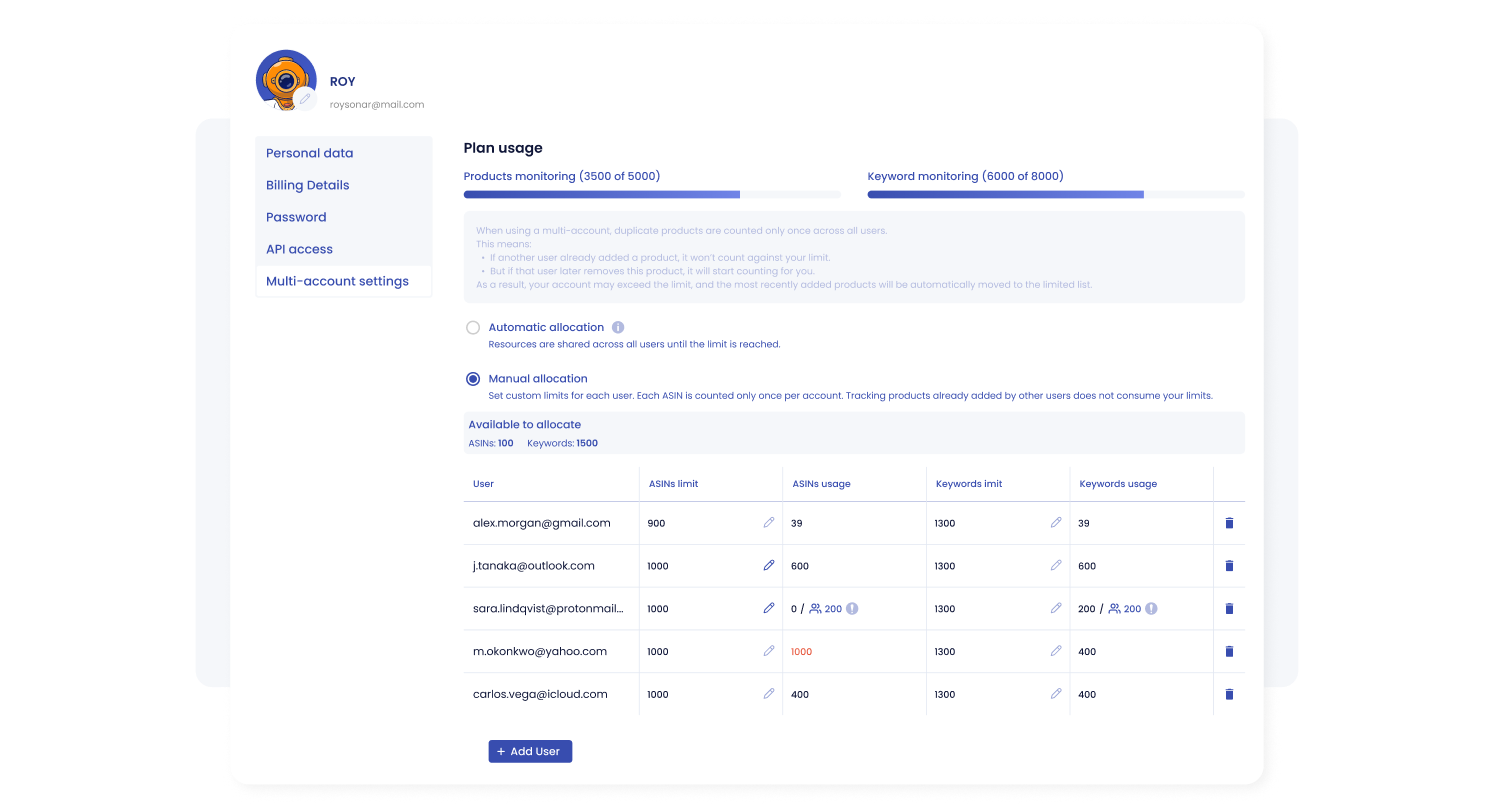
Manage product and keyword limits across multiple SellerSonar accounts without duplicate items counting against your plan more than once.
How it works now:
- Products and keywords count only once across all accounts
- They are assigned to the account where they were added first
- Adding the same item elsewhere doesn’t increase limits
- Shared items are clearly marked with an icon
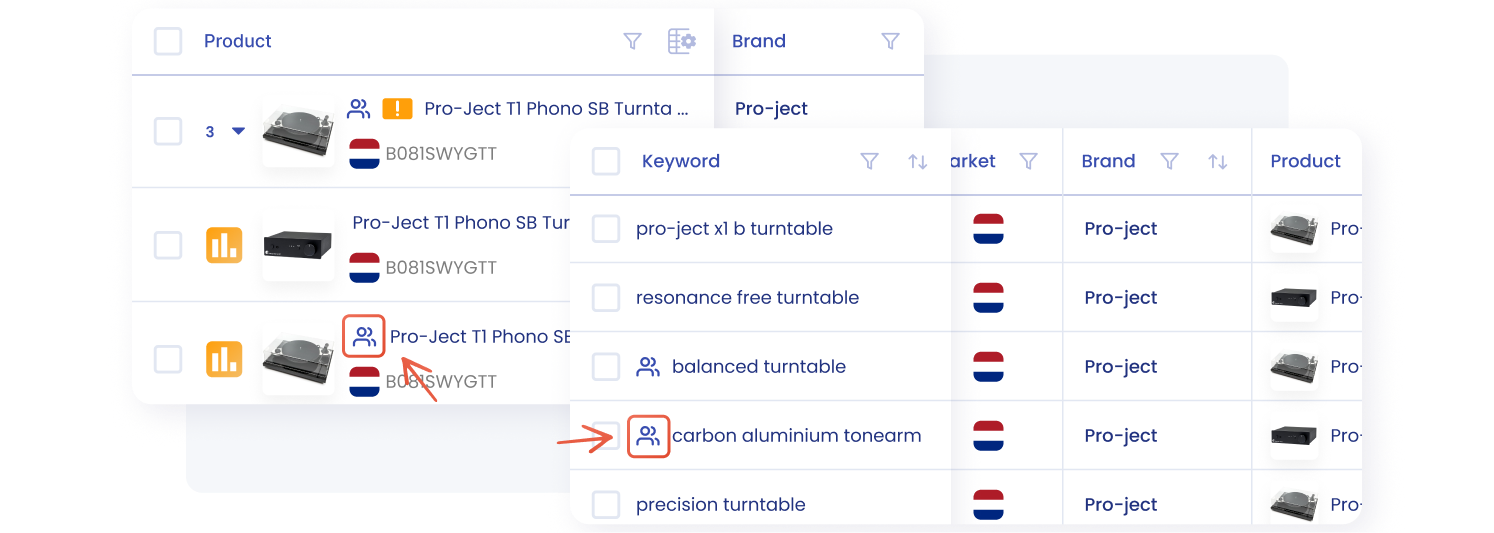
Quickly identify products and keywords shared across SellerSonar accounts with visual indicators in the product and keyword tables.
New Stock Alert: Only Used Items Left
We’ve introduced a new stock alert to catch a specific but important situation.
This alert triggers when new items are out of stock, but used listings are still available. In the alert details, you’ll see exactly how many used items remain.
It’s a small detail, but it can have a real impact on conversions and Buy Box performance, and now you won’t miss it.
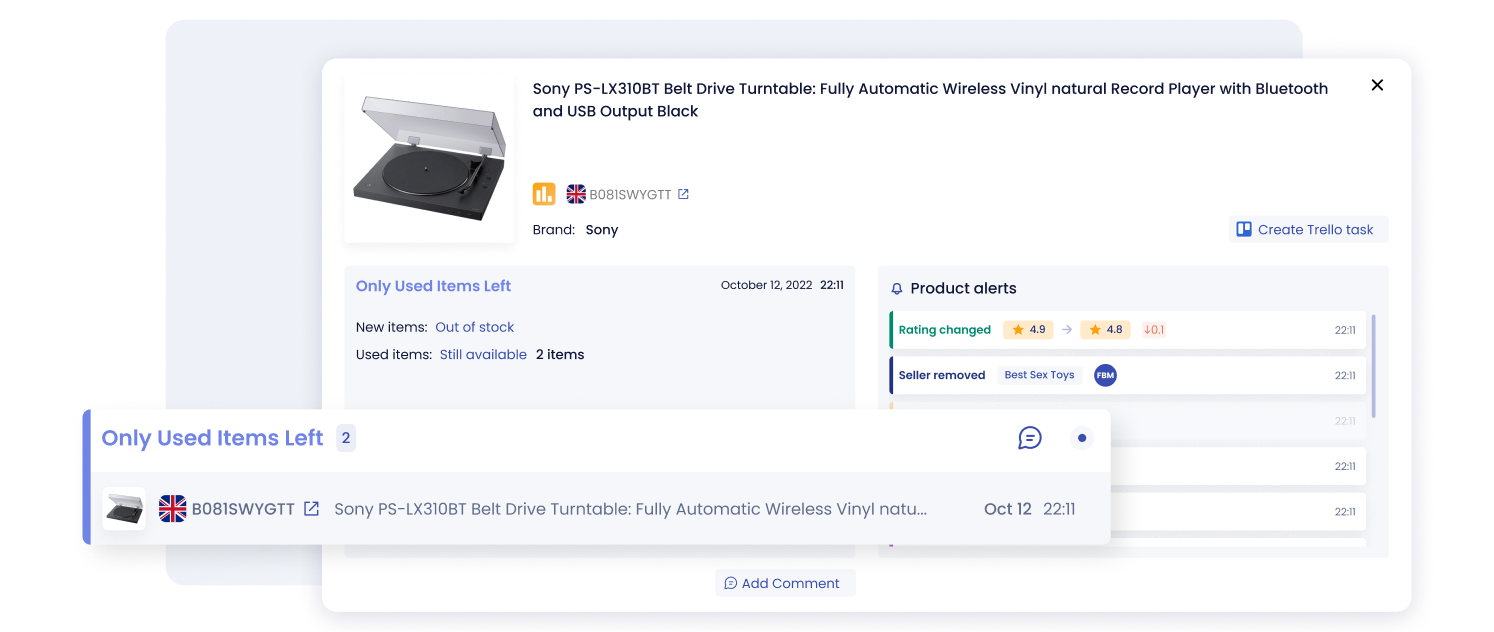
SellerSonar now alerts you when new items are out of stock but used offers are still available on the listing.
What it detects:
- New items are out of stock
- Only used items remain available
Why it matters: This often impacts conversion and Buy Box performance, so you can react faster when new inventory is gone but used offers remain visible.
Buy Box Suppressed — Now with Snapshot
We’ve improved the Buy Box suppressed alert by adding more context and visibility.
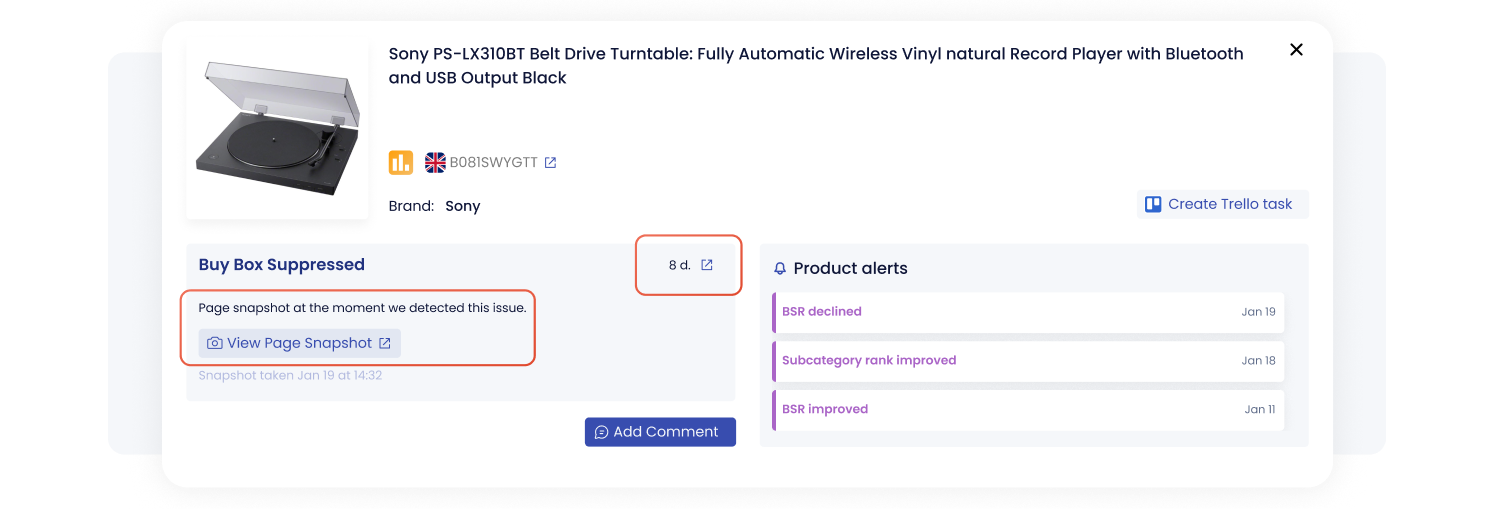
Review Buy Box suppressed issues with duration, detection time, and a product page snapshot captured when SellerSonar found the issue.
Now, when an issue appears in Running Issues, you can open a detailed view that shows how long the issue has been active and what exactly happened.
For Buy Box suppressed alerts, we’ve gone one step further. You can now open a snapshot of the product page taken at the moment we detected the issue, along with the exact date and time.
This helps you verify alerts and removes uncertainty around false positives — you can see exactly what we saw.
What’s new:
- “Details” view for running issues
- Duration of the issue displayed
- Page snapshot at the moment of detection
- Date and time of parsing
Why it matters: You no longer need to rely only on the alert text. The snapshot gives you clearer evidence of what was visible when the issue was detected.
Buy Box Export Update
We’ve added a new metric to Buy Box reports: Buy Box Stability.
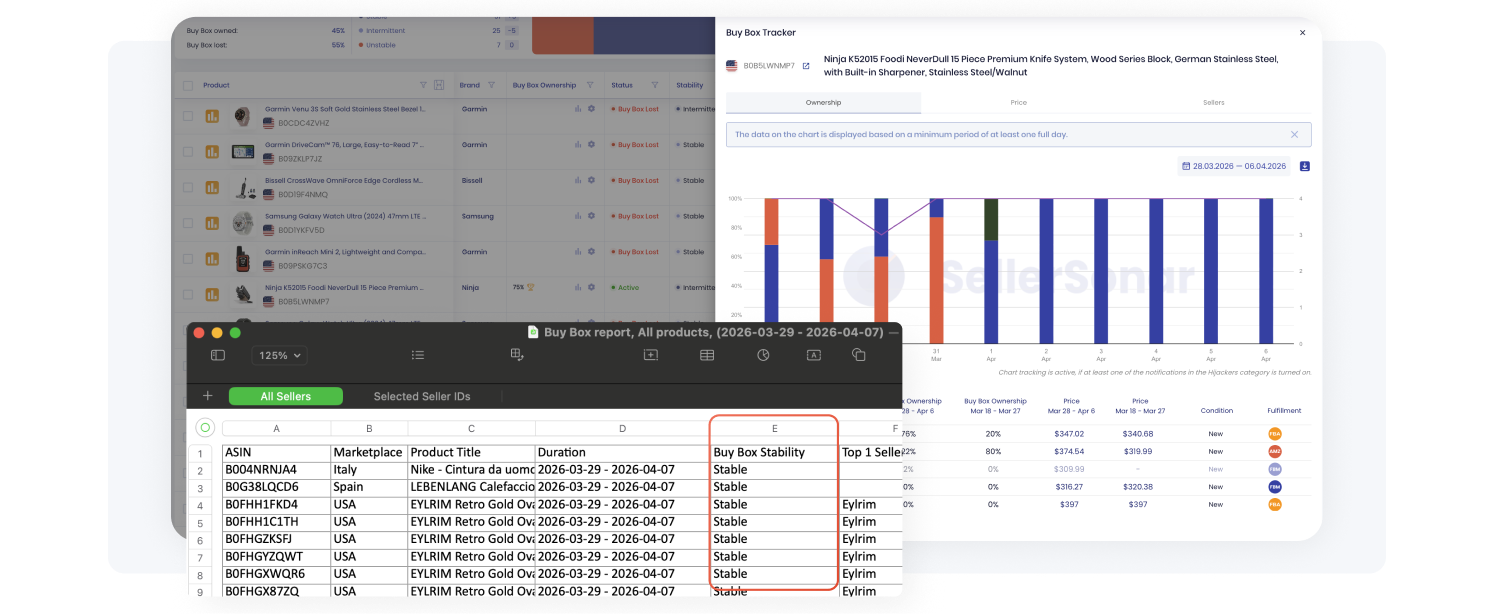
Review Buy Box Stability in SellerSonar exports to understand how consistent your Buy Box ownership is over time.
This gives you a clearer picture of how consistent your Buy Box ownership is over time, helping you move beyond single data points and understand overall performance.
Instead of only checking whether you owned the Buy Box at one moment, you can now review whether ownership stayed stable throughout the reporting period. This helps you spot products where Buy Box ownership looks acceptable at a glance but fluctuates too often to be reliable.
Built to Reduce Friction
This release is all about removing unnecessary steps and giving you clearer insights.
Less setup.
More control.
Better visibility.
Log in to SellerSonar to review the new alert setup flow, check your multi-account usage, and start using the latest Buy Box visibility updates.
And as always, more updates are coming 🙂

