





The Amazon Buy Box, officially called the Featured Offer in many Amazon materials, is the purchase module on a product detail page that contains the Add to Cart and Buy Now buttons. When multiple sellers offer the same ASIN, Amazon selects one featured offer based on factors such as landed price, fulfillment method, inventory availability, seller performance, and customer experience. An Amazon Buy Box tracker helps sellers monitor ownership changes and receive alerts when they win, lose, or share the Buy Box.
Kofi managed a private label supplement brand with 14 products, solid reviews, and steady sales. In March, he noticed something odd: traffic was stable, ads were running normally, and inventory looked fine. But daily revenue had dropped sharply in 48 hours.
He spent two days checking PPC settings, adjusting bids, and refreshing reports. None of it explained the drop.
Then a colleague asked one question: “Did you check your Buy Box?”
He had not. A reseller had undercut his price and taken the Buy Box on his three best-selling ASINs. For two days, many customers bought from another seller on his own listing, using his product photos, reviews, and page traffic.
That is what Buy Box loss often looks like in real operations. Sellers do not always find out when the issue starts. They find out when sales already dropped.
This guide explains what the Amazon Buy Box is, how Buy Box eligibility works, why sellers lose it, and how to monitor Buy Box ownership with tools like SellerSonar instead of relying only on manual checks.
What is the Amazon Buy Box?
The Amazon Buy Box is the section on a product detail page where customers can directly add an item to their cart or purchase it immediately. On desktop, it usually appears on the right side of the product page. On mobile, it appears close to the main purchase area.
When a shopper clicks Add to Cart or Buy Now, they buy from whichever seller Amazon has selected for the featured purchase option at that moment. If only one eligible seller offers the product, that seller usually controls the purchase box. If multiple sellers sell the same ASIN, Amazon decides which seller’s offer appears as the Featured Offer.
Other sellers may still appear under “Other Sellers on Amazon,” but most shoppers do not compare every available offer manually. That is why Buy Box ownership matters. If your offer is not featured, you may still be technically selling the product, but your sales potential can drop sharply because shoppers usually buy from the default purchase option.
Note on terminology: “Buy Box” is the common seller term, while Amazon increasingly uses “Featured Offer” in documentation and seller tools. In practice, both refer to the featured purchase option shoppers see on the product detail page. Most sellers, tools, and third-party content still use “Buy Box,” so this article uses that term throughout while recognizing Amazon’s Featured Offer terminology.
Why the Buy Box is important for Amazon sellers
The Buy Box is important because it directly affects product visibility, conversion, and sales velocity. Industry estimates often suggest that most Amazon purchases happen through the Buy Box, especially on mobile where alternative seller options are less visible. The exact percentage varies by category, device, competition, and product type, but the operational reality is simple: if you lose the Buy Box, you usually lose sales.
For sellers, Buy Box ownership affects several core outcomes:
- Sales volume: The featured offer gets the default purchase action, so Buy Box loss can reduce order volume quickly.
- Advertising efficiency: Running ads while you do not control the Buy Box can waste spend or send traffic to a competitor-owned purchase path.
- Competitive visibility: If a competitor wins the Buy Box, they become the default seller shoppers see on your ASIN.
- Revenue protection: The faster you detect Buy Box loss, the faster you can investigate pricing, fulfillment, inventory, or account-health causes.
Operator note: The cost of Buy Box loss is not only the lost orders during the period itself. If reduced sales velocity affects rank, advertising efficiency, or review flow, the impact can continue after you recover ownership.
Who is eligible to win the Buy Box?
Not every seller can compete for the Buy Box. Amazon has baseline eligibility requirements, and sellers who do not meet them may be excluded from the rotation regardless of price.
Common eligibility and performance areas include:
- Professional selling account: Buy Box eligibility is generally associated with professional seller accounts and eligible offers.
- Seller performance: Amazon evaluates customer experience signals such as order defect rate, late shipment rate, cancellation rate, and other account-health indicators.
- Inventory availability: Out-of-stock offers cannot win the Buy Box.
- Competitive offer: Your landed price, fulfillment method, and delivery promise need to be competitive against other eligible sellers.
- Account health: Policy issues or account-health problems can reduce eligibility even when your price looks competitive.
Eligibility is not the same as winning. It only means your offer can compete. To win meaningful Buy Box share, you still need a competitive offer, reliable fulfillment, clean metrics, and available stock.
How does the Amazon Buy Box work?
Amazon does not publish the exact Buy Box algorithm, and the weighting can vary by category, marketplace, seller type, product, and shopper context. However, several known factors consistently influence Buy Box eligibility and rotation.
1. Fulfillment method and delivery speed
Fulfillment method matters because Amazon prioritizes customer experience. FBA often has an advantage because it is tied to Amazon’s fulfillment network and Prime delivery expectations. FBM sellers can still compete if they maintain strong shipping performance, fast delivery promises, and reliable fulfillment metrics.
Seller Fulfilled Prime can also help sellers compete when they can maintain Amazon’s required shipping and service standards. For FBM sellers, delivery speed, valid tracking, handling time, and late shipment performance all matter.
2. Competitive landed price
Pricing is one of the strongest Buy Box factors. Amazon evaluates the landed price, which includes the item price plus shipping. The lowest price does not always win, but an offer that is meaningfully above competing sellers can lose Buy Box share if other performance factors are similar.
A sustainable Buy Box strategy should not mean blindly matching every price drop. Sellers need to understand margin floors, fulfillment costs, and whether chasing a competitor’s price is profitable.
3. Seller performance and account health
Amazon evaluates seller performance signals such as order defect rate, late shipment rate, cancellation rate, valid tracking, customer service quality, and other account-health indicators. Poor performance can reduce Buy Box eligibility even when your price is competitive.
Clean metrics over time build trust. A sudden spike in late shipments, cancellations, or defects can reduce Buy Box share quickly, especially for sellers using FBM.
4. Inventory availability
If you are out of stock, you cannot win the Buy Box. Low inventory, inconsistent availability, or delayed replenishment can also affect sales continuity and Buy Box stability. For sellers managing many ASINs, stock-related Buy Box loss is one of the easiest problems to miss without listing monitoring.
5. Offer consistency and customer experience
The Buy Box is not only about price. Amazon wants the shopper to receive the product quickly, reliably, and with minimal order risk. Sellers with consistent fulfillment, strong customer metrics, stable inventory, and competitive offers are generally better positioned than sellers who only compete on price.
The Buy Box is not always one seller
Amazon can rotate the Buy Box between multiple eligible sellers on the same ASIN. This is common in reseller and wholesale categories where several sellers have similar prices, fulfillment methods, and seller metrics.
The rotation is usually not equal. A seller with better metrics, stronger fulfillment, or a more competitive landed price may receive more Buy Box time. Another seller may still win a smaller share. That is why tracking Buy Box percentage or ownership history is more useful than checking the product page once.
For private label sellers, Buy Box rotation should usually be less common because you should be the only seller on your listing. But private label sellers can still lose the Buy Box if a hijacker or unauthorized reseller appears, if the offer becomes inactive, or if Amazon suppresses the purchase box because of offer or catalog issues.
Pro insight: A single manual check only tells you who owns the Buy Box at that moment. SellerSonar’s Buy Box monitoring tracker helps track ownership over time, so you can see whether a loss is temporary rotation or a recurring problem.
What does “Buy Box Wins” mean on Amazon?
In Amazon reporting, “Buy Box Wins” or related Featured Offer metrics generally refer to how often your offer appeared as the featured purchase option during a given period. This is not the same as total sales. It is a visibility and ownership metric.
For resellers and wholesalers, Buy Box win percentage helps estimate how much of the available purchase opportunity they are capturing on a shared ASIN. If Buy Box share drops while price stays the same, a competitor may have improved pricing, fulfillment, or seller metrics.
For private label sellers, Buy Box share should usually be close to full ownership when the listing is active, in stock, and eligible. If it drops sharply and you have no authorized resellers, something changed. A new seller may have appeared, your offer may have become ineligible, or the Buy Box may have been suppressed.
Why sellers lose the Buy Box
Buy Box loss usually comes from a small set of operational causes. The faster you classify the cause, the faster you can decide whether to adjust price, fix inventory, check account health, or monitor the situation without overreacting.
| What happened | Likely cause | What to check first |
| Competitor wins the Buy Box at a lower price | Pricing gap | Landed price, shipping cost, repricer rules, margin floor |
| Buy Box disappears while price looks competitive | Eligibility or account-health issue | Account health, late shipment rate, cancellation rate, ODR |
| You lose Buy Box after inventory fluctuation | Stock or fulfillment problem | FBA inventory, FBM stock, delivery promise, replenishment timing |
| A new seller appears and starts winning share | New competitor, reseller, or possible hijacker | Seller name, offer condition, price, fulfillment method, authorization status |
| Buy Box rotates unpredictably | Multiple eligible sellers competing closely | Buy Box ownership history, price changes, delivery speed, seller metrics |
How to know if you have the Buy Box right now
There are three practical ways to check whether you currently own the Buy Box.
Method 1. Check the product detail page directly
Open the product listing as a shopper. If your seller name appears in the Buy Box area, you currently own the featured purchase option. If another seller appears, you have lost it at that moment. If there is no buy button, the Buy Box may be suppressed.
Method 2. Check Seller Central
Seller Central can show Featured Offer status, Buy Box price, and eligibility signals in inventory-related views and reports. This is useful as a baseline, but it requires manual checking and does not create a practical alert workflow for every Buy Box change.
Method 3. Use automated monitoring
Manual checks have an obvious problem: they only tell you what is happening at the moment you check. A competitor or unauthorized seller can take the Buy Box overnight and disappear before your next manual review.
This is where tools like SellerSonar’s Buy Box and pricing alerts help catch what manual checks miss. You can monitor ownership changes, pricing shifts, and seller activity across tracked ASINs instead of checking product pages one by one.
How to track your Amazon Buy Box listings
Tracking Buy Box ownership is essential because a seller can lose the Buy Box before they see a clear sales drop in reporting. Manual checks work for small catalogs, but they become unreliable as ASIN count, marketplace count, or competition increases.
Method 1. Check Seller Central manually
Seller Central can show Featured Offer status and offer eligibility in inventory-related views and reports. This is useful for occasional checks, but it depends on someone remembering to review the data.
Method 2. Check the product page manually
You can open a product detail page in a private browser window and check which seller appears as the current “Sold by” offer. This is useful for confirming a specific ASIN, but it does not scale and may not reflect full-day ownership rotation.
Method 3. Use browser extensions for spot checks
Browser extensions can help during manual competitor research or listing checks. They are useful when you are already looking at the product page, but they do not replace ongoing Buy Box monitoring across a catalog.
Method 4. Use an Amazon Buy Box tracker
An Amazon Buy Box tracker monitors ownership changes across your tracked ASINs and sends alerts when important changes happen. This is the practical option for sellers managing multiple ASINs, agencies monitoring client catalogs, vendors tracking reseller activity, and wholesale sellers competing with many offers.
| Tracking method | Best for | Main limitation |
| Seller Central manual check | Small catalogs and occasional status review | Manual, easy to miss changes |
| Product page check | Confirming one ASIN at a specific moment | Does not show full ownership history |
| Browser extension | Spot checks and competitive research | Still depends on manual review |
| Automated Buy Box tracker | Catalog monitoring, alerts, agencies, vendors, wholesalers | Requires a paid monitoring tool |
The real cost of Buy Box loss
Nadia sold a kitchen product at $38, averaging 45 units per day. A reseller appeared on her listing and took the Buy Box with a slightly lower offer. Nadia did not notice for four days.
During those four days, most of the purchase path shifted to the reseller. Her daily order volume fell sharply, and by the time she investigated the cause, she had lost several days of revenue and momentum.
The revenue loss is the visible part. The slower secondary damage can include reduced sales velocity, weaker organic position, inefficient ad spend, or customer confusion if the new seller provides a worse experience.
The sellers who recover fastest are usually not the ones with the most complex theory about the Buy Box algorithm. They are the ones who detect ownership changes quickly and know what to check first.
Amazon Buy Box Tracker
An Amazon Buy Box Tracker helps sellers monitor who owns the Buy Box, when ownership changes, and what pricing or seller activity may have caused the change. This is especially important when a Buy Box loss happens outside working hours or across a large catalog where manual checking is not realistic.
A useful Buy Box tracker should help sellers answer four operational questions:
- Do we currently own the Buy Box?
- If not, who owns it now?
- When did the change happen?
- What changed: price, seller, stock, delivery, or account status?
SellerSonar’s Amazon Buy Box Tracker
SellerSonar’s Amazon Buy Box Tracker helps sellers monitor Buy Box ownership, seller competition, price movement, and related listing signals. Instead of checking product pages manually, sellers can track Buy Box activity across monitored ASINs and receive alerts when important ownership or pricing changes happen.
This is useful for private label sellers protecting their listings, wholesale sellers competing for the same ASIN, vendors watching reseller activity, and agencies managing multiple Amazon accounts.
What SellerSonar helps you monitor
- Buy Box won or lost: track whether your offer controls the Buy Box or whether another seller has taken it.
- Buy Box ownership history: review who has been winning the Buy Box over time and how ownership shifts across sellers.
- Price movement: watch pricing changes that may affect Buy Box share and competitive positioning.
- Competing offers: see seller activity around the same ASIN, including new sellers and offer changes.
- Related alerts: combine Buy Box monitoring with pricing, retail issues, content changes, review shifts, and other product alerts.

Buy Box Alerts
SellerSonar’s Buy Box alerts help sellers react faster when ownership changes. Instead of finding the issue after a sales drop, you can see the event, check the affected ASIN, compare the competing offer, and decide whether action is needed.
Buy Box analytics

With Buy Box analytics, sellers can review who has been winning the Buy Box and at what prices over a selected period. This helps you understand whether you are losing ownership because of pricing pressure, seller competition, or repeated availability issues.
Buy Box ownership charts

Buy Box Winners Chart
SellerSonar’s visual Buy Box charts help you compare top-performing sellers and understand how often each seller wins the Buy Box. This is useful when ownership rotates between several offers and a single manual check does not show the full picture.
Turn Buy Box alerts into Trello tasks
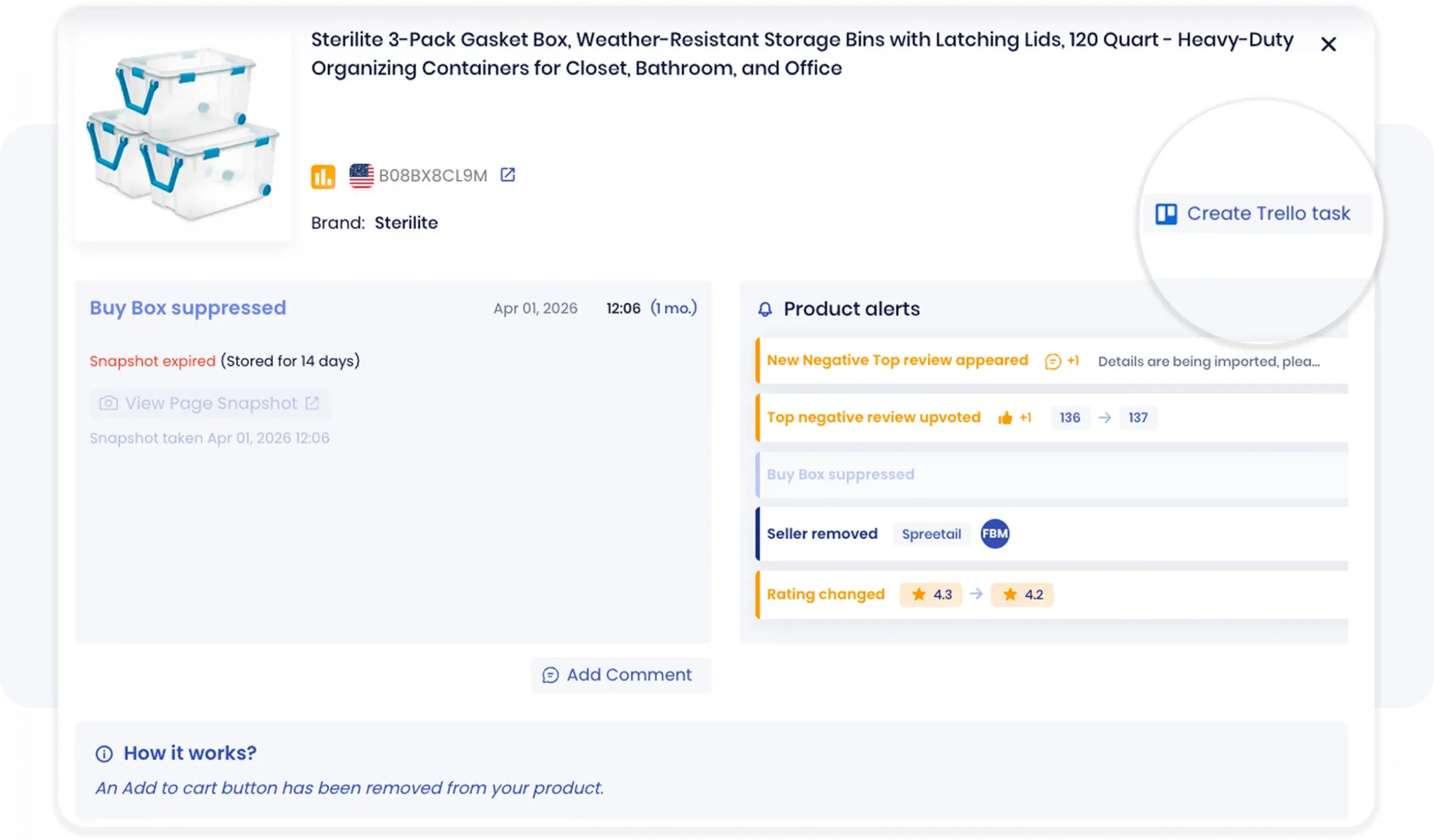
Review product alerts, add internal comments, and create Trello tasks from SellerSonar to help your team act on Buy Box, review, rating, and seller changes faster.
For agencies, vendors, and larger Amazon teams, a Buy Box alert is often only the first step. Someone still needs to check the ASIN, review the competing offer, compare the landed price, decide whether the issue is pricing, stock, fulfillment, or account-health related, and track the follow-up until the issue is resolved.
SellerSonar’s Trello Integration helps move that follow-up into your team workflow. When a critical alert appears, open the alert and create a Trello task directly from the alert itself. The task keeps the alert context attached, so your team does not need to copy ASIN details, seller activity, pricing notes, review updates, or event data manually into a separate board.
This is especially useful when Buy Box loss needs input from different roles. A pricing manager may need to review margin limits, a catalog manager may need to check listing status, and an account manager may need to update a client or stakeholder.
Example: If SellerSonar detects that your ASIN lost the Buy Box to a lower-priced seller, create a Trello task from the alert and assign it to the pricing owner. The task can include the affected ASIN, event context, and follow-up notes, so the team can decide whether to match price, wait, investigate seller activity, or escalate.
What to do when you lose the Buy Box
Do not start by changing price blindly. First, diagnose the likely cause. A pricing issue, hijacker, account-health issue, stockout, and catalog problem all require different responses.
Step 1. Identify who took it
Go to your product detail page and check which seller currently appears in the Buy Box. Review their price, fulfillment method, offer condition, and storefront. Is this an authorized reseller, a competitor, or a suspicious seller on your ASIN?
The answer determines your response. Repricing to compete with an authorized reseller is different from investigating a possible hijacker.
Step 2. Check your own metrics
Sometimes you lose the Buy Box because your own performance changed, not because a competitor did anything unusual. Review account health, order defect rate, late shipment rate, cancellations, and any recent policy or catalog notifications.
Step 3. Check Buy Box eligibility
If your price and fulfillment look competitive but you still cannot regain ownership, check whether the offer is eligible and active. Buy Box suppression or eligibility issues can block ownership even when your price looks right.
Step 4. Respond based on what you found
- Competitor undercut you on price: Evaluate whether repricing makes sense for your margins. Not every Buy Box battle is worth fighting.
- Hijacker or unauthorized seller appeared: Document the seller, price, offer condition, and any evidence. If appropriate, use Brand Registry or Amazon’s standard reporting routes.
- Your metrics slipped: Fix the underlying issue first. Buy Box recovery depends on restoring trust signals, not only changing price.
- Stockout or inventory issue: Restock as quickly as possible and adjust reorder points or fulfillment planning to prevent repeats.
5-minute Buy Box recovery checklist
When you lose the Buy Box, your response should be structured. Use this quick checklist before making pricing or catalog changes.
- Confirm the ownership change: open the listing and verify who currently owns the Buy Box.
- Check landed price: compare your offer price plus shipping against the current Buy Box owner.
- Check inventory and fulfillment: make sure your offer is in stock and your delivery promise is competitive.
- Review account health: look for recent order defect, cancellation, late shipment, or policy issues.
- Review competing seller activity: check whether a new seller, reseller, or suspected hijacker has appeared.
- Decide on action: match price if margin allows, fix the operational issue, investigate the seller, or accept temporary loss if chasing the Buy Box would damage profitability.
- Document the cause: log the ASIN, time, suspected cause, and action taken. Over time, this helps you see whether Buy Box loss is mostly driven by price, stock, metrics, or seller activity.
Buy Box for private label sellers vs resellers
The Buy Box plays out differently depending on your Amazon business model.
Private label sellers
Private label sellers should usually control the Buy Box by default because they are typically the only seller on their own listing. But they can still lose it when:
- a hijacker or unauthorized reseller appears on the ASIN
- the offer becomes inactive or out of stock
- account-health or eligibility issues affect the offer
- Amazon suppresses the Buy Box because of catalog, pricing, or offer concerns
Resellers and wholesalers
Resellers and wholesalers compete directly with other sellers on the same ASIN. For them, Buy Box share is often the practical market-share metric for that product. Pricing, fulfillment, seller metrics, and inventory reliability all affect how much ownership they capture.
For these sellers, monitoring Buy Box percentage over time helps show whether repricing strategy, fulfillment changes, or competitor activity is improving or reducing ownership.
From our experience: Private label sellers often underinvest in Buy Box monitoring because they assume they are the only seller. In practice, unexpected Buy Box changes can still happen on ASINs where the seller believed there was no competition.
Tips for improving your chances of winning the Buy Box
Winning and maintaining the Buy Box requires consistent operational discipline. The exact algorithm is not public, but sellers can improve their chances by focusing on the factors Amazon clearly rewards: competitive offers, reliable fulfillment, strong account metrics, and inventory availability.
Keep pricing competitive without destroying margin
Monitor competitor pricing and landed price, but do not treat “lowest price” as the only strategy. A sustainable Buy Box strategy balances competitiveness with profitability. Use pricing floors, margin checks, and Buy Box ownership history to avoid reacting emotionally to every price change.
Protect inventory availability
Stockouts remove your ability to win the Buy Box. Monitor inventory levels, replenishment timing, FBA transfer delays, and FBM stock accuracy. For high-volume ASINs, even short stock disruptions can create Buy Box volatility after replenishment.
Maintain strong seller performance
Late shipments, cancellations, order defects, and customer service issues can affect Buy Box eligibility. Sellers should review account-health metrics regularly and fix operational problems before they become visible in Buy Box ownership.
Use reliable fulfillment
FBA can improve Buy Box competitiveness because it supports fast shipping and Prime eligibility. FBM sellers can still compete, but they need strong delivery performance, reliable stock control, and accurate shipping promises.
Monitor reviews and listing quality
Reviews are not the only Buy Box factor, but customer experience still matters. Review trends, product clarity, fulfillment issues, and recurring complaints can affect conversion and seller performance. If a product starts receiving negative feedback, investigate whether the issue comes from product quality, listing clarity, delivery, or seller activity.
Common misconceptions about the Buy Box
Can any seller win the Buy Box?
Not every seller has the same chance of winning the Buy Box. Sellers need an active, eligible offer and must meet Amazon’s performance and customer-experience expectations. New sellers, sellers with poor account metrics, sellers with unavailable inventory, or sellers with uncompetitive landed prices may receive little or no Buy Box share.
Does the lowest price always win the Buy Box?
No. Lowest price can help, but it does not guarantee Buy Box ownership. Amazon also considers fulfillment, availability, account health, delivery promise, and seller performance. A seller with a slightly higher price but stronger fulfillment and account metrics can still win the Buy Box in some cases.
Is the Buy Box the same across all Amazon marketplaces?
No. Each Amazon marketplace operates separately. Winning the Buy Box on Amazon.com does not guarantee the same outcome on Amazon.co.uk, Amazon.de, or another marketplace. Sellers operating internationally should monitor Buy Box ownership by marketplace.
What happens to sales if you lose the Buy Box?
You can still receive sales through other seller options, but volume usually drops because the featured purchase action belongs to another seller. The impact depends on product demand, competition, brand strength, advertising activity, and how long the Buy Box loss lasts.
Buy Box alternatives: what sellers can do when they do not own it
Winning the Buy Box is often the primary goal, but there are still ways to protect visibility and sales when ownership is unstable.
- Improve offer competitiveness: review landed price, shipping speed, and fulfillment method.
- Use Amazon Advertising carefully: avoid wasting ad spend when another seller controls the Buy Box on the same ASIN.
- Improve listing content: strong content can support conversion when you regain ownership.
- Monitor unauthorized sellers: private label brands should investigate unexpected sellers that appear on their ASINs.
- Track Buy Box history: use ownership data to understand whether loss is occasional rotation or a recurring operational problem.
Conclusion: the Buy Box is simple to understand, but risky to take for granted
The Amazon Buy Box is one of the most important conversion points on an Amazon product detail page. Winning it can drive sales. Losing it can reduce volume quickly, especially when the loss goes unnoticed.
The strongest Buy Box strategy is not only about understanding the algorithm. It is about monitoring ownership, detecting changes early, classifying the cause, and responding with a clear playbook. Sellers should track price, fulfillment, inventory, account health, competing sellers, and Buy Box ownership history instead of relying only on manual checks.
SellerSonar helps sellers monitor Buy Box ownership, pricing changes, competitor activity, and related listing events across tracked ASINs. When a Buy Box alert needs action, teams can create Trello tasks, assign owners, and keep the investigation moving without copying alert details manually.
Ready to monitor Buy Box changes before they cost you sales? Register for a free 14-day SellerSonar trial and start tracking Buy Box, pricing, listing, review, and competitor alerts across your Amazon catalog.

