





Table of Contents
- 1 What Are Amazon Backend Keywords?
- 2 Amazon Backend Keywords: Indexing vs Ranking
- 3 How Amazon Uses Relevance to Rank Listings
- 4 How Amazon Backend Keywords Help Optimize Your Listing
- 5 Amazon Backend Keywords Guidelines in 2026
- 6 How to Find Amazon Backend Keywords
- 7 How to Add Backend Keywords on Amazon
- 8 Amazon Backend Keywords Tips
- 9 Wrap Up
 Amazon backend keywords help Amazon understand what your product is about, even though shoppers never see those terms on the product page. If you want better discoverability in 2026, backend search terms still matter. However, they only work when they are relevant, clean, and added correctly.
In this guide, you will learn what Amazon backend keywords are, how they affect indexing, how to find strong backend search terms, and how to add them without wasting space.
What Are Amazon Backend Keywords?
Amazon backend keywords are hidden search terms that sellers add in Seller Central. Buyers do not see them on the live listing. Still, Amazon can use them to understand product relevance and match your ASIN to more search queries.
By contrast, frontend keywords are visible. They appear in the title, bullet points, description, and other customer-facing parts of the listing. Backend keywords sit behind the page, usually in the Search Terms or Generic Keywords field, depending on the category and listing flow.
Although backend keywords are hidden, they are still useful. For example, you can place synonyms, alternate names, abbreviations, and close variations there when they do not fit naturally into your visible copy.
Here’s a simple example: if you sell a multicooker, shoppers may also search for “steam cooker” or “pressure cooker.” Those variations can support your Amazon SEO when added correctly. If you need help finding those terms, start with this Amazon keyword research guide.
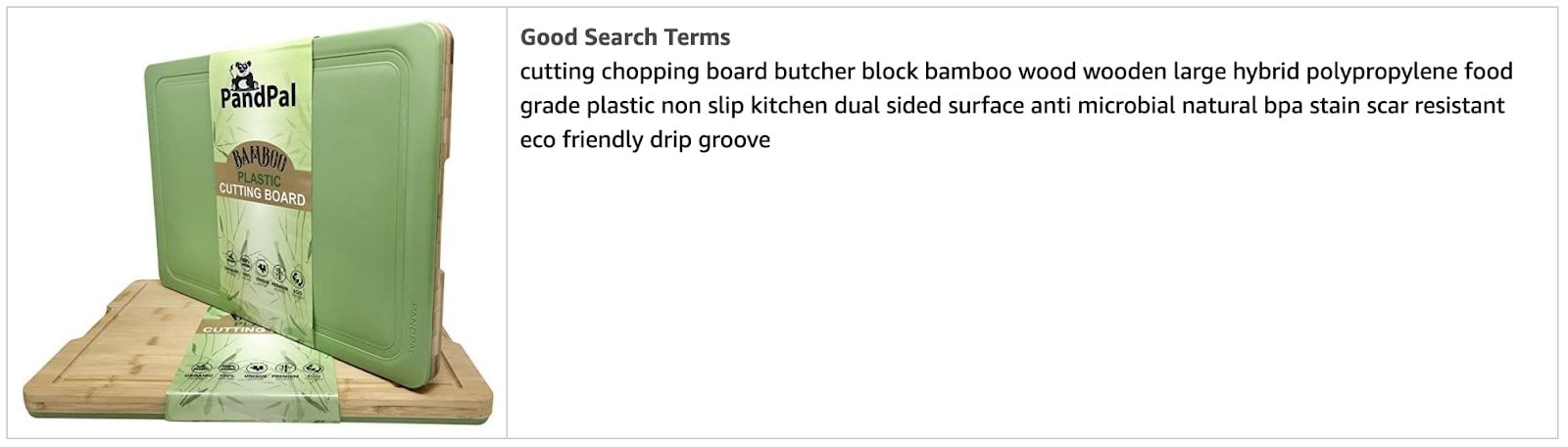
Amazon search terms example
In addition, backend fields can support targeting data in some listing flows, such as audience or intended use. That said, not every category shows the exact same fields, so always check the options available in your own Seller Central account.
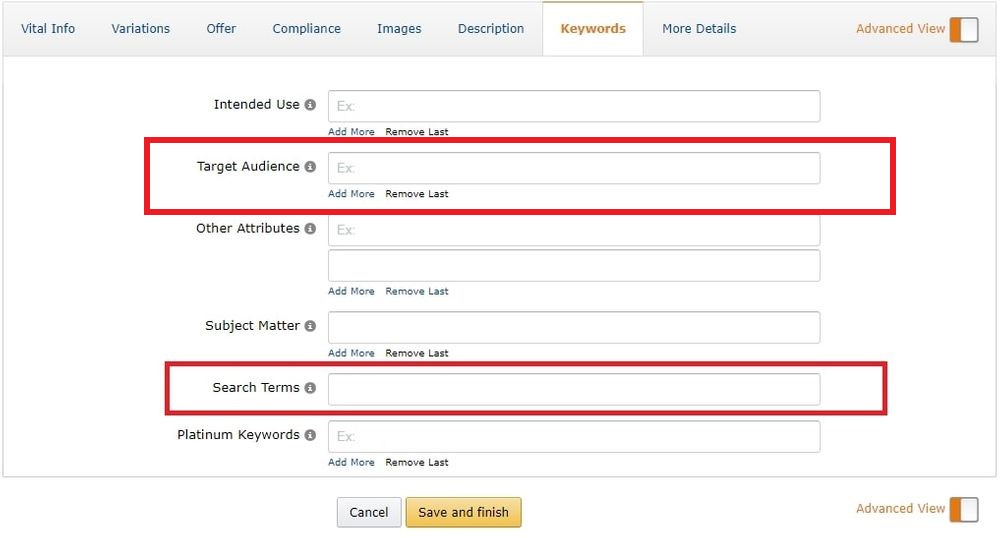
“Target Audience” section under the “Keywords” tab
Amazon Backend Keywords: Indexing vs Ranking
Indexing and ranking are related, but they are not the same thing. Indexing means Amazon recognizes your product as relevant for a search term. Ranking, meanwhile, is the position your listing gets in search results for that term.
In other words, backend keywords can help Amazon index your ASIN for more relevant searches. However, they do not guarantee top placement by themselves. Your ranking still depends on performance signals like sales, conversion, relevance, and listing quality.
How Amazon Uses Relevance to Rank Listings
When a shopper searches on Amazon, the marketplace tries to show the most relevant products first. Therefore, keyword placement matters. However, keywords are only one part of the equation.
Listing relevance factors
- product title
- product description
- high-quality images
- A+ content
- relevant backend keywords
Performance factors
- sales velocity
- click-through rate
- conversion rate
- sales history
- organic and PPC performance
Customer experience factors
- review quality and volume
- order defect rate
- in-stock rate
- seller feedback
- delivery and fulfillment performance
If you want a broader ranking overview, read our Amazon SEO guide.
How Amazon Backend Keywords Help Optimize Your Listing
Backend keywords improve discoverability when they add relevant search coverage without cluttering the visible listing. As a result, they help you support indexing while keeping the title and bullets readable.
Amazon backend keywords can help you:
- add relevant synonyms that do not fit naturally in visible copy
- include abbreviations and alternate names
- cover spelling variations
- support broader indexing for related searches
- keep your title and bullets cleaner
Amazon Backend Keywords Guidelines in 2026
Amazon still recommends using backend search terms carefully. The goal is simple: help Amazon understand your product better, without stuffing the field with repeated or irrelevant words.
Amazon backend search terms best practices
- stay under the text limit
- use synonyms
- include spelling variations, but not common misspellings
- add abbreviations and alternate names
- separate words with spaces
- avoid repeating words already used in the field
- do not add brand names, including your own or competitors’
- do not add ASINs
- skip filler words like “a,” “an,” “the,” “with,” and similar stop words
- avoid promotional claims such as “best,” “amazing,” or “on sale”
- avoid offensive or abusive language
Amazon backend keywords limit
This part is important. Amazon’s current guidance around generic keywords points sellers to a byte limit, not a simple character count. As of early 2026, Amazon moderator guidance in Seller Central discussions points to a 200-byte limit for generic keywords/search terms.
Because of that, you should write tightly. Plain letters and numbers usually take one byte each, while some special characters take more. Anything beyond the limit may be ignored, so every term in the field needs to earn its place.
How to Find Amazon Backend Keywords
Before you add backend keywords, you need keyword research. Start with search terms that are relevant to the product, then narrow them down by intent, relevance, and conversion potential.
Amazon Brand Analytics
If you are Brand Registered, Amazon Brand Analytics is one of the best places to start. In particular, the search-related dashboards can help you understand what customers search for and which products get clicks.
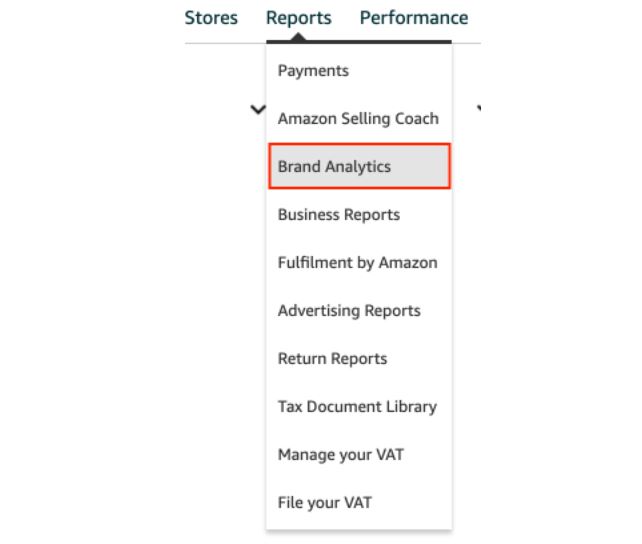
Amazon Brand Analytics
Amazon Search Term report
If you run PPC campaigns, your Amazon Advertising Search Term report is another strong source. There, you can find actual search queries that generated clicks or orders. Then, you can use the strongest relevant terms to improve both your frontend and backend keyword strategy.
How to download the Amazon Search Term report
Log in to Seller Central. Then go to Reports, open Advertising Reports, choose the reporting period, and create the report you need. After that, download the file and review which search terms are both relevant and efficient.
Automatic keyword research
Manual research is useful, but it takes time. Therefore, many sellers combine Amazon reports with keyword research tools and ranking trackers. For example, you can monitor keyword movements over time with SellerSonar’s Keyword Tracker.
How to Add Backend Keywords on Amazon
Step 1. Log in to Seller Central and open “Manage Inventory.”
Step 2. Select your product and click “Edit.”
Step 3. Open the “Keywords” tab, or the relevant field shown in your category-specific listing form.
Step 4. Add your backend search terms, plus any other available structured fields such as intended use or target audience, if they are relevant.
Step 5. Save and finish.
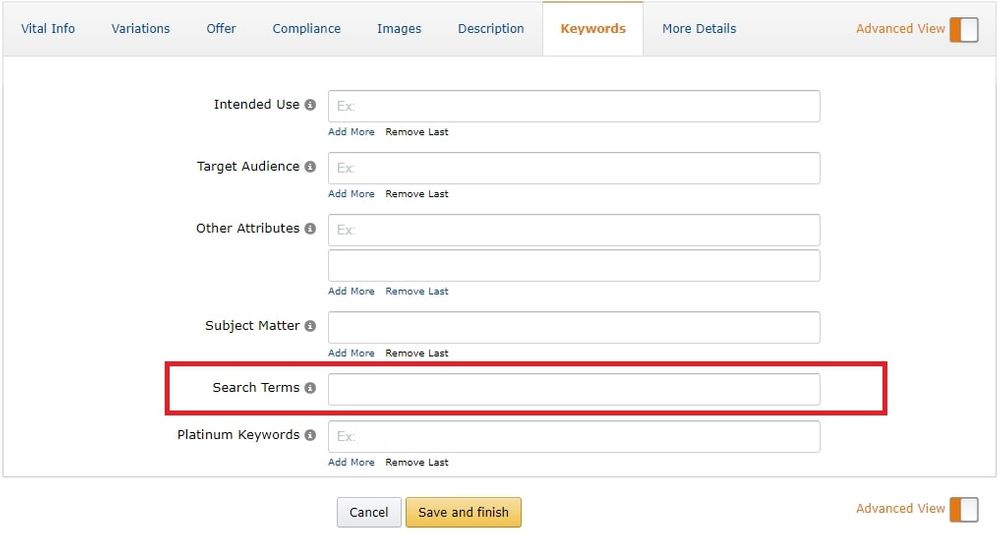
Backend keywords are located under Search Terms
Amazon Backend Keywords Tips
- use your most relevant terms first
- focus on words directly related to the product
- monitor keyword performance regularly
- keep terms concise and non-repetitive
- avoid brand identifiers in backend fields
Use only relevant backend keywords
Do not add backend keywords just because they have high search volume. If the term is not truly related to the item, it can hurt relevance and conversion quality. Instead, focus on terms that match how shoppers actually search for your product.
Keep the word order natural
Think about how customers type queries. For instance, “red fire engine” is more natural than “fire red engine.” Because of that, choose variants that reflect real search behavior.
Leave out brand identifiers
Do not place your own brand name, competitor brand names, or branded claims in backend search terms. Amazon’s guidance is clear here, so it is better to focus on descriptive, non-branded language.
Wrap Up
Amazon backend keywords are still a useful part of listing optimization in 2026. They help expand your search coverage, support indexing, and keep the visible listing cleaner. However, they only work well when they are relevant, concise, and backed by real keyword research.
At the same time, keywords are only one part of growth. You also need to monitor rank changes, listing edits, suppressed ASINs, and competitor activity. If you want to keep that under control, SellerSonar helps track listing changes, keyword ranking history, review activity, and product suppressions from one place.
Try SellerSonar now. Start with a free trial and keep your Amazon listings, keywords, and alerts under control.

