





Amazon forbidden words can get listings flagged, suppressed, or even blocked. In 2026, many false positives still involve pesticide language, especially when Amazon’s systems interpret marketing claims as regulated pesticide terms.
In this guide, we explain Amazon restricted keywords, including pesticide-related language, why products outside pesticide categories may still be affected, and how sellers can recover and reduce future compliance risks.
Important: Amazon does not publish one universal list of forbidden keywords covering every product and category. Context, marketplace, product type, supporting documentation, and the claims being made all affect whether a term is permitted.
What Are Amazon Restricted Keywords and Forbidden Words?
Amazon restricted keywords are words or phrases that may trigger policy checks because they imply regulated, unsafe, illegal, unsupported, or misleading product claims. Depending on the context, these terms can cause listing content to be rejected, an ASIN to be suppressed, or a detail page to be locked for editing.
In many cases, the problem is not the product itself but the language used to describe it. Certain terms suggest pesticide, disinfectant, or antimicrobial claims. Products in categories such as kitchen, apparel, beauty, and home goods may therefore be affected if their listings contain regulated claims.
Amazon enforces pesticide-related restrictions to comply with applicable regulations and reduce the risk of illegal, unsafe, or misclassified products being sold. Pesticides and pesticide devices have additional listing requirements, and Amazon applies strict rules to products that appear to make pesticidal claims.
If your listing claims that a product kills, repels, disinfects, prevents, or controls pests or microorganisms, review Amazon’s current policy and eligibility requirements. See Pest control products and pesticides in Amazon Seller Central.
Why Non-Pesticide Products Get Flagged for Pesticide Violations
Amazon evaluates listing text and product claims, not only the category in which an item is listed. A product can therefore be flagged even when it was not designed or marketed as a traditional pest-control product.
What Can Trigger a Pesticide Classification?
Potential triggers include health, antimicrobial, disinfectant, pest-control, or kill-and-repel language. Sellers sometimes encounter compliance checks after using terms such as antimicrobial, antibacterial, antifungal, disinfectant, or repellent in titles, bullet points, descriptions, A+ Content, images, or backend search terms.
These words are not automatically prohibited in every context. However, they can imply regulated claims and may require registration, documentation, specific labeling, or seller eligibility.
Why Amazon Is Strict About Pesticides
Amazon has faced regulatory scrutiny concerning pesticide compliance. The United States Environmental Protection Agency has documented enforcement action related to the sale and distribution of illegal pesticide products through the marketplace. See the Amazon Services LLC FIFRA settlement for background.
Why These Words Appear in Other Categories
Many pesticide-related terms also appear in ordinary product marketing. A seller may use words such as antibacterial or repellent without realizing that they can imply a regulated product claim.
When Amazon detects a potential violation, the listing may be suppressed while the claim or product classification is reviewed. In some cases, the detail page may also be temporarily locked for edits.
Why Products Outside Pest-Control Categories May Be Flagged
Selling on Amazon can become complicated when a listing is blocked because of a phrase the seller did not recognize as risky. Understanding common claim patterns can reduce the likelihood of avoidable compliance problems.
A Common Example
Imagine that you sell a kitchen product with no intended pest-control function. The listing could still receive a pesticide-related compliance request if the copy claims that the product prevents fungus or provides antibacterial protection.
In this situation, the issue is not necessarily the product category. It is the claim that Amazon’s systems interpret as pesticidal or antimicrobial language.
Why Suppression Can Be Costly
When an important ASIN is suppressed, it can lose visibility, sales velocity, organic ranking, and Buy Box performance. Storage fees may continue while inventory remains in Amazon fulfillment centers.
It is therefore safer to review product claims before publication and avoid regulated language unless the product, documentation, labeling, and seller account satisfy the applicable requirements.
Also Review Prohibited-Claims Policies
Pesticide requirements are only one part of Amazon’s compliance system. Amazon also restricts misleading or unsupported health, performance, environmental, guarantee, and promotional claims.
Review Amazon’s misleading and prohibited claims policy before adding strong marketing claims to a listing.
How to Avoid Restricted Keywords in Amazon Listings
Start by reviewing titles, bullet points, descriptions, A+ Content, backend search terms, packaging, and images for claims that may be regulated or unsupported.
Rewrite risky language as neutral product information where appropriate. Describe the product’s materials, construction, dimensions, and intended use without claiming pesticide, antimicrobial, medical, environmental, or safety benefits that you cannot substantiate.
Maintain a living compliance checklist and review listing copy regularly. This is particularly important after changing packaging, launching a variation, updating A+ Content, or allowing another contributor to modify catalog information.
Monitoring tools can also help identify unexpected public listing changes. An unauthorized catalog contribution or accidental edit could introduce language that was not part of the approved copy. Explore SellerSonar Alerts to learn more about monitored listing events.
How to Track Restricted Keywords with SellerSonar
Amazon continuously updates its restricted-keyword and product-compliance requirements. Using prohibited or unsupported terms in titles, bullet points, descriptions, images, A+ Content, or backend keywords can lead to listing suppression, reduced visibility, or account-level compliance issues.
SellerSonar helps sellers monitor important public listing changes and identify events that may require a compliance review before they affect sales.
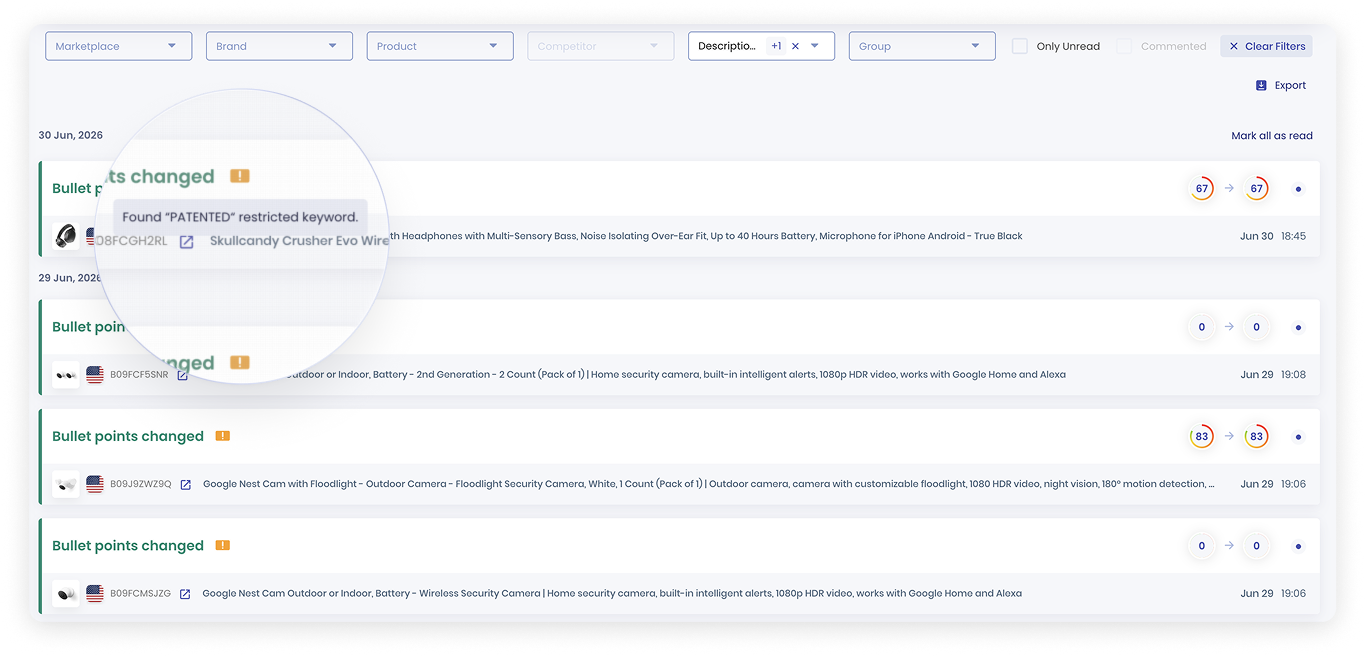
SellerSonar flags the restricted keyword “PATENTED” in an Amazon listing bullet-point update.
SellerSonar does not maintain Amazon’s official restricted-keyword rules or automatically certify that listing language is compliant. It also cannot monitor private backend search terms because those terms are not visible on the public product page. Sellers remain responsible for reviewing detected changes against current Amazon policies and applicable regulations.
With SellerSonar, you can:
- Track listing-content changes: receive alerts when public titles, descriptions, bullet points, or images are updated, then review whether the new content introduces compliance risks.
- Monitor competitor listings: track public changes to competing listings and evaluate how those updates may affect positioning within the category.
- Identify suppressed listings faster: receive alerts when tracked products become unavailable or their public status changes because of a potential retail or listing issue.
- Keep historical data for analysis: review listing events and historical information to determine when a risky phrase or content change appeared.
- Automate compliance-monitoring workflows: receive notifications by email or Slack, with API and webhook integrations available on supported plans.
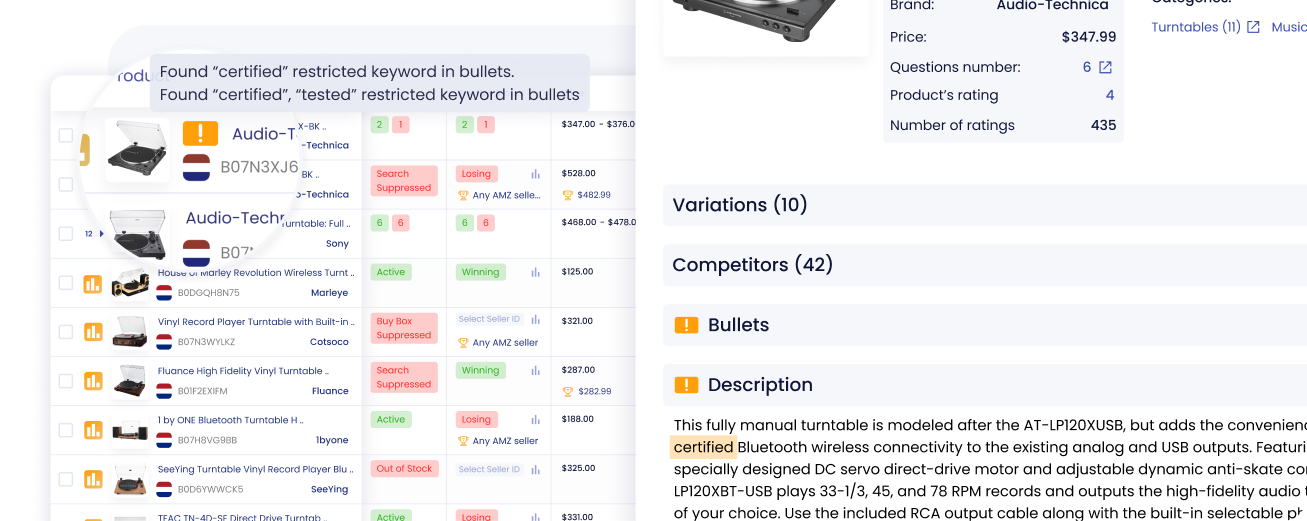
SellerSonar highlights potentially restricted terms in product bullets and descriptions alongside important listing-status signals.
Instead of manually reviewing hundreds of ASINs for public content and availability changes, SellerSonar helps surface potential issues earlier. Your team can then investigate the event, compare it with Amazon’s current policy, and take appropriate action before the problem has a larger effect on revenue.
The following terms frequently appear in pesticide or antimicrobial claims. Context matters, and inclusion in this list does not mean that a word is universally prohibited. If your product is not properly registered, documented, or eligible for a regulated claim, review these terms carefully.
- Pesticide
- Insecticide
- Fungicide
- Rodenticide
- Disinfectant
- Antimicrobial or anti-microbial
- Antibacterial or anti-bacterial
- Antifungal or anti-fungal
- Repellent, repel, or repelling
- Pest control or pest management
High-Risk Pesticide and Safety Language
These terms may imply regulated pesticide, antimicrobial, safety, or toxicity claims. Do not treat this as an official universal blocklist. Evaluate the complete claim, product classification, marketplace, documentation, and applicable regulations.
| Pesticide or antimicrobial terms | Safety or environmental claims |
|---|---|
| Anti-bacterial | Non-injurious |
| Anti-microbial | Non-poisonous |
| Anti-fungal | Harmless |
| Antimicrobial | Non-toxic |
| Antibacterial | All-natural |
| Antifungal | Safe |
| Insecticide | Repelling |
| Insect pest | Repellent |
| Pesticide | Repel |
| Pest control | Germ |
| Antiseptic | Fungus |
Claims That May Require Evidence or Additional Review
The following words are not automatically forbidden, but they may require substantiation, certifications, accurate product labeling, or category-specific compliance:
- Eco-friendly
- BPA-free
- Biodegradable
- Recyclable
- FDA approved, FDA cleared, or similar FDA references
- Compostable
Avoid using a certification, regulator, or environmental claim unless you understand the precise meaning and have evidence that supports the complete statement.
Promotional Phrases to Avoid in Amazon Titles
Amazon titles should describe the product rather than present temporary promotions, subjective rankings, guarantees, shipping promises, or sales messaging. Review title requirements for your category before publishing.
| Promotional phrase | Related phrase |
|---|---|
| Free shipping | Guaranteed satisfaction |
| Massive sale | Huge sale |
| Big sale | Best deal |
| Limited-time offer | Seen on TV |
| Bestseller | Money-back guarantee |
Is It Possible to Sell Pesticides on Amazon?
Yes, but eligibility depends on the marketplace, product type, registration status, seller location, and applicable regulations.
For Amazon.com, Amazon’s policy includes eligibility, documentation, labeling, and training requirements for sellers listing pesticides and pesticide devices. Review the current Amazon pesticide policy before creating or editing a listing.
Do not assume that completing Amazon training is the only requirement. The product must also comply with applicable federal, state, and local laws.
How to Recover an Amazon Listing Flagged as a Pesticide
Step 1: Save the Current Listing Content
Save a copy of the title, bullet points, description, A+ Content, backend terms, and images. This creates a record of the content that was present when the listing was flagged.
Step 2: Review the Compliance Notice
Read the performance notification, Account Health notice, or Seller Support case carefully. Identify the exact policy, claim, product type, or documentation Amazon is asking you to address.
Step 3: Identify Potential Trigger Terms
Review the listing for pesticide, antimicrobial, disinfectant, safety, environmental, health, and performance claims. Check visible content, backend search terms, packaging, image text, and A+ Content.
Do not delete accurate regulated information merely to evade enforcement. If the product genuinely makes pesticidal claims, verify that its registration, labeling, documentation, and Amazon eligibility are correct.
Step 4: Correct Unsupported Content
If the claim is inaccurate or unsupported, replace it with neutral, factual language. For example, describe a product’s material and intended use instead of claiming an antibacterial effect.
Step 5: Submit the Requested Information
Follow the instructions in the compliance notification or case log. Provide the specific documents or corrected content Amazon requests. Keep the response factual, concise, and aligned with the cited policy.
Step 6: Confirm That the Live Listing Is Correct
After reinstatement, review the public product page and backend listing information. Make sure that old claims have not returned through another catalog contribution, variation relationship, image, or content source.
How SellerSonar Helps Monitor Listing Risks
Begin by auditing your catalog for regulated or unsupported claims. This reduces the risk of suppressions caused by language that should not appear on the listing.
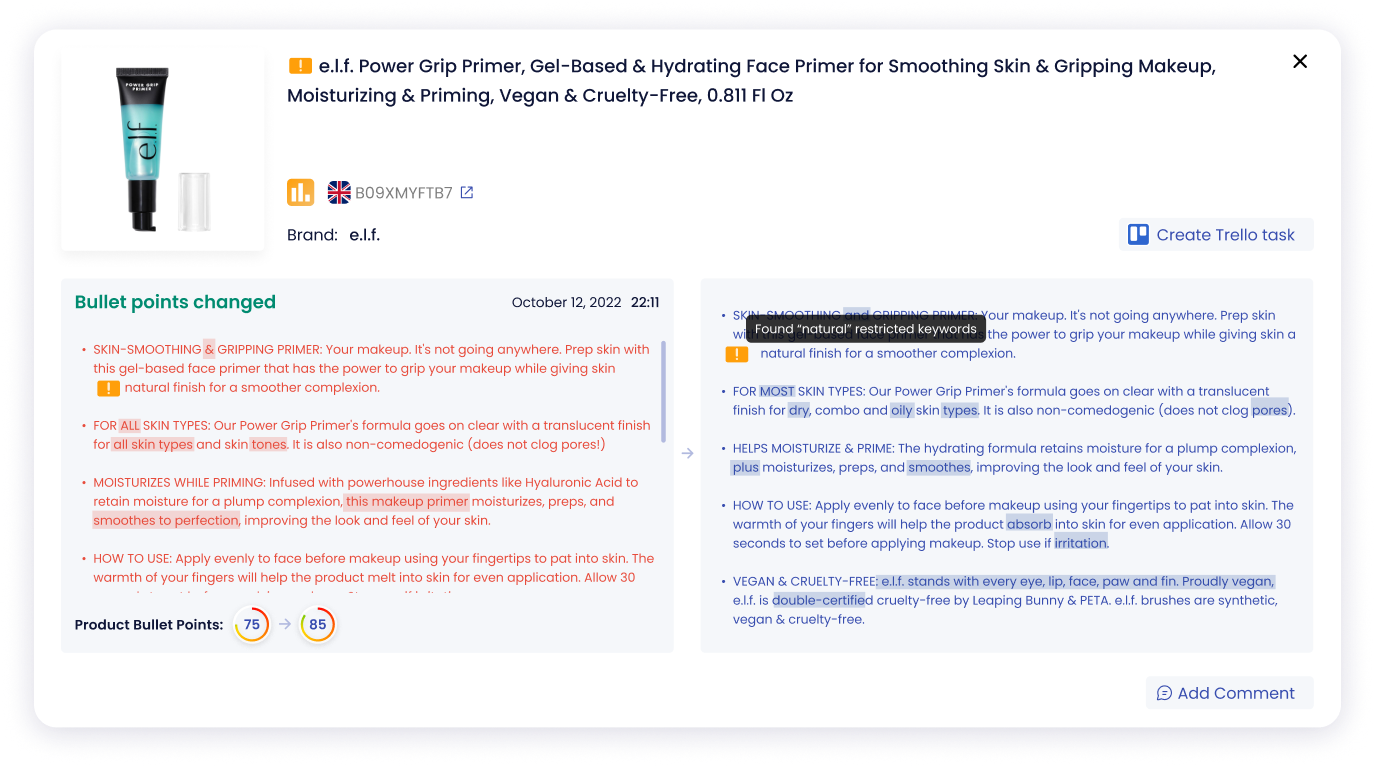
SellerSonar compares earlier and updated bullet points and identifies a potentially risky keyword introduced into the listing.
Unexpected public content changes can still occur after the audit. Monitoring can help your team detect when titles, bullet points, descriptions, images, availability, or other listing signals change.
Explore SellerSonar Alerts and review public listing signals with the SellerSonar Chrome Extension.
When SellerSonar detects a relevant event, your team can review it in the dashboard and compare the change with current Amazon policies. Faster visibility can reduce the time between a risky public edit or suppression event and the corrective action taken by the seller.

