





A weak Amazon listing usually does not fail in just one place. More often, several small issues stack up: an unclear title, weak images, missing content, poor review coverage, or a detail page that simply does not communicate value fast enough.
That is why an Amazon Listing Quality Checker is useful. It gives you a structured way to review a listing, spot obvious weaknesses, and decide what deserves attention first instead of editing at random.
With SellerSonar’s Amazon Listing Quality Checker, we help sellers, brands, agencies, and catalog managers audit listing quality faster. We treat it as a visibility layer: a practical way to detect weak listing elements, review recommendations, and investigate changes without manually checking every product page one by one.
Quick answer: An Amazon Listing Quality Checker reviews key detail-page elements such as title, images, bullets, description, reviews, and other visible listing signals to highlight what may be weakening the page. It does not replace category knowledge, copy judgment, or catalog troubleshooting, but it helps you find likely issues faster and prioritize the next fix.
What is an Amazon Listing Quality Checker?
An Amazon Listing Quality Checker is a tool that evaluates how complete and competitive a product detail page looks based on visible listing elements and common optimization signals. Depending on the tool, it may review areas such as the product title, image coverage, bullet points, product description, video presence, ratings, reviews, badges, and certain restricted or risky wording.
In practice, sellers use it for three main jobs:
- to audit a single ASIN before updating content
- to compare multiple products and find the weakest pages first
- to catch changes that may reduce listing quality over time
This matters because listing quality is not just a copywriting issue. It affects how clearly shoppers understand the offer, how credible the page feels, and how efficiently your team can investigate why a listing is underperforming.

Why listing quality matters on Amazon
On Amazon, the detail page has to do several jobs at once: match the search intent, explain the product fast, reduce doubt, and help the shopper feel confident enough to buy. When core listing elements are weak, the page can lose momentum even if traffic is present.
A stronger listing generally supports performance in four ways:
- Clearer first impression. Title, main image, ratings, and visible badges shape the first judgment quickly.
- Better conversion support. Bullets, secondary images, A+ content, and video help answer buying questions faster.
- Lower investigation time. When listing structure is reviewed systematically, teams waste less time guessing what changed.
- Fewer preventable misses. Missing images, weak copy blocks, or risky wording often stay unnoticed until performance drops.
Amazon also publishes general best-practice guidance around detail-page quality and image standards, including the importance of product title, bullets, description, and compliant product images. Those guidelines do not guarantee rank or conversion outcomes, but they do help define the baseline a healthy listing should meet.
What a good Amazon listing audit should actually look at
Not every listing issue has the same weight. Some are cosmetic. Some directly affect how understandable or trustworthy the page feels. A useful Amazon listing audit should help you separate the two.
1. Title clarity
A title should make the product identifiable fast. If it is vague, stuffed, or poorly structured, the listing can look lower quality even before the shopper scrolls.
2. Main image strength
The main image carries a large share of click and first-impression load. Amazon’s image requirements also set technical and presentation standards, including minimum size expectations for zoom support and category-specific compliance requirements.
3. Bullet points and description quality
These blocks should answer practical buying questions, not just repeat generic marketing claims. Thin bullets often create a conversion problem that teams misdiagnose as a traffic problem.
4. Secondary images and video
Additional visuals help explain use case, size, context, or differentiation. If they are missing, the page may still be technically complete but commercially weak.
5. Reviews and visible trust signals
Review volume, rating level, and the tone of recent top reviews can change how convincing a listing looks. These are not copy elements, but they affect perceived quality.
6. Risky or restricted wording
Certain claims or terms can create policy risk depending on product type, category rules, and local marketplace requirements. A listing checker can help flag suspicious wording, but a human still needs to verify context carefully.
7. Missing content blocks
A missing video, weak image set, absent A+ content, or incomplete bullets may not always be the root cause of a sales issue, but these are common places to start when the page feels thin.

Common mistake: confusing a weak listing with a catalog problem
This is where many teams lose time. A low-quality listing and a catalog issue are not the same thing.
| If you see this | It is often this type of issue | What to check first |
| Thin bullets, weak title, missing visuals | Listing quality problem | Content completeness and page clarity |
| Suppression, hidden contribution changes, blocked edits | Catalog or compliance problem | Account notifications, retail issues, contribution conflicts |
| Sudden drop after title, image, or bullet edits | Change-driven quality issue | What changed and when |
| Low conversion despite decent traffic | Usually page communication problem | Main image, title, bullets, review profile |
A good workflow starts with classification. First decide whether the ASIN has a content-quality problem, a listing-change problem, or a catalog-status problem. Then go deeper. This prevents teams from rewriting bullets when the real issue is suppression, contribution conflict, or another retail issue.
If your concern is broader catalog health rather than one-time audit work, it is often useful to combine a checker with ongoing product listing alerts so you can see when important listing elements change instead of finding out later through lost sales or manual review.
How SellerSonar’s Amazon Listing Quality Checker works
Our Amazon Listing Quality Checker is designed to review a listing based on visible quality signals and return a structured report. We do not treat it as a replacement for operator judgment. We use it to shorten the path from “this page feels weak” to “these are the first things worth fixing.”
The typical workflow looks like this:
- you enter an ASIN or product URL
- we review listing elements such as title, images, bullets, description, ratings, reviews, badges, and other visible page signals
- you receive a structured score and recommendations by metric
- you use that output to prioritize edits or investigate what changed
We also use this checker as part of a broader monitoring workflow inside SellerSonar. You can audit a page now, then keep watching for later content changes, retail issues, or other unusual listing activity without relying only on manual checks.
How to use an Amazon Listing Quality Checker without wasting time
The biggest efficiency gain comes from using the checker as a triage tool, not as a final answer machine.
Step 1. Check the ASIN that actually matters
Start with the product that is most commercially important or most visibly underperforming. For agencies or larger catalogs, start with the products showing the weakest page quality or the clearest recent change.

Step 2. Read the report by commercial weight, not by order
Do not treat every metric equally. Review the items that usually affect perception first:
- main image
- title
- bullets
- secondary images
- rating and review profile
A missing badge is rarely the first fix. A weak title or thin image set often is.

Step 3. Separate “fix now” items from “monitor” items
Some issues deserve immediate editing. Others should be watched. For example:
- rewrite unclear title structure now
- replace weak or non-compliant main image now
- improve thin bullets now
- monitor ratings, reviews, and badges over time
Step 4. Re-check after meaningful edits
A listing checker is most useful when used iteratively. Run the check, make meaningful improvements, then review again. This gives you a cleaner before-and-after view and prevents random edits that do not improve the page.
Operator shortcut: If the page looks weak and you only have 15 minutes, check these first: main image, title structure, first three bullets, ratings snapshot, and whether the listing recently changed. That sequence catches a large share of avoidable issues.
What metrics we surface in the SellerSonar app
Inside SellerSonar, we also surface Listing Quality Score signals at the product level, helping teams find weaker pages faster across a catalog instead of checking only one ASIN at a time.

Our LQS view can help you review elements such as images, title, bullets, description, reviews, A+ content, badges, and related listing signals. In practical terms, that helps with two workflows:
- prioritizing which ASINs to improve first
- reviewing which specific elements are holding a page back
For teams managing larger catalogs, that is usually more useful than auditing products one by one without a prioritization layer.If you want to see the checker workflow step by step, including where Listing Quality Score appears inside SellerSonar, this tutorial walks through it.
Why monitoring matters after the audit
A one-time listing audit is useful, but it is only a snapshot. Amazon detail pages can change over time because of your own edits, contribution changes, retail issues, or other marketplace activity. If you only run a checker once, you may miss the next change that matters.
That is where SellerSonar fits naturally. The checker helps you review the page. Our alerts help you keep watching it.
Relevant monitored events may include title changes, bullet changes, description changes, rating changes, review-related changes, badge gains or losses, and other listing updates that affect how strong the page looks or how urgently it should be investigated. Inside SellerSonar, we surface these workflows through our Amazon product listing alerts so teams can spot changes faster, review the context, and decide what needs follow-up.

This is especially useful when the problem is not “how do I optimize this page from scratch?” but “what changed on this ASIN and what should I check first?”

Turn listing alerts into Trello tasks
For agencies, vendors, catalog teams, and larger Amazon brands, spotting a weak listing or a new product-page change is only the first step. Someone still needs to review the ASIN, check what changed, decide whether the issue is content-related or catalog-related, and track the fix until it is resolved.
SellerSonar’s Trello Integration helps move that follow-up into your team workflow. When a critical listing alert appears, open the alert and create a Trello task directly from the alert itself. The task keeps the alert context attached, so your team does not need to copy product details, ASIN information, rating changes, review notes, badge updates, or seller activity into a separate board manually.
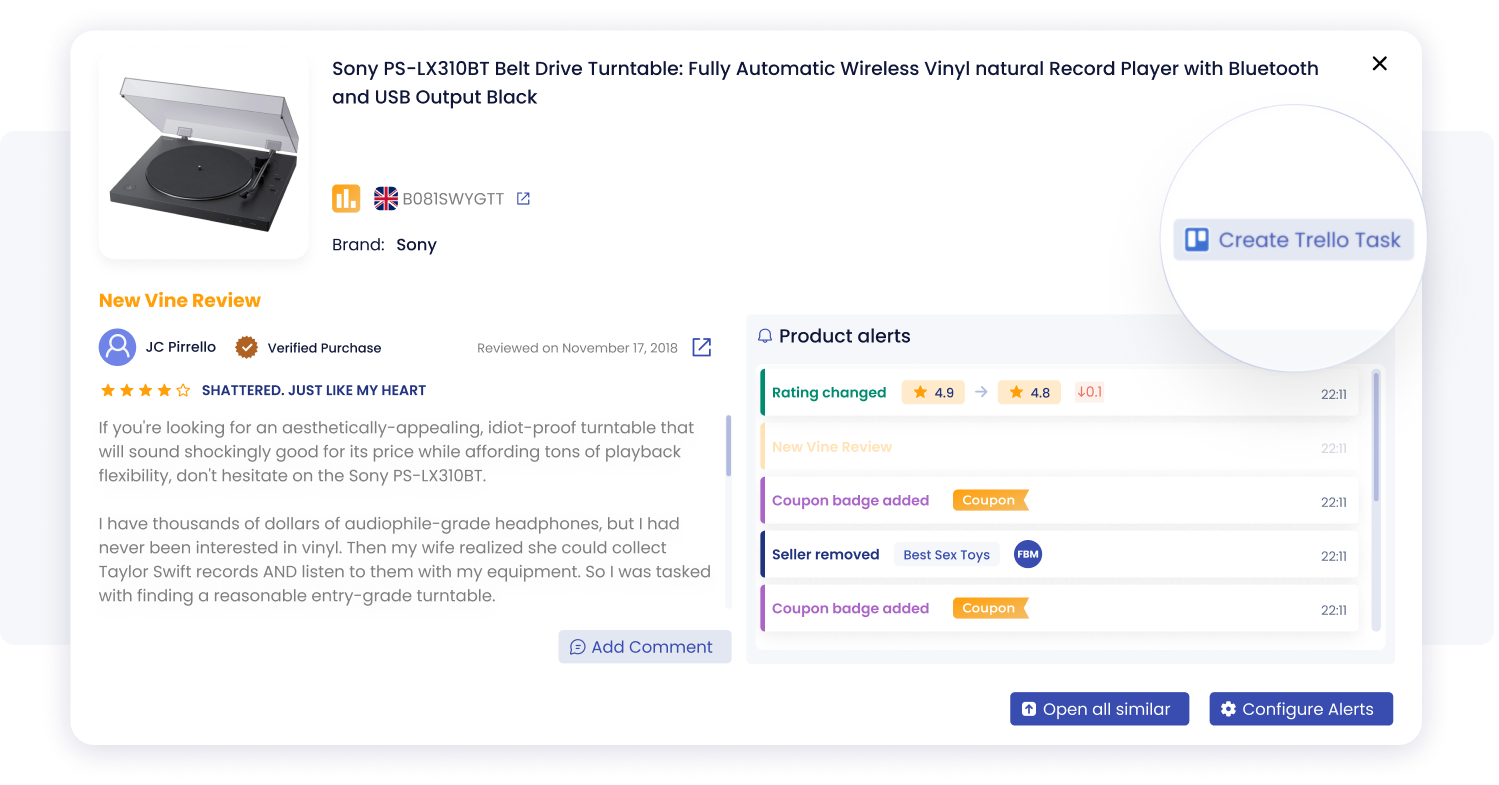
Track key listing events in one place with SellerSonar alerts, including rating changes, new reviews, coupon badges, and seller activity.
This is especially useful after a listing quality audit. If the checker shows weak content and SellerSonar later detects a title change, rating shift, new review, coupon badge, or seller activity update, your team can create a Trello task from the alert and assign the right owner for follow-up.
Example: If a product’s Listing Quality Score is already weak and SellerSonar detects a new negative review or rating change, create a Trello task for the content or catalog team to review the ASIN, check whether the issue connects to listing clarity, and decide whether the next step is a content update, image refresh, FAQ improvement, or deeper catalog investigation.
When an Amazon Listing Quality Checker is most useful
- before relaunching or refreshing a product detail page
- when conversion is soft and the page needs a fast structural review
- when managing many ASINs and you need to prioritize weak listings
- when a client asks what exactly is weak on a page
- when listing changes may have reduced page quality
- when alerts need to become assigned tasks for content, catalog, or account-management teams
It is less useful if your main issue is purely off-page, such as inventory constraints, ad inefficiency, or account-level restrictions. In those cases, listing quality may still matter, but it is not the first layer to diagnose.
Final take
A strong Amazon Listing Quality Checker should help you do three things well: spot weak listing elements, classify the problem correctly, and decide what to fix first.
That is where we see SellerSonar being most useful. We help you audit the page first, then keep track of listing changes, suppression visibility, and unusual detail-page activity without constant manual checks.
If you want a fast way to review a product page before editing it, start with our Amazon Listing Quality Checker. If you also need to detect what changed later, combine that workflow with listing monitoring and alerts so your team can investigate faster, assign follow-up when needed, and spend less time on manual catalog checks.

