




Quick Answer
KDP stands for Kindle Direct Publishing. Amazon KDP is the free self-publishing platform where you upload your book, set the price, and Amazon sells it as a Kindle eBook, a paperback or a hardcover, printing each print copy on demand. There are no upfront fees or inventory. According to KDP’s Help Center, royalties are 35% or 70% on eBooks and 50% or 60% (minus printing) on print, paid about 60 days after the month of the sale.
You’ve written a book, or you’re about to, and every guide points you to Amazon KDP. Before you upload anything, it helps to know what KDP actually is, what it keeps from each sale, and what changed in 2026.
This guide explains how Amazon KDP works step by step, what you can earn and when you’re paid, how KDP Select and Kindle+ (formerly Kindle Unlimited) fit in, the real downsides, and the mistakes that cost new authors sales.
About the Author: Gloria Anderson writes for the SellerSonar editorial team about self-publishing and selling on Amazon. She checks every KDP rule in her articles against Amazon’s KDP Help Center, and the tracking examples against live Amazon book listings we monitor.
What Is Amazon KDP?
Amazon KDP is the self-publishing arm of Amazon. Through kdp.amazon.com, any author can publish a book and sell it in Amazon’s stores without a publisher, an agent or a print run.
Amazon’s own Help Center sums up the deal in one line: “Publishing with KDP gives you full rights to your book, which is not something a traditional publishing house typically allows.” You keep your rights and you set the price.
Here’s KDP at a glance in 2026:
| Question | Answer |
|---|---|
| Cost to publish | Free. No upfront costs, no inventory |
| Formats | Kindle eBook, paperback, hardcover |
| eBook royalty | 35%, or 70% at a US list price of $2.99 to $12.99 |
| Print royalty | 60% at $9.99 and up, 50% below, minus printing cost |
| Time to go live | Up to 3 business days (low-content books: 3 to 4 weeks) |
| Payouts | About 60 days after the end of the month of the sale |
| Exclusivity | Only if you enroll the eBook in KDP Select |
| New titles per week | Up to 2 per book format |
What Type of Content Can You Publish on KDP?
KDP takes most kinds of books: novels and series, children’s books, comics, cookbooks, journals, poetry, textbooks and nonfiction of every sort. What it doesn’t accept is magazines, periodicals, calendars or spiral-bound books.
Each format has its own rules:
- Kindle eBook: no ISBN needed, and you can publish it alongside print.
- Paperback: printed on demand when a reader orders. It’s the only format that can join Expanded Distribution to other stores.
- Hardcover: case laminate only, with no dust jacket, 75 to 550 pages, in 5 trim sizes. It isn’t available on Amazon.co.jp.
Journals, notebooks, planners and coloring books count as low-content books. They don’t get a free KDP ISBN, and their review takes longer.
How Does KDP on Amazon Work?
The whole process runs inside your KDP account. Here’s the flow from sign-up to your first payment.
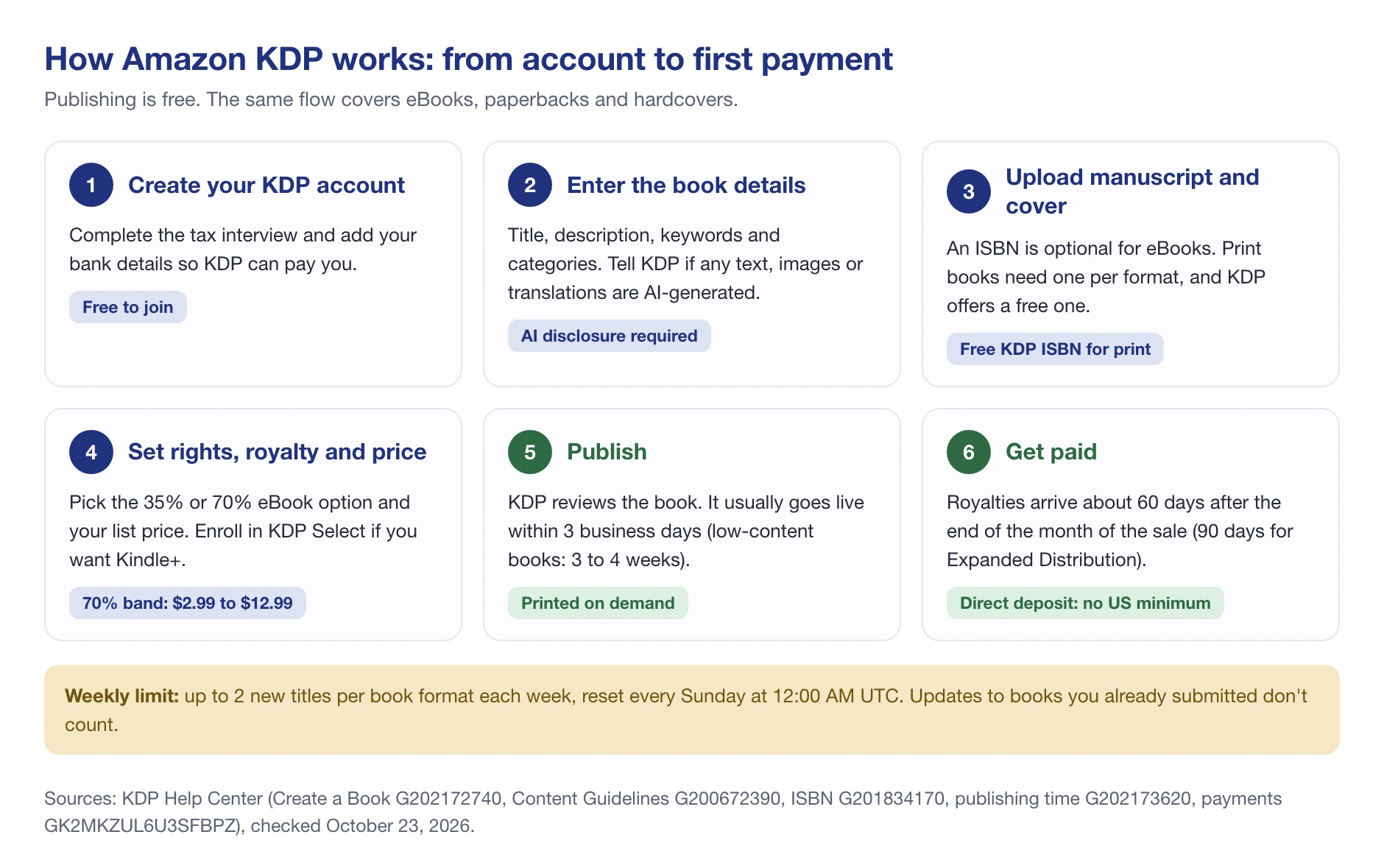
- Create your KDP account. You’ll complete a tax interview and add bank details. Authors outside the US face 30% US withholding unless they give a tax ID and claim treaty benefits.
- Enter the book details. Title, description, keywords and categories. KDP also asks about AI: its content guidelines say “We require you to inform us of AI-generated content (text, images, or translations)”. AI-assisted work, like editing or brainstorming, doesn’t need disclosing.
- Upload your manuscript and cover. An ISBN is optional for eBooks. Each print format needs its own, and KDP gives a free one that works only on KDP and shows “Independently published” as the imprint.
- Set rights, royalty and price. Choose the 35% or 70% eBook option, your list price per marketplace, and whether to enroll in KDP Select.
- Publish. Amazon reviews the book, and “it takes 3 business days” to go live. Low-content books take 3 to 4 weeks. Print copies are then printed on demand, one order at a time.
- Get paid. Amazon pays your royalties about 60 days after the end of each month.
One limit to plan around: KDP’s Create a Book page allows “Up to 2 new titles per book format each week”, reset every Sunday at 12:00 AM UTC. Updates to books you’ve already submitted don’t count toward it.
💡 Expert Tip: Have the tax interview, bank details and cover files ready before you start. The upload itself is quick. It’s the paperwork that slows a first book down.
How Much Can You Earn with KDP on Amazon?
There’s real money in the program. KDP’s Earn page reports “Total KDP Kindle+ Author Earnings for September are $69.3 Million”, and that’s only the pot paid for page reads in Kindle+, before regular sales.
That money isn’t spread evenly, though. What one author makes can differ from another by orders of magnitude, and it comes down to four things:
- How good the book is, from the writing to the cover.
- How well it matches what readers in its category want.
- Timing, including how crowded the niche is when you launch.
- Marketing: Amazon Ads, your own audience, social media and launch promotions.
Royalties and pricing
The pricing of your book is completely up to you, within KDP’s limits. The big 2026 change is the 70% band: “Effective July 7, 2026, the 70% royalty option price band is $2.99-$12.99 on Amazon.com”, up from $2.99-$9.99, “with equivalent changes in other KDP marketplaces”. The $9.99 cap had been in place since 2007, so a lot of KDP advice still quotes it.
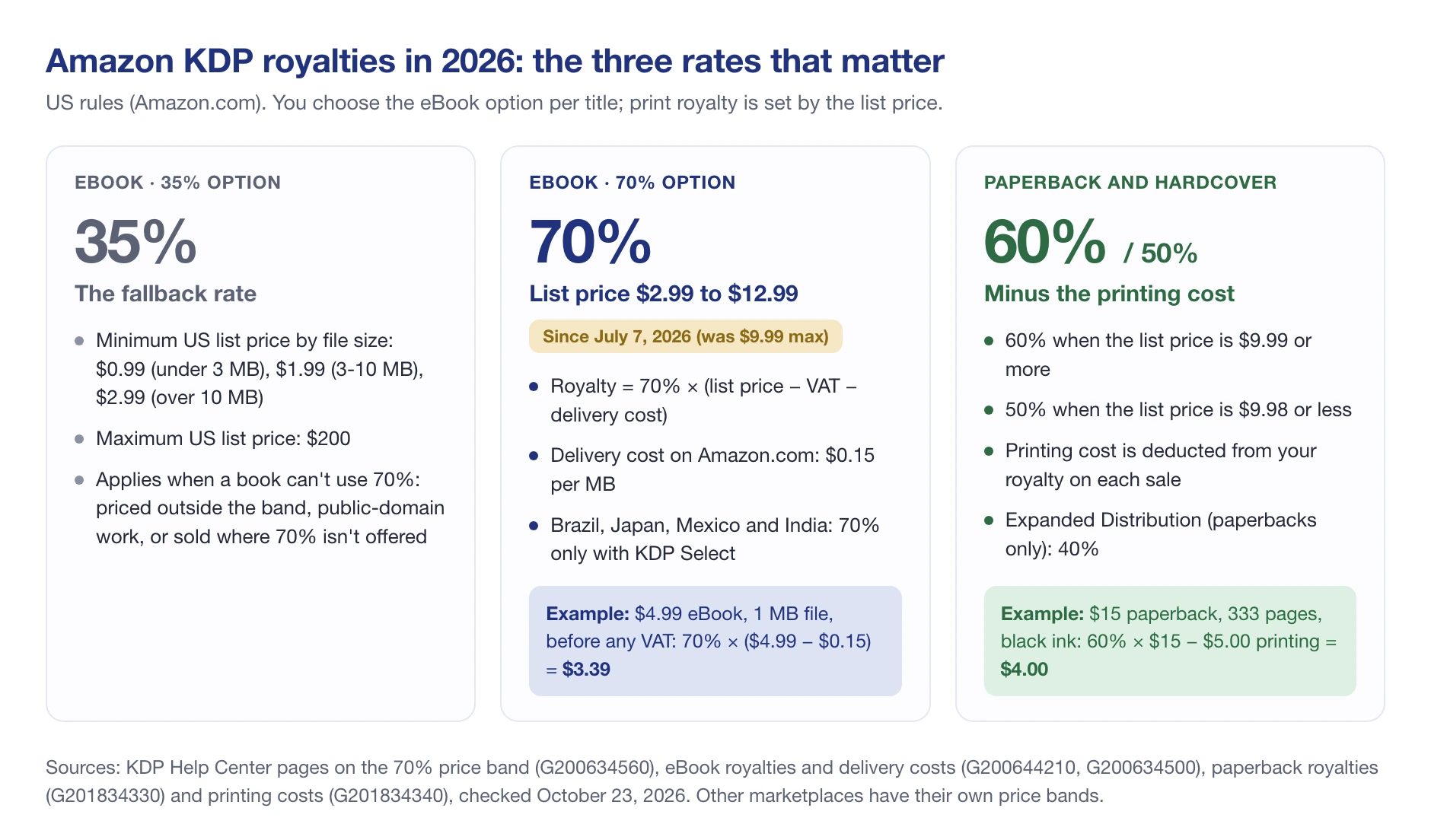
For eBooks, the 70% royalty isn’t 70% of the sticker price. KDP’s eBook royalty rules calculate it as 70% of the list price minus VAT and a delivery cost, which is $0.15 per MB on Amazon.com. A $4.99 eBook with a 1 MB file earns 70% × ($4.99 − $0.15) = $3.39 before any VAT. Public-domain books get 35% only, and in Brazil, Japan, Mexico and India the 70% option needs KDP Select.
For paperbacks and hardcovers, the print royalty is 60% at a list price of $9.99 or more and 50% at $9.98 or less, minus the printing cost. On Amazon.com, a black-ink, regular-trim paperback of 110 to 828 pages costs $1.00 plus $0.012 a page to print. So a $15, 333-page paperback earns 60% × $15 − $5.00 = $4.00.
Top tip: price against the books you’re competing with, not against a number you like. Check what comparable titles in your category charge, how their prices move, and where they rank. SellerSonar can show you the price history of a competing print book, so you can spot whether a rival discounts before holidays or holds its price.
Last but not least, reviews shape how credible your book looks. KDP allows free or discounted copies “as long as you do not require a review in exchange or attempt to influence the review”, and reviews tied to gift cards don’t count. Amazon’s star rating is machine-learned, not a simple average.
When and how KDP pays you
KDP pays royalties “approximately 60 days after the end of the month in which the sale was reported (90 days for Expanded Distribution)”. The clock starts at the end of the month, not at each sale.
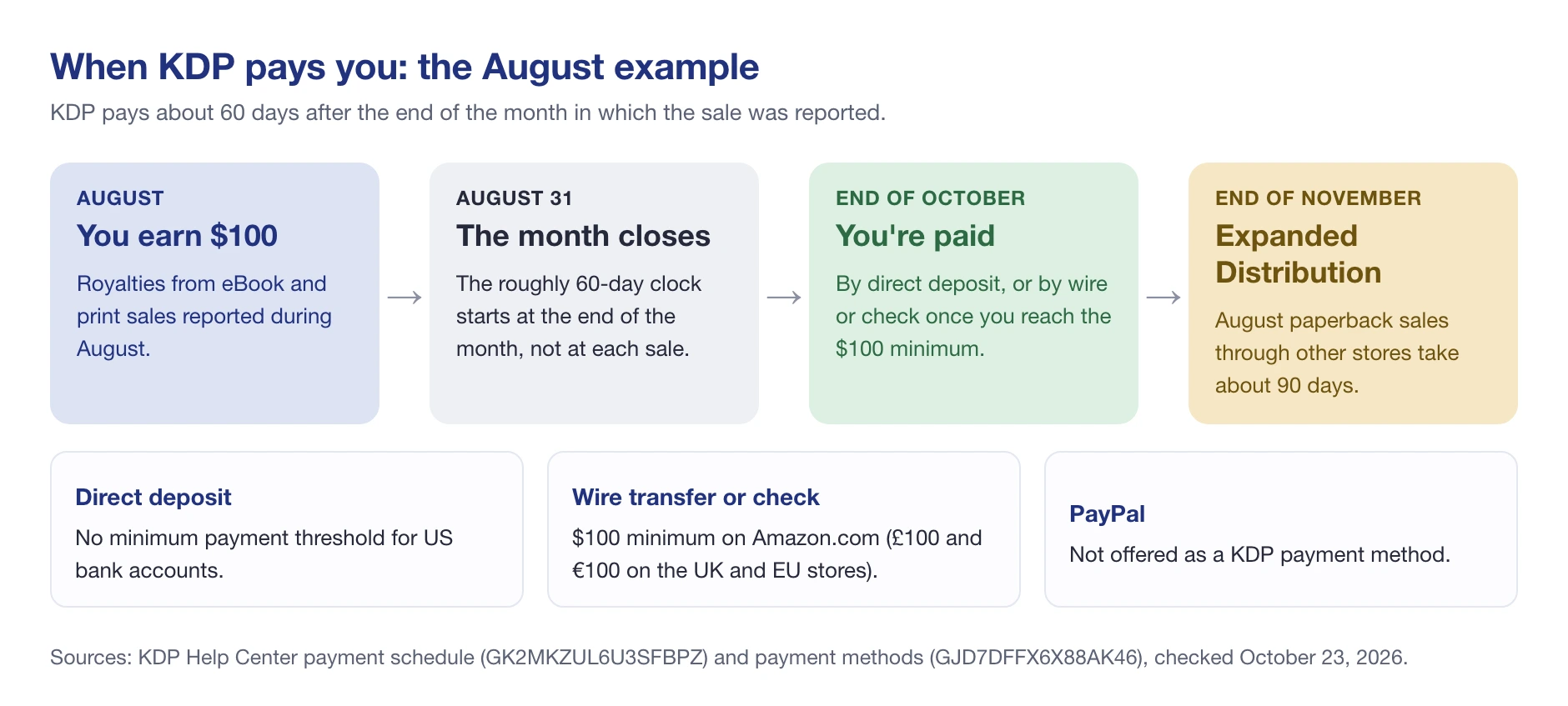
So if you earn $100 in August, per KDP’s schedule you’ll be paid at the end of October. Paperback sales through Expanded Distribution in the same month arrive around the end of November.
How you’re paid matters too. US direct deposit has no minimum, but wire transfers and checks need $100 on Amazon.com (£100 or €100 on the UK and EU stores). PayPal isn’t offered.
KDP Select and Kindle+
KDP Select is an optional program for eBooks. In return for exclusivity, your book joins Kindle+, the reading subscription Amazon renamed from Kindle Unlimited in October 2026.
The terms are simple. Enrollment lasts 90 days and renews automatically. During that time your eBook must be exclusive to Kindle, although your paperback and hardcover can be sold anywhere.
What you get back, per KDP’s Select benefits page:
- Page-read royalties. You’re paid for pages Kindle+ members read, from the KDP Select Global Fund.
- Promotions. According to KDP, each 90-day term, you can run a Kindle Countdown Deal (US and UK only) or a Free Book Promotion of up to 5 days.
- 70% in more markets. It’s the only way to get the 70% eBook option in Brazil, Japan, Mexico and India.
What the rename changes for authors: on October 22, 2026, Amazon renamed Kindle Unlimited to Kindle+, a $11.99-a-month reader subscription that now also covers audiobooks, comics and magazines. For you, the mechanics stay the same. KDP’s KDP Select page says that when you enroll an eBook or audiobook, “it’s automatically included in Kindle+”. Enrolled titles may also use the “Available in Kindle+” badge in their marketing, under KDP’s badge guidelines, and you must remove it as soon as the book leaves Kindle+. If your own site or ads still say “Kindle Unlimited”, update the wording.
Page reads are counted in Kindle Edition Normalized Pages (KENP), up to 3,000 per title per customer. KDP announces the fund near the 15th of the following month and divides it by the total pages read in each marketplace.
🎯 Pro Insight: Select suits fast-reading genres and series, where readers binge through Kindle+. If you want your eBook on other stores or your own website, skip it. You can still sell print everywhere either way.
Amazon KDP in India
KDP works the same way for authors in India, with four differences that matter on amazon.in.
- eBook prices in rupees. On amazon.in, the 70% royalty option needs a list price from ₹99 to ₹599, and it is only open to books enrolled in KDP Select. The 35% option starts at ₹49 and goes up to ₹10,999, per the same list price rules linked above.
- Delivery cost. The 70% option deducts a delivery cost of ₹7 per MB on amazon.in, according to KDP’s eBook royalty page.
- No print on amazon.in. KDP says amazon.in does not support paperback and hardcover distribution, so print copies sell through KDP’s other marketplaces, such as Amazon.com and Amazon.co.uk.
- Payments and languages. If your bank is in India, a direct deposit can take 7 to 10 business days after the payment date to arrive. Hindi, Marathi, Gujarati and Malayalam are supported for eBooks only.
Benefits of Self-Publishing on KDP Amazon
Traditional publishing can feel like an invitation-only club. KDP lets authors in on their own terms, and it has four clear advantages.
Ease
Self-publishing with KDP is simple. The KDP Help Center covers every setting, KDP University and Jumpstart walk you through the basics, and the KDP Community forum answers what the docs don’t. You don’t need design or printing experience to get a book live.
Accessibility
It costs nothing to publish, so anyone with a finished manuscript can reach Amazon’s readers. You’ll still choose to pay for things like editing or a professional cover, but those are your calls, not entry fees.
Pricing
You set your own list price, and you can change it later from your KDP Bookshelf. Since July 7, 2026, the 70% eBook option covers US prices from $2.99 up to $12.99, which gives longer or specialist books more room before the royalty drops to 35%. Other marketplaces have their own bands (£12.99 in the UK, €12.99 in the EU).
Payment options
Amazon pays on a fixed monthly schedule, by direct deposit, wire transfer or check. The trade-off is the wait: royalties land about 60 days after the month closes, which is slow next to selling direct from your own site.
Disadvantages of Amazon KDP
KDP is free, but it isn’t risk-free. These are the downsides worth weighing before you commit:
- You do the marketing. KDP lists your book. Getting readers to find it is your job.
- Slow cash flow. Two to three months between a sale and the payment is long when you’re paying for ads today.
- Exclusivity, if you choose Select. Your eBook can’t be sold on any other store during the 90-day term.
- Thin print margins at low prices. Below $9.99 the print royalty drops to 50%, and printing comes out of that.
- Limits on what goes wide. Expanded Distribution pays 40%, takes paperbacks only, and excludes cookbooks, biographies, journals, coloring books and more.
- The ISBN is tied to KDP. The free KDP ISBN only works on KDP. Buy your own if you plan to print elsewhere.
- Amazon’s rules, Amazon’s call. Content guidelines, the AI disclosure and the weekly title limit all apply, and Amazon decides how they’re enforced.
Common Mistakes Writers Make on Amazon Publishing
Quantity over quality
Once you understand how KDP works, it’s tempting to publish as many books as you can and hope volume carries you. More titles don’t guarantee sales. Readers pass on books that are poorly written, carelessly formatted or rushed.
KDP now limits it anyway: no more than 2 new titles per format each week. Treat that cap as a nudge to spend your time on books readers will finish and recommend.
Concentrating only on one aspect of your book
A great cover won’t save a book that doesn’t deliver, and great writing won’t sell behind a weak title and cover. Readers judge the title, cover, description and first pages together.
Give every part the same care, from the cover design to the epilogue. That includes the description and keywords, which decide whether the right readers find the book at all.
Pricing outside the 70% band
According to KDP’s price band rules, an eBook priced at $1.99 or $14.99 on Amazon.com drops to the 35% royalty. A $14.99 eBook at 35% earns about $5.25, while the same book at $12.99 on the 70% option earns about $8.99 with a 1 MB file, after the delivery cost. Check the band before you pick a number.
Skipping the AI disclosure
If your text, images or translations were generated by AI, KDP requires you to say so, even if you edited them heavily afterward. Leaving it out breaks the content guidelines you agree to when you publish.
Relying on the KDP platform too much
KDP gives you a storefront, not an audience. Build your own home base too: an author website with your bio, books, awards and contact details, plus an email list you control.
Use social media, such as X, Facebook or Instagram, to reach readers where they already spend time. If you’re not in KDP Select, your website can sell or give away your eBook directly as well.
KDP vs Seller Central
If you already sell products on Amazon, note that KDP and Seller Central are separate accounts with separate rules. With KDP, Amazon is the seller of your book: you set the list price and earn a royalty. With Seller Central, you’re the seller, you set the offer price, and you pay Amazon’s selling fees.
Authors use Seller Central when they sell things KDP doesn’t handle, such as signed author copies, box sets they ship themselves, or merchandise. That’s where a tool like SageMailer fits: it automates Seller Central’s Request a Review button for those orders. It doesn’t work on KDP book sales, because those orders belong to Amazon.
📌 From Our Experience: Authors who sell both ways tend to mix up the two dashboards. Keep it simple: KDP for the books Amazon prints and sells, Seller Central only for physical stock you ship or send to Amazon yourself.
Is Amazon KDP Worth It in 2026?
For most self-published authors, yes. It’s free, it reaches Amazon’s readers in every format, and per KDP’s July 7, 2026 change, the 70% band now reaches $12.99. It’s a worse fit if you need fast cash flow, want your eBook on every store, or aren’t prepared to market your own book.
Whether a book sells comes down to the niche you choose, and that’s where data helps. Every book on Amazon has an ASIN and a Best Sellers Rank. KDP’s own sales rank page says ranks update “at least once per day” and that a single rank is “not an accurate way to track your book’s activity”, so the trend matters more than any one day.
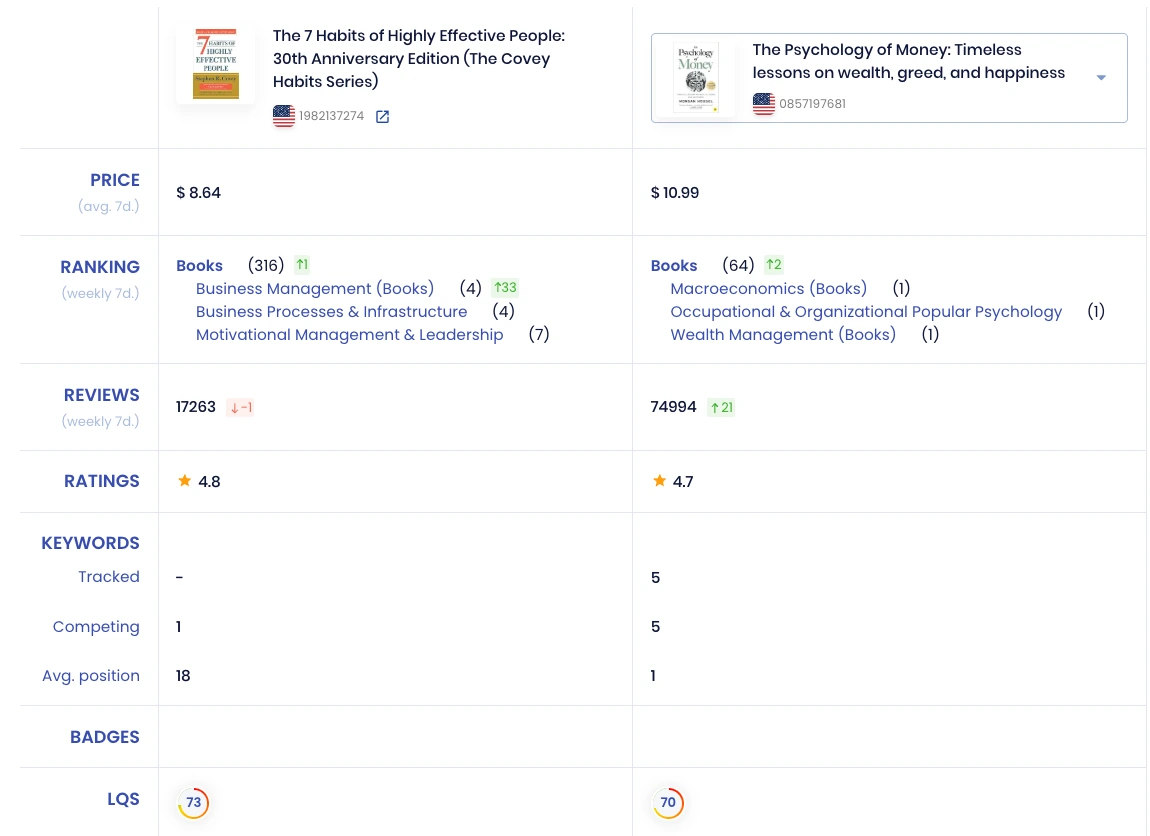
Here’s what that looks like in SellerSonar’s competitor comparison, for two bestselling print books we track on Amazon.com. The Psychology of Money (paperback, ASIN 0857197681) sits at #64 in Books, up 2 places over 7 days, and #1 in three categories: Macroeconomics, Occupational & Organizational Popular Psychology, and Wealth Management. It sells at $10.99, has 74,994 ratings at 4.7 stars (21 more than a week earlier), and averages position 1 across its 5 tracked keywords.
Next to it in SellerSonar, The 7 Habits of Highly Effective People (30th Anniversary Edition, ASIN 1982137274) is #316 in Books at $8.64, with 17,263 ratings at 4.8 stars. It competes on only 1 of those keywords, at an average position of 18.
Both are traditionally published, but the tracking works the same for your own KDP paperback and the titles you compete with, the way product sellers watch their rivals. You can follow a book’s BSR in every category, see where it ranks for the keywords you chose in KDP, and compare ratings with competing titles side by side.
Final Expert Recommendations: Publish the eBook and paperback together, price the eBook inside KDP’s top royalty band, and decide on KDP Select per book, not by default. Disclose any AI-generated content. Then judge your niche on BSR trends rather than one good day.
If you’d like to track your book and its competitors, try SellerSonar free: 14 days free, 5 ASINs, 10 keywords, no credit card.

