





Table of Contents
 Every seller who wants to make money on Amazon needs to ensure that their product reaches the right customer. Needless to say, if your item is an exact match to what a shopper looks for, that’s bingo.
Whenever a buyer wants to find a product, they search. More than 6 in 10 e-commerce shoppers start their product searches on Amazon.
Most often, they search for the product by entering search terms in the search bar. To match your product with the customer’s query, you’ll need to include keywords on your product listing. The higher the relevancy, the better your product will rank in the search results. This, in turn, increases sales and conversions. By the way, for sellers aiming to optimize their Amazon listings, tracking product listings is crucial. It involves monitoring changes in your listings and competitors, such as price adjustments, keyword ranking changes, and stock levels. SellerSonar provides alerts on these changes, helping sellers react promptly to maintain competitiveness and visibility on Amazon.
So, to find out which keywords work best for your product, you need to perform Amazon keyword research.
Read further to discover what are the different types of Amazon keywords, how to choose keywords for Amazon, and the methods to conduct keyword research with and without using the Amazon keyword tool.
What Is Amazon Keyword Research?
Keyword research on Amazon is the process when a seller finds and analyzes the search terms that their customers use. It helps choose the most efficient terms.
These search terms that shoppers enter into search engines, FBA sellers oftentimes use for search engine optimization (SEO).
Why is Amazon keyword research important for sellers?
When choosing the set of Amazon search keywords, you only need to select the ones that are most relevant to your product. These search terms should appear on your product title, frontend description, and listing backend.
Since the keywords are directing shoppers to your listing, you cannot add just anything as a keyword. Your keyword selection should be optimized for several reasons.
Firstly, irrelevant keywords create a terrible user experience. You should select your keywords having real buyer personas in mind. Imagine that a shopper looking for sunglasses finds wine glasses you sell. They’ll not buy your product.
Secondly, you shouldn’t use too many keywords on your listing. If you do so, it will not be readable. In addition, you won’t be able to present the right information about the product to your potential customers. Doing so is important to avoid returns and negative reviews. These unwanted effects may arise due to unclear item descriptions.
Thirdly, the quantity of characters you can use on the listing frontend and backend is limited. You should, therefore, be selective and use highly-performing search terms.
Keyword research shows demand. Shelf Intelligence shows visibility.
Finding the right keywords is the first step. However, knowing a keyword has search volume is not the same as knowing your product is actually visible for it. That is where SellerSonar’s Shelf Intelligence becomes useful.
With Share of Voice, you can see how visible your brand is across organic and sponsored results for the keyword groups you track. With Share of Shelf, you can see where your product appears on Amazon’s digital shelf, which brands dominate that space, and which subcategories are taking the most visibility. This helps you move from “I found the keyword” to “I know what customers really see for that keyword.”
What Are Keywords?
So, what are keywords on Amazon? Keywords are specific words or phrases that are strategically included in the product title, bullet points, description, and backend search terms on Amazon.
These keywords are relevant to the product and reflect what potential customers may search for when looking for similar products on AMZ.
Effective keyword research on Amazon and utilization are essential for optimizing product visibility, improving search rankings, and attracting the right target audience to the listing.
How do keywords work on Amazon?
As soon as a shopper wants to find a product, they type the search query into the Amazon search bar. After that, they can see search results that Amazon ranks in a certain order.
To rank the search results, Amazon applies its proprietary A10 search algorithm. It escalates the best-performing inventory optimized by the most relevant Amazon search terms to the first Search Engine Results Page (SERP).
The relevant keywords help make your ASINs visible to the shoppers. They guide Amazon’s A10 algorithm right to your listing. The A10 algorithm ranks the product listings in the order of relevance to the shopper’s search query. It processes listings according to Amazon’s ranking criteria.
Importantly, the higher the product ranking, the better are sales volumes and conversion rates. Research shows that products on the first page of search results get at least 80% of all the clicks, while the first 3 listings on page 1 get at least 60% of those clicks, Additionally, only 30% of shoppers go beyond page 1 of the search results.
Why keyword rankings alone do not tell the whole story
Ranking for a keyword is important, but it is only part of the picture. You also need to understand how much visibility your brand owns compared to competitors. SellerSonar’s Shelf Intelligence helps with that by tracking two useful metrics: Share of Voice and Share of Shelf.
Share of Voice helps you monitor how your visibility changes across organic and sponsored results. Share of Shelf helps you see where your products rank on Amazon’s digital shelf and which competitors are taking your space. So, instead of looking only at single keyword positions, you can understand how visible your brand really is across the searches that matter most.
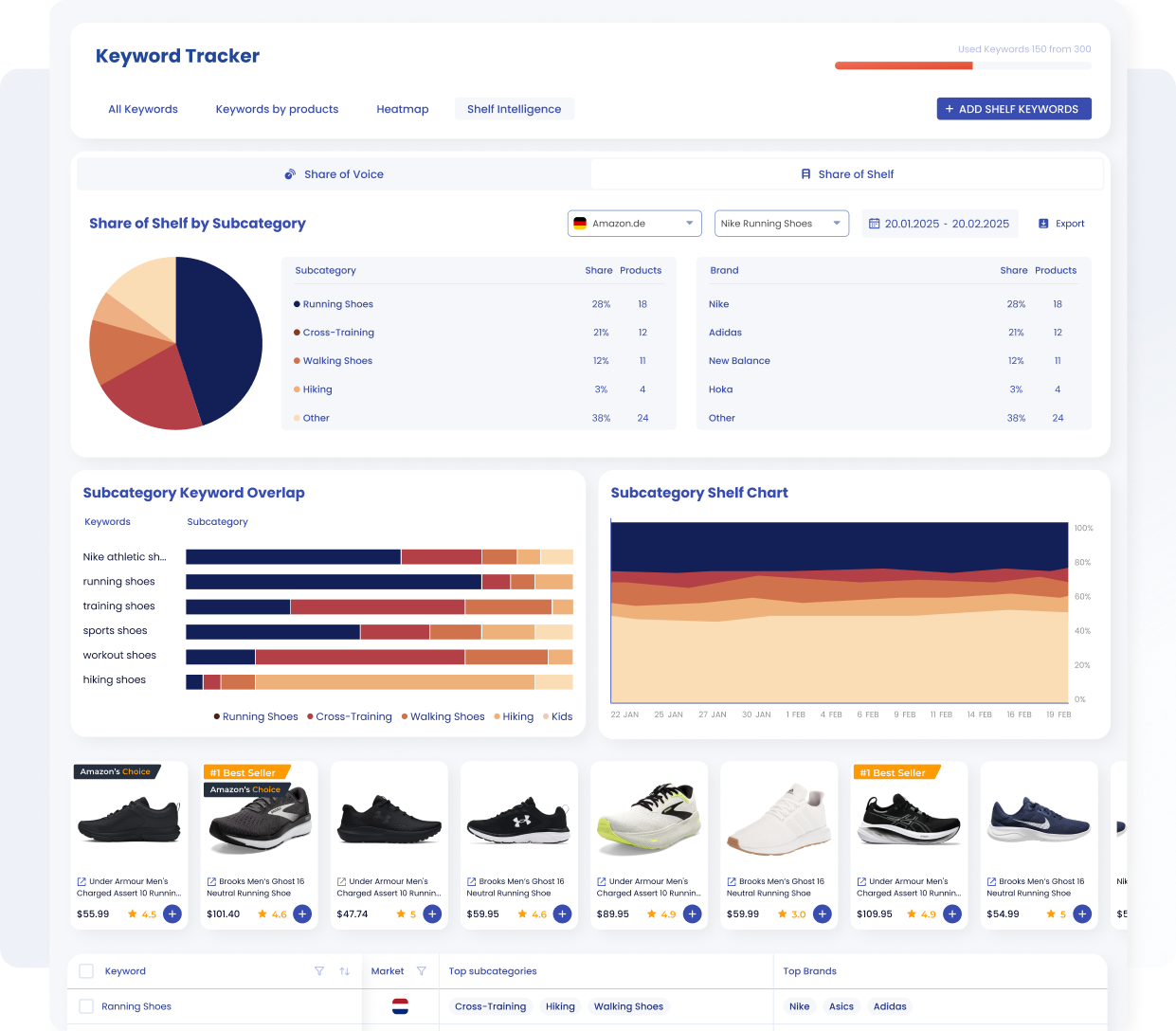
Track Share of Voice across keyword groups to see how visible your brand is in organic and sponsored search results.
How Do I Conduct Amazon Keyword Research?
There are two types of approaches to keyword research. You can do it manually or automatically. To perform an automatic search, you can use the Amazon keyword tool.
First of all, you can easily determine the correct Amazon keyword tips for your products. Secondly, the keyword generator helps you ongoingly analyze your items’ listings and track keyword rankings. Thirdly, you can get keyword performance insights. Based on this information, you can optimize your SEO and marketing strategies by the book.
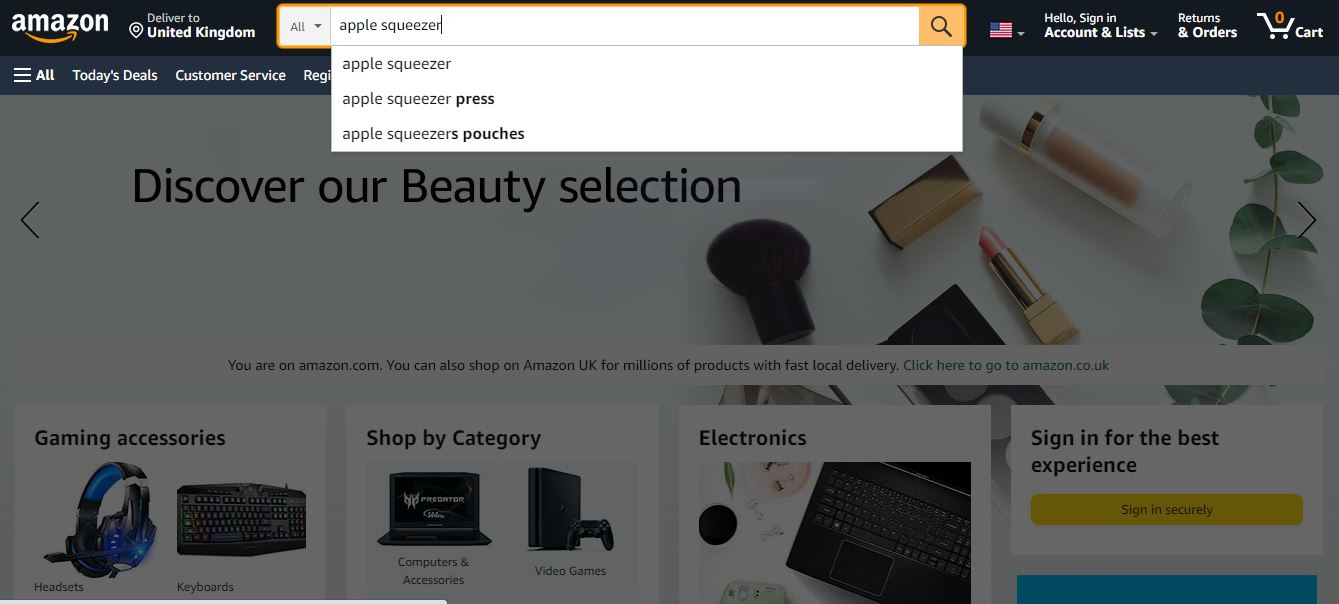
Meanwhile, you can use manual keyword research methods as an additional keyword source.
Manual keyword research
The most effective manual methods to find Amazon keywords are as follows.
#1. Automatic Amazon PPC Campaigns
When you run Amazon PPC campaigns in your Seller Central, you can choose between Manual Campaigns (you select the keywords yourself) and Automatic Campaigns (Amazon handles them automatically). In an automatic mode, you can extract a keyword report under Reports > Advertising. This way, you’ll get your top-converting keywords.
#2. Reverse ASIN Lookup
Reverse ASIN Search is the method that allows you to discover the most efficient competitors’ keywords. If you are enrolled in a Brand Registry, you can apply Amazon Brand Analytics as a reverse ASIN lookup tool.
#3. Amazon Autocomplete
Amazon autocomplete reveals the most frequently searched terms. Start typing a search query for your product in Amazon’s search bar. After that, you’ll see the typical search term sequences. Analyze them and filter out those that are the most relevant to your product.
#4. “Frequently Bought Together”
Look into the popular items that complement your product. By targeting complements, you can extract new keywords to reach new audiences.
#5. Google Ranking
There are sellers that have their own website, where they sell in addition to Amazon. In that case, they can utilize the Search Console to detect if it ranks for high-volume search queries. Such queries can be targeted as keywords on Amazon.
Tools for Amazon Keyword Research
Keyword research apps can help you detect all highly ranked Amazon search words relevant to your product. With that in mind, you can either build or improve your SEO strategy. In addition to keyword research, many of these services offer a range of additional features such as product research and listing optimization, making them valuable all-in-one solutions for Amazon sellers.
Amazon Keyword Tracking and Visibility Insights by SellerSonar
SellerSonar helps sellers stay on top of the changes that affect visibility and sales. You can monitor listing updates, Buy Box issues, review changes, product suppressions, competitor activity, and keyword performance from one place. On top of that, SellerSonar helps you move beyond simple keyword positions with Shelf Intelligence, where you can track Share of Voice and Share of Shelf for the keyword groups that matter most. Here’s how this works in practice.
#1. Add the keyword set you actually want to track
Once you have done your keyword research and selected the search terms that matter for your product, you can add them to SellerSonar and start tracking performance over time. This gives you a cleaner view of how your important keywords behave instead of checking rankings manually.
After you log in to your SellerSonar account, go to the Keywords section, choose the product you want to track, and add the keywords you want to monitor. If you work with larger keyword lists, you can also upload them in bulk using the import option.

Add Keywords
Also, there is an option to upload keywords to all products in bulk. For that, use the File Import button to open a pop-up window. Then, download the template, fill it with your keywords, and upload your file with a single click.
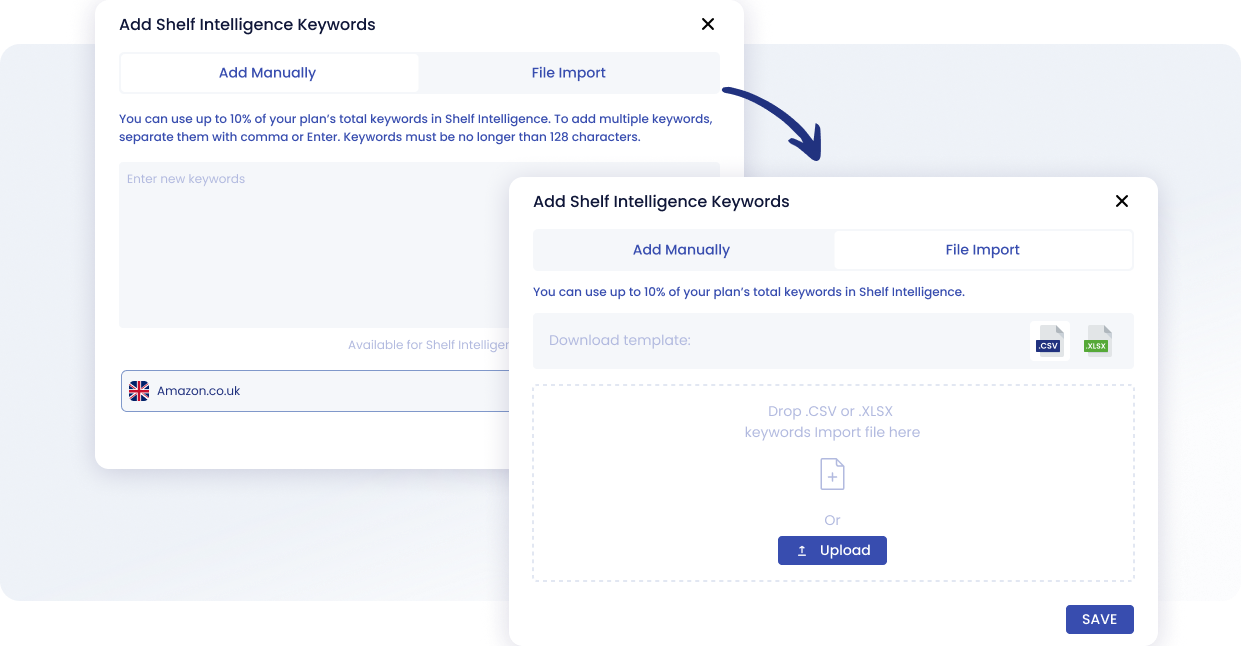
Interface for adding keywords to the Shelf Intelligence feature with manual input or file import.
When your keywords are added, SellerSonar helps you monitor how your positions change across the searches that matter to your product. This makes it easier to spot drops, gains, and patterns that would be hard to notice by checking Amazon manually.
Instead of looking at rankings as a one-time snapshot, you can use historical data to understand whether visibility is improving, slipping, or staying flat. That gives you a stronger base for listing updates, pricing changes, and campaign decisions.
#2. Compare your keyword visibility with competitors
Keyword tracking becomes much more useful when you compare your performance with competing products. SellerSonar helps you see where competitors are ranking better, which terms they appear for, and where they are gaining visibility faster than you.
This makes competitor analysis more practical. Instead of just collecting keyword ideas, you can see where the competitive pressure is strongest and where your product still has room to grow.

If your competitor listings are added, you can track organic and paid positions. It helps to identify keywords that tend to rank at the top on the search results page and earn more clicks.
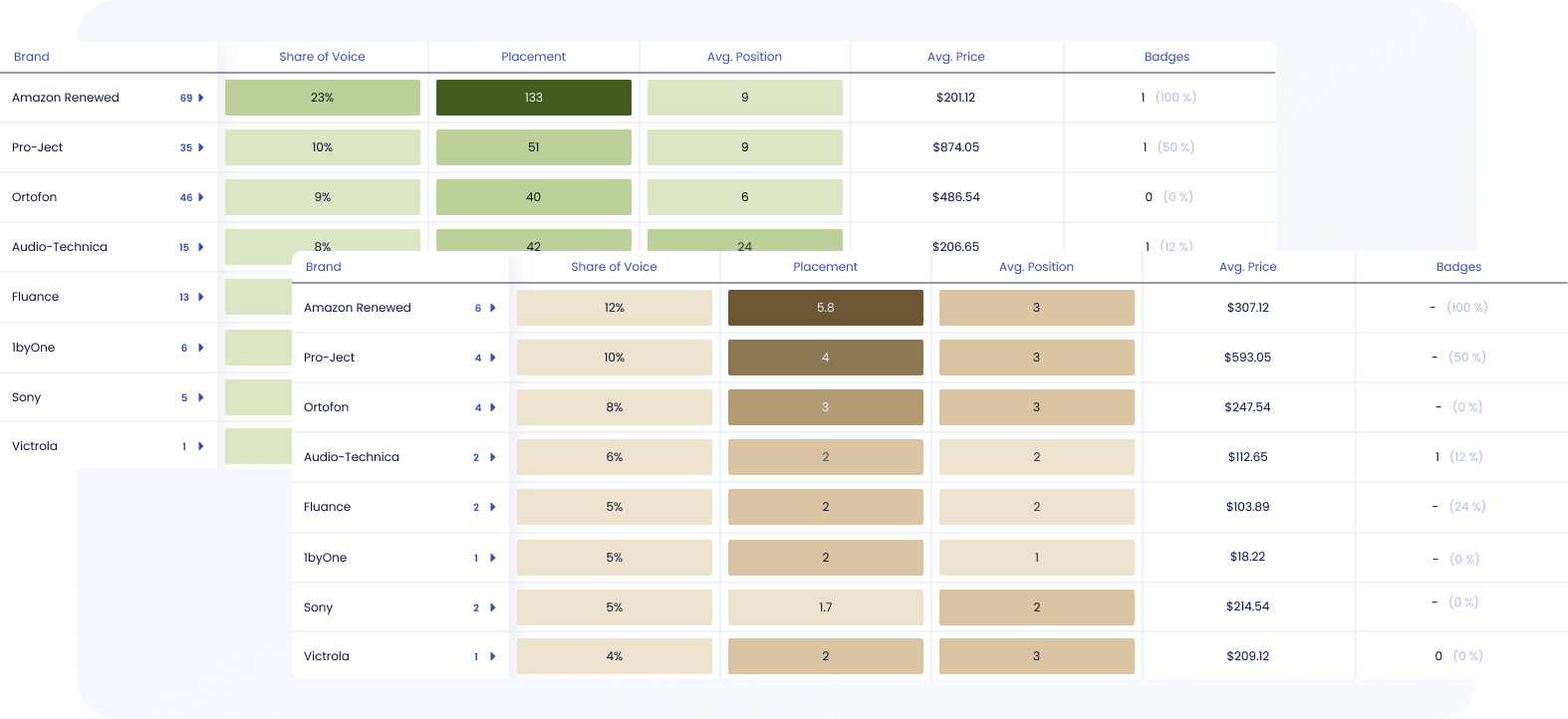
Side-by-side view of organic (green) and sponsored (sand) Share of Voice metrics helps sellers uncover keyword gaps instantly.
You can compare your keyword rankings with your competitor’s rankings and analyze which keywords your competitors use to rank higher in search results and lead with a superior organic reach.
#3. Use Share of Voice to measure search visibility
Keyword rankings are useful, but they do not show the full picture. SellerSonar’s Shelf Intelligence adds Share of Voice, which shows how visible your brand is across organic and sponsored results for the keyword groups you track.
This helps you understand more than just “where do I rank?” You can see how much visibility your brand actually owns, which competitors are gaining or losing space, and whether your changes are improving discoverability across the search results page. SellerSonar’s Share of Voice view compares organic and sponsored visibility side by side, which makes keyword gaps easier to spot.
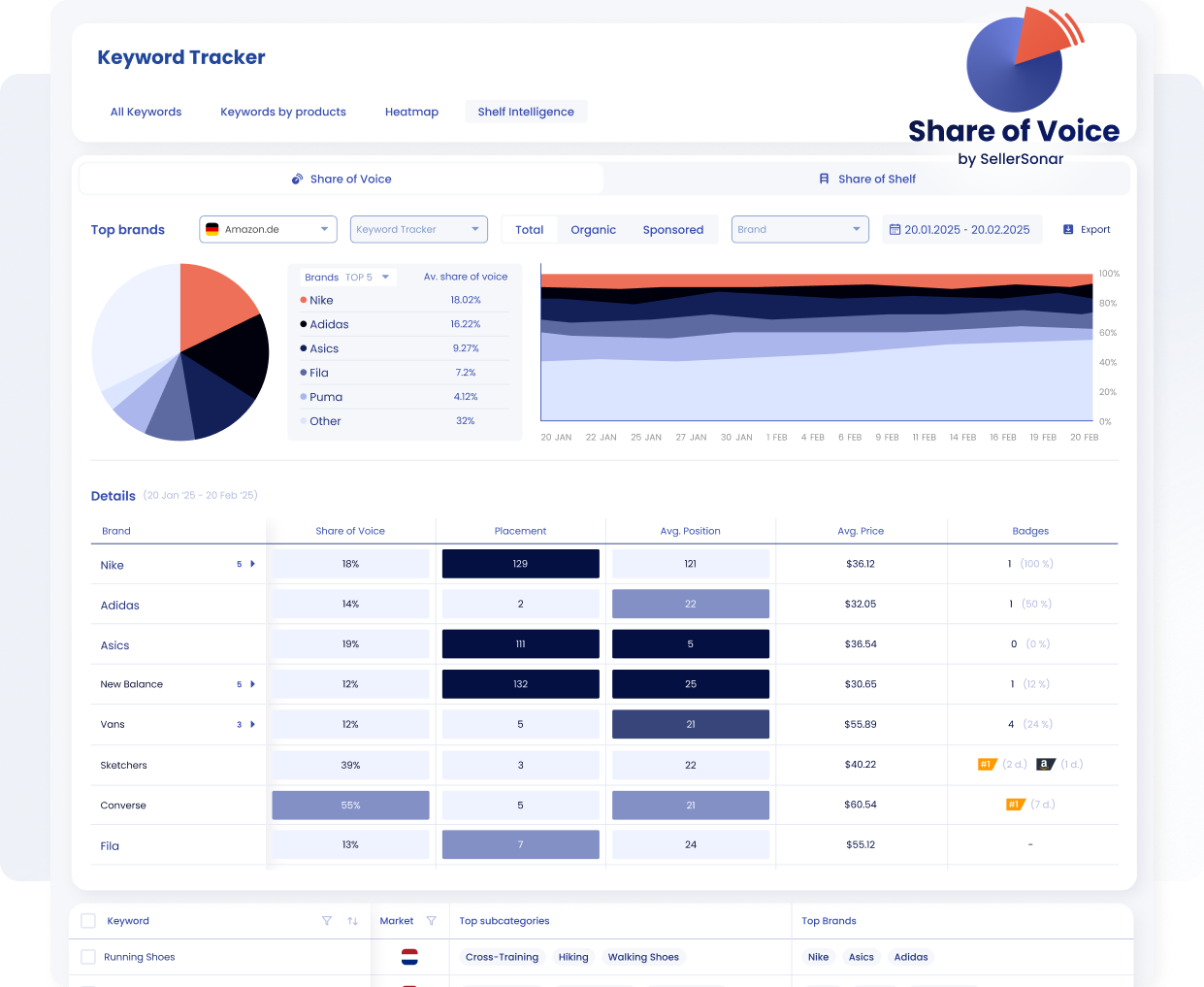
SellerSonar’s Share of Voice dashboard reveals which brands dominate search results and details their placements, positions and prices.
Furthermore, in the Competitors section, can compare product metrics with your competitors’ changes in price, BSR, product review numbers, keyword rankings, etc. Our competitor research tool provides convenient graphs to understand the product’s competitive landscape. For example, you can monitor your competitors’ BSR to respond to spikes and drops in sales and quickly adjust your sales strategy.

#4. Use Share of Shelf to see what shoppers really see
SellerSonar also includes Share of Shelf, which shows how much of the digital shelf your products occupy compared with competitors. In practical terms, it answers a bigger question than keyword position alone: out of everything shoppers see for this search, how much belongs to you and how much belongs to other brands?
Share of Shelf helps you see where your products appear on Amazon’s shelf, which brands dominate that space, and which subcategories take the most visibility. That is especially useful when keyword rankings look stable, but the actual shelf is being controlled by other products or neighboring subcategories.
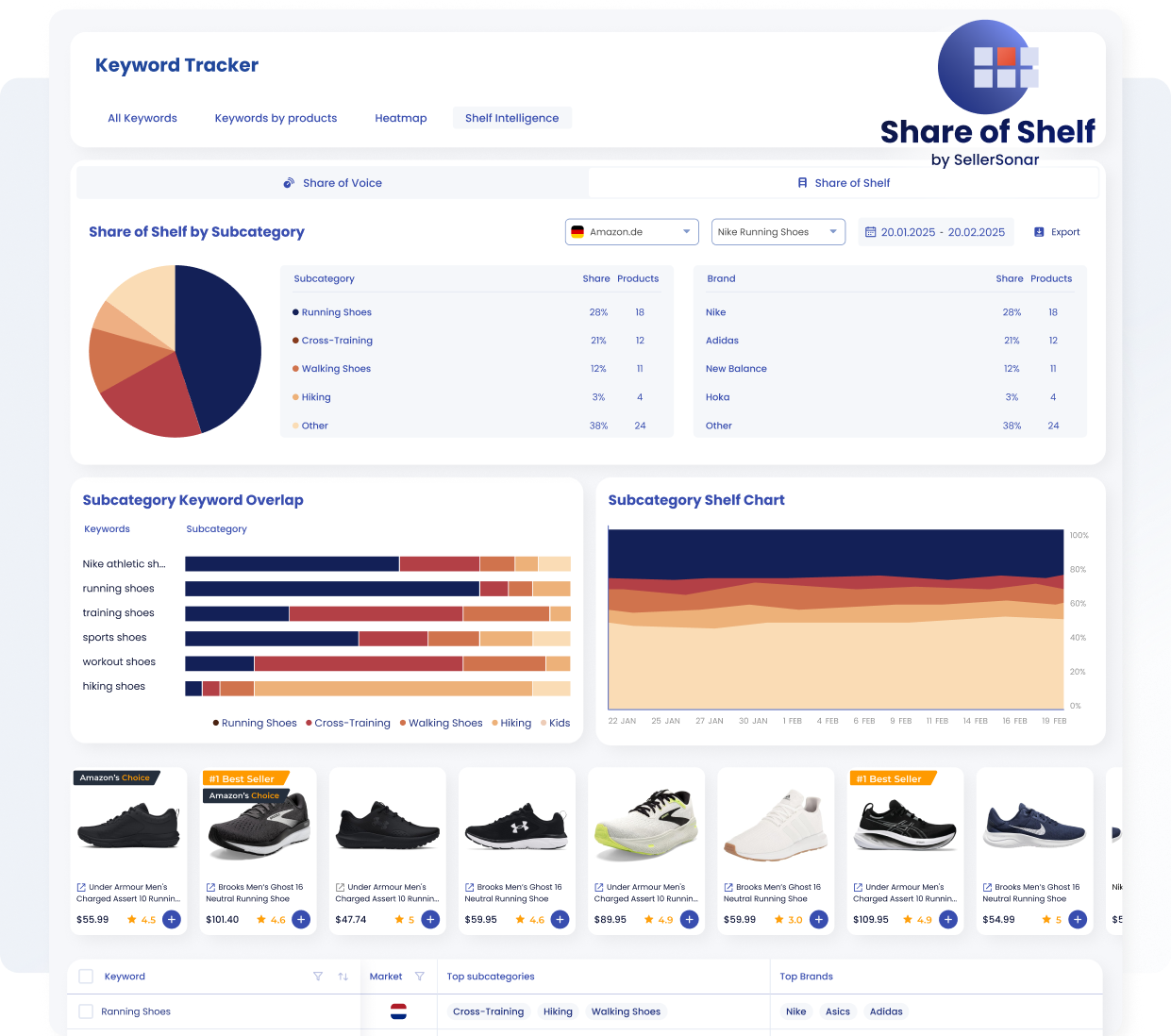
Use Share of Shelf to see which brands and subcategories dominate the digital shelf for your tracked keyword groups.
Shelf Intelligence also helps you understand how keyword intent spreads across subcategories. This makes it easier to see where search visibility is concentrated and where competing shelf space overlaps.
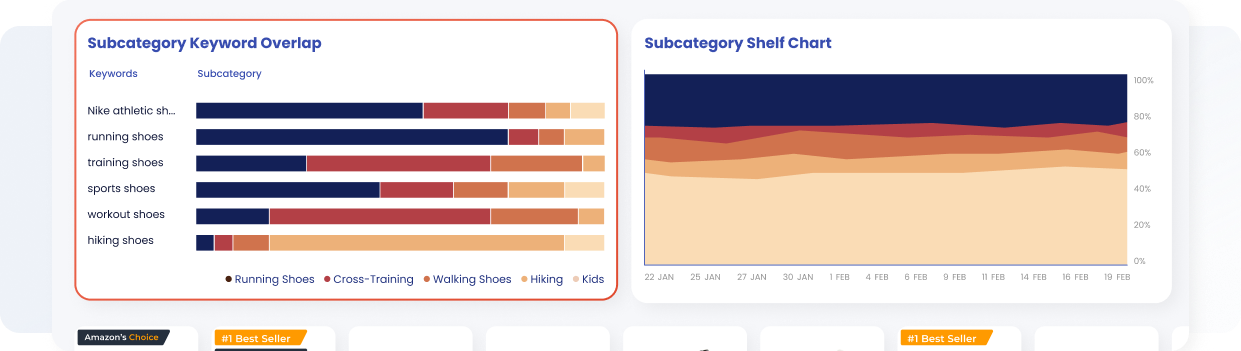
Subcategory Keyword Overlap helps you see how tracked search terms are distributed across different shelf segments.
#5. Turn keyword research into ongoing visibility tracking
The biggest advantage of this setup is that keyword research stops being a one-time task. Instead, you can keep tracking how your products perform, how competitors move, how much visibility your brand really owns, and where you need to react next.
This is just a taste of what SellerSonar has to offer. To explore the features firsthand, feel free to check out our demo or schedule a live meeting with our expert.
Optimizing Product Listings with Keywords
Optimizing product listings with keywords is essential for improving visibility and driving sales on Amazon. Here’s how to do it effectively:
- Strategic Placement: Incorporate your primary keywords naturally into your product title, bullet points, description, and backend search terms. Focus on readability and relevance to ensure that your listing resonates with both customers and Amazon’s search algorithm.
- Prioritize Relevance: Choose Amazon key words that accurately describe your product and match what shoppers are likely to search for. Avoid keyword stuffing or using irrelevant terms, as this can harm your listing’s performance and credibility.
- Long-Tail Keywords: Don’t just focus on broad, high-volume keywords. Include long-tail keywords, which are longer and more specific phrases that capture the intent of potential buyers. These keywords often have less competition and higher conversion rates.
- Optimize Images and Backend Keywords: Don’t overlook the importance of images and backend keywords. Use high-quality images that showcase your product and include relevant keywords in the backend search terms section to further improve your listing’s visibility.
- Monitor Performance: Regularly monitor the performance of your keywords using SellerSonar’s keyword rank tracker. Continuously refine your strategy based on new data and insights to maintain a competitive edge.
Try SellerSonar now. Register for our 14-day trial with all Business plan features and boost your incredible journey of running your business on the online platform.

