






Shoppers on Amazon are used to fast delivery. Therefore, every Amazon seller needs to process orders quickly. In most cases, the sales process goes smoothly. A shopper adds a product to the cart, completes the purchase, and the seller receives the order. Normally, Amazon verifies the payment quickly, and the seller can then fulfill and ship the order.
However, if there is an issue with the customer’s payment method, the sales process can take longer than expected. In that case, the transaction receives a Pending status. Sellers cannot change this status manually because Amazon is still processing the transaction.
A delayed order can create problems for both the seller and customer. Read further to learn why Amazon purchases remain pending, how to find these orders, and what to do when you have pending orders on Amazon.
What Does a Pending Order Mean?
When a customer places an order on Amazon, the platform initially puts the item on hold and shows the order status as Pending. While the order is Pending, Amazon verifies the buyer’s payment method.
Amazon doesn’t publish a fixed holding time. The order moves on once the payment is authorized. If there’s a problem with the payment method or verification, Amazon’s Pending Orders help page says processing can take as long as 21 days. After that, according to Amazon’s seller support team, the order is canceled and the item goes back into inventory.
An order cannot be fulfilled until its status changes from Pending to Unshipped. Sellers should therefore monitor their order status and avoid shipping products before Amazon confirms that the order is ready for fulfillment.

How Does the Amazon Order Process Work?
When an Amazon shopper adds an item to their cart and checks out, the platform processes the purchase according to a defined procedure. Delays can occur if something goes wrong during payment or order verification.
Amazon order process steps
- The customer adds a product to the shopping cart.
- Amazon places the transaction in Pending status.
- The order appears under the Pending tab in Manage Orders, where it can’t be shipped or canceled yet.
- Amazon verifies the purchase and the customer’s payment method.
- If payment verification succeeds, the order status changes to Unshipped. If verification fails, Amazon may keep the order pending or cancel it.
- The order appears in your Orders report and FBM Unshipped orders report, and the Confirm shipment and Cancel order buttons become available in Manage Orders.
- The seller processes and fulfills the order or cancels it when appropriate.
Why Are Amazon Orders Pending?
When a customer’s order on Amazon is put on hold, it receives a Pending status. The most common reason is that Amazon has not yet obtained authorization for the customer’s payment method.
For FBA orders, an order can also stay Pending while Amazon gathers all the items, or when one item in a multi-item order is out of stock.
Common reasons for pending orders
- Amazon couldn’t get authorization for the buyer’s credit card.
- The buyer chose convenience store payment and hasn’t paid yet.
- For an FBA order, the buyer qualified for free shipping, and Amazon is waiting to gather all the items.
- For an FBA order with several items, one item is out of stock. Even if Amazon ships the in-stock units separately, the order still shows Pending.
- For Subscribe & Save, Amazon places orders several days before the customer’s delivery date to reserve inventory.
- It’s a business order waiting for the customer’s approval: up to 7 days, or up to 14 days for Business Prime Medium and Enterprise customers. Orders that aren’t approved in time are canceled automatically.
Why can Amazon digital orders remain pending?
Digital products can also receive a Pending status. Although digital products do not need to be packed and shipped, their payment and security checks can still be delayed.
When a customer purchases a digital product, they would normally receive access or a code shortly after payment. If this does not happen, the transaction may still be pending.
This usually occurs when Amazon cannot authorize the customer’s payment method or needs to conduct additional verification. The customer may need to contact Amazon Customer Service to resolve the payment issue.
What to Do with Amazon Pending Orders
Do not ship an order while its status is Pending, even if the customer contacts you and asks for the product to be sent. Amazon has not yet confirmed the payment, and the seller cannot confirm the order as shipped until it appears as Unshipped.
Pending orders don’t include the buyer’s shipping address or contact information, so you couldn’t ship them correctly anyway. If a buyer contacts you while the order is Pending, even to cancel it, Amazon says to refer them to Amazon Customer Service. You don’t need to open a support case for a normal pending order: if verification fails, Amazon cancels the order itself.
Monitor Critical Retail Issues with SellerSonar
Pending orders can sometimes coincide with broader issues affecting Amazon sales, from listing problems and product-availability risks to unexpected offer changes. SellerSonar helps sellers monitor important public retail signals and receive alerts when action may be needed.
SellerSonar does not track the payment status of individual pending orders. Sellers must continue using Seller Central to check and manage those transactions. Instead, SellerSonar monitors listing and marketplace events that may affect product visibility, availability, competition, and sales performance.
With SellerSonar, you can:
- Track product-availability changes: receive alerts when a tracked product becomes unavailable or its public status changes.
- Monitor listing issues: identify suppressed listings, missing content, retail issues, or unexpected changes that may affect visibility and conversions.
- Detect Buy Box and offer changes: stay informed about seller appearances, seller removals, price fluctuations, Buy Box events, and offer competition. Buy Box Lost/Won availability depends on the selected plan.
- Analyze product-performance trends: combine current retail signals with historical charts to understand changes in ratings, reviews, prices, sellers, Best Sellers Rank, and keyword positions.
- Automate monitoring with custom alerts: receive notifications by email or Slack, with API and webhook workflows available on supported plans.
This monitoring does not replace Seller Central or Amazon Customer Service for resolving pending orders. It reduces the need to check public listings manually and can help sellers identify broader retail issues before they contribute to a larger decline in visibility or sales.
Monitor your Amazon products smarter with SellerSonar.
How to Find a Pending Order
To check orders with a Pending status, sign in to Seller Central and open the Manage Orders page. Click the Pending tab to see them. Pending orders that Amazon fulfills (FBA) are listed on the View FBA orders tab.
Pending orders don’t appear in your Orders report or FBM Unshipped orders report. Your inventory does change, though: Amazon subtracts the ordered quantity in Manage Inventory, and if you had only one unit, the listing disappears from the offer page and shows zero until the order is processed.
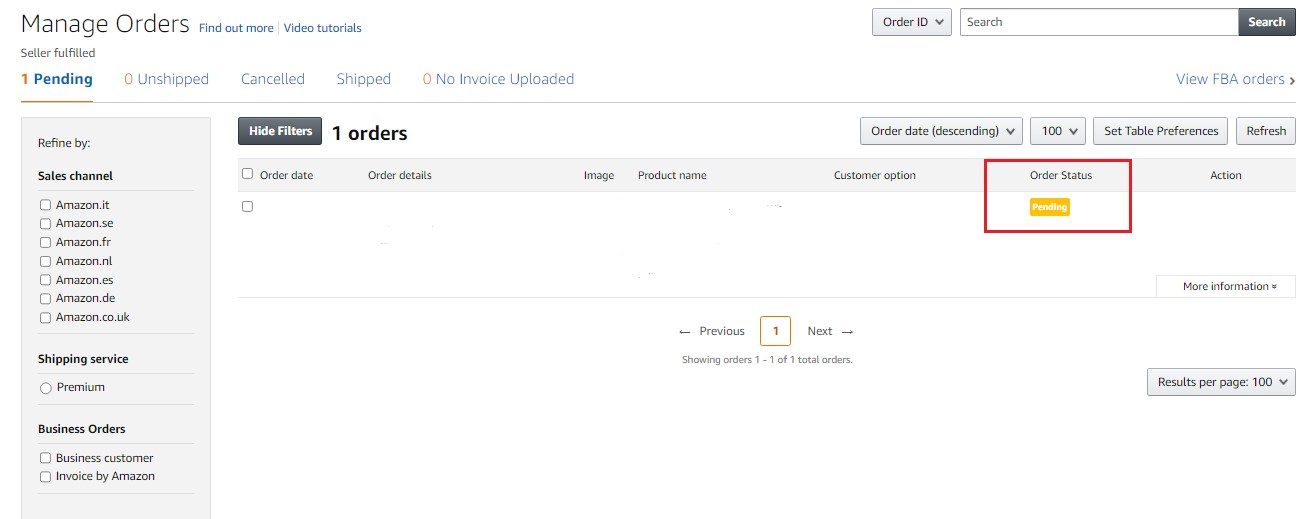
Amazon pending order
Is It Possible to Cancel a Pending Order?
No, not while it’s Pending. Once Amazon verifies the payment, the Confirm shipment and Cancel order buttons appear in Manage Orders, and the order shows up in your Orders report and FBM Unshipped orders report. At that point, ship it, or cancel it if you need to.
To cancel an eligible merchant-fulfilled order, open Manage Orders and select Cancel order in the Action column. Choose the appropriate cancellation reason and submit the request. Amazon will notify the customer automatically.
Professional sellers may also be able to cancel eligible orders in bulk by using an Order Cancellation file. Sellers should avoid canceling orders unnecessarily because seller-initiated cancellations can affect account-performance metrics.
Final Thoughts
A pending Amazon order usually means that the marketplace is still verifying the payment or processing the transaction. Sellers cannot manually approve the payment or change the status. The safest approach is to wait for Amazon to move the order to Unshipped before fulfilling it.
Pending-order management is only one part of maintaining a healthy Amazon business. Sellers should also monitor product availability, listing content, Buy Box ownership, competing offers, reviews, keyword rankings, and product suppression.
Amazon monitoring software can help reduce manual listing checks. SellerSonar provides alerts for listing changes, seller activity, Buy Box events, reviews, keyword positions, prices, and retail issues, with coverage and update frequency depending on the selected plan.
Try SellerSonar and register for a free 14-day trial to monitor the retail signals affecting your Amazon products.



Sandra