





Verdict: BQool is a low-cost Amazon repricer: Repricing Central starts at $25 a month ($22.5 billed yearly) per BQool’s pricing page, but that price covers one marketplace region, so selling in the US and Europe means two subscriptions. It earns its place with AI Buy Box rules, conditional rules for aged or low inventory, and EU VAT settings, and it is weaker on reporting and history.
Best for: FBA and FBM resellers, wholesalers and private label sellers who want automated Buy Box repricing on Amazon for under $100 a month per region. Look elsewhere if: you also sell on Walmart, you sell in many regions on a tight budget, or what you actually need is an alert when the Buy Box or a listing changes.
This BQool review covers the Repricing Central repricer, its 2026 pricing and plan limits, the free trial, and BigCentral, BQool’s separate tool for review requests and seller feedback. We read every price and limit on BQool’s own pricing pages and help center on November 4, 2026, and every screenshot below comes from those public pages.
Disclosure: SellerSonar publishes this review. We don’t sell a repricer, but we compete with BQool for the Amazon seller’s software budget, so we say where BQool is the better choice and link each fact to BQool’s own pages.
BQool pricing in 2026: Repricing Central plans at a glance
According to the Repricing Central pricing page, BQool sells five repricer plans. Each plan caps how many listings you can reprice with AI rules and with rule-based rules.
| Plan | Billed monthly | Billed yearly (per month) | AI and conditional listings | Rule-based listings | Users |
|---|---|---|---|---|---|
| Basic | $25 | $22.5 | 50 | 1,000 | 2 |
| AI Deluxe | $50 | $45 | 100 | 5,000 | 5 |
| AI Premium | $100 | $90 | 1,000 | 10,000 | 10 |
| AI Ultimate | $200 | $180 | 6,000 | 30,000 | 15 |
| AI Enterprise | $300 | $270 | 15,000 | 50,000 | 20 |
Here are the plan cards with yearly billing selected.
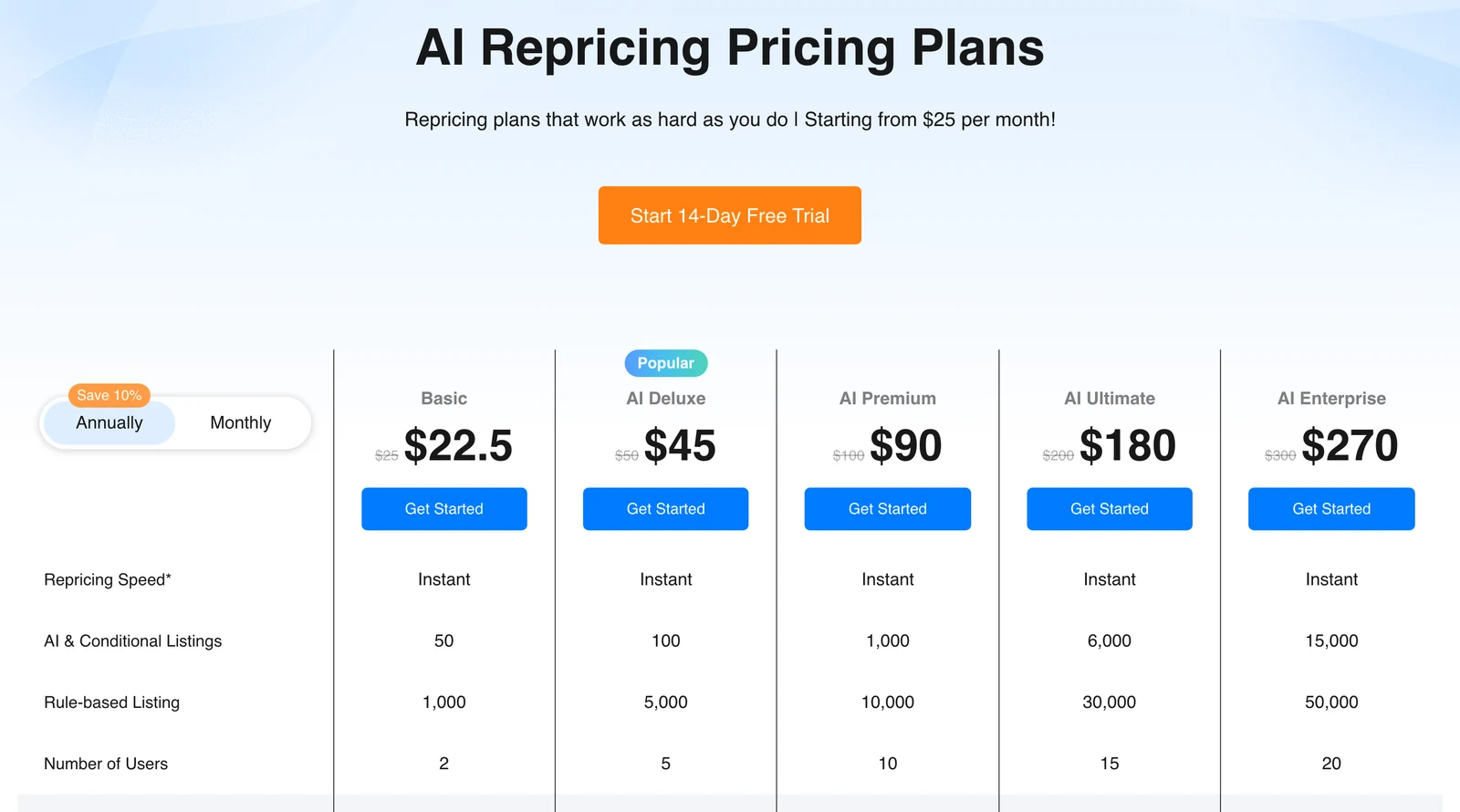
Under the plans sits the line that changes the real price most: “Each marketplaces sold separately: US, CA, MX, JP & EU (DE, ES, FR, IT & UK included as one marketplace).”

In practice, the plan price is per region:
- US plus Europe means two subscriptions. BQool’s help center confirms that the five marketplaces are sold separately. With AI Deluxe in both regions at the listed prices, that works out to $100 a month, or $90 billed yearly.
- Europe is one region, with one listing allowance. Germany, Spain, France, Italy and the UK share one EU subscription, and BQool’s Europe Settings page is where you split that plan’s listings between the five countries.
- Prices are in US dollars everywhere. BQool’s help center says all prices are listed in US dollars, including for EU sellers.
- Yearly billing saves 10%, and loyalty adds more. The pricing FAQ adds a renewal discount of 5% in the first consecutive year, 10% in the second and 15% in the third.
- Cards only. According to the same FAQ, BQool accepts Visa, MasterCard, JCB and PayPal linked to those cards, “but not Debit Card, American Express, or Discover.”
BQool counts only the listings you switch on for repricing, not your whole catalog. You can pause out-of-stock listings after a set number of days so they stop using the plan limit.
What changed in 2026 (and what didn’t)
The prices did not move. Archived copies of the pricing page from December 15, 2025, March 11, May 9 and September 25, 2026 show the same $25 to $300 monthly prices and the same listing caps as the live page.
The plan table did gain two rows between the May 9 and September 25 versions: Price Looping, which starts on AI Deluxe, and integrations with SellerAmp, InventoryLab and Boxem on every plan. BQool’s site now also lists a third product, AI Advertising, marked New, from $99 a month plus 2% of ad spend over $5,000, according to its pricing page.
Plan limits: what Basic leaves out
According to BQool’s feature table, the $25 Basic plan has the five AI Win Buy Box rules and the rule-based builder, and nothing from the Conditional Repricer group.
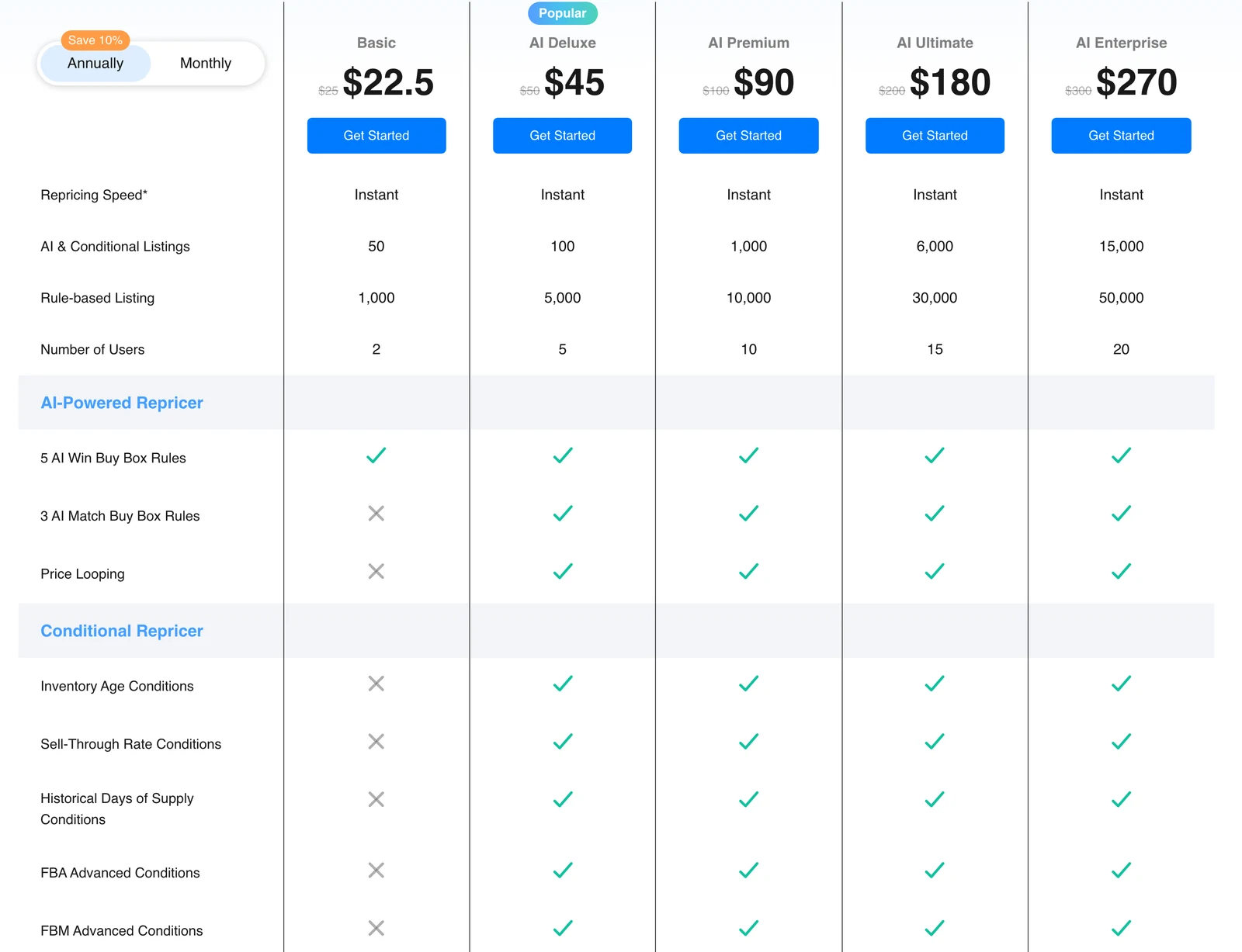
The same rows as a table:
| Feature | Basic ($25) | AI Deluxe ($50) and up |
|---|---|---|
| 5 AI Win Buy Box rules | Included | Included |
| 3 AI Match Buy Box rules | – | Included |
| Price Looping | – | Included |
| Inventory age, sell-through and days-of-supply conditions | – | Included |
| FBA and FBM advanced conditions | – | Included |
| Rule-based rules, competitor analysis, profit calculator, schedules | Included | Included |
| AI and conditional listings | 50 | 100 to 15,000 |
The AI cap is the limit most sellers hit first. According to the plan table, Basic reprices 50 listings with AI and up to 1,000 with rules, so a wholesaler with 400 active SKUs either runs most of them on rules or moves to AI Premium.
💡 Expert Tip: Before picking a plan, count only the SKUs that actually have competition on the listing. Private label ASINs where you are the only seller don’t need a repricer slot, and BQool lets you leave them switched off.
BQool free trial: what you get
BQool’s pricing FAQ promises “a 14-day free trial with no credit card required”. Some buttons on the same page say “Start 30-Day Free Trial”, but the FAQ and the help center both say 14 days for the repricer.
- You trial the $100 plan. According to BQool’s help center, the trial runs on the $100 monthly plan, so you test the AI and conditional rules even if you will buy Basic.
- One product at a time. The trial covers Repricing or BigCentral, and a second product needs an email to support.
- No automatic charge. When the trial ends, BQool asks you to subscribe; if you don’t, your account is removed after 90 days.
- Seller Central access is required. Repricing starts only after you authorize BQool through Amazon’s SP-API in Seller Central.
BQool repricer review: what it does well
Repricing Central reacts to Amazon’s price notifications. According to BQool’s repricing mechanics article, Amazon sends an SQS report when prices or offer positions change, with the top 20 offers, Buy Box winner, fulfillment types and feedback, and BQool sends back a new price once it has calculated one.
The AI side is a set of presets rather than one black box. BQool’s help center lists five AI Win Buy Box rules, from Sales Maximizer to Profit Maximizer, plus three AI Match Buy Box rules that never price below the Buy Box. Each rule asks how to behave in specific cases, such as when you are the only seller or the Buy Box is suppressed.
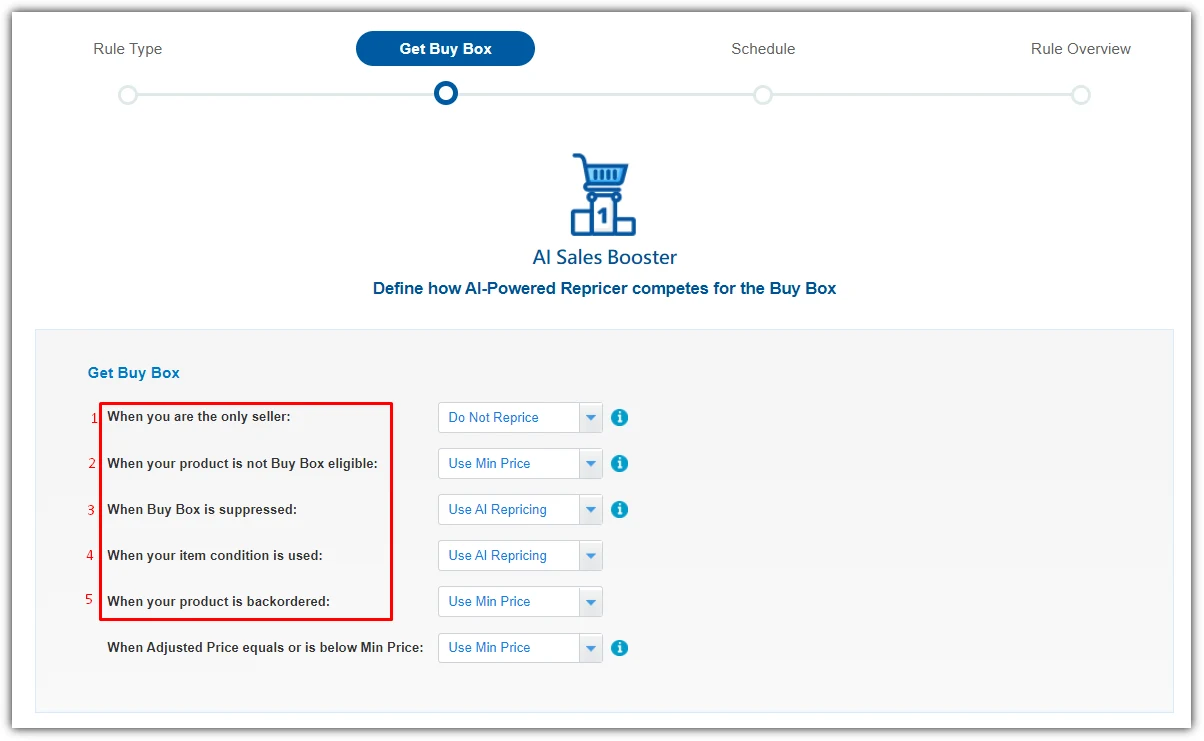
That scenario list is useful: you can skip repricing when you are alone on the listing and use your minimum price when the item is backordered.
Other strengths, all documented in BQool’s help center:
- Guardrails. Min and max prices are mandatory, and the Price Change Safety Net limits a single drop. In BQool’s example, a 50% trigger and a 10% cap turn a planned cut from $10.00 to $3.99 into $9.00.
- Inventory-aware rules. From AI Deluxe up, conditional repricing switches rules by inventory age, sell-through rate or historical days of supply, which BQool ties to Amazon’s low-inventory-level fee.
- EU profit math. The VAT settings cover five VAT types, with standard rates of 19% for Germany and 20% for France per BQool, and listings can be marked for the European Fulfillment Network.
The Competitor Analysis window is the screen you will open most. It lists up to 20 sellers on the ASIN with price, shipping, seller type, condition, handling time and ratings, plus Amazon’s suggested lower price when Amazon provides one.
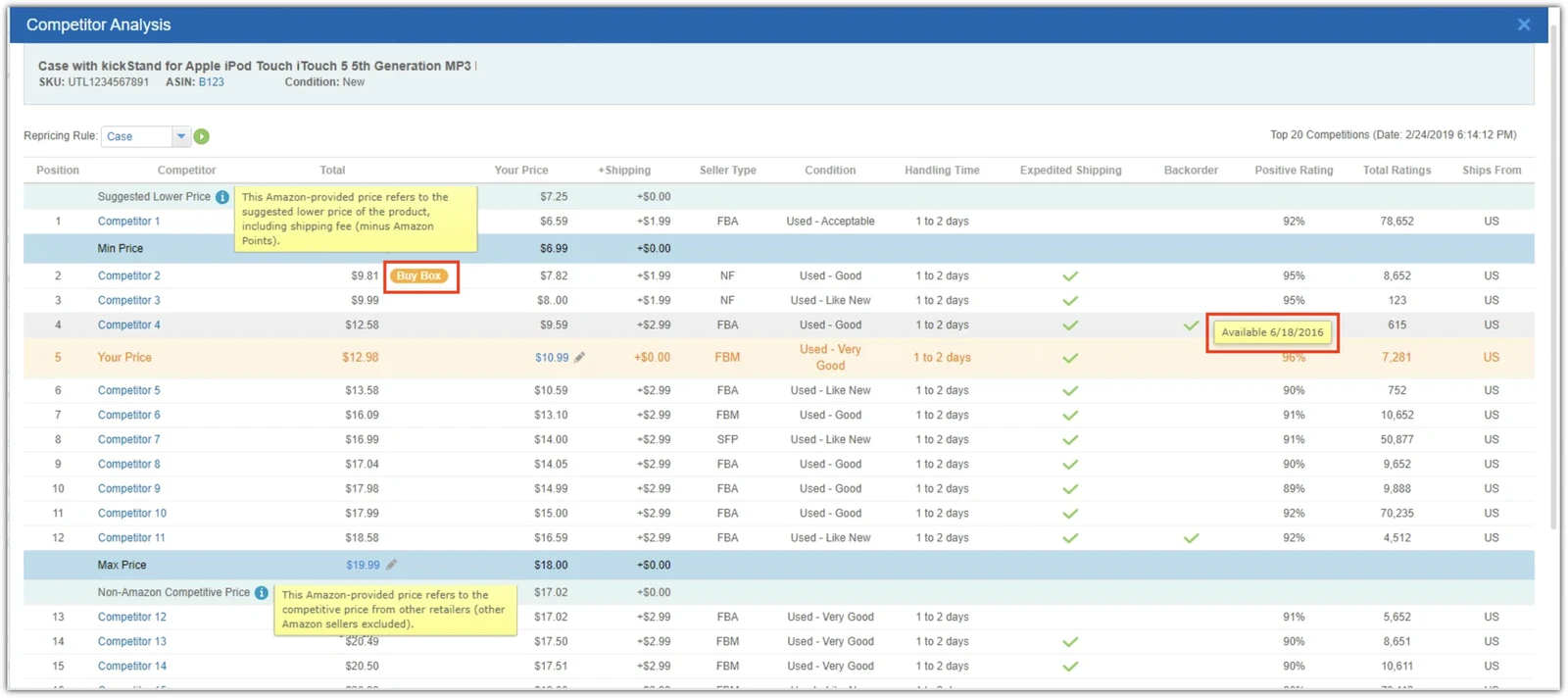
Your min and max prices sit inside the offer list, so you see which competitors your rule can reach.
Where BQool falls short
Most limits come from the way BQool gets its data:
- Speed depends on Amazon. The plan table footnotes the speed row “As fast as Amazon allows”, and BQool’s speed FAQ admits SQS reports can arrive late. It also says BQool reprices “only if competitors change their price”.
- Rule changes take an hour. A new or edited rule takes effect after one hour, per BQool.
- Reporting is daily. According to the dashboard article, repricer analytics update once per day.
- Short price history. Price History shows 24 hours to 5 days, and advanced search reaches back 11 days.
- Catalog lag. BQool says FBA data arrives every 1-2 hours and FBM data every 4-8 hours, and a new listing can take up to 96 hours to sync.
- Amazon only. The FAQ says Repricing Central “only enables you to reprice on Amazon”, so there is no Walmart or eBay repricing.
- No cross-ASIN repricing. The mechanics article states that BQool “does not support repricing activities for cross ASINs”.
The dashboard reports sales, orders and a Buy Box win ratio per rule.
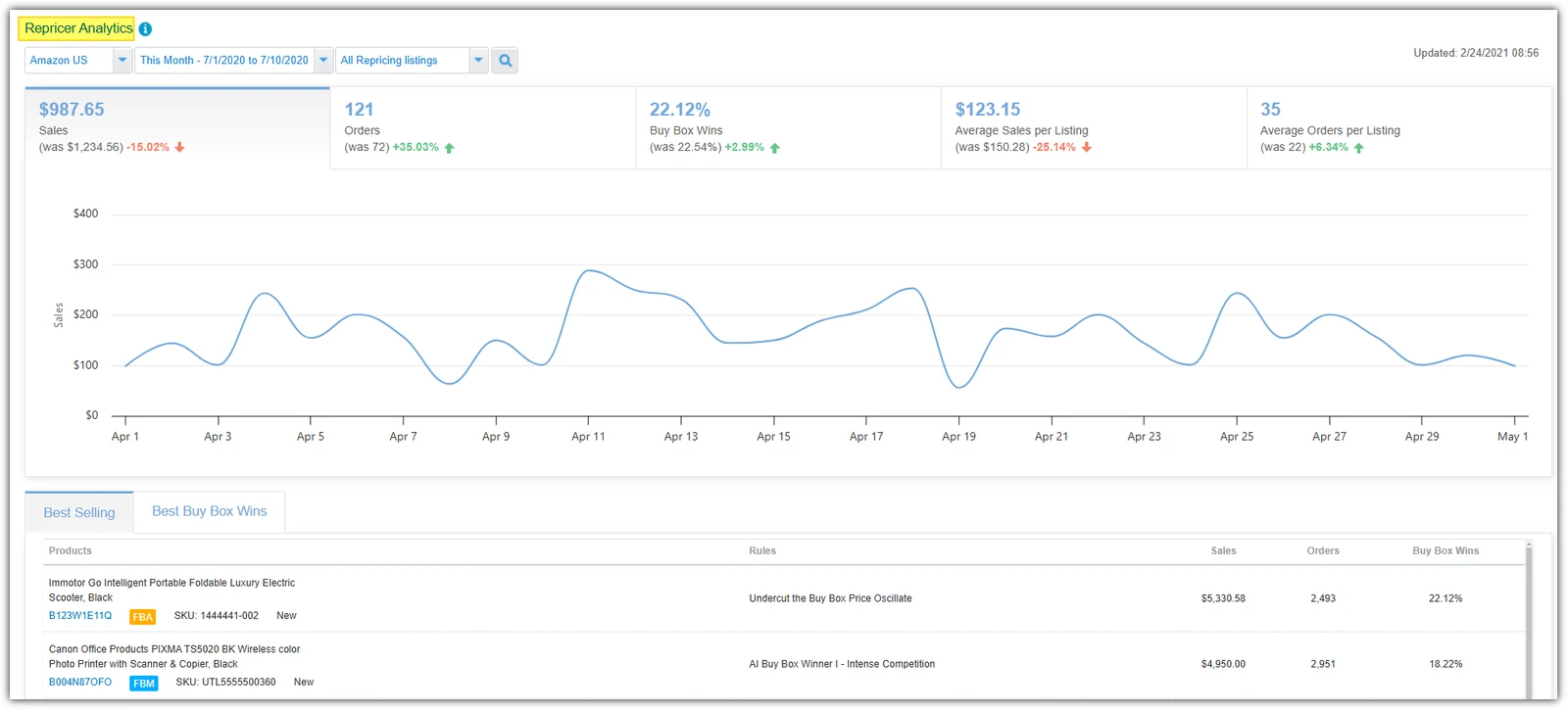
That Buy Box figure looks back. BQool defines the Buy Box win percentage as the share of the day’s SQS reports in which you held the Buy Box, and a day with no reports counts as 0%. We found no Buy Box lost alert in Repricing Central’s help center.
🎯 Pro Insight: A repricer only sees price competition. If Amazon suppressed the Buy Box, a new seller went below your floor, or your listing was edited, the repricer sits at your floor and waits for the next price notification.
BigCentral: BQool’s review request and feedback tool
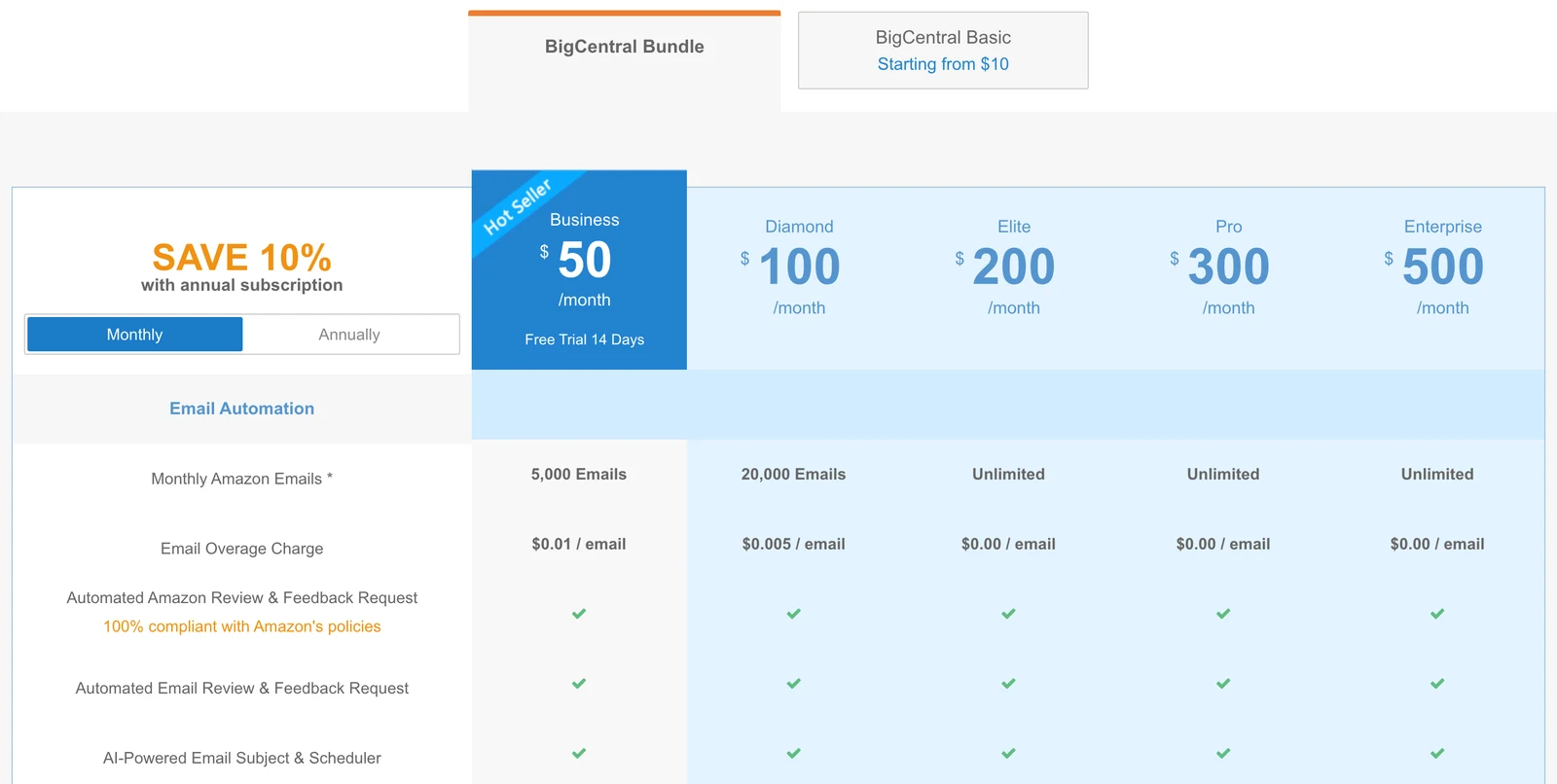
BQool’s second product, BigCentral, is live and sold separately. The BigCentral pricing page offers a bundle from $50 a month (Business) to $500 (Enterprise), or single modules from $10 a month each.
The core feature is automated review requests. BQool’s Request a Review automation sends Amazon’s own review-and-feedback message, which “is non-customizable”, on a schedule you set, for example 5 days after delivery for FBA orders.
- Email limits. Per the pricing page, Business includes 5,000 Amazon emails a month and Diamond 20,000, and the single Email Automation module includes 500.
- Feedback management. The Feedback Manager filters seller feedback by star rating and marketplace, with negative feedback email alerts.
- Product tracking. The $10 Product / Keyword Research module includes a Product Tracker for 5 ASINs with a product tracking alert, per the pricing page.
- Review tracking. The pricing page lists a review tracker from 25 ASINs on the $10 module, updated every 24 hours, and 500 ASINs on Business.
Most BigCentral help articles were last updated in 2023 or 2024, so check the trial before you build a workflow around it.
Is BQool worth it?
For a reseller who needs Buy Box repricing on one Amazon region, yes: the $22.5 yearly entry price, per BQool’s pricing page, is among the lowest of the paid repricers in our comparison. The value drops as you add regions.
| Seller type | Verdict |
|---|---|
| New FBA reseller, under 50 contested SKUs | Basic at $22.5 billed yearly is fair value. Amazon’s free Automate Pricing is worth testing first. |
| Wholesale or arbitrage, 100 to 1,000 SKUs, one region | AI Deluxe or AI Premium. The conditional rules for aged and low inventory are the main reason to pay more. |
| Seller in the US and Europe | Budget for two subscriptions. Compare against repricers that price by account or revenue. |
| Amazon and Walmart seller | Look elsewhere: BQool reprices on Amazon only. |
| Private label brand, mostly alone on its listings | You may not need a repricer. Monitoring for new sellers and Buy Box losses matters more. |
Pros & cons
Pros: low entry price; AI rules with clear presets; mandatory min and max plus a safety net; inventory-based conditional rules; EU VAT and EFN settings; SellerAmp, InventoryLab and Boxem integrations; 14-day trial without a card.
Cons: each region billed separately; only 50 AI listings on Basic; daily analytics and a 5-day price history view; one-hour delay on rule changes; Amazon only; Seller Central connection required; no Buy Box lost alert found in its documentation.
BQool alternatives
If per-region billing or the listing caps rule BQool out, these are the closest options. Our best Amazon repricers comparison covers nine tools in depth.
- Aura. Unlimited listings, priced by monthly sales instead: the Aura pricing page lists Starter at $37 a month billed yearly for up to $15K in sales, with Amazon and Walmart. Our Aura alternatives guide compares the two in detail.
- Informed Repricer. From $99 a month for sellers under $5k in monthly revenue, with no charge per item, according to Informed’s pricing page.
- Seller Snap. From $100 a month billed yearly for 1,000 SKUs on one marketplace, per the Seller Snap pricing page.
- Amazon Automate Pricing. Free with the $39.99 Professional plan, with changes “usually processed in less than 15 minutes”, according to Amazon.
When a monitoring tool makes more sense
Repricing Central changes your price. It doesn’t send you an alert that you lost the Buy Box, that a new seller appeared on your listing, or that someone edited your title. SellerSonar does that job, and it does not need a Seller Central connection: you add any ASIN on any of 23 Amazon marketplaces.
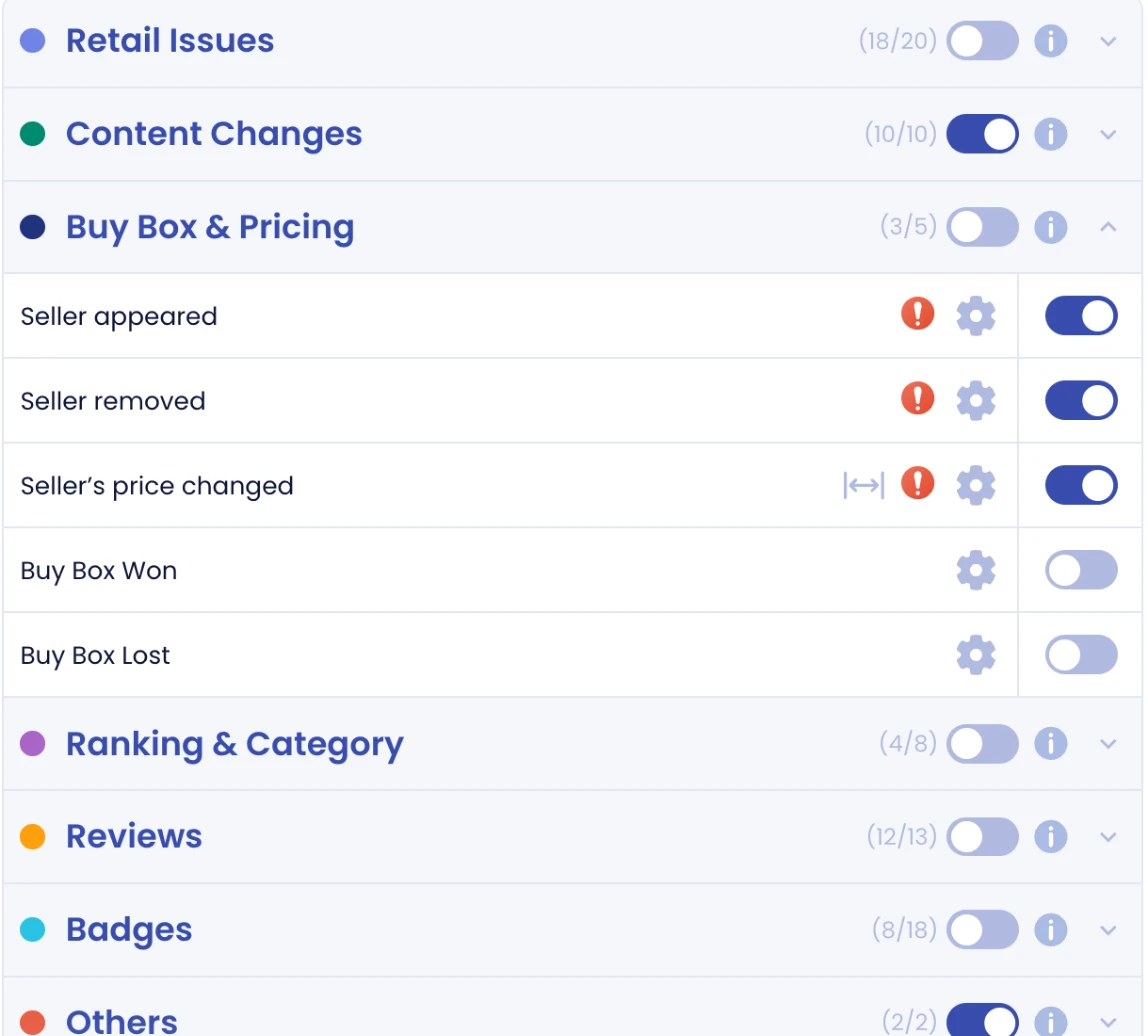
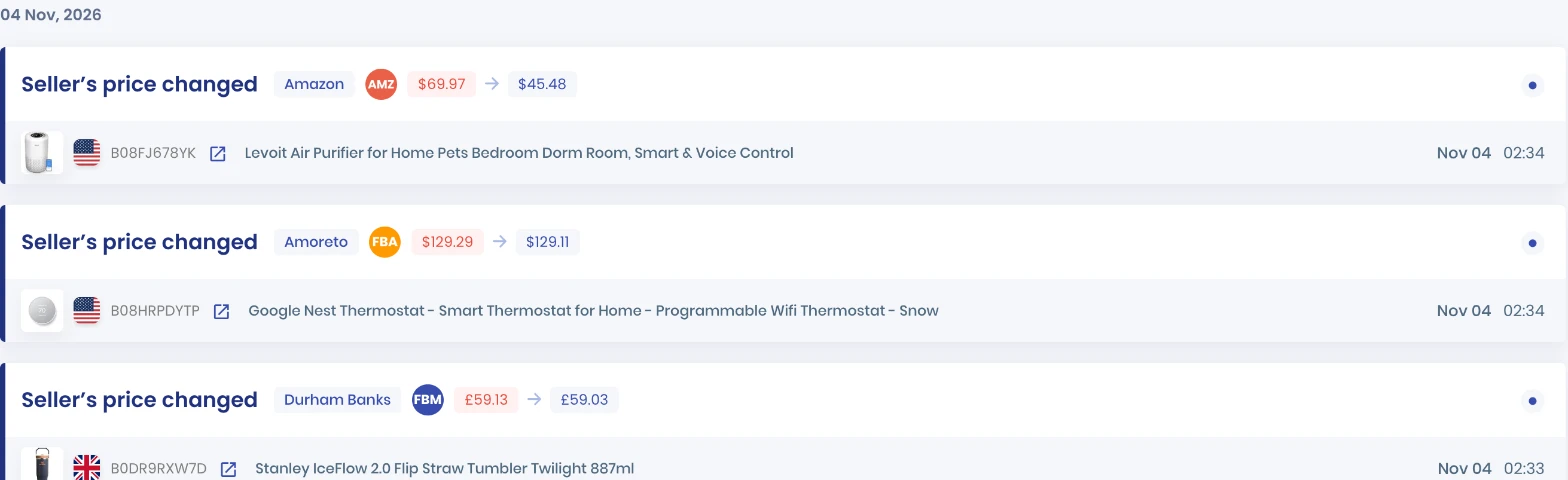
The Buy Box and pricing alerts cover a seller appearing or leaving, a seller’s price change, and Buy Box won or lost, which shows who took it and at what price. Won and lost alerts start on Premium; Pro has the other three.
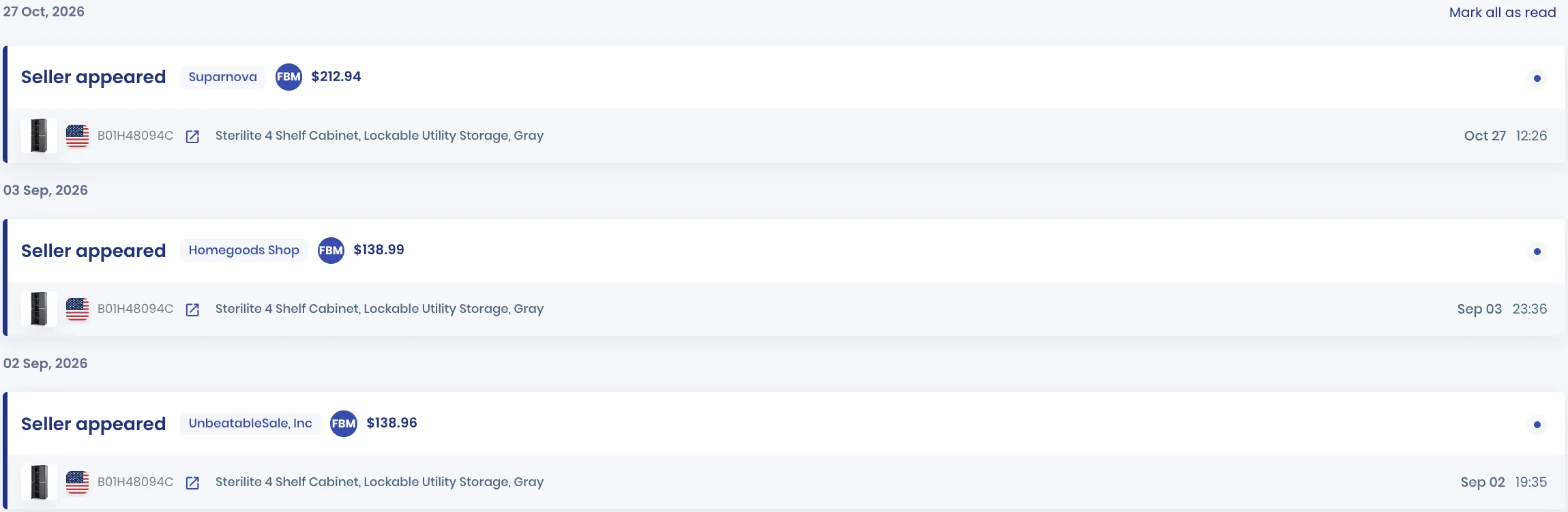
A new FBM seller on your listing is a possible hijacker, not just a price to match. The event feed also records every seller price change, including Amazon’s.
On price, SellerSonar’s plans start at $19.98 a month billed yearly for Pro: 150 ASINs, checked every four hours. Premium is $39.98 for 300 ASINs and checks every two hours, and Business is $74.98 for 500 ASINs with hourly checks. That is slower than a repricer’s price feed, so treat SellerSonar as the second opinion, not the trigger.
SellerSonar does not reprice and does not send review requests. It does track reviews and ratings on every plan, plus Buy Box ownership over time. Many sellers pair the two: BQool sets the price, SellerSonar says when the listing changed.
📌 From Our Experience: When a seller tells us their repricer “stopped working”, the cause is usually outside the repricer: a suppressed Buy Box, a new seller below their floor, or a listing edit. Check the listing before you change the rule.
Final Expert Recommendations:
Pick BQool if you sell on one Amazon region and want AI Buy Box rules for $22.5 to $90 a month billed yearly, and count your contested SKUs before choosing a plan. If you sell in the US and Europe, price both subscriptions first. And if what you really need is to know when the Buy Box, a seller or a listing changes, SellerSonar’s listing monitoring watches any ASIN without a Seller Central connection.
Start your free 14-day SellerSonar trial and see what’s happening on your listings today.
Related: Amazon repricing software explained · How to win the Buy Box · Tools for managing reviews and feedback · Helium 10 review

