





Quick Answer
Amazon repricing means changing your offer’s price automatically when competitors’ prices, your sales or other events change, always inside a minimum and maximum you set. Repricing software (a repricer) runs those rules around the clock to keep you competitive for the Featured Offer, the spot Amazon still calls the Buy Box. Amazon’s own Automate Pricing tool does this for free on the Professional plan. Paid repricers add algorithmic strategies and, in some cases, other marketplaces. Price is only one of the factors Amazon weighs.
If you share a listing with other sellers, the price that wins today can lose tomorrow. Changing prices by hand works for a few products. It stops working when you have dozens of offers and competitors who reprice at night.
This guide explains how Amazon repricing works and how Amazon actually picks the Featured Offer. It covers what Amazon’s free tool can and can’t do, and the guardrails to set before any repricing tool touches your prices. It also covers when you don’t need a repricer at all.
About the Author: Gloria Anderson writes for the SellerSonar editorial team about Amazon competitor research, pricing and the Buy Box. She checks every Amazon program detail in her articles against Amazon’s own pages, and the examples against live Amazon listings we track in SellerSonar.
What Is Amazon Repricing?
Amazon repricing is the practice of changing the price of your offer on an Amazon listing in response to the market. You can do it by hand, or you can let repricing software do it based on rules you set.
Prices on shared listings move often, and Amazon reprices its own retail offers too. Take a Google Nest Thermostat on Amazon.com. SellerSonar recorded Amazon’s own winning price at $99.99 on October 16, 2026. It was $129.98 on October 23, $79.00 on October 26 and $89.99 on October 27. While Amazon was priced higher or out of the Featured Offer, third-party sellers won it at $112.49 to $126.50.
No seller can follow moves like that by hand across a whole catalog. That’s the job repricing software was built for.
Repricing usually aims at one of three goals:
- Win or keep the Featured Offer on a listing you share with other sellers.
- Protect margin by raising the price when competitors run out or raise theirs.
- Move stock by lowering the price when units sit unsold.

What Does a Repricer Tool on Amazon Do?
A repricer tool watches a reference price and changes yours according to a rule. Every repricer, free or paid, runs the same basic loop:
- Watch: it reads a signal, such as the current Featured Offer price, the lowest price on the listing, a competitor’s price change or your own sales speed.
- Decide: it applies your rule, for example “match the Featured Offer” or “stay $0.10 below the lowest FBA offer”.
- Check limits: it keeps the new price between your minimum (floor) and maximum (ceiling).
- Update: it sends the new price to Amazon and waits for the next change.
The difference between tools is in step 2 and in speed. A simple repricer follows fixed rules. A more advanced one weighs several signals at once and may decide not to drop the price at all. Both are only as safe as the floor you set in step 3.
What a repricer does not do: it doesn’t fix the non-price reasons you lose the Featured Offer. It also doesn’t tell you when a new seller appears, your listing changes or Amazon suppresses your offer. It sees prices and reacts to them.
How Amazon Decides the Featured Offer (Buy Box)
Before you pay for any repricing software, it helps to know what it is competing for. Amazon’s help page on becoming the Featured Offer says Amazon evaluates all offers on a listing and features the one that is most attractive to the customer. It ranks offers “the same way for every product” and never uses manual overrides.
| Amazon considers | Amazon does not consider |
|---|---|
| Total price: item price plus shipping fee | Customer reviews and star ratings of the seller |
| Delivered promise: faster offers and a specific delivery date rather than a range | Prime eligibility: offers with or without the Prime badge are equally likely to be featured if other factors are equal |
| Free shipping and free returns | Fulfillment method: FBA and FBM offers are equally likely to be featured if other factors are equal |
| Seller performance: order volume, chargeback rate and customer complaints | |
| Stock: an out-of-stock offer can’t be featured |
Two details on that page matter for anyone using a repricer:
- Rotation is normal. When no single offer is clearly more attractive, “the Featured Offer could be a rotation of the best offers.” Matching a competitor’s price often means sharing the spot, not winning it outright.
- Eligibility is gone. “As of September 2026, Amazon no longer maintains a seller eligibility requirement,” so offers from all sellers are now evaluated. On shared listings, that can mean more offers competing for the same spot.
The fulfillment label itself isn’t scored, but the delivery promise and shipping fee that come with it are. Amazon also decides the Featured Offer separately for each variation, and shoppers in different locations or with Prime can see a different winner. Our guide to what the Amazon Buy Box is covers the basics if you are new to it.
💡 Expert Tip: If you lose the Featured Offer at the same price as the winner, check your delivery promise and shipping fee before you cut the price. Amazon’s own example: a $40 offer with free shipping is preferable to a $35 offer with $5 shipping, even though the totals are equal.
Rule-Based vs Algorithmic (AI) Repricing Software
Repricing software comes in two broad types. Some tools sold as “AI repricers” also offer rule-based repricing on the same plan, so the line is about how each rule decides, not about the brand.
| Rule-based repricer | Algorithmic or AI repricer | |
|---|---|---|
| How it decides | Fixed “if this, then that” rules you write | Weighs several signals (competitor offers, Featured Offer history, sales speed) and picks a price |
| Typical rule | Match the Featured Offer, or go $0.01 below the lowest FBA offer | Win the Featured Offer at the highest price that still wins it |
| Strength | Predictable, easy to check | Can raise prices when competitors leave, not just cut them |
| Risk | Two rule-based sellers chasing each other down to the floor | Harder to see why it chose a price |
| Best fit | Small catalogs, simple competition, Amazon’s free tool | Large catalogs of shared listings with many active sellers |
Watch how vendors define speed. Words like “instant” and “real-time” mean different things in different tools. BQool, for example, defines “Instant” repricing as a price change right after its system receives a notification from Amazon, and adds that occasional delays may occur. Amazon’s own tool gives times in minutes, as you’ll see below.
Amazon Automate Pricing: The Free Repricing Tool
Amazon’s built-in repricing tool is called Automate Pricing. It lets you “automatically adjust prices on SKUs in your catalog in response to events such as the Featured Offer (Buy Box) price,” according to Amazon’s Automate Pricing help page.
The Automate Pricing tool page confirms the basics:
- Cost: included free in the Professional selling plan, which is $39.99 a month plus selling fees.
- Requirements: a Professional selling account and an active offer on each product you want to reprice.
- Where to find it: in Seller Central, go to Pricing, then Automate Pricing.
- Scope: rules apply only to the SKUs you assign, one at a time or in bulk with the Automate Pricing file.
- Speed: for existing rules, price updates are “usually processed in less than 15 minutes.” New or changed rules can take up to one hour.
- Reporting: a 30-day history you can compare with your Business Reports.
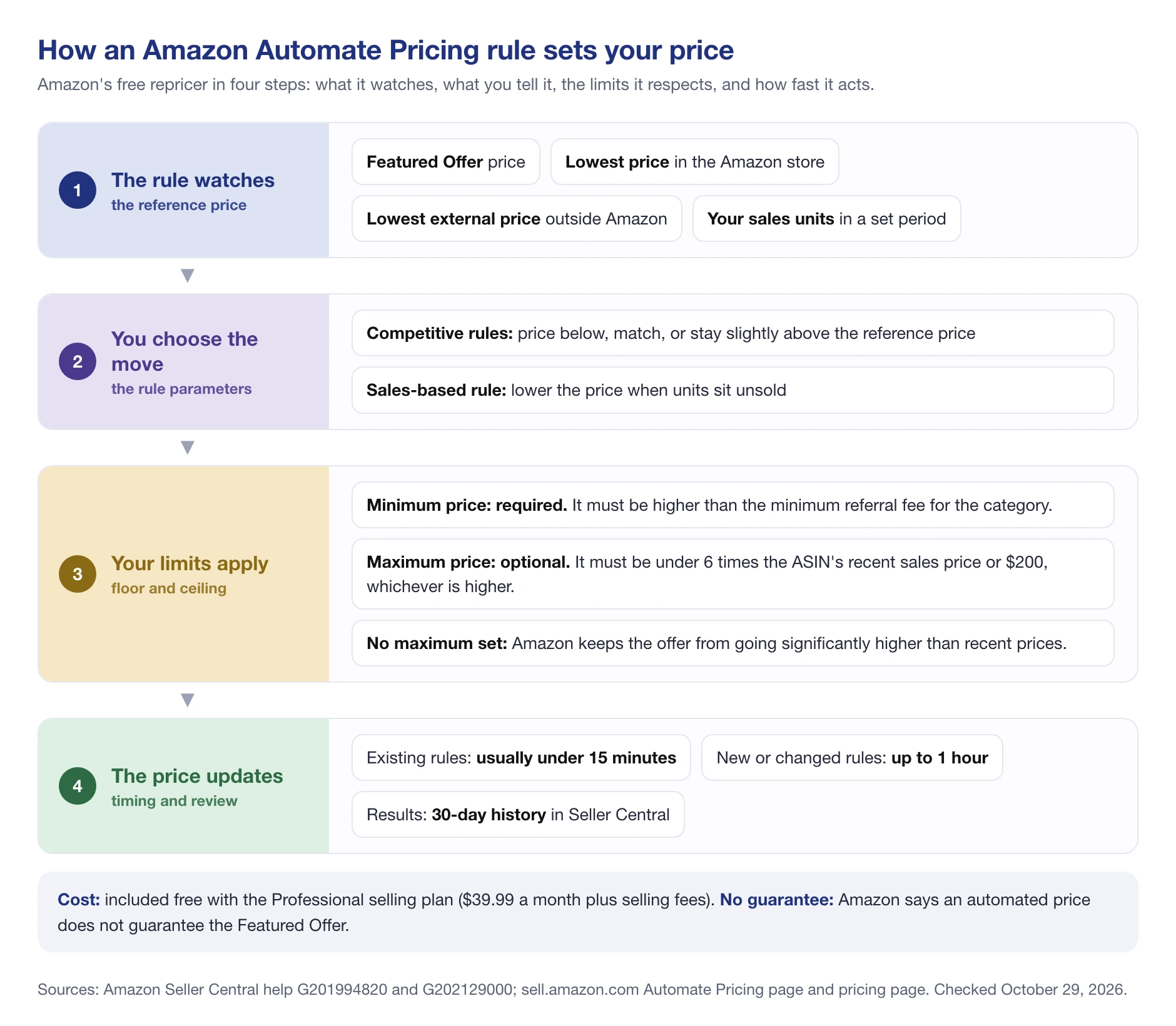
The diagram shows the order in which a rule works. The rule type you pick decides the first two steps.
The six Automate Pricing rule types
Amazon’s guide to Automate Pricing rules lists six rule types you can create:
- Competitive Featured Offer: price lower than, match, or stay slightly higher than the current Featured Offer.
- Competitive Lowest Price: price below, match, or just above the lowest price in the Amazon store.
- Competitive External Price: stay competitive with prices for similar items outside the Amazon store.
- Based on sales units: adjust the price to how fast stock moves, lowering it when products sit unsold.
- Business Competitive Featured Offer: compete for the Business Featured Offer by keeping your price in line with other business sellers.
- Business Price and Quantity Discounts: keep business prices and bulk discounts in step with your standard price.
Every rule needs a minimum price. The maximum is optional. If you leave it empty, Amazon says it will keep your offers from being priced significantly higher than recent prices, so they stay eligible to be featured. If you set a listing to Inactive, its pricing rules pause until you reactivate it.
Where Automate Pricing falls short
Amazon’s tool covers the basics well. Based on what Amazon documents, these are the gaps sellers usually hit (our assessment, not Amazon’s words):
- No algorithmic strategy. Rules follow a reference price. Nothing decides on its own to hold or raise a price when competitors leave.
- Amazon only. The external price rule compares against prices outside Amazon but doesn’t change them. It doesn’t reprice your Walmart or eBay offers.
- No fee-aware floor. The minimum is whatever number you type. Amazon doesn’t calculate your break-even price for you.
- No guarantee. Asked whether automating your price guarantees the Featured Offer, Amazon answers “No.”
If your catalog is small and your competition is simple, those gaps may not matter. That is the main question to answer before you pay for repricing software.
Price Floors, Ceilings and Pricing Errors
A repricer is only as safe as its limits. Get the floor and ceiling right before you fine-tune any rule.
Set the floor from your costs
Your minimum price should cover the product cost, inbound shipping, Amazon’s referral and fulfillment fees, and the margin you need. Work it out per SKU with the SellerSonar FBA calculator before you switch any rule on. A floor copied from a competitor’s price can sit below your own break-even.
Amazon’s limits on minimum and maximum prices
Amazon validates the numbers you enter. Its help page on offers suppressed after using Automate Pricing sets two thresholds:
- The minimum item price must be greater than the minimum referral fee for the product’s category.
- The maximum item price must be less than 6 times the ASIN’s recent sales price or $200.00, whichever is higher.
A price outside those limits can block the offer until you fix it. The same goes for a rule that fires wrongly overnight and lists a $40 product at $0.01 or $400. Our guide to fixing a suppressed Amazon listing walks through the recovery steps.
The Fair Pricing Policy
A ceiling also protects you from Amazon’s Marketplace Fair Pricing Policy. One of the practices it lists as harming customer trust is “setting a price on a product or service that is significantly higher than recent prices offered on or off Amazon.” Amazon can then remove the Featured Offer, remove the offer, suspend the ship option, or in serious or repeated cases suspend or terminate selling privileges.
So the risk isn’t small price differences between your channels. It’s a price on Amazon that jumps well above recent prices, which is exactly what a repricer without a ceiling can do when every competitor runs out of stock.
🎯 Pro Insight: Set a ceiling even though Amazon’s tool doesn’t require one. A ceiling a little above your normal price lets you earn more when competitors run out, without drifting into the “significantly higher than recent prices” zone that the Fair Pricing Policy targets.
Benefits of Using a Repricing Tool on Amazon
When you sell many products on shared listings, a repricing tool pays for itself mostly in time and consistency. Here is what it can realistically do.
Competing for the Featured Offer
Price is one of the factors Amazon weighs, and on a listing where several sellers have similar delivery and performance, it is often the one that decides. A repricer keeps you inside the group of offers Amazon rotates between, day and night.
Protecting margins, not just cutting prices
A good setup raises prices too. When a competitor runs out of stock or raises its price, a repricer can move your price back up toward your ceiling. Algorithmic tools tend to do this better than simple “match the lowest price” rules.
Moving slow stock
Sales-based rules lower the price when units sit unsold. That helps clear inventory before storage fees build up, as long as the floor still covers your fees.
Scaling without more manual work
Checking prices by hand works for five SKUs. It doesn’t work for five hundred across several Amazon stores. Rules apply the same logic to every SKU you assign.
Selling on more than one channel
Some paid repricers also cover Walmart or eBay, and a few can sync prices between channels. Many are Amazon-first or Amazon-only, so cross-channel pricing is a feature to check on each tool, not something every repricer does.
Cons of Using a Repricing Tool on Amazon
Cost
Paid repricers charge a monthly fee, usually tied to the number of SKUs or your monthly sales. Amazon’s Automate Pricing is free on the Professional plan, so the real question is whether a paid tool earns back more than its fee over the free one.
Setup and compatibility
Each tool has its own rule logic, limits and quirks. Some only reprice on Amazon, some only on certain marketplaces, and some need your exact cost data to work well. Plan time for setup and testing.
Lower margins and price wars
When two sellers both run “beat the lowest price” rules, they push each other down to their floors. Everyone earns less, and the shopper sees almost no difference. On a listing with many sellers matching each other, you often end up sharing the Featured Offer at a lower price instead of winning it.
Pricing errors
A wrong floor, a typo in a ceiling or a bad cost file can price an item far too low or too high. Amazon may then block the offer. Always test a new rule on a few SKUs first.
Price isn’t everything
A repricer can’t fix late deliveries, a range instead of a delivery date, a shipping fee, chargebacks or customer complaints. If those are why you lose the Featured Offer, a lower price only costs you margin.
When You Don’t Need a Repricer
Repricing software solves one problem: competing on price with other sellers on the same listing. If that isn’t your problem, you may not need it.
- You are the only seller on your listings. Private label sellers with no other offers on their ASINs have no one to reprice against. Your price is a strategy decision, not a race.
- Your catalog is small and stable. With a handful of SKUs and few competitors, checking prices yourself or using Amazon’s free Automate Pricing is usually enough.
- Your margins are already thin. If your floor sits right next to the current price, there is little room for a repricer to work with.
- You lose the Featured Offer for non-price reasons. Fix shipping, delivery promise and performance first.
Even sole sellers should watch their listings, though. A new offer on your listing is a sign of a reseller or a possible hijacker, and that is a monitoring job, not a repricing one.
Watching Buy Box Rotation: What a Real Listing Shows
Here is what Featured Offer rotation looks like on a busy shared listing. Below is the Stanley 1913 Quencher H2.0 FlowState 1.2L tumbler on amazon.de, tracked in SellerSonar from October 20 to October 29, 2026.

Four sellers held almost all of the Featured Offer time, out of 15 stores on the listing (a fifth seller, shkrex, had 2% and is now inactive):
- BShop00 (FBA): 35%, at an average price of €42.84
- NurFürDich GmbH (FBA): 26%, at €42.19
- Amazon: 24%, at €45.95
- FLGB (FBA): 13%, at €43.47
The seller with the lowest average price didn’t hold the largest share, and Amazon held almost a quarter at the highest average price of the four. Shares also move fast: in the 10 days before, FLGB had 30% at a similar average price (€43.17). SellerSonar logged at least 111 changes of the Featured Offer winner in these 10 days, and since it only sees changes at each check, the real number is likely higher.
📌 From Our Experience: On this listing, undercutting by a few cents rarely paid off. FLGB dropped to €41.84 on October 21, 2026 and lost the Featured Offer to Amazon at the next check, less than an hour later. When offers are this close, Amazon’s other factors and rotation decide, not the last cent.
A repricer reacts to prices like these. It doesn’t tell you who took the Featured Offer, how often it rotates, or that a new seller just joined. That’s where SellerSonar fits. It is a monitoring tool, not a repricer, and it never changes your prices:
- Buy Box Tracker (Premium and up): ownership share per seller and price analysis, as in the screenshot above.
- Buy Box Won and Lost alerts (Premium and up): who took the Featured Offer and at what price.
- Seller appeared, Seller removed and Seller’s price changed alerts (Pro and up): a new offer on your listing, a seller leaving, or a competitor’s price move.
- Check frequency: every 4 hours on Pro, every 2 hours on Premium, and as often as every hour on Business and Enterprise.
All five Buy Box and pricing alerts are off by default, so switch them on in Alerts, then Delivery Settings. You don’t need to connect Seller Central, and you can track competitors’ ASINs as well as your own. Our Buy Box monitoring page shows the tracker in more detail.
What to Check Before You Pay for a Repricer
If you’ve decided you need more than Amazon’s free tool, run through this list first. It will tell you what kind of repricing tool fits your business.
- Count your competitors. Look at how many sellers share your top listings and how often the Featured Offer changes hands. One or two stable competitors rarely justify a paid tool.
- Check your non-price factors. Delivery promise, shipping fee, stock and seller performance come before price.
- Know your floor for every SKU. If you can’t calculate break-even per product, no repricer will protect your margin.
- Decide between rules and algorithms. Rule-based is enough for simple listings. Algorithmic tools pay off with many shared listings and active sellers.
- Ask how “fast” is measured. Get the vendor’s own definition of real-time or instant, and whether delays can happen.
- Check channel coverage. If you sell on Walmart or eBay too, confirm the tool reprices there and on the plan you’d buy.
- Look at pricing tiers. Most tools price by SKU count or monthly sales. Check where your catalog lands in six months, not just today.
- Test on a few SKUs. Use the vendor’s free trial on a small group of products, compare the results with Amazon’s 30-day Automate Pricing history, then expand.
- Pick your battles. You can’t beat every competitor. Compete hardest with the sellers whose fulfillment and performance are closest to yours.
For specific tool picks, plans and prices, see our comparison of Amazon repricers, which puts Amazon’s free tool next to four paid options.
Repricing Software for Amazon: Final Thoughts
Repricing is one lever, not the whole strategy. Amazon picks the Featured Offer on total price, delivery, shipping, returns, seller performance and stock, and it rotates between offers that are close. A repricer handles the price part well. It can’t fix the rest.
Final Expert Recommendations: Start with Amazon’s free Automate Pricing if you have a Professional account and a small catalog. Set a floor from your real costs and a ceiling on every SKU. Move to paid repricing software only when you have many shared listings and can show that the free tool’s rules leave money on the table. If you’re the only seller on your listings, skip the repricer and watch for new sellers instead.
Whichever tool sets your prices, keep an eye on who holds the Featured Offer and who joins your listings. You can try SellerSonar with a free 14-day trial: 5 ASINs and 10 keywords, no credit card required.

