





Verdict: SmartScout is an Amazon market research database that maps the marketplace from the brand and seller level down, built for wholesale sourcing, agency prospecting and brand research. The critical caveat: it answers the questions you ask it, and alerts exist only on the custom-priced Enterprise plan.
Best for: wholesale sellers, Amazon agencies and brand teams who research brands and sellers every week. Look elsewhere if: you need to know when sellers, the Buy Box, prices or content change on your own ASINs.
Is SmartScout legit? Yes. SmartScout is a real Amazon research tool, founded in 2019 by Scott Needham out of the systems his reseller business BuyBoxer used, and its About page reports 10K+ operators using it. This review covers what each tool does, how accurate the estimates are by SmartScout’s own account, and who should pay for it.
Disclosure: SellerSonar publishes this review and competes with SmartScout only in listing and Buy Box tracking, so where SmartScout is the better tool, we say so. Every SmartScout fact and screenshot comes from SmartScout’s public pages, read on November 4, 2026.
What is SmartScout?
SmartScout is a set of linked databases covering Amazon brands, sellers, products, subcategories and search terms, with tools for ads, keywords and wholesale sourcing on top. The SmartScout Features Hub lists 30+ tools in one platform, grouped into market data, keyword tools, selling tools, market analysis and data integration.
The difference is the starting point: you filter brands or sellers by revenue, Amazon’s in-stock rate and seller count, then drill down to products. In SmartScout’s words, you “pick the market first, then find the product inside it.”
Who SmartScout is for
SmartScout’s Features Hub names three starting points: brand owners start with Brand Reports and Buy Box Map, agencies with Sellers and Ad Spy (“qualify prospects on revenue before the first call”), and resellers with Subcategories and the FBA Calculator. The About page adds business buyers and investors.
Private label sellers can use it too, but SmartScout’s edge is wherever the question starts with “which brand” or “which seller.”
SmartScout at a glance
From SmartScout’s own pages as of November 4, 2026.
| Question | SmartScout |
|---|---|
| Type of tool | Market research database for Amazon (plus TikTok Shop data) |
| Built by | Scott Needham, founder of the reseller BuyBoxer; founded 2019 |
| Core databases | Products, brands, sellers, subcategories, search terms |
| Marketplaces | 12 in the public Seller Map marketplace picker |
| Data refresh | “Daily” per the demo page; “refreshed continuously” per the Features Hub |
| Amazon account connections | Connects to Seller Central and Amazon Advertising; the Chrome extension relies on SP-API |
| Alerts | “Custom Dashboards + Alerts” on Enterprise only |
| Free option | Chrome extension with a monthly allowance of free uses |
SmartScout features: a verdict on each tool
Brands database: the best reason to buy
The Brands database lists brands with estimated monthly revenue, category, dominant seller and growth columns. According to SmartScout’s brand research page, its filters are built for reverse sourcing: lower the Amazon In Stock Rate to find brands Amazon does not sell, cap the average number of FBA sellers, and “eliminate sellers with more than 50% of the revenue on a brand.”
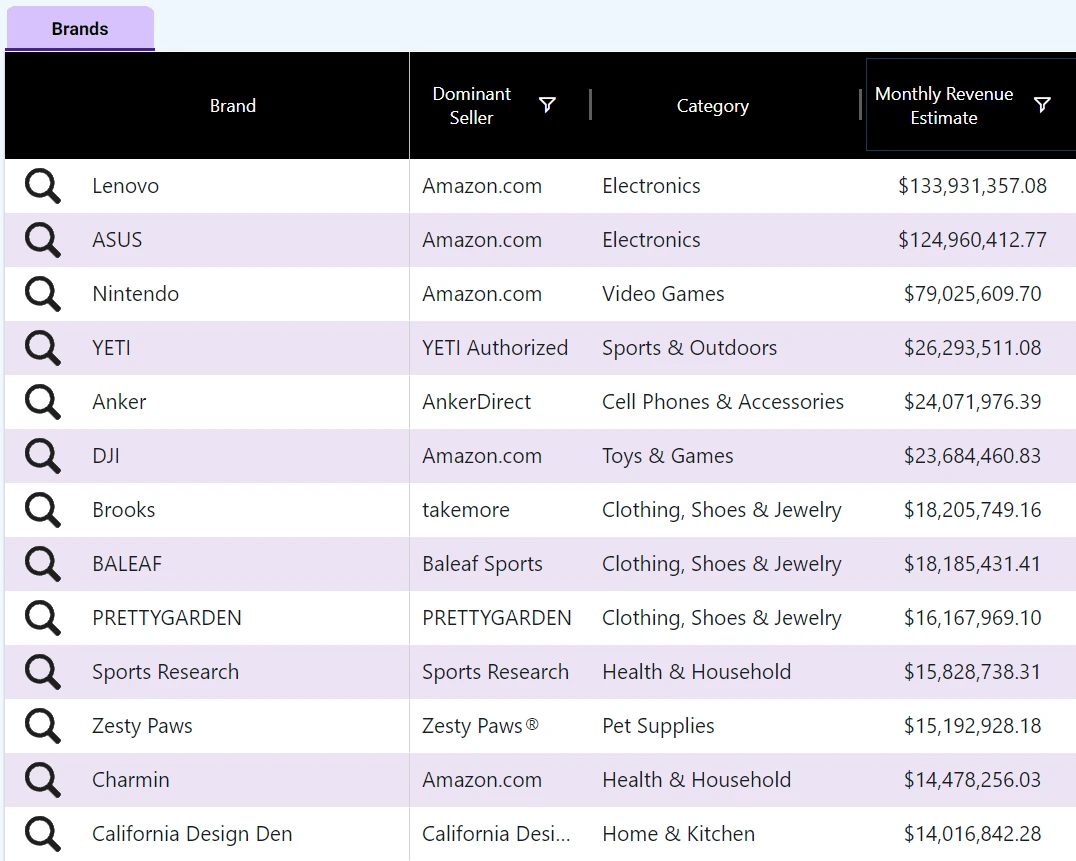
The Dominant Seller column is the useful part for wholesale: Amazon.com or the brand’s own store at the top usually means a closed door. Per SmartScout’s plan table, the Brands database starts at Essentials.
Verdict: strong, and rare among Amazon tools.
Sellers database and Seller Map: built for prospecting
The Sellers database covers “over 1.5 million sellers,” according to SmartScout’s seller data page. You filter by monthly revenue, category, state and country, number of brands, FBA share and Buy Box percentage, and the Seller Map plots the same sellers by location.
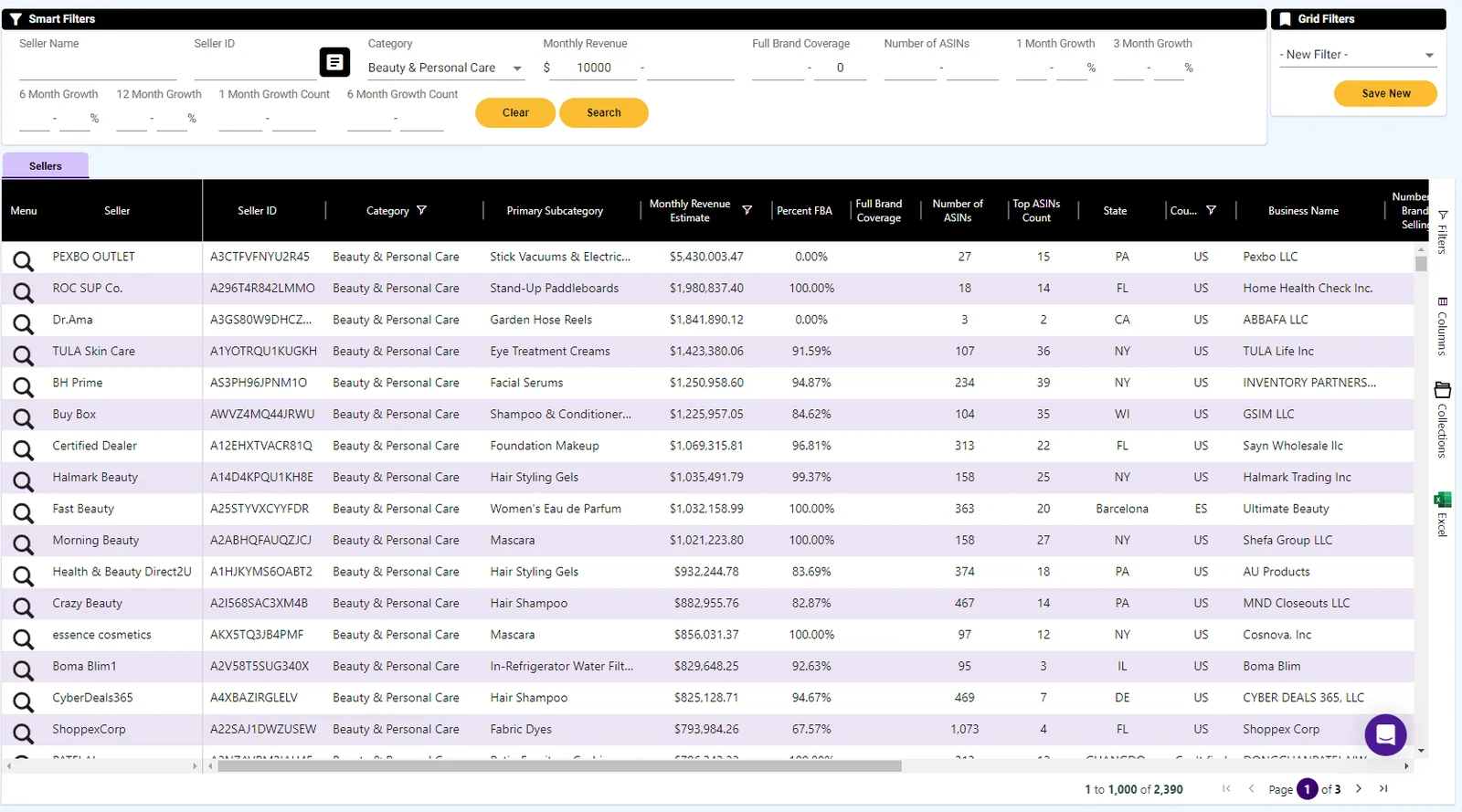
For an agency, that turns a vague target into a prospect list. One gap: SmartScout’s guide for service providers says “we don’t offer the contact information of sellers” and suggests a separate tool such as ZoomInfo.
Verdict: excellent for agencies and business buyers, but SmartScout’s plan table puts it on Business and up.
Subcategories and Niche Finder: market-first research
Subcategories breaks Amazon’s catalog into a browsable tree with revenue, seller and price data for each node. SmartScout’s subcategories page says it covers 42K+ subcategories, and each one opens its own brands, products and subcategory tabs.
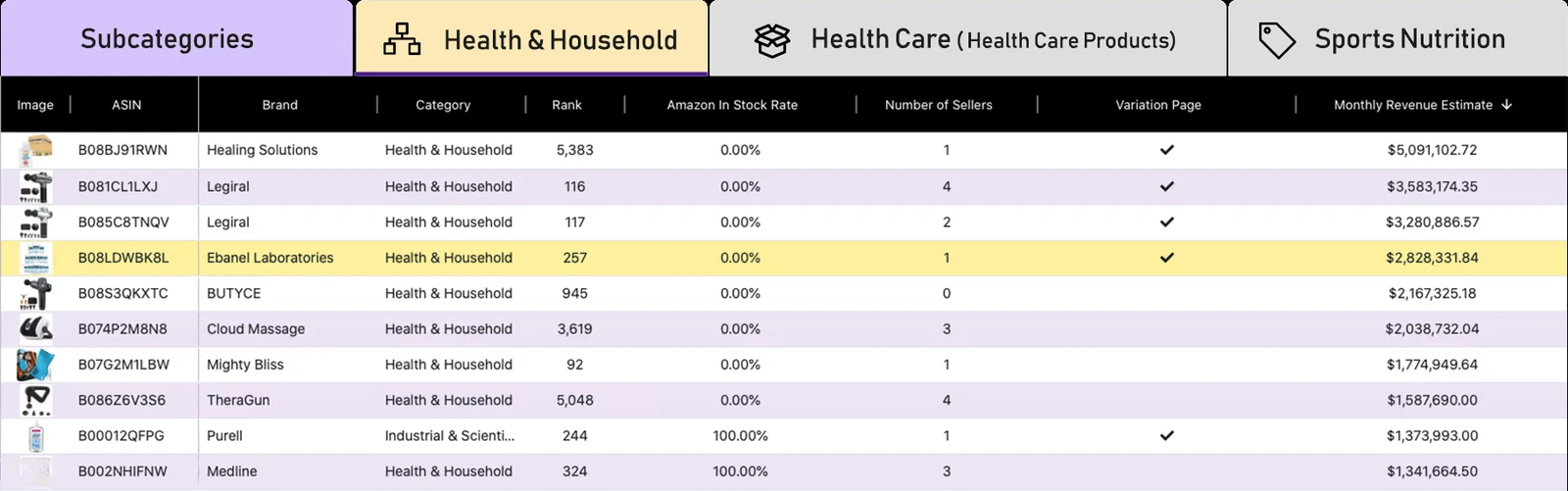
The Amazon In Stock Rate column makes it quick to spot products Amazon does not sell itself. Subcategories and Niche Finder are Business features in the plan table.
Verdict: good for sizing a niche before you pick a product.
Traffic Graph: unusual and useful for ads
Traffic Graph maps Amazon’s “frequently bought together” links between products. According to SmartScout’s Traffic Graph page, it “uses each product’s estimated monthly revenue to measure its traffic strength,” and SmartScout suggests exporting the table and copying the top 20 to 30 ASINs into an Amazon advertising campaign.
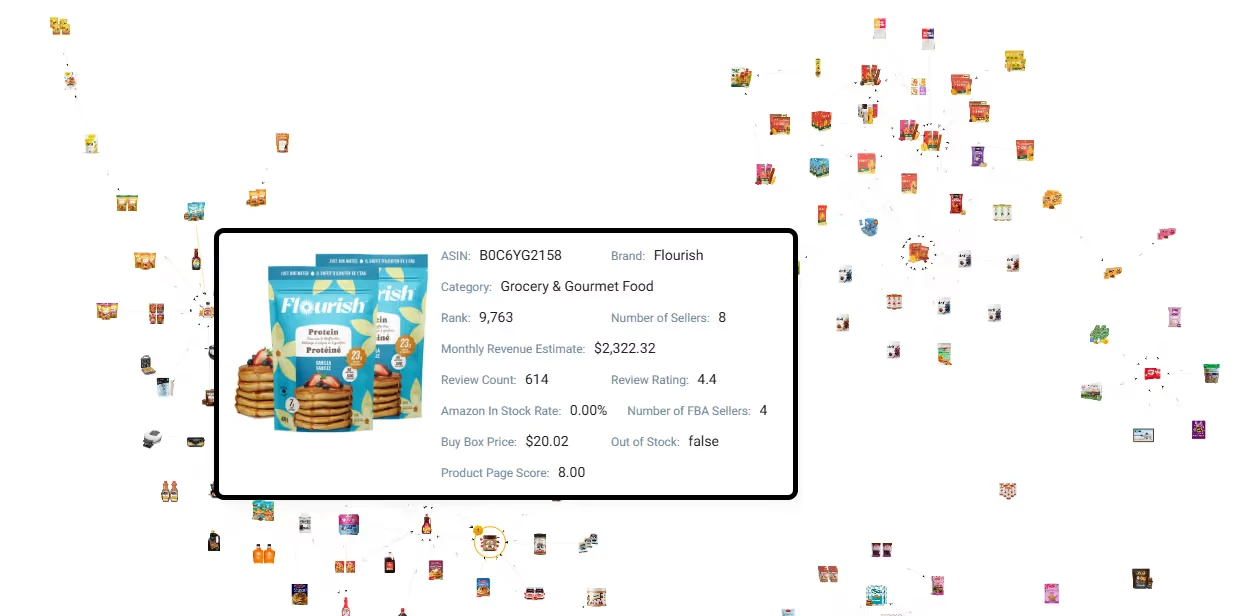
The same page calls Traffic Graph “included for free with a SmartScout subscription,” but the plan table lists the Traffic Graph row from Business up. Check before you buy a lower plan for it.
Verdict: a real differentiator for ad targeting and bundle ideas.
Ad Spy and Share of Voice: directional, and an add-on
Ad Spy shows which search terms a brand advertises on, with estimated searches, estimated CPC and win rates for each sponsored placement. SmartScout’s Ad Spy methodology page explains the spend estimate as “Volume x CPC x Win Rates x CTR.”
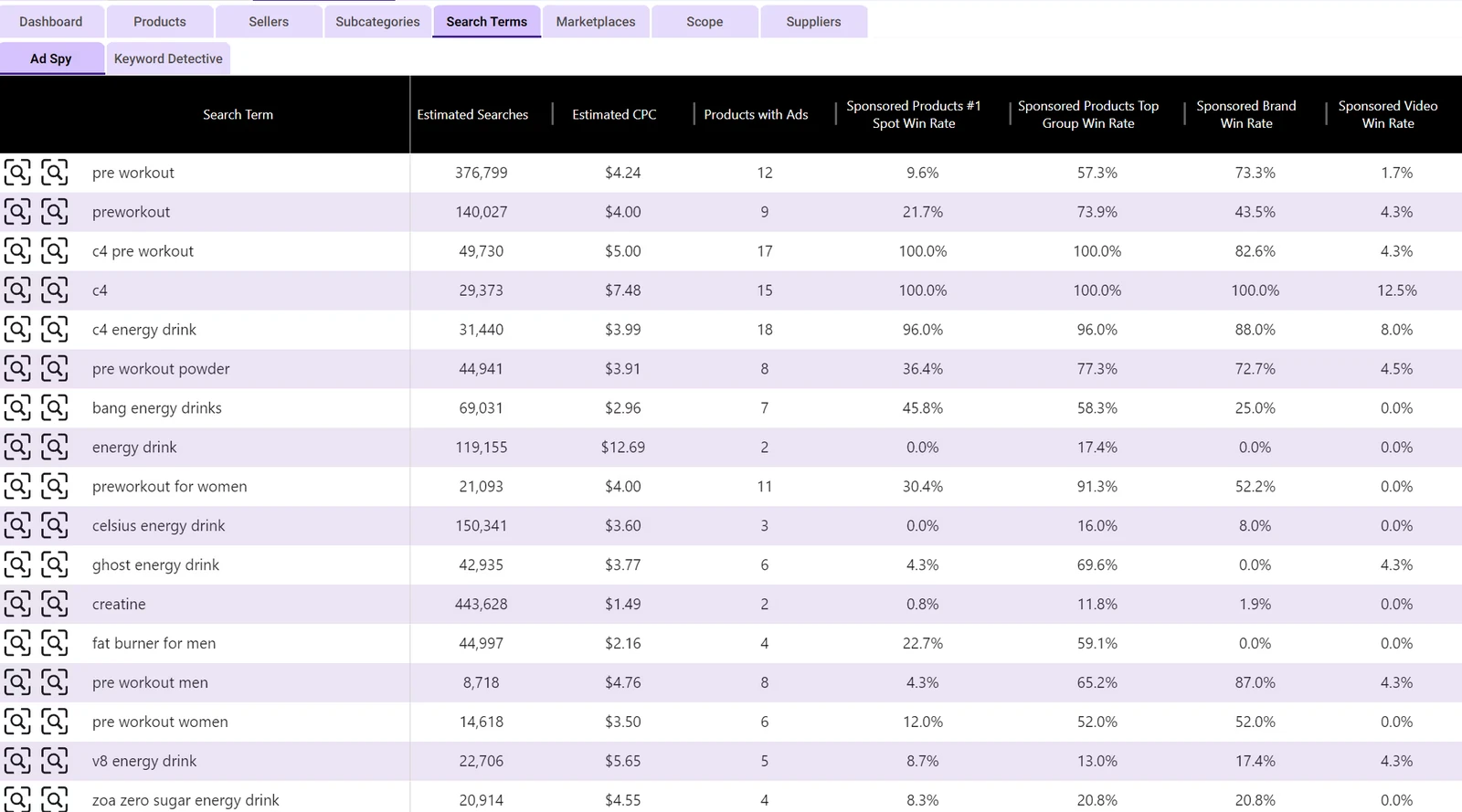
SmartScout is upfront about the limits: “We don’t include ads on page 2, Sponsored Display, product page targeting, and the DSP.” Its answer to why it shows the numbers anyway: “Directional data is helpful for planning.”
Per the plan table, Search Terms Ad Spy is an add-on on Business (“talk to sales”) and included on Enterprise. Share of Voice is Enterprise only and “computed on a weekly cadence,” according to SmartScout’s Share of Voice page.
Verdict: fine for comparing brands’ ad presence; do not budget from the dollar figures.
Rank Maker and keyword tools: solid reverse ASIN
Rank Maker is SmartScout’s reverse ASIN and rank tracking workspace. SmartScout’s Rank Maker page promises 1000+ keywords per ASIN, 20+ data points per keyword and 18 months of visibility history, and says you can “track unlimited keywords with no caps or throttling.”
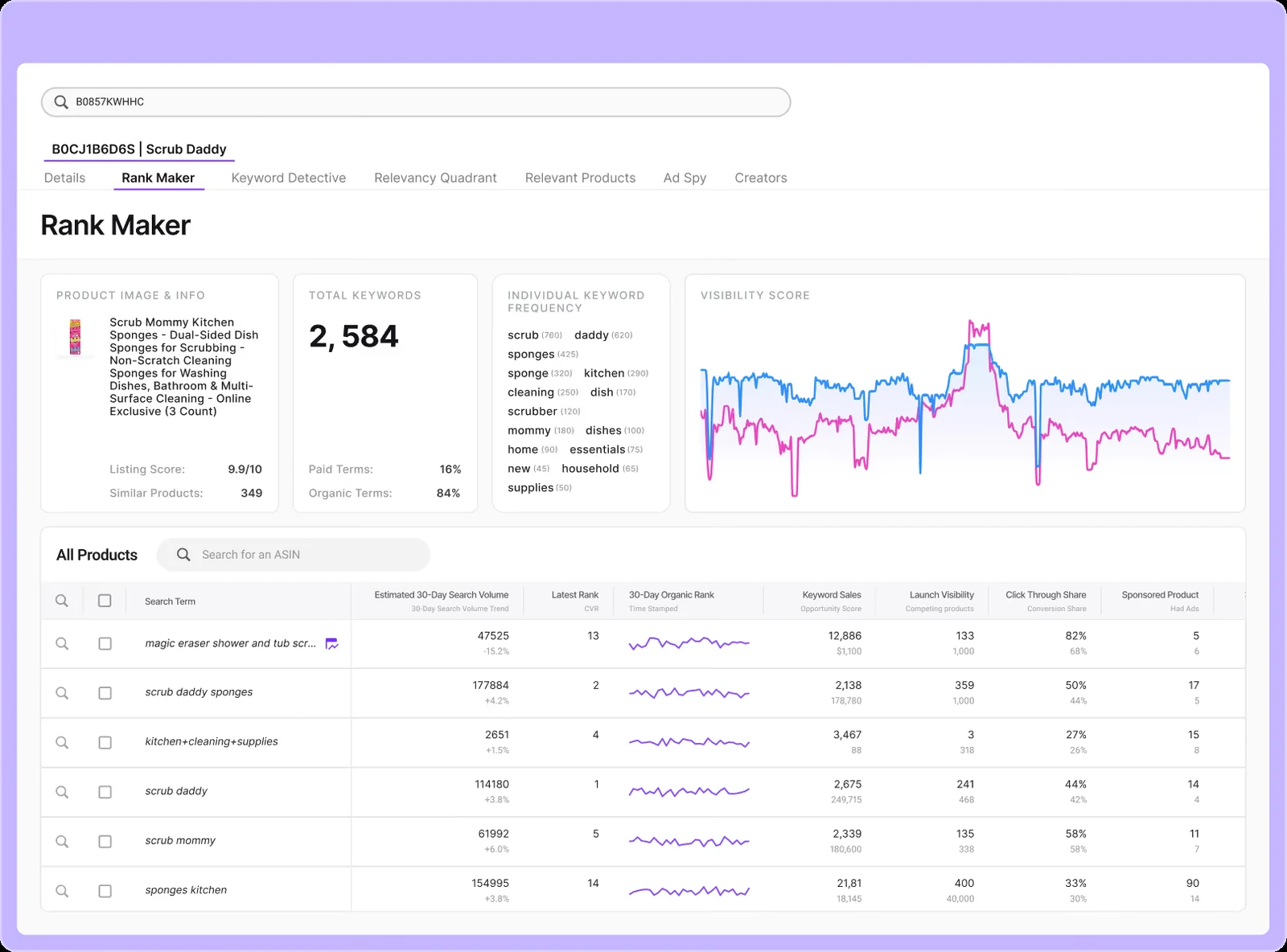
Connecting an Amazon Advertising account adds ROAS, ACOS and a campaign builder. Per the plan table, Rank Maker starts at Essentials.
Verdict: capable for keyword research and listing work.
UPC Scanner: the wholesale workhorse
The UPC Scanner takes a supplier price list (UPC, EAN or ASIN, as CSV or Excel) and returns fees, net profit, margin and ROI per line. According to SmartScout’s wholesale guide, it uses the Buy Box price when you leave the selling price blank and adds a “Buy Box Equity” estimate of units you would sell sharing the Buy Box.
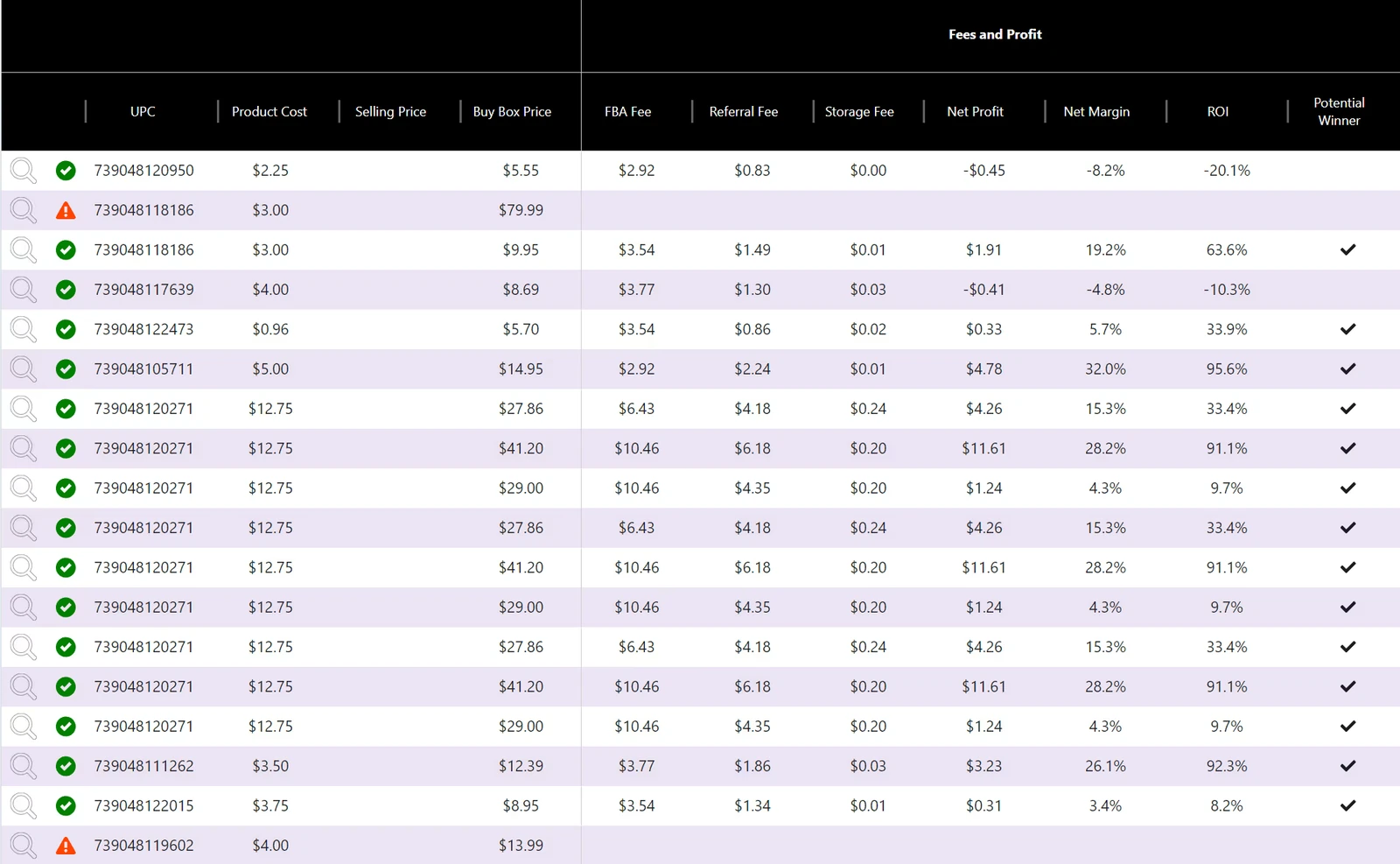
SmartScout’s guide credits this scanner with making BuyBoxer’s own large catalog manageable. The number of ASINs you can scan is capped by plan.
Verdict: the feature that pays for SmartScout for most wholesale buyers.
Chrome extension: the free way in
The extension adds search summaries, profit math and history charts to Amazon pages. Its Chrome Web Store listing showed 10,000 users on November 4, 2026 and offers “100 free, full-feature uses a month,” while the Features Hub says the free tier has 1,000 uses. The listing also says the extension “relies on a connection via Amazon’s SP-API.”
How accurate is SmartScout data?
SmartScout’s revenue numbers are estimates, and SmartScout says so. On its accuracy page, founder Scott Needham writes that “we are within 80-90% accuracy on most brands and products,” and that SmartScout covers the 30 million products that generate revenue rather than all 500 million.
Estimates come from Best Sellers Rank and category. According to SmartScout’s accuracy page, about 5% of products have no sales rank, so they get no revenue estimate, and SmartScout splits a variation page’s revenue across child ASINs using reviews per child.
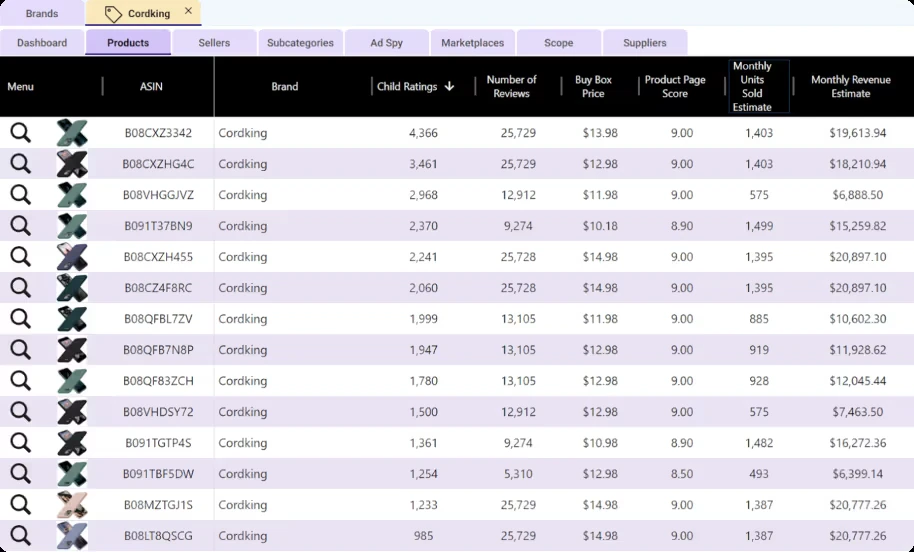
The most honest line on that page: “If the single point of value to you is the revenue number that SmartScout puts next to a brand, then SmartScout might not be the tool for you.” SmartScout pitches trends and market share as the reliable signal.
Three more notes from SmartScout’s own pages:
- Sales Estimator: SmartScout’s Sales Estimator page calls its output “a directional estimate” and adds that “no tool can be exact, since Amazon does not publish unit sales.”
- Fixes happen: a changelog entry dated September 14, 2026 says AI Assistant answers on brand revenue history had left out delisted products, which “could undercount the total.”
- The headline numbers vary by page: the Features Hub says 1.5M+ brands and 300M+ ASINs, the pricing page says 500,000+ brands and 30,000,000+ active products, and the demo page says 500M+ products tracked.
💡 Expert Tip: Before a buying decision, look up three brands or ASINs whose sales you know, such as your own. If the estimates land in range and move the right way, use SmartScout for ranking and trends, and keep its dollar figures out of your forecasts.
SmartScout pricing in short
Per SmartScout’s pricing page on November 4, 2026, Basic costs $29, Essentials $99 and Business $239 a month billed yearly ($49, $119 and $299 month to month), and Enterprise is custom; each plan includes one user. The 7-day money-back guarantee applies only to new customers, once, per section 9.3 of SmartScout’s terms of use. For plan limits, the 2026 price increase and which tier fits, see our SmartScout pricing guide.
What SmartScout does well
- Brand-first research. Filters for Amazon’s in-stock rate, FBA seller count and dominant seller cut a brand list down to realistic wholesale targets.
- Seller discovery. The Sellers database and Seller Map turn “who sells this category, and where” into a filtered list.
- Bulk price list scanning. The UPC Scanner scores a supplier catalog instead of checking it ASIN by ASIN.
- Transparency about estimates. SmartScout publishes how its revenue and ad spend numbers are built, including what they leave out.
Where SmartScout falls short
- Research, not monitoring. The only alerting on the pricing page is “Custom Dashboards + Alerts” on Enterprise. On lower plans, you find out about a change when you open the tool and look.
- The best data sits on Business. Sellers, Seller Map, Subcategories and Traffic Graph all start there, and Ad Spy is an add-on even then.
- No seller contact details. Agencies need a second tool to reach the prospects they find.
- Estimates, not sales. Revenue, units and ad spend are modeled, and the headline database sizes differ from page to page.
- Daily data. The demo page lists a daily data refresh, so SmartScout is not built to catch a hijacker within hours.
- No public help center to check. SmartScout announced a new Help Center in January 2026, but its footer link opens the contact page.
Is SmartScout worth it? By seller type
Our read of SmartScout’s documented features and plan table, by the job you need done.
| Seller type | Worth it? | Why |
|---|---|---|
| Wholesale resellers sourcing brands | Yes | Brand filters, dominant seller column, UPC Scanner |
| Amazon agencies and service providers | Yes, on Business | Sellers database, Seller Map, Brand Reports; add a contact data tool |
| Brand and CPG analysts | Yes | Market share, Custom Segments, historical data; Share of Voice on Enterprise |
| Business buyers | Yes | Seller revenue estimates and footprint; Seller Growth Filter on Enterprise |
| Private label sellers | Maybe | Subcategories, Rank Maker and Traffic Graph help; Ad Spy is an add-on |
| Online arbitrage | Maybe | Start with the extension’s free uses before paying |
| Sellers protecting their own listings | No | No alerts below Enterprise; data refreshed daily |
🎯 Pro Insight: SmartScout answers “which brands and sellers should I go after?” A monitoring tool answers “what changed on my listing since the last check?” Sellers who regret a SmartScout subscription usually bought it for the second question.
Pros & cons
Pros: brand-first wholesale filters; the Sellers database and Seller Map for prospecting; bulk UPC Scanner; Traffic Graph for ad targeting; Rank Maker with unlimited keyword tracking; published methodology for its estimates; a free extension tier.
Cons: alerts only on Enterprise; seller, subcategory and traffic data start on Business; Ad Spy is an add-on; no seller contact details; modeled revenue with inconsistent headline counts; daily data refresh; one user per plan.
When a monitoring tool makes more sense
If your question is “who sells this brand, and how big are they,” SmartScout is the better tool, and SellerSonar is no substitute. If it is “did someone join my listing, cut the price or take the Buy Box,” you need a tool that checks your ASINs on a schedule and alerts you.
That is what SellerSonar does. You add the ASINs you sell or watch, on any of 23 Amazon marketplaces and without a Seller Central connection, and each check compares the listing with the last one. Buy Box and pricing alerts cover Seller appeared, Seller removed, Seller’s price changed and Buy Box Won or Lost.
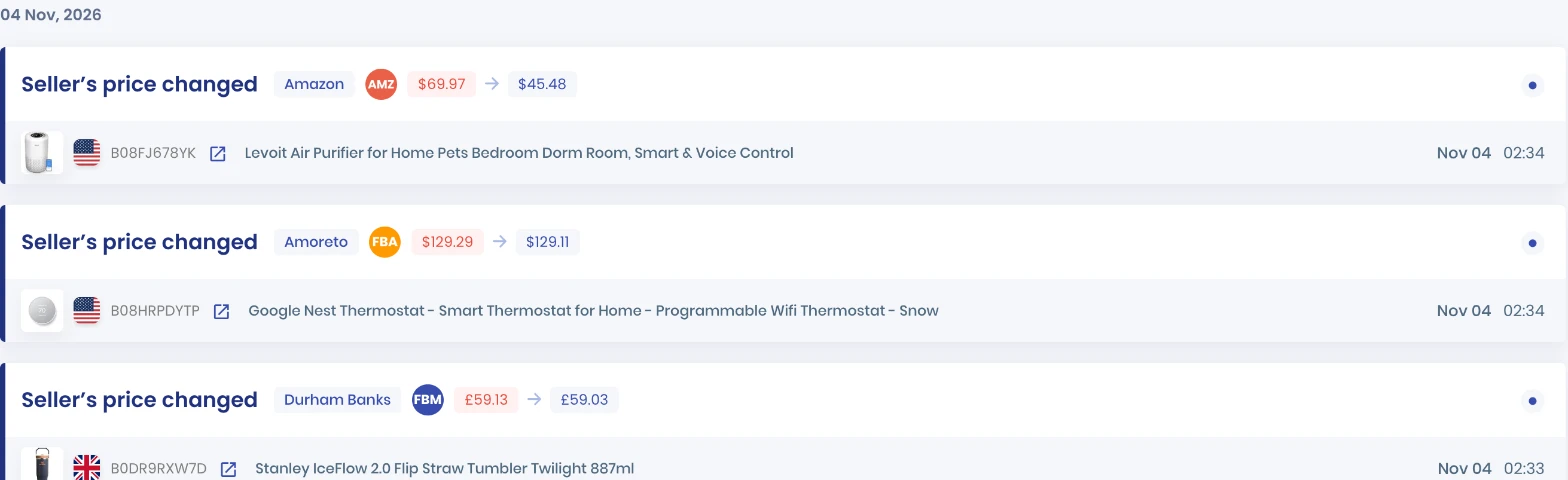
In this SellerSonar data from November 4, 2026, Amazon cut its price on a Levoit air purifier from $69.97 to $45.48, a change that a monthly revenue estimate would never show you.
For wholesale sellers, the Buy Box Tracker shows who actually holds the Buy Box on a listing you carry, day by day.
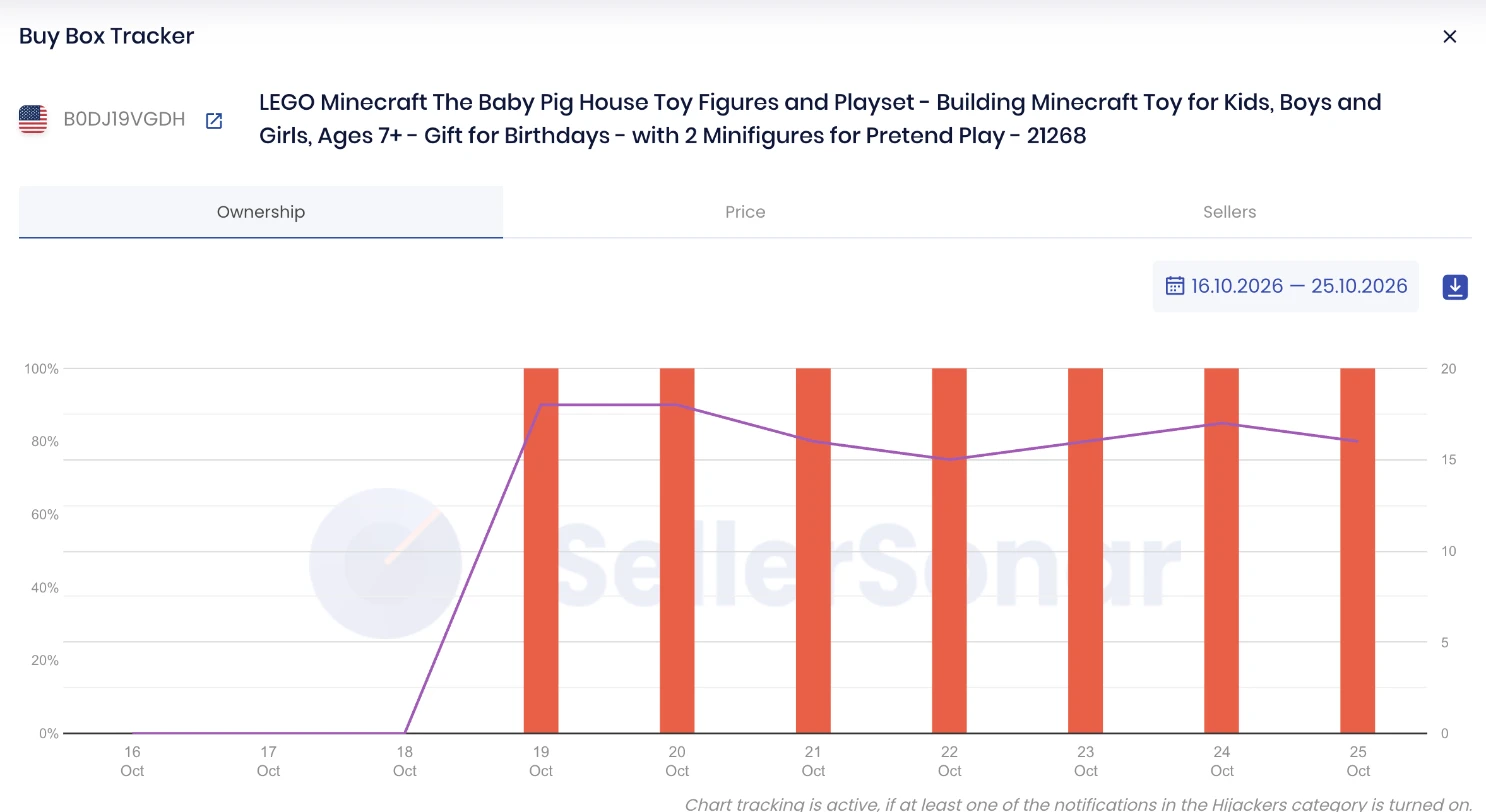
Here SellerSonar data shows Amazon holding 100% of the Buy Box every day from October 19 to 25, 2026, with 15 to 18 sellers on the listing. Content change alerts add title, bullet, description and image edits.
Setup note: Buy Box and pricing alerts start switched off; turn them on under Alerts, then Delivery Settings.
According to SellerSonar’s plans, Pro costs $19.98 a month billed yearly for 150 ASINs checked every four hours. Premium is $39.98 for 300 ASINs every two hours and adds Buy Box Won and Lost alerts; Business is $74.98 for 500 ASINs checked hourly. SellerSonar does not do product research, brand or seller discovery, sourcing, PPC management or repricing.
📌 From Our Experience: Wholesale accounts rarely lose money on the brand they picked. They lose it weeks later, when a new reseller joins and undercuts by a few cents, or Amazon starts selling the ASIN. Pick a research tool for the first decision and a monitoring tool for everything after it.
Final Expert Recommendations:
Buy SmartScout for research: it earns its price for wholesale sellers who source brands every week and agencies that prospect sellers, if you treat its revenue figures as directional. For the listings you already carry, add SellerSonar’s listing monitoring so a new seller, a price cut or a lost Buy Box reaches you on the next check.
Start your free 14-day SellerSonar trial and see what’s happening on your listings today.
Related: SmartScout pricing · Helium 10 review · SellerSonar vs Jungle Scout · Best Amazon product research tools

