





Amazon product research tools run from $39 to $359 a month. Here’s what the vendors won’t lead with: if you have a Professional selling account, you already own one. It’s called Product Opportunity Explorer, it sits in Seller Central under Growth, and it costs nothing on top of the $39.99 a month you already pay.
That doesn’t make the paid tools useless. It does mean you should know what you’re buying before you add another subscription, because the gap between “free and already yours” and “$129 a month” is smaller than most roundups admit.
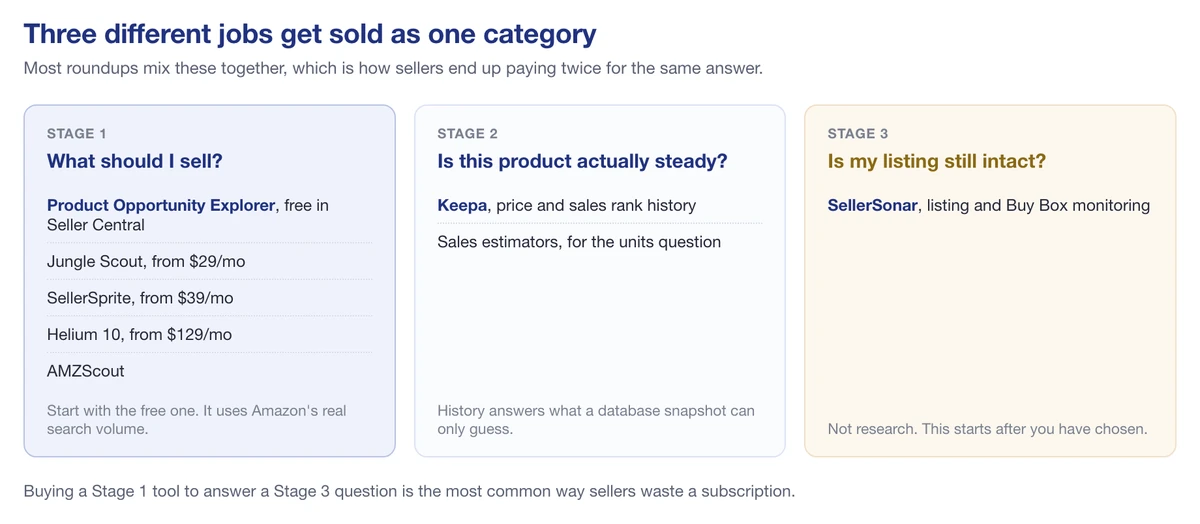
Three different jobs, three different tools, one category name
I’ve priced every tool below from the vendor’s own page, today. Two of the tools this article used to recommend don’t exist any more, and I’ve left them in at the bottom so you know what happened to them.
Start with the one you’re already paying for
Amazon built Product Opportunity Explorer to help sellers, in its words, “uncover opportunities with unmet customer demand and high sales potential.” You’ll find it in Seller Central under Growth.
What it gives you:
- Demand and competition data by niche, with saturation signals
- Search terms and search volume, straight from Amazon rather than estimated
- Customer review themes and return activity for the niche
- Sales and price trends over time
That search volume line matters more than it sounds. Every third-party tool estimates Amazon search volume by inference. Amazon doesn’t have to estimate. So on the single metric that drives most product decisions, the free tool has better data than the paid ones.
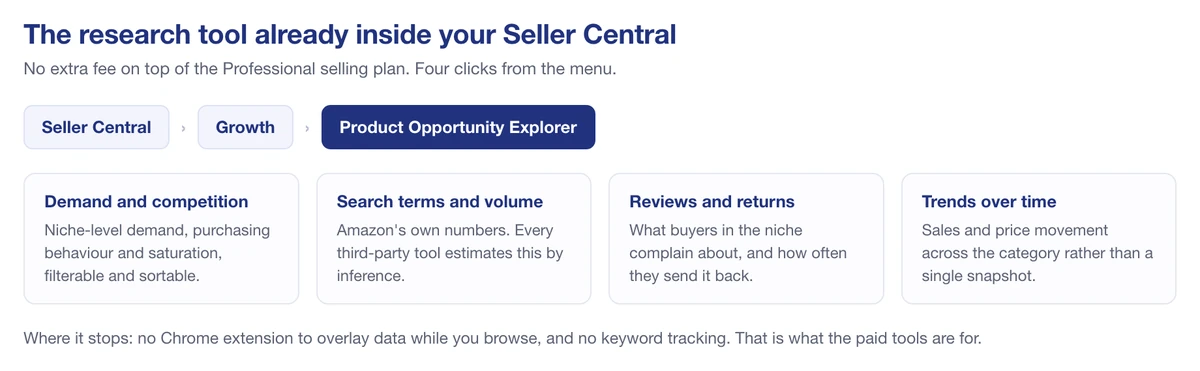
Free inside the account you already pay for
Where it falls short: it’s slower to work in than a Chrome extension, it won’t follow you onto a product page while you browse, and it doesn’t do keyword tracking or listing optimization. That’s what the paid tools are for.
What the paid tools cost
Prices checked on the vendors’ own pricing pages, September 30, 2026.
| Tool | Entry price | Top tier | Free option |
|---|---|---|---|
| Product Opportunity Explorer | Included with a Professional account | n/a | Yes, if you’re already selling |
| Jungle Scout Catalyst | $49/mo (Starter), $29 on annual | $149/mo (Brand Owner + CI) | No trial, 7-day money back |
| SellerSprite | $39/mo (Basic) | $189/mo (VIP) | 3-day trial, some free tools |
| Helium 10 | $129/mo (Platinum) | $359/mo (Diamond) | Limited free plan |
| AMZScout | $59.99/mo, $33 effective on annual | n/a | Limited free searches, no card |
| Keepa | €29/mo, billed in euros only | n/a | Free tier never expires |
Two notes on that table. Annual billing cuts roughly 30 to 40%, so Helium 10’s Platinum drops to $99 a month and Jungle Scout’s Starter to $29. And AMZScout and Keepa both block automated price checks, so those two figures come from our own competitor records, last verified on 4 August 2026 and billed in euros respectively. AMZScout in particular runs several offer pages at different prices, so check the number at checkout rather than trusting any article, this one included.
Jungle Scout
The default recommendation in this category. $49 a month month-to-month, or $29 if you commit to a year.
Catalyst runs three plans. Billed monthly they are $49, $79 and $149; billed annually they work out at $29, $49 and $129 a month. The annual toggle is the one the pricing page shows first, which is how the lower numbers end up quoted as monthly prices all over the internet. The product database and Opportunity Finder are the parts you’ll actually use for research; the rest of the suite covers launch, reviews, and inventory.
One thing to plan around: there’s no free trial. Jungle Scout offers a 7-day money-back guarantee instead, which means you pay first and ask for the money back later, and seven days is short enough that it’s genuinely easy to miss. Put a reminder in your calendar for day six.
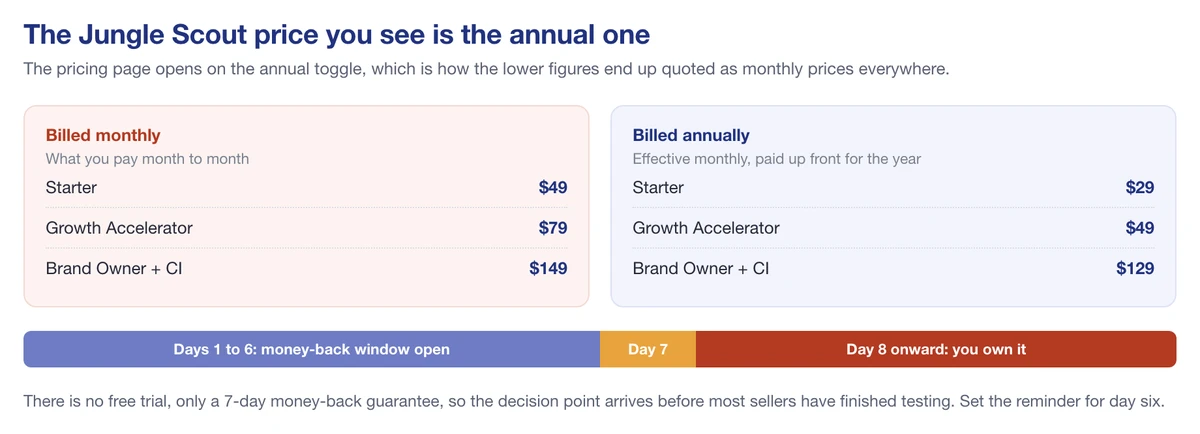
The lower figures are the annual rate, and the refund window closes on day seven
If you’re weighing it against monitoring rather than research, we’ve written up SellerSonar against Jungle Scout separately.
Helium 10
The biggest suite, and priced like it. Platinum is $129 a month, Diamond is $359, and Enterprise starts at $1,499.
For research specifically you’re paying for Black Box (the product database) and Cerebro (reverse ASIN keyword lookup). Cerebro is the reason a lot of sellers stay: seeing which keywords a competitor actually ranks for is the closest thing to reading their homework.
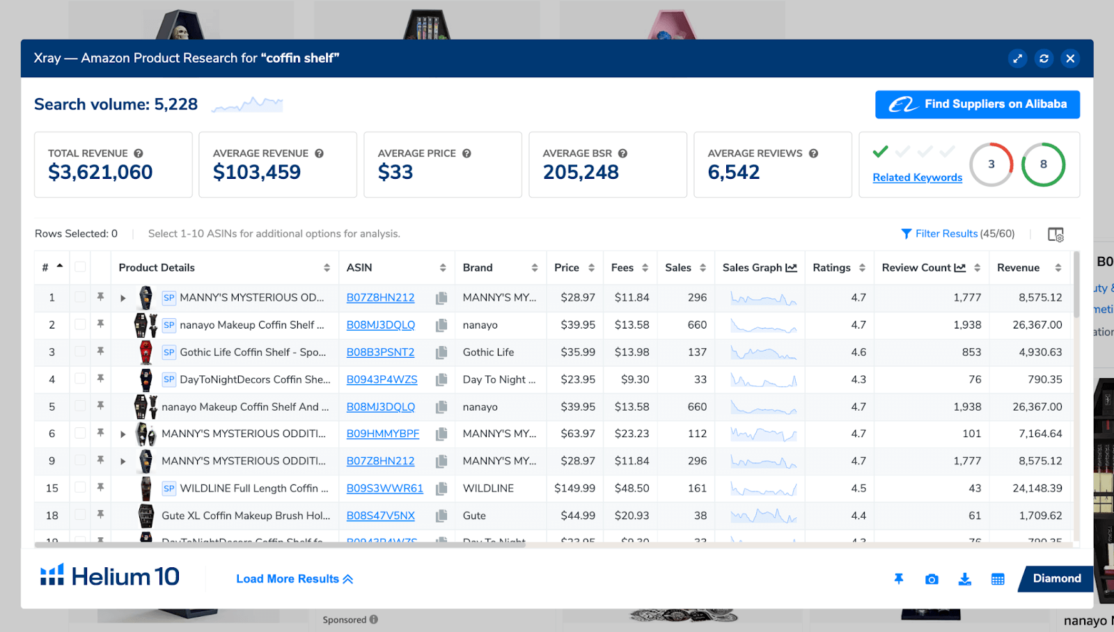
Helium 10’s Xray, the view you’re actually paying for: revenue, BSR and per-ASIN estimates across a niche
There’s a free plan, but access is limited and it’s really a sampler for the Chrome extension. At $129 a month, Helium 10 makes sense once you’re running a catalog, not while you’re deciding whether to sell one product. Our SellerSonar and Helium 10 comparison covers where the two overlap.
SellerSprite
Missing from most English-language roundups. Which is odd, given it turns up in Google’s own AI answers on these queries.
Four plans: Basic $39, Standard $79, Advanced $129, and VIP $189 a month. There’s a 3-day trial of the monthly plan, plus a handful of tools (listing builder, sales estimator, profitability calculator) that stay free.
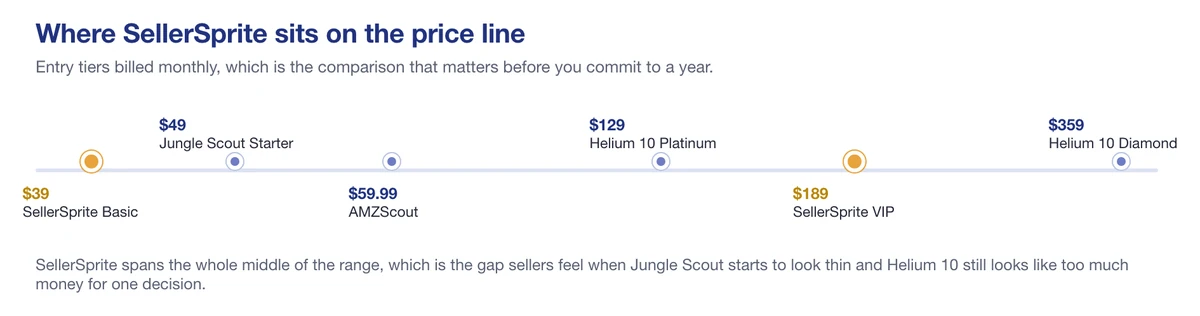
SellerSprite spans the middle of the range
It’s strongest on keyword and market data, and the pricing sits in the gap most sellers actually feel: the point where Jungle Scout starts to look thin and Helium 10 still looks like too much money for one decision. Worth a look if Jungle Scout feels thin and Helium 10 feels expensive.
Keepa
Not a product research tool in the roundup sense. That’s the point.
Keepa does one thing: price and sales rank history, going back years, drawn directly on the Amazon product page through its extension. No product database, no opportunity score, no filters.
What it answers is the question the others mostly guess at. Is this product’s rank steady, or did it spike once in Q4 and flatline, and has the price been ground down by competitors over eighteen months while they all raced each other to the bottom? You can’t see that in a product database snapshot.
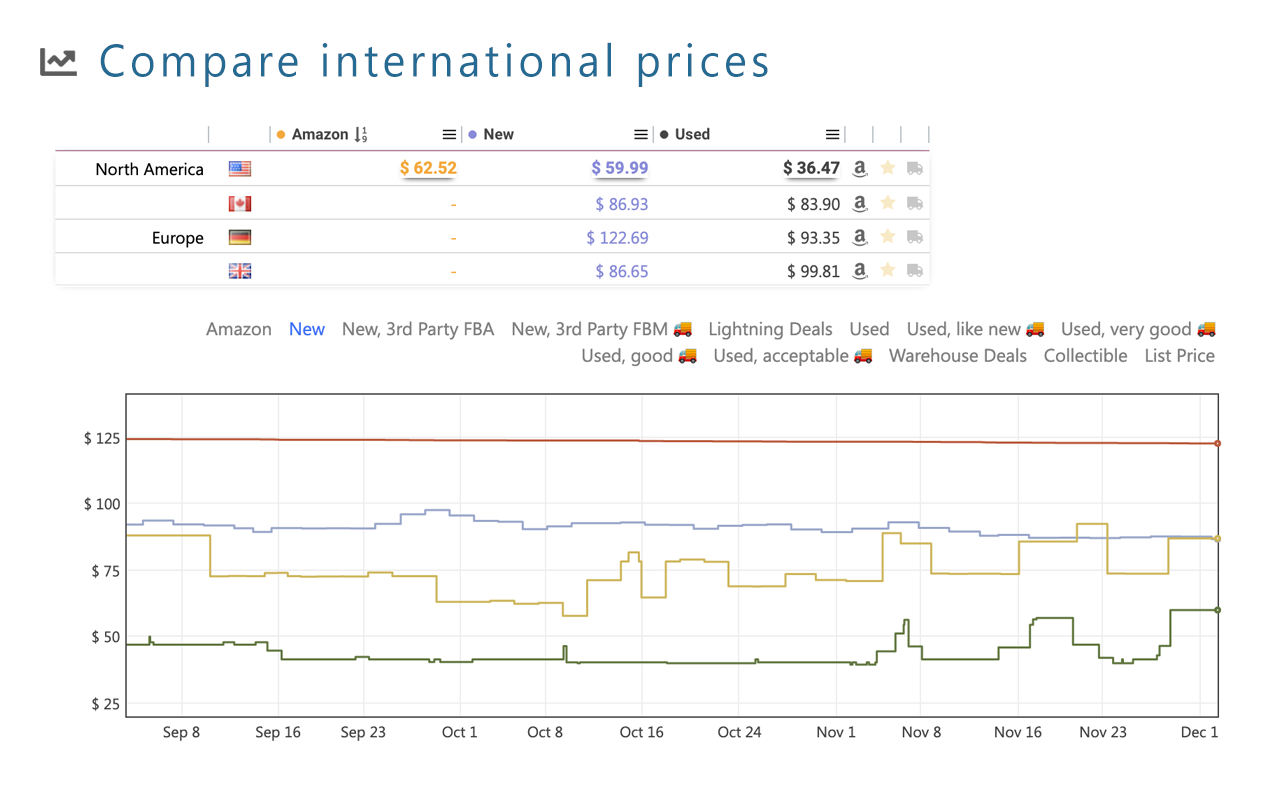
Keepa’s price history and cross-marketplace view, the data a database snapshot can’t show you
Most sellers I’d point at Keepa alongside something else, not instead of it. The history view is free on the extension and the free tier doesn’t expire. Keepa Pro, which adds sales rank and Buy Box history, is €29 a month and billed only in euros, so the dollar cost moves with the exchange rate.
AMZScout
Positioned as the budget option for beginners: a product database, a Chrome extension and a set of free calculators around the edges. The extension is the part with real adoption, at 100,000 users and a 4.5 rating across 878 reviews on the Chrome Web Store as of 29 September 2026.
Pricing is $59.99 a month, or about $33 a month if you pay $399.99 for the year. There’s an open trial with a limited number of searches and no card required, plus a 10-day money-back guarantee on the paid plans.
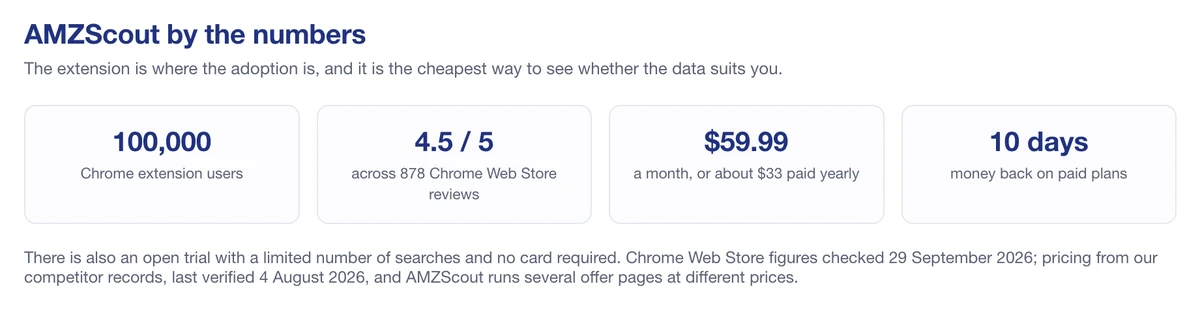
The extension is where the adoption is
We’ve gone into it properly in our AMZScout review, and if you’ve already decided it isn’t for you, the AMZScout alternatives piece covers the field.
The number every one of these tools is guessing at
Open any of them and you’ll see estimated monthly sales for a product. Jungle Scout will say one number. Helium 10 will say another. They’ll both be confident.
None of them can see Amazon’s sales data. What they can see is Best Sellers Rank, which Amazon publishes, and every tool runs that through its own model to turn a rank into a sales figure. The model is the product. That’s the whole disagreement.
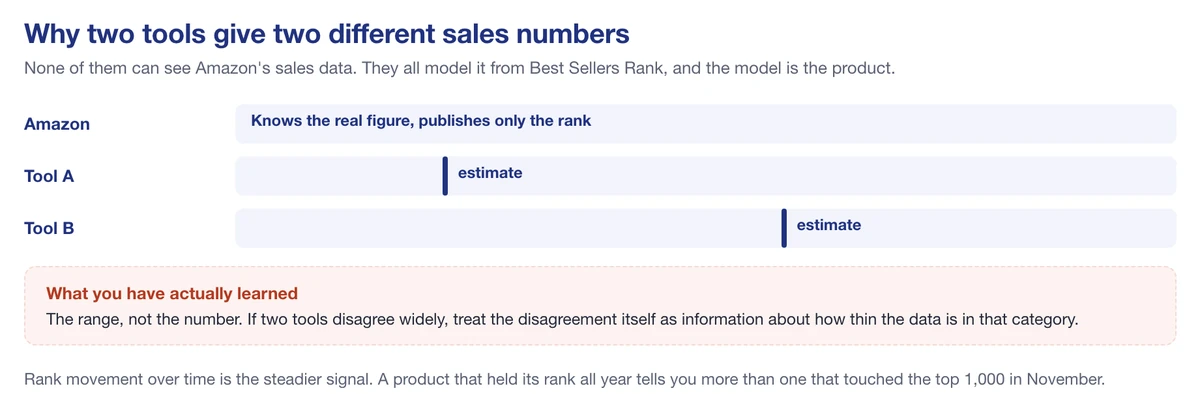
Every estimate is a model of Best Sellers Rank, which is why they disagree
Which means a few practical things:
- Treat the number as a range, not a figure. If two tools say 400 and 700 units, what you’ve learned is “hundreds, not thousands.”
- Rank movement beats rank position. A product sitting at #8,000 all year is a steadier signal than one that touched #900 in November.
- Accuracy varies by category. The models are trained where the data is thickest, so mainstream categories estimate better than narrow ones.
- Never source on one tool’s estimate alone. Cross-check two, and if they disagree wildly, that disagreement is itself information.
We’ve gone deeper into how these estimates are produced in our guide to Amazon sales estimators, including where they break down.
Extension or web app
Most of these tools ship both, and sellers tend to use one and forget the other exists.
The Chrome extension is for browsing. You’re on a search results page or a product page, you want the numbers laid over what you’re already looking at, and you want them now. It’s how most product research actually happens: you’re shopping, and you’re thinking.
The web app is for filtering. You want every product in Home and Kitchen between $20 and $40, with under 200 reviews, ranked better than #30,000, and you want to sort that list. You can’t do that from a product page.
Rough rule: extensions are better for validating a product you’ve already spotted; databases are better for finding one you haven’t. If you only ever use the extension, you’re limited to products you happened to browse past.
Two tools this guide used to recommend
Roundups rot quietly. This one did, so here’s the correction rather than a silent deletion.
Viral Launch. Gone. As of today, the old Viral Launch domain redirects to Intellifox. If you were sent here by an older version of this article telling you to check it out, that’s why the link went somewhere unexpected.
Sellics. Also gone as a name. the Sellics domain now redirects to Perpetua, and the product moved toward advertising optimization rather than product research. Its free keyword tool, Sonar, is not the same thing as SellerSonar, which is a confusion the old version of this page managed to create all by itself.
If you read a tools roundup that still lists either one as a live option, you’re reading something nobody has checked in two years. That’s worth knowing about the rest of its advice too.
How to pick one without burning three months of subscription
The mistake isn’t picking the wrong tool. It’s paying for a tool before you know which question you’re trying to answer.
- Spend a week in Product Opportunity Explorer first. It’s free and it uses Amazon’s real search volume. If it answers your question, stop here.
- Write down the one thing it couldn’t tell you. Usually that’s competitor keywords, historical sales rank, or scanning products while you browse.
- Pick the cheapest tool that answers that one thing. Reverse ASIN keywords means Helium 10. Price and rank history means Keepa. A broad database on a budget means SellerSprite at $39, or Jungle Scout at $29 if you’ll commit to a year.
- Set a calendar reminder before the trial or refund window closes. Jungle Scout’s is seven days and it’s a refund, not a trial.
- Cancel the one you stopped opening. Most sellers end up paying for two research tools and using one.
- If you work in an AI assistant, check whether it has an MCP server. Jungle Scout, Helium 10, Keepa and SellerSonar all ship one now, which lets Claude or ChatGPT read the tool’s data directly. Not a reason to pick a tool on its own, but it costs nothing to check before committing to a year.
A tool tells you a product looks good. It can’t tell you whether you can source it, land it, and still make a margin after fees. Run the numbers separately with our FBA calculator, and be honest about what Amazon charges before you commit to a purchase order.
Where SellerSonar fits, and where it doesn’t
Straight answer: SellerSonar isn’t a product research tool, and you shouldn’t buy it as one.
Research tools help you decide what to sell. SellerSonar starts working after that decision, when the listing is live and something changes without telling you. Different job, different moment.
What it watches, specifically:
- Listing changes: title, bullets, images and A+ content edited by anyone, including Amazon.
- Buy Box ownership, and hijackers arriving on your ASIN.
- Keyword rank movement, organic and sponsored.
- Price changes on your listings and on the ones you track.
- Suppressions and badge changes, which usually surface as a sales drop before you find the cause.
- Review and rating history. Tracking and history, not live alerts: Amazon changed how reviews can be parsed in 2026 and every tool in this space lost that.
How often it checks depends on the plan: every four hours on Pro, every two on Premium, hourly on Business.
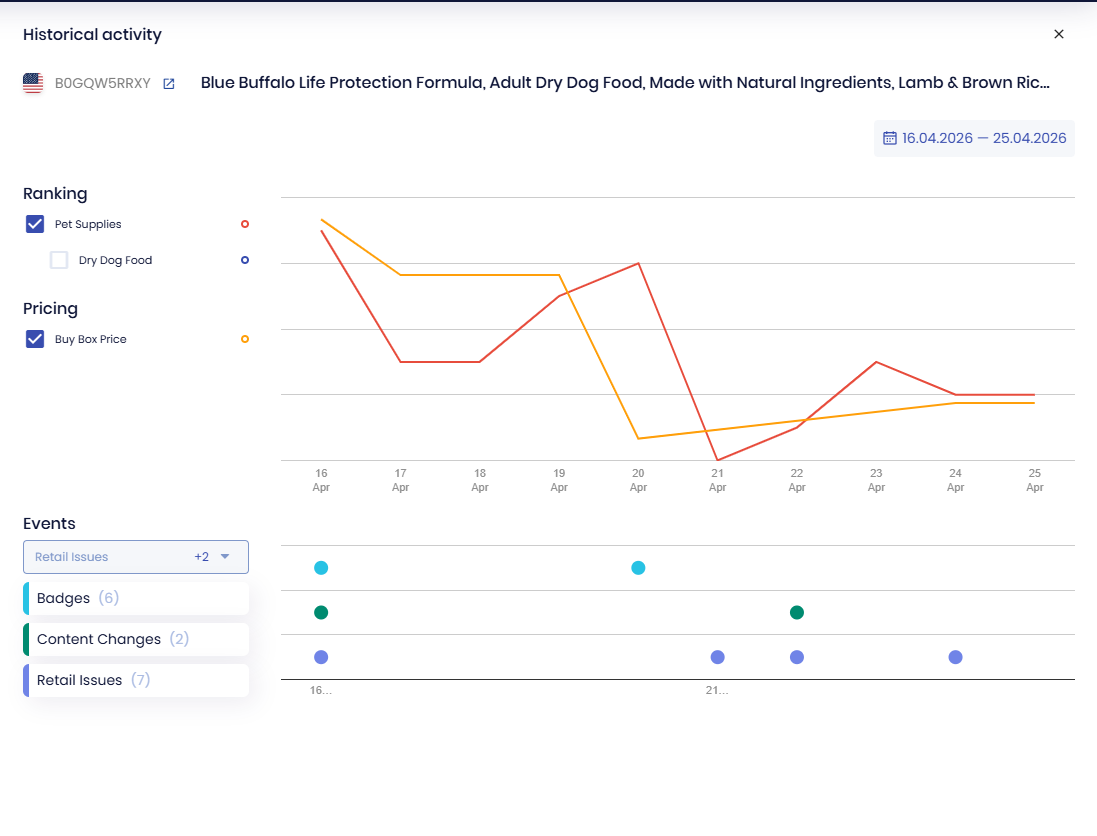
Ranking and Buy Box price over time, with the listing events that moved them marked underneath
The two do meet in one place, and it’s the part worth knowing about while you’re still choosing.
You can track any ASIN, including competitors’, without connecting Seller Central. So you can pick five products you’re considering, watch what their BSR, price, rating and badges actually do for a month, and find out whether the niche is steady before you place a purchase order. A product database gives you a snapshot. Watching the same ASINs for four weeks gives you the trend, which is the question a snapshot can’t answer.
That validation month is also the easiest place to use the SellerSonar MCP server: instead of opening the dashboard every few days, you ask your AI assistant what the five candidate ASINs did this week and read the answer in the chat you are already working in. Access is read-only and needs no Seller Central connection, which is the same arrangement the tracking itself uses.
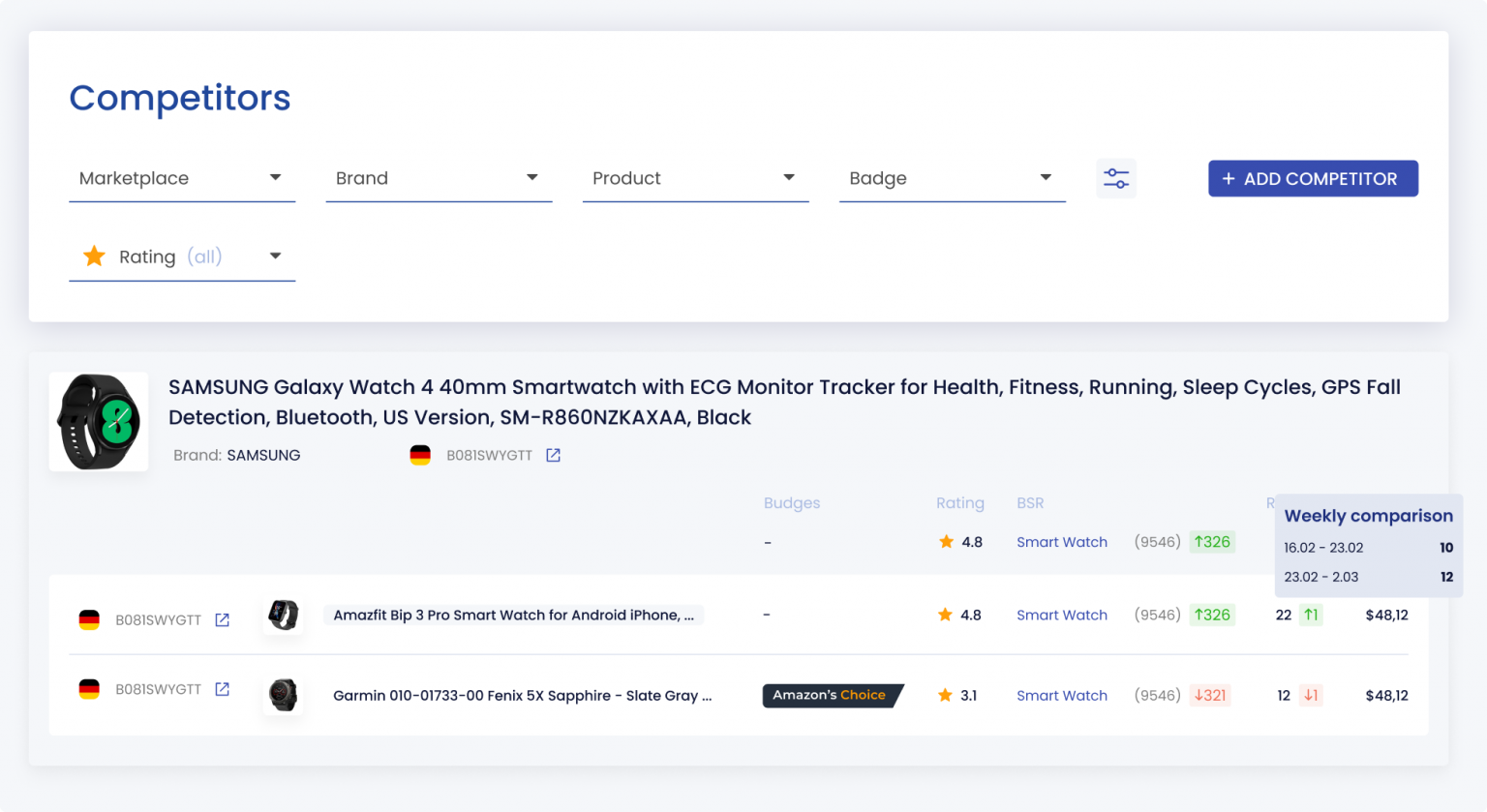
Tracking rival ASINs: badge, rating, BSR and week-on-week price, with no Seller Central connection
Prices, so you can compare them with the table above: $19.98 a month for Pro, $39.98 for Premium and $74.98 for Business, all billed annually, with custom pricing above that. Two trials, picked at registration: a free 14-day one covering 5 ASINs and 10 keywords with no card, or a $5 Full Business 14-day trial covering 500 ASINs and 3,000 keywords.
Where it stops, in our own words: it’s specialised on monitoring and protection, not an all-in-one research or advertising suite. It also has no G2 or Capterra profile yet, so there’s less third-party review evidence than the older tools on this page carry. If you want the sales side of the picture, our guide to Amazon sales estimators walks through how those numbers get produced and how far to trust them.
SellerSonar watches your listings after you’ve picked the product: listing changes, Buy Box hijackers, keyword rank movements and suppressions. Start your free 14-day trial.

