





Verdict: SellerAmp SAS is a sourcing analysis tool that tells Amazon resellers, in one lookup, whether they can sell a product, whether it sells and whether it is profitable. The critical caveat: it stops at the buy decision, with no price-drop alerts or watchlists for the stock you already hold.
Best for: online and retail arbitrage sellers who source every week in SellerAmp’s 7 marketplaces: the US, UK, Canada, France, Germany, Italy and Spain. Look elsewhere if: you need private label research, Safari or Firefox support, or alerts on your listings after you buy.
This SellerAmp review covers what SAS does, how it works for arbitrage and wholesale, how accurate it is, and who should pay for it. Every claim and SellerAmp screenshot below comes from SellerAmp’s public site, help center and app store listings, read on November 4, 2026.
Disclosure: SellerSonar publishes this review and competes with SellerAmp only after the sourcing step, in listing monitoring. SellerSonar does not do product research or sourcing analysis, so where SellerAmp is the better tool, we say so.
What is SellerAmp SAS?
SAS stands for Sourcing Analysis Simplified. According to SellerAmp’s FAQ, it is “3 tools in 1 subscription”: a web app, a Chrome extension and a mobile app for iOS and Android, all sharing one analysis history and one set of settings.
You find a product at a retailer or on a store shelf, and SAS answers three questions: can I sell it, does it sell, and is it profitable? SellerAmp’s About page says it has grown to over 100,000 users since 2019.
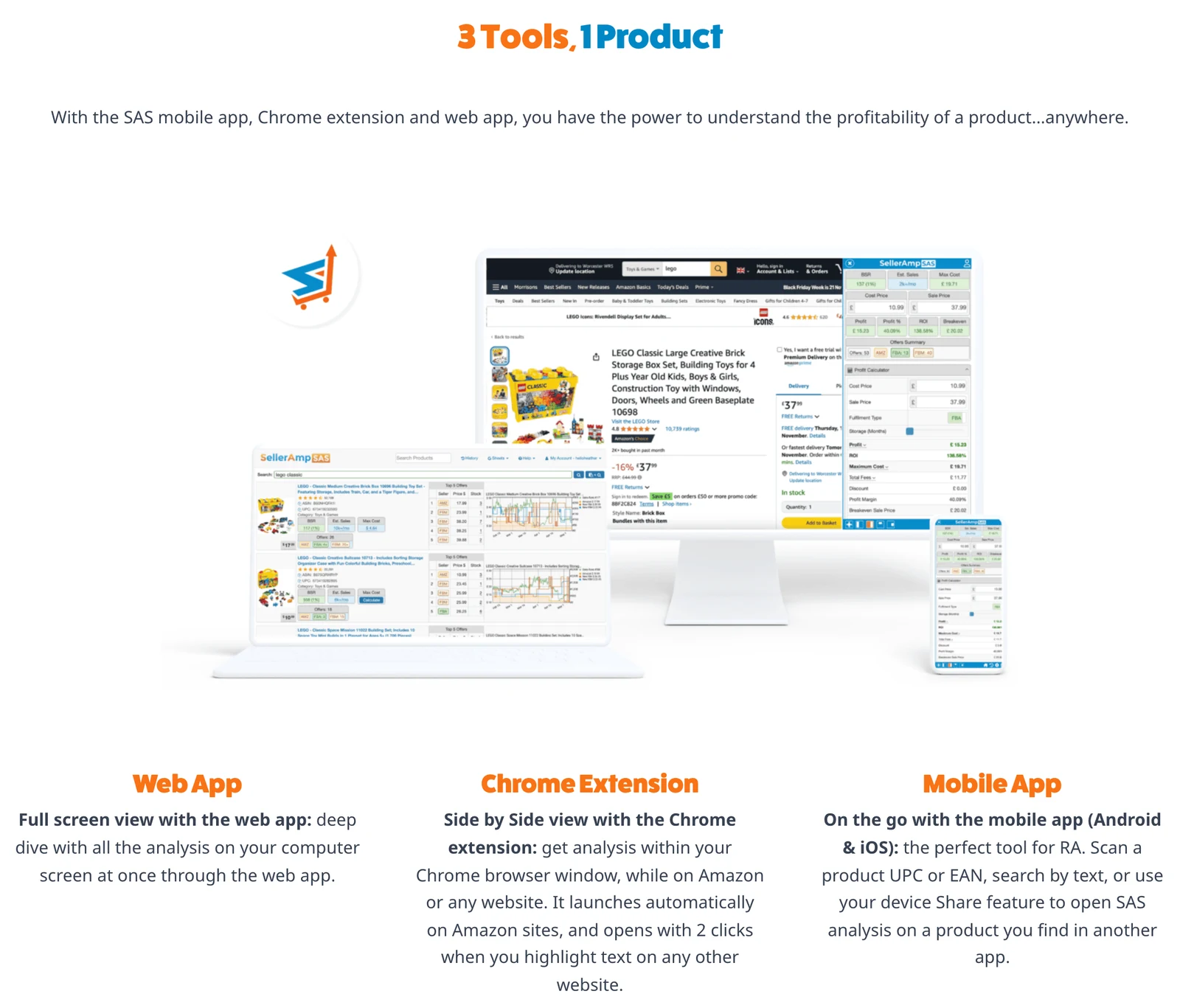
All three tools cover the same seven Amazon marketplaces, per the FAQ on SellerAmp’s pricing page: the US, UK, Canada, France, Germany, Italy and Spain.
SellerAmp at a glance
Every row comes from SellerAmp’s own pages as of November 4, 2026.
| Question | SellerAmp SAS |
|---|---|
| Tools | Web app, Chrome extension, iOS and Android app (one subscription) |
| Marketplaces | 7: US, UK, Canada, France, Germany, Italy, Spain |
| History data | Licensed from Keepa |
| Seller Central connection | Optional; needed for eligibility and dangerous goods status |
| Browsers | Full Google Chrome only |
| Price | From $19.95 to $49.95 a month, 14-day free trial |
| Alerts on stock you hold | – |
How the SellerAmp analysis works
Every lookup opens a stack of panels that you can switch on, off or reorder. These are the ones that drive a buy-or-skip decision, as SellerAmp’s features page describes them.
Quick Info and Max Cost
Quick Info is the top strip: eligibility to sell, BSR against your limits, profit, ROI and Max Cost. Max Cost is the most useful number in the tool. It is the most you can pay and still hit the minimum ROI and profit you set, and SellerAmp’s help center gives the formula: Max Cost = Sale Price – Min. Profit – Fees – VAT.
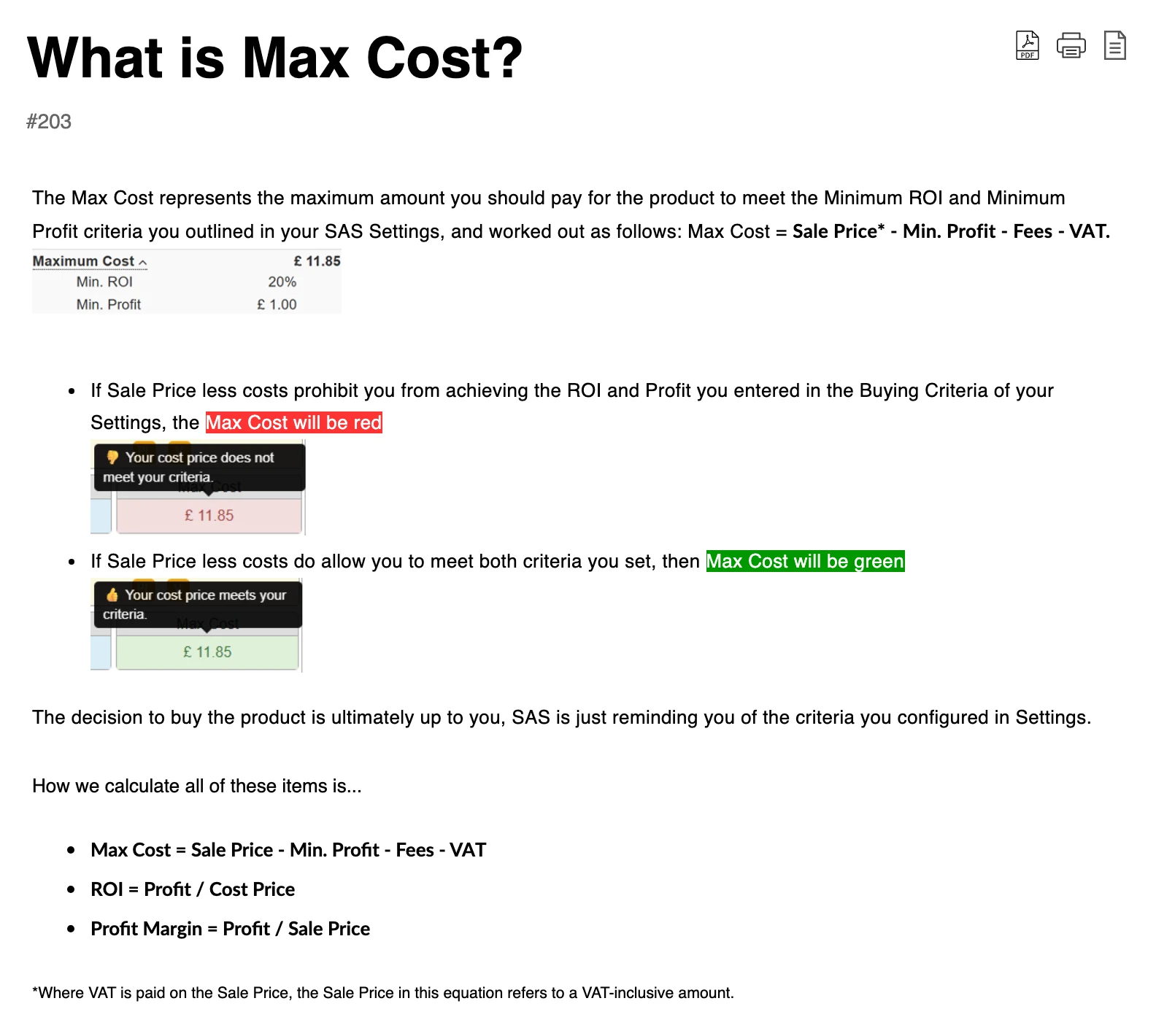
SellerAmp is clear that the color is a reminder, not advice: “The decision to buy the product is ultimately up to you.” It is also why SAS has no single deal score, a choice SellerAmp defends on its BuyBotPro comparison page.
Alerts: eligibility, IP, hazmat and meltables
The Alerts panel uses a stoplight format for problems that kill a deal before profit matters: gated or ineligible products, IP and private label warnings, hazmat and dangerous goods, meltables, listings branded Generic, and whether Amazon historically shares the Buy Box. IP alerts come in yellow (investigate further) or red (more reports or consistent infringements).
One quirk: per SellerAmp’s help center, the meltable alert is not dynamic, so it shows all year, even outside FBA’s October 15 to April 30 meltable season.
Offers, stock and Buy Box history
The Offers panel lists every seller with fulfillment type, estimated stock and price, plus your profit and ROI if you matched that price, as the Offers panel guide explains.
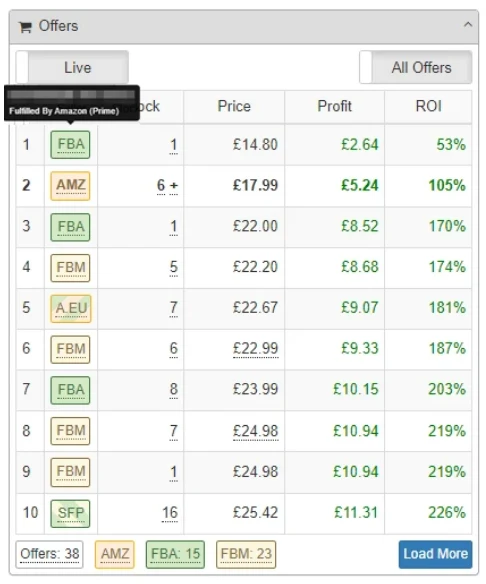
A toggle switches between Live offers, read from Amazon, and Recent offers, updated within the last hour. The Ranks & Prices panel adds BSR, Buy Box, Amazon, lowest FBA and lowest FBM prices, estimated sales per month and an estimated time to sell, over 30, 90 or 180 days or the full history.
The Buy Box Analysis panel shows who owned the Buy Box, and at what average price, over the window you choose.
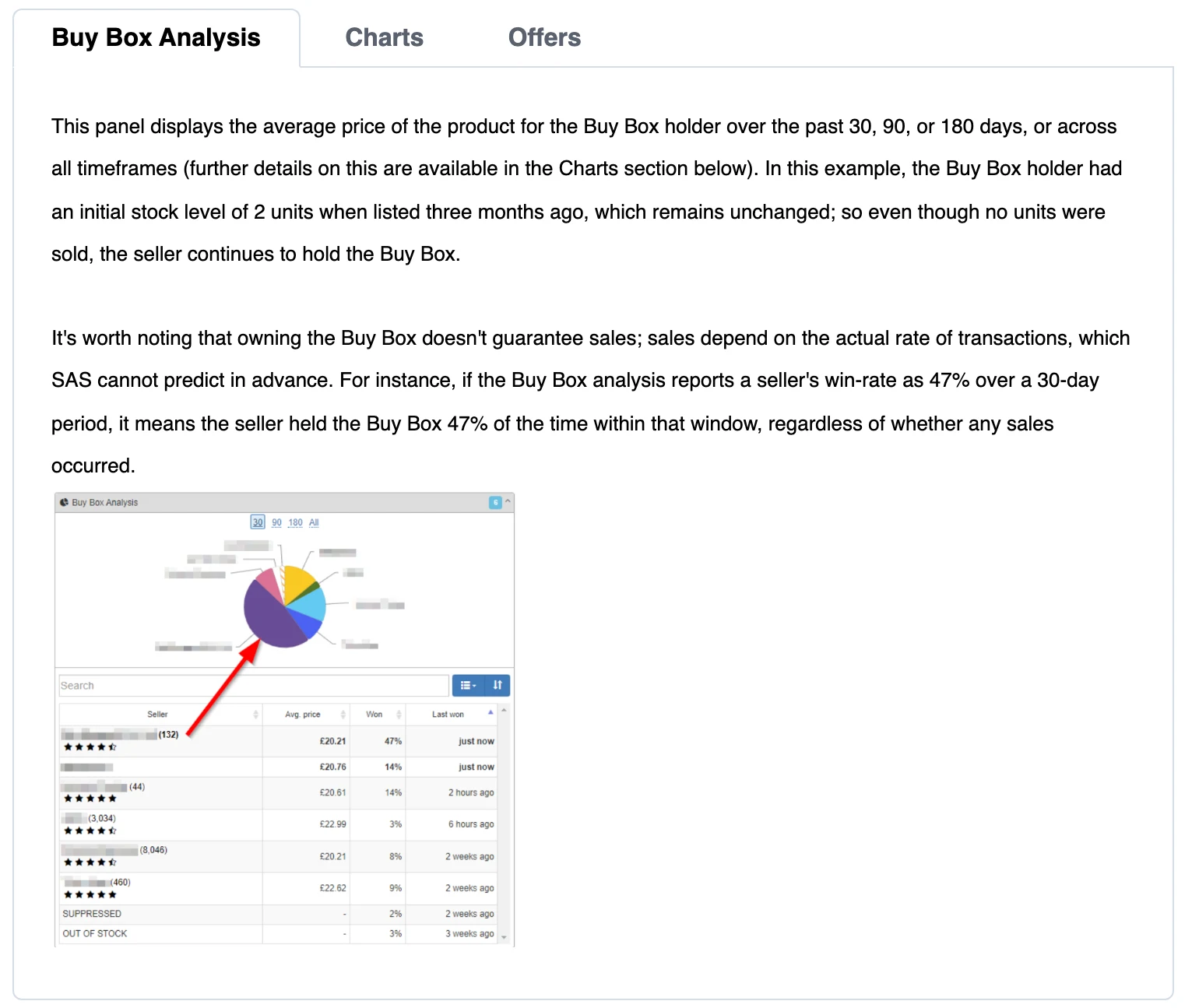
Read that panel the way SellerAmp tells you to. According to its help article on Buy Box ownership, a seller who won 47% of a 30-day window held the Buy Box 47% of the time, and that figure “has nothing to do with sales.”
🎯 Pro Insight: The strongest skip signal in SAS is Amazon holding most of the Buy Box window: a green Max Cost means little if you will rarely get the sale. Our guide on how to win the Buy Box covers what moves that share.
SellerAmp for online arbitrage, retail arbitrage and wholesale
Online arbitrage
Online arbitrage is where the Chrome extension shines. It opens by itself on Amazon product pages, and on any retailer site Smart Search jumps to the matching ASIN. Search Insights adds BSR and seller counts to every Amazon search result.
For finding leads, Advanced Search filters on 200+ criteria, per SellerAmp, such as brand, sales rank, price history and seller count, with templates like Good Deal. ArbiSource and Arbitrage Hero integrations add deal feeds.
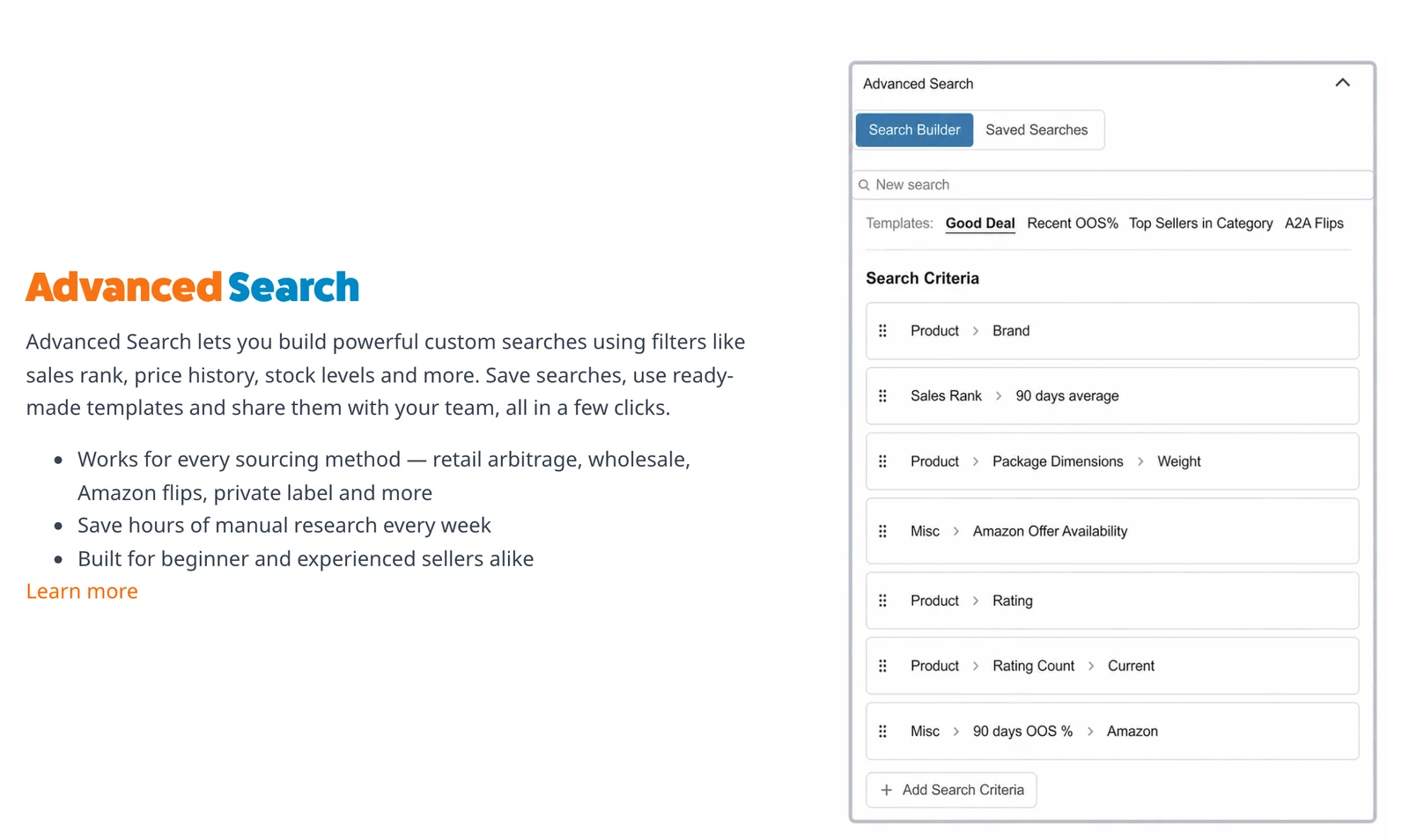
Plan size matters here. According to SellerAmp’s pricing page, Advanced Search returns 10 results on Getting Started, 50 on Getting Serious and 1,000+ on Going Pro.
Retail arbitrage
The mobile app scans UPC or EAN barcodes, searches by text, and can search by photo with its AI image search. Speed Mode, added in app version 1.80, overlays a condensed panel with BSR, estimated monthly sales, Max Cost and offer count without leaving the camera.
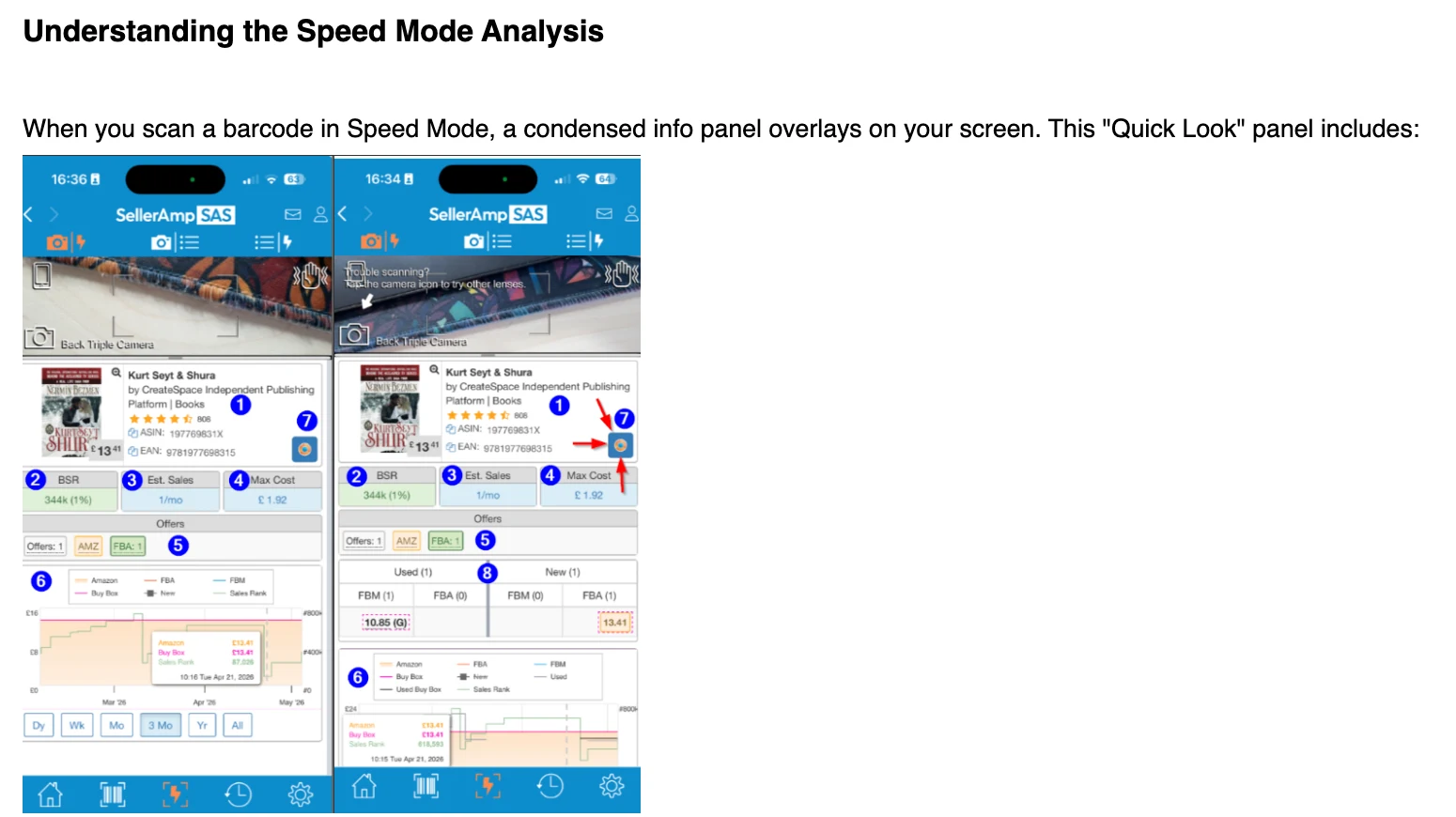
Two details help in stores. According to the Speed Mode guide, quick scans do not use a lookup unless you open the full analysis. The Scan Analysis List keeps saving barcodes if your connection drops mid-aisle.
Book and used-goods resellers get Used Mode, which shows used offers by condition next to new ones.
Wholesale
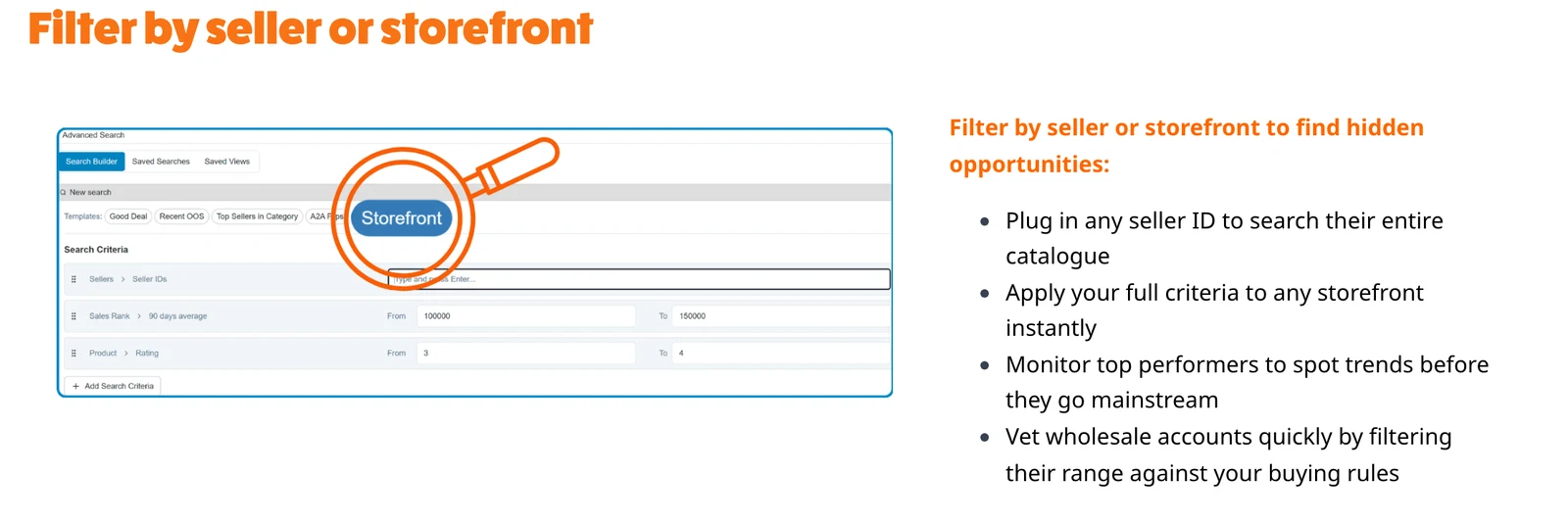
Wholesale support is lighter but real. Storefront Search shows SAS analysis for every product in a seller’s storefront, and Advanced Search can filter any seller ID’s catalog against your buying rules, which SellerAmp pitches for vetting wholesale accounts.
We found no mention on SellerAmp’s site or help center of uploading a supplier price list for bulk matching. If that is your main wholesale workflow, test it during the trial.
How accurate is SellerAmp?
SAS is as accurate as its inputs, and SellerAmp is open about where they come from. Its SellerAmp vs Keepa page says SAS “licenses data directly from Keepa”, so the sales ranks, Amazon and Buy Box prices and lowest FBA and FBM prices match what Keepa shows. For the basics of reading those charts, see our guide to Amazon price history.
The profit math is fixed: ROI is profit divided by cost price, with fees and VAT from your settings. The figures that look most precise are the estimates. The same SellerAmp help article says of its sales numbers that “the figures shown are just estimates”, and the Offers panel labels stock levels as estimated too.
Location matters too: your Amazon delivery address changes which offers SAS sees, and the mobile app can show different offers than the extension if you are not signed in to Amazon.
The top organic result for “selleramp review” on November 4, 2026 was a Reddit thread titled “Your SellerAmp ROI lied to you.” The issue is timing, not arithmetic: SAS prices a product at the moment of the lookup, and that sale price can vanish if more sellers join after you buy.
💡 Expert Tip: Set your Amazon delivery address to the marketplace you sell in, then type the lowest FBA offer into the sale price instead of the current Buy Box. If Max Cost still turns green at that price, the deal has room for one more seller to undercut you.
The Chrome extension and mobile app: what users rate them
On the Chrome Web Store, the SellerAmp SAS extension showed 100,000 users and a 4.3 rating from 83 ratings on November 4, 2026, at version 2.5.1, updated July 30, 2026.
The mobile app rates lower. On the same day, the App Store listing showed 3.6 from 126 ratings, and the Google Play listing showed 3.0 from 281 reviews and 100K+ downloads. Critical App Store reviews shown that day cite barcodes not scanning and missing offers.
Per SellerAmp’s FAQ, the web app and extension need the full version of Google Chrome (no Safari, Firefox, Edge or Chromium), and SAS is English only.
SellerAmp pricing in brief
Per SellerAmp’s pricing page on November 4, 2026, there are three plans, each with a 14-day free trial; annual billing gives two months free. Going Pro was added on February 25, 2026.
| Plan | Per month | Main limits |
|---|---|---|
| Getting Started | $19.95 | 1,000 lookups a month, 2 app and 2 extension installs, 10 Advanced Search results |
| Getting Serious | $29.95 | Unlimited lookups (fair use), up to 5 profiles, 5 installs each, 50 results |
| Going Pro | $49.95 | Adds team users, user analytics, shared searches, 1,000+ results |
A lookup counts once per ASIN every 24 hours, according to SellerAmp’s lookup guide. SellerAmp takes a card at signup, and its refund policy says charges are non-refundable, so cancel at least 24 hours before the trial ends if SAS is not for you.
What SellerAmp does well
- One lookup, the whole decision. Eligibility, IP and hazmat flags, profit, ROI, Max Cost, offers and price history sit in one view.
- Three tools, one history. Start a lookup in a store and finish it at your desk, with tags, notes and Google Sheets export.
- Keepa data built in. Licensed Keepa charts come with every lookup, so for sourcing alone you may not need a separate Keepa subscription.
- No Seller Central required. SellerAmp says over 95% of SAS features and data work without connecting an account; connecting adds eligibility and dangerous goods status.
- UK and EU math. VAT schemes, EFN and Pan-EU fees, and a European Marketplaces panel that compares one ASIN across the UK, France, Germany, Spain and Italy.
Where SellerAmp falls short
- Nothing watches your stock after you buy. SellerAmp’s own Keepa comparison gives Keepa “Price-drop alerts & tracking watchlists” and marks SAS with a dash.
- Seven marketplaces. Anything outside the US, UK, Canada, France, Germany, Italy and Spain, such as Japan, Mexico or Australia, is not covered.
- Chrome and English only. Safari, Firefox and Edge users are out.
- Estimates look exact. Sales per month, time to sell and stock levels are estimates, and a Buy Box win rate is not a sales rate.
- Teams pay for the top plan. Multiple users are a Going Pro feature, and so are add-on install packs.
- Not a research suite. SellerAmp’s features list has no keyword research, listing or PPC tools.
SellerAmp states the first gap itself, on its comparison page.
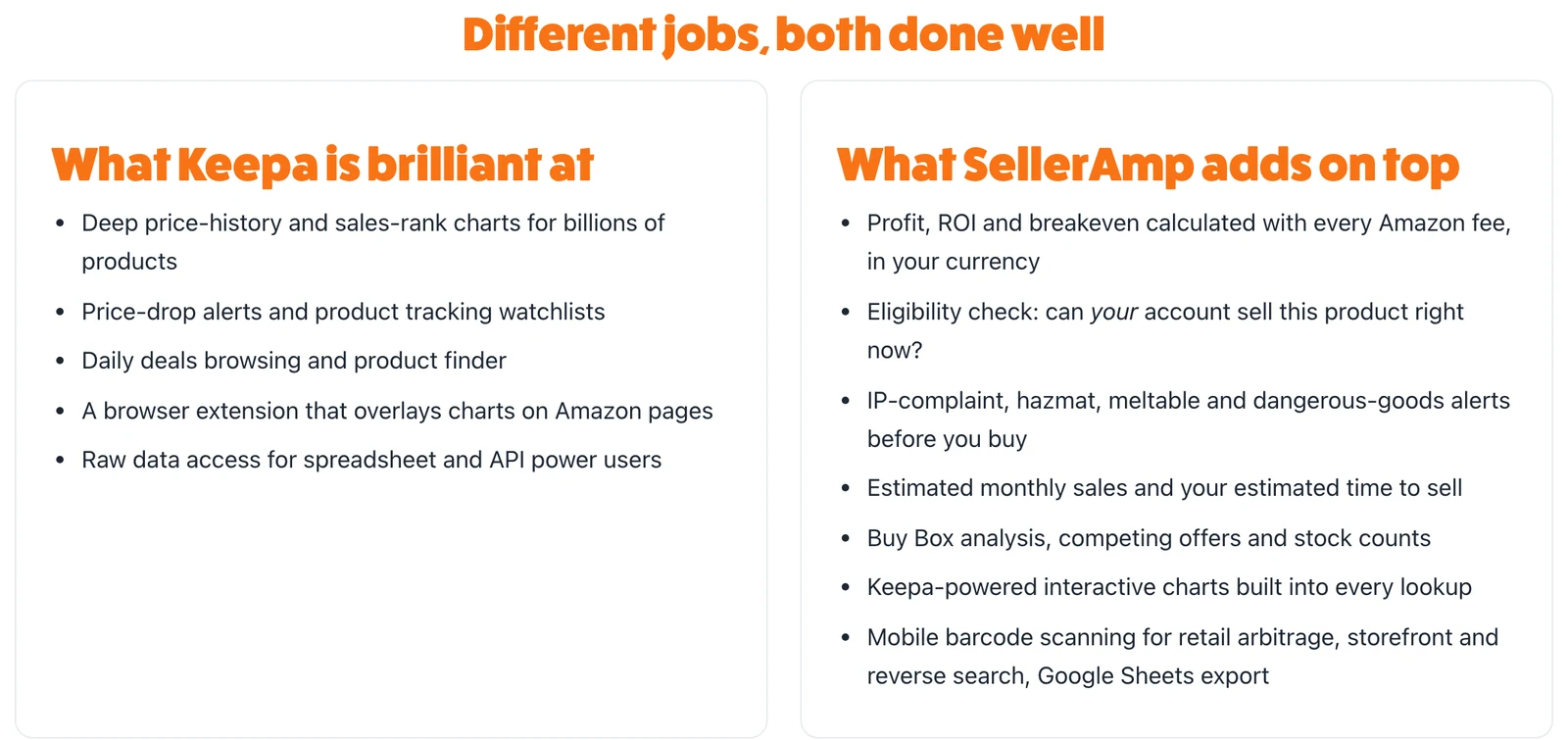
SellerAmp’s suggested answer is to run both: “Keepa for tracking and deal-hunting, SAS for the buy-or-skip decision.”
Is SellerAmp worth it? By seller type
Our read of SellerAmp’s documented features, by the way you source.
| Seller type | Worth it? | Why |
|---|---|---|
| Online arbitrage | Yes | Extension on Amazon and retailer pages, Max Cost, Search Insights, Advanced Search |
| Retail arbitrage | Yes, test the app first | Barcode scanning, Speed Mode, offline scan list; app ratings trail the extension |
| Books and used goods | Yes | Used Mode with condition codes and used price charts |
| Wholesale | Maybe | Storefront and seller ID filters, Sheets export; no price-list upload documented |
| Teams with VAs | Only on Going Pro | Users, user analytics and shared searches are Going Pro features |
| Private label | No | No keyword research, listing or PPC tools |
| Sellers outside the 7 marketplaces | No | Not supported |
| Watching stock you already hold | No | No alerts or watchlists |
Pros & cons
Pros: fast buy-or-skip answers with Max Cost; risk flags before you spend; Keepa history in every lookup; three tools on one plan; works without Seller Central; strong VAT handling.
Cons: no alerts or watchlists after purchase; seven marketplaces; Chrome and English only; weaker mobile ratings; estimated sales and stock; non-refundable billing.
After you buy: when a monitoring tool makes more sense
SAS answers whether to buy. Once your units are in FBA, the questions change: did another seller join, did someone cut the price, did you lose the Buy Box? SAS only shows that if you rerun the lookup by hand.
That gap is what SellerSonar covers. You add the ASINs you hold, on any of 23 Amazon marketplaces and without a Seller Central connection, and SellerSonar checks them on a schedule. Its Buy Box and pricing alerts include Seller appeared, Seller removed and Seller’s price changed.
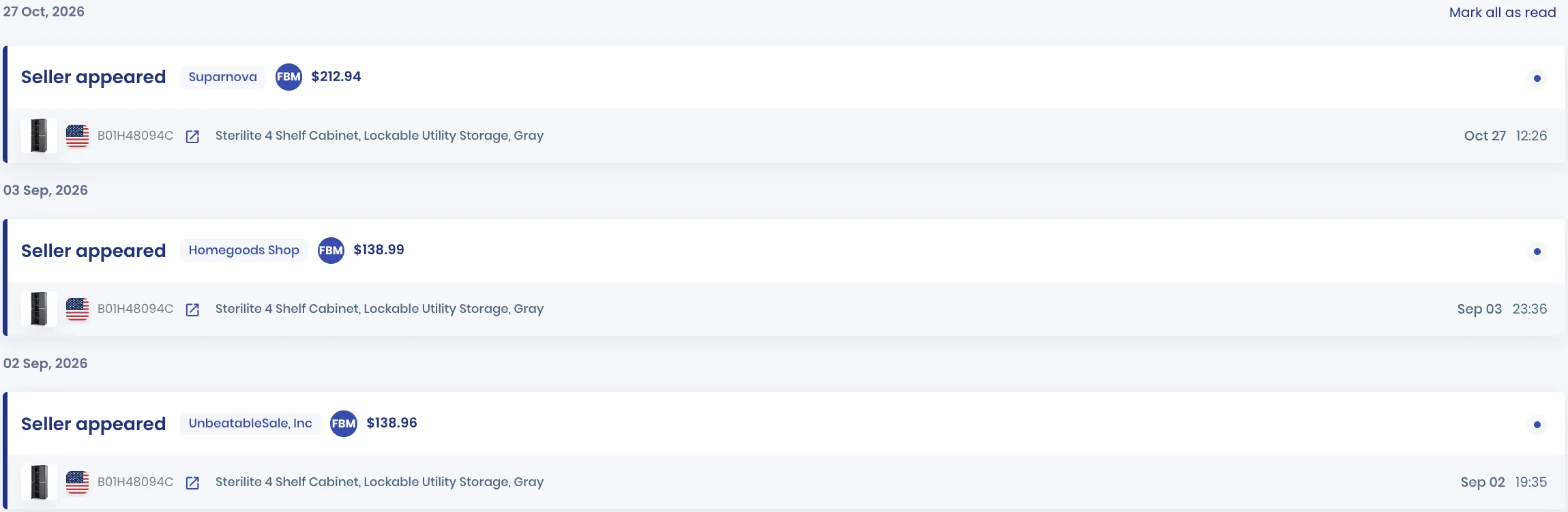
In this SellerSonar data, an FBM seller joined the listing at $212.94 on October 27, 2026: for a reseller holding that ASIN, the cue to recheck the price.
From Premium, the Buy Box Tracker shows ownership share over time: the after-purchase version of the SAS Buy Box Analysis panel.
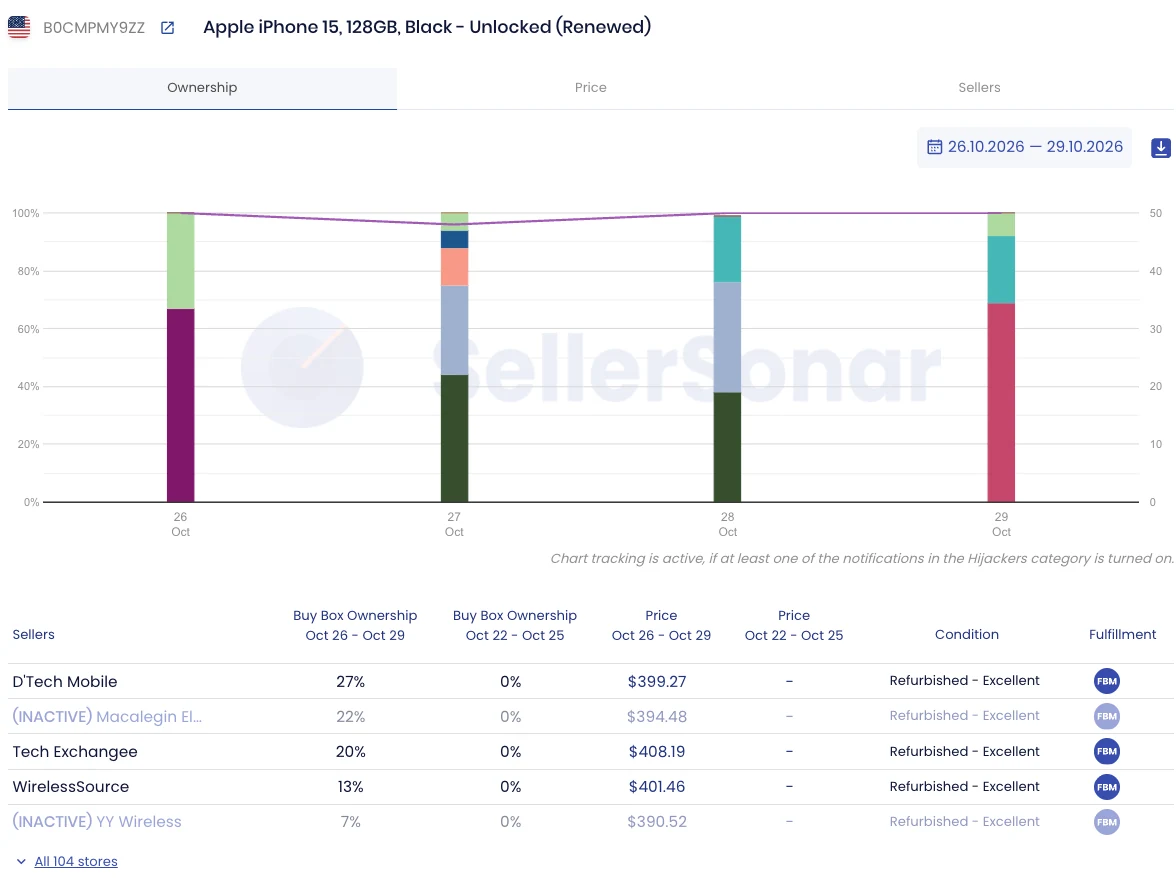
Here SellerSonar data shows D’Tech Mobile with 27% of the Buy Box across 104 stores. Alerts arrive by email or Slack, with webhooks on Business.
One setup note: all five Buy Box and pricing alerts start switched off, so turn them on under Alerts, then Delivery Settings, and pick your own Seller ID for each marketplace.
According to SellerSonar’s plans, Pro costs $19.98 a month billed yearly for 150 ASINs checked every four hours. Premium is $39.98 for 300 ASINs every two hours and adds Buy Box Won and Lost alerts; Business is $74.98 for 500 ASINs checked hourly. SellerSonar does not do product research, profit calculation or repricing, so it sits next to SAS rather than replacing it.
📌 From Our Experience: Profitable resellers treat sourcing and holding as two jobs. SAS decides what goes in the cart; alerts decide when to reprice or stop restocking.
Final Expert Recommendations:
SellerAmp SAS earns its price for arbitrage sellers who source every week; Getting Serious at $29.95 a month, per SellerAmp’s pricing page, removes the lookup cap. Treat its sales and stock figures as estimates. Once you own inventory, add SellerSonar’s listing monitoring so a new seller, a price cut or a lost Buy Box on your ASINs reaches you on the next check.
Start your free 14-day SellerSonar trial and see what’s happening on your listings today.
Related: SellerAmp pricing · Helium 10 review · SellerSonar vs Helium 10 · Best Amazon product research tools · How to use the Amazon FBA calculator

