





Quick Answer
Amazon shipping delays usually come from four places: holiday demand, weather and carrier problems, FBA receiving backlogs in the fall, and the occasional outage, like the AWS failure on October 20, 2025 that Amazon confirmed hit Amazon.com. Amazon’s own help page says most late parcels arrive within 48 hours of the estimated delivery date.
For sellers, delays only cost you directly on orders you ship yourself (FBM):
- Late Shipment Rate: keep it under 4%, according to Amazon’s Seller Central help pages
- On-time delivery rate: at least 90% (Amazon recommends 95%)
- Valid tracking rate: at least 95% per category
- Cancellation rate: under 2.5%; Order Defect Rate: under 1%
None of these apply to FBA orders. With FBA, the delay you control is getting stock into Amazon’s warehouses on time.
If you sell on Amazon, a late package isn’t only the customer’s problem. Ship your own orders, and late weeks show up in your account metrics. Use FBA, and a slow fall at the warehouse can leave you out of stock in December.
This guide covers what causes Amazon shipping delays, the five numbers Amazon checks when your orders run late, how delays affect the Buy Box, and what to change before the holiday peak.
About the Author: Diana Walsh writes for the SellerSonar editorial team about Amazon fulfillment, account health, and the policies that sit behind both. She checks every threshold in her articles against Amazon’s own Seller Central help pages before publishing.
Is Amazon shipping delayed right now?
There’s no public dashboard for Amazon order delays, so no article (including this one) can tell you what’s happening today. What you can do is check the order itself.
On the shopper side, open Your Orders and select Track package. Amazon’s late deliveries help page says to allow 48 hours past the estimated delivery date for unexpected delays, and lists the usual causes: bad weather, heavy traffic, high delivery demand during holidays, customs delays, and operational problems like a vehicle breaking down. For orders shipped by Amazon, it says to contact Customer Service within 30 days of the estimated delivery date. If a third-party seller shipped the order, you contact the seller.
When something big breaks, you’ll usually see it in the news first. That’s what happened on October 20, 2025.
Why Amazon orders get delayed
Most delays aren’t mysteries. They come from the same handful of causes, and the biggest ones are predictable.
Holiday and event peaks
Order volume jumps around Prime Big Deal Days, Black Friday Week, and the weeks before Christmas, and carriers run out of capacity at the same time. Amazon adjusts its own delivery promises for this with what it calls promise extensions: “additional days that we may add to the delivery date to account for logistical factors that may delay a delivery such as extreme weather, transportation network constraints.” If you’re planning around the holidays, our Amazon Christmas sales guide lists the 2026 dates announced so far.
FBA receiving in the fall
This one catches FBA sellers every year. In its Q4 2026 announcement to sellers, Amazon wrote that its fulfillment centers “focus on receiving holiday shipments in September and October, then shift to processing customer orders in November and December. So, you may see lower capacity limits during this time.” The same announcement set the 2026 inbound deadlines for Black Friday Week: October 14 for AWD, October 21 for FBA with minimal splits, and October 28 for FBA with Amazon-optimized splits.
In other words, stock that arrives late isn’t delayed for the customer yet. It’s delayed for you, because it can’t sell until Amazon receives it.
Outages
On October 20, 2025, AWS had a long failure in its us-east-1 region. According to AWS’s own summary, the event ran from 11:48 PM PDT on October 19 to 2:20 PM PDT on October 20 and started with an empty DNS record for DynamoDB. CNBC reported that “Amazon also confirmed that the outage impacted Amazon.com,” and that Seller Central was knocked offline too. Customers reported delivery delays in the days after.
Our old version of this page got almost 29,000 impressions that one day, per Google Search Console. That’s how many people go looking for an answer when Amazon stalls.
Your own operation
For FBM sellers, a lot of “Amazon delays” start at the packing table: a handling time that’s too short, a carrier that picks up late, or a label without a valid scan. These are the delays Amazon measures, and they’re the ones you can fix.
The five numbers Amazon checks when your orders run late
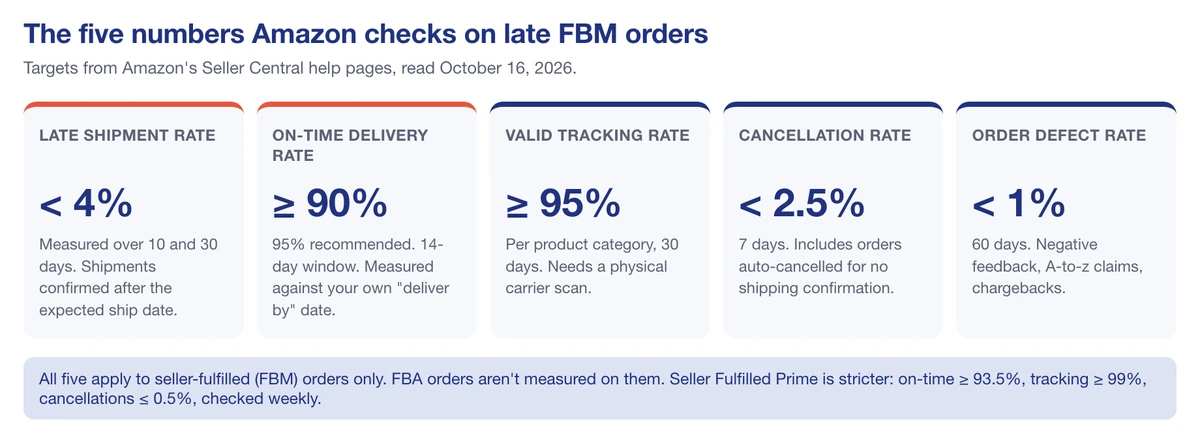
If you ship your own orders, Amazon tracks your delivery performance with five metrics in Account Health. All of them apply to seller-fulfilled orders only. Here’s each one, with the target and the window from Amazon’s Seller Central help pages:
| Metric | Amazon’s target | Window | What it counts |
|---|---|---|---|
| Late Shipment Rate | Under 4% | 10 and 30 days | Orders shipped (confirmed) after the expected ship date |
| On-time delivery rate | At least 90%, 95% recommended | 14-day window | Orders delivered by your own “deliver by” date, without promise extensions |
| Valid tracking rate | At least 95% per category | 30 days | Shipments with a tracking number that gets a physical carrier scan |
| Cancellation rate | Under 2.5% | 7 days | Orders you cancel, including ones auto-cancelled because you never confirmed shipment |
| Order Defect Rate | Under 1% | 60 days | Orders with negative feedback, an A-to-z claim, or a chargeback |
Miss one of the rate targets, and Amazon’s wording is careful but serious. For late shipments, according to its Late Shipment Rate page, an LSR above 4% “may result in suspension of your Fulfilled by Merchant selling privileges or deactivation of your seller-fulfilled offers with high rates of late shipments.” That’s your self-shipped offers, not necessarily your whole account. The on-time delivery page also states plainly that the policy “does not apply to offers using the Fulfillment by Amazon (FBA) service.”
💡 Expert Tip: On-time delivery is measured against the “deliver by” date you set, not the date Amazon shows the customer. If Amazon adds a promise extension and shows Friday, you still have to deliver by your own Thursday. Set your transit times honestly, and the metric takes care of itself.
According to Amazon’s Seller Fulfilled Prime requirements, SFP is stricter: at least 93.5% on-time delivery, at least 99% valid tracking, and at most 0.5% cancellations, reviewed every week.
Do shipping delays cost you the Buy Box?
Sort of. Not the way most guides say.
Amazon’s page on becoming the Featured Offer (the Buy Box) lists delivery as a factor: “Faster offers and offers with a specific delivery promise (instead of a range) are more likely to be featured.” It also says your offer “can’t become featured if you’re out of stock.” And it says fulfillment method isn’t a factor when everything else is equal: FBA and FBM offers “are equally likely to be featured.”
You can see it on a Sterilite storage cabinet we track in SellerSonar. Between September 1 and October 16, 2026, SellerSonar recorded 78 Buy Box changes between Amazon’s offer and FBM sellers, mostly at the same price. On October 2 and 3, at $133.99, the Buy Box went Amazon, Spreetail, Amazon, Spreetail, roughly every two hours.
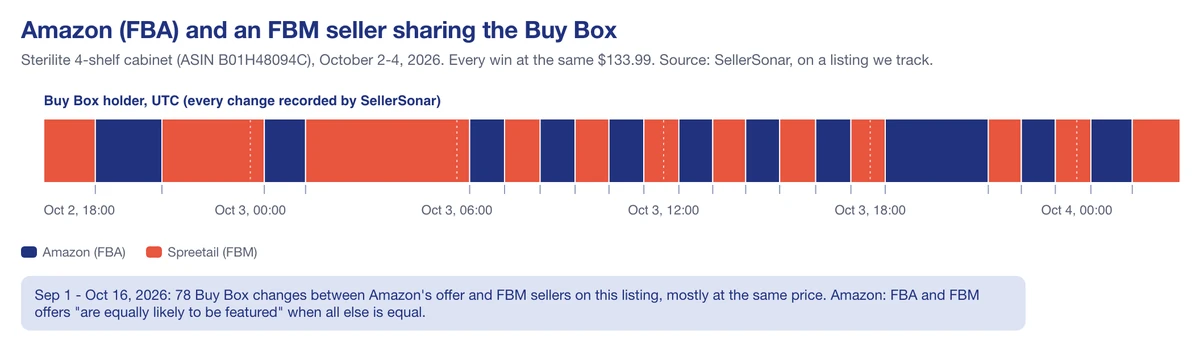
So here’s how delays connect to the Buy Box in practice. If you lengthen your handling time to stop missing ship dates, your delivery promise gets slower, and Amazon says slower offers are less likely to be featured. If you run out of stock, you’re out of the Buy Box entirely. The fix isn’t to promise less. It’s to ship reliably on the promise you make.
SellerSonar’s Buy Box monitoring records who held the Buy Box on your listings, at what price, and when it changed, so you can see whether a longer handling time is quietly costing you share. It checks every 1 to 4 hours depending on your plan, so it isn’t a real-time feed, but it’s plenty to spot a pattern within a day. Our guide on winning the Buy Box covers the other factors.
🎯 Want to see who holds the Buy Box on your listings? Start a free 14-day SellerSonar trial: 5 ASINs, 10 keywords, no credit card.
What to do before and during a delay
If you ship your own orders (FBM)
- Set an accurate handling time. From June 29, 2026, Amazon requires accurate handling times on seller-fulfilled SKUs. If you don’t fix them within 30 days of a notice, Amazon adjusts them for you for the next 180 days, and you can’t change them in that period. The handling time help page also covers automated handling time, which gives your account late shipment protection while it’s on.
- Let Amazon set your transit times. Amazon says Shipping Settings Automation gives delivery promises that are “on average 30% more accurate” than seller-set transit times.
- Use order handling capacity for spikes. When orders go over the capacity you set, Amazon adds one day of handling time to the extra orders instead of letting you miss them.
- Tell buyers when you’re late. Amazon’s communication policy says that if a shipment will be delayed beyond the advertised availability, “the seller must notify the customer about the delay.” Shipping confirmations and thank-you messages aren’t allowed, and you should answer buyer messages within 24 hours.
- During a storm or disaster, Amazon’s own advice is to raise your handling time, switch Prime offers to Standard Shipping, and message affected buyers.
If you use FBA
- Work back from the receiving window. Amazon receives holiday stock in September and October, then shifts to orders. Plan inbound shipments around the October deadlines, not around your sales forecast for December.
- Watch your capacity limits. They’re set monthly for each storage type, and Amazon warned that October and November limits may be lower.
- Follow the shipment status. An inbound shipment goes from In transit to Delivered, Checked in, Receiving, and Closed. Amazon says reconciliation “usually takes 2 to 30 days,” and you have nine months from delivery to the fulfillment center to file a claim for missing units.
- Don’t run out. A stockout takes you out of the Buy Box and the delay becomes weeks, not days.
📌 From Our Experience: Low stock gives you warning before it becomes a stockout. On a phone case we track, SellerSonar recorded a low-stock warning four times between September 4 and October 11, 2026, as the seller’s stock dropped to 20, then 1, then 5, then 1 unit. Turn on low-stock and listing alerts in product monitoring for your top sellers before the peak, not during it.
Late deliveries, refunds and A-to-z claims
Sooner or later a customer will ask for money back because a package was late. Here’s what Amazon’s own pages say, so you know what they can and can’t claim.
- Shipping fee refunds: Amazon refunds shipping fees only when it showed a guaranteed delivery date at checkout and missed it. A normal estimated date isn’t a guarantee.
- A-to-z Guarantee: for orders sold and shipped by a third-party seller, the A-to-z Guarantee covers “both the timely delivery and condition of your items.” For a package that hasn’t arrived, the customer can file once three days have passed since the latest estimated delivery date and they contacted the seller more than 48 hours ago without a fix.
- Your window: that 48 hours is your chance. Answer the message, give tracking, and offer a solution before it turns into a claim and a hit to your Order Defect Rate.
Holiday orders also come with a longer return window. In 2025, Amazon let most items bought from November 1 to December 31 be returned until January 31, 2026, and that applied to FBA and FBM orders alike. The Amazon seller holiday calendar keeps the year’s key dates in one place.
So, how worried should you be about Amazon shipping delays?
Less worried than the search results suggest, and more prepared. Amazon shipping delays mostly follow the calendar, and the parts that hurt sellers are measurable:
- FBM sellers are judged on five metrics, and the on-time delivery rate is checked against the date you set.
- FBA sellers face their delays at the warehouse door in October, not at the customer’s door in December.
- The Buy Box rewards fast, specific delivery promises, and it can’t go to an offer that’s out of stock.
- Customers can claim refunds only for missed guaranteed dates, and A-to-z only after 3 days plus 48 hours.
Final Expert Recommendations:
Based on our experience with sellers in peak season, the most critical factor is honest promises. Set handling and transit times you can actually hit, let Amazon automate them where it offers to, and keep enough stock to stay featured through December. If you’re just getting started, turn on automated handling time and low-stock alerts this week, because both protect you before the first delay arrives.
Want an early warning when stock runs low or the Buy Box moves? Compare SellerSonar plans or start the free trial before the holiday rush.

