






Quick Answer
To sell stuff on Amazon, you pick a product you’re allowed to sell, choose a selling plan ($0.99 per item sold or $39.99 a month), register a seller account with your ID, bank account and credit card, list the product, and decide whether Amazon ships it (FBA) or you do (FBM). According to Amazon’s seller registration guide, identity verification usually takes three business days or less, and your first payout lands in your bank by ACH.
Selling on Amazon looks simple from the buyer’s side: one product page, one Add to Cart button. Behind it there’s an account to open, a plan to pick, product rules to check, and a choice about who ships your orders. None of it is hard, but the order matters, and a few early mistakes are expensive to undo.
This guide walks through the whole process for a first-time US seller, from choosing what to sell to the day the money reaches your bank. Every rule and number comes from Amazon’s own seller pages, checked in October 2026.
About the Author: Gloria Anderson writes for the SellerSonar editorial team about starting and running an Amazon business. She checks every policy in her guides against Amazon’s Seller Central help pages, and the examples against listings we track.
How selling on Amazon works
When you sell on Amazon, you’re a third-party seller in Amazon’s store. (Our guide to Amazon third-party sellers shows what that looks like from the buyer’s side.) Customers find your product in Amazon search, pay Amazon, and Amazon passes the money on to you after taking its fees. More than 60% of sales in the Amazon store come from independent sellers, per Amazon’s how to sell on Amazon page.
The part that surprises most beginners: product pages are shared. If the item you want to sell is already on Amazon, you don’t build your own page; you add your offer to the existing one and compete with every other seller on it for the spot with the Add to Cart button. If the item is new to Amazon (your own brand, for example), you create the page.
Here’s the whole path at a glance:
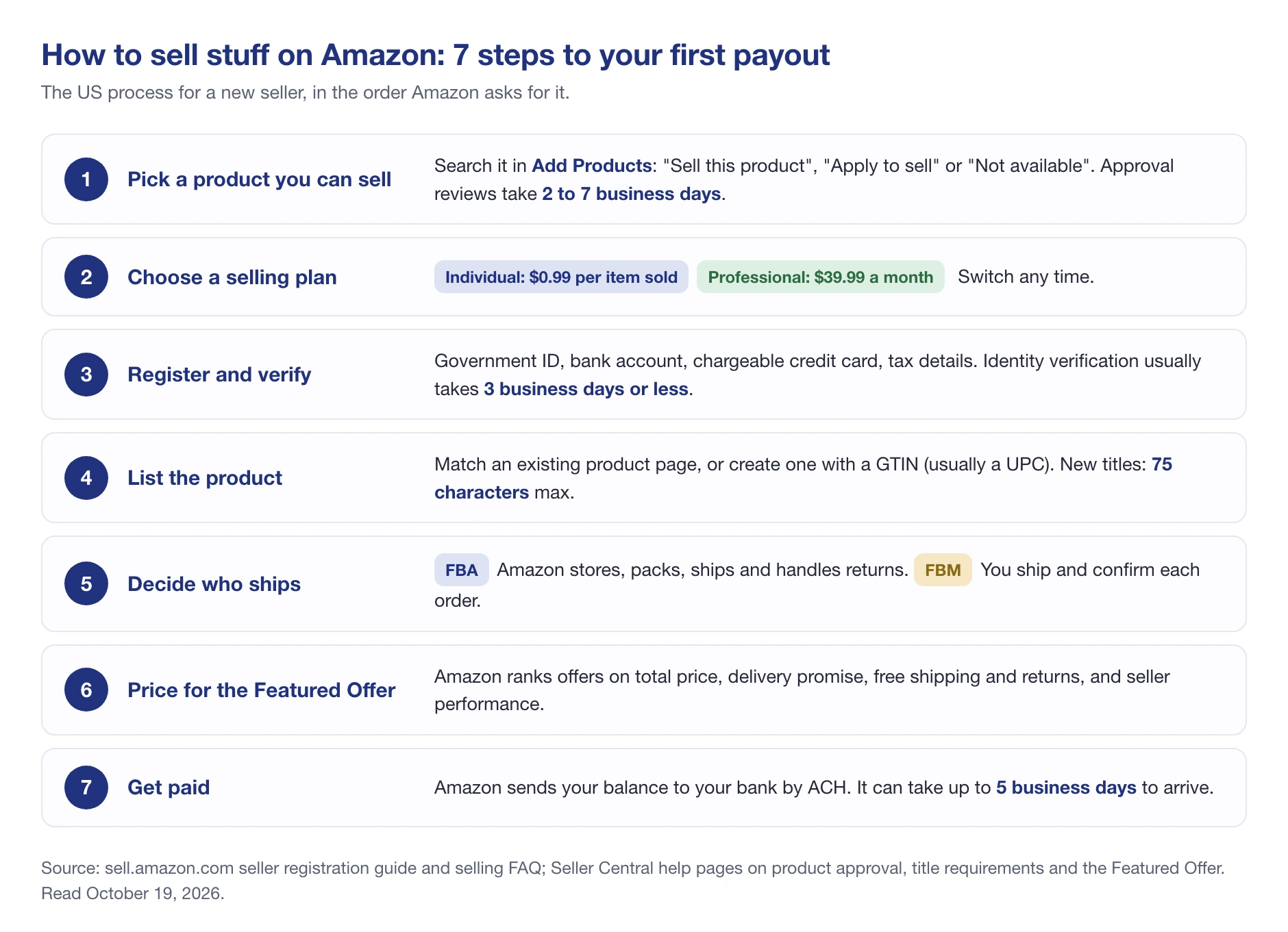
Each step below covers what Amazon asks for and where new sellers get stuck.
What you need before you start
Gather these before you click Sign up, because registration asks for them in one sitting. According to Amazon’s selling FAQ, you’ll need:
- A government-issued ID (a passport or driver’s license)
- A phone number and an email address
- An internationally chargeable credit card
- A bank account and routing number for payouts
- Proof of your residential address dated within the last 180 days, like a bank or credit card statement
- Tax information
- A business license or registration, if you have one
That last item trips people up. Amazon’s registration guide says you don’t need an LLC or a registered business to sell. If you’re selling as yourself, pick “None, I am an individual” as your business type and Amazon adjusts the forms.
Use an email address that isn’t tied to your Amazon shopping account, Amazon recommends, unless you already have Brand Registry, Amazon Ads or Vendor Central access (then use that same login so everything syncs).
Step 1: Decide what to sell
Start with what you’re allowed to sell, then work out whether it’s worth selling.
Check the restrictions first. Some products need Amazon’s approval, some categories need it, and some brands need it. Per Amazon’s page on categories and products that require approval, you search the product in Add Products in Seller Central and get one of three answers: “Sell this product” (go ahead), “Apply to sell” (approval needed) or “Not available.” Amazon asks you to prepare purchase invoices dated within 180 days and clear product photos, and the review takes 2 to 7 business days, according to Amazon. If the answer is “Your account does not qualify,” Amazon says that decision can’t be appealed.
Then check demand and margin. A product people already search for, with room left after Amazon’s cut, beats a clever idea nobody’s looking for. We go through how to find those products in what to sell on Amazon.
Selling a few things from around the house is fine too. It’s the same process, just with fewer approvals to worry about, since you’re usually adding offers to pages that already exist.
Step 2: Choose a selling plan
Amazon has two plans: Individual costs $0.99 per item sold with no monthly fee, and Professional costs $39.99 a month with no per-item fee, per Amazon’s pricing page. Both pay a referral fee on every sale, and Amazon’s own rule of thumb is that the Individual plan may suit you if you sell fewer than 40 items a month. Some categories are open only to Professional sellers, and you can switch plans any time. We break down what’s actually free (and what isn’t) in how to sell on Amazon for free, and every 2026 fee in Amazon seller fees.
Step 3: Register your seller account
Registration runs through five screens, according to Amazon’s guide. Amazon says many sellers finish them “in just a few hours”:
- Business information. Country, business type, legal business name, address and phone. Individuals select “None, I am an individual.”
- Seller information. Your full legal name, date of birth, citizenship and residential address, taken from your ID.
- Billing information. Your bank account and credit card. The bank account must be in your name or your business’s name; the credit card doesn’t have to be.
- Store and product information. The store name customers will see (it has to be unique and doesn’t need to match your business name) and whether you have product codes or own a brand.
- Identity verification. You upload your ID and proof of address, then either take a photo of your face with your ID or join a video call with an Amazon associate.
Verification “usually takes three business days or less,” per Amazon. Use clear color scans that show all four corners of each document; Amazon asks you not to upload screenshots or blurry images.
One rule to know before you start: Amazon allows one Seller Central account per region unless you have a legitimate business need for a second one, per its new seller guidelines. If you’ve ever opened a seller account, even to sell a few textbooks, use that one rather than creating another. The account you open from sell.amazon.com also covers Canada, Mexico and Brazil, according to Amazon.
Step 4: List your products
There are two ways to list, and which one you use depends on whether the product is already on Amazon.
Match an existing page. Search for the product in Seller Central, pick the matching page, and add your price, quantity and condition. Resellers and people selling things from around the house usually list this way. Amazon is clear that product pages “do not belong to a single seller,” so you can’t rewrite the title or images to suit your offer.
Create a new page. For your own brand or a product Amazon doesn’t carry yet, you build the page yourself. For most categories you need a GTIN, usually a UPC barcode, according to Amazon’s product ID requirements. Private-label, handmade and bundled products without one can apply for a GTIN exemption.
When you create the page, Amazon’s rules are strict and specific:
- Title: 75 characters at most, including spaces, per Amazon’s title requirements, with no promotional phrases like “free shipping” and no word used more than twice. Extra detail goes in a separate 125-character Item Highlights field.
- Main image: the product only, on a pure white background, filling at least 85% of the frame, per Amazon’s guidelines. Amazon asks for 1,600 pixels or more on the longest side.
- Category: pick one that matches Amazon’s existing browse tree, not the one with the least competition.
💡 Expert Tip: Write the title for a phone screen. Amazon’s 75-character limit exists because mobile screens cut long titles off, so put the brand, product type and the one attribute buyers filter by (size, count or color) first.
Step 5: Decide how to fulfill orders
This is the biggest operational choice you’ll make, and you make it per product, not per account.
Fulfillment by Amazon (FBA). You send inventory to Amazon’s warehouses, and Amazon picks, packs and ships each order, then handles returns and customer service. Your products get the Prime badge. You pay a fulfillment fee per unit sold and monthly storage; in 2026 the fulfillment fee starts at $2.43 per unit plus a 3.5% surcharge, according to Amazon’s 2026 rate card (the full table is in our fees guide linked above).
Fulfilled by Merchant (FBM). You store and ship orders yourself. You don’t pay FBA fees, but you own every delivery promise. Amazon requires you to confirm each shipment before you can be paid, and to ship media products (books, music, video) within 2 business days, per Amazon’s new seller guidelines. It also tracks three numbers on your account: a late shipment rate under 4%, a cancellation rate under 2.5%, and an Order Defect Rate under 1%, according to Amazon. Go over them and Amazon can suspend your FBM selling privileges.
If you’ll ship a handful of orders a week, starting with FBM and moving your fast sellers to FBA later keeps early costs down. We run both options with real cost numbers in Amazon FBA vs FBM.
Step 6: Price to win the Featured Offer
On a shared product page, only one offer gets the Add to Cart and Buy Now buttons. Amazon calls it the Featured Offer; most sellers still call it the Buy Box. Everyone else is tucked away in “All offers.”
Amazon lists what it weighs: the total price (item plus shipping), how fast and how specific the delivery promise is, free shipping, free returns, and seller performance (order volume, chargebacks and customer complaints). It also lists what it doesn’t weigh: customer reviews, Prime eligibility, and, if everything else is equal, whether the order is fulfilled by Amazon or by the seller.
Two things in that page matter for a beginner. First, as of September 2026, Amazon says it “no longer maintains a seller eligibility requirement,” so a brand-new seller’s offer can be featured. Second, FBA isn’t a shortcut to the Buy Box.
We see that second point in our own data. On a Sterilite storage cabinet we track in SellerSonar, two sellers who ship their own orders held the Buy Box more often than Amazon itself between October 1 and 18, 2026:
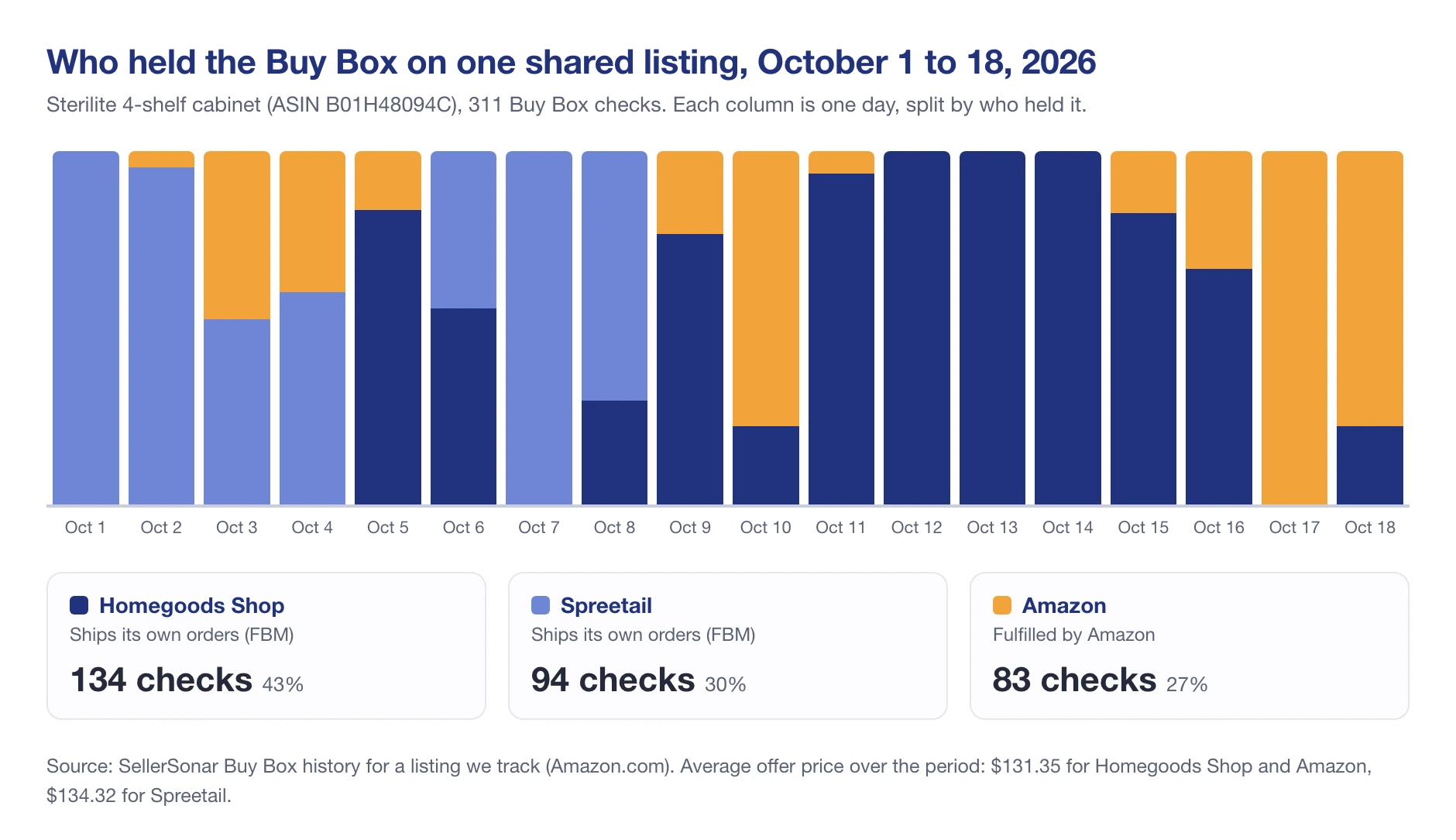
Across 311 Buy Box checks, SellerSonar recorded Homegoods Shop (FBM) as the holder 134 times and Spreetail (FBM) 94 times, against 83 for Amazon. Homegoods Shop and Amazon averaged the same $131.35 price over the period, per SellerSonar, and the Buy Box changed hands within the day on 12 of the 18 days. Same price, very different share: the other factors Amazon weighs decided how often each seller won.
When you set your first price, work backward from fees. Most categories pay a 15% referral fee, so a $25.00 item gives up $3.75 before shipping or FBA costs, per Amazon’s referral fee table. Check what the current featured offer charges, including shipping, and make sure your price still leaves a profit after that cut.
Step 7: Get paid
The customer pays Amazon, and Amazon pays you. When your account is settled with a positive balance, Amazon sends the money to your bank account by ACH, and it can take up to five business days to show up, according to its selling FAQ. Amazon can’t pay out to a credit card or an online payment service, so the bank account you add at registration is the one that matters.
If your bank is outside the US, Amazon’s Currency Converter pays out in your local currency. And if you ship orders yourself, remember that an order you haven’t confirmed as shipped is an order you won’t be paid for.
Returns come out of the same balance. Amazon requires sellers to accept returns of new, unopened items within 30 days of delivery for a full refund, per its new seller guidelines, so build a few returns into your first month’s math.
Your first-sale checklist
Before you flip your first listing live, run through this list:
- Every product shows “Sell this product” in Add Products, or you have the approval.
- You have a GTIN (or an exemption) for any product page you’re creating.
- New titles are under 75 characters, with no promotional words.
- Your main image is the product alone on white.
- Your shipping settings and return address are filled in, even if you plan to use FBA later.
- Order notifications are switched on (email or text) in Notification Preferences.
- You know your fee per unit and your profit at your launch price.
- You’ve checked who holds the Featured Offer now, and at what total price.
Mistakes that get new sellers in trouble
Amazon’s new seller guidelines list the things it sees most often from people who assumed every marketplace works the same way. The ones we’d underline:
- Opening a second account. One account per region, unless Amazon agrees you have a business need.
- Sending customers your own emails. Amazon sends the order and shipping confirmations. You can’t, and you can’t market to Amazon customers or send them to your website.
- Putting flyers in the box. Marketing or promotional inserts are on Amazon’s list of things to avoid, and shipping anything not described on the product page can get your account deactivated.
- Asking for good feedback in exchange for something. Amazon’s term is “bribing customers,” and it’s on the list of things to avoid.
- Listing a website or URL in your store name, product details or business information.
So, how do you sell stuff on Amazon?
You check that you’re allowed to sell the product, pick the plan that fits your volume, register with your ID and bank details, list the product on an existing page or a new one, decide who ships it, price it against the current featured offer, and wait for your first ACH payout. Most of the work is in steps 1 and 6: what you sell, and how you compete on a page you share.
Three things to hold onto:
- Check restrictions before you buy stock. An “Apply to sell” result takes days to clear, and some products are simply “Not available.”
- The page isn’t yours. On a shared listing you’re one offer among several, and the Featured Offer moves between sellers, sometimes several times a day.
- FBA is a fulfillment choice, not a Buy Box shortcut. Amazon says fulfillment method isn’t a factor when everything else is equal, and our data agrees.
Final Expert Recommendations:
Start with one or two products you can source again at the same cost. Get the account verified and one listing live before you scale, and watch who holds the Featured Offer on that listing for the first few weeks. That’s where you’ll learn what price and delivery promise actually win in your category.
When you’re running more than a few listings, SellerSonar’s Buy Box monitoring tracks who holds the Featured Offer and at what price, and alerts you when you lose or win it back on the next scheduled check (every hour on Business and Enterprise plans).

