





Verdict: SellerApp is a legitimate Amazon seller platform whose real strength is PPC automation, with a free Freemium plan and paid plans that start at $99 a month and rise with your revenue, per SellerApp’s pricing page. The critical caveat: its own help center contradicts its pricing page, and its alerts guide says alert emails go out once a day.
Best for: sellers who spend on Amazon Ads and want bid rules, keyword data and listing scores in one dashboard. Look elsewhere if: you need to know within hours when a hijacker joins your listing or the Featured Offer (Buy Box) changes hands.
This SellerApp review answers what sellers search for before they pay: is SellerApp legit, what does it cost, is there a free plan, and is it worth it. Every claim below comes from SellerApp’s own pricing page, product pages, help center or Chrome Web Store listing, all read on November 11, 2026.
Disclosure: SellerSonar publishes this review and competes with SellerApp in Amazon listing alerts, not in PPC management or product research. This is desk research: we did not buy a plan, and the app screenshots come from SellerApp’s own help center.
What is SellerApp?
SellerApp is software for Amazon sellers, brands and agencies. It covers product research, keyword research and rank tracking, listing quality scores, a profit dashboard, business alerts and, above all, Amazon Ads management with rule-based bid automation.
Is SellerApp legit? Yes: its Why SellerApp page says it has been in the Amazon Advertising Partner Network since 2021 and is now an Amazon Ads Advanced Partner. Its contact page lists an office in Bengaluru, India, and the site footer gives a US address in Spring, Texas.
SellerApp also sells services on top of the software: managed Amazon advertising, listing writing and a data API. This review is about the self-serve software, which is what most sellers mean by “SellerApp”.
SellerApp at a glance
| Question | Answer (as of November 11, 2026) |
|---|---|
| What it does | PPC automation, keyword research and tracking, product research, listing quality scores, profit dashboard, business alerts |
| Plans | Freemium, Pro Plan, Smart Plan with Automation, Custom |
| Price | $0; Pro from $99 a month; Smart from $149 a month for 3 months, then $250; both rise with your monthly revenue |
| Free plan | Yes, Freemium, no credit card |
| Annual billing | Pricing page FAQ says you save 50% |
| Marketplaces | 19 Amazon marketplaces listed on the pricing page |
| Seller Central connection | Not needed for research and tracking; needed for sales, profit and ads data |
| Chrome extension | Free with an account: 30,000 users, 4.5 out of 5 from 257 ratings |
| Alerts | Price, listing quality, rating, Buy Box, negative reviews, inventory; emailed daily per its help center |
Plans, prices and marketplaces come from the SellerApp pricing page, the extension figures from the Chrome Web Store, and the alert details from SellerApp’s help center.
SellerApp pricing in 2026
According to SellerApp’s pricing page, there are four plans. The default view, for sellers with up to $10K in monthly revenue, looks like this.
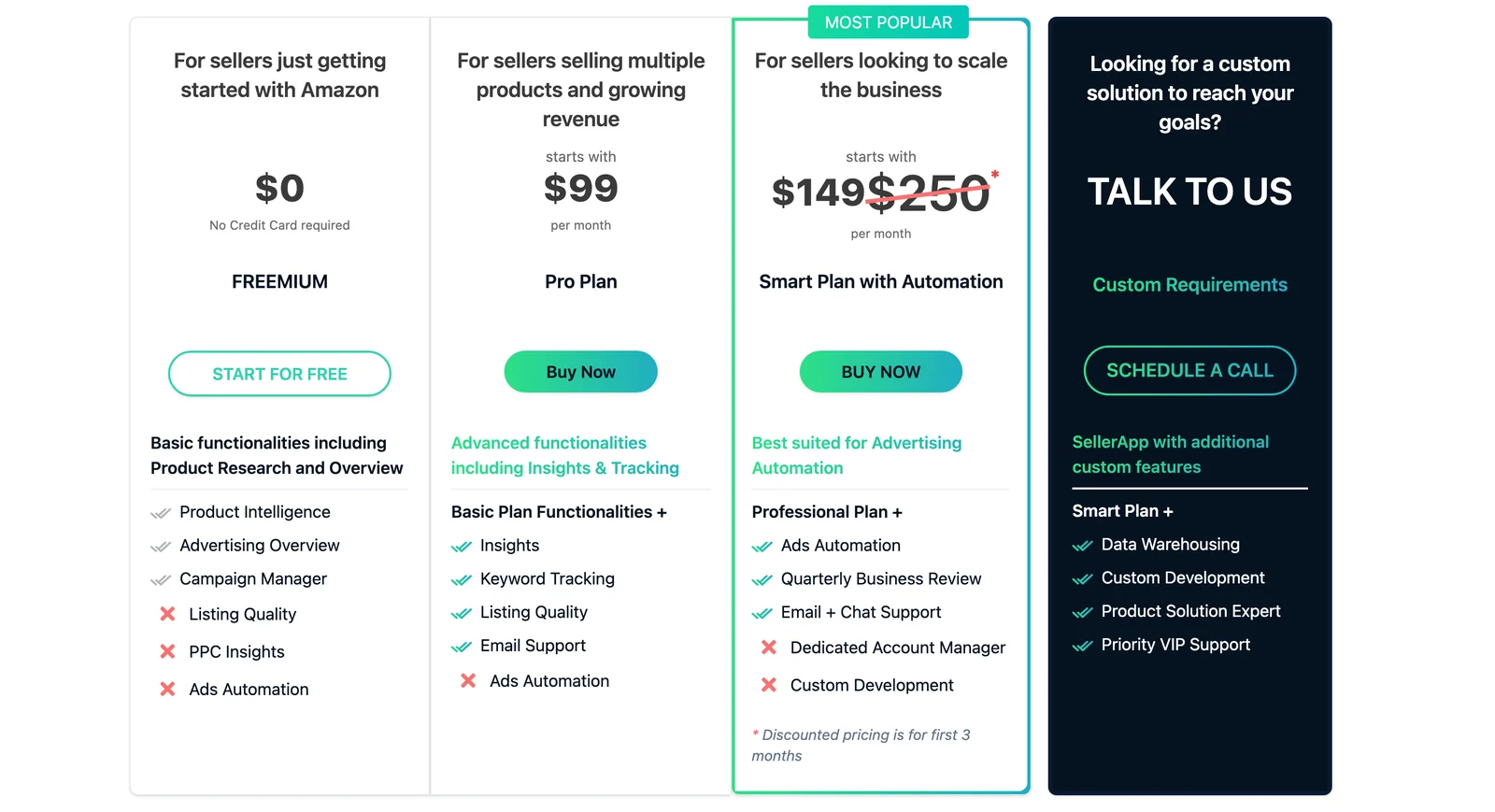
Per SellerApp’s pricing page, Freemium covers Product Intelligence, Advertising Overview and Campaign Manager. Pro adds Insights, Keyword Tracking, Listing Quality and email support, and Smart adds Ads Automation, a quarterly business review and chat support.
The price depends on your revenue
The cards say “starts with” for a reason. Above them, a calculator asks for your ASIN count, monthly ad spend and monthly revenue, and in our test only the revenue answer changed the price.
| Monthly revenue you select | Pro Plan | Smart Plan, first 3 months | Smart Plan after that |
|---|---|---|---|
| Up to $10K | $99/mo | $149/mo | $250/mo |
| Up to $50K | $199/mo | $299/mo | $350/mo |
| Up to $100K | $399/mo | $449/mo | $550/mo |
| Up to $1M | $699/mo | $749/mo | $850/mo |
Source: SellerApp’s pricing calculator, read on November 11, 2026, with the ASIN and ad spend answers left at their lowest options. Here is the $100K revenue view.
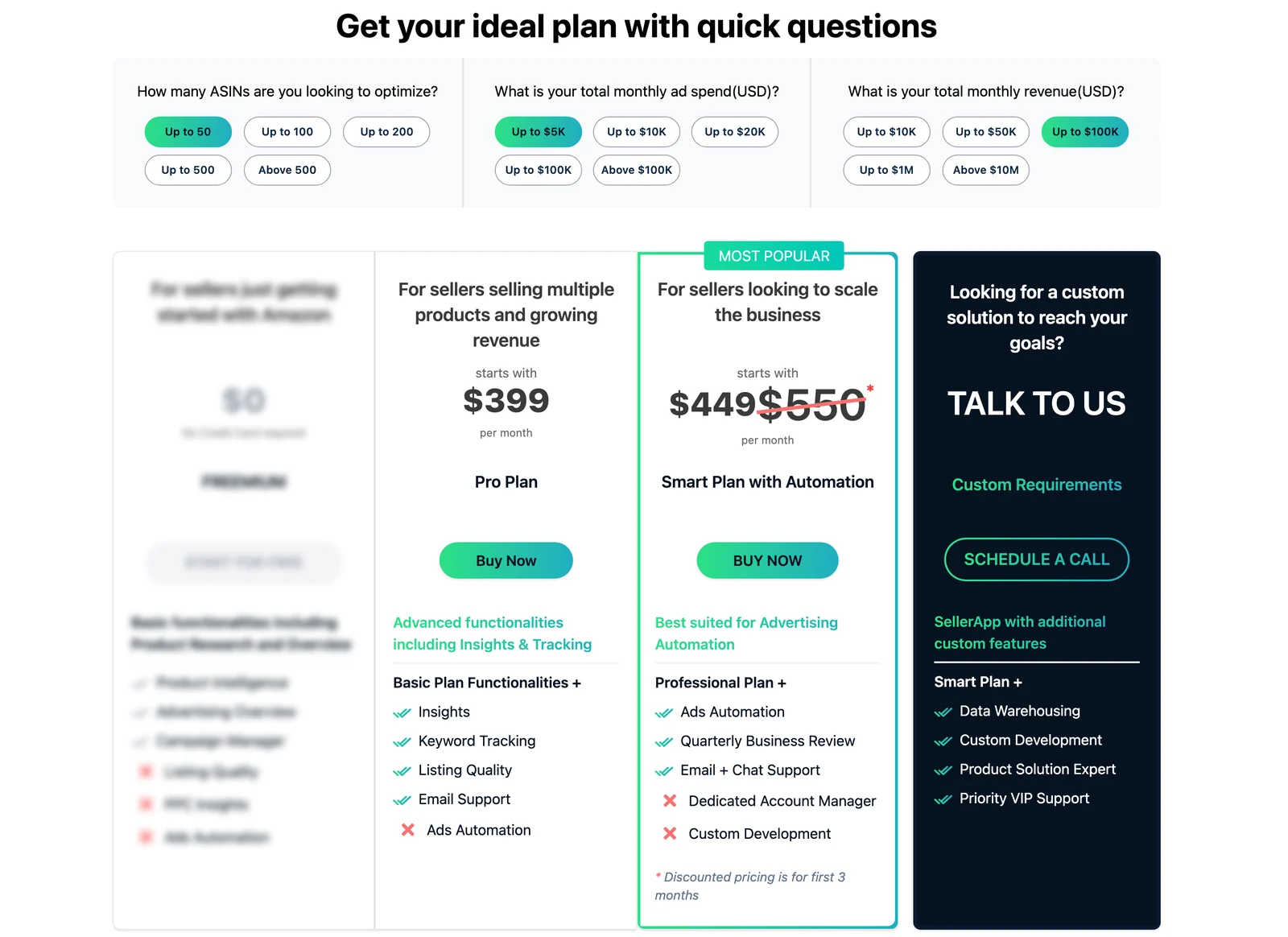
Two quirks are worth knowing, according to our test of the calculator. The revenue options jump from “Up to $1M” to “Above $10M”, and choosing “Above $10M” shows the $99 and $149 starting prices again, so expect a sales call at that size.
💡 Expert Tip: Before you compare SellerApp’s “$99” with another tool, set the revenue answer in its calculator to your real number. A brand doing $80K a month sees $399 for Pro, according to the same pricing page.
Is SellerApp free?
Yes, in part. The pricing page FAQ describes Freemium as “a forever free service plan” with no credit card, and the SellerApp Pricing and Plans help article adds a 7-day free trial on paid plans. That article says Freemium tracks two products.
The free SellerApp Chrome extension also works with a Freemium account, so you can test the research side without paying.
What SellerApp’s own help center gets wrong about its prices
This is the biggest problem we found. SellerApp’s help articles quote at least three different price lists:
- The Pricing and Plans article, updated October 13, 2026, lists Pro-Lite at $39 and Professional at $79 a month, with annual billing saving “up to 25%”.
- The billing overview article lists Pro Lite at $99 and Professional at $199 a month.
- The Pro plan article prices Pro at $99.99 a month with up to 100 tracked products.
The live pricing page uses none of those plan names. It shows Pro from $99 and Smart from $149, and archived copies of the same page from December 22, 2025 and September 25, 2026 show identical prices, according to the Wayback Machine. Trust the pricing page and its calculator, and treat older help-center prices as history.
Refunds are inconsistent too. The pricing page FAQ says SellerApp will “validate your account usage” and refund within 5 to 10 days, while its subscription management article says it does not refund the rest of a billing cycle. Ask support in writing before you pay for a year.
Services and agency pricing
According to the same pricing page, listing optimization and creation starts at $200 per parent ASIN, and the managed AMS Growth Plan starts at $750 a month. Agencies pay from $300 plus 0.5% to 2.5% of their Amazon ad spend.
SellerApp features: a verdict on each tool
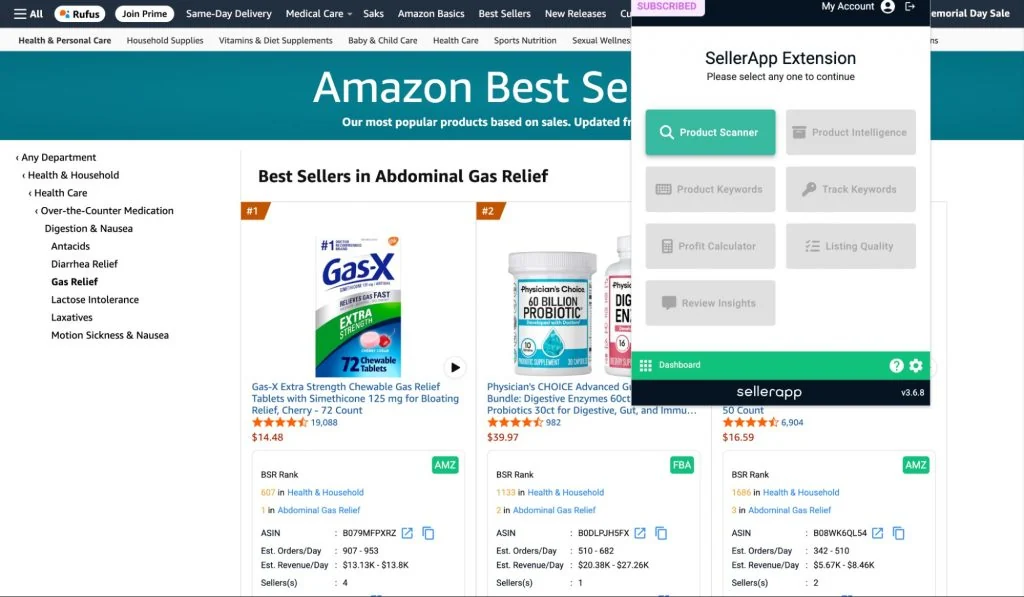
Most sellers meet SellerApp through its Chrome extension. This is its menu on an Amazon Best Sellers page, from SellerApp’s own help center.
Here is how each part of the platform holds up.
PPC automation: the reason to buy SellerApp
Advertising is where SellerApp is strongest. Its help center has dozens of articles on bid rules, dayparting, budget automation, keyword harvesting and auto-negation, and the Smart Plan is the one built around Ads Automation.
The Amazon Ads Advanced Partner status supports that focus. If ads are your biggest lever, SellerApp belongs on your shortlist next to the tools in our Helium 10 alternatives comparison.
Product research: useful, read the estimates carefully
The Product Scanner in the extension lists every product in an Amazon search with brand, price, rating, an Opportunity Score and estimated daily orders and revenue. You can track products or export the list to CSV, according to SellerApp’s Chrome extension guide.
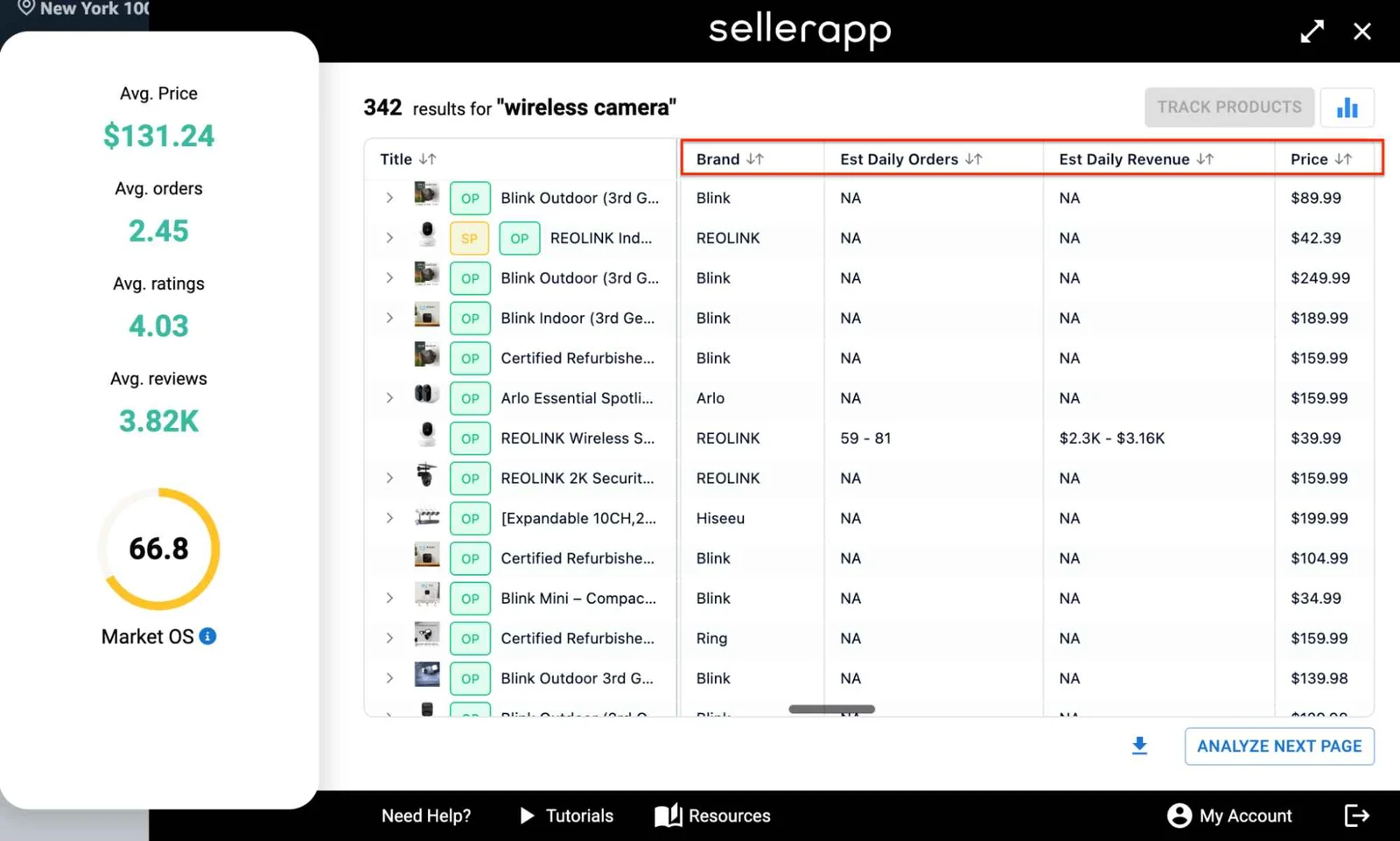
Note what SellerApp’s own screenshot shows: of the 13 fully visible products, only one has a daily orders estimate. The product research page claims “over 100 million product records”, while the homepage says 35+ million, so treat database size as marketing.
Keyword research and tracking: solid, US-first
SellerApp’s keyword data draws on Amazon autocomplete, search results, the Amazon Ads API and Brand Analytics. Its keyword accuracy article is candid that the data is “mostly U.S.-centric by default”.
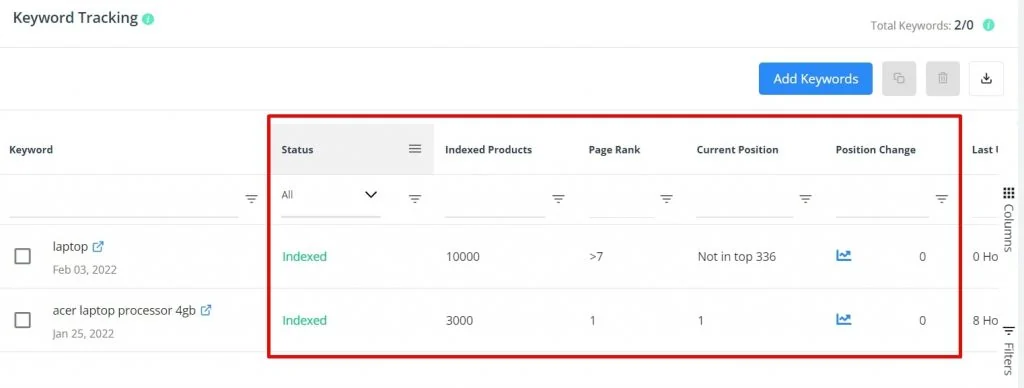
Rank updates are slow by design. The keyword tracker page says page rank and position “are updated every 12-24 hours”, with fresher checks only through the extension.
Product Intelligence and listing quality: good for audits
Product Intelligence puts one ASIN’s Opportunity Score, tracked keywords, search visibility and Listing Quality Index on one screen. The Listing Quality Index scores discoverability and desirability, which is a quick way to audit a competitor.
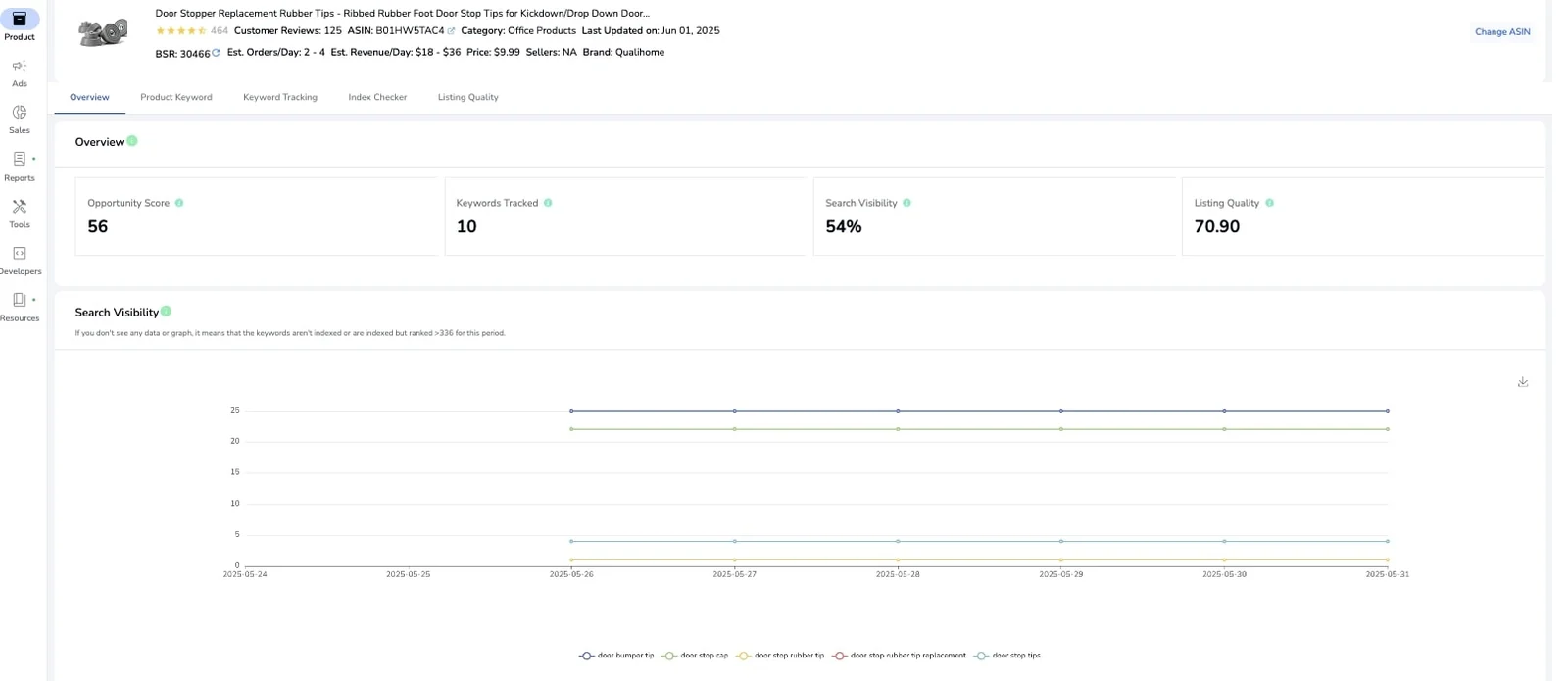
Sales, profit and refund data need a Seller Central connection. Per SellerApp’s Seller Central connection guide, the first sync takes about 15 to 30 minutes.
Business alerts: broad list, daily delivery
SellerApp’s alerts cover price, listing quality, rating, Buy Box, negative reviews and inventory, on your products and on competitors’. The Pro plan article also names Hijacker, Page Rank and Keyword Index alerts.
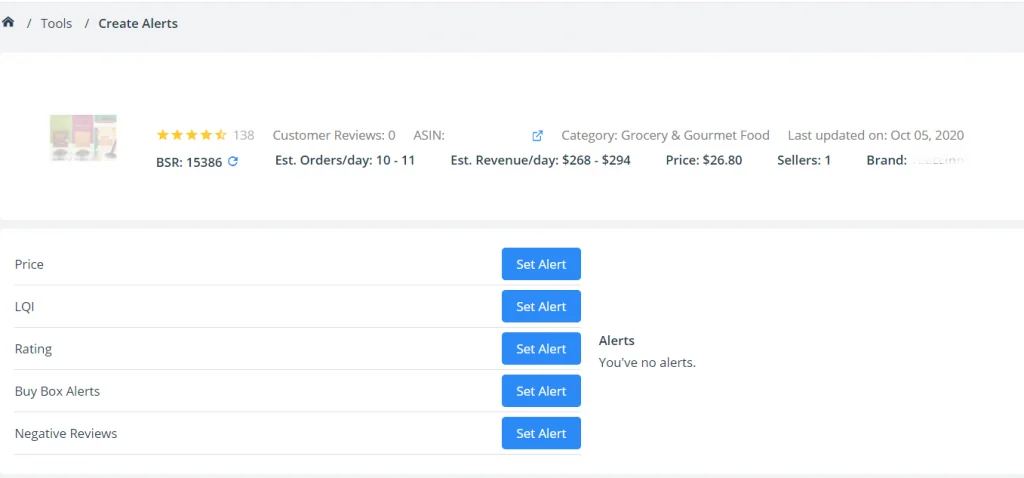
The catch is timing. SellerApp’s alerts page sells round-the-clock notifications, but both the business alerts guide (updated August 5, 2026) and the alert setup article say: “The alert notifications are sent to your mail inbox every day.”
🎯 Pro Insight: A daily digest is fine for rating and listing-quality changes. It is too slow for a hijacker: a seller who joins your listing in the morning can take Buy Box sales all day before the email arrives.
Is the SellerApp Chrome extension safe?
The listing looks clean. The Chrome Web Store marks it “Featured”, says the publisher “has a good record with no history of violations”, and shows version 4.0.15, updated October 22, 2026.

We read the permissions in the extension’s manifest, version 4.0.15. It asks for storage, unlimited storage and identity, and site access only to dashboard.sellerapp.com and 23 Amazon domains, not to every website you visit.
Per its Chrome Web Store privacy section, SellerApp handles location, user activity and website content, and declares that data is not sold to third parties. You need a free SellerApp account to sign in, and the developer has not identified itself as an EU trader.
Where SellerApp falls short
- Confusing pricing. Prices scale with revenue, and help articles quote old plans and a 25% annual discount where the pricing page says 50%.
- Daily alert emails. Its help center says alerts arrive once a day, which is slow for hijackers and Buy Box losses.
- Slow rank updates. Keyword positions refresh every 12 to 24 hours on the dashboard.
- Thin estimates. Its own scanner screenshot shows NA for most daily order estimates.
- Mixed marketplace counts. The pricing page lists 19 marketplaces, the research pages say 16 and the agency FAQ names 15, all on sellerapp.com.
Is SellerApp worth it? By seller type
| Seller type | Worth it? | Plan to look at |
|---|---|---|
| New seller testing ideas | Start free: Freemium plus the extension | Freemium, $0 |
| Private label under $10K a month, running ads | Yes, if you will use bid automation | Smart, $149 then $250 |
| Brand doing $50K to $1M a month | Maybe: price rises to $399-$749 for Pro or Smart | Compare with other PPC tools first |
| Agency | Yes, it has an agency program | From $300 plus 0.5% to 2.5% of ad spend |
| Reseller or brand fighting hijackers | No: alerts arrive as a daily email | A listing monitoring tool |
The table uses prices from SellerApp’s pricing page and calculator on November 11, 2026.
SellerApp pros and cons
Pros: strong Amazon Ads automation from an Amazon Ads Advanced Partner; a free plan with no card; a free, well-rated extension with narrow permissions; keyword data from Amazon’s own sources; listing quality scores for any ASIN.
Cons: revenue-based pricing; contradictory help-center prices and refund terms; alerts emailed daily; rank data refreshed every 12 to 24 hours; keyword data US-first; many sales estimates missing.
When a monitoring tool makes more sense
SellerApp helps you grow sales with ads and research. SellerSonar helps you monitor and protect listings that are already live: it watches any ASIN on 23 Amazon marketplaces with no Seller Central connection and checks every 4, 2 or 1 hours, depending on the plan.
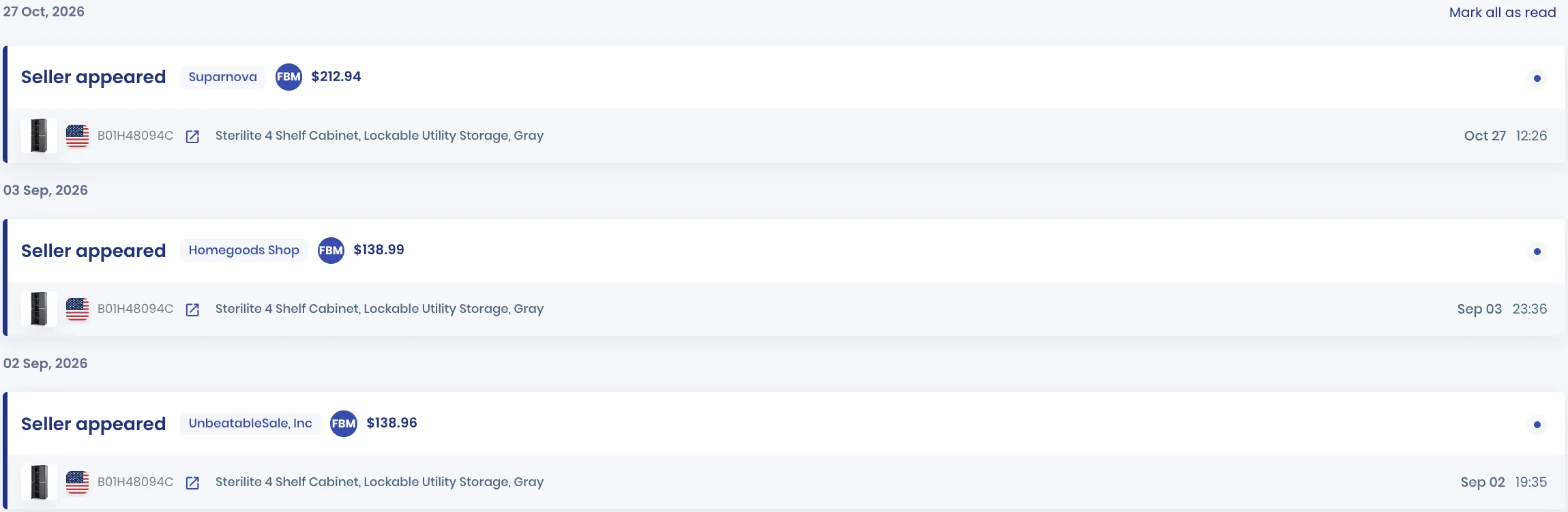
The alert sellers ask for most is Seller appeared, which is on every SellerSonar plan and arrives by email or in the app after the check that finds the new seller.
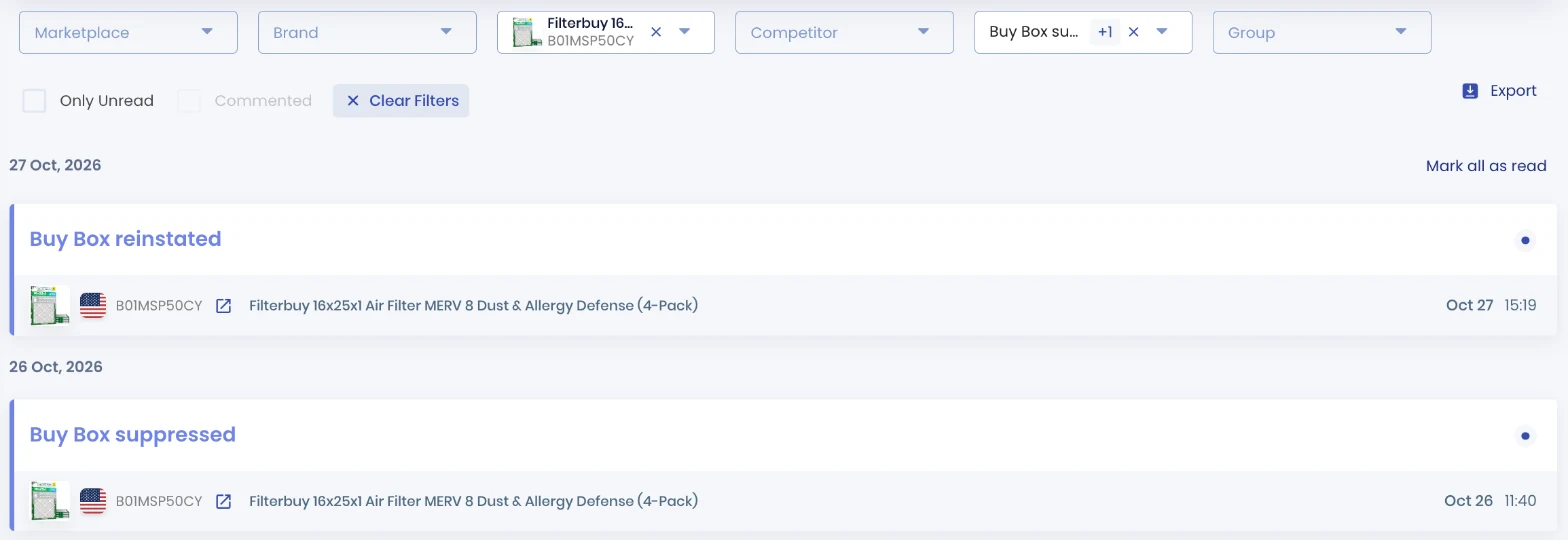
Buy Box and pricing alerts start switched off, so turn them on in Alerts settings. From Premium up, SellerSonar’s Buy Box and pricing alerts include Buy Box Won and Lost. Buy Box suppressed and reinstated alerts sit in the Retail Issues group.
On price, SellerSonar’s plans start at $19.98 a month billed yearly for Pro: 150 ASINs and 500 keywords, checked every four hours. Premium is $39.98 for 300 ASINs with checks every two hours, and every plan tracks keyword rank daily.
SellerSonar does not manage PPC, research products, estimate sales or calculate profit, so it does not replace SellerApp’s ads tools. You can run both: SellerApp for ads, SellerSonar for Buy Box monitoring and hijacker alerts.
📌 From Our Experience: The sellers we talk to rarely drop their ads or research suite. They add a monitoring tool after one bad day: a hijacker on the listing that nobody saw until the Buy Box sales were gone.
Final Expert Recommendations:
SellerApp is worth it if Amazon Ads drive your business: start on Freemium, then move to the Smart Plan, which costs $149 a month for three months and $250 after that at up to $10K revenue, per SellerApp’s pricing page. Read the pricing page, not the help center, and get refund terms in writing. For hijackers, Buy Box changes and listing edits, add SellerSonar’s listing monitoring, which checks as often as every hour on Business.
Start your free 14-day SellerSonar trial and see what’s happening on your listings today.
Related: Helium 10 pricing and review · AMZScout review · SmartScout review · Best Amazon keyword rank trackers

