




Quick Answer
Amazon categories are the departments Amazon’s store is organized into, such as Home & Kitchen, Beauty & Personal Care and Toys & Games. On October 30, 2026, Amazon’s Best Sellers page listed 40 top-level departments, each split into subcategories several levels deep. For sellers, the category decides three things: whether you need Amazon’s approval, which item conditions you can list, and your referral fee (15% in most categories, from 5% to 45% overall).
Amazon sells hundreds of millions of products, and every one of them sits somewhere in its category tree. Shoppers use that tree to browse. Sellers live inside it: it sets your fees, your Best Sellers list and, in a few categories, whether you can sell at all.
This guide gives you the full list of Amazon departments as of October 2026, the rules for each one from Amazon’s own seller pages, what Amazon charges by category, how to find any product’s category, and how to choose one to sell in.
About the Author: Gloria Anderson writes for the SellerSonar editorial team about Amazon categories, fees and catalog rules. She checks every rule in her articles against Amazon’s Seller Central help pages, and the category examples against live Amazon listings we track in SellerSonar.
Amazon Categories List: What Products Can You Sell?
Amazon’s store is a tree. At the top are departments like Electronics or Home & Kitchen. Each department splits into subcategories, and those split again. Amazon’s own example of a browse path is Electronics > Electronics Bags & Cases > Laptop Computer Briefcases.
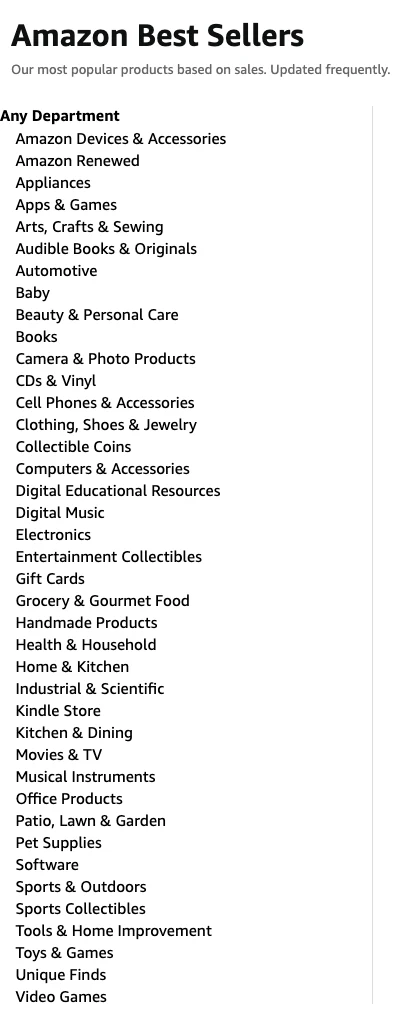
The easiest place to see the top level is Amazon’s Best Sellers page, which ranks the best-selling products in every department. On October 30, 2026, it listed 40 departments.
Not every department works the same way for sellers. Most are regular product categories you list in through Seller Central. A few are Amazon’s own digital stores or programs with a separate sign-up.
Amazon’s top product categories list
Here are all 40 departments, with the selling rules Amazon publishes in its seller overview of categories (version 23, checked October 30, 2026). “Conditions” are the item conditions you may list. Amazon’s seller category names don’t always match the store department names, so the closest match is shown.
| Department (amazon.com) | Selling rules for third-party sellers |
|---|---|
| Amazon Devices & Accessories | Amazon’s own devices. Accessories: New, Used; 45% referral fee |
| Amazon Renewed | Separate Renewed application with inspected, refurbished products |
| Appliances | Major Appliances: New, Used; no approval |
| Apps & Games | Amazon’s app store; developers publish apps, not Seller Central listings |
| Arts, Crafts & Sewing | Art Supplies: New, Used, Collectible; no approval |
| Audible Books & Originals | Audiobooks, published through ACX |
| Automotive | New: no approval. “Used like new”: approval required |
| Baby | New only; no approval |
| Beauty & Personal Care | New only; no category approval, but some brands need approval |
| Books | New, Used, Collectible; no approval |
| Camera & Photo Products | New, Used; no approval |
| CDs & Vinyl | Music: New, Used, Collectible; approval required |
| Cell Phones & Accessories | New, Used; no category approval (certain phones may need it) |
| Clothing, Shoes & Jewelry | Apparel, Shoes, Jewelry: New, Used, no approval. Fine Jewelry: approval required |
| Collectible Coins | Approval required |
| Computers & Accessories | New, Used: no approval. Collectible: approval required |
| Digital Educational Resources | Digital store, not in Amazon’s category overview for sellers |
| Digital Music | Digital store, not in Amazon’s category overview for sellers |
| Electronics | Consumer Electronics: New, Used; no approval |
| Entertainment Collectibles | Approval required |
| Gift Cards | Only Amazon can list |
| Grocery & Gourmet Food | New only; no category approval |
| Handmade Products | Amazon Handmade application for makers; 15% referral fee |
| Health & Household | Health & Personal Care Appliances: New only; some products have their own approval steps |
| Home & Kitchen | Home: New, Used, Collectible. Kitchen: New, Used. No approval |
| Industrial & Scientific | Not a separate row in the overview; 12% referral fee |
| Kindle Store | E-books, published through Kindle Direct Publishing |
| Kitchen & Dining | Kitchen: New, Used; no approval |
| Movies & TV | Video, DVD & Blu-ray: New, Used, Collectible; approval required |
| Musical Instruments | New, Used; no approval |
| Office Products | New, Used; no approval |
| Patio, Lawn & Garden | Lawn & Garden: New, Used; no approval |
| Pet Supplies | Pet Products: New, Used; no approval |
| Software | New, Used: no approval. Collectible, Refurbished: approval required |
| Sports & Outdoors | Outdoors: New, Used; no approval |
| Sports Collectibles | Sports Memorabilia: approval required |
| Tools & Home Improvement | New, Used: no approval. Collectible tools: approval required |
| Toys & Games | Toys: New only. Games: New, Collectible. No approval |
| Unique Finds | Not in Amazon’s category overview for sellers |
| Video Games | New, Used; no approval |
The seller overview also names categories that live inside these departments, such as Furniture, Luggage, Shoes, Watches and Batteries. Watches is a special case: the overview table says no approval, but Amazon’s Watches guidelines page still shows a “Request approval” button, so check each product before you buy stock.
How many products and categories does Amazon have?
Amazon says it carries “hundreds of millions of products, including 300 million items available with free delivery for Prime members, across more than 35+ categories,” according to its Amazon Store page (read October 30, 2026). The Best Sellers page shows 40 departments because it also counts digital stores and programs like Kindle Store, Audible and Amazon Renewed.
Below the departments, the number of subcategories is much larger, and Amazon doesn’t publish a total. The tree also changes over time. Amazon tells sellers to use its Product Classifier because it has “the most current and accurate information on the Amazon website structure,” and that’s why category lists you find online rarely agree.
Which Amazon categories need approval?
At category level, approval is required in Fine Art, Fine Jewelry, Collectible Coins, Entertainment Collectibles, Sports Memorabilia, Music, and Video, DVD & Blu-ray. Some conditions need approval too: Collectible in Personal Computers and Tools, Collectible or Refurbished in Software, and “Used like new” in Automotive. Gift Cards are closed to sellers.
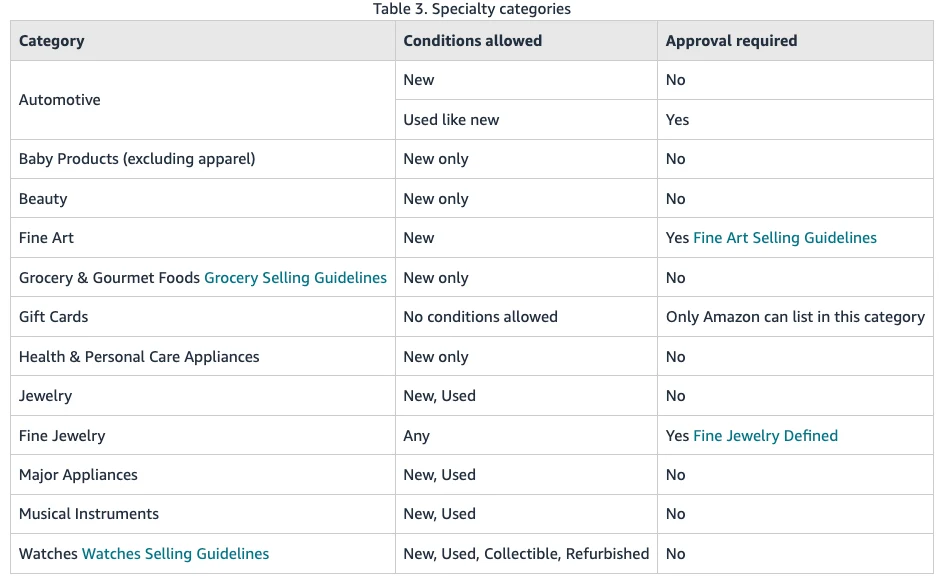
Category approval is only one layer. Amazon notes that “Many brands have their own restrictions beyond these category requirements,” and single products can be restricted too. Its advice is to check before you buy inventory: in Seller Central, go to Add a Product and search for the item. If you see an Apply to sell button, it needs approval.
Our guide to Amazon restricted products and ungating walks through the application, the documents Amazon asks for and what to do if you’re refused.
How Do Amazon Product Categories Differ?
Categories differ in four ways that matter to a seller: what Amazon charges, who may sell, which conditions are allowed, and how crowded they are. The first three come straight from Amazon’s rules. The fourth you have to measure yourself.
Referral fees by category
Amazon takes a referral fee on every sale. It’s a percentage of the total the buyer pays (item price, delivery and gift wrap), or a minimum of $0.30 per item in most categories, whichever is greater. The rate depends on the product’s fee category, per Amazon’s Selling on Amazon fee schedule (version 112).
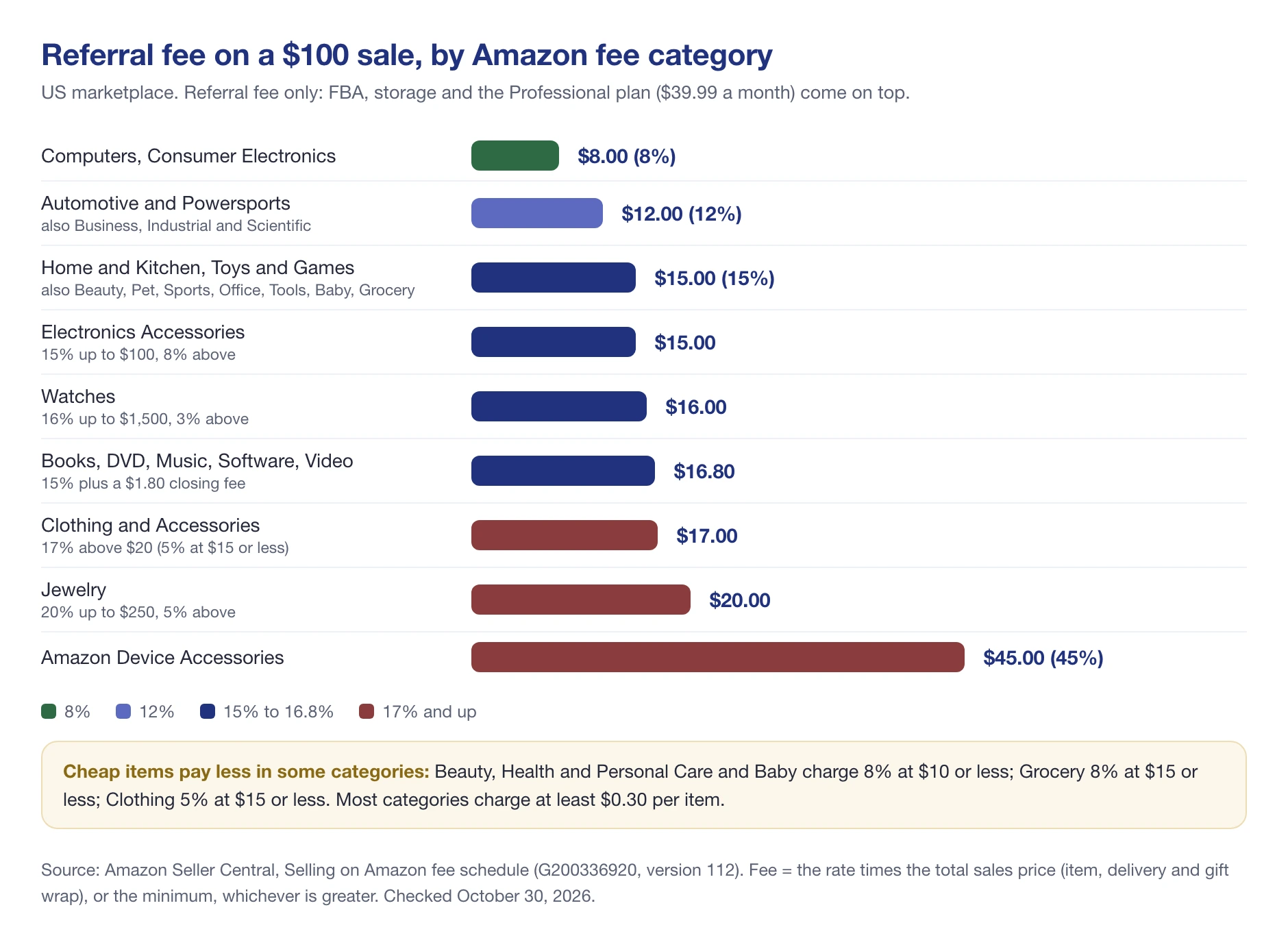
Most categories charge 15%. The exceptions are worth knowing:
- 8%: Computers, Consumer Electronics, Full-Size Appliances, Video Game Consoles.
- 12%: Automotive and Powersports, Business, Industrial and Scientific Supplies, Base Equipment Power Tools.
- Tiered by price: Clothing and Accessories pays 5% at $15 or less, 10% up to $20 and 17% above $20. Beauty, Health and Personal Care and Baby pay 8% at $10 or less, then 15%. Grocery pays 8% at $15 or less, then 15%.
- Tiered by portion: Jewelry pays 20% up to $250 and 5% above. Watches pay 16% up to $1,500 and 3% above. Furniture pays 15% up to $200 and 10% above.
- Highest: Amazon Device Accessories at 45%.
- Media: Books, DVD, Music, Software and Video pay 15% plus a $1.80 closing fee per item.
So the same $100 product pays $8 to Amazon as a computer and $17 as a piece of clothing, before any FBA fees. For the full picture, including FBA, storage and the $39.99 Professional plan, see our breakdown of Amazon seller fees.
💡 Expert Tip: If you sell Renewed products, check your fees after October 19, 2026. Amazon is running a one-year promotional referral fee of 10% for Renewed products in eligible fee categories, applied automatically until October 18, 2027.
The browse category and the fee category are not the same thing
This trips up a lot of sellers. Amazon keeps three separate systems, and a product has a place in each:
- Browse category: where shoppers find the product in the store. It decides which Best Sellers list ranks you. One node can sit on more than one path; Amazon’s example is a baby boy’s hat node that appears under both Baby Products and Clothing, Shoes & Jewelry.
- Fee category: what you pay. “Every ASIN in the Amazon catalog … can belong to only one fee category,” and it “may or may not correspond” to the product’s place in the browse tree, per Amazon’s page on understanding fee categories.
- Listing requirements: who may sell it and in what condition, set by category, brand or ASIN.
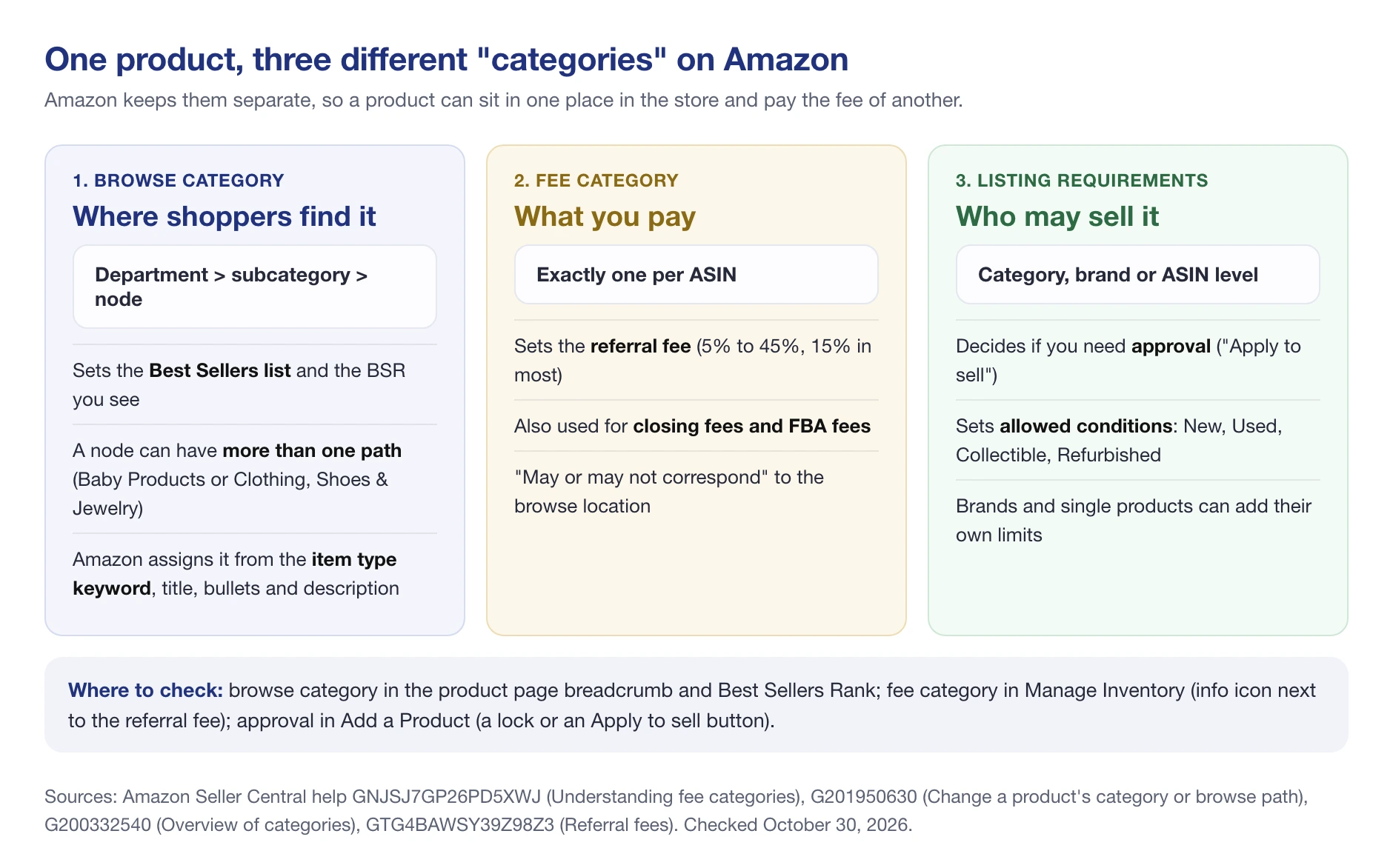
In practice, don’t estimate your fees from the department a product shows in. Check its fee category, as shown in the next section.
Which categories are most popular with sellers?
Amazon doesn’t publish sales totals by category. The best public signal is seller surveys. In Jungle Scout’s 2024 State of the Seller Survey, the categories where most sellers had products listed were:
- Home & Kitchen: 35% of sellers
- Beauty & Personal Care: 26%
- Clothing, Shoes & Jewelry: 20%
- Toys & Games: 18%
- Health, Household & Baby Care: 17%
Treat that as a map of competition, not of opportunity. The most popular categories are big because shoppers buy a lot there, but you’ll also meet the most sellers there.
How to Find a Product’s Category on Amazon
As a shopper, open the product page. The category path usually appears as links above the product title, and the Best Sellers Rank line in the product details shows the department and subcategory the item ranks in. In search results, the “Department” filter on the left narrows results to one category.
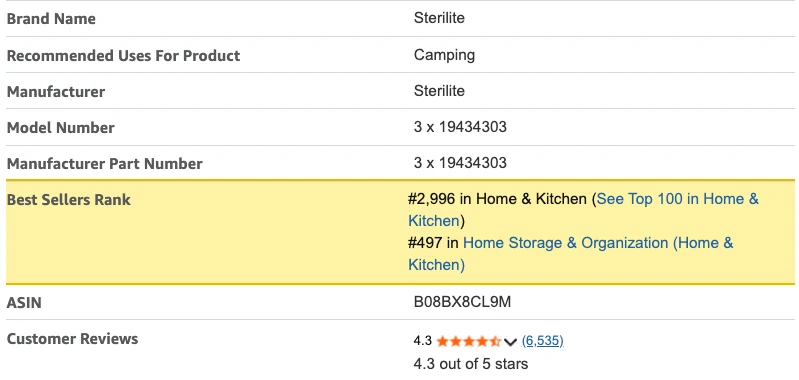
As a seller, you have three tools:
- Fee category: in Manage Inventory, search the SKU or ASIN, click the value in the “Estimated fees per unit sold” column, then the info icon next to the referral fee. The Fee Preview report shows it too.
- Product Classifier: available to all sellers in Seller Central. You pick a category and narrow it down. A lock sign next to a product type means you need approval to sell it.
- Browse category: Amazon assigns it from your item type keyword, title, bullet points and description. If a product is in the wrong place, you can change the browse path in Edit listing, under Product Details, in the Item Type Keyword field.
Amazon’s help page on how to change a product’s category or browse path has the steps, including a bulk option for Professional sellers. If you think your fee category is wrong, Amazon lets you file a dispute.
What Happens When Amazon Moves Your Product to Another Category?
Categories aren’t fixed once you list. Amazon can reassign a product to another subcategory, and the first sign is often a rank number that suddenly looks wrong.
Here is a real case from a listing we track. On October 15, 2026, the Sterilite Gasket Storage Box, 120 Quart, 3-Pack (ASIN B08BX8CL9M) on amazon.com was moved out of its “Storage Boxes” subcategory, where it ranked #35, into “Home Storage & Organization (Home & Kitchen)”, where it ranked #784. In the same check it dropped out of “Lidded Home Storage Bins”, where it had been #87.
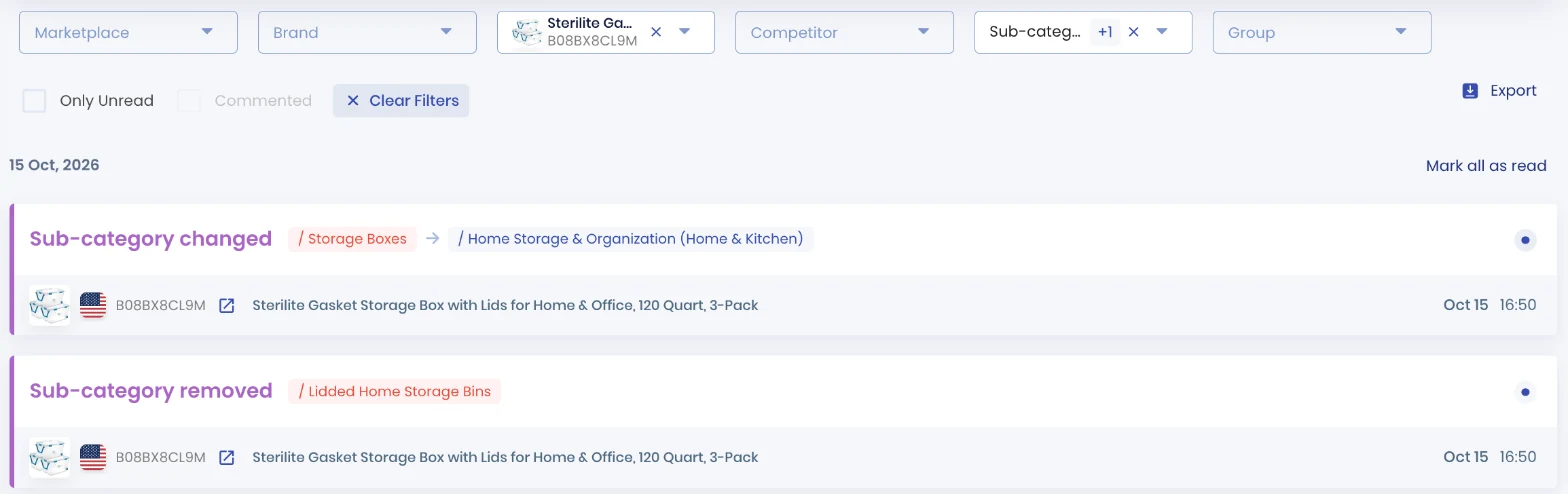
The jump from #35 to #784 doesn’t mean sales fell twentyfold. The product moved from a narrow node to a broad one, where #784 is a different kind of number. By October 30, 2026 it stood at #497 in Home Storage & Organization and #2,994 in Home & Kitchen.
Moves like this matter because the subcategory decides which Best Sellers list you compete on, and the Best Seller badge goes to the top product in a category. A product that leads a small node can lose its spot on the list overnight without selling one unit less.
Some products move back and forth. A business book we track as a competitor, ASIN 1982137274, switched subcategories 9 times between October 20 and October 29, 2026, between Leadership & Motivation, Motivational Management & Leadership and Personal Finance. Amazon’s rules let media products sit in more than one browse node, so this kind of churn is common for books.
📌 From Our Experience: When a listing drops in rank on a single day, check the subcategory before you change anything else. A category move looks exactly like a sales drop on a rank chart, and the fix is a browse path request, not a price cut.
How Do You Pick the Proper Niche to Sell In?
The category isn’t the opportunity. A good product can sell in any category, and a crowded category still has quiet corners. But the category sets the rules you’ll play by, so check these six things before you commit:
- Can you sell it? Check approval and allowed conditions in Add a Product, then check the brand. Used goods are out in New-only categories such as Baby, Beauty and Grocery.
- What’s the fee at your price? A $12 beauty product pays 15%, a $9 one pays 8%. A $25 T-shirt pays 17%, a $14 one pays 5%. Price near a threshold and the fee changes.
- Is it a safety category? From November 2, 2026, sellers in Amazon’s enhanced-safety categories, such as children’s products, consumables and lithium battery products, need USD 1 million commercial liability insurance regardless of sales.
- How strong are the leaders? Open the Best Sellers list for the subcategory, not the department, and look at review counts and who the sellers are.
- Is demand steady? Watch the subcategory’s top products for a few weeks. Seasonal items look great in November and empty in February.
- Does the margin survive? Run the numbers with real fees. Our guide to Amazon profit margins shows how.
For product ideas inside a category, our guide on what to sell on Amazon covers Amazon’s Best Sellers lists, Product Opportunity Explorer and a step-by-step research method.
How to Choose a Less Competitive Niche on Amazon?
You won’t find low competition at the department level. Home & Kitchen will always be crowded. You find it two or three levels down, in subcategories where the top listings are weaker.
Drill down the browse tree
Start at a department on the Best Sellers page and click into subcategories until the products in the top 10 look like something you could make or source. Then compare the leaders: how many reviews they have, how good their images and titles are, and whether one brand or Amazon itself holds most of the list.
A subcategory where the top sellers have a few hundred reviews and plain listings is a better start than one where every leader has tens of thousands. Rank only compares products inside one node, so read it there. Our guide to Amazon Best Sellers Rank explains what a rank number means in sales terms.
Check demand outside Amazon
Google Trends shows how interest in a search term changes over time and by country. Its numbers are relative, “scaled on a range of 0 to 100,” so a 100 means peak interest for that term, not a sales figure. Use it to spot seasonality and long declines, not to size a market.
Look at Amazon search, not Google difficulty scores
Keyword difficulty scores in SEO tools measure Google results, not Amazon search. To judge competition on Amazon, search your main keywords on Amazon itself and look at the first page: how many sponsored results, how many brands, and how established the organic leaders are.
🎯 Pro Insight: A narrow subcategory is also where a category move hurts most. If your product leads a small node, watch its subcategory as closely as its price. Losing the node can cost you the Best Seller badge even when sales hold.
Track Category and BSR Changes With SellerSonar
SellerSonar doesn’t pick a category for you. It watches the one you’re in, for your products and for competitors, so you see a move instead of guessing at a rank drop.
Its Ranking & Category alerts cover 8 types: Main category changed, Sub-category changed, Sub-category added, Sub-category removed, BSR improved, BSR declined, Subcategory rank improved and Subcategory rank declined. The BSR alerts start at a 20% change by default, and you can set the threshold in percent or positions. The two subcategory rank alerts are off by default, so switch them on in Alerts > Delivery Settings if you want them.
Alerts arrive on the next check, not in real time: every 4 hours on Pro, every 2 hours on Premium, and every hour on Business and Enterprise. The Sterilite move above was recorded in a single check, with the old and new subcategory and both rank numbers.
You can try it on your own listings with a free 14-day trial: 5 ASINs and 10 keywords, no credit card needed.
Final Thoughts
Amazon’s category list is long, but for a seller only a few facts about any category matter: whether you can list there, in which conditions, what Amazon charges, and how strong the leaders are. All four are on Amazon’s own pages or on the Best Sellers list, and none of them takes more than a few minutes to check.
Pick the product first, then let the category tell you the rules. And once you’re listed, keep an eye on where Amazon puts you, because the category can change even when your listing doesn’t.

