



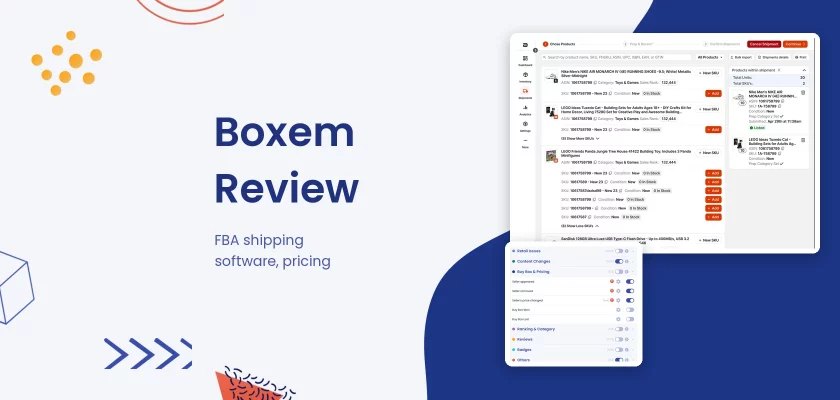


Verdict: Boxem is FBA shipment and inventory software from Seven Tools LLC, not a wholesale or done-for-you service: you still buy, prep and ship the goods yourself. It makes building FBA shipments, printing labels, checking ungating and tracking profit faster than Seller Central, but it works only on amazon.com and the cheaper plan leaves out LTL freight and 2D barcodes.
Best for: US online arbitrage, retail arbitrage and wholesale sellers who send their own FBA shipments. Look elsewhere if: you sell outside the US, want someone to source and ship for you, or need a tool for private label research or ads.
What does Boxem cost? As of November 12, 2026, the Boxem pricing page lists two plans: Standard at $49.99 a month and Professional at $69.99, or $449 and $699 billed yearly. Both start with a 14-day free trial.
This Boxem review covers how it works, every plan, the free trial, refunds and cancellation, the app, what Boxem reviews and Reddit say, and how it compares with InventoryLab.
Disclosure: SellerSonar publishes this review and sells listing monitoring, not shipment software, so we don’t compete with Boxem. This is desk research (we didn’t buy a plan): every Boxem fact comes from boxem.com, its help docs, its terms and its Amazon Selling Partner Appstore listing, read on November 12, 2026.
What is Boxem?
Boxem is web software for Amazon FBA sellers. Its homepage describes it as “Amazon FBA Shipment Software” and lists four areas: the FBA shipment flow, inventory management, shipment tracking and profit analytics.
It is not a wholesale program, a prep center or a done-for-you store. Boxem’s terms and conditions say even its warehouse tools are “a software tool” and that the company does not “handle, store, ship, or otherwise interact with your physical inventory”. You source the products, Boxem helps you list them, box them and send them in.
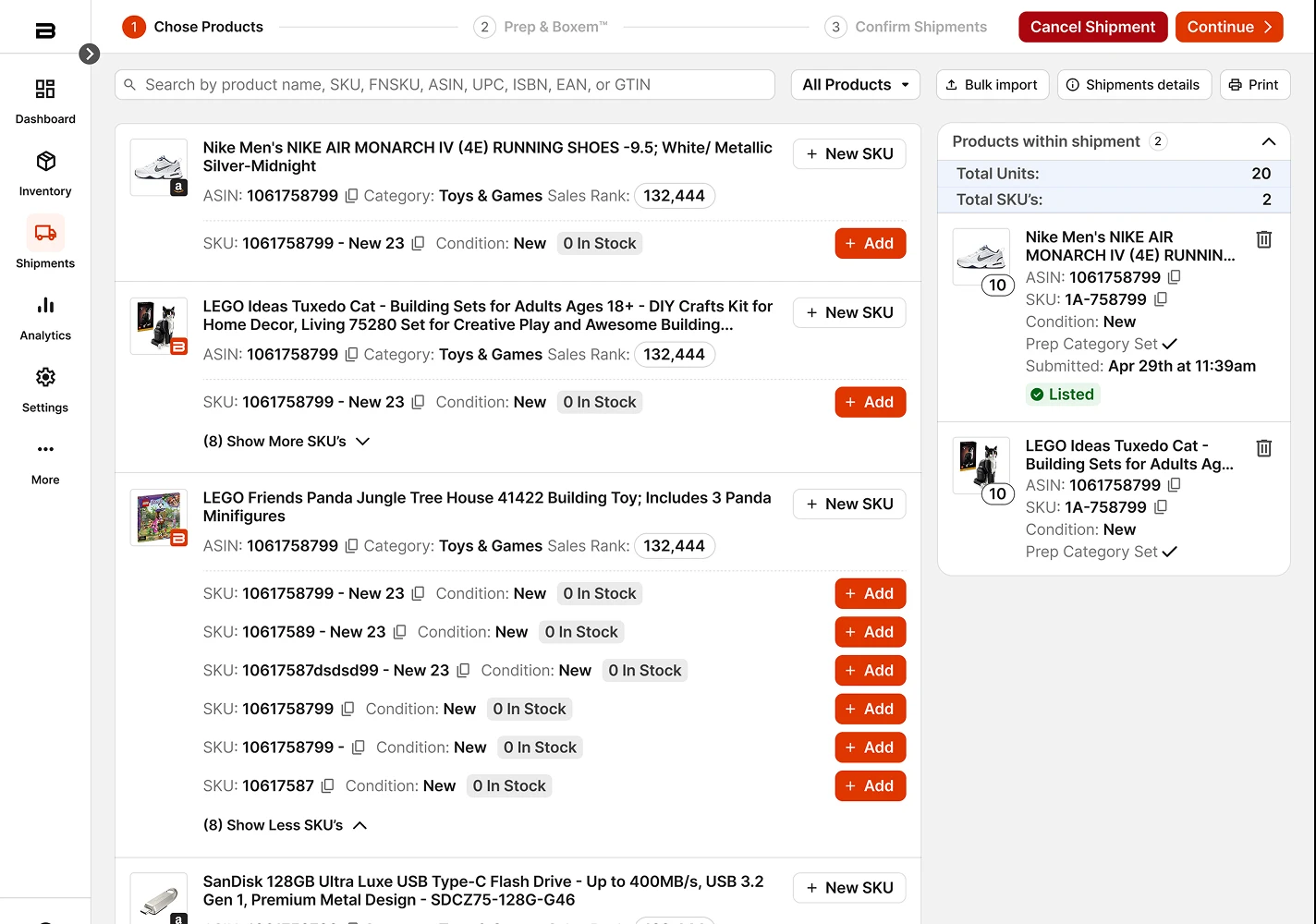
Around the shipment flow, both plans add bulk ungating checks, a feedback request tool, an AI assistant called Boxi AI and buy-cost sharing with repricers.
How does Boxem work?
You connect Boxem to Seller Central once. Per Boxem’s guide to connecting your Amazon account, you need a Professional seller account, “Amazon.com (US) is exclusively supported”, and the first sync “may take up to 24 hours”.
After that, a shipment takes four steps on the FBA Shipment Flow page: add products and set prices, assign units to boxes and print FNSKU labels, confirm the shipment and print box labels, then follow it to check-in. Boxem can fill the list price from the current Buy Box and print an FNSKU label as you add each unit to a box.
Shipping labels come through Amazon’s Partnered Carrier program. Boxem’s help article on purchasing shipping says the cost is “directly charged to your Amazon account”, so Boxem adds no postage bill of its own.
Boxem at a glance
From Boxem’s own pages, help docs and Appstore listing, as of November 12, 2026.
| Question | Boxem |
|---|---|
| Who runs it | Seven Tools, LLC dba Boxem, Austin, Texas |
| What it is | FBA shipment, inventory and profit software (no sourcing, no prep) |
| Marketplace | amazon.com only |
| Plans | Standard, Professional |
| Monthly price | $49.99, $69.99 |
| Billed yearly | $449, $699 |
| Free trial | 14 days on every plan |
| Refunds | Full refund within 7 days of the first purchase |
| Needs | Amazon Professional seller account |
Boxem pricing in 2026
Boxem has two plans, and the difference is shipping features, not store size. The pricing page FAQ says there are no hidden fees and “One clean monthly payment no matter the size your store is.”
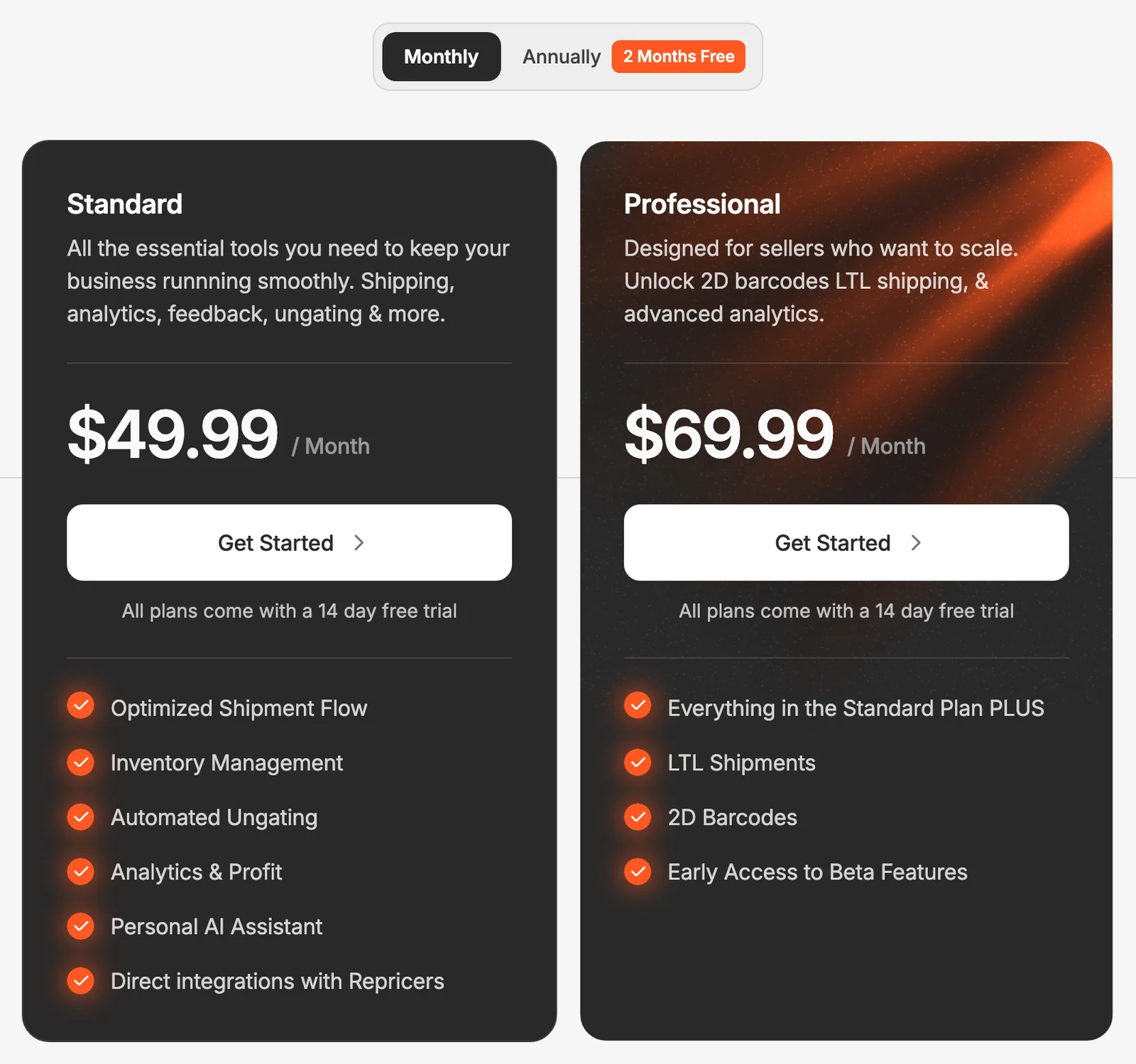
According to the pricing page and Boxem’s help docs, Professional adds the features that matter once you ship pallets or work with a team.
| Plan | Monthly | Billed yearly | Includes |
|---|---|---|---|
| Standard | $49.99 | $449 (shown as $38/mo) | Shipment flow, inventory, automated ungating checks, profit analytics, AI assistant, repricer integrations |
| Professional | $69.99 | $699 (shown as $59/mo) | Everything in Standard, plus LTL shipments, 2D barcodes, Restock (beta), early access to beta features, up to 3 users |
The user limit comes from the help article on adding users: “Boxem Professional accounts can hold up to three Users”, and Standard accounts must upgrade to add anyone. You can give each user access to only some areas, such as Shipments or Bulk Ungate.
Monthly vs annual billing
The pricing page opens on the Annually tab, under a “2 Months Free” badge.
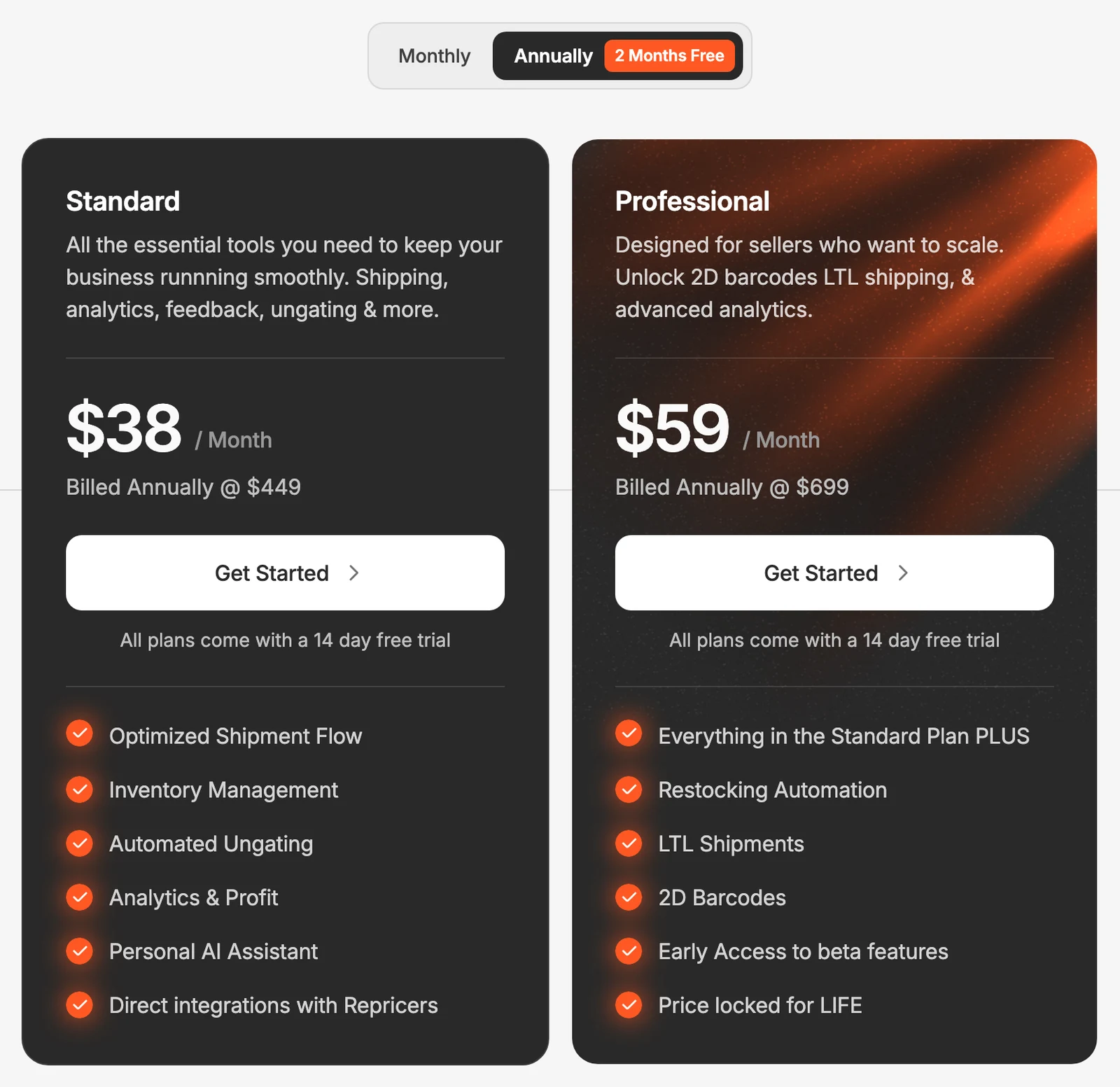
According to Boxem’s pricing page, Standard costs $449 a year, which by our math is 25% below 12 monthly payments ($599.88); Professional at $699 is almost exactly 10 months of $69.99. The annual Professional card also promises “Price locked for LIFE”, and the pricing FAQ says annual plans “are locked at their price for life”.
One line on the page is out of date. The pricing FAQ says “Boxem starts at $42/mo”, but no card shows $42. A Wayback Machine capture from November 2024 shows $42 as the old launch price for Standard, so read the plan cards, not the FAQ.
What changed in 2026
Prices did not move. According to Wayback Machine captures, the pricing page showed the same $49.99, $69.99, $449 and $699 from December 16, 2025 to July 13, 2026 as it does on November 12, 2026.
The plan lists grew instead. Per those captures, “Automated Ungating” and “Personal AI Assistant” were added to Standard between December 2025 and February 26, 2026, and “Restocking Automation” was added to the annual Professional card between May 14 and July 13, 2026.
The terms effective August 27, 2026 also add a section for prep-center software formerly sold as PrepFlow, now owned by Boxem, with no refunds at all. It doesn’t change the seller plans above.
Boxem free trial
Yes, Boxem has a free trial. The pricing page FAQ says “Boxem is free for your first two weeks”, and both plan cards say “All plans come with a 14 day free trial”.
Some limits apply during the trial. The help article on ungating ASINs in bulk says “During the free trial period, you can scan up to 1,000 ASINs.” Boxem’s public pages don’t say whether the signup asks for a card, so check the checkout screen before you start.
Boxem discount and promo codes
The pricing page has no coupon field and lists no promo code. Its FAQ names one official discount: “annual plans include 2 free months of Boxem”.
Codes in YouTube descriptions usually come from creators in Boxem’s affiliate program, which its terms describe. We don’t list affiliate codes; if you use one, compare the checkout price with the annual prices above.
Boxem refunds and how to cancel
Boxem’s refund rule is short. It sits in section 2 of the terms, right after the cancellation rules.
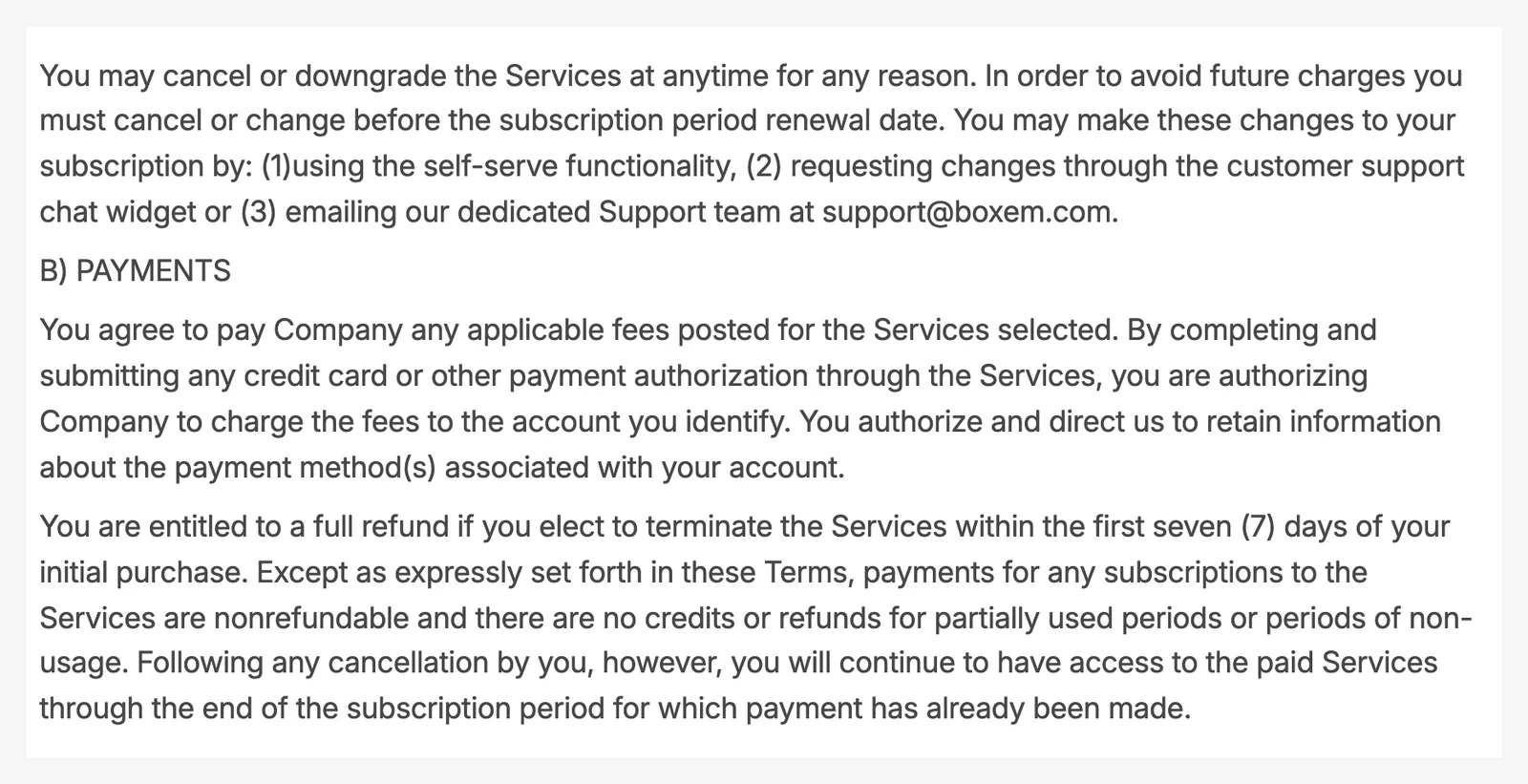
Per the terms, you get “a full refund” if you cancel “within the first seven (7) days of your initial purchase”. After that, payments are nonrefundable, with no credit for unused time, though you keep access until the paid period ends.
To cancel, open Account, then Billing, and click Cancel Subscription, as Boxem’s guide to managing your billing shows. The terms also accept a request through the support chat or an email to [email protected], as long as it arrives before the renewal date.
💡 Expert Tip: Put two dates in your calendar on day one: the end of the free trial and seven days after your first charge. If the plan isn’t saving you time on real shipments by the first date, cancel then. Ask support in writing how the 7-day refund applies to a trial that converted, so you have the answer before you need it.
Boxem features in practice
FBA shipments, labels and 2D barcodes
The shipment flow handles small parcel (SPD) and LTL freight shipments, box content, FNSKU labels and box labels. You can clone or void a shipment, and the shipment history shows “how much has checked in” so you can spot missing units and claim them.
2D barcodes put the box content on the box label so the fulfillment center can scan it. That and LTL are the two features that need Professional, and Boxem’s 2D barcode article says you must also turn the setting on in Seller Central. If FNSKU labels are new to you, start with our guide to what an FNSKU is.
Bulk ungating checks
Bulk Ungate checks which ASINs you can sell before you buy. You paste or upload ASINs, pick a brand, or run Boxem’s suggested list, and the results split into three tabs.
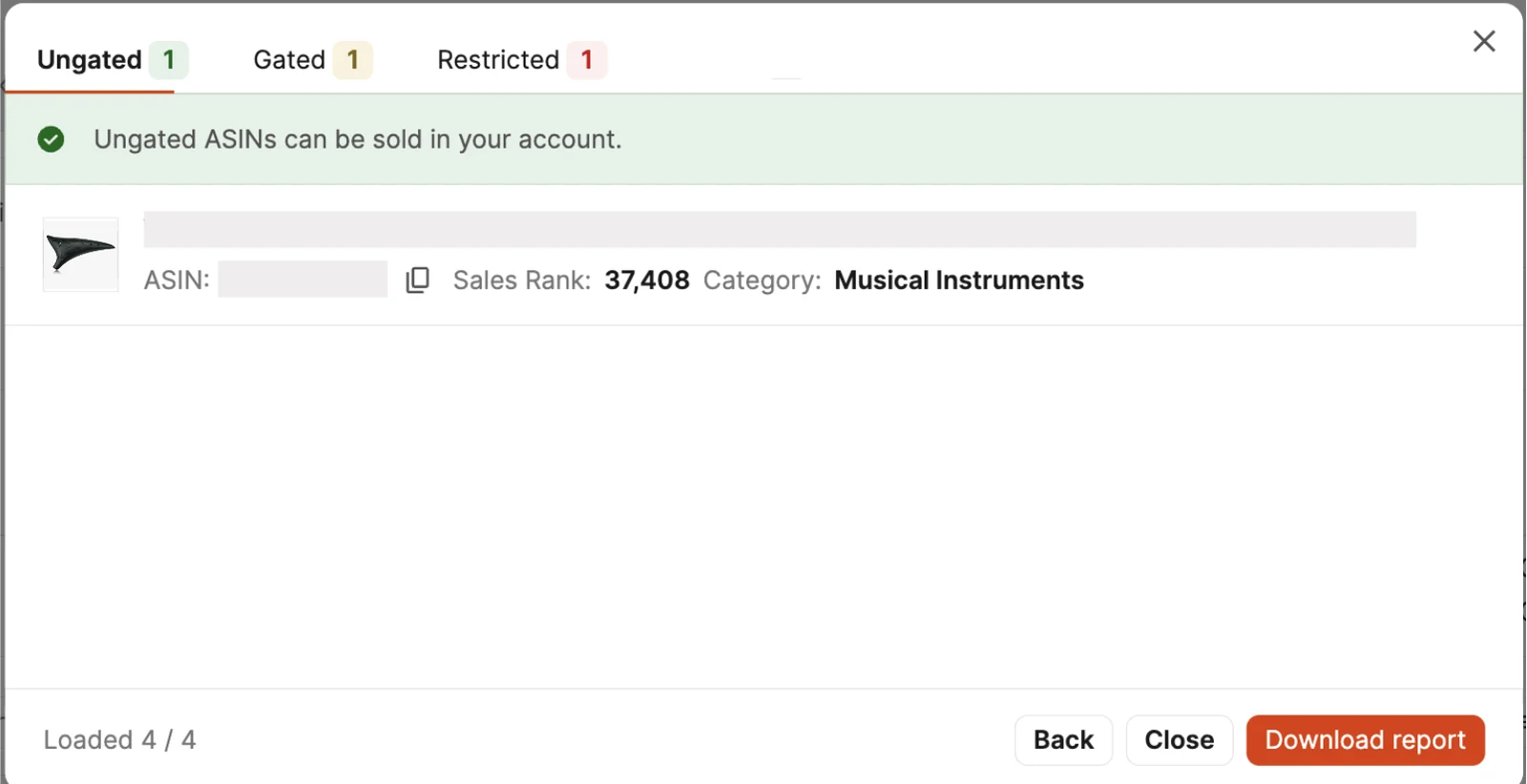
“Ungated” lists ASINs you can already sell, including ones Amazon auto-approved. On “Gated” ASINs, the Ungate button opens the Seller Central application page, so Boxem speeds up the check but Amazon still makes the decision. Our guide to Amazon restricted products explains the approval rules.
Profit analytics and buy costs
The dashboard shows sales, Amazon fees, profit, margin, ROI and refunds for today, this week, month to date and last month. SKU, ASIN and category reports sort products by profit.
Boxem imports buy costs from InventoryLab, sellerboard, Aura and BQool files, and shares them with the Aura, BQool and Seller Snap repricers. Our BQool review covers that side.
Restock, Boxi AI and Feedback Requester
Restock is a beta table for products you buy again. Boxem’s Restock help article says it is “available exclusively to Boxem Professional subscribers” and lets you set a target ROI, a source URL to scrape the supplier price from, and a days-of-stock warning.
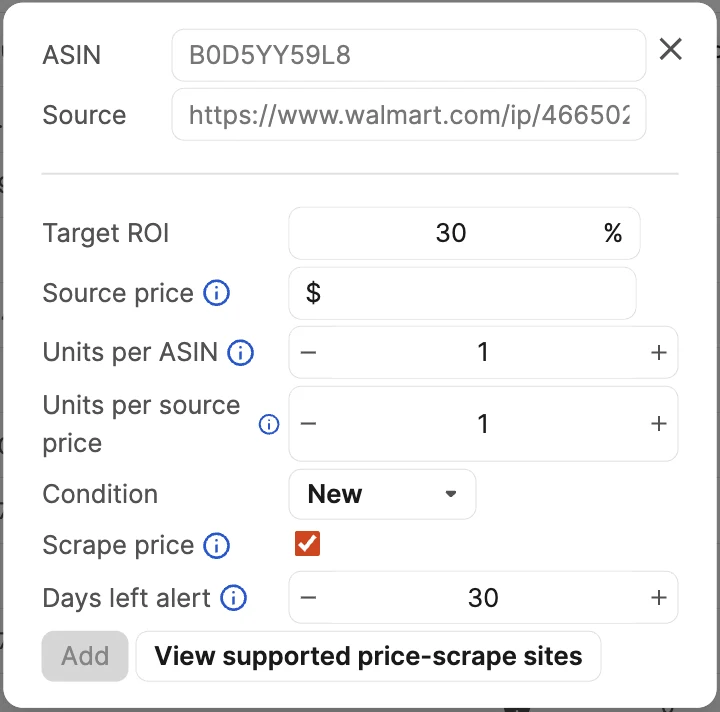
Sales per day are a weighted average of the last 3, 7, 30 and 90 days, per the same article. The table tells you when to reorder, not what is happening on the listing.
Boxi AI is the “Personal AI Assistant” on the Standard card; a Boxem blog post describes using it to work out what a product really costs once supplier discounts are counted. The Feedback Requester, marked beta, sends review request emails a set number of days after delivery, shipping or order date, using Amazon’s default template or your own.
Does Boxem have an app?
Boxem is a web app: you sign in at app.boxem.com from a browser. We found no Boxem app in Apple’s App Store search on November 12, 2026, and boxem.com links no mobile app or Chrome extension.
The “app” most sellers find is the Boxem listing on Amazon’s Selling Partner Appstore, published by Seven Tools LLC. It lists “Starting at $49.99 / month – FREE TRIAL”, and Amazon notes that the sale happens on the developer’s website.
Is Boxem legit?
Yes. Boxem is a working product from a registered company: its terms name “Seven Tools, LLC dba Boxem” at an Austin, Texas address, and the app is listed on Amazon’s Selling Partner Appstore. The site, help center and signup page were all live when we checked.
Boxem reviews: what sellers and Reddit say
Most Boxem reviews are videos. In our Google check for “boxem reviews” on November 12, 2026, page one held Boxem’s own site, three YouTube reviews and walkthroughs from August 2024 and February 2026, one Reddit thread, the Appstore listing, a Boxem help article, a software directory and a few blog and social posts.
Treat the testimonials on boxem.com as marketing; a video that shows a full shipment to check-in tells you more than a dashboard tour.
Boxem on Reddit
The Reddit result was a thread in r/AmazonFBA titled “is boxem worth it?”, where the poster asks about Boxem “for Amazon FBA/OA/wholesale”. Reddit blocks automated reading, so we did not summarize the replies beyond what Google shows.
If you read Reddit yourself, look for how many shipments a week each poster sends. Boxem’s value grows with shipment volume.
What Boxem does well
- Faster FBA shipments. Four steps, labels as you pack and partnered-carrier labels without leaving the app.
- Ungating checks in bulk. Hundreds of ASINs sorted into Ungated, Gated and Restricted before you buy.
- Profit next to shipments. Buy costs, fees and ROI per SKU, ASIN and category in the same tool.
- Repricer links. Buy costs flow to Aura, BQool and Seller Snap.
- Simple pricing. Two plans, a flat price whatever your store size, and a 14-day trial.
Where Boxem falls short
- US only. amazon.com is the only supported marketplace, so UK, EU and Canadian stores are out.
- Key features cost more. LTL, 2D barcodes, extra users and Restock all need Professional.
- Several tools are beta. Restock and Feedback Requester are both marked beta in the help center.
- Short refund window. Seven days after the first purchase, then no refunds.
- No listing alerts. Boxem shows the current offers and the Buy Box holder when you list a product, but none of the 61 help articles in its sitemap describes an alert when a seller joins or you lose the Buy Box.
🎯 Pro Insight: Run Bulk Ungate on a whole supplier price list before you place the order, then download the report and keep it with the invoice. If a brand you sell later becomes gated, you have a dated record of what your account could sell when you bought.
Boxem vs InventoryLab
InventoryLab is the tool Boxem is most often compared with: both list products, build FBA shipments and track profit, and both are US only. Prices below come from each vendor’s page on November 12, 2026.
| Question | Boxem | InventoryLab |
|---|---|---|
| Monthly price | $49.99 Standard, $69.99 Professional | $69 |
| Billed yearly | $449 or $699 | $58/mo |
| Free trial | 14 days | 30 days |
| Users | 1, or up to 3 on Professional | Unlimited |
| Marketplace | amazon.com | amazon.com |
| Restriction checks | Bulk Ungate on lists of ASINs | In the Scoutify scanning app |
| Scanning app | – | Scoutify and ScoutX included |
| Restock | Professional (beta) | $25/mo add-on |
Per the Threecolts InventoryLab page, InventoryLab costs $69 a month or $58 a month billed yearly, with a 30-day free trial, unlimited users and InventoryLab Accounting, Scoutify and ScoutX included. Restocking Insights is an optional $25 a month add-on.
Pick Boxem if you mostly need fast shipments and ungating checks at a lower price. Pick InventoryLab if you scan in stores with a phone, need several staff accounts or want accounting reports. Boxem can import your InventoryLab buy costs, so switching keeps your history; our InventoryLab pricing page covers its plans in depth.
You can also skip both. Amazon’s own Send to Amazon workflow in Seller Central builds FBA shipments without extra software; Boxem’s case is that it does the same job in fewer clicks and adds profit and ungating data.
Is Boxem worth it?
| Seller type | Worth it? | Why |
|---|---|---|
| US online or retail arbitrage seller | Yes, on Standard | Mixed-SKU boxes, FNSKU labels and ungating checks save the most time here |
| US wholesale seller shipping pallets | Yes, on Professional | LTL and 2D barcodes are Professional only |
| Small team or prep helper | Maybe, on Professional | Up to 3 users with limited access; InventoryLab allows unlimited |
| UK, EU or Canadian seller | No | amazon.com only |
| Seller who wants it done for you | No | Boxem is software; you still source, prep and ship |
Pros & cons
| Pros | Cons |
|---|---|
| Fast four-step FBA shipments with labels as you pack | amazon.com only |
| Bulk ungating checks before you buy | LTL and 2D barcodes only on Professional |
| Profit, fees and ROI per SKU | Restock and Feedback Requester still beta |
| Flat price, 14-day trial, annual price locked | 7-day refund window only |
| Buy costs shared with three repricers | Stale “$42/mo” line in the pricing FAQ |
After check-in: when a monitoring tool makes more sense
Boxem gets your units into a fulfillment center and tells you what they earn. SellerSonar watches the listing they sell on. It does no shipments, labels, ungating or profit math, so it sits next to Boxem, not in place of it.
Arbitrage and wholesale sellers share listings, so the risks after check-in are new sellers, price cuts and losing the Featured Offer (Buy Box). SellerSonar’s Buy Box and pricing alerts cover Seller appeared, Seller removed and Seller’s price changed; you switch them on in Delivery Settings.
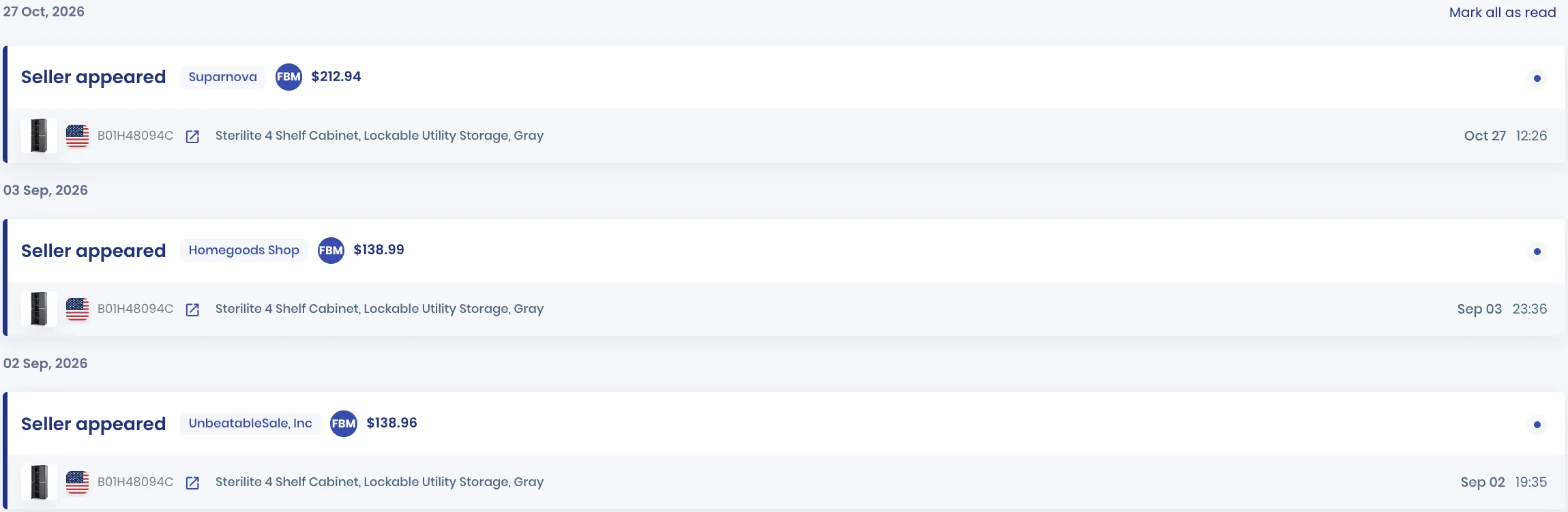
Here a merchant-fulfilled seller joined a storage cabinet listing at $212.94, per SellerSonar data. On a wholesale listing, the Buy Box tracker shows who holds the Buy Box each day.
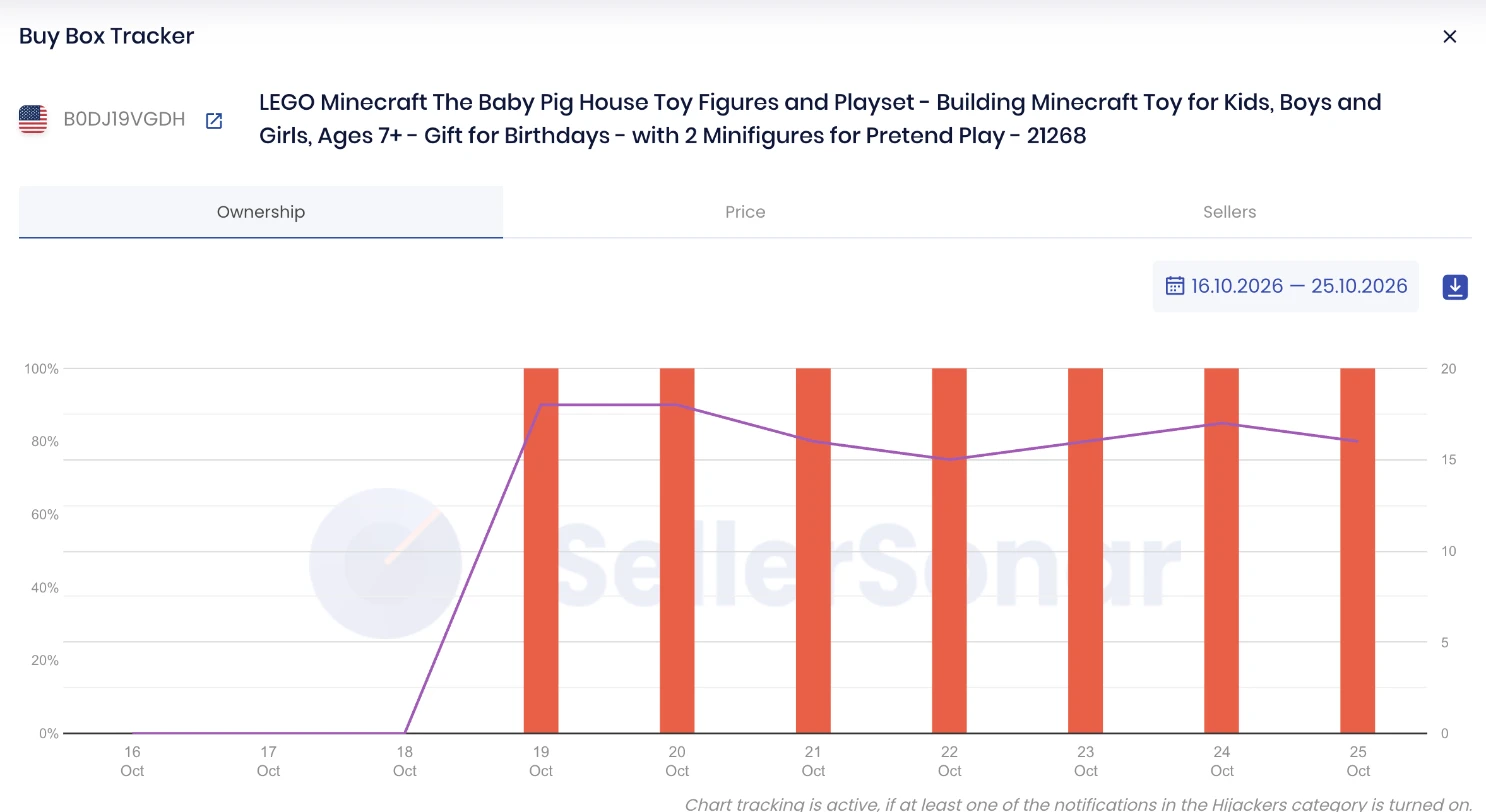
On this LEGO set, SellerSonar data shows Amazon holding 100% of the Buy Box every day from October 19 to 25, 2026, so no reseller on the listing held it that week.
According to SellerSonar’s plans, Pro costs $19.98 a month billed yearly for 150 ASINs, checked every 4 hours, with the three seller alerts; Premium at $39.98 checks every 2 hours and adds Buy Box Won and Lost alerts. It covers 23 Amazon marketplaces and needs no Seller Central connection.
📌 From Our Experience: Sellers watch a shipment closely until it checks in, then move on to the next buy. That is when a shared listing changes: a new seller, a lower price, Amazon back in stock. Add the ASIN to a monitor the day the shipment closes, while you still know the price you need to hold.
For more on shared listings, read our guides to Amazon listing hijacking and wholesale suppliers for Amazon FBA.
Final Expert Recommendations:
Take the Boxem free trial on Standard if you sell on amazon.com and build FBA shipments every week, and judge it by the time you save on real shipments in 14 days. Move to Professional only if you ship LTL, want 2D barcodes or need a second user. If you sell outside the US or want someone else to source and ship, Boxem is the wrong tool.
Start your free 14-day SellerSonar trial and see what’s happening on your listings today.
Related: sellerboard pricing · best Amazon repricers · SellerAmp review · Amazon arbitrage

