



Quick Answer
Merch by Amazon is a print-on-demand program run by Amazon, renamed Amazon Merch on Demand in 2022: you upload designs, and Amazon prints, sells and ships T-shirts, hoodies, mugs and other products, then pays you a monthly royalty. It costs nothing to join. You sign up with your Amazon account, and Amazon says applications are typically processed within 14 days. A $19.99 standard T-shirt in the US store pays $2.44 at the Creator rate, per Amazon’s Royalties page. Creators who drive at least 15% or 35% of their unit sales with their own traffic earn 2x or 2.16x that.
If you can draw, letter or come up with a good slogan, Merch by Amazon lets you sell it on Amazon without buying a single blank shirt. It sits next to Kindle Direct Publishing as one of the few ways to sell on Amazon for free.
A lot of what’s written about it is out of date, though. This guide covers how the program works as of November 2, 2026: how sign-up works, what each sale pays under the 2026 royalty groups, how tiers limit your uploads, and the rules that get accounts suspended.
About the Author: Diana Walsh writes for the SellerSonar editorial team about Amazon selling programs, fees, and account rules. She checks every program detail in her articles against Amazon’s own help and resource pages, and every royalty figure against Amazon’s published tables.
What is Merch by Amazon?
Merch by Amazon is a print-on-demand service run by Amazon. You supply the artwork and choose the products and colors. Amazon creates the product page, prints each item when a customer orders it, ships it, and handles customer service.
The program has a newer name. In a Services Agreement update posted June 21, 2022, Amazon wrote that “Merch by Amazon is now known as Amazon Merch on Demand.” Both names point to the same program and the same portal at merch.amazon.com, and sellers still search for the old one.
Three facts shape everything else in this guide:
- Amazon is the seller. The product is “sold by Amazon,” so Amazon sets the price customers pay and handles customer service.
- There’s no upfront cost. Amazon’s overview describes the program as having “no risk and no up-front costs.” You don’t buy inventory or pay for printing and shipping.
- It’s non-exclusive. Amazon’s FAQ says you can sell the same design on other websites too.
Merch on Demand also has a shopper side. Amazon’s help page on Merch on Demand personalized products explains that customers can customize some products on the product page, or design one with AI by chatting with Alexa for Shopping.
That’s a customer feature, not the creator program. The rest of this guide is about selling your own designs.
How does Merch by Amazon work?
Amazon’s own landing page sums up the program in five steps: upload your artwork, suggest a list price, Amazon prints what’s sold, ships it with Prime, and you earn monthly royalties.
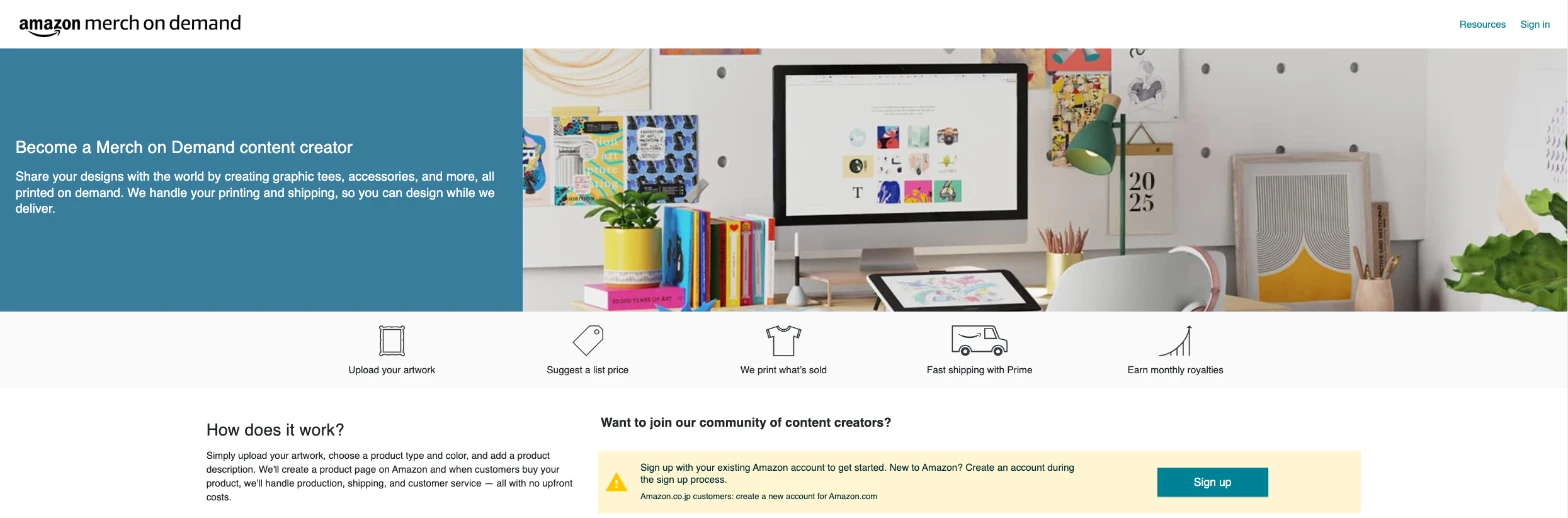
In practice, each step looks like this:
- Upload your artwork. One design file can be applied to every product and marketplace you choose.
- Pick products, colors and a list price. You add a title, brand name and up to two feature bullets, then suggest a list price.
- Amazon reviews and publishes. Approved designs go live as regular Amazon product pages, eligible for Prime shipping.
- A customer orders. Amazon prints the item with direct-to-garment (DTG) printing, a CMYK process with water-based inks, then ships it.
- You get paid. Amazon pays a royalty on each product sold, monthly.
Step 2 hides the detail most guides get wrong: you only suggest the list price.
In the Merch portal, Amazon says it takes your suggested list price into consideration, “but we make all pricing decisions independently. Your royalty payment will be based on the actual purchase price.”
🎯 Pro Insight: Because Amazon sets the purchase price, your royalty can change without you editing anything. Amazon’s FAQ also says you can’t run a sale on a Merch product, since Amazon is the seller. The only price you control is the list price you suggest.
How to sign up for Merch by Amazon
Older guides, including the first version of this one, called Merch “invite-only” with a waiting list of several months. That’s no longer how Amazon describes it. As of November 2, 2026, the landing page has two “Sign up” buttons, the form is titled “Sign up Form,” and the button at the end says “Send Request.”
Approval still isn’t guaranteed. Amazon reviews every request and turns some down.
What you need before you start
Amazon’s sign-up screens ask you to have three things ready:
- Business contact information
- Bank account and routing numbers
- Your Social Security number or another tax identification number
You’ll also need an Amazon account. The landing page says to sign up with your existing Amazon account, or create one during sign-up. Customers of Amazon.co.jp are told to create a new account for Amazon.com.
The sign-up form
The form is short, and that’s exactly why it deserves care:
| Field | What Amazon asks for |
|---|---|
| Industry Type | App Developer, Charity, Novelty T-shirt Business, School, Brands (Artists, Musicians, Magazines), Small Business, or Other |
| Organization Name | Up to 50 characters |
| Additional Information | Up to 512 characters. Amazon’s prompt asks about “your design background and what types of designs you plan to create on Merch.” |
| Website | Optional, up to 500 characters |
💡 Expert Tip: Treat the 512-character box as your whole application. Name the kind of designs you’ll make, any design experience you have, and a portfolio link if you have one. Write it as if you get one try, because you do: Amazon’s FAQ says that if your request is rejected, “you may not submit another request.”
What happens after you apply
Amazon’s FAQ says applications “are typically processed within 14 days.” If you hear nothing after 14 days, you can contact Merch support through the Contact Us form. Amazon won’t give status updates on requests younger than that.
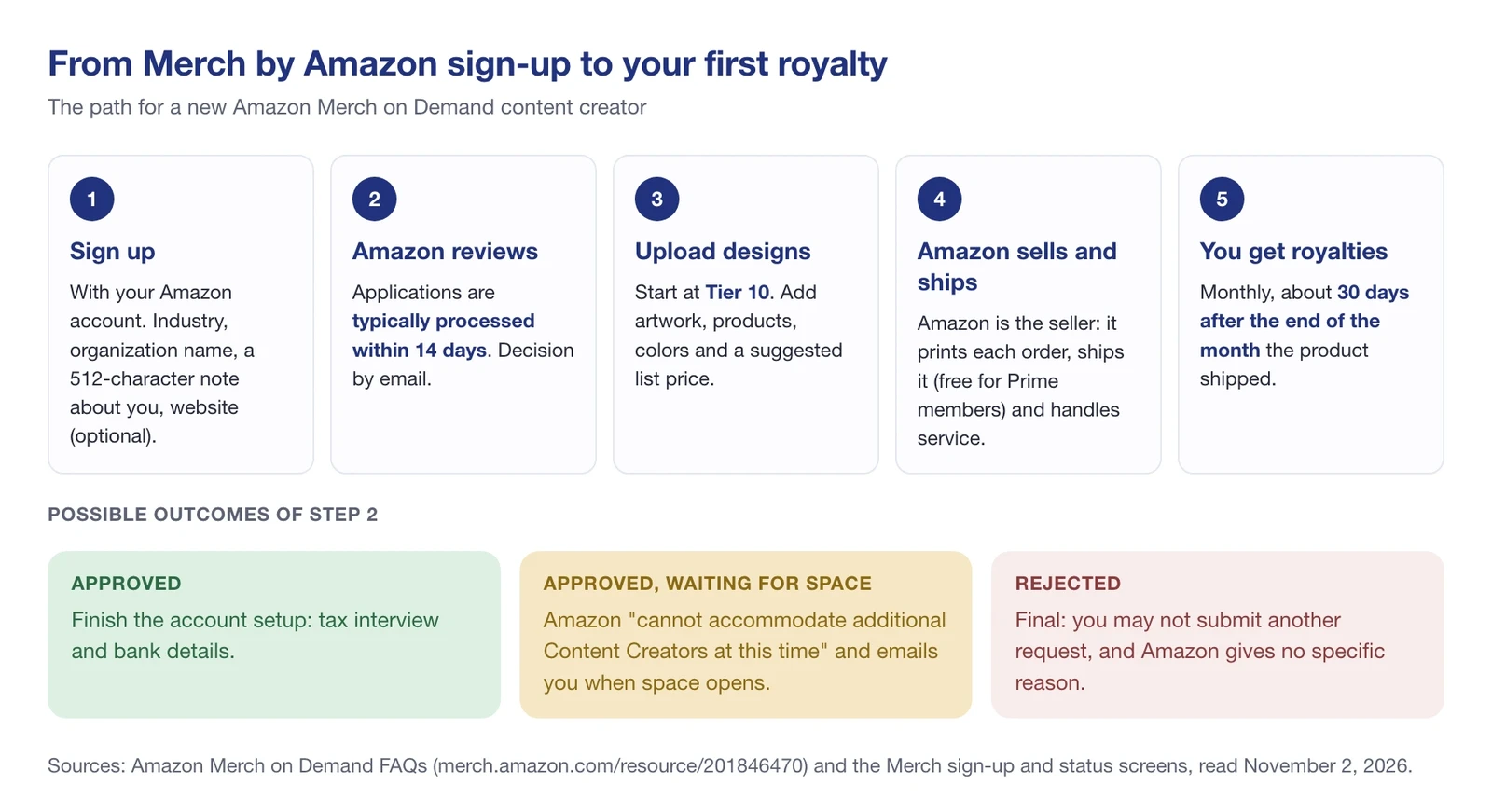
There are three possible outcomes:
- Approved. You set up the account, including the tax interview, and start uploading.
- Approved, but waiting for space. One status screen reads: “Your account has been approved, but we currently cannot accommodate additional Content Creators at this time.” Amazon emails you when space becomes available.
- Rejected. Amazon doesn’t explain why, and the decision is final.
Two more rules apply. You can only have one Merch account, and if a previous account was terminated for breaking the Terms of Use, you can’t get a new one.
Merch by Amazon login
There’s no separate Merch password. Amazon’s FAQ says your Merch account “uses the same login email and password as the Amazon account you used to submit your Merch application.” To sign in, go to the Merch on Demand landing page and click “Sign in” with that Amazon account.
If you change your Amazon login email or password, your Merch login changes with it. Monthly payment emails go to a separate business email, which you set under “Your account” in the Merch portal.
How much does Merch by Amazon pay?
You earn a royalty on every product Amazon sells. Amazon’s Royalties page gives the formula: the product’s offer price, less any applicable tax, less Amazon’s costs, “with a multiplier applied based on your royalty group.”
According to Amazon, its costs cover materials, production, fulfillment (including Prime and free shipping), customer service, returns, exchanges, and fraud prevention. Amazon publishes no royalty percentage. Any “you earn 25%” figure you see elsewhere isn’t Amazon’s.
The biggest change to Merch in 2026 is royalty groups. They apply to sales in the US store, and Merch emailed every creator their current group on April 13, 2026.
- Creator: standard royalty rates, per Amazon’s Royalties page.
- Plus: 2x Creator rates, for creators who drive at least 15% of their unit sales with non-organic traffic.
- Premium: 2.16x Creator rates, for creators who drive at least 35%.
Non-organic traffic means any traffic Amazon identifies as driven by you, “including via ads (whether on or off Amazon) or social media.” To qualify for Plus or Premium, you must also sell at least 10 units a month in the US store.
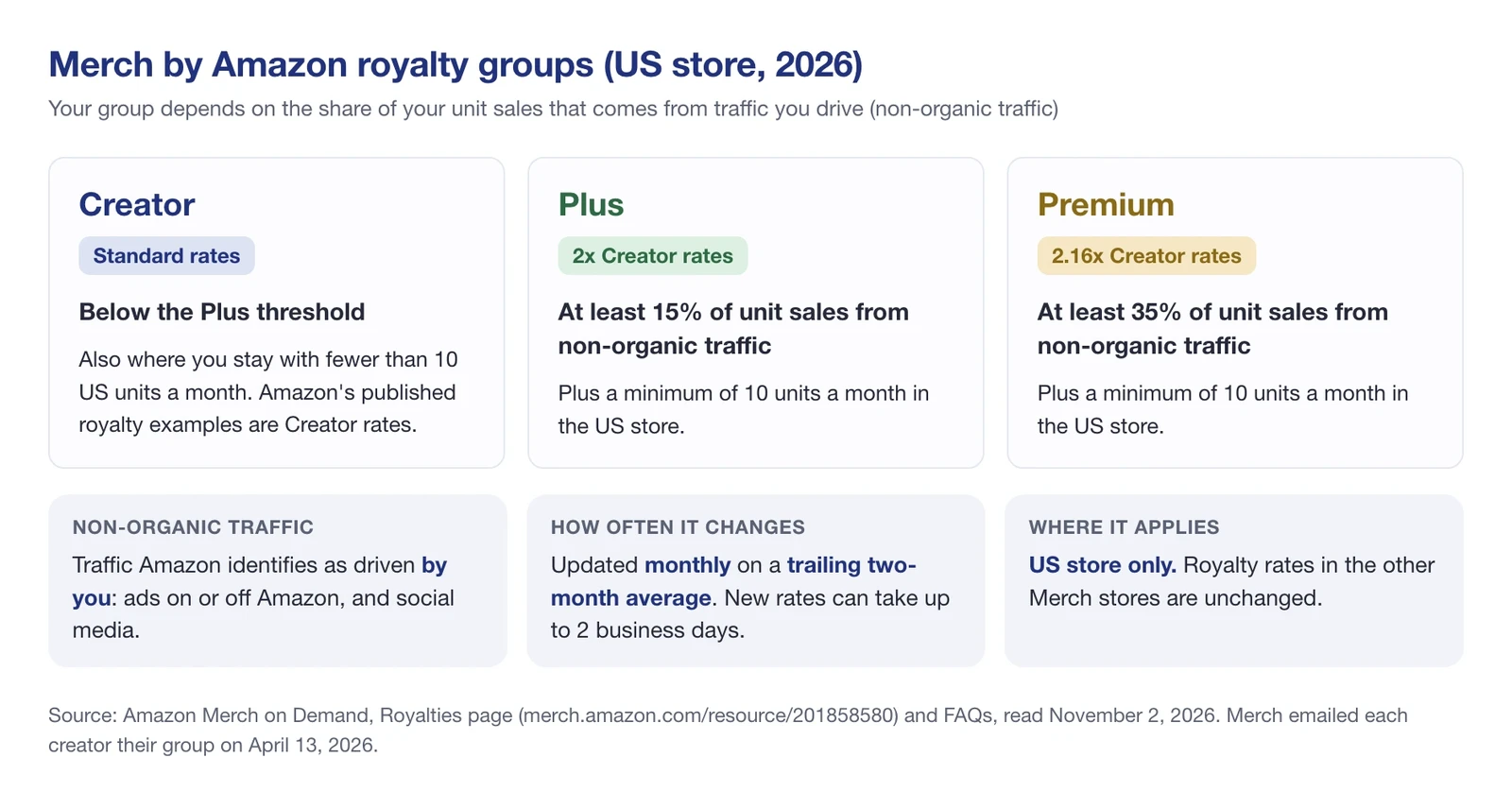
Your group updates automatically each month, based on a trailing two-month average, and new rates can take up to 2 business days to apply. Sales in the other Merch stores aren’t affected: Amazon says royalty rates outside the US store “remain unchanged.”
What a standard T-shirt pays in the US
According to Amazon’s Royalties page, these are the Creator royalties for a standard T-shirt in the US store. The Plus and Premium columns below are our calculations from Amazon’s 2x and 2.16x multipliers, rounded to the cent.
| Purchase price | Creator (Amazon) | Plus (2x, calculated) | Premium (2.16x, calculated) |
|---|---|---|---|
| $15.99 | $0.96 | $1.92 | $2.07 |
| $17.99 | $1.70 | $3.40 | $3.67 |
| $19.99 | $2.44 | $4.88 | $5.27 |
| $21.99 | $3.18 | $6.36 | $6.87 |
| $23.99 | $3.92 | $7.84 | $8.47 |
| $25.99 | $4.66 | $9.32 | $10.07 |
Two things stand out. Each $2 step in price adds $0.74 to the Creator royalty, per Amazon’s table. And moving from Creator to Plus doubles your income per shirt at any price.
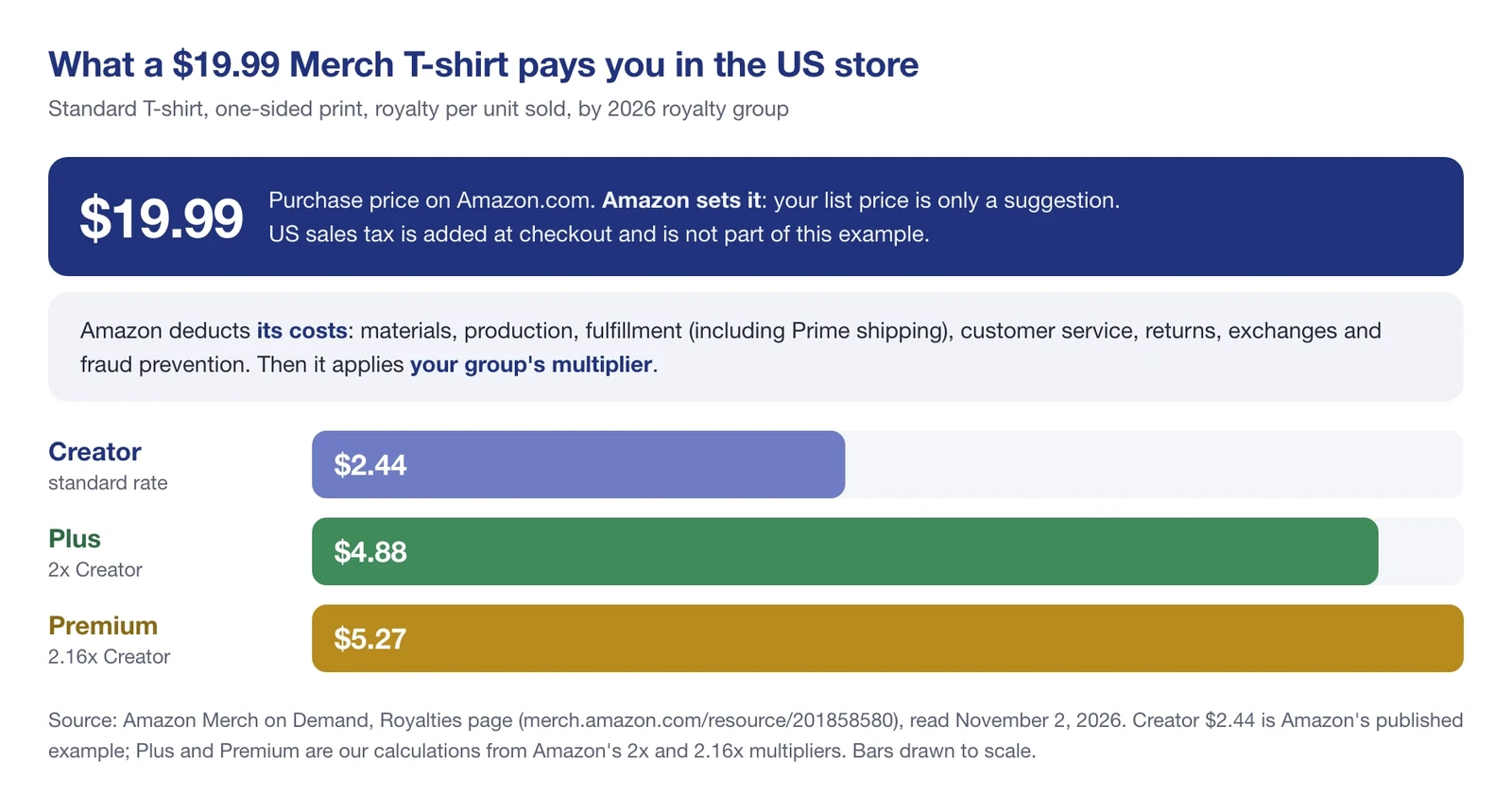
Printing on both sides costs more. Amazon lists 2-sided printing as an additional cost of $4.00 in the US store, per Amazon’s Royalties page. Other products, from hoodies to mugs, have their own royalty tables on the Royalties page.
What reduces your royalties
“No up-front costs” doesn’t mean every sale sticks. According to Amazon’s FAQ, royalties are deducted on returned products.
If returns in a month outweigh your sales, the negative balance comes out of the following month’s earnings, per Amazon’s FAQ. Its example: earn $20 in royalties, have $30 worth returned, and you start the next month $10 down.
Under the Services Agreement (last updated June 7, 2024), no royalty is paid on returns Amazon chooses to liquidate. Cancelled orders pay nothing either, because they never ship.
Merch by Amazon tiers and upload limits
Tiers decide how many designs you can have live. According to Amazon’s FAQ, new accounts begin at Tier 10, “which means a content creator can have a total of 10 published designs.” Tier levels go 10, 25, 100, 500, 1,000, and so on.
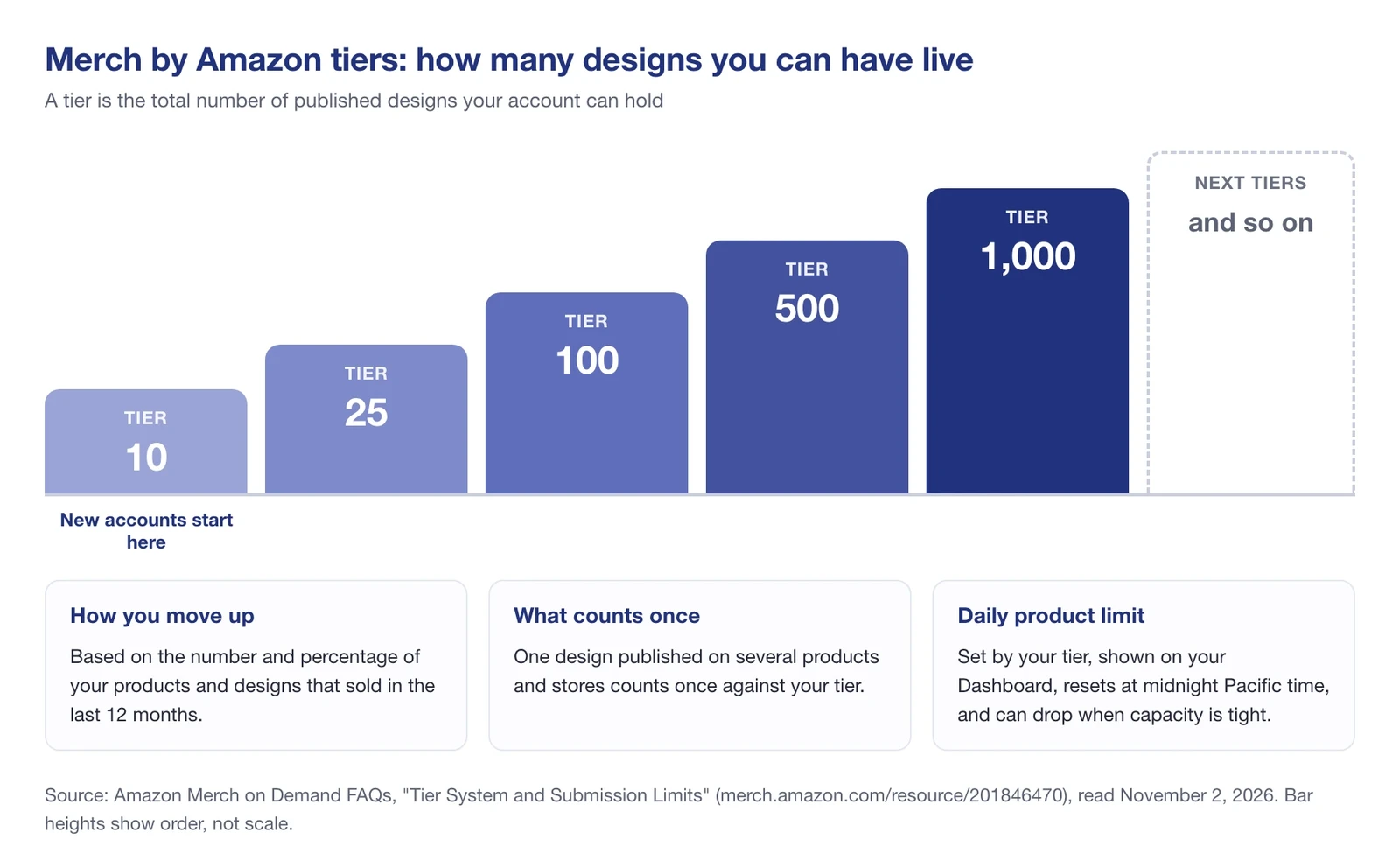
How you move up: Amazon calculates tiers “based on both the number and percentage of products and designs sold in the last 12 months.” So a handful of designs that sell can matter more than a big catalog that doesn’t.
Three related limits are worth knowing:
- A design counts once. The same design on several products and marketplaces uses one slot of your tier.
- There’s a daily product limit. It depends on your tier, shows on your Dashboard, and resets at midnight Pacific time. Amazon says it “may decrease when capacity is limited.”
- Designs expire. Amazon keeps a design live only if it received at least one order in the last 18 months, and returned orders don’t count. Separately, accounts with no sale in over a year “may be transitioned to an inactive status.”
What can you sell on Merch by Amazon?
Merch started with T-shirts, but Amazon’s product templates page lists over 30 product types. They fall into a few groups:
| Group | Products on Amazon’s template page |
|---|---|
| Shirts and tops | T-shirts, women’s V-necks, raglans, tank tops, long sleeve T-shirts, value T-shirts, crop tops, performance polos |
| Sweatshirts and outerwear | Crewneck and crop sweatshirts, pullover and zip hoodies, youth hoodies, performance quarter-zips, soft shell jackets |
| Accessories | Baseball and trucker hats, sun visors, sport backpacks, crossbody bags, tote bags, PopSockets grips, iPhone cases |
| Home and office | Throw pillows, throw and Sherpa blankets, mugs, tumblers, water bottles, hardcover journals, pens, mouse pads, laptop sleeves, posters |
Merch sells in seven Amazon stores: the US, the UK, Germany, France, Italy, Spain and Japan. An optional setting lets Amazon automatically upload your designs to new products and marketplaces “where we think they will sell.” Those automatic uploads don’t count against your daily limits, and you earn royalties on them.
Design file requirements
- PNG with transparency, in the sRGB color space, under 25 MB.
- 4500 x 5400 pixels for T-shirts, sweatshirts, long sleeves, tank tops and hoodie backs. Other products have their own sizes.
- At least 485 x 485 pixels: Amazon lists that minimum when it explains upload errors.
- Templates are available for Adobe Photoshop, Adobe Illustrator and GIMP. Free tools such as Canva can export transparent PNGs too.
What each design status means
After you submit, each design shows one of nine statuses on the Manage page:
| Status | What it means |
|---|---|
| Draft | Not submitted yet, or a live product you edited but haven’t resubmitted |
| Under Review | Amazon is checking it against the content policy; you get an email if it’s rejected |
| Rejected | Found to break the content policy; the reason shows below the status |
| Processing | Its product page is being published |
| Live | On sale on Amazon |
| Removed | Deleted because the design or product details broke the content policy |
| Failed / Timed Out | An error during publishing; you can edit and resubmit |
| Locked | Can’t be edited at this time |
Want to see a product before customers do? Set its availability to “non-searchable” on the Create page. It won’t appear in Amazon search, but you can buy it through the direct link once it’s published.
Merch by Amazon content policy: what gets designs removed
Intellectual property rules cover more than the artwork. Amazon’s rules apply not only to the artwork but also to “the product name, the product description, the bullet points, and the ‘brand’ name you select.”
Copycats and trademarks
Amazon draws the line at artwork, not ideas. Its FAQ allows designs with the same idea or concept, but defines copycat designs as:
- reproductions of all or part of someone else’s original artwork;
- resized, recolored, or visually adjusted reproductions of original artwork;
- reproductions containing distinct design elements.
Copying another creator’s artwork without permission “will result in the immediate suspension or termination of your account.” Before you upload a phrase, check it in the trademark databases Amazon’s content policy names: USPTO for the US, UKIPO for the UK, DPMA for Germany, EUIPO and TMDN for EU stores, and J-PlatPat for Japan.
Merch’s own route to well-known brand and celebrity content is Merch Collab, a separate schedule where Amazon and the licensor approve each design, and Amazon may deduct a brand royalty.
Content Amazon doesn’t allow
Beyond IP, Amazon’s content policy bans offensive and controversial content (hate, graphic violence, human tragedies and natural disasters, profanity aimed at a group or person), adult content on youth sizes, requests for customer reviews, claims that proceeds go to charity, and references to product, fulfillment or delivery attributes, such as shipping promises.
Suspension and termination
Per Amazon’s Merch FAQs, designs that violate the Services Agreement “may result in your account being suspended for approximately 30 days.” Continued violations after a suspension lead to termination, and Amazon can terminate accounts “with or without advance notice to you.”
How Merch by Amazon pays you
Amazon pays monthly. Payment arrives “approximately 30 days after the end of the calendar month in which the product was shipped,” so April sales are paid at the end of May. A sale only counts once the item ships.
| Payment method | Minimum balance |
|---|---|
| Direct deposit | $0 USD, €0 EUR, £0 GBP, ¥0 JPY, or $0 CAD |
| Wire | $100 USD, €100 EUR, £100 GBP, ¥10,000 JPY, or $100 CAD |
Amazon doesn’t pay by check. Creators outside the US can be paid electronically if their bank’s country is supported; you can check the list under “Manage your account” in the Merch portal.
The tax interview
Every creator completes a tax interview in the portal that produces an IRS Form W-9 (US) or W-8 (non-US), per Amazon’s FAQ. Until Amazon validates your tax information, “you may be subject to 30% withholding.”
According to Amazon, at year end US creators receive a 1099-MISC by January 31 if they were paid over $10 or had tax withheld. Non-US creators receive a Form 1042-S by March 15.
How to promote your Merch designs
Promotion matters more in 2026 than before, because the traffic you drive decides your royalty group in the US store. Three levers:
- Your own channels. Social media posts and links from your site count as non-organic traffic, the kind that moves you toward Plus or Premium.
- Merch advertising. Amazon invites Merch accounts to advertise “on an ongoing basis” and notifies eligible creators by email. Invited accounts get one advertising account covering the US, UK, Germany, France, Italy and Spain, with Sponsored Products and Sponsored Brands campaigns. Ads count as non-organic traffic too.
- Search-friendly listings. Your title and two bullets carry your keywords. Basic keyword research, starting with what Amazon’s search bar autocompletes, tells you which words shoppers use.
Merch by Amazon for Amazon sellers and agencies
If you already sell through Seller Central, Merch is a separate program. It uses your Amazon login, but it’s a separate account, and you can hold only one. Advertising is separate too: Amazon says Merch’s ad account can “only create and manage campaigns for your Merch products,” so your other products stay in Amazon Ads.
Agencies face a stricter rule. Amazon’s FAQ says Merch accounts are non-transferable and “giving other users access to your account puts your account at risk of suspension or termination.” You can hire designers, marketers or accountants, but the owner keeps the login.
That leaves public data. Live Merch products are regular Amazon listings with ASINs, so anyone can watch them from the outside. Since Amazon is the seller and sets the price, three public signals are worth watching:
- Purchase price. Your royalty follows the price Amazon charges, so price history on your best sellers shows what each sale is likely paying.
- Best Sellers Rank and keyword rank. A sales drop on a top design shows up there.
- New offers on the listing. If another seller adds an offer to your design’s ASIN, you want to know.
📌 From Our Experience: Our tracking data from an Amazon-sold apparel listing, a Gildan crew T-shirt, shows Amazon holding 100% of the Buy Box at $20.99 every day from October 19 to November 2, 2026, while a second seller’s offer sat at $45.00. Its Clothing, Shoes & Jewelry rank still moved from #11 to #28 and back to #12. A listing Amazon sells can look calm on price and still swing on rank.
SellerSonar can track a Merch ASIN like any other listing. Turn on the Buy Box and pricing alerts, which are off by default, and choose Amazon as the seller, the way vendors do.
Then price change alerts show when Amazon reprices your design, and the Seller appeared alert flags a new offer on its ASIN, alongside BSR, keyword rank and listing change alerts. Checks run every 4 hours on Pro, every 2 hours on Premium and every hour on Business and Enterprise.
Is Merch by Amazon worth it?
For a designer, it’s one of the lowest-risk ways to sell physical products on Amazon. There’s no inventory, no fee to join, and Amazon handles printing, shipping and service. The trade-off is control: Amazon picks the price, decides your tier, and can remove designs or close accounts over IP mistakes.
The 2026 royalty groups change the math. A Creator-rate $19.99 shirt pays $2.44, per Amazon’s table, which takes volume to add up. Creators who bring their own audience can double that in the US store.
Final Expert Recommendations:
Write the 512-character sign-up note carefully, because a rejection is final. Once you’re in, spend your first 10 design slots on a narrow niche you can promote yourself, since outside traffic is what lifts you into Plus or Premium. Check every phrase against the trademark databases before upload, and treat returns as part of your margin, not an exception. Finally, watch the purchase price and rank on your best sellers, so a royalty change doesn’t wait for your monthly payment to surprise you.
Want to watch your best-selling Merch designs without checking them by hand? Start a free 14-day SellerSonar trial: 5 ASINs and 10 keywords, no credit card needed.