






Quick Answer
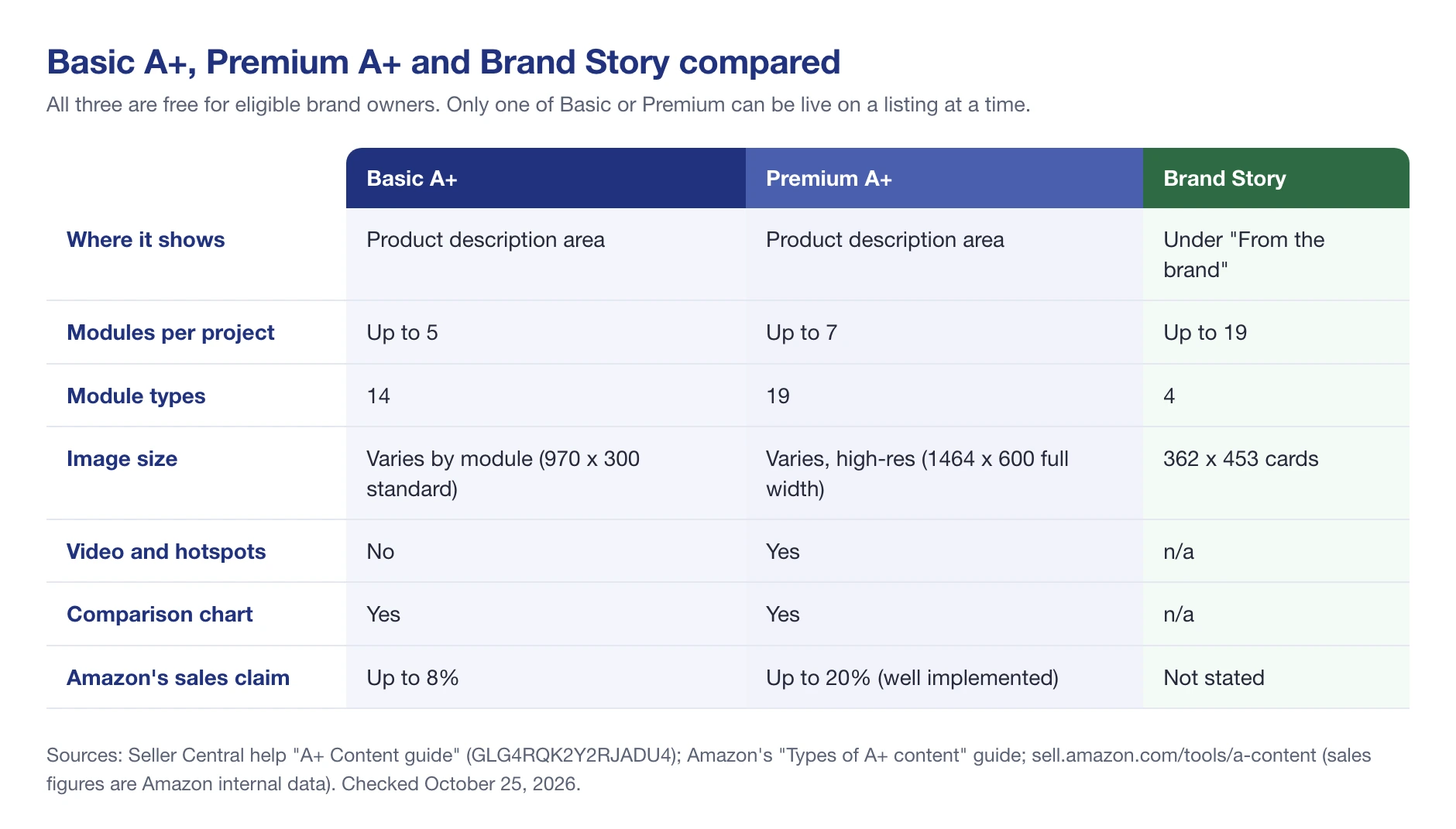
Amazon A+ Content is the free section of images, text and comparison charts that brand owners add to a product page, in place of the plain product description. Basic A+ allows up to 5 modules and Premium A+ up to 7, with video. According to Amazon, Basic A+ can increase sales by up to 8%, and well-implemented Premium A+ by up to 20%. Every submission is reviewed against Amazon’s A+ content guidelines, which can take up to seven business days.
A shopper who scrolls past your bullets is still deciding. A+ Content is what they see next: the images, comparison charts and short copy that answer the questions your title and bullets couldn’t.
This guide covers what A+ Content is, the difference between Basic, Premium and Brand Story, the module sizes, Amazon’s A+ content guidelines and why submissions get rejected, how to create it, and how to tell whether it’s working.
About the Author: Diana Walsh writes for the SellerSonar editorial team about Amazon listings and brand content. She checks every rule in her articles against Amazon’s own help pages, and the examples against live listings we track in SellerSonar.
What is A+ Content?
A+ Content is a feature that lets brand owners replace the plain-text product description with a designed section of images, text, comparison tables and, on Premium, video. It used to be called Enhanced Brand Content (EBC). Our A+ Content glossary entry has the short definition.
According to Amazon’s A+ Content page, “Basic A+ Content can increase sales by up to 8%, and well-implemented Premium A+ Content can increase sales by up to 20%.” Those figures come from Amazon’s internal data, and “up to” is doing a lot of work. Treat them as a ceiling, not a promise.
On search, Amazon is specific. Its help page on creating A+ content says the alt-text you write for each A+ image “helps your products in search results”. It makes no such claim for the rest of the A+ copy, so write real alt-text, and don’t count on A+ text alone to rank you for new keywords.
Where Does A+ Content Display?
A+ Content appears on the product detail page, below the bullets and the buy box, in the product description area. A Brand Story, if you have one, shows separately under “From the brand”. If a vendor has added A+ for the same product, it appears under “From the manufacturer” and replaces seller A+.
Most shoppers will see it on a phone. Amazon says A+ is optimized for both desktop and mobile, but text placed inside images can become hard to read on a small screen, so preview both before you submit.
What Does A+ Amazon Contain?
There are three kinds of A+ content, and they stack. Basic and Premium A+ are two versions of the same section: only one of them can be live on a listing at a time. Brand Story is a separate section that you can add on top.
Basic A+ (Enhanced Product Description)
Basic A+ gives you up to 5 modules from 14 module types: images with text, image-and-text blocks, comparison charts and similar layouts. It’s where most brands start.
Premium A+ allows up to 7 modules from 19 types, larger full-width images (1464 x 600 pixels), and interactive modules such as video, hotspots, Q&A and navigation carousels. It’s also free. Older guides call it invite-only or expensive; that’s out of date.
A+ Brand Story
Brand Story is a carousel about your brand that shows under “From the brand”. It can hold up to 19 modules, and its cards can link to your other products and to your Amazon Brand Store. Our Amazon Brand Story glossary entry covers it in more detail.
A+ Content Modules and Image Sizes
Image sizes depend on the module, so always check the size shown in A+ Content Manager when you upload. These are the figures Amazon publishes:
| Item | Size or rule | Source |
|---|---|---|
| Basic A+ standard image | 970 x 300 px | A+ Content guide |
| Premium A+ full image (desktop) | 1464 x 600 px | A+ Content guide, Premium module guide |
| Premium A+ full image (mobile) | 600 x 450 px | Premium module guide |
| Premium “Four images and text” | 300 x 225 px per image | Premium module guide |
| Premium “Dual images with text” | 650 x 350 px | Premium module guide |
| Premium “Single image with text” | 800 x 600 px | Premium module guide |
| Brand Story card | 362 x 453 px | Types of A+ content guide |
| Premium video | MP4, up to 200 MB and 180 seconds | Premium module guide |
| All images | JPG, BMP or PNG, RGB, under 2 MB, at least 72 dpi, no GIFs | A+ Content guide |
Amazon’s Premium A+ module guide lists every Premium module with its sizes and limits. For the product images on your listing itself, see our guide to Amazon image requirements.
What Can Affect Your Amazon A+ Conversion Rates?
A+ helps when it answers a shopper’s question faster than the bullets did. It hurts, or does nothing, when it repeats the bullets in bigger letters.
Picture Quality
Blurry, stretched or text-heavy images undo the point of A+. Use sharp photos at the module’s full size, and show the product in use.
A+ Design
Plan the order: lead with the main benefit, then the details, then a comparison chart of your own products. A comparison chart keeps shoppers inside your catalog instead of sending them back to search.
Mobile Readability
Text baked into an image shrinks on a phone. Keep text in images short and large, and put the detail in the module’s text fields instead.
Not Following AMZ Best Practices and Guidelines
A rejected submission means no A+ at all until you fix it. The next section lists what Amazon rejects.
💡 Expert Tip: Write the comparison chart first. If you can’t fill it with clear differences between your own products, shoppers can’t either, and that tells you which product pages need work before any A+ design does.
A+ Content Guidelines
Amazon reviews every A+ submission against its A+ content guidelines. Most rejections come from a short list of rules.
Image and Text Formatting
- Images in JPG, BMP or PNG, RGB color, under 2 MB, at least 72 dpi.
- No animated GIFs, watermarks, HTML or hyperlinks.
- Text in the content’s language. Other languages are allowed only for brand identity.
- Trademark symbols belong on packaging or a logo, not in your text.
The Content You Can’t Use
- Pricing and promotions: prices, discounts, “free shipping” or other time-sensitive offers.
- Contact details: phone numbers, emails, website addresses or QR codes.
- Boastful claims: “#1 rated”, “top-rated”, “best-selling”, or satisfaction promises like “100% satisfaction guaranteed”, according to Amazon’s guidelines.
- Old awards: awards more than 2 years old.
- Unsupported environmental claims: “eco-friendly”, “biodegradable” and “compostable” aren’t allowed, and “recyclable” needs substantiation.
- Health claims: anything saying the product cures or treats a disease.
- Customer reviews and testimonials, and anything that mimics Amazon’s own logos or page headings.
- Content you don’t own: you need the rights to every image and line of text.
If you use AI to create images with realistic people, Amazon’s guidelines ask you to disclose them as AI-generated when you upload.
Why A+ Content Gets Rejected and How to Fix It
| Rejection reason | Fix |
|---|---|
| Price, discount or “free shipping” in an image | Remove it. The buy box shows the live price. |
| “Best-selling”, “#1” or “top-rated” | Replace it with a specific, provable feature. |
| Website, email or QR code | Remove it. A Brand Story can link to your Brand Store instead. |
| Image too large or the wrong format | Export as JPG or PNG, RGB, under 2 MB. |
| Text in the wrong language | Match the marketplace’s language. |
Who Is Eligible for A+ Content?
Sellers need a Professional selling account and a Brand Representative or Reseller role on a brand enrolled in Amazon Brand Registry. Vendors create A+ in Vendor Central, and authors create it from the KDP Marketing page. Amazon doesn’t support seller A+ for books, music, video and DVD listings; authors use KDP instead.
Premium A+ is where Amazon’s own pages disagree. The newer A+ Content guide says “There is no additional eligibility criteria for sellers to access Premium A+.” An older A+ Content help page still lists a published Brand Story on all your ASINs and at least 5 approved A+ submissions in the past 12 months. If A+ Content Manager shows you Premium modules, you’re eligible.
How Much Does Amazon A+ Content Cost?
A+ Content is free. Amazon’s A+ Content guide says it’s “available at no additional cost for basic and Premium features.” What you pay for is the work: product photography, design, and your time. Agencies charge for A+ design, but Amazon doesn’t charge to publish it.
Is A+ Content Worth It?
For a brand owner, almost always, because it’s free and the listing has to show something below the bullets anyway.
Our own data points the same way. Across 251 listings we score in SellerSonar, 207 (82%) have A+ Content. Among the 160 competitor listings we track, mostly picked from top search results, 149 do. In a long-tail reseller catalog we track, only 31% do. The listings that already rank tend to have A+.
Benefits of Amazon A+ Content
Higher Conversion
According to Amazon’s A+ Content page, Basic A+ can lift sales by up to 8% and well-implemented Premium A+ by up to 20%. Those are Amazon’s best cases, so measure your own result (see below).
Fewer Unanswered Questions
Size charts, compatibility, what’s in the box: A+ is the place for details the bullets can’t hold, which can cut down on returns from shoppers who misunderstood the product.
A Reason to Stay in Your Catalog
Comparison charts and Brand Story cards link to your other products, so a shopper who isn’t sold on one item can find another one of yours.
A Stronger Brand Page Overall
SellerSonar’s Listing Quality Score includes an A+ section. Listings without A+ scored lower overall in our sample: an average of 60.3 against 84.7 with A+. Part of that gap is the A+ section itself, but listings without A+ also tended to be weaker elsewhere. You can run any ASIN through our free listing quality checker to see where it stands.
How to Create A+ Content in Seller Central
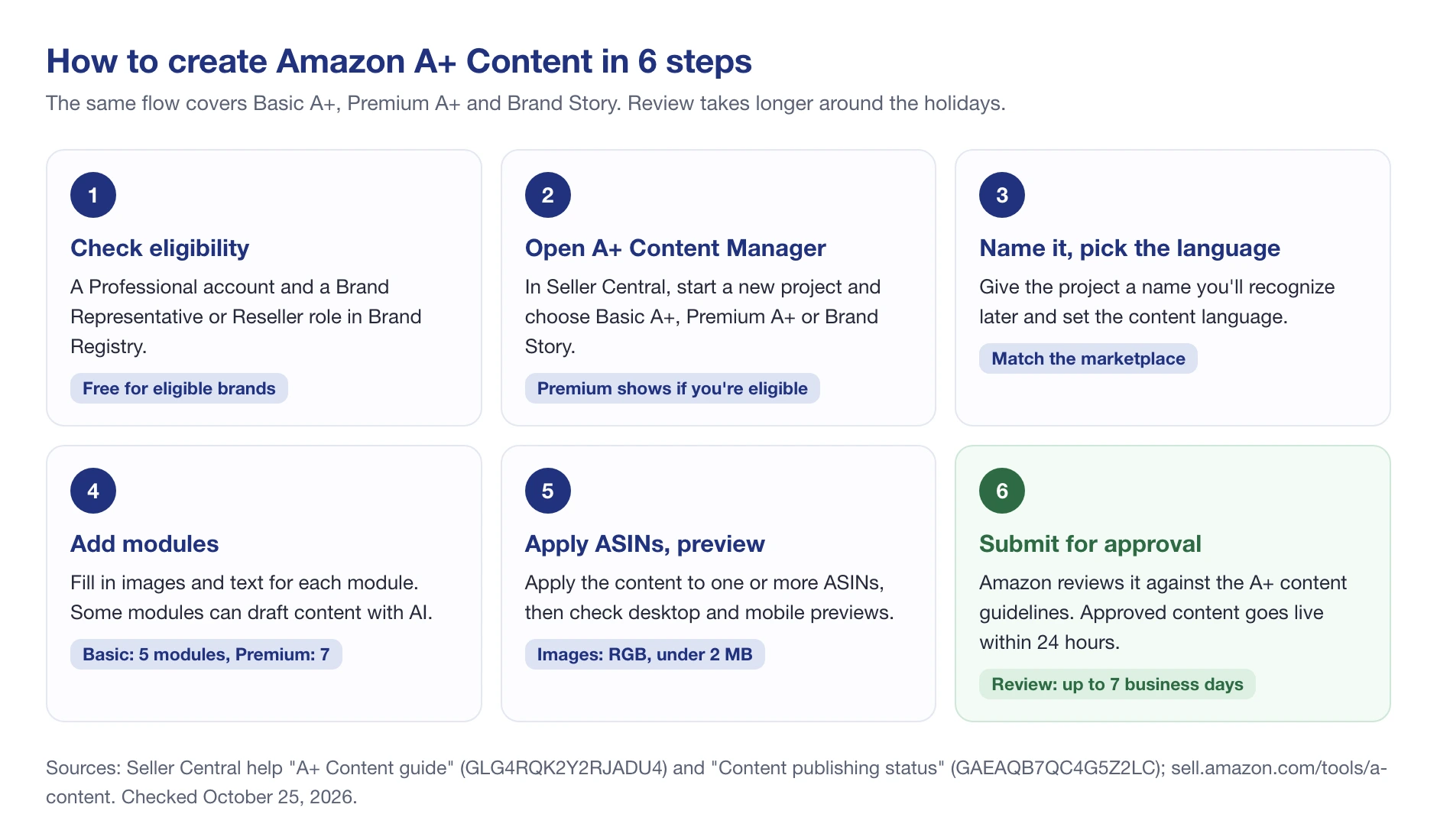
- In Seller Central, open A+ Content Manager and start a new project.
- Choose Basic A+, Premium A+ (if offered) or Brand Story.
- Name the project and pick the content language.
- Add modules and fill in the images and text for each one.
- Apply the content to one or more ASINs.
- Preview on desktop and mobile, then submit for approval.
Amazon’s help page on the A+ Content guide says review can take up to seven business days, longer during the holidays, and approved content goes live within 24 hours. If you’re editing content that’s already live, the current version stays up while the edit is reviewed.
Using Amazon’s AI to Draft A+ Content
Some modules carry an “AI Ready” badge. Select the text and image fields you’d like help with, click Generate content, enter a brand-owned ASIN, and Amazon drafts content based on that ASIN and top products in your category. Review every line before submitting: the same A+ content guidelines apply.
Amazon A+ Content Examples
Two lip balms we track in SellerSonar show the difference A+ makes on a real page, checked on amazon.com on October 25, 2026:
- Aquaphor Lip Repair 2-pack (ASIN B07SRRLVQ1) uses Premium A+ with full-width images, an FAQ module and a comparison table, plus a Brand Story. Per SellerSonar data, it had 34,158 ratings at 4.6 stars and ranked #2 in Lip Balms & Moisturizers.
- eos Natural Lip Balm (ASIN B0G2T52PRG) has no A+, just a plain description. Per SellerSonar data, it had 33,715 ratings at 4.7 stars and ranked #7 in Lip Balms & Moisturizers.
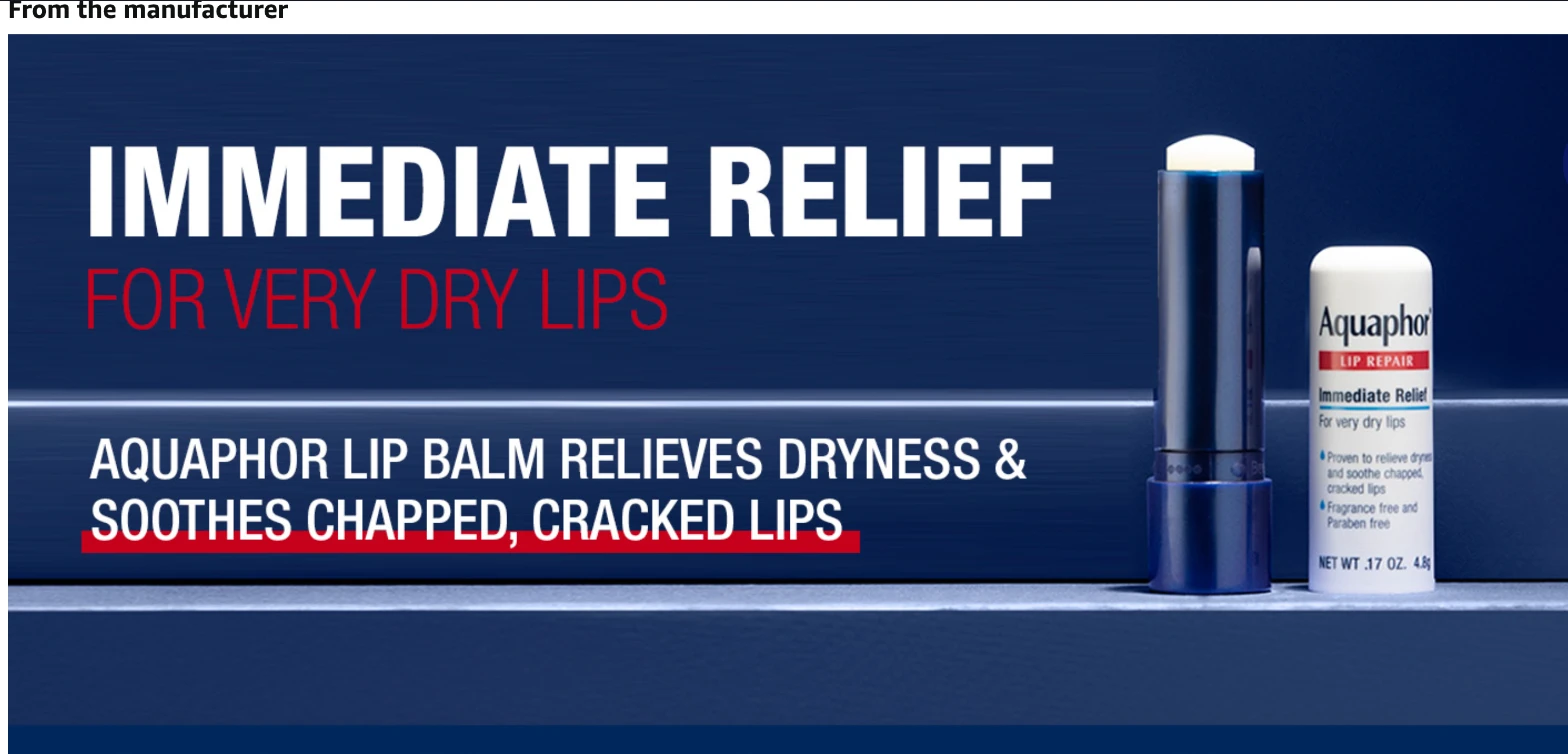
Above: part of Aquaphor’s A+ section on amazon.com, under “From the manufacturer”. Below: the eos listing, where the same spot holds a single paragraph of text. Both captured on October 25, 2026.

Same category, almost the same number of reviews, and only one of them tells its story below the bullets. A+ alone doesn’t explain the rank gap, but it’s the most visible difference between the two pages. Even big brands skip it: per SellerSonar data, the Apple iPhone 16 Pro Max Silicone Case listing we track (ASIN B0DGHLFC4M) has no A+ at all.
🎯 Pro Insight: Before you design anything, open the top three listings for your main keyword and scroll to the bottom. If they all use Premium A+ with video, Basic A+ won’t stand out. If none of them use A+, even a simple comparison chart sets you apart.
How to Test and Measure A+ Content
Amazon’s Manage Your Experiments tool can A/B test A+ Content and Brand Story, as well as titles, images and bullets. You need to own the brand, the ASIN needs enough traffic, and the A+ must already be published. Our guide to A/B testing on Amazon walks through the setup.
Once A+ is live, it can change without you noticing, especially when several people or an agency manage the account. SellerSonar doesn’t have a separate A+ alert, but A+ text edits show up as a “Description changed” alert, with the text before and after.

Here’s a real case from a listing we track. Per SellerSonar data, the A+ copy on Amazon Basics wood-cased #2 pencils (ASIN B071JM699B, amazon.com) was edited twice in three days. On October 19, 2026 it dropped “#2 HB” and “long-lasting”; on October 21, “Medium-Soft HB Lead” became “Medium-Soft Lead”. Both arrived as Description changed alerts with the old and new text side by side.
Content change alerts are checked as often as every hour on Business and Enterprise plans. They track text, so A+ image swaps or module reordering won’t trigger them.
Vendors create A+ in Vendor Central. Vendor A+ shows under “From the manufacturer” and replaces seller A+ for the same product, so a brand selling through both channels should decide which side owns it. Our guide to Amazon Vendor Central explains how the two programs differ.
KDP authors add A+ from the KDP Marketing page, where it shows under “From the Publisher”. Amazon’s KDP A+ help page says it can appear within eight business days, it’s published per marketplace, and it can’t quote customer reviews.
Wrap Up
Amazon A+ Content is free, it fills the part of the page shoppers reach when they’re still deciding, and Amazon’s own data suggests it can lift sales. The hard parts are good images, staying inside the A+ content guidelines, and keeping the content accurate once it’s live.
Final Expert Recommendations: Start with Basic A+ and a comparison chart across your own products, add a Brand Story that links to your Store, then move to Premium A+ if your category’s top listings use it. Test with Manage Your Experiments, and keep an eye on text changes after launch.
If you’d like to know when the A+ text on your listings or your competitors’ changes, try SellerSonar free: 14 days free, 5 ASINs, 10 keywords, no credit card.


Thanks for sharing a very informative blog.