





Quick Answer
Amazon Vendor Central is the portal brands and manufacturers use when Amazon buys their products wholesale and resells them as “Ships from and sold by Amazon”. This is the first-party (1P) model. It’s invitation-only: there’s no public application. Seller Central is the open, third-party (3P) alternative, where you sell to shoppers yourself and keep control of price and stock.
Maybe an Amazon buyer just emailed you an invitation. Or you’re a brand trying to work out whether Vendor Central beats selling through Seller Central. Either way, most of what’s written about Vendor Central skips the parts that decide whether it pays: who sets the price, what comes off your invoices, and what happens when Amazon stops ordering.
This guide covers how Amazon Vendor Central works, how it compares with Seller Central, what vendors actually pay, how advertising works for 1P brands, how vendor relationships start, and how to keep an eye on your listings once Amazon is the one selling them.
About the Author: Diana Walsh writes for the SellerSonar editorial team about Amazon selling models, fees, and account health. She checks every program detail in her articles against Amazon’s own pages, and the listing examples against live Amazon listings we track.
What Is Amazon Vendor Central?
Amazon Vendor Central is the web portal for Amazon’s first-party suppliers. Instead of selling to shoppers yourself, you sell your products to Amazon at a wholesale price. Amazon then lists them, stocks them, sets the retail price, and sells them under its own name. If you’ve seen “Ships from and sold by Amazon” on a brand’s listing, there’s a good chance a vendor is behind it.
That’s the whole idea in one line: Amazon is your customer, not the shopper. You receive purchase orders, ship stock, invoice Amazon, and get paid on agreed terms. Amazon publishes its own developer interfaces for this workflow, including Vendor Orders for purchase orders, which is a good sign of how the relationship runs day to day. (Our Vendor Central glossary entry has the short definition and the key terms.)
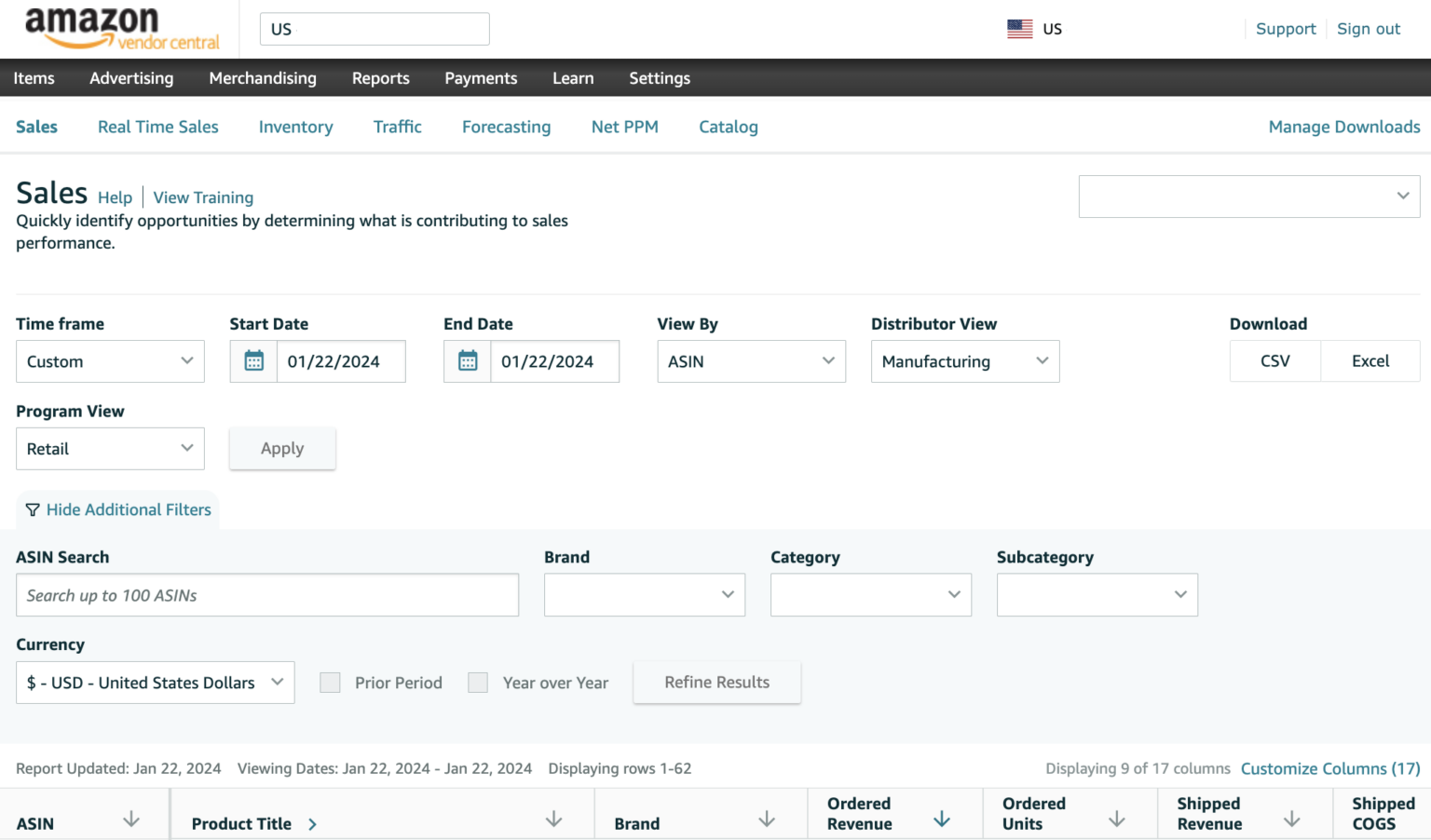
Inside the portal, vendors manage items, purchase orders, payments, advertising and merchandising, and read their sales data. The screenshot above is the Sales report from 2024: ordered revenue, ordered units and shipped cost of goods, by ASIN.
What was Amazon Vendor Express?
Vendor Express was a lighter, open version of the vendor program aimed at smaller brands. It’s gone.
According to Amazon’s emails to Vendor Express users, reported by PYMNTS in 2018, Amazon stopped new orders on May 21, 2018 and retired the program on January 1, 2019. Its old address, vendorexpress.amazon.com, no longer even resolves. If a guide still tells you to sign up for Vendor Express, it’s out of date.
Not to be confused with Supplier Connect or Supplier Central
Search “Amazon Vendor Central” and two other Amazon portals show up near the top. Neither is a way in.
- Amazon Supplier Connect is for companies that want to sell Amazon the goods and services it needs to run its own retail and logistics operations. Amazon says plainly that this is different from selling on its retail marketplaces.
- Amazon Supplier Central is a collaboration tool for upstream supply-chain partners, and you join it by invitation from an existing Amazon partner.
How Does Amazon Vendor Central Work?
Here’s the 1P cycle from first order to payment, next to how the same product would reach the shopper through Seller Central.
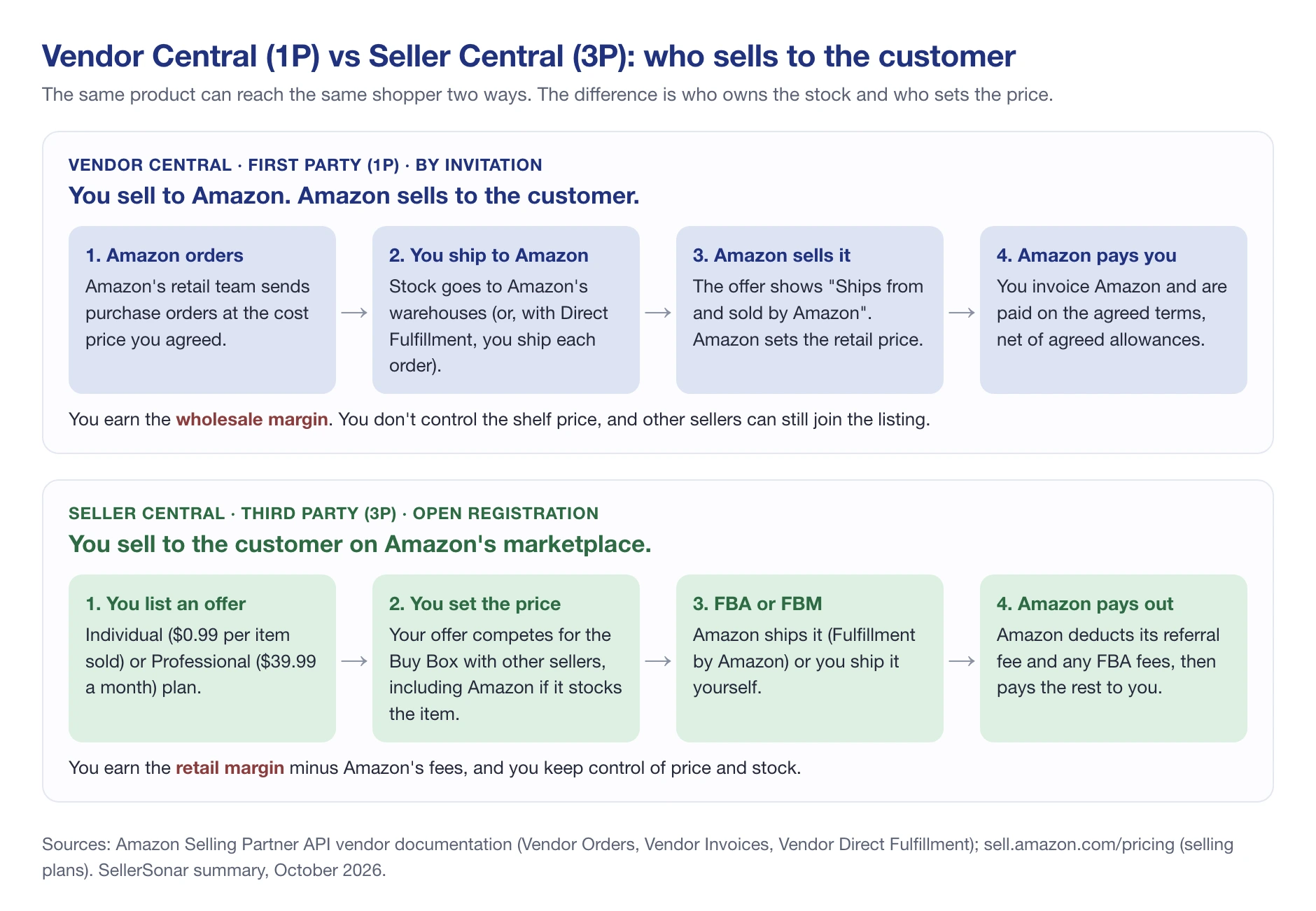
- Amazon sends a purchase order. Amazon’s retail team decides what to buy and how much, at the cost price you agreed.
- You confirm and ship. You send the stock to the Amazon warehouses on the order, with the shipment notice and labels Amazon requires. Some vendors are set up for Direct Fulfillment instead, where you ship each customer order yourself on Amazon’s behalf.
- Amazon sells it. Your product appears as sold by Amazon. Amazon sets and changes the retail price.
- You invoice and get paid. Amazon pays your invoices on the agreed payment terms, minus whatever allowances and chargebacks apply.
Notice what’s missing from your side: the shelf price. You negotiate what Amazon pays you, not what the shopper pays. That’s the single biggest difference from Seller Central, and it shapes everything else.
Amazon Vendor Central vs. Amazon Seller Central
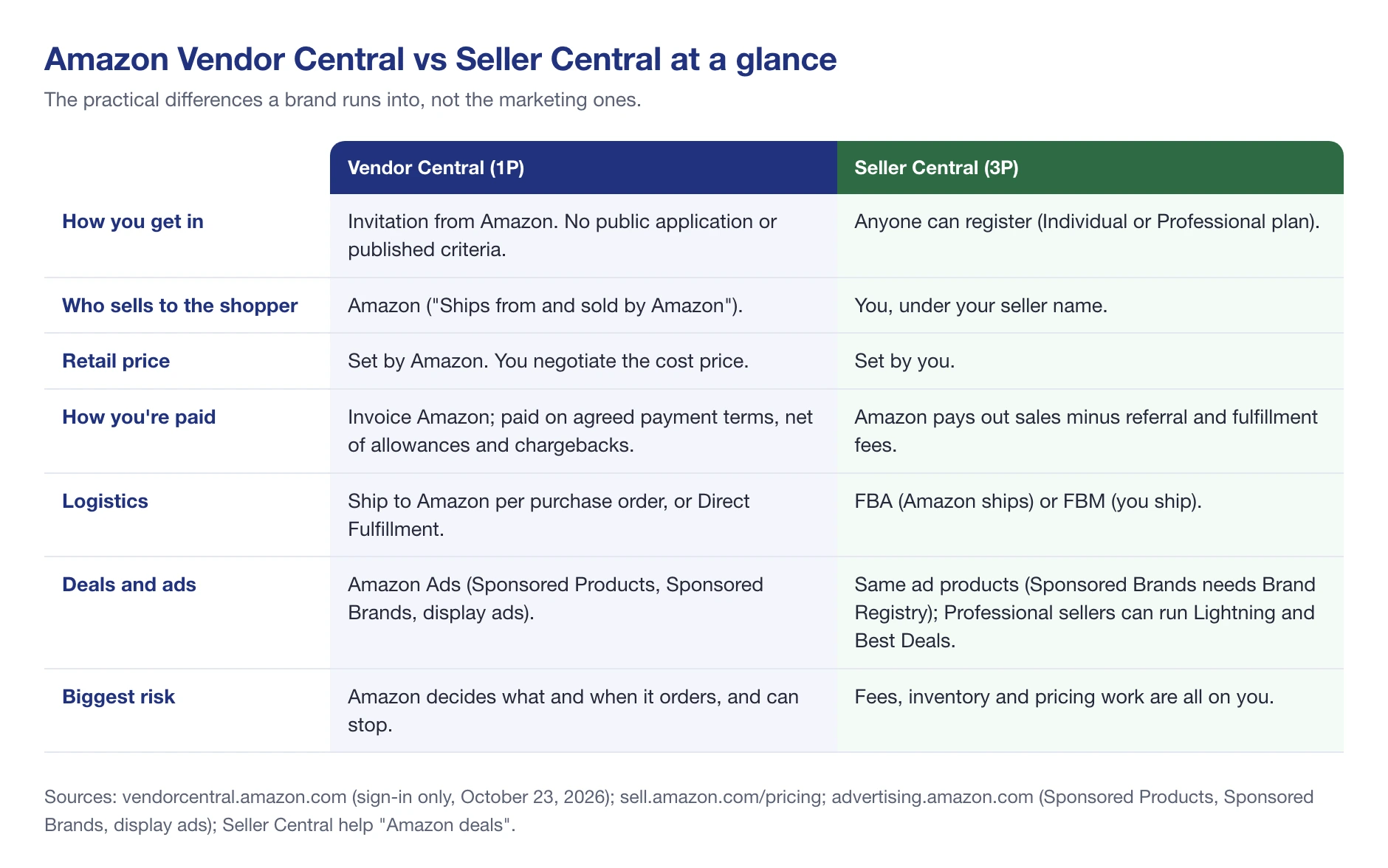
Both portals put your products on the same Amazon pages. What changes is who owns the sale.
Amazon Vendor Central
Vendor Central is first party (1P). You’re a wholesale supplier and Amazon is the retailer. You get Amazon’s retail operation behind your products, but you give up control of price, and you live with Amazon’s ordering decisions.
- Access: invitation only. Amazon doesn’t publish its criteria.
- Price: Amazon sets the retail price; you negotiate the cost price.
- Money: you invoice Amazon and are paid on agreed terms.
- Logistics: you ship to Amazon per purchase order, or use Direct Fulfillment.
Amazon Seller Central
Seller Central is third party (3P). You’re the seller on Amazon’s marketplace. Anyone can register, on the Individual plan ($0.99 per item sold) or the Professional plan ($39.99 a month), per Amazon’s pricing page.
You set your own prices, choose Fulfillment by Amazon or ship yourself, and pay Amazon a referral fee on each sale plus any fulfillment fees. Our breakdown of Amazon seller fees covers each one.
One point that trips people up: deals aren’t a vendor-only perk. Amazon’s help pages say sellers with a Professional account can create Lightning Deals and Best Deals too.
💡 Expert Tip: Ask yourself one question before you choose: who do you want setting your price on Amazon? If the answer is “us, always”, Seller Central is the better fit, whatever the invitation says.
What Vendor Central Really Costs
There’s no monthly fee and no referral fee in the 1P model, which is why it looks cheap at first. The cost sits inside your vendor agreement instead, as deductions from what Amazon pays you.
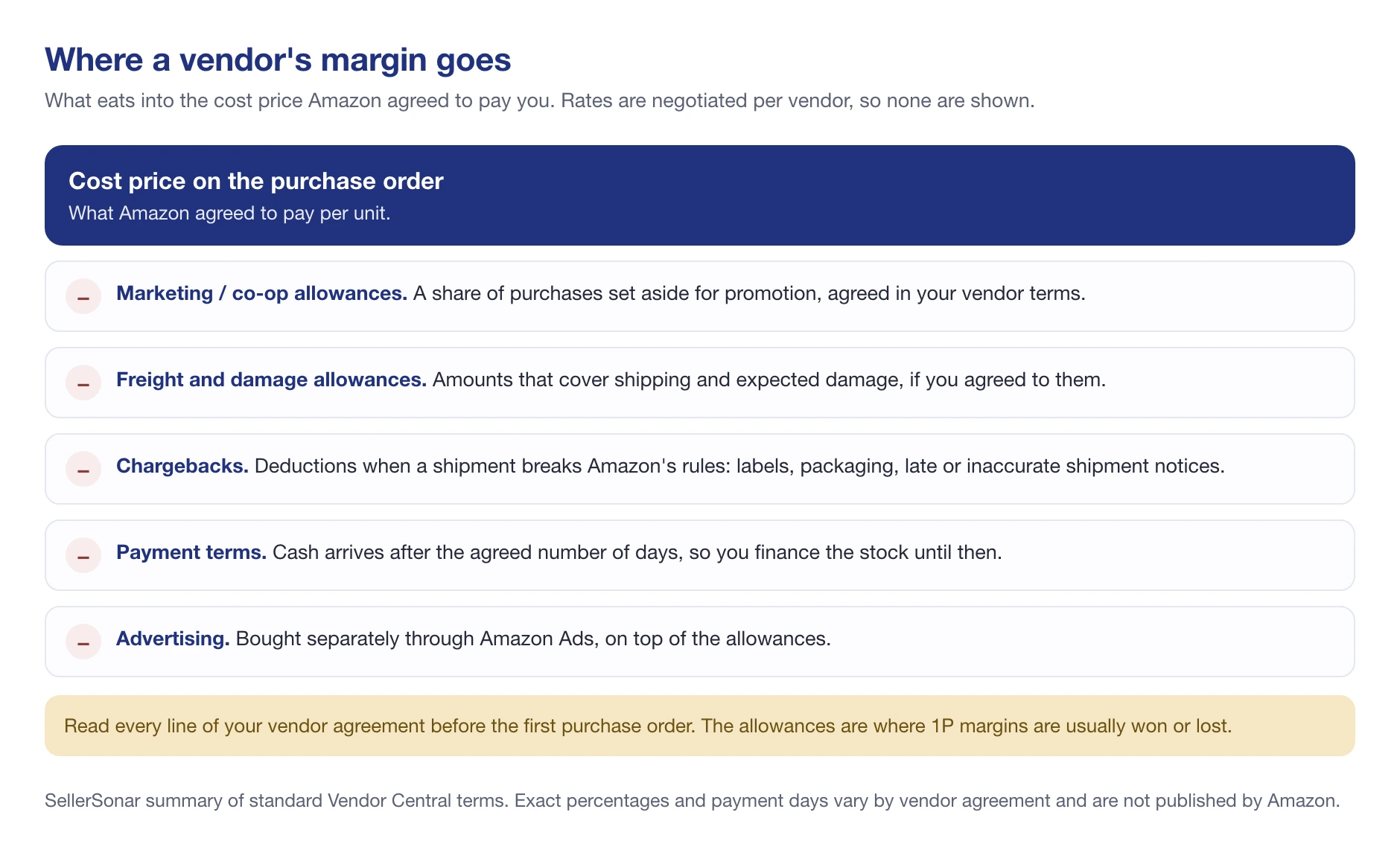
- Marketing (co-op) allowances: a share of your purchases set aside for promotion.
- Freight and damage allowances: amounts that cover shipping and expected damage, if your terms include them.
- Chargebacks: deductions when a shipment breaks Amazon’s rules, such as wrong labels, packaging problems, or late or inaccurate shipment notices.
- Payment terms: you’re paid after the agreed number of days, so you finance the stock until then.
- Advertising: bought separately through Amazon Ads.
We haven’t put percentages on any of these, on purpose. They’re negotiated vendor by vendor and Amazon doesn’t publish them, so any “typical” figure you read is someone’s estimate. Get the real numbers from your own terms and model them before you accept the first purchase order.
Advertising Amazon Vendor Central
Vendors advertise through Amazon Ads, the same ad platform sellers use. Older guides call it “AMS” (Amazon Marketing Services), a name Amazon retired years ago. The main formats:
Sponsored Products promote individual products in search results and on product pages. Amazon lists vendors among the advertisers who can use them on its Sponsored Products page.
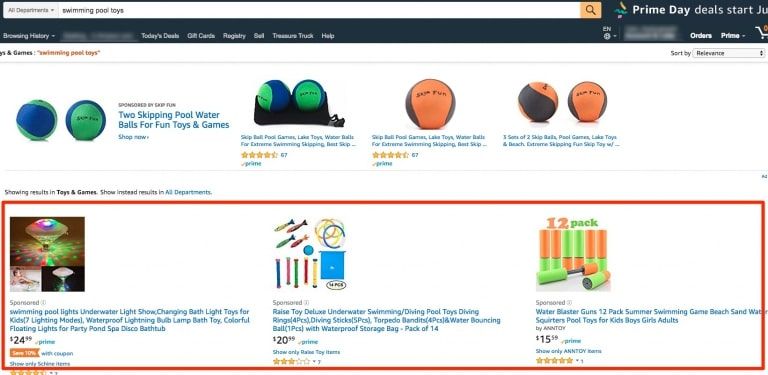
Sponsored Brands feature your logo, a headline and several products, usually above the search results. Amazon’s Sponsored Brands page opens them to vendors, and to sellers enrolled in Brand Registry.
Display ads reach shoppers on and off Amazon based on what they browse and buy. This used to be called Sponsored Display; Amazon now says Sponsored Display is now known as display ads, part of one display platform across Amazon properties and the open web.
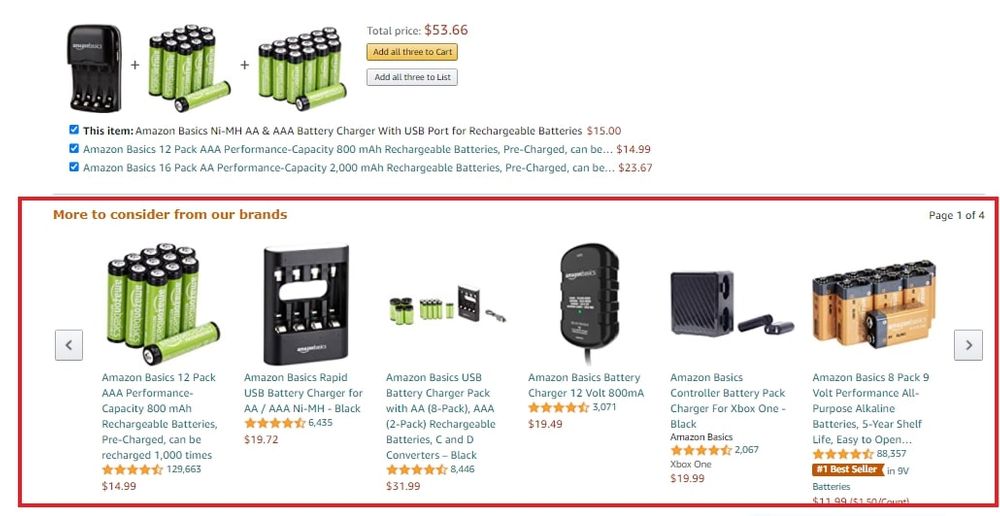
Two things change for vendors compared with sellers. First, you’re advertising a product whose price Amazon controls, so a promotion can run into a price you didn’t choose. Second, ad spend comes on top of any co-op allowances already in your terms. Our guide to Amazon ad types goes deeper on each format.
How Do I Become a Vendor on Amazon?
Short answer: you get invited. There’s no public sign-up for Vendor Central. Its home page, vendorcentral.amazon.com, is a sign-in screen and nothing else, and Amazon doesn’t publish the criteria it uses.
- Build a track record where Amazon can see it. Most brands start in Seller Central, where sales, reviews and demand are visible on Amazon itself. If you’re starting from zero, our guide on how to start Amazon FBA walks through the 3P route.
- Protect your brand first. Enroll in Amazon Brand Registry, so your listings, A+ Content and brand tools are under your control whichever model you end up in.
- If an invitation arrives, read the terms before you click accept. Check the cost price, every allowance, the payment terms and the chargeback rules, and run your margin with real numbers.
- Accept and set up the account. Then load your catalog and get your shipping process ready for purchase orders.
Be wary of anyone selling “guaranteed Vendor Central access”. Amazon’s retail team decides who it buys from.
Selling on Amazon.in?
Amazon India runs its own Vendor Central at vendorcentral.in, which signs you in through Amazon.in. Terms, payment and the businesses Amazon India buys from are set locally, so check everything with your Amazon India contact rather than relying on US guides, including this one.
What Are the Benefits of Amazon Vendor Central for Your Business?
For the right brand, 1P has real advantages:
- Amazon does the retailing. Amazon handles pricing, customer service and fulfillment to shoppers. Your team ships pallets, not parcels.
- Volume orders. A purchase order can move far more units at once than selling one order at a time.
- “Sold by Amazon” on the listing. Shoppers see Amazon as the seller.
- Retail-style data. Vendor Central reports show sales, inventory and traffic for your products.
And the drawbacks
- No control of the retail price. Amazon sets and changes it, and it can end up below what you charge in other channels.
- Margin comes off in pieces. Allowances, chargebacks and payment terms add up, and they’re easy to underestimate.
- Amazon decides what it orders. Purchase orders can shrink or stop, and you can’t sell your way through it on your own.
- Other sellers can still join your listing. Being 1P doesn’t keep resellers, or hijackers, off the page.
🎯 Pro Insight: Many brands run both models: core lines through Vendor Central, and new launches or slower products through Seller Central, where they control price and stock. If you go hybrid, decide product by product who sells what, so you don’t end up competing with Amazon on your own listing.
Moving Between Vendor Central and Seller Central
Brands move in both directions. Some get invited to 1P after building a business in Seller Central. Others move from Vendor Central to Seller Central because purchase orders shrank, margins got squeezed, or they wanted their price back. Either way, plan it product by product, not as one switch.
Going from Vendor Central to Seller Central
- Open a Seller Central account and enroll the brand in Brand Registry, if you haven’t already. You’ll need both to control your listings as a seller.
- Decide which ASINs move. You can keep some in 1P and sell others yourself.
- Expect Amazon’s offer to stay live for a while. Amazon owns the stock it already bought from you and can keep selling it, so your new seller offer may share the listing with Amazon’s at first.
- Set up fulfillment. Use FBA if you want Amazon to keep shipping to shoppers, or ship orders yourself. Our FBA vs FBM comparison helps you choose per product.
- Price with all the fees in. As a seller you pay referral and fulfillment fees, but you also stop paying vendor allowances. Run the numbers for each ASIN before you set your price.
Going from Seller Central to Vendor Central
If an invitation arrives, compare the vendor terms with what each product earns in Seller Central today. Keep your Seller Central account open. It’s your fallback for products Amazon doesn’t order.
In both directions, watch the Buy Box closely during the changeover. With Amazon’s offer and yours on the same listing, it’s easy to end up undercutting yourself.
How to Optimize Your Vendor Central Listings
As a vendor, you still own the listing content, and it’s still your sales on the line. A few basics pay off quickly:
- Keep titles, bullets and images accurate and complete. They’re what converts, whoever sells the item.
- Use A+ Content. Richer product pages help shoppers decide. Our A+ Content guide covers the modules.
- Watch your reviews. They feed conversion and, sooner or later, Amazon’s ordering.
- Keep enough stock in Amazon’s network. A listing Amazon can’t sell is a listing that’s losing rank.
Watch who actually sells on your listing
Here’s the part most vendor guides leave out. Amazon being the seller doesn’t mean Amazon wins the Buy Box. Here’s a Honeywell thermostat we track in SellerSonar, where Amazon sells its own new offer.
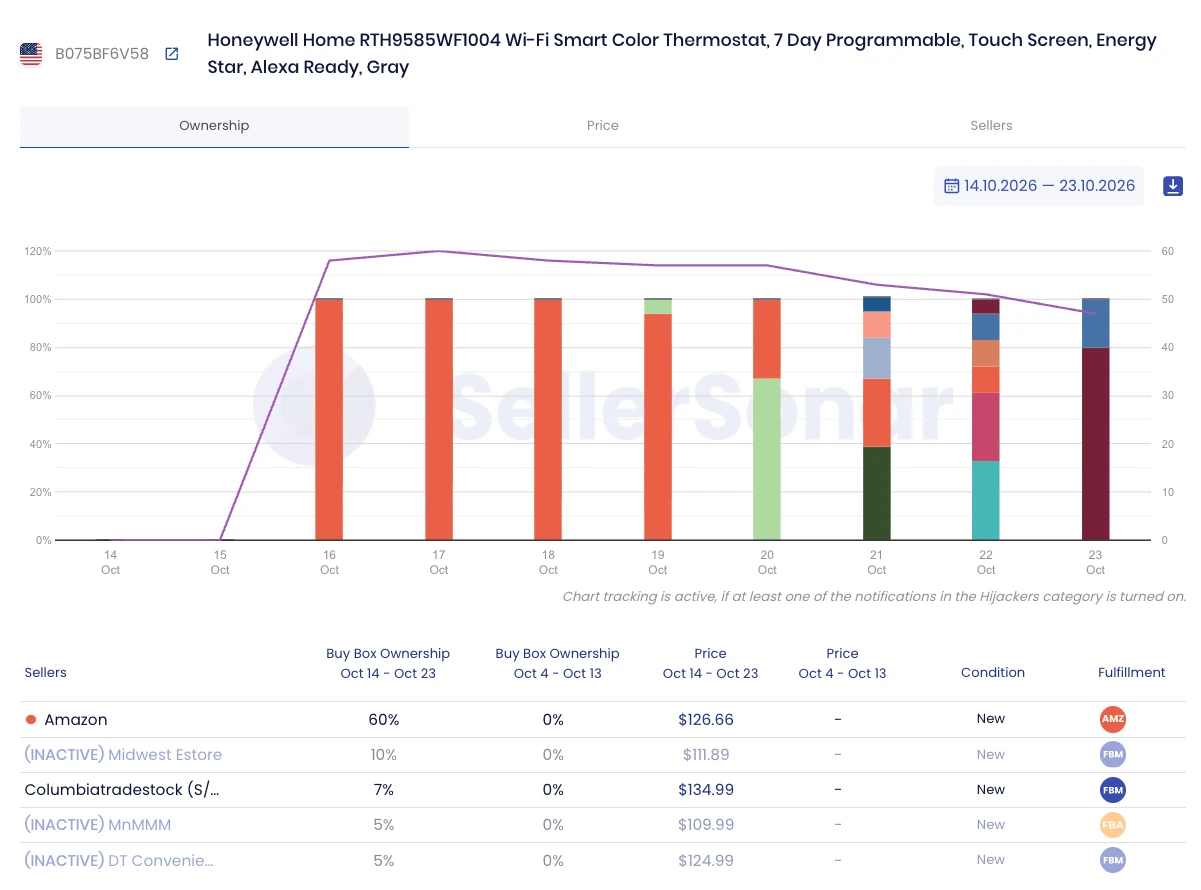
Amazon held the Buy Box on almost every check from October 16 to 19, 2026. From October 20, resellers started taking it, and by October 23 Amazon held none of it.
Across the ten days Amazon held 60% at an average of $126.66, and the resellers taking the rest were priced between $109.99 and $134.99. By then, nearly 50 sellers were on the listing. For the brand behind a 1P listing, that’s sales, price and customer experience moving to sellers it never approved.
You won’t hear about this from Amazon. SellerSonar reads the public listing, with no Vendor Central or Seller Central connection needed, and alerts you when the Buy Box changes hands, when new sellers or hijackers appear on your listing, and when prices move. Our Buy Box monitoring shows who held it, for how long, and at what price. For a wider look at software built for 1P brands, see our roundup of the best tools for Amazon vendors.
📌 From Our Experience: The first sign of trouble on a 1P listing usually isn’t a drop in purchase orders. It’s the Buy Box quietly moving to resellers at a different price. By the time it shows up in your next order, it’s been going on for weeks.
So, Is Amazon Vendor Central Right for You?
Amazon Vendor Central suits brands that sell in volume, can absorb allowances and payment terms, and are comfortable letting Amazon set the price. Seller Central suits brands that want control of price, stock and margin, and it’s open to anyone. Plenty of brands use both.
Final Expert Recommendations: Treat a Vendor Central invitation as a negotiation, not a prize. Model your margin with every allowance and the payment terms included, keep a Seller Central plan for products Amazon won’t order, and watch your listings, because being 1P doesn’t stop the Buy Box from moving.
If you’d like to see who’s selling on your listings right now, try SellerSonar free for 14 days (5 ASINs and 10 keywords, no credit card).

